We are running Windows 11 Enterprise 24H2. I noticed that after the September update that Gaming is now showing back up under Settings and showing:
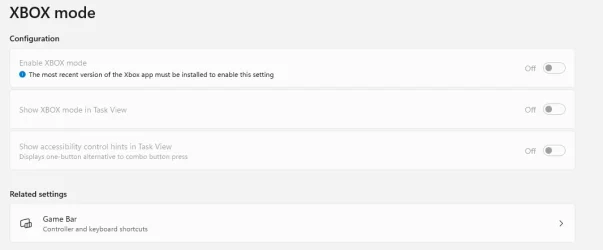
In group policy: (User Configuration/Policies/Administrative Templates/Control Panel/Settings Page Visibility) we have it set to
hide:gaming;gaming-gamebar;gaming-gamedvr;gaming-broadcasting;gaming-gamemode;gaming-trueplay;gaming-xboxnetworking
I've done every kind of search to find a way to hide XBOX mode so that the Gaming setting disappears.
Any help would be appreciated....
In group policy: (User Configuration/Policies/Administrative Templates/Control Panel/Settings Page Visibility) we have it set to
hide:gaming;gaming-gamebar;gaming-gamedvr;gaming-broadcasting;gaming-gamemode;gaming-trueplay;gaming-xboxnetworking
I've done every kind of search to find a way to hide XBOX mode so that the Gaming setting disappears.
Any help would be appreciated....
My Computer
At a glance
Windows 11 Enterprise 2H42
- OS
- Windows 11 Enterprise 2H42
- Manufacturer/Model
- Dell