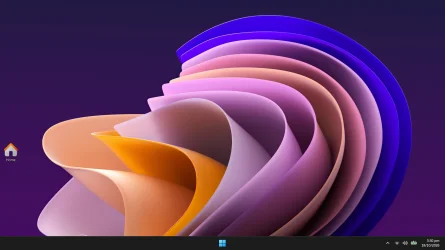
Home icon appearing on desktop when deleting files


MK77P

Well-known member
Member
Local time
7:08 PM
Posts
158
OS
Windows 11
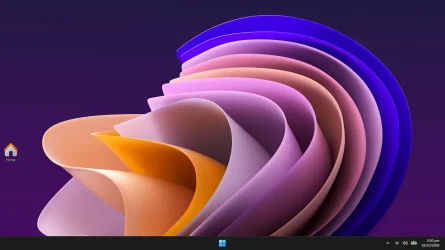
Sometimes when I delete a file that's on the desktop (or sometimes when copying a file to the desktop) I get this Home icon which only goes away after I refresh which also causes the files on the desktop to get rearranged to the left top side of the screen
 

Attachments
  • Screenshot (11).webp
    Screenshot (11).webp
    61.6 KB · Views: 1
Last edited:

My Computer My Computer

At a glance

Windows 11Intel Core i5-14600KFCORSAIR VENGEANCE RGB PRO SL 32GB (2x16GB) DD...GIGABYTE 4080 Gaming OC
OS
Windows 11
Computer type
PC/Desktop
Manufacturer/Model
Custom
CPU
Intel Core i5-14600KF
Motherboard
MSI PRO Z690-A WIFI DDR4
Memory
CORSAIR VENGEANCE RGB PRO SL 32GB (2x16GB) DDR4 3200MHz CL16
Graphics Card(s)
GIGABYTE 4080 Gaming OC
Screen Resolution
1920 x 1080
Hard Drives
Kingston NV3 1TB, Kingston KC600 1TB, SAMSUNG 860 EVO 500GB
PSU
Lian Li Edge EG0850G 850W Gold
Cooling
ARCTIC Liquid Freezer III 360
Keyboard
Logitech G513 Carbon LIGHTSYNC RGB Mechanical
Mouse
Steelseries Prime
Browser
Firefox
imgur is not visible in all countries. I am in the UK and all I see is a content not available message.

And the forum has a diagram-posting mechanism of its own that allows you to show your diagram within your post so people can see your words and your diagram at the same time - use Option 1.
Upload and Attach Images and Files in Post - ElevenForumTutorials


Denis
 

My Computer My Computer

At a glance

Windows 11 Home x64 Version 26H2 Build 26300....
OS
Windows 11 Home x64 Version 26H2 Build 26300.9457

Attachments

  • Screenshot (11).webp
    Screenshot (11).webp
    61.6 KB · Views: 1

My Computer My Computer

At a glance

Windows 11Intel Core i5-14600KFCORSAIR VENGEANCE RGB PRO SL 32GB (2x16GB) DD...GIGABYTE 4080 Gaming OC
OS
Windows 11
Computer type
PC/Desktop
Manufacturer/Model
Custom
CPU
Intel Core i5-14600KF
Motherboard
MSI PRO Z690-A WIFI DDR4
Memory
CORSAIR VENGEANCE RGB PRO SL 32GB (2x16GB) DDR4 3200MHz CL16
Graphics Card(s)
GIGABYTE 4080 Gaming OC
Screen Resolution
1920 x 1080
Hard Drives
Kingston NV3 1TB, Kingston KC600 1TB, SAMSUNG 860 EVO 500GB
PSU
Lian Li Edge EG0850G 850W Gold
Cooling
ARCTIC Liquid Freezer III 360
Keyboard
Logitech G513 Carbon LIGHTSYNC RGB Mechanical
Mouse
Steelseries Prime
Browser
Firefox
Sometimes when I delete a file that's on the desktop (or sometimes when copying a file to the desktop) I get this Home icon which only goes away after I refresh which also causes the files on the desktop to get rearranged to the left top side of the screen
Hi @MK77P ,

I have experienced the same issue.
It is quite inconsistent and unpredictable, making looking for the cause a real pain.
Sometimes a refresh is not even needed, opening a new explorer pane makes it go away.
I have noticed it more on 29683.1000 EXP. than on 26340.9750 26H2, but it could be just a perception.
 

My Computers My Computers

  • At a glance

    All Branches but StableAMD Ryzen 7 7735HS 3200-4500 Mhz 8 cores x 232 GB DDR5Radeon Graphic / NVIDIA GeForce RTX 4060 8 GB...
    OS
    All Branches but Stable
    Computer type
    Laptop
    Manufacturer/Model
    Acer Nitro ANV15-51
    CPU
    AMD Ryzen 7 7735HS 3200-4500 Mhz 8 cores x 2
    Motherboard
    Sportage_RBH
    Memory
    32 GB DDR5
    Graphics Card(s)
    Radeon Graphic / NVIDIA GeForce RTX 4060 8 GB GDDR6
    Sound Card
    AMD/Realtek(R) Audio
    Monitor(s) Displays
    Integrated Monitor (15.3"vis)
    Screen Resolution
    FHD 1920X1080 16:9 144Hz
    Hard Drives
    KINGSTON OM8SEP4512Q-AA 1TB
    Western Digital 256GB
    PSU
    19V DC 6.32 A 120 W
    Cooling
    Dual Fans
    Mouse
    MS Bluetooth
    Internet Speed
    Fiber 1GB Cox -us & 1GB Orange-fr
    Browser
    Edge Canary- Firefox Nightly-Chrome Dev-Chrome Dev
    Antivirus
    Windows Defender
  • At a glance

    Windows 11 BetaAMD A9-94208 GB of DDR4AMD Radeon R5
    Operating System
    Windows 11 Beta
    Computer type
    Laptop
    Manufacturer/Model
    Asus X751BP
    CPU
    AMD A9-9420
    Memory
    8 GB of DDR4
    Graphics card(s)
    AMD Radeon R5
    Screen Resolution
    1600x900
    Hard Drives
    Seagate 1 TB
I had this happening until I rebuilt the iconcache.

C:\Users\YourUsername\AppData\Local

Delete the file named IconCache.db

I also deleted the desktop.ini file from C:\Users\YourUsername\Desktop

desktop.ini is a hidden file.
 

My Computer My Computer

At a glance

Windows 11 Pro
OS
Windows 11 Pro

Latest Tutorials

Back
Top Bottom