Solved Hot Swap drive won't eject.


HoosierDaddy

Member
Local time
2:36 PM
Posts
11
OS
Windows 11 Pro
I just shucked a WD Elements drive I want to use in IcyDock MB830SPs I have installed in various Windows desktops. The drive has worked fine in the Elements for years BUT USB 3 is slower than SATA and more significantly, the WD Elements would put itself to sleep which then added 5 or more seconds to common activities such as opening Windows Explorer while they waited for it to wake up.

I'm trying to figure out why I can't eject it. All my other drives can be ejected from any of the 3 IcyDock bays so it's not a BIOS issue.

Typically, I use the Process Explorer (admin mode) Find option searching drive letter to find what is using a drive and preventing it from ejecting. But drive letter isn't finding any hits other than the System which always appears in all drive letter finds.

So.... that suggests to me that whatever is preventing the drive from being ejected is NOT based on a drive letter but rather something like a device ID.

Any ideas what process could be preventing it being ejected OR what other value other than drive letter I could search in Process Explorer with to find the process? I realize that is unlikely to solve the problem but is a necessary step in that direction.

The drive is a WD100EMAZ-00WJTA0. I am hesitant to throw red herrings into this but... FYI these drives will not power up on some power supplies based on what's on the 3.3v pin of the drive. The work-around is to put non-conducting tape on the pin OR power it with a Molex to SATA adapter bypassing the power supply reacting to the 3.3v (and some other pins) on a SATA connector. Since the drive will be regularly mounted and dismounted, I chose to change the power to the IcyDock to a Molex to SATA adapter rather than dealing with tape issues from constantly plugging and unpluging the drive.

I cannot see how Molex to SATA adapter is a factor since all over drives continue to register and eject in all bays of the IcyDock.

Additional info:

Inability to eject occurs whether the drive is in the bay at boot time or mounted after boot. It also doesn't matter if logged on as a Microsoft or local account. Fails to eject even if the first thing attempted after booting or mounting the drive is to attempt to eject it.

The drive letter is configured to allow caching (just like all the drives that eject just fine) and I suspect turning that off MAY solve the eject problem by making it pretty safe to just remove it even if the eject fails, but I do move large amounts of data on and off this drive and don't want the performance hit.
 

My Computer My Computer

At a glance

Windows 11 Proi5 9600K16 GB G-Skill F4-3600C16D-16GVKC DDR4 RAMNone, Intel UHD Graphics 630
OS
Windows 11 Pro
Computer type
PC/Desktop
Manufacturer/Model
Me/Mine
CPU
i5 9600K
Motherboard
ASUS TUF Z390-PRO
Memory
16 GB G-Skill F4-3600C16D-16GVKC DDR4 RAM
Graphics Card(s)
None, Intel UHD Graphics 630
Sound Card
None, MB
Hard Drives
Multiple Samsung NVMe
PSU
Seasonic Prime Ultra 650 Titanium
Case
Raijintek AGOS
This won't be much help to you other than information. For what it's worth I have multiple external drives, 2 which are older WD Passports, one which is a WD 2.5' drive I installed in an external enclosure. None of these WD will EVER let me eject them. Windows always locks a handle on these drives, whereas all my other external hard drives (Seagates) will eject just fine.
Whether it has anything to do with it or not, when I went to Windows 11, I was unable to enable core isolation until I removed an old WDCSam driver.

Luckily, I have an older version of an app called USB Safely Remove which was very cheap many years ago. Though very outdated, it still works. The updated version of this app is now paid and isn't cheap. It allows me to force stop any handle Windows retains on these WD drives, or any usb flash drive as well. Once this app releases the handle, I get the message that it's safe to remove the device.

So you aren't alone with these WD devices.
 

My Computers My Computers

  • At a glance

    Windows 11 Pro 25H2 26200.8655i9-10900 10 core 20 threads32 gbnone-Intel UHD Graphics 630
    OS
    Windows 11 Pro 25H2 26200.8655
    Computer type
    PC/Desktop
    Manufacturer/Model
    Dell Optiplex 7080
    CPU
    i9-10900 10 core 20 threads
    Motherboard
    DELL 0J37VM
    Memory
    32 gb
    Graphics Card(s)
    none-Intel UHD Graphics 630
    Sound Card
    Integrated Realtek
    Monitor(s) Displays
    Benq 27
    Screen Resolution
    2560x1440
    Hard Drives
    2x1tb Solidigm m.2 nvme /External drives 512gb Samsung m.2 sata+2tb Kingston m2.nvme
    PSU
    500w
    Case
    MT
    Cooling
    Dell Premium
    Keyboard
    Logitech wired
    Mouse
    Logitech wireless
    Internet Speed
    so slow I'm too embarrassed to tell
    Browser
    #1 Edge #2 Firefox
    Antivirus
    Defender+MWB Premium
  • At a glance

    Windows 11 Pro 24H2 26200.8457AMD Ryzen 7 6800U32 gbintegrated
    Operating System
    Windows 11 Pro 24H2 26200.8457
    Computer type
    PC/Desktop
    Manufacturer/Model
    Beelink Mini PC SER5
    CPU
    AMD Ryzen 7 6800U
    Memory
    32 gb
    Graphics card(s)
    integrated
    Sound Card
    integrated
    Monitor(s) Displays
    Benq 27
    Screen Resolution
    2560x1440
    Hard Drives
    1TB Crucial nvme
    Keyboard
    Logitech wired
    Mouse
    Logitech wireless
    Internet Speed
    still too embarrassed to tell
    Browser
    Firefox
    Antivirus
    Defender
    Other Info
    System 3 is non compliant Dell 9020 i7-4770/24gb ram Win11 PRO 26200.8457
If it is a hot swap drive, it means you can pull it out even without ejecting it.
 

My Computers My Computers

  • At a glance

    Windows 11 ProAMD Ryzen 7 9800X3D32GB DDR5 CL30 Kingston FuryASUS Prime Radeon RX 9060 XT OC Edition 16GB
    OS
    Windows 11 Pro
    Computer type
    PC/Desktop
    CPU
    AMD Ryzen 7 9800X3D
    Motherboard
    MSI PRO B850-P Wifi
    Memory
    32GB DDR5 CL30 Kingston Fury
    Graphics Card(s)
    ASUS Prime Radeon RX 9060 XT OC Edition 16GB
    Monitor(s) Displays
    LG Ultrawide 34" + LG 27" 1080p
    Screen Resolution
    3440x1440
    Hard Drives
    Main Boot Drive : 512GB Adata XPG RGB Gen3x4 NVMe M.2 SSD
    PSU
    EVGA 750 Watts 80+ Gold
    Case
    Deepcool Genome II
    Cooling
    Thermalright Burst Assassin 120
    Internet Speed
    1Gbps
    Browser
    Chrome
    Antivirus
    "Moderna"
  • At a glance

    Windows 11 Proi7-4790K16GB Corsair Vengeance ProMSI R9 290
    Operating System
    Windows 11 Pro
    Computer type
    PC/Desktop
    CPU
    i7-4790K
    Motherboard
    ASRock Xtreme6 Z97
    Memory
    16GB Corsair Vengeance Pro
    Graphics card(s)
    MSI R9 290
    Monitor(s) Displays
    LG Ultrawide 34"
    Screen Resolution
    3440x1440
    Hard Drives
    500GB Adata SSD (OS Only)
    PSU
    Thermaltake 475 Watts 80 Bronze
    Case
    Thermaltake Commander I Snow Edition
    Cooling
    Deep Cool Archer Air Cooler
    Keyboard
    Armageddon MKA-5R RGB-Hornet
    Mouse
    Logitech G402
    Internet Speed
    1Gbps
    Browser
    Chrome
    Antivirus
    Moderna :)
Can you not just pull the drive out of the bay? As @badrobot says, you can remove it without ejective it because it's a hot swap drive.
 

My Computers My Computers

  • At a glance

    Windows 11 Pro 25H2 RP channelRyzen 9 5900XCorsair Vengeance RGB PRO 64GB (2x32GB) DDR4 ...ASUS GeForce RTX 4070 Super OC 12GB DDR6 / ZO...
    OS
    Windows 11 Pro 25H2 RP channel
    Computer type
    PC/Desktop
    Manufacturer/Model
    Home built
    CPU
    Ryzen 9 5900X
    Motherboard
    MSI MPG X570S Edge Max WiFi
    Memory
    Corsair Vengeance RGB PRO 64GB (2x32GB) DDR4 3600 (PC4-28800) C18
    Graphics Card(s)
    ASUS GeForce RTX 4070 Super OC 12GB DDR6 / ZOTAC RTX 3060 Twin Edge OC 12GB GDDR6
    Sound Card
    Proprietary on MB / FiiO K5Pro DAC
    Monitor(s) Displays
    ViewSonic XG2530 25"/Benq XL2411P 24"/ ASUS VA24DQSB) 23.8"
    Screen Resolution
    1920x1080 240Hz/144Hz/60Hz (based on monitor setup above)
    Hard Drives
    SK hynix Gold P31 1TB PCIe NVMe Gen3 M.2 2280 Internal SSD
    ADATA XPG SX8200 Pro 1TB
    Samsung SSD 860 EVO 1TB 2.5 Inch SATA III Internal SSD
    PSU
    Corsair RM1000e
    Case
    Phanteks Enthoo Pro Full Tower Chassis with Window
    Cooling
    Corsair iCUE H60i RGB PRO XT Liquid CPU Cooler
    Keyboard
    Corsair K70
    Mouse
    Logitech MX Master 3
    Internet Speed
    ~950Mb/s download / ~700Mb/s upload
    Browser
    Edge (Chromium)
    Antivirus
    Norton 360
  • At a glance

    Windows 11 ProRyzen 7 3700X32MB DDR4I forget, but it's old. I can't see the need ...
    Operating System
    Windows 11 Pro
    Computer type
    PC/Desktop
    Manufacturer/Model
    Home Built
    CPU
    Ryzen 7 3700X
    Motherboard
    MSI B550 Gaming GEN3 Gaming Motherboard
    Memory
    32MB DDR4
    Graphics card(s)
    I forget, but it's old. I can't see the need to upgrade it.
    Sound Card
    Propietary
    Monitor(s) Displays
    ACER LED 24"
    Screen Resolution
    1920X1080
    Hard Drives
    1TB Samsung SSD 3.5"
    Case
    Corsair
    Cooling
    Stock
    Keyboard
    Logitech
    Mouse
    Logitech
    Internet Speed
    ~750Mb/s download / ~750Mb/s upload
    Browser
    Edge
    Antivirus
    Defender and Malware Bytes
  • ASUS Vivobook 16X, 16" WUXGA(1920x1200) Business Laptop Computer, AMD Ryzen 7, 16GB DDR4 RAM, 1TB SSD, Windows 11 Pro, Wi-Fi 6, USB-C, Full-Sized Keyboard, Webcam, HDMI
To find out what's preventing 'safely remove..' first go to task manager and on the heading right click and tick the box for showing PID. Once showing then left click the heading to show in ascending order.

Open Event viewer, Custom Views, Administrative Events. In the centre pane look for Event ID 225. They should be at or near the top of the list. Open the individual events and check the General tab for info and the Details tab should show the PID.
Go back to task manager and find the PIDs. PID 4 is just the system symptom so check any others showing.
 

My Computers My Computers

  • At a glance

    Win 11 ProAMD Ryzen™ 7 7730U24GB Dual-Channel DDR4 @ 1596MHz (22-22-22-52)512MB ATI AMD Radeon Graphics (ASUStek Comput...
    OS
    Win 11 Pro
    Computer type
    Laptop
    Manufacturer/Model
    ASUS Vivobook
    CPU
    AMD Ryzen™ 7 7730U
    Motherboard
    M1605YA
    Memory
    24GB Dual-Channel DDR4 @ 1596MHz (22-22-22-52)
    Graphics Card(s)
    512MB ATI AMD Radeon Graphics (ASUStek Computer Inc)
    Monitor(s) Displays
    Generic PnP Monitor (1920x1200@60Hz) - P1 PLUS (1920x1080@59Hz)
    Screen Resolution
    1920 X 1200
    Hard Drives
    953GB Western Digital WD
    PSU
    45 Watts
    Mouse
    Lenovo Bluetooth.
    Internet Speed
    500 Mbps
    Browser
    Edge
    Antivirus
    Defender
  • At a glance

    Windows 11AMD Ryzen 7 5800H / 3.2 GHz32 GB DDR4 SDRAM 3200 MHzNVIDIA GeForce RTX 3060 6 GB GDDR6 SDRAM
    Operating System
    Windows 11
    Computer type
    Laptop
    Manufacturer/Model
    ACER NITRO
    CPU
    AMD Ryzen 7 5800H / 3.2 GHz
    Motherboard
    CZ Scala_CAS (FP6)
    Memory
    32 GB DDR4 SDRAM 3200 MHz
    Graphics card(s)
    NVIDIA GeForce RTX 3060 6 GB GDDR6 SDRAM
    Sound Card
    Realtek Audio. NVIDIA High Definition Audio
    Monitor(s) Displays
    15.6" LED backlight 1920 x 1080 (Full HD) 144 Hz
    Screen Resolution
    1920 x 1080 (Full HD)
    Hard Drives
    Samsung 970 Evo Plus 2TB NVMe M.2
    PSU
    180 Watt, 19.5 V
    Mouse
    Lenovo Bluetooth
    Internet Speed
    500 Mbps
    Browser
    Edge
    Antivirus
    Defender
If it is a hot swap drive, it means you can pull it out even without ejecting it.
Thanks, But I don't think so. The fact that there is a setting for caching the drive (which is enabled), means some writes may not yet be done to the HD at a particular moment. I may "think" I know what processes could/should be writing to the drive, but the fact that I don't know what is preventing the drive from being ejected, suggests there COULD be something somewhere writing to it.
 

My Computer My Computer

At a glance

Windows 11 Proi5 9600K16 GB G-Skill F4-3600C16D-16GVKC DDR4 RAMNone, Intel UHD Graphics 630
OS
Windows 11 Pro
Computer type
PC/Desktop
Manufacturer/Model
Me/Mine
CPU
i5 9600K
Motherboard
ASUS TUF Z390-PRO
Memory
16 GB G-Skill F4-3600C16D-16GVKC DDR4 RAM
Graphics Card(s)
None, Intel UHD Graphics 630
Sound Card
None, MB
Hard Drives
Multiple Samsung NVMe
PSU
Seasonic Prime Ultra 650 Titanium
Case
Raijintek AGOS
This won't be much help to you other than information. For what it's worth I have multiple external drives, 2 which are older WD Passports, one which is a WD 2.5' drive I installed in an external enclosure. None of these WD will EVER let me eject them. Windows always locks a handle on these drives, whereas all my other external hard drives (Seagates) will eject just fine.
Whether it has anything to do with it or not, when I went to Windows 11, I was unable to enable core isolation until I removed an old WDCSam driver.

Luckily, I have an older version of an app called USB Safely Remove which was very cheap many years ago. Though very outdated, it still works. The updated version of this app is now paid and isn't cheap. It allows me to force stop any handle Windows retains on these WD drives, or any usb flash drive as well. Once this app releases the handle, I get the message that it's safe to remove the device.

So you aren't alone with these WD devices.
Thanks. This drive is not being accessed via USB. The IcyDoc has a MB SATA cable running to each of the 3 bays and is powered by TWO SATA power sockets, i.e. not one per bay. Was always curious about that since in almost every scenario, both power connectors would be off the same power supply cable.
 

My Computer My Computer

At a glance

Windows 11 Proi5 9600K16 GB G-Skill F4-3600C16D-16GVKC DDR4 RAMNone, Intel UHD Graphics 630
OS
Windows 11 Pro
Computer type
PC/Desktop
Manufacturer/Model
Me/Mine
CPU
i5 9600K
Motherboard
ASUS TUF Z390-PRO
Memory
16 GB G-Skill F4-3600C16D-16GVKC DDR4 RAM
Graphics Card(s)
None, Intel UHD Graphics 630
Sound Card
None, MB
Hard Drives
Multiple Samsung NVMe
PSU
Seasonic Prime Ultra 650 Titanium
Case
Raijintek AGOS
To find out what's preventing 'safely remove..' first go to task manager and on the heading right click and tick the box for showing PID. Once showing then left click the heading to show in ascending order.

Open Event viewer, Custom Views, Administrative Events. In the centre pane look for Event ID 225. They should be at or near the top of the list. Open the individual events and check the General tab for info and the Details tab should show the PID.
Go back to task manager and find the PIDs. PID 4 is just the system symptom so check any others showing.
Awesome! Thanks. Just did this and see:

The application \Device\HarddiskVolume7\Windows\System32\SearchIndexer.exe with process id 5000 stopped the removal or ejection for the device SCSI\Disk&Ven_WDC&Prod_WD100EMAZ-00WJTA\4&fe99083&0&040000.
Process command line: C:\WINDOWS\system32\SearchIndexer.exe /Embedding
List of affected devices:

Now to figure out how to prevent this.
 
Last edited:

My Computer My Computer

At a glance

Windows 11 Proi5 9600K16 GB G-Skill F4-3600C16D-16GVKC DDR4 RAMNone, Intel UHD Graphics 630
OS
Windows 11 Pro
Computer type
PC/Desktop
Manufacturer/Model
Me/Mine
CPU
i5 9600K
Motherboard
ASUS TUF Z390-PRO
Memory
16 GB G-Skill F4-3600C16D-16GVKC DDR4 RAM
Graphics Card(s)
None, Intel UHD Graphics 630
Sound Card
None, MB
Hard Drives
Multiple Samsung NVMe
PSU
Seasonic Prime Ultra 650 Titanium
Case
Raijintek AGOS
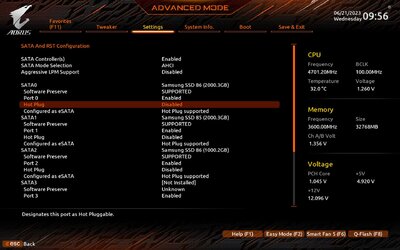
Can you not just pull the drive out of the bay? As @badrobot says, you can remove it without ejective it because it's a hot swap drive.
You should be able. I've done it plenty of times when I was hot-swapping. This is a non-issue.

Edit:

if you're hot-swapping, you should ensure your BIOS is set to support it so your drives don't get corrupted by just pulling them out.

230621095614.jpeg

Mine is disabled as I no longer have a need to hot swap.
 
Last edited:

My Computers My Computers

  • At a glance

    Windows 11 Pro 24H2 (Build 26100.4770)Intel Core 9 Ultra 285K64G (4x16) DDR5 Corsair RGB Dominator Platinu...Radeon (XFX Mercury) RX 9070XT OC (with Magne...
    OS
    Windows 11 Pro 24H2 (Build 26100.4770)
    Computer type
    PC/Desktop
    Manufacturer/Model
    Custom built
    CPU
    Intel Core 9 Ultra 285K
    Motherboard
    Gigabyte Aorus Z890 Xtreme AI Top
    Memory
    64G (4x16) DDR5 Corsair RGB Dominator Platinum (6400Mhz)
    Graphics Card(s)
    Radeon (XFX Mercury) RX 9070XT OC (with Magnetic Fans)
    Sound Card
    Onboard (DTS:X® Ultra Audio: ESS ES9280A DAC)
    Monitor(s) Displays
    27-inch Eizo Color Edge - CG2700X
    Screen Resolution
    3840 x 2160
    Hard Drives
    4 Samsung NVM 990 Pro drives: 1TB (OS), 2TB, 2 X 4TB.
    PSU
    Seasonic TX-1300 (1300 Watts)
    Case
    Cooler Master H500M
    Cooling
    Corsair Link Titan 280 RX RGB
    Keyboard
    Logitech Craft
    Mouse
    Logitech MX Master 3S
    Internet Speed
    1TB Download. 512mb Upload
    Browser
    Microsoft Edge Chromium
    Antivirus
    Windows Security
    Other Info
    System used for gaming, photography, music, school.
  • At a glance

    Windows 11 Pro 24H2 (Build 26100.4061)Intel Core i9-9900K32gig (4 x 8) Corsair Dominator Platinum DDR4...Radeon XFX Merc 7900XT (20gig)
    Operating System
    Windows 11 Pro 24H2 (Build 26100.4061)
    Computer type
    PC/Desktop
    Manufacturer/Model
    Custom built
    CPU
    Intel Core i9-9900K
    Motherboard
    Gigabyte Z390 Aorus Xtreme
    Memory
    32gig (4 x 8) Corsair Dominator Platinum DDR4 3600Mhz (B-Die)
    Graphics card(s)
    Radeon XFX Merc 7900XT (20gig)
    Sound Card
    Onboard
    Monitor(s) Displays
    24-Inch NEC PA242W
    Screen Resolution
    2880 x 1800
    Hard Drives
    2 X NVME, 1 X SATA SSD
    PSU
    EVGA Super Nova 1000 P2 (1000 Watt)
    Case
    Phantek Enthoo Luxe
    Cooling
    Corsair H115i Elite AIO Cooler
    Keyboard
    Logitech Keys
    Mouse
    Logitech MX Master 3
    Internet Speed
    1TB Download. 512mb Upload
    Browser
    Microsoft Edge Chromium
    Antivirus
    Windows Security
    Other Info
    Backup System
You should be able. I've done it plenty of times when I was hot-swapping. This is a non-issue.

Edit:

if you're hot-swapping, you should ensure your BIOS is set to support it so your drives don't get corrupted by just pulling them out.

View attachment 62944

Mine is disabled as I no longer have a need to hot swap.
FWIW Removing drives hundreds or even thousands of times without ejecting them isn't proof you can't lose a write since I doubt you ever intentionally pulled a drive while you thought a write was actually in progress and may even have had cache disabled.

Anyway, @Fabler2 posted how to find the culprit, which turned out to be Search Indexer.
 

My Computer My Computer

At a glance

Windows 11 Proi5 9600K16 GB G-Skill F4-3600C16D-16GVKC DDR4 RAMNone, Intel UHD Graphics 630
OS
Windows 11 Pro
Computer type
PC/Desktop
Manufacturer/Model
Me/Mine
CPU
i5 9600K
Motherboard
ASUS TUF Z390-PRO
Memory
16 GB G-Skill F4-3600C16D-16GVKC DDR4 RAM
Graphics Card(s)
None, Intel UHD Graphics 630
Sound Card
None, MB
Hard Drives
Multiple Samsung NVMe
PSU
Seasonic Prime Ultra 650 Titanium
Case
Raijintek AGOS
Thanks again @Fabler2. I removed the drive letter from Indexing, rebooted and the drive is ejectable now. I added the drive letter back to indexing and it is still ejectable, pointing to some glitch in Indexing. I'll hope it's not a glitch that repeats but if it does, I can live without Windows Search for that drive.
 

My Computer My Computer

At a glance

Windows 11 Proi5 9600K16 GB G-Skill F4-3600C16D-16GVKC DDR4 RAMNone, Intel UHD Graphics 630
OS
Windows 11 Pro
Computer type
PC/Desktop
Manufacturer/Model
Me/Mine
CPU
i5 9600K
Motherboard
ASUS TUF Z390-PRO
Memory
16 GB G-Skill F4-3600C16D-16GVKC DDR4 RAM
Graphics Card(s)
None, Intel UHD Graphics 630
Sound Card
None, MB
Hard Drives
Multiple Samsung NVMe
PSU
Seasonic Prime Ultra 650 Titanium
Case
Raijintek AGOS
Thanks. This drive is not being accessed via USB. The IcyDoc has a MB SATA cable running to each of the 3 bays and is powered by TWO SATA power sockets, i.e. not one per bay. Was always curious about that since in almost every scenario, both power connectors would be off the same power supply cable.
Yes I know. You use a dock. That's why I said my experience with the idiosyncrisies I've encountered with WD drives might not help you. I was just pointing out WD drives do not work the same way as my Toshiba and Seagate drives do. I might add that I can connect these same drives to my old Windows 10 PC and they work as expected or I can connect a WD drive to my mobo and things are fine. I can only surmise that it's specific to this machine's hardware or maybe even the age of the drives themselves and the way 11 sees them. I never was able to figure it out.
 

My Computers My Computers

  • At a glance

    Windows 11 Pro 25H2 26200.8655i9-10900 10 core 20 threads32 gbnone-Intel UHD Graphics 630
    OS
    Windows 11 Pro 25H2 26200.8655
    Computer type
    PC/Desktop
    Manufacturer/Model
    Dell Optiplex 7080
    CPU
    i9-10900 10 core 20 threads
    Motherboard
    DELL 0J37VM
    Memory
    32 gb
    Graphics Card(s)
    none-Intel UHD Graphics 630
    Sound Card
    Integrated Realtek
    Monitor(s) Displays
    Benq 27
    Screen Resolution
    2560x1440
    Hard Drives
    2x1tb Solidigm m.2 nvme /External drives 512gb Samsung m.2 sata+2tb Kingston m2.nvme
    PSU
    500w
    Case
    MT
    Cooling
    Dell Premium
    Keyboard
    Logitech wired
    Mouse
    Logitech wireless
    Internet Speed
    so slow I'm too embarrassed to tell
    Browser
    #1 Edge #2 Firefox
    Antivirus
    Defender+MWB Premium
  • At a glance

    Windows 11 Pro 24H2 26200.8457AMD Ryzen 7 6800U32 gbintegrated
    Operating System
    Windows 11 Pro 24H2 26200.8457
    Computer type
    PC/Desktop
    Manufacturer/Model
    Beelink Mini PC SER5
    CPU
    AMD Ryzen 7 6800U
    Memory
    32 gb
    Graphics card(s)
    integrated
    Sound Card
    integrated
    Monitor(s) Displays
    Benq 27
    Screen Resolution
    2560x1440
    Hard Drives
    1TB Crucial nvme
    Keyboard
    Logitech wired
    Mouse
    Logitech wireless
    Internet Speed
    still too embarrassed to tell
    Browser
    Firefox
    Antivirus
    Defender
    Other Info
    System 3 is non compliant Dell 9020 i7-4770/24gb ram Win11 PRO 26200.8457
FWIW Removing drives hundreds or even thousands of times without ejecting them isn't proof you can't lose a write since I doubt you ever intentionally pulled a drive while you thought a write was actually in progress and may even have had cache disabled.
There's also no definite rule that people won't get struck by lightning; or in the PC world, won't have a drive go bad, so...

As the end of the day, it's your PC so do as you will. I'm simply posting the reason to use said settings.

Peace :cool:
 

My Computers My Computers

  • At a glance

    Windows 11 Pro 24H2 (Build 26100.4770)Intel Core 9 Ultra 285K64G (4x16) DDR5 Corsair RGB Dominator Platinu...Radeon (XFX Mercury) RX 9070XT OC (with Magne...
    OS
    Windows 11 Pro 24H2 (Build 26100.4770)
    Computer type
    PC/Desktop
    Manufacturer/Model
    Custom built
    CPU
    Intel Core 9 Ultra 285K
    Motherboard
    Gigabyte Aorus Z890 Xtreme AI Top
    Memory
    64G (4x16) DDR5 Corsair RGB Dominator Platinum (6400Mhz)
    Graphics Card(s)
    Radeon (XFX Mercury) RX 9070XT OC (with Magnetic Fans)
    Sound Card
    Onboard (DTS:X® Ultra Audio: ESS ES9280A DAC)
    Monitor(s) Displays
    27-inch Eizo Color Edge - CG2700X
    Screen Resolution
    3840 x 2160
    Hard Drives
    4 Samsung NVM 990 Pro drives: 1TB (OS), 2TB, 2 X 4TB.
    PSU
    Seasonic TX-1300 (1300 Watts)
    Case
    Cooler Master H500M
    Cooling
    Corsair Link Titan 280 RX RGB
    Keyboard
    Logitech Craft
    Mouse
    Logitech MX Master 3S
    Internet Speed
    1TB Download. 512mb Upload
    Browser
    Microsoft Edge Chromium
    Antivirus
    Windows Security
    Other Info
    System used for gaming, photography, music, school.
  • At a glance

    Windows 11 Pro 24H2 (Build 26100.4061)Intel Core i9-9900K32gig (4 x 8) Corsair Dominator Platinum DDR4...Radeon XFX Merc 7900XT (20gig)
    Operating System
    Windows 11 Pro 24H2 (Build 26100.4061)
    Computer type
    PC/Desktop
    Manufacturer/Model
    Custom built
    CPU
    Intel Core i9-9900K
    Motherboard
    Gigabyte Z390 Aorus Xtreme
    Memory
    32gig (4 x 8) Corsair Dominator Platinum DDR4 3600Mhz (B-Die)
    Graphics card(s)
    Radeon XFX Merc 7900XT (20gig)
    Sound Card
    Onboard
    Monitor(s) Displays
    24-Inch NEC PA242W
    Screen Resolution
    2880 x 1800
    Hard Drives
    2 X NVME, 1 X SATA SSD
    PSU
    EVGA Super Nova 1000 P2 (1000 Watt)
    Case
    Phantek Enthoo Luxe
    Cooling
    Corsair H115i Elite AIO Cooler
    Keyboard
    Logitech Keys
    Mouse
    Logitech MX Master 3
    Internet Speed
    1TB Download. 512mb Upload
    Browser
    Microsoft Edge Chromium
    Antivirus
    Windows Security
    Other Info
    Backup System
Thanks, But I don't think so. The fact that there is a setting for caching the drive (which is enabled), means some writes may not yet be done to the HD at a particular moment. I may "think" I know what processes could/should be writing to the drive, but the fact that I don't know what is preventing the drive from being ejected, suggests there COULD be something somewhere writing to it.
Why is it called "hot swappable" then? You can remove a hot swappable drive even without powering off your computer or dock.
 

My Computers My Computers

  • At a glance

    Windows 11 ProAMD Ryzen 7 9800X3D32GB DDR5 CL30 Kingston FuryASUS Prime Radeon RX 9060 XT OC Edition 16GB
    OS
    Windows 11 Pro
    Computer type
    PC/Desktop
    CPU
    AMD Ryzen 7 9800X3D
    Motherboard
    MSI PRO B850-P Wifi
    Memory
    32GB DDR5 CL30 Kingston Fury
    Graphics Card(s)
    ASUS Prime Radeon RX 9060 XT OC Edition 16GB
    Monitor(s) Displays
    LG Ultrawide 34" + LG 27" 1080p
    Screen Resolution
    3440x1440
    Hard Drives
    Main Boot Drive : 512GB Adata XPG RGB Gen3x4 NVMe M.2 SSD
    PSU
    EVGA 750 Watts 80+ Gold
    Case
    Deepcool Genome II
    Cooling
    Thermalright Burst Assassin 120
    Internet Speed
    1Gbps
    Browser
    Chrome
    Antivirus
    "Moderna"
  • At a glance

    Windows 11 Proi7-4790K16GB Corsair Vengeance ProMSI R9 290
    Operating System
    Windows 11 Pro
    Computer type
    PC/Desktop
    CPU
    i7-4790K
    Motherboard
    ASRock Xtreme6 Z97
    Memory
    16GB Corsair Vengeance Pro
    Graphics card(s)
    MSI R9 290
    Monitor(s) Displays
    LG Ultrawide 34"
    Screen Resolution
    3440x1440
    Hard Drives
    500GB Adata SSD (OS Only)
    PSU
    Thermaltake 475 Watts 80 Bronze
    Case
    Thermaltake Commander I Snow Edition
    Cooling
    Deep Cool Archer Air Cooler
    Keyboard
    Armageddon MKA-5R RGB-Hornet
    Mouse
    Logitech G402
    Internet Speed
    1Gbps
    Browser
    Chrome
    Antivirus
    Moderna :)
Update: As reported it was search that was preventing ejecting in one instance. However, many processes will prevent ejecting for short periods of time and that was the case with Search.

Since removing the drive letter from search, the drive is easily ejected but only if it was not in the bay when Windows booted. Used the same procedure that detected Search preventing an earlier ejection and:

The application \Device\HarddiskVolume7\Program Files (x86)\Intel\Driver and Support Assistant\DSAService.exe with process id 4488 stopped the removal or ejection for the device SCSI\Disk&Ven_WDC&Prod_WD100EMAZ-00WJTA\4&fe99083&0&040000.
Process command line: "C:\Program Files (x86)\Intel\Driver and Support Assistant\DSAService.exe"

Tried repairing that app, and no change. Uninstalled the app and now can also eject if the drive was present during boot.
 

My Computer My Computer

At a glance

Windows 11 Proi5 9600K16 GB G-Skill F4-3600C16D-16GVKC DDR4 RAMNone, Intel UHD Graphics 630
OS
Windows 11 Pro
Computer type
PC/Desktop
Manufacturer/Model
Me/Mine
CPU
i5 9600K
Motherboard
ASUS TUF Z390-PRO
Memory
16 GB G-Skill F4-3600C16D-16GVKC DDR4 RAM
Graphics Card(s)
None, Intel UHD Graphics 630
Sound Card
None, MB
Hard Drives
Multiple Samsung NVMe
PSU
Seasonic Prime Ultra 650 Titanium
Case
Raijintek AGOS
Why is it called "hot swappable" then? You can remove a hot swappable drive even without powering off your computer or dock.
You should start another thread to get an answer to that. ;)
 

My Computer My Computer

At a glance

Windows 11 Proi5 9600K16 GB G-Skill F4-3600C16D-16GVKC DDR4 RAMNone, Intel UHD Graphics 630
OS
Windows 11 Pro
Computer type
PC/Desktop
Manufacturer/Model
Me/Mine
CPU
i5 9600K
Motherboard
ASUS TUF Z390-PRO
Memory
16 GB G-Skill F4-3600C16D-16GVKC DDR4 RAM
Graphics Card(s)
None, Intel UHD Graphics 630
Sound Card
None, MB
Hard Drives
Multiple Samsung NVMe
PSU
Seasonic Prime Ultra 650 Titanium
Case
Raijintek AGOS
Update: As reported it was search that was preventing ejecting in one instance. However, many processes will prevent ejecting for short periods of time and that was the case with Search.

Since removing the drive letter from search, the drive is easily ejected but only if it was not in the bay when Windows booted. Used the same procedure that detected Search preventing an earlier ejection and:

The application \Device\HarddiskVolume7\Program Files (x86)\Intel\Driver and Support Assistant\DSAService.exe with process id 4488 stopped the removal or ejection for the device SCSI\Disk&Ven_WDC&Prod_WD100EMAZ-00WJTA\4&fe99083&0&040000.
Process command line: "C:\Program Files (x86)\Intel\Driver and Support Assistant\DSAService.exe"

Tried repairing that app, and no change. Uninstalled the app and now can also eject if the drive was present during boot.
Hi. That Intel Driver & Support Assistant is an old nut in preventing ejecting. When it happens I go to services and stop these two services,

1687367967031.png

I re-enable them if I want to check for updates.
 

My Computers My Computers

  • At a glance

    Win 11 ProAMD Ryzen™ 7 7730U24GB Dual-Channel DDR4 @ 1596MHz (22-22-22-52)512MB ATI AMD Radeon Graphics (ASUStek Comput...
    OS
    Win 11 Pro
    Computer type
    Laptop
    Manufacturer/Model
    ASUS Vivobook
    CPU
    AMD Ryzen™ 7 7730U
    Motherboard
    M1605YA
    Memory
    24GB Dual-Channel DDR4 @ 1596MHz (22-22-22-52)
    Graphics Card(s)
    512MB ATI AMD Radeon Graphics (ASUStek Computer Inc)
    Monitor(s) Displays
    Generic PnP Monitor (1920x1200@60Hz) - P1 PLUS (1920x1080@59Hz)
    Screen Resolution
    1920 X 1200
    Hard Drives
    953GB Western Digital WD
    PSU
    45 Watts
    Mouse
    Lenovo Bluetooth.
    Internet Speed
    500 Mbps
    Browser
    Edge
    Antivirus
    Defender
  • At a glance

    Windows 11AMD Ryzen 7 5800H / 3.2 GHz32 GB DDR4 SDRAM 3200 MHzNVIDIA GeForce RTX 3060 6 GB GDDR6 SDRAM
    Operating System
    Windows 11
    Computer type
    Laptop
    Manufacturer/Model
    ACER NITRO
    CPU
    AMD Ryzen 7 5800H / 3.2 GHz
    Motherboard
    CZ Scala_CAS (FP6)
    Memory
    32 GB DDR4 SDRAM 3200 MHz
    Graphics card(s)
    NVIDIA GeForce RTX 3060 6 GB GDDR6 SDRAM
    Sound Card
    Realtek Audio. NVIDIA High Definition Audio
    Monitor(s) Displays
    15.6" LED backlight 1920 x 1080 (Full HD) 144 Hz
    Screen Resolution
    1920 x 1080 (Full HD)
    Hard Drives
    Samsung 970 Evo Plus 2TB NVMe M.2
    PSU
    180 Watt, 19.5 V
    Mouse
    Lenovo Bluetooth
    Internet Speed
    500 Mbps
    Browser
    Edge
    Antivirus
    Defender
You should start another thread to get an answer to that. :wink:
Just google it up and you'll understand why you don't need to eject a hot swap drive.
You know you have a hot swap drive but you don't understand what it is.
 

My Computers My Computers

  • At a glance

    Windows 11 ProAMD Ryzen 7 9800X3D32GB DDR5 CL30 Kingston FuryASUS Prime Radeon RX 9060 XT OC Edition 16GB
    OS
    Windows 11 Pro
    Computer type
    PC/Desktop
    CPU
    AMD Ryzen 7 9800X3D
    Motherboard
    MSI PRO B850-P Wifi
    Memory
    32GB DDR5 CL30 Kingston Fury
    Graphics Card(s)
    ASUS Prime Radeon RX 9060 XT OC Edition 16GB
    Monitor(s) Displays
    LG Ultrawide 34" + LG 27" 1080p
    Screen Resolution
    3440x1440
    Hard Drives
    Main Boot Drive : 512GB Adata XPG RGB Gen3x4 NVMe M.2 SSD
    PSU
    EVGA 750 Watts 80+ Gold
    Case
    Deepcool Genome II
    Cooling
    Thermalright Burst Assassin 120
    Internet Speed
    1Gbps
    Browser
    Chrome
    Antivirus
    "Moderna"
  • At a glance

    Windows 11 Proi7-4790K16GB Corsair Vengeance ProMSI R9 290
    Operating System
    Windows 11 Pro
    Computer type
    PC/Desktop
    CPU
    i7-4790K
    Motherboard
    ASRock Xtreme6 Z97
    Memory
    16GB Corsair Vengeance Pro
    Graphics card(s)
    MSI R9 290
    Monitor(s) Displays
    LG Ultrawide 34"
    Screen Resolution
    3440x1440
    Hard Drives
    500GB Adata SSD (OS Only)
    PSU
    Thermaltake 475 Watts 80 Bronze
    Case
    Thermaltake Commander I Snow Edition
    Cooling
    Deep Cool Archer Air Cooler
    Keyboard
    Armageddon MKA-5R RGB-Hornet
    Mouse
    Logitech G402
    Internet Speed
    1Gbps
    Browser
    Chrome
    Antivirus
    Moderna :)

Latest Support Threads

Back
Top Bottom