
How can I limit my CPU temps?


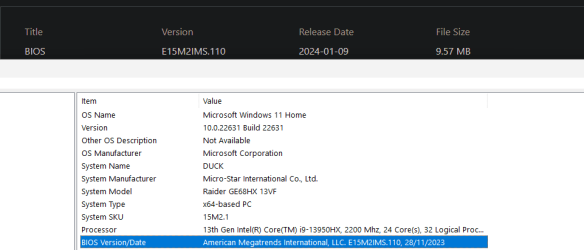
thing is, my bios version was lined up with the most up to date one, but the dates were different. would i still need to update bios?
 

My Computer My Computer

At a glance

Microsoft Windows 11 Home13th Gen Intel(R) Core(TM) i9-13950HX 2.20 GHzMax 64GB Up to DDR5-5600Intel(R) UHD Graphics (iGPU), NVIDIA® GeForce...
OS
Microsoft Windows 11 Home
Computer type
Laptop
Manufacturer/Model
MSI Raiders GE68HX 13VF
CPU
13th Gen Intel(R) Core(TM) i9-13950HX 2.20 GHz
Motherboard
MS-15M2 REV:1.0
Memory
Max 64GB Up to DDR5-5600
Graphics Card(s)
Intel(R) UHD Graphics (iGPU), NVIDIA® GeForce RTX™ 4060 Laptop GPU 8GB GDDR6
Sound Card
Realtek(R) Audio, Intel Smart Sound
Monitor(s) Displays
144 hz, 8-bit
Screen Resolution
1920 x 1200
Hard Drives
NVMe Micron 2400
PSU
4-Cell 99.9 Battery (Whr)
Keyboard
Per-Key RGB Keyboard by SteelSeries
Browser
Google
Antivirus
Malwarebytes / Windows Defender
Other Info
I got my laptop around ~ November 2023, this is my first laptop ever
Lacks much, if any, experience in opening up the back of it or whatnot
1725060281973.png
theyre the same version
 

My Computer My Computer

At a glance

Microsoft Windows 11 Home13th Gen Intel(R) Core(TM) i9-13950HX 2.20 GHzMax 64GB Up to DDR5-5600Intel(R) UHD Graphics (iGPU), NVIDIA® GeForce...
OS
Microsoft Windows 11 Home
Computer type
Laptop
Manufacturer/Model
MSI Raiders GE68HX 13VF
CPU
13th Gen Intel(R) Core(TM) i9-13950HX 2.20 GHz
Motherboard
MS-15M2 REV:1.0
Memory
Max 64GB Up to DDR5-5600
Graphics Card(s)
Intel(R) UHD Graphics (iGPU), NVIDIA® GeForce RTX™ 4060 Laptop GPU 8GB GDDR6
Sound Card
Realtek(R) Audio, Intel Smart Sound
Monitor(s) Displays
144 hz, 8-bit
Screen Resolution
1920 x 1200
Hard Drives
NVMe Micron 2400
PSU
4-Cell 99.9 Battery (Whr)
Keyboard
Per-Key RGB Keyboard by SteelSeries
Browser
Google
Antivirus
Malwarebytes / Windows Defender
Other Info
I got my laptop around ~ November 2023, this is my first laptop ever
Lacks much, if any, experience in opening up the back of it or whatnot
thing is, my bios version was lined up with the most up to date one, but the dates were different. would i still need to update bios?
No, the fact that the version matches is how you can tell that you already have the latest BIOS installed. The build date is 28/11/2023, but they didn't release it (officially) on their website until 9/01/2024.
 

My Computers My Computers

  • At a glance

    11 Homei7 13650HX16GB DDR5GeForce RTX 4060 Mobile
    OS
    11 Home
    Computer type
    Laptop
    Manufacturer/Model
    Asus TUF Gaming F16 (2024)
    CPU
    i7 13650HX
    Memory
    16GB DDR5
    Graphics Card(s)
    GeForce RTX 4060 Mobile
    Sound Card
    Eastern Electric MiniMax DAC Supreme; Emotiva UMC-200; Astell & Kern AK240
    Monitor(s) Displays
    Sony Bravia XR-55X90J
    Screen Resolution
    3840×2160
    Hard Drives
    512GB SSD internal
    37TB external
    PSU
    Li-ion
    Cooling
    2× Arc Flow Fans, 4× exhaust vents, 5× heatpipes
    Keyboard
    Logitech K800
    Mouse
    Logitech G402
    Internet Speed
    30Mbit/s up, 500Mbit/s down
    Browser
    FF
    Antivirus
    What's an antivirus?
  • At a glance

    11 Homei5 1135G716GB DDR4Intel Iris Xe
    Operating System
    11 Home
    Computer type
    Laptop
    Manufacturer/Model
    Medion S15450
    CPU
    i5 1135G7
    Memory
    16GB DDR4
    Graphics card(s)
    Intel Iris Xe
    Sound Card
    Eastern Electric MiniMax DAC Supreme; Emotiva UMC-200; Astell & Kern AK240
    Monitor(s) Displays
    Sony Bravia XR-55X90J
    Screen Resolution
    3840×2160
    Hard Drives
    2TB SSD internal
    37TB external
    PSU
    Li-ion
    Keyboard
    Logitech K800
    Mouse
    Logitech G402
    Internet Speed
    30Mbit/s up, 500Mbit/s down
    Browser
    FF
ah, alright then thank you
No, the fact that the version matches is how you can tell that you already have the latest BIOS installed. The build date is 28/11/2023, but they didn't release it (officially) on their website until 9/01/2024.
alright thne thank you
 

My Computer My Computer

At a glance

Microsoft Windows 11 Home13th Gen Intel(R) Core(TM) i9-13950HX 2.20 GHzMax 64GB Up to DDR5-5600Intel(R) UHD Graphics (iGPU), NVIDIA® GeForce...
OS
Microsoft Windows 11 Home
Computer type
Laptop
Manufacturer/Model
MSI Raiders GE68HX 13VF
CPU
13th Gen Intel(R) Core(TM) i9-13950HX 2.20 GHz
Motherboard
MS-15M2 REV:1.0
Memory
Max 64GB Up to DDR5-5600
Graphics Card(s)
Intel(R) UHD Graphics (iGPU), NVIDIA® GeForce RTX™ 4060 Laptop GPU 8GB GDDR6
Sound Card
Realtek(R) Audio, Intel Smart Sound
Monitor(s) Displays
144 hz, 8-bit
Screen Resolution
1920 x 1200
Hard Drives
NVMe Micron 2400
PSU
4-Cell 99.9 Battery (Whr)
Keyboard
Per-Key RGB Keyboard by SteelSeries
Browser
Google
Antivirus
Malwarebytes / Windows Defender
Other Info
I got my laptop around ~ November 2023, this is my first laptop ever
Lacks much, if any, experience in opening up the back of it or whatnot
And sometimes the BIOS, the updates can break things that was fine on a previous BIOS so it's a your mileage may vary thing.
 

My Computer My Computer

At a glance

WindowsXP/7/8/8.1/10/11,Linux,Android,FreeBSD...Intel® Core™ i7-8750H 8th Gen 2.2Ghz up to 4....64GB using 2x32GB CL16 Mushkin redLine modulesIntel UHD 630 & NVIDIA GeForce GTX 1050 Ti wi...
OS
WindowsXP/7/8/8.1/10/11,Linux,Android,FreeBSD Unix
Computer type
Laptop
Manufacturer/Model
Dell XPS 15 9570
CPU
Intel® Core™ i7-8750H 8th Gen 2.2Ghz up to 4.1Ghz
Motherboard
Dell XPS 15 9570
Memory
64GB using 2x32GB CL16 Mushkin redLine modules
Graphics Card(s)
Intel UHD 630 & NVIDIA GeForce GTX 1050 Ti with 4GB DDR5
Sound Card
Realtek ALC3266-CG
Monitor(s) Displays
15.6" 4K Touch UltraHD 3840x2160 made by Sharp
Screen Resolution
3840x2160 4K UltraHD
Hard Drives
Samsung MZ-V9P4T0B/AM 990 PRO 4TB PCIe®4.0 NVMe™ M.2 SSD was Toshiba KXG60ZNV1T02 NVMe 1TB SSD
PSU
Dell XPS 15 9570
Case
Dell XPS 15 9570
Cooling
Stock
Keyboard
Stock
Mouse
SwitftPoint ProPoint
Internet Speed
Comcast/XFinity 1.44Gbps/42.5Mbps
Browser
Microsoft EDGE (Chromium based) & Google Chrome
Antivirus
Windows Defender that came with Windows
And sometimes the BIOS, the updates can break things that was fine on a previous BIOS so it's a your mileage may vary thing.
for future referance, assuming yhis happens, is there any way to revert your bios back? if not, what do yoy do in that situation?
 

My Computer My Computer

At a glance

Microsoft Windows 11 Home13th Gen Intel(R) Core(TM) i9-13950HX 2.20 GHzMax 64GB Up to DDR5-5600Intel(R) UHD Graphics (iGPU), NVIDIA® GeForce...
OS
Microsoft Windows 11 Home
Computer type
Laptop
Manufacturer/Model
MSI Raiders GE68HX 13VF
CPU
13th Gen Intel(R) Core(TM) i9-13950HX 2.20 GHz
Motherboard
MS-15M2 REV:1.0
Memory
Max 64GB Up to DDR5-5600
Graphics Card(s)
Intel(R) UHD Graphics (iGPU), NVIDIA® GeForce RTX™ 4060 Laptop GPU 8GB GDDR6
Sound Card
Realtek(R) Audio, Intel Smart Sound
Monitor(s) Displays
144 hz, 8-bit
Screen Resolution
1920 x 1200
Hard Drives
NVMe Micron 2400
PSU
4-Cell 99.9 Battery (Whr)
Keyboard
Per-Key RGB Keyboard by SteelSeries
Browser
Google
Antivirus
Malwarebytes / Windows Defender
Other Info
I got my laptop around ~ November 2023, this is my first laptop ever
Lacks much, if any, experience in opening up the back of it or whatnot
for future referance, assuming yhis happens, is there any way to revert your bios back? if not, what do yoy do in that situation?
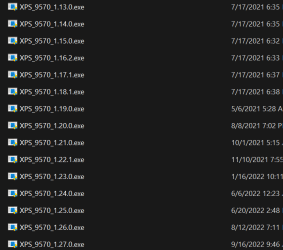
Depends on the system if it allows reverting back or not. On my system which is a Dell XPS 15 9570, I have a copy of most of the BIOS versions that were released and on their website, it specifically states the following:
Important Information
- Once you upgrade the BIOS to version 1.4.1 or later, you cannot downgrade the BIOS to earlier versions. BIOS downgrades are restricted when there are security updates and important fixes with earlier versions that impact the functionality of the system.
- BIOS version 1.4.1 and later versions are updated with Intel Boot Guard technology.

So I can use anything from 1.4.1 to 1.27.0 but not anything before 1.4.1. Basically, only the first two I cannot use.

1725204536878.png

And also, the brand of the BIOS makes the difference too. Not sure who makes the current Dell BIOS/UEFI as I know it was Phoenix before but Phoenix has always been the best followed by Award. You have AMI which is American Megatrends Inc which is usually inferior as in the old days, they did not call PCs by the type of CPU, it was all referred to as PC clone or IBM Compatible as they were all trying to be a replica of a IBM so obviously IBM's own BIOS was the best and Phoenix was the 100% compatible BIOS. So a lot depends on which BIOS versions have problems and which don't. Newer versions might add or remove features and might be there just to fix security issues, etc. It's hard to know unless there is a changes list available.
 

My Computer My Computer

At a glance

WindowsXP/7/8/8.1/10/11,Linux,Android,FreeBSD...Intel® Core™ i7-8750H 8th Gen 2.2Ghz up to 4....64GB using 2x32GB CL16 Mushkin redLine modulesIntel UHD 630 & NVIDIA GeForce GTX 1050 Ti wi...
OS
WindowsXP/7/8/8.1/10/11,Linux,Android,FreeBSD Unix
Computer type
Laptop
Manufacturer/Model
Dell XPS 15 9570
CPU
Intel® Core™ i7-8750H 8th Gen 2.2Ghz up to 4.1Ghz
Motherboard
Dell XPS 15 9570
Memory
64GB using 2x32GB CL16 Mushkin redLine modules
Graphics Card(s)
Intel UHD 630 & NVIDIA GeForce GTX 1050 Ti with 4GB DDR5
Sound Card
Realtek ALC3266-CG
Monitor(s) Displays
15.6" 4K Touch UltraHD 3840x2160 made by Sharp
Screen Resolution
3840x2160 4K UltraHD
Hard Drives
Samsung MZ-V9P4T0B/AM 990 PRO 4TB PCIe®4.0 NVMe™ M.2 SSD was Toshiba KXG60ZNV1T02 NVMe 1TB SSD
PSU
Dell XPS 15 9570
Case
Dell XPS 15 9570
Cooling
Stock
Keyboard
Stock
Mouse
SwitftPoint ProPoint
Internet Speed
Comcast/XFinity 1.44Gbps/42.5Mbps
Browser
Microsoft EDGE (Chromium based) & Google Chrome
Antivirus
Windows Defender that came with Windows

Latest Support Threads

Back
Top Bottom


