
Hi. New to Windows 11 - just installed.
I have a few apps that I would like to keep pinned to the taskbar next to the start button. I would like it so that when I click on them or other apps that these pinned apps do not move on the taskbar and that all apps open in a space past these pinned apps. Basically I would like to lock these apps into place. Basic windows 10 type functionality.
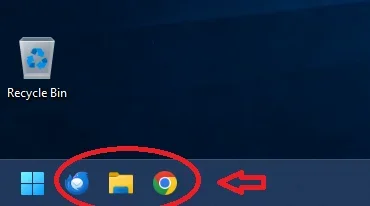
Also, is there anyway to set apps in this position like you can in the other windows os'es? I forgot the name of this location on the taskbar or what that kind of setup is called. There is a trick to do it on windows 10 so it is like previous windows os. Thanks.
Added: I think it is called quick launch.
I have a few apps that I would like to keep pinned to the taskbar next to the start button. I would like it so that when I click on them or other apps that these pinned apps do not move on the taskbar and that all apps open in a space past these pinned apps. Basically I would like to lock these apps into place. Basic windows 10 type functionality.
Also, is there anyway to set apps in this position like you can in the other windows os'es? I forgot the name of this location on the taskbar or what that kind of setup is called. There is a trick to do it on windows 10 so it is like previous windows os. Thanks.
Added: I think it is called quick launch.
My Computer
At a glance
Windows 11 Home Version➝25H2 Build➝26200.8037Intel® Core™ i3-N305 up to 3.8 GHz with Intel...8 GB DDR4-3200 MT/s (1 x 8 GB) Transfer rates...Intel(R) UHD Graphics
- OS
- Windows 11 Home Version➝25H2 Build➝26200.8037
- Computer type
- Laptop
- Manufacturer/Model
- HP 15-fd0027st
- CPU
- Intel® Core™ i3-N305 up to 3.8 GHz with Intel® Turbo B
- Motherboard
- 8DDB 62.51
- Memory
- 8 GB DDR4-3200 MT/s (1 x 8 GB) Transfer rates up to 3200 MT/s. 1 x 8 GB
- Graphics Card(s)
- Intel(R) UHD Graphics
- Sound Card
- Realtek High Definition Audio
- Screen Resolution
- 1366 x 768
- Hard Drives
- 256 GB PCIe® NVMe™ M.2 SSD
- Keyboard
- Logitech K345
- Mouse
- Logitech M275
- Internet Speed
- 600 Mbps down
- Browser
- Chrome and Firefox
- Antivirus
- Windows Defender






