
JavaScript is disabled. For a better experience, please enable JavaScript in your browser before proceeding.
You are using an out of date browser. It may not display this or other websites correctly.
You should upgrade or use an
alternative browser .
Solved How do I Enable Virtualisation?
I am new to the whole world of virtualisation, so am very much a novice and may need a little guidance.
I have downloaded 'Oracle Virtualbox', and have set up a Windows 10 virtual box, when I go to run it I get a error message, and on the side panel underneath where my virtual drive is listed it says 'Aborted'. I suspect the reason for this is because I need to enable Virtualisation. When I go to Task Manager is says that is is currently disabled. I know to go to the BIOS to enable this, but I have had a look and I can't find anything there, I even used the search tool for 'Virtualistaion' and nothing comes up. Any help is much appreciated. My Windows version number is Version 24H2 (OS build 26100.2454)
OS
Windows 11
Computer type
PC/Desktop
Manufacturer/Model
PC Specialist
CPU
Intel Core i7 8700 CPU Processor LGA 1151
Motherboard
ASUS® H310M-A: Micro-ATX, DDR4, LGA1151, USB 3.1, SATA 6GBs
Memory
8GB Corsair Vengeance DDR4 2133MHz (1 x 8GB)
Graphics Card(s)
Palit GeForce GTX 1050 TI StormX
Sound Card
Onboard 6 Channel (5.1) High Def Audio
Monitor(s) Displays
MSI Pro MP251 24.5 Inch 100Hz IPS FHD Monitor
Hard Drives
500GB SATA-III 3.5" HDD, 6GB/s, 7200RPM, 16MB Cache
Integral V Series 500GB SATA III 2.5 Inch Internal SSD
PSU
Corsair 350W VS Series™ VS-350 Power Supply
Case
Stylish Piano Black Enigma Micro-ATX Case + 2 Front USB
Cooling
Noctua NH-L9I Low Profile CPU Cooler
Keyboard
Advent SWT1200
Mouse
Logitech M100 Wired Mouse - Black
Browser
Google Chrome
Antivirus
Avast
Other Info
DVD/BLU-RAY Drive: 24x Dual Layer DVD Writer ±R/±RW/RAM
Memory Card Reader: Internal 52 In 1 Card Reader (XD, MS, CF, SD, etc) + 1 x USB 2.0 Port
Well-known member
Pro User
VIP
You need to boot into your firmware and enable VT-X. Consult your motherboard manufacturer docs for the process.
OS
Linux Mint
Computer type
Laptop
Manufacturer/Model
System76 Lemur Pro
Member
Member
Thread Starter
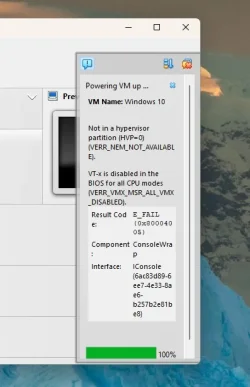
Thanks for that I found it now, I'm now able to start the Virtual Machine. I started the Windows setup and the following message appeared, how can I proceed?
Last edited: Dec 2, 2024
OS
Windows 11
Computer type
PC/Desktop
Manufacturer/Model
PC Specialist
CPU
Intel Core i7 8700 CPU Processor LGA 1151
Motherboard
ASUS® H310M-A: Micro-ATX, DDR4, LGA1151, USB 3.1, SATA 6GBs
Memory
8GB Corsair Vengeance DDR4 2133MHz (1 x 8GB)
Graphics Card(s)
Palit GeForce GTX 1050 TI StormX
Sound Card
Onboard 6 Channel (5.1) High Def Audio
Monitor(s) Displays
MSI Pro MP251 24.5 Inch 100Hz IPS FHD Monitor
Hard Drives
500GB SATA-III 3.5" HDD, 6GB/s, 7200RPM, 16MB Cache
Integral V Series 500GB SATA III 2.5 Inch Internal SSD
PSU
Corsair 350W VS Series™ VS-350 Power Supply
Case
Stylish Piano Black Enigma Micro-ATX Case + 2 Front USB
Cooling
Noctua NH-L9I Low Profile CPU Cooler
Keyboard
Advent SWT1200
Mouse
Logitech M100 Wired Mouse - Black
Browser
Google Chrome
Antivirus
Avast
Other Info
DVD/BLU-RAY Drive: 24x Dual Layer DVD Writer ±R/±RW/RAM
Memory Card Reader: Internal 52 In 1 Card Reader (XD, MS, CF, SD, etc) + 1 x USB 2.0 Port
Well-known member
Pro User
VIP
I would start by looking at the log file mentioned.
OS
Linux Mint
Computer type
Laptop
Manufacturer/Model
System76 Lemur Pro
Member
Member
Thread Starter
I would start by looking at the log file mentioned.
I did have a quick look through it, but the file is extremely long and I don't know what I'm looking for. What possible errors could be causing my problem?
OS
Windows 11
Computer type
PC/Desktop
Manufacturer/Model
PC Specialist
CPU
Intel Core i7 8700 CPU Processor LGA 1151
Motherboard
ASUS® H310M-A: Micro-ATX, DDR4, LGA1151, USB 3.1, SATA 6GBs
Memory
8GB Corsair Vengeance DDR4 2133MHz (1 x 8GB)
Graphics Card(s)
Palit GeForce GTX 1050 TI StormX
Sound Card
Onboard 6 Channel (5.1) High Def Audio
Monitor(s) Displays
MSI Pro MP251 24.5 Inch 100Hz IPS FHD Monitor
Hard Drives
500GB SATA-III 3.5" HDD, 6GB/s, 7200RPM, 16MB Cache
Integral V Series 500GB SATA III 2.5 Inch Internal SSD
PSU
Corsair 350W VS Series™ VS-350 Power Supply
Case
Stylish Piano Black Enigma Micro-ATX Case + 2 Front USB
Cooling
Noctua NH-L9I Low Profile CPU Cooler
Keyboard
Advent SWT1200
Mouse
Logitech M100 Wired Mouse - Black
Browser
Google Chrome
Antivirus
Avast
Other Info
DVD/BLU-RAY Drive: 24x Dual Layer DVD Writer ±R/±RW/RAM
Memory Card Reader: Internal 52 In 1 Card Reader (XD, MS, CF, SD, etc) + 1 x USB 2.0 Port
Well-known member
Pro User
VIP
The logs should be time stamped, so looking at the most recent since you tried launching the VM, or simply delete the log and try to relaunch to have a smaller log file to review.
OS
Linux Mint
Computer type
Laptop
Manufacturer/Model
System76 Lemur Pro
Member
Member
Thread Starter
I looked through the log file and couldn't see anything in particular that could pose a problem. So I thought I'd run the virtual machine again and see what happens, to my surprise everything run perfectly fine. After the error message I got last time I never even thought of trying to run it again.So I'm now fully set up and running.
OS
Windows 11
Computer type
PC/Desktop
Manufacturer/Model
PC Specialist
CPU
Intel Core i7 8700 CPU Processor LGA 1151
Motherboard
ASUS® H310M-A: Micro-ATX, DDR4, LGA1151, USB 3.1, SATA 6GBs
Memory
8GB Corsair Vengeance DDR4 2133MHz (1 x 8GB)
Graphics Card(s)
Palit GeForce GTX 1050 TI StormX
Sound Card
Onboard 6 Channel (5.1) High Def Audio
Monitor(s) Displays
MSI Pro MP251 24.5 Inch 100Hz IPS FHD Monitor
Hard Drives
500GB SATA-III 3.5" HDD, 6GB/s, 7200RPM, 16MB Cache
Integral V Series 500GB SATA III 2.5 Inch Internal SSD
PSU
Corsair 350W VS Series™ VS-350 Power Supply
Case
Stylish Piano Black Enigma Micro-ATX Case + 2 Front USB
Cooling
Noctua NH-L9I Low Profile CPU Cooler
Keyboard
Advent SWT1200
Mouse
Logitech M100 Wired Mouse - Black
Browser
Google Chrome
Antivirus
Avast
Other Info
DVD/BLU-RAY Drive: 24x Dual Layer DVD Writer ±R/±RW/RAM
Memory Card Reader: Internal 52 In 1 Card Reader (XD, MS, CF, SD, etc) + 1 x USB 2.0 Port


