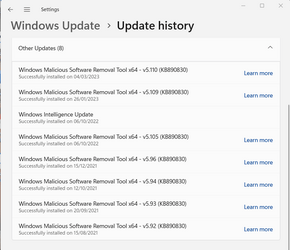
I have been trying to find a way to get rid of this as it keeps updating and it's another MS product I don't need as I have Kaspersky Standard , which does this for me. Kaspersky protects me from Malware as per their website below.

How to get rid of malware?
How does malware protection and malware removal work? Read now to learn about malware protection and safeguard your devices.
www.kaspersky.com
Use anti-virus protection
Protect your computer from malware with Kaspersky Anti-Virus. Our advanced software automatically scans your computer to find threats, and if your system has been infected by malware, our technology will remove it from your device and inform you.My Computers
-
At a glance
Windows 11 Pro 25H2 26200.9457Ryzen 7 9800X3DG.Skill Trident Z5 RGB DDR5-6000 32GB (2×16GB...RTX 5080 Palit Gaming Pro- OS
- Windows 11 Pro 25H2 26200.9457
- Computer type
- PC/Desktop
- Manufacturer/Model
- Gigababyte X870E Aorus Pro Rev 1.1
- CPU
- Ryzen 7 9800X3D
- Motherboard
- Gigababyte X870E Aorus Pro Rev 1.1
- Memory
- G.Skill Trident Z5 RGB DDR5-6000 32GB (2×16GB) CL30 2 x 16gb
- Graphics Card(s)
- RTX 5080 Palit Gaming Pro
- Sound Card
- Steel Series Arctis 1 Gaming Head phones
- Monitor(s) Displays
- Asus ROG Strix 27″ QHD OLED XG27AQDMG & Phillips 272V8
- Screen Resolution
- 2560 X1440 27 Inch 240 HZ Asus
- Hard Drives
- Drive Model Capacity Type / current use
Samsung SSD 990 PRO NVMe SSD 2 TB Main drive C: Windows (~497 GB) + E: Games (~1.36 TB)
Samsung SSD 840 EVO SATA SSD 500 GB K: (~463 GB)
Samsung SSD 960 EVO NVMe SSD 500 GB Secondary SSD; previously F:
Crucial P2 – CT1000P2SSD8 NVMe SSD 1 TB Secondary storage; previously G:
Crucial MX500 – CT1000MX500SSD1 SATA SSD 1 TB Secondary storage; D:
Samsung T7 Shield External USB SSD 2 TB External storage; H:
- PSU
- Corsair RM1000X
- Case
- Corsair CC750D (CC-9011078) Obsidian 750D Airflow Edition Black Full Tower ATX Case
- Cooling
- Corsair iCUE LINK TITAN 360 RX RGB
- Keyboard
- Razer BlackWidow V4 X Razer™ Yellow Mechanical Switches
- Mouse
- Logitech G502X Plus
- Internet Speed
- HFC 2000/100
- Browser
- Opera GX
- Antivirus
- Kaspersky Plus
-
At a glance
Windows 11 23H2 22631.2715Intel i5-1135G78 GBIntel Iris Xe Graphics- Operating System
- Windows 11 23H2 22631.2715
- Computer type
- Laptop
- Manufacturer/Model
- Dell XPS EVO 13.3" RNX9305C01AUSB
- CPU
- Intel i5-1135G7
- Motherboard
- Dell
- Memory
- 8 GB
- Graphics card(s)
- Intel Iris Xe Graphics
- Monitor(s) Displays
- LED
- Screen Resolution
- 1920 x 1080
- Hard Drives
- 256GB SSD