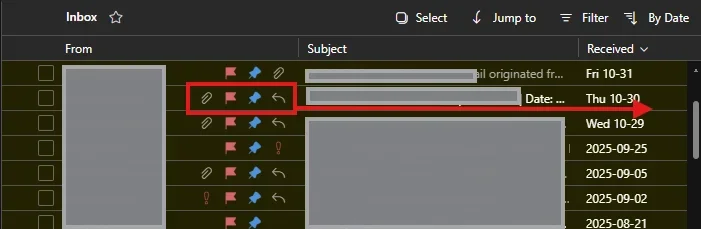
In my outlook desktop app, I had my "quick actions" toolbar to the right-side of my screen, right after the "received" column. I made the mistake of going to the outlook web version which had the quick actions in the middle of the screen after the "from" column. I made the grand mistake of pressing the "sync" button on outlook web, and now my outlook desktop looks like the web, which i absolutely hate.
How do i move my quick actions back as I had it all the way to the right-side of the view?
How do i move my quick actions back as I had it all the way to the right-side of the view?
Attachments
My Computer
At a glance
Windows 11
- OS
- Windows 11
- Computer type
- Laptop
- Manufacturer/Model
- Dell