How do I show my desktop on monitor 2?


johnr283

Member
Member
Local time
6:04 PM
Posts
12
OS
Windows 11
I've searched but I can't find the information I need. I have a monitor and a TV connected. Monitor display 1, TV display 2. When I extend the displays the desktop shows on the TV. I want it to display on the monitor. Setting either display as the main display changes the display where windows open but not where the desktop is displayed.
 

My Computer My Computer

At a glance

Windows 1112th Gen Intel(R) Core(TM) i7-12700F 2.10 GHz32GB CORSAIR Vengeance RGB Pro SL 32GB (4 x 8...GIGABYTE AORUS GeForce RTX™ 3060 Ti ELITE 8G ...
OS
Windows 11
Computer type
PC/Desktop
Manufacturer/Model
Custom
CPU
12th Gen Intel(R) Core(TM) i7-12700F 2.10 GHz
Motherboard
GIGABYTE B660 AORUS MASTER DDR4 B660 Intel LGA 1700 ATX
Memory
32GB CORSAIR Vengeance RGB Pro SL 32GB (4 x 8GB) 288-Pin PC RAM DDR4 3600 (PC4 28800)
Graphics Card(s)
GIGABYTE AORUS GeForce RTX™ 3060 Ti ELITE 8G PCI Express 4.0 ATX LHR GV-N306TAORUS E-8GD (rev. 2.0)
Monitor(s) Displays
Samsung
Screen Resolution
3840x2160
Hard Drives
WD Black SN850X 1Tb SSD
PSU
CORSAIR - RM Series RM750 Fully Modular Ultra-Low Noise ATX
Case
Fractal Design Pop Air RGB Black TG ATX High-Airflow Clear Tempered Glass Window Mid Tower
Cooling
Corsair RGB Fans
Keyboard
Razer Cynosa V2
Mouse
Microsoft Wireless Mouse 900, Black
Internet Speed
300mbs
Browser
MS Edge
Antivirus
AVG Free
Please post some screenshots to explain what you mean.
Upload and Attach Images and Files in Post - ElevenForumTutorials

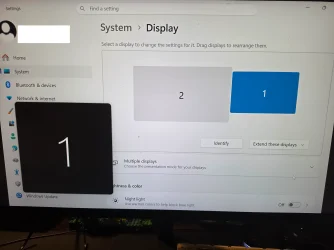
This is a screenshot of my computer with its monitor as Display 1 and an external screen as Display 2.
Extended displays.webp


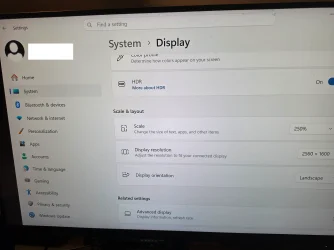
Oh, and it will probably save a bit of toing & froing if you also post a screenshot of Settings, System, Display.
Extended displays 3.webp


Denis
 
Last edited:

My Computer My Computer

At a glance

Windows 11 Home x64 Version 26H2 Build 26300....
OS
Windows 11 Home x64 Version 26H2 Build 26300.9457
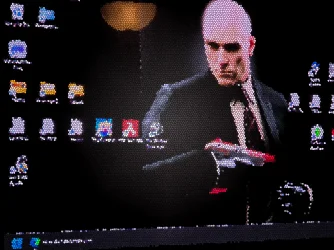
The last pic is the desktop displayed on my TV. I want that on my monitor instead.
 

Attachments

  • 4010 sg.webp
    4010 sg.webp
    1.1 MB · Views: 1
  • 4009.webp
    4009.webp
    680.5 KB · Views: 1
  • 4007.webp
    4007.webp
    573.7 KB · Views: 1
  • 4006.webp
    4006.webp
    537.3 KB · Views: 1

My Computer My Computer

At a glance

Windows 1112th Gen Intel(R) Core(TM) i7-12700F 2.10 GHz32GB CORSAIR Vengeance RGB Pro SL 32GB (4 x 8...GIGABYTE AORUS GeForce RTX™ 3060 Ti ELITE 8G ...
OS
Windows 11
Computer type
PC/Desktop
Manufacturer/Model
Custom
CPU
12th Gen Intel(R) Core(TM) i7-12700F 2.10 GHz
Motherboard
GIGABYTE B660 AORUS MASTER DDR4 B660 Intel LGA 1700 ATX
Memory
32GB CORSAIR Vengeance RGB Pro SL 32GB (4 x 8GB) 288-Pin PC RAM DDR4 3600 (PC4 28800)
Graphics Card(s)
GIGABYTE AORUS GeForce RTX™ 3060 Ti ELITE 8G PCI Express 4.0 ATX LHR GV-N306TAORUS E-8GD (rev. 2.0)
Monitor(s) Displays
Samsung
Screen Resolution
3840x2160
Hard Drives
WD Black SN850X 1Tb SSD
PSU
CORSAIR - RM Series RM750 Fully Modular Ultra-Low Noise ATX
Case
Fractal Design Pop Air RGB Black TG ATX High-Airflow Clear Tempered Glass Window Mid Tower
Cooling
Corsair RGB Fans
Keyboard
Razer Cynosa V2
Mouse
Microsoft Wireless Mouse 900, Black
Internet Speed
300mbs
Browser
MS Edge
Antivirus
AVG Free
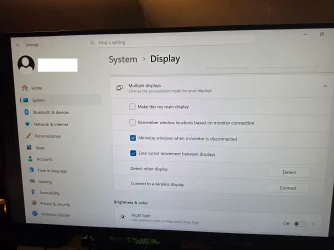
Your screenshot 4007 makes me think you have told your computer to use the TV as the main display because that checkbox for Make this my main display is only active [clickable] on one display when the other display is set as the main one. So set that checkbox to make the computer's monitor the main display instead - which is what I think you are asking for.


More generally -
- If you use the PrntScrn key [which would be Fn-PrntScrn for many laptops depending on their keyboard design] while you have set it to Extended displays then it will display as my first screenshot did - showing what is on both displays in a single screenshot. And that is what I think will enable me to understand your situation better.
- If you use Option 1 of that tutorial I will be able to see your screenshots at the same time as your words which will make your posts easier to understand.


Denis
 
Last edited:

My Computer My Computer

At a glance

Windows 11 Home x64 Version 26H2 Build 26300....
OS
Windows 11 Home x64 Version 26H2 Build 26300.9457
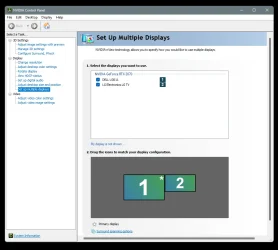
If you have the Nvidia control panel, you can select which monitor is the "Primary" like @Try3 mentioned.
Just right click whichever you want to be Primary and choose that.

Image1.webp

In the Nvidia control panel, the asterisk shows which screen is the Primary.
The Primary screen shows the desktop.
 

My Computers My Computers

  • At a glance

    Win 11 Home ♦♦♦26300.9550 ♦♦♦♦♦♦♦26H2AMD Ryzen 7 3700XG.Skill (F4-3200C14D-16GTZKW)EVGA RTX 2070 (08G-P4-2171-KR)
    OS
    Win 11 Home ♦♦♦26300.9550 ♦♦♦♦♦♦♦26H2
    Computer type
    PC/Desktop
    Manufacturer/Model
    Built by Ghot® [May 2020]
    CPU
    AMD Ryzen 7 3700X
    Motherboard
    Asus Pro WS X570-ACE (BIOS 5302)
    Memory
    G.Skill (F4-3200C14D-16GTZKW)
    Graphics Card(s)
    EVGA RTX 2070 (08G-P4-2171-KR)
    Sound Card
    Realtek ALC1220P / ALC S1220A
    Monitor(s) Displays
    Dell U3011 30"
    Screen Resolution
    2560 x 1600
    Hard Drives
    2x Samsung 860 EVO 500GB,
    WD 4TB Black FZBX - SATA III,
    WD 8TB Black FZBX - SATA III,
    DRW-24B1ST CD/DVD Burner
    PSU
    PC Power & Cooling 750W Quad EPS12V
    Case
    Cooler Master ATCS 840 Tower
    Cooling
    CM Hyper 212 EVO (push/pull)
    Keyboard
    Ducky DK9008 Shine II Blue LED
    Mouse
    Logitech Optical M-100
    Internet Speed
    300/300
    Browser
    Firefox (latest)
    Antivirus
    Bitdefender Total Security
    Other Info
    Speakers: Klipsch Pro Media 2.1
  • At a glance

    Windows XP Pro 32bit w/SP3AMD Athlon 64 X2 5000+ (OC'd @ 3.2Ghz)TWIN2X2048-6400C4DHX (2 x 1GB, DDR2 800)EVGA 256-P2-N758-TR GeForce 8600GT SSC
    Operating System
    Windows XP Pro 32bit w/SP3
    Computer type
    PC/Desktop
    Manufacturer/Model
    Built by Ghot® (not in use)
    CPU
    AMD Athlon 64 X2 5000+ (OC'd @ 3.2Ghz)
    Motherboard
    ASUS M2N32-SLI Deluxe Wireless Edition
    Memory
    TWIN2X2048-6400C4DHX (2 x 1GB, DDR2 800)
    Graphics card(s)
    EVGA 256-P2-N758-TR GeForce 8600GT SSC
    Sound Card
    Onboard
    Monitor(s) Displays
    ViewSonic G90FB Black 19" Professional (CRT)
    Screen Resolution
    up to 2048 x 1536
    Hard Drives
    WD 36GB 10,000rpm Raptor SATA
    Seagate 80GB 7200rpm SATA
    Lite-On LTR-52246S CD/RW
    Lite-On LH-18A1P CD/DVD Burner
    PSU
    PC Power & Cooling Silencer 750 Quad EPS12V
    Case
    Generic Beige case, 80mm fans
    Cooling
    ZALMAN 9500A 92mm CPU Cooler
    Keyboard
    Logitech Classic Keybooard 200
    Mouse
    Logitech Optical M-BT96a
    Internet Speed
    300/300
    Browser
    Firefox 3.x ??
    Antivirus
    Symantec (Norton)
    Other Info
    Still assembled, still runs. Haven't turned it on for 15 years?
I changed monitor to the main display but as you can see the desktop icons are still on the TV.
Screenshot 2026-10-11 171530 sg.webp
 

My Computer My Computer

At a glance

Windows 1112th Gen Intel(R) Core(TM) i7-12700F 2.10 GHz32GB CORSAIR Vengeance RGB Pro SL 32GB (4 x 8...GIGABYTE AORUS GeForce RTX™ 3060 Ti ELITE 8G ...
OS
Windows 11
Computer type
PC/Desktop
Manufacturer/Model
Custom
CPU
12th Gen Intel(R) Core(TM) i7-12700F 2.10 GHz
Motherboard
GIGABYTE B660 AORUS MASTER DDR4 B660 Intel LGA 1700 ATX
Memory
32GB CORSAIR Vengeance RGB Pro SL 32GB (4 x 8GB) 288-Pin PC RAM DDR4 3600 (PC4 28800)
Graphics Card(s)
GIGABYTE AORUS GeForce RTX™ 3060 Ti ELITE 8G PCI Express 4.0 ATX LHR GV-N306TAORUS E-8GD (rev. 2.0)
Monitor(s) Displays
Samsung
Screen Resolution
3840x2160
Hard Drives
WD Black SN850X 1Tb SSD
PSU
CORSAIR - RM Series RM750 Fully Modular Ultra-Low Noise ATX
Case
Fractal Design Pop Air RGB Black TG ATX High-Airflow Clear Tempered Glass Window Mid Tower
Cooling
Corsair RGB Fans
Keyboard
Razer Cynosa V2
Mouse
Microsoft Wireless Mouse 900, Black
Internet Speed
300mbs
Browser
MS Edge
Antivirus
AVG Free
I changed monitor to the main display but as you can see the desktop icons are still on the TV.
Drag the icons to the Main display.
 

My Computers My Computers

  • At a glance

    Windows 11 Pro
    OS
    Windows 11 Pro
    Computer type
    PC/Desktop
    Manufacturer/Model
    ASUS ROG Strix
  • At a glance

    Windows 11 Pro
    Operating System
    Windows 11 Pro
    Computer type
    Laptop
    Manufacturer/Model
    ASUS VivoBook
  • ASUS VivoBook 'Lite' ~ Windows 11 Home
Please would you click on the Identify button in Settings, System, Display then post your new 4007, 4007 screenshots as one single screenshot so all the info can be seen together - firstly with display 1 selected and then with display 2 selected. I'll add mine in a minute as examples.


Denis
 
Last edited:

My Computer My Computer

At a glance

Windows 11 Home x64 Version 26H2 Build 26300....
OS
Windows 11 Home x64 Version 26H2 Build 26300.9457
In both these screenshots [left large so you can read all the text in them], the lower half is my computer monitor [Display 1] & the upper part is an external monitor [Display 2].
In the first picture, Display 1 is selected for its details to be displayed as you can see in the display layout diagram at the top.
You can see that the control/checkbox is inactive, greyed out, because it is already the main display so it cannot be switched to become the main display.
Display 1.webp


When I then select Display 2 so its details are displayed, that checkbox is not greyed out, it is active so that you can, if you wish, set it to be your main display.
Display 2.webp


And do note that the display layout diagram at the top just changes which display's details are shown in Settings, System, Display - it is not a mechanism for changing which of them is the main display - you use the checkbox for that decision.


Denis
 

My Computer My Computer

At a glance

Windows 11 Home x64 Version 26H2 Build 26300....
OS
Windows 11 Home x64 Version 26H2 Build 26300.9457

Latest Support Threads

Back
Top Bottom