How do I turn off Synchronization on non-Outlook account?


GregS

Well-known member
Member
Local time
6:17 PM
Posts
12
Location
Traverse City, Michigan
OS
Windows 11
I am using Outlook (client version) in my MS 365 subscription. My main email that I use is an Outlook.com account. I also have a 2nd email account that I send/receive in Outlook.

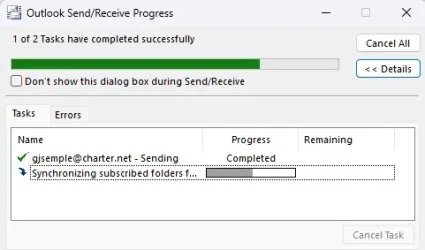
For the past week, when I open Outlook off my desktop, the send/receive task does not complete the Synchronization for my 2nd account which is an IMAP account.

I've looked at each of the IMAP folders to see if I can find a subscribed folder, but nothing appears to be subscribed.

The step never finishes and when I go to shut down the shutdown Windows warns me about the task that never finished. Most of the time I end the task through Task Manager.

So why does it still run? Can I exclude this task on the startup of Outlook?

Screenshot attached of what I see every time I open Outlook.

Thanks,
Greg
 

Attachments
  • Screenshot 2025-11-20 100740.webp
    Screenshot 2025-11-20 100740.webp
    14.3 KB · Views: 1

My Computer

System One

  • OS
    Windows 11
    Computer type
    PC/Desktop
    Manufacturer/Model
    Alienware R13
    CPU
    12th Gen Intel(R) Core(TM) i9 12900KF
    Motherboard
    Alienware
    Memory
    NVIDIA(R) GeForce RTX(TM) 3080 10GB GDDR6X
    Graphics Card(s)
    64GB Dual Channel DDR5 at 4400MHz
    Sound Card
    Dell Sound Bar
    Monitor(s) Displays
    Dell UP2716
    Screen Resolution
    2560 x 1440
    Hard Drives
    1TB NVMe M.2 PCIe SSD (Boot) + 1TB 7200RPM SATA 6Gb/s
    PSU
    Alienware(TM) 750 Watt
    Case
    Alienware Clear Side Panel
    Cooling
    Alienware Cryo-tech(TM) Edition CPU Liquid Cooling
    Keyboard
    Dell
    Mouse
    Wired
    Internet Speed
    Spectrum Gig/40
    Browser
    MS Edge
    Antivirus
    Norton Security
Can I exclude this task on the startup of Outlook?


You could try adding the “Disable Scheduled Send/Receive” to the toolbar (Ribbon), click on it and it should stay disabled even after restarting Outlook. Clicking on it again will allow send receive.

Adding a custom task icon to the Outlook Toolbar and entails starting a new Toolbar section, then adding the tools you want, this can be done with “Right click on toolbar > Customise.

Win-1997.webp

Disable Auto send/receive in settings:
  • Launch Outlook
  • Go to the File menu and select Options
  • In the Options window, click Advanced
  • Scroll down to the Send and Receive section
  • Click the Send/Receive… button
  • In the Send/Receive Groups dialog, uncheck "Perform an automatic send/receive when starting Outlook"
  • (Optional) Uncheck "Schedule an automatic send/receive every X minutes" if you want full manual control
  • Click Close to exit the dialog
  • Click OK to save changes
To manually check mail, press F9 or click Send/Receive All Folders on the ribbon​
I have notes somewhere regarding settings to try so as to disable the long sync wait, but I have to find them.
Also, it could be server side related.
 
Last edited:

My Computers

System One System Two

  • OS
    Windows 11 Pro 25H2 Build 26200.8524
    Computer type
    PC/Desktop
    Manufacturer/Model
    Sin-built 2013
    CPU
    Intel(R) Core(TM) i7-4770K CPU @ 3.50GHz
    Motherboard
    ASUS ROG Maximus VI Formula
    Memory
    32.0 GB of I forget and the box is in storage.
    Graphics Card(s)
    Gigabyte nVidia GeForce GTX 1660 Super OC 6GB
    Sound Card
    Onboard thingy
    Monitor(s) Displays
    5 x LG 25MS500-B - 1 x 24MK430H-B - 1 x Wacom Pro 22" Touch Screen Tablet
    Screen Resolution
    All over the place
    Hard Drives
    Too many to list.
    OS on Samsung 1TB 870 QVO SATA
    PSU
    Silverstone 1500
    Case
    NZXT Phantom 820 Full-Tower Case
    Cooling
    Noctua NH-D15 Elite Class Dual Tower CPU Cooler / 6 x EziDIY 120mm / 2 x Corsair 140mm somethings / 1 x 140mm Thermaltake something / 2 x 200mm Corsair.
    Keyboard
    Corsair K95 / Logitech diNovo Edge Wireless
    Mouse
    Logitech: G402 / G502 / Mx Masters / Mx Air Cordless
    Internet Speed
    2000/500Mbps
    Browser
    All sorts
    Antivirus
    Kaspersky Premium
    Other Info
    ㅤㅤㅤㅤㅤㅤㅤㅤㅤㅤㅤㅤㅤㅤㅤㅤㅤㅤㅤㅤㅤㅤㅤㅤㅤㅤㅤㅤㅤㅤㅤㅤㅤㅤㅤㅤㅤㅤㅤㅤ⠀⠀⠀⠀⠀⠀⠀⠀⠀⠀
    TP-Link BE9300 WiFi 7 Bluetooth 5.4 (Archer TBE550E)
    TP-Link TX201 V1 2.5GB Lan

    Grandstream HT812 - VoIP
    ASUS DSL-AX82U - Mesh
    ASUS RT-AC68U - Mesh
    ASUS RT-BE88U Router

    Brother MFC-L2880DW Printer

    I’m on a horse.
  • Operating System
    Windows 11 Pro 25H2 Build 26200.8524
    Computer type
    Laptop
    Manufacturer/Model
    LENOVO Yoga 7 14IRL8 - 7i EVO OLED 14" Touchscreen i5 12 Core 16GB/512GB
    CPU
    Intel Core 12th Gen i5-1240P Processor (1.7 - 4.4GHz)
    Memory
    16GB LPDDR5 RAM
    Graphics card(s)
    Intel Iris Xe Graphics Processor
    Sound Card
    Optimized with Dolby Atmos®
    Screen Resolution
    QHD 2880 x 1800 OLED
    Hard Drives
    M.2 512GB
    Antivirus
    Defender / Malwarebytes
    Other Info
    …still on a horse.
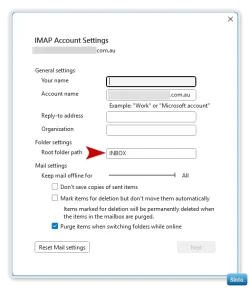
Something to try:
  • Click on the custom email account
  • Click File > Account Settings > Account name & sync settings
  • In the "Root folder path" type "INBOX" (All caps)
  • Click Next > Done
  • Restart Outlook
  • If there is no change, repeat steps and remove "INBOX"
Win-1998.webp

Win-2000.webp


To find or to subscribe to folders:
  • Right click on "Inbox" in your custom email account
  • Select "IMAP Folders"
  • Click on "Query"
I would be careful in there, I don't think it's what you need to mess with to solve the Sync issues
 
Last edited:

My Computers

System One System Two

  • OS
    Windows 11 Pro 25H2 Build 26200.8524
    Computer type
    PC/Desktop
    Manufacturer/Model
    Sin-built 2013
    CPU
    Intel(R) Core(TM) i7-4770K CPU @ 3.50GHz
    Motherboard
    ASUS ROG Maximus VI Formula
    Memory
    32.0 GB of I forget and the box is in storage.
    Graphics Card(s)
    Gigabyte nVidia GeForce GTX 1660 Super OC 6GB
    Sound Card
    Onboard thingy
    Monitor(s) Displays
    5 x LG 25MS500-B - 1 x 24MK430H-B - 1 x Wacom Pro 22" Touch Screen Tablet
    Screen Resolution
    All over the place
    Hard Drives
    Too many to list.
    OS on Samsung 1TB 870 QVO SATA
    PSU
    Silverstone 1500
    Case
    NZXT Phantom 820 Full-Tower Case
    Cooling
    Noctua NH-D15 Elite Class Dual Tower CPU Cooler / 6 x EziDIY 120mm / 2 x Corsair 140mm somethings / 1 x 140mm Thermaltake something / 2 x 200mm Corsair.
    Keyboard
    Corsair K95 / Logitech diNovo Edge Wireless
    Mouse
    Logitech: G402 / G502 / Mx Masters / Mx Air Cordless
    Internet Speed
    2000/500Mbps
    Browser
    All sorts
    Antivirus
    Kaspersky Premium
    Other Info
    ㅤㅤㅤㅤㅤㅤㅤㅤㅤㅤㅤㅤㅤㅤㅤㅤㅤㅤㅤㅤㅤㅤㅤㅤㅤㅤㅤㅤㅤㅤㅤㅤㅤㅤㅤㅤㅤㅤㅤㅤ⠀⠀⠀⠀⠀⠀⠀⠀⠀⠀
    TP-Link BE9300 WiFi 7 Bluetooth 5.4 (Archer TBE550E)
    TP-Link TX201 V1 2.5GB Lan

    Grandstream HT812 - VoIP
    ASUS DSL-AX82U - Mesh
    ASUS RT-AC68U - Mesh
    ASUS RT-BE88U Router

    Brother MFC-L2880DW Printer

    I’m on a horse.
  • Operating System
    Windows 11 Pro 25H2 Build 26200.8524
    Computer type
    Laptop
    Manufacturer/Model
    LENOVO Yoga 7 14IRL8 - 7i EVO OLED 14" Touchscreen i5 12 Core 16GB/512GB
    CPU
    Intel Core 12th Gen i5-1240P Processor (1.7 - 4.4GHz)
    Memory
    16GB LPDDR5 RAM
    Graphics card(s)
    Intel Iris Xe Graphics Processor
    Sound Card
    Optimized with Dolby Atmos®
    Screen Resolution
    QHD 2880 x 1800 OLED
    Hard Drives
    M.2 512GB
    Antivirus
    Defender / Malwarebytes
    Other Info
    …still on a horse.

My Computer

System One

  • OS
    Windows 10, Windows 11
    Computer type
    PC/Desktop
Thanks all, I've made some changes and will monitor for the results.
 

My Computer

System One

  • OS
    Windows 11
    Computer type
    PC/Desktop
    Manufacturer/Model
    Alienware R13
    CPU
    12th Gen Intel(R) Core(TM) i9 12900KF
    Motherboard
    Alienware
    Memory
    NVIDIA(R) GeForce RTX(TM) 3080 10GB GDDR6X
    Graphics Card(s)
    64GB Dual Channel DDR5 at 4400MHz
    Sound Card
    Dell Sound Bar
    Monitor(s) Displays
    Dell UP2716
    Screen Resolution
    2560 x 1440
    Hard Drives
    1TB NVMe M.2 PCIe SSD (Boot) + 1TB 7200RPM SATA 6Gb/s
    PSU
    Alienware(TM) 750 Watt
    Case
    Alienware Clear Side Panel
    Cooling
    Alienware Cryo-tech(TM) Edition CPU Liquid Cooling
    Keyboard
    Dell
    Mouse
    Wired
    Internet Speed
    Spectrum Gig/40
    Browser
    MS Edge
    Antivirus
    Norton Security
Back
Top Bottom