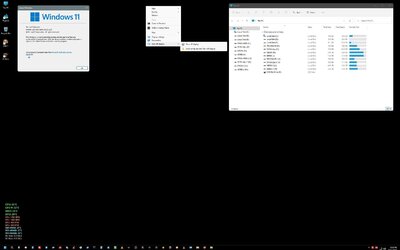
How I upgraded to 22H2


Ghot

Well-known member
Guru
VIP
Local time
5:12 PM
Posts
20,111
Location
Pgh PA, USA
OS
Win 11 Home ♦♦♦26200.8875 ♦♦♦♦♦♦♦25H2
First let me say, that my computer IS compatible with Windows 11.
I downloaded the 22H2 ISO from here... Microsoft 22H2 ISO download

I used the third option down. The one labled: Download Windows 11 Disk Image (ISO)

Then, I just did an In-Place Upgrade, using the ISO I just downloaded.
The In-Place Upgrade took 17 minutes on my computer (not including download).

Note: The In-Place Upgrade to 22H2, didn't change my Power Plan settings.
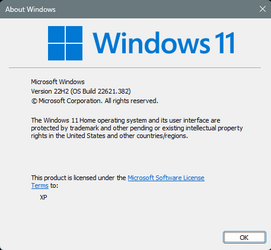
Image1.png Image1.png


Now to fix a few personalizations. :-)


Ok... got the personalizations done... EDGE is removed. All is well with the world.
TranslucentTB still makes the Taskbar clear, but it has an upper edge to it...

You can see it in this pic...
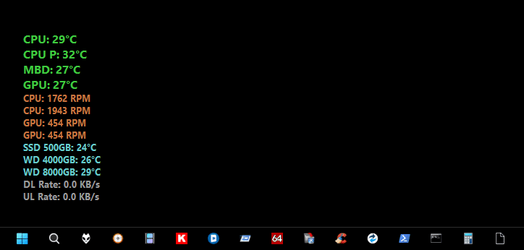
Image1.png


I also had to redo adding "Turn off Display" to the context menu.


Just checked Windows Updates, there were a few.
KB5017026 .NET update
KB5016632 22H2 Cumulative Update.
KB5017321 22H2 another CU


Continued in post #9



Image1.png
 
Last edited:

My Computers My Computers

  • At a glance

    Win 11 Home ♦♦♦26200.8875 ♦♦♦♦♦♦♦25H2AMD Ryzen 7 3700XG.Skill (F4-3200C14D-16GTZKW)EVGA RTX 2070 (08G-P4-2171-KR)
    OS
    Win 11 Home ♦♦♦26200.8875 ♦♦♦♦♦♦♦25H2
    Computer type
    PC/Desktop
    Manufacturer/Model
    Built by Ghot® [May 2020]
    CPU
    AMD Ryzen 7 3700X
    Motherboard
    Asus Pro WS X570-ACE (BIOS 5302)
    Memory
    G.Skill (F4-3200C14D-16GTZKW)
    Graphics Card(s)
    EVGA RTX 2070 (08G-P4-2171-KR)
    Sound Card
    Realtek ALC1220P / ALC S1220A
    Monitor(s) Displays
    Dell U3011 30"
    Screen Resolution
    2560 x 1600
    Hard Drives
    2x Samsung 860 EVO 500GB,
    WD 4TB Black FZBX - SATA III,
    WD 8TB Black FZBX - SATA III,
    DRW-24B1ST CD/DVD Burner
    PSU
    PC Power & Cooling 750W Quad EPS12V
    Case
    Cooler Master ATCS 840 Tower
    Cooling
    CM Hyper 212 EVO (push/pull)
    Keyboard
    Ducky DK9008 Shine II Blue LED
    Mouse
    Logitech Optical M-100
    Internet Speed
    300/300
    Browser
    Firefox (latest)
    Antivirus
    Bitdefender Total Security
    Other Info
    Speakers: Klipsch Pro Media 2.1
  • At a glance

    Windows XP Pro 32bit w/SP3AMD Athlon 64 X2 5000+ (OC'd @ 3.2Ghz)TWIN2X2048-6400C4DHX (2 x 1GB, DDR2 800)EVGA 256-P2-N758-TR GeForce 8600GT SSC
    Operating System
    Windows XP Pro 32bit w/SP3
    Computer type
    PC/Desktop
    Manufacturer/Model
    Built by Ghot® (not in use)
    CPU
    AMD Athlon 64 X2 5000+ (OC'd @ 3.2Ghz)
    Motherboard
    ASUS M2N32-SLI Deluxe Wireless Edition
    Memory
    TWIN2X2048-6400C4DHX (2 x 1GB, DDR2 800)
    Graphics card(s)
    EVGA 256-P2-N758-TR GeForce 8600GT SSC
    Sound Card
    Onboard
    Monitor(s) Displays
    ViewSonic G90FB Black 19" Professional (CRT)
    Screen Resolution
    up to 2048 x 1536
    Hard Drives
    WD 36GB 10,000rpm Raptor SATA
    Seagate 80GB 7200rpm SATA
    Lite-On LTR-52246S CD/RW
    Lite-On LH-18A1P CD/DVD Burner
    PSU
    PC Power & Cooling Silencer 750 Quad EPS12V
    Case
    Generic Beige case, 80mm fans
    Cooling
    ZALMAN 9500A 92mm CPU Cooler
    Keyboard
    Logitech Classic Keybooard 200
    Mouse
    Logitech Optical M-BT96a
    Internet Speed
    300/300
    Browser
    Firefox 3.x ??
    Antivirus
    Symantec (Norton)
    Other Info
    Still assembled, still runs. Haven't turned it on for 15 years?
@Ghot What app are you using to view temperature of the CPU, GPU and HDD?
 

My Computer My Computer

At a glance

Windows 11AMD Ryzen 7 5700GMicron Technology DDR4-3200 16GBNVIDIA GeForce RTX 3060
OS
Windows 11
Computer type
PC/Desktop
Manufacturer/Model
HP Pavilion
CPU
AMD Ryzen 7 5700G
Motherboard
Erica6
Memory
Micron Technology DDR4-3200 16GB
Graphics Card(s)
NVIDIA GeForce RTX 3060
Sound Card
Realtek ALC671
Monitor(s) Displays
Samsung SyncMaster U28E590
Screen Resolution
3840 x 2160
Hard Drives
SAMSUNG MZVLQ1T0HALB-000H1
  • Like
Reactions: WAI

My Computers My Computers

  • At a glance

    Win 11 Home ♦♦♦26200.8875 ♦♦♦♦♦♦♦25H2AMD Ryzen 7 3700XG.Skill (F4-3200C14D-16GTZKW)EVGA RTX 2070 (08G-P4-2171-KR)
    OS
    Win 11 Home ♦♦♦26200.8875 ♦♦♦♦♦♦♦25H2
    Computer type
    PC/Desktop
    Manufacturer/Model
    Built by Ghot® [May 2020]
    CPU
    AMD Ryzen 7 3700X
    Motherboard
    Asus Pro WS X570-ACE (BIOS 5302)
    Memory
    G.Skill (F4-3200C14D-16GTZKW)
    Graphics Card(s)
    EVGA RTX 2070 (08G-P4-2171-KR)
    Sound Card
    Realtek ALC1220P / ALC S1220A
    Monitor(s) Displays
    Dell U3011 30"
    Screen Resolution
    2560 x 1600
    Hard Drives
    2x Samsung 860 EVO 500GB,
    WD 4TB Black FZBX - SATA III,
    WD 8TB Black FZBX - SATA III,
    DRW-24B1ST CD/DVD Burner
    PSU
    PC Power & Cooling 750W Quad EPS12V
    Case
    Cooler Master ATCS 840 Tower
    Cooling
    CM Hyper 212 EVO (push/pull)
    Keyboard
    Ducky DK9008 Shine II Blue LED
    Mouse
    Logitech Optical M-100
    Internet Speed
    300/300
    Browser
    Firefox (latest)
    Antivirus
    Bitdefender Total Security
    Other Info
    Speakers: Klipsch Pro Media 2.1
  • At a glance

    Windows XP Pro 32bit w/SP3AMD Athlon 64 X2 5000+ (OC'd @ 3.2Ghz)TWIN2X2048-6400C4DHX (2 x 1GB, DDR2 800)EVGA 256-P2-N758-TR GeForce 8600GT SSC
    Operating System
    Windows XP Pro 32bit w/SP3
    Computer type
    PC/Desktop
    Manufacturer/Model
    Built by Ghot® (not in use)
    CPU
    AMD Athlon 64 X2 5000+ (OC'd @ 3.2Ghz)
    Motherboard
    ASUS M2N32-SLI Deluxe Wireless Edition
    Memory
    TWIN2X2048-6400C4DHX (2 x 1GB, DDR2 800)
    Graphics card(s)
    EVGA 256-P2-N758-TR GeForce 8600GT SSC
    Sound Card
    Onboard
    Monitor(s) Displays
    ViewSonic G90FB Black 19" Professional (CRT)
    Screen Resolution
    up to 2048 x 1536
    Hard Drives
    WD 36GB 10,000rpm Raptor SATA
    Seagate 80GB 7200rpm SATA
    Lite-On LTR-52246S CD/RW
    Lite-On LH-18A1P CD/DVD Burner
    PSU
    PC Power & Cooling Silencer 750 Quad EPS12V
    Case
    Generic Beige case, 80mm fans
    Cooling
    ZALMAN 9500A 92mm CPU Cooler
    Keyboard
    Logitech Classic Keybooard 200
    Mouse
    Logitech Optical M-BT96a
    Internet Speed
    300/300
    Browser
    Firefox 3.x ??
    Antivirus
    Symantec (Norton)
    Other Info
    Still assembled, still runs. Haven't turned it on for 15 years?
I have AIDA64 Extreme, to tell you the true i don't know how to display those views on desktop.
 

My Computer My Computer

At a glance

Windows 11AMD Ryzen 7 5700GMicron Technology DDR4-3200 16GBNVIDIA GeForce RTX 3060
OS
Windows 11
Computer type
PC/Desktop
Manufacturer/Model
HP Pavilion
CPU
AMD Ryzen 7 5700G
Motherboard
Erica6
Memory
Micron Technology DDR4-3200 16GB
Graphics Card(s)
NVIDIA GeForce RTX 3060
Sound Card
Realtek ALC671
Monitor(s) Displays
Samsung SyncMaster U28E590
Screen Resolution
3840 x 2160
Hard Drives
SAMSUNG MZVLQ1T0HALB-000H1
I have AIDA64 Extreme, to tell you the true i don't know how to display those views on desktop.


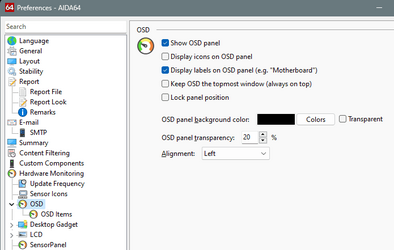
No problem... Down by the Taskbar clock... double click on the "64" icon.
In the window that opens, click on File > Preferences.

On the left side click on "OSD", and for now, choose these settings...

Image1.png

Then back on the left side, click on OSD Items...

1. Anything withe a checkmark will show in the OSD.
2. You can edit each item's name, size, font and color. Double click an item to edit it.
3. With the buttons down at the bottom, you can move items up or down on the list. (I keep the ones I use at the top)
4. You can drag the OSD to anywhere you want.

Image1.png


NOTE: For the OSD settings (top pic), make sure you un-check "Transparent". If that's checked... then to move the OSD or to open the OSD configuration window, you will have to click on the actual text, rather than the OSD "area".

Also... any font that's installed in Windows... will be available to you for the OSD items.
 

My Computers My Computers

  • At a glance

    Win 11 Home ♦♦♦26200.8875 ♦♦♦♦♦♦♦25H2AMD Ryzen 7 3700XG.Skill (F4-3200C14D-16GTZKW)EVGA RTX 2070 (08G-P4-2171-KR)
    OS
    Win 11 Home ♦♦♦26200.8875 ♦♦♦♦♦♦♦25H2
    Computer type
    PC/Desktop
    Manufacturer/Model
    Built by Ghot® [May 2020]
    CPU
    AMD Ryzen 7 3700X
    Motherboard
    Asus Pro WS X570-ACE (BIOS 5302)
    Memory
    G.Skill (F4-3200C14D-16GTZKW)
    Graphics Card(s)
    EVGA RTX 2070 (08G-P4-2171-KR)
    Sound Card
    Realtek ALC1220P / ALC S1220A
    Monitor(s) Displays
    Dell U3011 30"
    Screen Resolution
    2560 x 1600
    Hard Drives
    2x Samsung 860 EVO 500GB,
    WD 4TB Black FZBX - SATA III,
    WD 8TB Black FZBX - SATA III,
    DRW-24B1ST CD/DVD Burner
    PSU
    PC Power & Cooling 750W Quad EPS12V
    Case
    Cooler Master ATCS 840 Tower
    Cooling
    CM Hyper 212 EVO (push/pull)
    Keyboard
    Ducky DK9008 Shine II Blue LED
    Mouse
    Logitech Optical M-100
    Internet Speed
    300/300
    Browser
    Firefox (latest)
    Antivirus
    Bitdefender Total Security
    Other Info
    Speakers: Klipsch Pro Media 2.1
  • At a glance

    Windows XP Pro 32bit w/SP3AMD Athlon 64 X2 5000+ (OC'd @ 3.2Ghz)TWIN2X2048-6400C4DHX (2 x 1GB, DDR2 800)EVGA 256-P2-N758-TR GeForce 8600GT SSC
    Operating System
    Windows XP Pro 32bit w/SP3
    Computer type
    PC/Desktop
    Manufacturer/Model
    Built by Ghot® (not in use)
    CPU
    AMD Athlon 64 X2 5000+ (OC'd @ 3.2Ghz)
    Motherboard
    ASUS M2N32-SLI Deluxe Wireless Edition
    Memory
    TWIN2X2048-6400C4DHX (2 x 1GB, DDR2 800)
    Graphics card(s)
    EVGA 256-P2-N758-TR GeForce 8600GT SSC
    Sound Card
    Onboard
    Monitor(s) Displays
    ViewSonic G90FB Black 19" Professional (CRT)
    Screen Resolution
    up to 2048 x 1536
    Hard Drives
    WD 36GB 10,000rpm Raptor SATA
    Seagate 80GB 7200rpm SATA
    Lite-On LTR-52246S CD/RW
    Lite-On LH-18A1P CD/DVD Burner
    PSU
    PC Power & Cooling Silencer 750 Quad EPS12V
    Case
    Generic Beige case, 80mm fans
    Cooling
    ZALMAN 9500A 92mm CPU Cooler
    Keyboard
    Logitech Classic Keybooard 200
    Mouse
    Logitech Optical M-BT96a
    Internet Speed
    300/300
    Browser
    Firefox 3.x ??
    Antivirus
    Symantec (Norton)
    Other Info
    Still assembled, still runs. Haven't turned it on for 15 years?
Thanks mate, i have figured out by your guide.
 

My Computer My Computer

At a glance

Windows 11AMD Ryzen 7 5700GMicron Technology DDR4-3200 16GBNVIDIA GeForce RTX 3060
OS
Windows 11
Computer type
PC/Desktop
Manufacturer/Model
HP Pavilion
CPU
AMD Ryzen 7 5700G
Motherboard
Erica6
Memory
Micron Technology DDR4-3200 16GB
Graphics Card(s)
NVIDIA GeForce RTX 3060
Sound Card
Realtek ALC671
Monitor(s) Displays
Samsung SyncMaster U28E590
Screen Resolution
3840 x 2160
Hard Drives
SAMSUNG MZVLQ1T0HALB-000H1
First let me say, that my computer IS compatible with Windows 11 .... I use the third option down. The one labled: Download Windows 11 Disk Image (ISO)
My compatible System One was offered the upgrade in Windows Update so I took that. My incompatible systems have all taken the ISO in-place upgrade route.
 

My Computers My Computers

  • At a glance

    Windows 11 HomeAMD Athlon Silver 3050U8GBRadeon Graphics
    OS
    Windows 11 Home
    Computer type
    Laptop
    Manufacturer/Model
    Acer Aspire 3 A315-23-R9VY
    CPU
    AMD Athlon Silver 3050U
    Memory
    8GB
    Graphics Card(s)
    Radeon Graphics
    Monitor(s) Displays
    laptop screen
    Screen Resolution
    1366x768 native resolution, up to 2560x1440 with Radeon Virtual Super Resolution
    Hard Drives
    1TB Samsung EVO 870 SSD (from April 2026: 250GB EVO 850)
    Internet Speed
    150 Mbps
    Browser
    Edge, Firefox
    Antivirus
    Defender
    Other Info
    fully 'Windows 11 ready' laptop. Windows 10 C: partition migrated from my old unsupported 'main machine' then upgraded to 11. A test migration ran Insider builds for 2 months. When 11 was released on 5th October 2021 it was re-imaged back to 10 and was offered the upgrade in Windows Update on 20th October. Windows Update offered the 22H2 Feature Update on 20th September 2022. It got the 23H2 Feature Update on 4th November 2023 through Windows Update, 24H2 on 3rd October 2024 through Windows Update by setting the Target Release Version for 24H2, and 25H2 on 30th September 2025 through Windows Update by setting the Target Release Version for 25H2.

    UPDATE - 11 April 2026: due to mechanical deterioration this PC has been retired from active duty. The OS with all software and files has been migrated to my System Seven in 'Other systems' to carry on as my general purpose 'main machine'.

    I've now clean installed 25H2 and used Garlin's scripts to update Secure Boot to CA 2023 and revoke the PCA 2011 certificates. It's new role is to test secure boot issues.
  • At a glance

    Windows 11 ProIntel® Core™ i5-520M8GB(integrated graphics) Intel HD Graphics
    Operating System
    Windows 11 Pro
    Computer type
    Laptop
    Manufacturer/Model
    Dell Latitude E4310
    CPU
    Intel® Core™ i5-520M
    Motherboard
    0T6M8G
    Memory
    8GB
    Graphics card(s)
    (integrated graphics) Intel HD Graphics
    Screen Resolution
    1366x768
    Hard Drives
    500GB Crucial MX500 SSD
    Browser
    Firefox, Edge
    Antivirus
    Defender
    Other Info
    unsupported machine: Legacy bios, MBR, TPM 1.2, upgraded from W10 to W11 using W10/W11 hybrid install media workaround.

    In-place upgrade to 22H2 using ISO and a workaround.
    Feature Update to 23H2 by manually installing the Enablement Package.
    In-place upgrade to 24H2 using hybrid 23H2/24H2 install media.
    Upgraded to 25H2 by Enablement Package.

    Also running Insider Dev, and Canary builds and Windows 10 as native boot .vhdx.
  • My SYSTEM THREE is a Dell Latitude 5410, i7-10610U, 32GB RAM, 512GB NVMe ssd, supported device running Windows 11 Pro.

    My SYSTEM FOUR is a 2-in-1 convertible Lenovo Yoga 11e 20DA, Celeron N2930, 8GB RAM, 256GB ssd. Unsupported device: currently running Win10 Pro, plus Win11 Pro RTM and Insider Dev, Beta, and RP 24H2 as native boot vhdx.

    My SYSTEM FIVE is a Dell Latitude 3190 2-in-1, Pentium Silver N5030, 8GB RAM, 1TB NVMe ssd, supported device running Windows 11 Pro, plus Insider Beta, Dev, and Canary builds (and a few others) as a native boot .vhdx.

    My SYSTEM SIX is a Dell Latitude 5550, Core Ultra 7 165H, 64GB RAM, 1TB NVMe SSD, supported device, Windows 11 Pro 24H2, Hyper-V host machine. Updated to 25H2 on 30th September 2025.

    My SYSTEM SEVEN is a Lenovo Thinkpad T580, Intel Core i7-8650U, 16GB RAM, 512GB NVMe SSD + 2nd 512GB NVMe SSD, a supported device for Windows 11. This is my current general purpose 'main machine'. The installed Windows 11 Home from my System One has been migrated to this machine.
Ran the "Windows11InstallationAssistant.exe" program from Microsoft last night. In less than 50 minutes, my PC was officially upgraded to 22H2. So far everything seems to be working fine.
 

My Computer My Computer

At a glance

Windows 11 Home 25H2Intel i9-14900KFTeamGroup T-Force Delta DDR5-6000 64Gb(32Gb x 2)MSI Shadow 3X NVIDIA GeForce RTX-5080 w/16Gb ...
OS
Windows 11 Home 25H2
Computer type
PC/Desktop
Manufacturer/Model
IBuyPower Intel 14th Gen Ultra Extreme Gaming PC
CPU
Intel i9-14900KF
Motherboard
ASUS Z790 Gaming WIFI-7
Memory
TeamGroup T-Force Delta DDR5-6000 64Gb(32Gb x 2)
Graphics Card(s)
MSI Shadow 3X NVIDIA GeForce RTX-5080 w/16Gb GDDR7
Sound Card
Realtec 3D Premium Surround Sound Onboard
Monitor(s) Displays
Samsung Odessey G70NC 43"
Screen Resolution
3840 x 2160 144Hz
Hard Drives
WD BLUE SN7100 M.2 PCIe NVMe SSD 1Tb (Main Drive with Win 11 Home)
WD BLUE SN570 M.2 PCIe NVMe SSD 1Tb (Game Drive)
WD BLUE SN570 M.2 PCIe NVMe SSD 1Tb (Programs Drive)
WD BLUE SN570 M.2 PCIe NVMe SSD 1Tb (Data BackUp)
PSU
Enermax Revolution III, 80 Plus Gold, 1000 Watts, Gen 5
Case
Hyte 70, 3 - 120mm Side Fans, 1 - 120mm Back Fan, 3 - 120mm Bottom Fans
Cooling
iBuyPower AW5 360 ARGB Liquid Cooling Radiator
Keyboard
Corsair K70
Mouse
Basilisk v3 RZ01-0400
Internet Speed
Spectrum 1 Gb
Browser
Firefox Nightly
Antivirus
Windows Defender
Other Info
On Board Network and Bluetooth
Ok... this is/was weird.
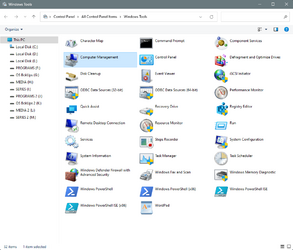
When I go to Start > Apps > Windows Tools... 85% of these had a white-page icon and wouldn't do anything.
All these items still worked but I had to find them on C: and run them from their executables.

I had to go to C:\ProgramData\Microsoft\Windows\Start Menu ...and it wouldn't let me in until I...
clicked OK to... take control of this permanently.

This Startup folder gave me the same option (Click OK to take control of this permanently).
C:\ProgramData\Microsoft\Windows\Start Menu\Programs\Startup

And I have an Administrators account.
But after clicking OK... all these things started working again...

This is... Start > Apps > Windows Tools
Image1.png


Oh... btw, Win 11 is now approx. 6GB smaller that it was on 22000.1042
The difference in the size of my backups is 3GB x 2 = 6GB
Image1.png


Image1.png Image2.jpg


Attached at the bottom is a ZIP of the tweaks I used after the In-Place upgrade.

NOTE: When you're ready to remove the Windows.old folder... Use the Disk Cleanup method.

Danger: Do NOT use these two options for "Shortcut Arrow" in Winaero Tweaker.
Using these tweaks will break Windows shortcuts.
Image1.png

NOTE: CCleaner Reg cleaner... actually works. ^^

A-team.png


The tweaks I used after the In-Place upgrade from 22000.1042 (21H2), to 22621.521 (22H2)
 

Attachments

Last edited:

My Computers My Computers

  • At a glance

    Win 11 Home ♦♦♦26200.8875 ♦♦♦♦♦♦♦25H2AMD Ryzen 7 3700XG.Skill (F4-3200C14D-16GTZKW)EVGA RTX 2070 (08G-P4-2171-KR)
    OS
    Win 11 Home ♦♦♦26200.8875 ♦♦♦♦♦♦♦25H2
    Computer type
    PC/Desktop
    Manufacturer/Model
    Built by Ghot® [May 2020]
    CPU
    AMD Ryzen 7 3700X
    Motherboard
    Asus Pro WS X570-ACE (BIOS 5302)
    Memory
    G.Skill (F4-3200C14D-16GTZKW)
    Graphics Card(s)
    EVGA RTX 2070 (08G-P4-2171-KR)
    Sound Card
    Realtek ALC1220P / ALC S1220A
    Monitor(s) Displays
    Dell U3011 30"
    Screen Resolution
    2560 x 1600
    Hard Drives
    2x Samsung 860 EVO 500GB,
    WD 4TB Black FZBX - SATA III,
    WD 8TB Black FZBX - SATA III,
    DRW-24B1ST CD/DVD Burner
    PSU
    PC Power & Cooling 750W Quad EPS12V
    Case
    Cooler Master ATCS 840 Tower
    Cooling
    CM Hyper 212 EVO (push/pull)
    Keyboard
    Ducky DK9008 Shine II Blue LED
    Mouse
    Logitech Optical M-100
    Internet Speed
    300/300
    Browser
    Firefox (latest)
    Antivirus
    Bitdefender Total Security
    Other Info
    Speakers: Klipsch Pro Media 2.1
  • At a glance

    Windows XP Pro 32bit w/SP3AMD Athlon 64 X2 5000+ (OC'd @ 3.2Ghz)TWIN2X2048-6400C4DHX (2 x 1GB, DDR2 800)EVGA 256-P2-N758-TR GeForce 8600GT SSC
    Operating System
    Windows XP Pro 32bit w/SP3
    Computer type
    PC/Desktop
    Manufacturer/Model
    Built by Ghot® (not in use)
    CPU
    AMD Athlon 64 X2 5000+ (OC'd @ 3.2Ghz)
    Motherboard
    ASUS M2N32-SLI Deluxe Wireless Edition
    Memory
    TWIN2X2048-6400C4DHX (2 x 1GB, DDR2 800)
    Graphics card(s)
    EVGA 256-P2-N758-TR GeForce 8600GT SSC
    Sound Card
    Onboard
    Monitor(s) Displays
    ViewSonic G90FB Black 19" Professional (CRT)
    Screen Resolution
    up to 2048 x 1536
    Hard Drives
    WD 36GB 10,000rpm Raptor SATA
    Seagate 80GB 7200rpm SATA
    Lite-On LTR-52246S CD/RW
    Lite-On LH-18A1P CD/DVD Burner
    PSU
    PC Power & Cooling Silencer 750 Quad EPS12V
    Case
    Generic Beige case, 80mm fans
    Cooling
    ZALMAN 9500A 92mm CPU Cooler
    Keyboard
    Logitech Classic Keybooard 200
    Mouse
    Logitech Optical M-BT96a
    Internet Speed
    300/300
    Browser
    Firefox 3.x ??
    Antivirus
    Symantec (Norton)
    Other Info
    Still assembled, still runs. Haven't turned it on for 15 years?
On another subject entirely...

It's a good thing Windows is smarter than I am.
I was just trying to use the Windows 10 shell32.dll on Windows 11.

Fortunately, the things I tried were getting so convoluted... that I just gave up. :-)
Probably needed to be done, outside Windows.
 
Last edited:

My Computers My Computers

  • At a glance

    Win 11 Home ♦♦♦26200.8875 ♦♦♦♦♦♦♦25H2AMD Ryzen 7 3700XG.Skill (F4-3200C14D-16GTZKW)EVGA RTX 2070 (08G-P4-2171-KR)
    OS
    Win 11 Home ♦♦♦26200.8875 ♦♦♦♦♦♦♦25H2
    Computer type
    PC/Desktop
    Manufacturer/Model
    Built by Ghot® [May 2020]
    CPU
    AMD Ryzen 7 3700X
    Motherboard
    Asus Pro WS X570-ACE (BIOS 5302)
    Memory
    G.Skill (F4-3200C14D-16GTZKW)
    Graphics Card(s)
    EVGA RTX 2070 (08G-P4-2171-KR)
    Sound Card
    Realtek ALC1220P / ALC S1220A
    Monitor(s) Displays
    Dell U3011 30"
    Screen Resolution
    2560 x 1600
    Hard Drives
    2x Samsung 860 EVO 500GB,
    WD 4TB Black FZBX - SATA III,
    WD 8TB Black FZBX - SATA III,
    DRW-24B1ST CD/DVD Burner
    PSU
    PC Power & Cooling 750W Quad EPS12V
    Case
    Cooler Master ATCS 840 Tower
    Cooling
    CM Hyper 212 EVO (push/pull)
    Keyboard
    Ducky DK9008 Shine II Blue LED
    Mouse
    Logitech Optical M-100
    Internet Speed
    300/300
    Browser
    Firefox (latest)
    Antivirus
    Bitdefender Total Security
    Other Info
    Speakers: Klipsch Pro Media 2.1
  • At a glance

    Windows XP Pro 32bit w/SP3AMD Athlon 64 X2 5000+ (OC'd @ 3.2Ghz)TWIN2X2048-6400C4DHX (2 x 1GB, DDR2 800)EVGA 256-P2-N758-TR GeForce 8600GT SSC
    Operating System
    Windows XP Pro 32bit w/SP3
    Computer type
    PC/Desktop
    Manufacturer/Model
    Built by Ghot® (not in use)
    CPU
    AMD Athlon 64 X2 5000+ (OC'd @ 3.2Ghz)
    Motherboard
    ASUS M2N32-SLI Deluxe Wireless Edition
    Memory
    TWIN2X2048-6400C4DHX (2 x 1GB, DDR2 800)
    Graphics card(s)
    EVGA 256-P2-N758-TR GeForce 8600GT SSC
    Sound Card
    Onboard
    Monitor(s) Displays
    ViewSonic G90FB Black 19" Professional (CRT)
    Screen Resolution
    up to 2048 x 1536
    Hard Drives
    WD 36GB 10,000rpm Raptor SATA
    Seagate 80GB 7200rpm SATA
    Lite-On LTR-52246S CD/RW
    Lite-On LH-18A1P CD/DVD Burner
    PSU
    PC Power & Cooling Silencer 750 Quad EPS12V
    Case
    Generic Beige case, 80mm fans
    Cooling
    ZALMAN 9500A 92mm CPU Cooler
    Keyboard
    Logitech Classic Keybooard 200
    Mouse
    Logitech Optical M-BT96a
    Internet Speed
    300/300
    Browser
    Firefox 3.x ??
    Antivirus
    Symantec (Norton)
    Other Info
    Still assembled, still runs. Haven't turned it on for 15 years?
Can you tell me if Windows Update files are getting deleted successfully from Disk Cleanup?
 

My Computer My Computer

At a glance

Windows 11 Pro 25H2Intel Core i7-11800H16GB (2x8 GB)RTX 3060 Laptop GPU
OS
Windows 11 Pro 25H2
Computer type
Laptop
Manufacturer/Model
Acer Predator Helios 300 PH314-54-72ZJ
CPU
Intel Core i7-11800H
Motherboard
TGL
Memory
16GB (2x8 GB)
Graphics Card(s)
RTX 3060 Laptop GPU
Sound Card
Realtek ALC295
Monitor(s) Displays
1
Screen Resolution
2560 x 1440 @ 165Hz
Hard Drives
1TB NVMe SSD, 512GB NVMe SSD, 1TB 7200 RPM HDD
Cooling
Aeroblade 5th Gen 3D fan
Keyboard
RGB Laptop keyboard
Mouse
Logitech Lightsync G203
Internet Speed
175 Mbps up/175 Mbps down
Browser
Firefox with uBlock Origin and YouTube enhancing extensions..
Antivirus
Windows Security with Core Isolation on
Can you tell me if Windows Update files are getting deleted successfully from Disk Cleanup?


Yeah, they are. As I said above... 22H2 is approx. 6GB smaller than 21H2.
You have to go back and forth in Disk Cleanup to check all the boxes.

Run Disk Cleanup
Check all the boxes.
Click on "Clean up system files".
Click OK and make sure all the boxes are checked, once again.
Then actually run the Cleaner.


Don't ask me... that's the way MS built it. :-)
 

My Computers My Computers

  • At a glance

    Win 11 Home ♦♦♦26200.8875 ♦♦♦♦♦♦♦25H2AMD Ryzen 7 3700XG.Skill (F4-3200C14D-16GTZKW)EVGA RTX 2070 (08G-P4-2171-KR)
    OS
    Win 11 Home ♦♦♦26200.8875 ♦♦♦♦♦♦♦25H2
    Computer type
    PC/Desktop
    Manufacturer/Model
    Built by Ghot® [May 2020]
    CPU
    AMD Ryzen 7 3700X
    Motherboard
    Asus Pro WS X570-ACE (BIOS 5302)
    Memory
    G.Skill (F4-3200C14D-16GTZKW)
    Graphics Card(s)
    EVGA RTX 2070 (08G-P4-2171-KR)
    Sound Card
    Realtek ALC1220P / ALC S1220A
    Monitor(s) Displays
    Dell U3011 30"
    Screen Resolution
    2560 x 1600
    Hard Drives
    2x Samsung 860 EVO 500GB,
    WD 4TB Black FZBX - SATA III,
    WD 8TB Black FZBX - SATA III,
    DRW-24B1ST CD/DVD Burner
    PSU
    PC Power & Cooling 750W Quad EPS12V
    Case
    Cooler Master ATCS 840 Tower
    Cooling
    CM Hyper 212 EVO (push/pull)
    Keyboard
    Ducky DK9008 Shine II Blue LED
    Mouse
    Logitech Optical M-100
    Internet Speed
    300/300
    Browser
    Firefox (latest)
    Antivirus
    Bitdefender Total Security
    Other Info
    Speakers: Klipsch Pro Media 2.1
  • At a glance

    Windows XP Pro 32bit w/SP3AMD Athlon 64 X2 5000+ (OC'd @ 3.2Ghz)TWIN2X2048-6400C4DHX (2 x 1GB, DDR2 800)EVGA 256-P2-N758-TR GeForce 8600GT SSC
    Operating System
    Windows XP Pro 32bit w/SP3
    Computer type
    PC/Desktop
    Manufacturer/Model
    Built by Ghot® (not in use)
    CPU
    AMD Athlon 64 X2 5000+ (OC'd @ 3.2Ghz)
    Motherboard
    ASUS M2N32-SLI Deluxe Wireless Edition
    Memory
    TWIN2X2048-6400C4DHX (2 x 1GB, DDR2 800)
    Graphics card(s)
    EVGA 256-P2-N758-TR GeForce 8600GT SSC
    Sound Card
    Onboard
    Monitor(s) Displays
    ViewSonic G90FB Black 19" Professional (CRT)
    Screen Resolution
    up to 2048 x 1536
    Hard Drives
    WD 36GB 10,000rpm Raptor SATA
    Seagate 80GB 7200rpm SATA
    Lite-On LTR-52246S CD/RW
    Lite-On LH-18A1P CD/DVD Burner
    PSU
    PC Power & Cooling Silencer 750 Quad EPS12V
    Case
    Generic Beige case, 80mm fans
    Cooling
    ZALMAN 9500A 92mm CPU Cooler
    Keyboard
    Logitech Classic Keybooard 200
    Mouse
    Logitech Optical M-BT96a
    Internet Speed
    300/300
    Browser
    Firefox 3.x ??
    Antivirus
    Symantec (Norton)
    Other Info
    Still assembled, still runs. Haven't turned it on for 15 years?
Yeah, they are. As I said above... 22H2 is approx. 6GB smaller than 21H2.
You have to go back and forth in Disk Cleanup to check all the boxes.

Run Disk Cleanup
Check all the boxes.
Click on "Clean up system files".
Click OK and make sure all the boxes are checked, once again.
Then actually run the Cleaner.


Don't ask me... that's the way MS built it. :-)
Additionally, Windows 11 seems to be much better at cleaning up after normal Cumulative Updates. Windows 10 often left behind a few GB which you had to cleanup with Disk Cleanup.
 

My Computer My Computer

At a glance

Windows 11 Pro + Win11 Canary VM.I9 13th gen i9-13900H 2.60 GHZ16 GB solderedIntegrated Intel Iris XE
OS
Windows 11 Pro + Win11 Canary VM.
Computer type
Laptop
Manufacturer/Model
ASUS Zenbook 14
CPU
I9 13th gen i9-13900H 2.60 GHZ
Motherboard
Yep, Laptop has one.
Memory
16 GB soldered
Graphics Card(s)
Integrated Intel Iris XE
Sound Card
Realtek built in
Monitor(s) Displays
laptop OLED screen
Screen Resolution
2880x1800 touchscreen
Hard Drives
1 TB NVME SSD (only weakness is only one slot)
PSU
Internal + 65W thunderbolt USB4 charger
Case
Yep, got one
Cooling
Stella Artois (UK pint cans - 568 ml) - extra cost.
Keyboard
Built in UK keybd
Mouse
Bluetooth , wireless dongled, wired
Internet Speed
900 mbs (ethernet), wifi 6 typical 350-450 mb/s both up and down
Browser
Edge
Antivirus
Defender
Other Info
TPM 2.0, 2xUSB4 thunderbolt, 1xUsb3 (usb a), 1xUsb-c, hdmi out, 3.5 mm audio out/in combo, ASUS backlit trackpad (inc. switchable number pad)

Macrium Reflect Home V8
Office 365 Family (6 users each 1TB onedrive space)
Hyper-V (a vm runs almost as fast as my older laptop)
I found an @Brink tutorial for removing the shortcut arrow, aka blank arrow.
I added a way to use the "classic" (Windows XP I believe), shortcut arrow, and posted it here...


I also added it to the 22H2 Tweaks zip file in post #9 of this topic.


@HuntyFtw

Also, if Disk Cleanup misses anything, you can always open an elevated command prompt and run this...
Dism.exe /online /Cleanup-Image /StartComponentCleanup
This only takes about a minute to run.
 
Last edited:

My Computers My Computers

  • At a glance

    Win 11 Home ♦♦♦26200.8875 ♦♦♦♦♦♦♦25H2AMD Ryzen 7 3700XG.Skill (F4-3200C14D-16GTZKW)EVGA RTX 2070 (08G-P4-2171-KR)
    OS
    Win 11 Home ♦♦♦26200.8875 ♦♦♦♦♦♦♦25H2
    Computer type
    PC/Desktop
    Manufacturer/Model
    Built by Ghot® [May 2020]
    CPU
    AMD Ryzen 7 3700X
    Motherboard
    Asus Pro WS X570-ACE (BIOS 5302)
    Memory
    G.Skill (F4-3200C14D-16GTZKW)
    Graphics Card(s)
    EVGA RTX 2070 (08G-P4-2171-KR)
    Sound Card
    Realtek ALC1220P / ALC S1220A
    Monitor(s) Displays
    Dell U3011 30"
    Screen Resolution
    2560 x 1600
    Hard Drives
    2x Samsung 860 EVO 500GB,
    WD 4TB Black FZBX - SATA III,
    WD 8TB Black FZBX - SATA III,
    DRW-24B1ST CD/DVD Burner
    PSU
    PC Power & Cooling 750W Quad EPS12V
    Case
    Cooler Master ATCS 840 Tower
    Cooling
    CM Hyper 212 EVO (push/pull)
    Keyboard
    Ducky DK9008 Shine II Blue LED
    Mouse
    Logitech Optical M-100
    Internet Speed
    300/300
    Browser
    Firefox (latest)
    Antivirus
    Bitdefender Total Security
    Other Info
    Speakers: Klipsch Pro Media 2.1
  • At a glance

    Windows XP Pro 32bit w/SP3AMD Athlon 64 X2 5000+ (OC'd @ 3.2Ghz)TWIN2X2048-6400C4DHX (2 x 1GB, DDR2 800)EVGA 256-P2-N758-TR GeForce 8600GT SSC
    Operating System
    Windows XP Pro 32bit w/SP3
    Computer type
    PC/Desktop
    Manufacturer/Model
    Built by Ghot® (not in use)
    CPU
    AMD Athlon 64 X2 5000+ (OC'd @ 3.2Ghz)
    Motherboard
    ASUS M2N32-SLI Deluxe Wireless Edition
    Memory
    TWIN2X2048-6400C4DHX (2 x 1GB, DDR2 800)
    Graphics card(s)
    EVGA 256-P2-N758-TR GeForce 8600GT SSC
    Sound Card
    Onboard
    Monitor(s) Displays
    ViewSonic G90FB Black 19" Professional (CRT)
    Screen Resolution
    up to 2048 x 1536
    Hard Drives
    WD 36GB 10,000rpm Raptor SATA
    Seagate 80GB 7200rpm SATA
    Lite-On LTR-52246S CD/RW
    Lite-On LH-18A1P CD/DVD Burner
    PSU
    PC Power & Cooling Silencer 750 Quad EPS12V
    Case
    Generic Beige case, 80mm fans
    Cooling
    ZALMAN 9500A 92mm CPU Cooler
    Keyboard
    Logitech Classic Keybooard 200
    Mouse
    Logitech Optical M-BT96a
    Internet Speed
    300/300
    Browser
    Firefox 3.x ??
    Antivirus
    Symantec (Norton)
    Other Info
    Still assembled, still runs. Haven't turned it on for 15 years?
Ran the "Windows11InstallationAssistant.exe" program from Microsoft last night. In less than 50 minutes, my PC was officially upgraded to 22H2. So far everything seems to be working fine.
Did the Installation Assistant prompt you to use the PC Health Check in order to ensure your system is fully compatible with Windows 11?
 

My Computer My Computer

At a glance

windows 11 Pro11th Gen Intel(R) Core(TM) i7-11800H @ 2.30GH...16 GBNVIDIA GeForce RTX 3050 Ti
OS
windows 11 Pro
Computer type
Laptop
Manufacturer/Model
Dell XPS 15 9510
CPU
11th Gen Intel(R) Core(TM) i7-11800H @ 2.30GHz (16 CPUs
Memory
16 GB
Graphics Card(s)
NVIDIA GeForce RTX 3050 Ti
Hard Drives
512GB Solid State Drive
Browser
Firefox
Did the Installation Assistant prompt you to use the PC Health Check in order to ensure your system is fully compatible with Windows 11?
For me it didn't.
 

My Computer My Computer

At a glance

Windows 11 Pro 25H2Intel Core i7-11800H16GB (2x8 GB)RTX 3060 Laptop GPU
OS
Windows 11 Pro 25H2
Computer type
Laptop
Manufacturer/Model
Acer Predator Helios 300 PH314-54-72ZJ
CPU
Intel Core i7-11800H
Motherboard
TGL
Memory
16GB (2x8 GB)
Graphics Card(s)
RTX 3060 Laptop GPU
Sound Card
Realtek ALC295
Monitor(s) Displays
1
Screen Resolution
2560 x 1440 @ 165Hz
Hard Drives
1TB NVMe SSD, 512GB NVMe SSD, 1TB 7200 RPM HDD
Cooling
Aeroblade 5th Gen 3D fan
Keyboard
RGB Laptop keyboard
Mouse
Logitech Lightsync G203
Internet Speed
175 Mbps up/175 Mbps down
Browser
Firefox with uBlock Origin and YouTube enhancing extensions..
Antivirus
Windows Security with Core Isolation on
Did the Installation Assistant prompt you to use the PC Health Check in order to ensure your system is fully compatible with Windows 11?
Did not use the PC Health Check. Went straight to the "Windows11InstallationAssistant.exe" program from Microsoft. Work fine for me.
 

My Computer My Computer

At a glance

Windows 11 Home 25H2Intel i9-14900KFTeamGroup T-Force Delta DDR5-6000 64Gb(32Gb x 2)MSI Shadow 3X NVIDIA GeForce RTX-5080 w/16Gb ...
OS
Windows 11 Home 25H2
Computer type
PC/Desktop
Manufacturer/Model
IBuyPower Intel 14th Gen Ultra Extreme Gaming PC
CPU
Intel i9-14900KF
Motherboard
ASUS Z790 Gaming WIFI-7
Memory
TeamGroup T-Force Delta DDR5-6000 64Gb(32Gb x 2)
Graphics Card(s)
MSI Shadow 3X NVIDIA GeForce RTX-5080 w/16Gb GDDR7
Sound Card
Realtec 3D Premium Surround Sound Onboard
Monitor(s) Displays
Samsung Odessey G70NC 43"
Screen Resolution
3840 x 2160 144Hz
Hard Drives
WD BLUE SN7100 M.2 PCIe NVMe SSD 1Tb (Main Drive with Win 11 Home)
WD BLUE SN570 M.2 PCIe NVMe SSD 1Tb (Game Drive)
WD BLUE SN570 M.2 PCIe NVMe SSD 1Tb (Programs Drive)
WD BLUE SN570 M.2 PCIe NVMe SSD 1Tb (Data BackUp)
PSU
Enermax Revolution III, 80 Plus Gold, 1000 Watts, Gen 5
Case
Hyte 70, 3 - 120mm Side Fans, 1 - 120mm Back Fan, 3 - 120mm Bottom Fans
Cooling
iBuyPower AW5 360 ARGB Liquid Cooling Radiator
Keyboard
Corsair K70
Mouse
Basilisk v3 RZ01-0400
Internet Speed
Spectrum 1 Gb
Browser
Firefox Nightly
Antivirus
Windows Defender
Other Info
On Board Network and Bluetooth
Thanks (y)
 

My Computer My Computer

At a glance

windows 11 Pro11th Gen Intel(R) Core(TM) i7-11800H @ 2.30GH...16 GBNVIDIA GeForce RTX 3050 Ti
OS
windows 11 Pro
Computer type
Laptop
Manufacturer/Model
Dell XPS 15 9510
CPU
11th Gen Intel(R) Core(TM) i7-11800H @ 2.30GHz (16 CPUs
Memory
16 GB
Graphics Card(s)
NVIDIA GeForce RTX 3050 Ti
Hard Drives
512GB Solid State Drive
Browser
Firefox
Did not use the PC Health Check. Went straight to the "Windows11InstallationAssistant.exe" program from Microsoft. Work fine for me.
I used both for the heck of it and everything worked according to Hoyle.
 

My Computers My Computers

  • At a glance

    Windows 11 (25H2)Core(TM) i5-12400T12.0 GB (11.7 GB usable)Intel(R) UHD Graphics 730
    OS
    Windows 11 (25H2)
    Computer type
    PC/Desktop
    Manufacturer/Model
    HP Pavilion 577B5AA#ABA
    CPU
    Core(TM) i5-12400T
    Motherboard
    HP 89E9
    Memory
    12.0 GB (11.7 GB usable)
    Graphics Card(s)
    Intel(R) UHD Graphics 730
    Sound Card
    DFX Audio
    Monitor(s) Displays
    HO Generic PnP Monitor
    Screen Resolution
    1920 x 1080
    Hard Drives
    SAMSUNG MZVLQ10HBLB00BH1 SSD 1TB
    PSU
    HP Std. for this product
    Case
    All-in-One
    Cooling
    Fan
    Keyboard
    HP Wireless / Bluetooth
    Mouse
    HP Wireless / Bluetooth
    Internet Speed
    Link speed (Receive/Transmit): 1000/1000 (Mbps)
    Browser
    Firefox
    Antivirus
    Malwarebytes Pro / Windows Security
    Other Info
    Retired IT professional.
  • At a glance

    Windows 11 (25H2)Intel I-7-1165G78 GB DDR4-3200 SDRAMIntel Iris Xe Graphics
    Operating System
    Windows 11 (25H2)
    Computer type
    Laptop
    Manufacturer/Model
    HP 15tegooo [HP Pavilion Laptop Intel I-7]
    CPU
    Intel I-7-1165G7
    Motherboard
    HP
    Memory
    8 GB DDR4-3200 SDRAM
    Graphics card(s)
    Intel Iris Xe Graphics
    Sound Card
    Realtek
    Monitor(s) Displays
    HP HD micro edge, Bright View, 250 nits
    Screen Resolution
    1366 x768
    Hard Drives
    256 GB DD4-3200 SDRAM
    PSU
    HP
    Case
    Std HP Laptop
    Cooling
    Fan
    Keyboard
    std
    Mouse
    Logi M585
    Browser
    Edge
    Antivirus
    Windows Security

Latest Support Threads

Back
Top Bottom