How many separate stand-alone PCs can you have with Win 11 Pro installed?


rzn6jw

Well-known member
Member
Local time
3:40 PM
Posts
272
OS
Win 11Pro v25H2 build 26200.7171
Was wondering how may separate stand-alone PCs you can have with Win 11 Pro installed using the same MS email ID or must you have separate IDs for each.
 

My Computer

System One

  • OS
    Win 11Pro v25H2 build 26200.7171
    Computer type
    PC/Desktop
    Manufacturer/Model
    DIY
    CPU
    AMD Ryzen 7 9800X3D
    Motherboard
    Gigabyte X670 Aorus Elite AX
    Memory
    64G DDR5 6000
    Graphics Card(s)
    ASUS RTX 4070 Ti Super OC
    Sound Card
    Soundblaster Z SE
    Monitor(s) Displays
    LG 24"
    Screen Resolution
    3480 x 2160
    Hard Drives
    C: drive SOLIDIGM P44 PRO 2TB SSD
    D: drive SOLIDIGM P44 PRO 2TB SSD
    H: drive Samsung 970 EVO Plus 2TB SSD
    PSU
    Corsair RM850X
    Case
    GameMax
    Cooling
    NZXT Kraken Elite 360 RGB 2024
    Keyboard
    Corsair
    Mouse
    Razor
    Internet Speed
    Gigabyte
    Browser
    Firefox
    Antivirus
    Norton 360
Some time I read that the number was 10. There was also a mention of how to un-register machines but I don't have the link any longer. Maybe since Pro is primarily for businesses the number may be higher.
 

My Computers

System One System Two

  • OS
    Win11 Pro RTM Version 24H2 Build 26100.4202
    Computer type
    Laptop
    Manufacturer/Model
    Dell Vostro 3400
    CPU
    Intel Core i5 11th Gen. 2.40GHz
    Memory
    12GB
    Hard Drives
    256GB SSD NVMe M.2
  • Operating System
    Win11 Pro RTM Version 24H2 Build 26100.4202
    Computer type
    PC/Desktop
    Manufacturer/Model
    Dell Vostro 5890
    CPU
    Intel Core i5 10th Gen. 2.90GHz
    Memory
    16GB
    Graphics card(s)
    Onboard, no VGA, using a DisplayPort-to-VGA adapter
    Monitor(s) Displays
    24" Dell
    Hard Drives
    512GB SSD NVMe, 4TB Seagate HDD
    Browser
    Firefox, Edge
    Antivirus
    Windows Defender/Microsoft Security

My Computers

System One System Two

  • OS
    Windows 11
    Computer type
    PC/Desktop
    Manufacturer/Model
    Homebuilt
    CPU
    AMD Ryzen 7 3800XT
    Motherboard
    ASUS ROG Crosshair VII Hero (WiFi)
    Memory
    32GB
    Graphics Card(s)
    EVGA GeForce GTX 1080 Ti
  • Operating System
    Windows 11 Education
    Computer type
    Laptop
    Manufacturer/Model
    Dell Inspiron 7773
    CPU
    Intel i7-8550U
    Memory
    32GB
    Graphics card(s)
    Nvidia Geforce MX150
    Sound Card
    Realtek
    Monitor(s) Displays
    17"
    Screen Resolution
    1920 x 1080
    Hard Drives
    Toshiba 512GB NVMe SSD
    SK Hynix 512GB SATA SSD
    Internet Speed
    Fast!
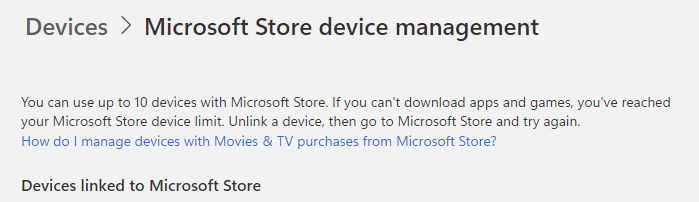
According to the MS Account login, the number of PCs for any MSA (MIcrosoft Account) for access to Store applications is 10. Here's the text as grabbed from the MSA Login "MS Store devmgmt" page online itself:

1698603754384.png

HTH,
--Ed--
 

My Computers

System One System Two

  • OS
    Windows 11
    Computer type
    Laptop
    Manufacturer/Model
    Lenovo X380 Yoga
    CPU
    i7-8650U (8th Gen/Kaby Lake)
    Motherboard
    20LH000MUS (U3E1)
    Memory
    16 GB
    Graphics Card(s)
    Intel UHD Graphics 620
    Sound Card
    Integrated Conexant SmartAudio HD
    Monitor(s) Displays
    FlexView Display
    Screen Resolution
    1920x1080
    Hard Drives
    Toshiba 1 TB PCIe x3 NVMe SSD
    external 5TB Seagate USB-C attached HDD
    PSU
    Lenovo integrated 65W power brick
    Case
    Laptop
    Cooling
    Laptop
    Keyboard
    Integrated Lenovo ThinkPad keyboard
    Mouse
    touchscreen, touchpad
    Internet Speed
    GbE (Spectrum/Charter)
    Browser
    all of em
    Antivirus
    Defender
    Other Info
    Purchased early 2019 as Windows Insider test PC
  • Operating System
    Windows 11
    Computer type
    PC/Desktop
    Manufacturer/Model
    DIY
    CPU
    Ryzen 5800X
    Motherboard
    Asrock B550 Extreme4
    Memory
    128 GB (4x32 DDR5-5600)
    Graphics card(s)
    NVIDIA 3070Ti
    Sound Card
    built-in
    Monitor(s) Displays
    2xDell 2707
    Screen Resolution
    1980x1200
    Hard Drives
    2XNVMe, multiple HDDs from 3 to 12 TB
    PSU
    Seasonic 650
    Case
    NZXT Flo 6
    Cooling
    dual-fan air cooler
    Keyboard
    Logitech Wave
    Mouse
    Logitech Logi
    Internet Speed
    GbE
    Browser
    all of 'em
    Antivirus
    Defender
    Other Info
    temperamental UEFI
According to the MS Account login, the number of PCs for any MSA (MIcrosoft Account) for access to Store applications is 10. Here's the text as grabbed from the MSA Login "MS Store devmgmt" page online itself:

View attachment 75779

HTH,
--Ed--
There are a few "games" that you can play with this...

As Ed pointed out, yes, the limitation for Microsoft Store apps is ten devices tied to the same account, but this will only make a difference to you if you have paid apps that you want to install on more than ten devices.

Accepting that as a limitation, here is what I do:

I have two separate Microsoft accounts. Just for the sake of a fictitious example, let's call them accounts 1 and 2. Account 1 is where I have everything configured exactly how I want it. All my browser favorites, my e-mail is tied to this account, etc. Basically, this is the account I have been using for years.

The problem is that I have more than 10 machines, but I want as much to be the same as possible between all machines.

So, first, I always start off by installing Windows with a local account. I make sure to use the same name every single time with the same password on all my machines. After the initial installation, I go into the Microsoft Store and specify the Microsoft account I want to use, either Account1 or Account2. This ensures that every machine can connect to every other machine on the network without being prompted for credentials because I have the same underlying local account but 2 different Microsoft accounts in use. This also causes Account1 to be used anywhere that a Microsoft account is needed even though I am technically using a local account.

Next, I use Edge as my browser. In Edge, you can create multiple profiles. On systems that are using Account2 I create a profile specifying Account1 and make it my default profile. Bingo! Just like that Edge is synced with all my settings from Account1 even though I am using Account2 for my Microsoft account. So, as far as Edge is concerned, it looks like I am on Account1. I don't use Chrome, but I image that a similar feature must be available there.

Next, E-mail. I use outlook. I configure Outlook to use both Account1 and Account2, making Account1 my primary account. Now my e-mail also looks like and is synced with Account1.

So, I do have a few old paid Microsoft Store apps, but they are small, inexpensive apps so I simply purchased them again on Account2.

Oh yeah, I also subscribe to Microsoft 365 Family. You can install it on multiple machines per user and you can share this with multiple users. That way I get Work, Outlook, etc. on all my more important machines, regardless of which account I am using.

This takes away most of the pain of the 10 machine limit for me.

 

My Computers

System One System Two

  • OS
    Win11 Pro 25H2 (RTM+)
    Computer type
    PC/Desktop
    Manufacturer/Model
    Acemagic
    CPU
    Intel i7-14650HX
    Memory
    32 GB
    Graphics Card(s)
    No GPU - Built-in Intel Graphics
    Sound Card
    Integrated
    Monitor(s) Displays
    Varies as machine will often be moved to locations with different monitors
    Screen Resolution
    Varies
    Hard Drives
    1 x 1TB Gen 4 NVMe SSD
    PSU
    120W Power Brick
    Keyboard
    Corsair K70 Max RGB Magnetic Keyboard
    Mouse
    Logitech MX Master 3
    Internet Speed
    1Gb Up / 1 Gb Down
    Browser
    Edge
    Antivirus
    Windows Defender
  • Operating System
    Win11 Pro 25H2 (RTM+)
    Computer type
    Laptop
    Manufacturer/Model
    Lenovo ThinkBook 13x Gen 2
    CPU
    Intel i7-1255U
    Memory
    16 GB
    Graphics card(s)
    Intel Iris Xe Graphics
    Sound Card
    Realtek® ALC3306-CG codec
    Monitor(s) Displays
    13.3-inch IPS Display
    Screen Resolution
    WQXGA (2560 x 1600)
    Hard Drives
    2 TB 4 x 4 NVMe SSD
    PSU
    USB-C / Thunderbolt 4 Power / Charging
    Keyboard
    Backlit, spill resistant keyboard
    Mouse
    Buttonless Glass Precision Touchpad
    Internet Speed
    1Gb Up / 1Gb Down
    Browser
    Edge
    Antivirus
    Windows Defender
    Other Info
    WiFi 6e / Bluetooth 5.1 / Facial Recognition / Fingerprint Sensor / ToF (Time of Flight) Human Presence Sensor
Good comeback @hsehestedt: I *KNEW* you'd have something useful to add to this discussion. Good stuff! Thanks for sharing this trick. I kind of do things that way, too. Wasn't sure if it was "legal" as per 11F standards. Now I know!
Best wishes & good work,
--Ed--
 

My Computers

System One System Two

  • OS
    Windows 11
    Computer type
    Laptop
    Manufacturer/Model
    Lenovo X380 Yoga
    CPU
    i7-8650U (8th Gen/Kaby Lake)
    Motherboard
    20LH000MUS (U3E1)
    Memory
    16 GB
    Graphics Card(s)
    Intel UHD Graphics 620
    Sound Card
    Integrated Conexant SmartAudio HD
    Monitor(s) Displays
    FlexView Display
    Screen Resolution
    1920x1080
    Hard Drives
    Toshiba 1 TB PCIe x3 NVMe SSD
    external 5TB Seagate USB-C attached HDD
    PSU
    Lenovo integrated 65W power brick
    Case
    Laptop
    Cooling
    Laptop
    Keyboard
    Integrated Lenovo ThinkPad keyboard
    Mouse
    touchscreen, touchpad
    Internet Speed
    GbE (Spectrum/Charter)
    Browser
    all of em
    Antivirus
    Defender
    Other Info
    Purchased early 2019 as Windows Insider test PC
  • Operating System
    Windows 11
    Computer type
    PC/Desktop
    Manufacturer/Model
    DIY
    CPU
    Ryzen 5800X
    Motherboard
    Asrock B550 Extreme4
    Memory
    128 GB (4x32 DDR5-5600)
    Graphics card(s)
    NVIDIA 3070Ti
    Sound Card
    built-in
    Monitor(s) Displays
    2xDell 2707
    Screen Resolution
    1980x1200
    Hard Drives
    2XNVMe, multiple HDDs from 3 to 12 TB
    PSU
    Seasonic 650
    Case
    NZXT Flo 6
    Cooling
    dual-fan air cooler
    Keyboard
    Logitech Wave
    Mouse
    Logitech Logi
    Internet Speed
    GbE
    Browser
    all of 'em
    Antivirus
    Defender
    Other Info
    temperamental UEFI
Back
Top Bottom