How to add BCD boot files to newly created EFT partition


spartanz1080

Well-known member
Member
VIP
Local time
1:52 PM
Posts
113
OS
windows 11
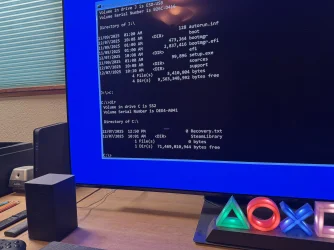
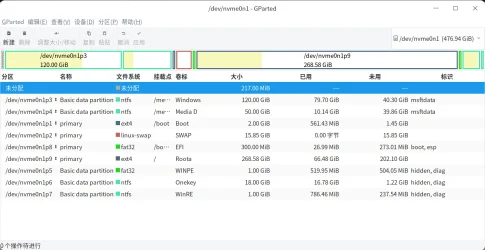
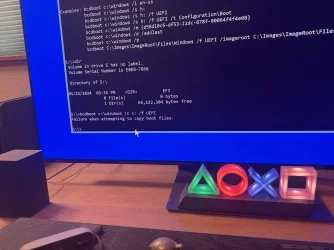
My computer wouldn’t boot so how do I add the the BCD boot files to my newly created EFI partition when it shows there is no C:/Windows directory I can point to the point to copy the boot files even though windows is on that drive. My USB repair disk is drive J and it shows directories on there so what would be the path to copy the boot files from the USB repair disk? Here are some images.
 

Attachments
  • IMG_2669.webp
    IMG_2669.webp
    1 MB · Views: 2
  • IMG_2668.webp
    IMG_2668.webp
    1.3 MB · Views: 1

My Computer My Computer

At a glance

windows 1113900k64 GB (32x2) G.Skill Ripjaws DRR4 3600 mhz CL 16MSI Gaming Trio RTX 4090
OS
windows 11
Computer type
PC/Desktop
CPU
13900k
Motherboard
MSI Z690 DRR4 Tomahawk Wifi
Memory
64 GB (32x2) G.Skill Ripjaws DRR4 3600 mhz CL 16
Graphics Card(s)
MSI Gaming Trio RTX 4090
Monitor(s) Displays
Samsung 55” QD-OLED S90D 4k TV
Hard Drives
3x nvme sn850x
3x Samsung ssd sata
PSU
Thermaltake GF3 1200 Watt ATX 3 PSU

How come you say you have a windows partition but you can't boot? Did you convert the drive from MBR to GPT?
You must tell us the hole story so we can understand what you did and what you have.
 

My Computers My Computers

  • At a glance

    Windows 11 Pro - Windows 7 HP 64 - Lubuntui5 6600K - 800MHz to 4400MHz4+4G GSkill DDR4 3000IG - Intel 530
    OS
    Windows 11 Pro - Windows 7 HP 64 - Lubuntu
    Computer type
    PC/Desktop
    Manufacturer/Model
    custom build
    CPU
    i5 6600K - 800MHz to 4400MHz
    Motherboard
    GA-Z170-HD3P
    Memory
    4+4G GSkill DDR4 3000
    Graphics Card(s)
    IG - Intel 530
    Monitor(s) Displays
    Samsung 226BW
    Screen Resolution
    1680x1050
    Hard Drives
    (1) -1 SM951 – 128GB M.2 AHCI PCIe SSD drive for Win 11
    (2) -1 WD SATA 3 - 1T for Data
    (3) -1 WD SATA 3 - 1T for backup
    (4) -1 BX500 SSD - 256G for Windows 7 and Lubuntu
    PSU
    Thermaltake 450W TR2 gold
    Keyboard
    Old and good Chicony mechanical keyboard
    Mouse
    Logitech mX performance - 9 buttons (had to disable some)
    Internet Speed
    500 Mb/s
    Browser
    Firefox 64
  • At a glance

    Windows 11 Proi7-4500U 800- 3000MHz(4+4)G DDR3 1600IG intel 4400 + NVIDIA GeForce GT 745M
    Operating System
    Windows 11 Pro
    Computer type
    Laptop
    Manufacturer/Model
    Asus Q550LF
    CPU
    i7-4500U 800- 3000MHz
    Motherboard
    Asus Q550LF
    Memory
    (4+4)G DDR3 1600
    Graphics card(s)
    IG intel 4400 + NVIDIA GeForce GT 745M
    Sound Card
    Realtek
    Monitor(s) Displays
    LG Display LP156WF4-SPH1
    Screen Resolution
    1920 x 1080
    Hard Drives
    BX500 120G SSD for Windows and programs
    & 1T HDD for data
    Internet Speed
    500 Mb/s
    Browser
    Firefox 64
BCDBOOT <source> [/s <volume letter> [/f <firmware type>]]

<source>

- Required.
- Specifies the location of the Windows directory to use as the source for copying boot-environment files.
- Check the volume letter of the Windows partition with DiskPart’s list volume command.

/s <volume letter>
- Optional volume letter for the target system partition where the boot files will be copied.

/f <firmware type>
- Optional firmware type for the target system partition. Determines whether to copy UEFI or BIOS boot files.
- Used together with the /s option.

If the /s option is not used, the system partition is automatically identified based on whether the system is booted in UEFI or BIOS mode. Use /s only when targeting a non-default system partition.


Your system contains six disks:

3x nvme sn850x
3x Samsung ssd sata

When you are in the Windows Recovery Environment (WinRE), the volume letter of the Windows partition is not always C:.

To find the correct letter:

Code:
diskpart
list volume (identify the Windows partition)
exit

Then run:

Code:
bcdboot x:\windows

Replace "x" with the correct volume letter of your Windows partition.

On a GPT disk, the bcdboot command automatically identifies the FAT32 EFI system partition, copies the required UEFI boot files from the Windows partition to it, and creates a new Boot Configuration Data (BCD) store on that partition.

On a GPT disk, the command above will fail if the USB flash drive was booted in BIOS mode instead of UEFI mode. In that case, you will receive:

"Failure when attempting to copy boot files."

You will also see this error if:
- you specify the wrong Windows volume letter,
- the EFI system partition is missing,
- or the EFI system partition is not formatted as FAT32.

BCDBOOT.webp
 
Last edited:

My Computers My Computers

  • At a glance

    Windows 11 ProAMD Ryzen 9 9950X3DKingston FURY Beast 64GB (2x32GB) DDR5 6000MT/sASUS TUF Gaming Radeon RX 9070 OC Edition 16G...
    OS
    Windows 11 Pro
    Computer type
    PC/Desktop
    CPU
    AMD Ryzen 9 9950X3D
    Motherboard
    ASRock B650E Taichi Lite
    Memory
    Kingston FURY Beast 64GB (2x32GB) DDR5 6000MT/s
    Graphics Card(s)
    ASUS TUF Gaming Radeon RX 9070 OC Edition 16GB GDDR6
    Hard Drives
    Solidigm P44 Pro 2TB M.2 NVMe SSD
  • At a glance

    Windows 11 HomeIntel Core Ultra 9 275HX64GB (2x 32GB) DDR5-6400NVIDIA GeForce RTX 5080 16GB GDDR7 Laptop GPU
    Operating System
    Windows 11 Home
    Computer type
    Laptop
    Manufacturer/Model
    Lenovo Legion Pro 7i Gen 10 16"
    CPU
    Intel Core Ultra 9 275HX
    Memory
    64GB (2x 32GB) DDR5-6400
    Graphics card(s)
    NVIDIA GeForce RTX 5080 16GB GDDR7 Laptop GPU
    Hard Drives
    2x 1TB M.2 NVMe SSD (SK Hynix)
1) Please boot to the flash drive Windows RE


2) Run > startup repair > search for srttrail.txt (windows\system32\logfiles\srt\srttrail.txt) > post a share link


3) Perform a system restore to the oldest system restore point > repeat as necessary to newer restore points


4) Open command prompt > type >

notepad
notepad
notepad

Save these commands with results to notepad > save to a flash drive > move to a working computer > post a share link

bcdedit | find "osdevice"
diskpart
lis dis
lis vol
sel dis 0
det dis
lis par
sel dis 1
det dis
lis par
 

My Computer My Computer

At a glance

Windows 10Intel(R) Core(TM) i7-4800MQ CPU @ 2.70GHz16 GB Total: Manufacturer : Samsung MemoryTyp...NVIDIA Quadro K3100M; Intel(R) HD Graphics 4600
OS
Windows 10
Computer type
Laptop
Manufacturer/Model
HP
CPU
Intel(R) Core(TM) i7-4800MQ CPU @ 2.70GHz
Motherboard
Product : 190A Version : KBC Version 94.56
Memory
16 GB Total: Manufacturer : Samsung MemoryType : DDR3 FormFactor : SODIMM Capacity : 8GB Speed : 1600
Graphics Card(s)
NVIDIA Quadro K3100M; Intel(R) HD Graphics 4600
Sound Card
IDT High Definition Audio CODEC; PNP Device ID HDAUDIO\FUNC_01&VEN_111D&DEV_76E0
Hard Drives
Model Hitachi HTS727575A9E364
Antivirus
Microsoft Defender
Other Info
Mobile Workstation

My Computer My Computer

At a glance

Windows 11 Pro 25H2 (Build 26200.8728)Intel Core Ultra 9 285 5.6 GHz32.00 GBIntel Integrated Graphics (128 MB)
OS
Windows 11 Pro 25H2 (Build 26200.8728)
Computer type
PC/Desktop
Manufacturer/Model
Dell Pro Max Tower T2 FCT2250
CPU
Intel Core Ultra 9 285 5.6 GHz
Motherboard
64-bit operating system, x64-based processor
Memory
32.00 GB
Graphics Card(s)
Intel Integrated Graphics (128 MB)
Sound Card
Realtek Audio
Monitor(s) Displays
Dell P2714H Monitor
Screen Resolution
1920 x 1080
Hard Drives
1 x 512GB M.2 XG10d SED KIOXIA PCIe solid state drive (Internal)
1 x 2TB Seagate ST2000DM008-2UB102 HDD (Internal)
1 x 1TB Seagate STGX4000400 External HDD
1 x 4TB Seagate STGX4000400 External HDD
1 x 6TB WD Elements AE 2689 External HDD
PSU
500 Watts
Cooling
Air
Keyboard
Microsoft Wired Keyboard 600
Mouse
Microsoft USB Basic Optical Mouse v2.0
Browser
Firefox
Antivirus
Windows Defender + Malwarebytes Premium
Other Info
BaseBoard Manufacturer Dell Inc.
BaseBoard Product 022RY57
BaseBoard Version A01

Latest Support Threads

Back
Top Bottom