How to change default windows shortcuts ?


Bug locker

Well-known member
Member
VIP
Local time
1:23 AM
Posts
644
Location
Athens
OS
Windows 11 Pro
Hey.
Anyone to know the location of shortcuts at the registry ?
If not any utility to do that , except powertoys and sharpkeys ?
Thanks. (y) :-)
 
Windows Build/Version
Win 11 pro x64

My Computer My Computer

At a glance

Windows 11 ProIntel 113700H16GBNVIDIA RTX 3050 ti
OS
Windows 11 Pro
Computer type
Laptop
Manufacturer/Model
HP Pavilion 17 cd2205nw
CPU
Intel 113700H
Memory
16GB
Graphics Card(s)
NVIDIA RTX 3050 ti
Screen Resolution
1980x1020
Hard Drives
Micron 512GB
Mouse
Logitech
Internet Speed
100Mbs
Browser
Vivaldi , Edge
Antivirus
Windows defender
why not search the registry?
 

My Computer My Computer

At a glance

Win11i9-1390064 GBNvidia RTX 5070 TI OC
OS
Win11
Computer type
PC/Desktop
Manufacturer/Model
Asus Home built
CPU
i9-13900
Motherboard
ASUS Strix Z790-H
Memory
64 GB
Graphics Card(s)
Nvidia RTX 5070 TI OC
Monitor(s) Displays
Sony 55"
Hard Drives
SSD
PSU
850 watt EVGA
Case
Cooler Master Haf 932
Cooling
CoolerMaster
Keyboard
RedDragon
Mouse
CoolerMaster
Internet Speed
300/300
Antivirus
Defender
Other Info
VR, Virtual Reality
What is wanted to be changed? Usually a shortcut's icon can be changed on right-click and Properties.
 

My Computers My Computers

  • At a glance

    Win11 Pro RTM Version 24H2 Build 26100.4202Intel Core i5 11th Gen. 2.40GHz12GB
    OS
    Win11 Pro RTM Version 24H2 Build 26100.4202
    Computer type
    Laptop
    Manufacturer/Model
    Dell Vostro 3400
    CPU
    Intel Core i5 11th Gen. 2.40GHz
    Memory
    12GB
    Hard Drives
    256GB SSD NVMe M.2
  • At a glance

    Win11 Pro RTM Version 24H2 Build 26100.4202Intel Core i5 10th Gen. 2.90GHz16GBOnboard, no VGA, using a DisplayPort-to-VGA a...
    Operating System
    Win11 Pro RTM Version 24H2 Build 26100.4202
    Computer type
    PC/Desktop
    Manufacturer/Model
    Dell Vostro 5890
    CPU
    Intel Core i5 10th Gen. 2.90GHz
    Memory
    16GB
    Graphics card(s)
    Onboard, no VGA, using a DisplayPort-to-VGA adapter
    Monitor(s) Displays
    24" Dell
    Hard Drives
    512GB SSD NVMe, 4TB Seagate HDD
    Browser
    Firefox, Edge
    Antivirus
    Windows Defender/Microsoft Security

My Computer My Computer

At a glance

Windows 11 ProIntel 113700H16GBNVIDIA RTX 3050 ti
OS
Windows 11 Pro
Computer type
Laptop
Manufacturer/Model
HP Pavilion 17 cd2205nw
CPU
Intel 113700H
Memory
16GB
Graphics Card(s)
NVIDIA RTX 3050 ti
Screen Resolution
1980x1020
Hard Drives
Micron 512GB
Mouse
Logitech
Internet Speed
100Mbs
Browser
Vivaldi , Edge
Antivirus
Windows defender
What is wanted to be changed? Usually a shortcut's icon can be changed on right-click and Properties.
I dont want to change a shortcut's icon shortcut , but the default windows shortcut keys e.g ctrl+x or winkey +R.
 

My Computer My Computer

At a glance

Windows 11 ProIntel 113700H16GBNVIDIA RTX 3050 ti
OS
Windows 11 Pro
Computer type
Laptop
Manufacturer/Model
HP Pavilion 17 cd2205nw
CPU
Intel 113700H
Memory
16GB
Graphics Card(s)
NVIDIA RTX 3050 ti
Screen Resolution
1980x1020
Hard Drives
Micron 512GB
Mouse
Logitech
Internet Speed
100Mbs
Browser
Vivaldi , Edge
Antivirus
Windows defender
I use Autohotkey (AHK) extensively to override or disable many of them and for many, many other things. There are limitations:

1. A handful of Windows shortcuts can't be overridden at all, like Win+L to lock workstation and some of the Game Bar shortcuts like Win+Alt+B, IIRC.
2. If an elevated program has the focus, like Task Manager, AHK hotkeys are effectively disabled. You might be able to work around this by running AHK elevated and starting your script through Task Scheduler if you want it to be a startup program, which you probably would.

One big advantage to AHK over modifying the registry is that the code is in a simple text file and takes effect when you reload the script, no rebooting required. It's also a capable (if weird) programming language that can do anything you want.
 

My Computer My Computer

At a glance

Windows 11
OS
Windows 11
The WinKey + R may not be changeable, opens the Run dialog box. Ctrl + X does nothing on mine, WinKey + X opens the same menu as right-click of the Start button. One more, WinKey + I opens the System Information. WinKey + E opens File Explorer. WinKey + S opens Search.
 
Last edited:

My Computers My Computers

  • At a glance

    Win11 Pro RTM Version 24H2 Build 26100.4202Intel Core i5 11th Gen. 2.40GHz12GB
    OS
    Win11 Pro RTM Version 24H2 Build 26100.4202
    Computer type
    Laptop
    Manufacturer/Model
    Dell Vostro 3400
    CPU
    Intel Core i5 11th Gen. 2.40GHz
    Memory
    12GB
    Hard Drives
    256GB SSD NVMe M.2
  • At a glance

    Win11 Pro RTM Version 24H2 Build 26100.4202Intel Core i5 10th Gen. 2.90GHz16GBOnboard, no VGA, using a DisplayPort-to-VGA a...
    Operating System
    Win11 Pro RTM Version 24H2 Build 26100.4202
    Computer type
    PC/Desktop
    Manufacturer/Model
    Dell Vostro 5890
    CPU
    Intel Core i5 10th Gen. 2.90GHz
    Memory
    16GB
    Graphics card(s)
    Onboard, no VGA, using a DisplayPort-to-VGA adapter
    Monitor(s) Displays
    24" Dell
    Hard Drives
    512GB SSD NVMe, 4TB Seagate HDD
    Browser
    Firefox, Edge
    Antivirus
    Windows Defender/Microsoft Security
I think the first step would be to disable the current hotkeys. Then get a small program that will let you program your own hotkeys.

Disable them with Group Policy:
  1. Go to User Configuration > Administrative Templates > Windows Components > File Explorer.
  2. Scroll down to find Turn off Windows Key hotkeys and double-click on it.
  3. On the pop-up window, select Enabled and then click the Apply and OK buttons to save changes.
But some can't be disabled that way. They're called "hard-wired hotkeys."

Win + P
Win + L (but I found a reg hack to disable that one)
Win + U
Win + G
Win + X
Ctrl + Shift + Esc
Ctrl + Alt + Del

Then, I recommend a tiny standalone (no installation required) program called "Clavier+". Here's a link to it:


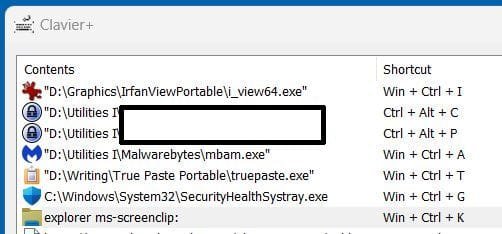
It lets me set up as many hotkeys as I want, and open programs, jump to Websites, restart programs, and other things. Here's a sample of some if the hotkeys I've set up:

Clipboard 02.jpg
 

My Computers My Computers

  • At a glance

    11 Pro 24H2 26100.2454i7-9700 @ 3.00GHz32GBDDR4 @ 2666MHzIntel HD 630 Graphics onboard
    OS
    11 Pro 24H2 26100.2454
    Computer type
    PC/Desktop
    Manufacturer/Model
    Lenovo ThinkCentre M920S SFF
    CPU
    i7-9700 @ 3.00GHz
    Motherboard
    Lenovo 3132
    Memory
    32GBDDR4 @ 2666MHz
    Graphics Card(s)
    Intel HD 630 Graphics onboard
    Sound Card
    Realtek HD Audio
    Monitor(s) Displays
    LG E2442
    Screen Resolution
    1920x1080
    Hard Drives
    1 x Samsung 970 EVO PLUS 500GB NVMe SSD, 1 x WD_BLACK SN770
    250GB NVMe SSD (OS and programs), 1 x WD_BLACK SN770
    500GB NVMe SSD (Data)
    Case
    Lenovo SFF
    Keyboard
    Cherry Stream TKL JK-8600US-2 Wired
    Mouse
    LogiTech M510 wireless
    Internet Speed
    Fast (for fixed wireless!)
    Browser
    Chrome, sometimes Firefox
    Antivirus
    Malwarebytes Premium & Defender (working together beautifully!)
  • At a glance

    11 Pro 24H2 26100.2454i5-8400 @ 2.80GHz32GB DDR4 @ 2600MHzIntel HD 630 Graphics onboard
    Operating System
    11 Pro 24H2 26100.2454
    Computer type
    PC/Desktop
    Manufacturer/Model
    Lenovo ThinkCentre M920S SFF
    CPU
    i5-8400 @ 2.80GHz
    Motherboard
    Lenovo 3132
    Memory
    32GB DDR4 @ 2600MHz
    Graphics card(s)
    Intel HD 630 Graphics onboard
    Sound Card
    Realtek High Definition Audio onboard
    Monitor(s) Displays
    LG FULL HD (1920x1080@59Hz)
    Screen Resolution
    1920 x 1080
    Hard Drives
    1 x Samsung 970 EVO PLUS NVMe; 1 x Samsung 980 NVMe SSD
    Case
    Lenovo Think Centre SFF
    Keyboard
    Cherry Stream TKL JK-8600US-2 Wired
    Mouse
    LogiTech M510 wireless
    Internet Speed
    Fast (for fixed wireless!)
    Browser
    Chrome
    Antivirus
    Malwarebytes Premium and MS Defender, beautiful together
I use Autohotkey (AHK) extensively to override or disable many of them and for many, many other things. There are limitations:

1. A handful of Windows shortcuts can't be overridden at all, like Win+L to lock workstation and some of the Game Bar shortcuts like Win+Alt+B, IIRC.
2. If an elevated program has the focus, like Task Manager, AHK hotkeys are effectively disabled. You might be able to work around this by running AHK elevated and starting your script through Task Scheduler if you want it to be a startup program, which you probably would.

One big advantage to AHK over modifying the registry is that the code is in a simple text file and takes effect when you reload the script, no rebooting required. It's also a capable (if weird) programming language that can do anything you want.
I just want to change few shortcuts. Autohotkey requires to learn a language, running scripts ..... :eyeroll:
 

My Computer My Computer

At a glance

Windows 11 ProIntel 113700H16GBNVIDIA RTX 3050 ti
OS
Windows 11 Pro
Computer type
Laptop
Manufacturer/Model
HP Pavilion 17 cd2205nw
CPU
Intel 113700H
Memory
16GB
Graphics Card(s)
NVIDIA RTX 3050 ti
Screen Resolution
1980x1020
Hard Drives
Micron 512GB
Mouse
Logitech
Internet Speed
100Mbs
Browser
Vivaldi , Edge
Antivirus
Windows defender
I think the first step would be to disable the current hotkeys. Then get a small program that will let you program your own hotkeys.

Disable them with Group Policy:
  1. Go to User Configuration > Administrative Templates > Windows Components > File Explorer.
  2. Scroll down to find Turn off Windows Key hotkeys and double-click on it.
  3. On the pop-up window, select Enabled and then click the Apply and OK buttons to save changes.
But some can't be disabled that way. They're called "hard-wired hotkeys."

Win + P
Win + L (but I found a reg hack to disable that one)
Win + U
Win + G
Win + X
Ctrl + Shift + Esc
Ctrl + Alt + Del

Then, I recommend a tiny standalone (no installation required) program called "Clavier+". Here's a link to it:


It lets me set up as many hotkeys as I want, and open programs, jump to Websites, restart programs, and other things. Here's a sample of some if the hotkeys I've set up:

View attachment 93476
I dont want to run a program. I want to change default windows shortcuts. E.g i want winkey+; to ctrl+.
Thanks. I will test Clavier+ perhaps other abilities.
 

My Computer My Computer

At a glance

Windows 11 ProIntel 113700H16GBNVIDIA RTX 3050 ti
OS
Windows 11 Pro
Computer type
Laptop
Manufacturer/Model
HP Pavilion 17 cd2205nw
CPU
Intel 113700H
Memory
16GB
Graphics Card(s)
NVIDIA RTX 3050 ti
Screen Resolution
1980x1020
Hard Drives
Micron 512GB
Mouse
Logitech
Internet Speed
100Mbs
Browser
Vivaldi , Edge
Antivirus
Windows defender
I think the first step would be to disable the current hotkeys. Then get a small program that will let you program your own hotkeys.

Disable them with Group Policy:
  1. Go to User Configuration > Administrative Templates > Windows Components > File Explorer.
  2. Scroll down to find Turn off Windows Key hotkeys and double-click on it.
  3. On the pop-up window, select Enabled and then click the Apply and OK buttons to save changes.
But some can't be disabled that way. They're called "hard-wired hotkeys."

Win + P
Win + L (but I found a reg hack to disable that one)
Win + U
Win + G
Win + X
Ctrl + Shift + Esc
Ctrl + Alt + Del

Then, I recommend a tiny standalone (no installation required) program called "Clavier+". Here's a link to it:


It lets me set up as many hotkeys as I want, and open programs, jump to Websites, restart programs, and other things. Here's a sample of some if the hotkeys I've set up:

View attachment 93476
If you wanna disable winkey's shortcuts check this. It works for me.
 

My Computer My Computer

At a glance

Windows 11 ProIntel 113700H16GBNVIDIA RTX 3050 ti
OS
Windows 11 Pro
Computer type
Laptop
Manufacturer/Model
HP Pavilion 17 cd2205nw
CPU
Intel 113700H
Memory
16GB
Graphics Card(s)
NVIDIA RTX 3050 ti
Screen Resolution
1980x1020
Hard Drives
Micron 512GB
Mouse
Logitech
Internet Speed
100Mbs
Browser
Vivaldi , Edge
Antivirus
Windows defender

Latest Support Threads

Latest Tutorials

Back
Top Bottom