

- Local time
- 5:57 AM
- Posts
- 21
- OS
- Win 11
Hi friends,
New question for you.
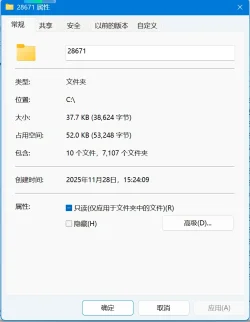
After Direct upgrading Win10 to Win11 on my PC, a Wondows.old folder appeared in C:\. Today I compulsively deleted it using some tool but another folder named with a number emerged, which is tens of KB in size and contains thousands of subdirectories. I've deleted the number named folder with the same toole for many times, but it always emerges with a varying number each time.
Does anyone of you have idea to completely remove this folder? Thanks.
New question for you.
After Direct upgrading Win10 to Win11 on my PC, a Wondows.old folder appeared in C:\. Today I compulsively deleted it using some tool but another folder named with a number emerged, which is tens of KB in size and contains thousands of subdirectories. I've deleted the number named folder with the same toole for many times, but it always emerges with a varying number each time.
Does anyone of you have idea to completely remove this folder? Thanks.
Attachments
My Computer
At a glance
Win 11i3-8100Kingston DDR4 2400 3000Mhz 8G
- OS
- Win 11
- Computer type
- PC/Desktop
- Manufacturer/Model
- DIY
- CPU
- i3-8100
- Motherboard
- GIGABYTE B360M D3H
- Memory
- Kingston DDR4 2400 3000Mhz 8G
- Hard Drives
- WD10EZEX 1TB Blue






