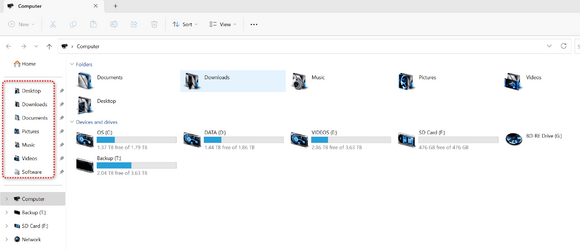
I changed my folder icons under Users and also libraries but these left navigation icons won't change.
If I click on Home, I also see the icons unchanged there but if I go to properties, it does show the cuztomized icon in the properties page just now what I can see in File Explorer.
What is the trick to do this?

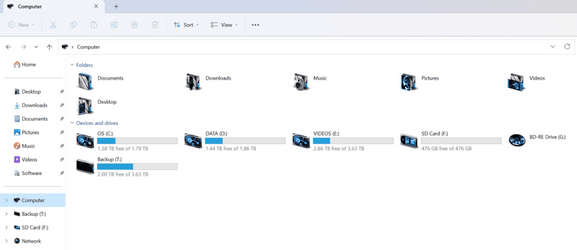
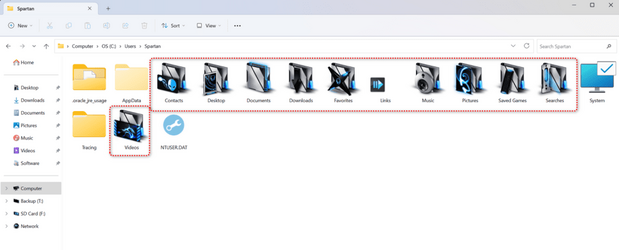
Notice, only the desktop icon changed in both the left navigation pane and the Home icons
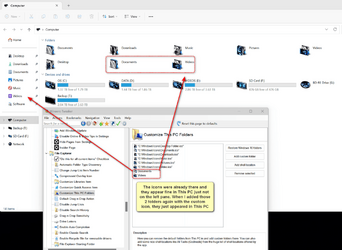
For reference, I have followed these 2 guides but those icons won't change even if I unpin them, clear icon cache, reboot then pin them again:

 www.tenforums.com

 www.elevenforum.com
If I click on Home, I also see the icons unchanged there but if I go to properties, it does show the cuztomized icon in the properties page just now what I can see in File Explorer.
What is the trick to do this?
Notice, only the desktop icon changed in both the left navigation pane and the Home icons
For reference, I have followed these 2 guides but those icons won't change even if I unpin them, clear icon cache, reboot then pin them again:
Change Icons of Folders in This PC in Windows 10
How to Change Icons of Folders in This PC in Windows 10
www.tenforums.com
Change Icon of Library in Windows 11 Tutorial
This tutorial will show you how to change the icon of a library for your account in Windows 11. Windows 7 introduced libraries, which provide users with a single, coherent view of their files even when those files are stored in different locations. Libraries can be configured and organized by a...
www.elevenforum.com
My Computers
System One System Two
-
- OS
- Windows 11 Pro
- Computer type
- Laptop
- Manufacturer/Model
- ASUS ROG Strix SCAR 16 G635LX
- CPU
- Intel Core Ultra 9 275HX
- Motherboard
- ASUS
- Memory
- SK Hynix 64GB DDR5-5600MHz RAM
- Graphics Card(s)
- GeForce RTX 5090 24 GB GDDR7 VRAM
- Sound Card
- Dolby Atmos-powered speakers - 2 tweeters and 3 downward firing woofers
- Monitor(s) Displays
- ASUS ROG Strix OLED XG27AQWMG QHD 280 Hz 27" Monitor
- Screen Resolution
- QHD (2560x1440)
- Hard Drives
- 2x WD_BLACK SN850X 8TB SSDs (RAID 0)
- PSU
- 380W AC Power Adapter
- Cooling
- Thermal Grizzly Conductonaut + IETS GT600 Cooling Pad
- Keyboard
- ROG Strix Scope II 96 RX Wireless
- Mouse
- ROG Chakram X Origin
- Internet Speed
- 1 GBPS Down / 882 MBPS Up
- Browser
- Google Chrome
- Antivirus
- Microsoft Defender
-
- Operating System
- Windows 11 Pro
- Computer type
- Laptop
- Manufacturer/Model
- Dell XPS 15 9500
- CPU
- Intel i7-10875H
- Memory
- Kingston FURY Impact 64 GB 3200 MHz DDR4 RAM
- Graphics card(s)
- nVIDIA GeForce GTX 1650 Ti Max-Q w/ 4 GB GDDR6
- Sound Card
- Realtek
- Monitor(s) Displays
- 15.6 UHD+ Touch, InfinityEdge, 500-nits, Anti-Reflecitve
- Screen Resolution
- 3840 x 2400
- Hard Drives
- Samsung 990 PRO 2TB + 4TB SSDs
- PSU
- Dell 130W Laptop Charger USB C Type C AC Adapter
- Cooling
- Noctua NT-H2 Thermal Paste on CPU + GPU
- Mouse
- Logitech MX Anywhere 3
- Internet Speed
- 1 GBPS Down / 875 MBPS Up
- Browser
- Google Chrome
- Antivirus
- AVG Free Antivirus








 . A couple of weeks ago I finished my trial period using Snagit and I'm looking for something free similar to Snagit.