JavaScript is disabled. For a better experience, please enable JavaScript in your browser before proceeding.
You are using an out of date browser. It may not display this or other websites correctly.
You should upgrade or use an
alternative browser .
Solved How to Enable or Disable Automatic Updates for Windows Update
Windows Insider
Power User
VIP
This
tutorial does not appear to be working in Windows 11.
'Check for Updates' appears to be running randomly, not at my specific request.
Windows 11 Pro 25H2 (Build 26200.8728) Intel Core Ultra 9 285 5.6 GHz 32.00 GB Intel Integrated Graphics (128 MB) Windows 11 Pro 25H2 (Build 26200.8728) PC/Desktop Dell Pro Max Tower T2 FCT2250 Intel Core Ultra 9 285 5.6 GHz 64-bit operating system, x64-based processor 32.00 GB Intel Integrated Graphics (128 MB) Realtek Audio Dell P2714H Monitor 1920 x 1080 1 x 512GB M.2 XG10d SED KIOXIA PCIe solid state drive (Internal) 500 Watts Air Microsoft Wired Keyboard 600 Microsoft USB Basic Optical Mouse v2.0 Firefox Windows Defender + Malwarebytes Premium BaseBoard Manufacturer Dell Inc.
I use Option 7. And still windows does run when it wants to sometimes, or at least there`s always I pile of files in Windows/Logs/Windows Update I`m always deleting.
Windows 11 Pro Intel Core i9 9900X GSkill Trident Z RGB 32GB 3600 16-16-16-36 (F... EVGA RTX 3080 12GB FTW3 Ultra Gaming (12G-P5-... Windows 11 Pro PC/Desktop Skylake Special X299 Intel Core i9 9900X Asus ROG Strix X299-E Gaming II GSkill Trident Z RGB 32GB 3600 16-16-16-36 (F4-3600C16Q-32GTZR) EVGA RTX 3080 12GB FTW3 Ultra Gaming (12G-P5-4877-KL) Supreme FX Asus PG279Q 2560 x 1440 165Hz Samsung 980 Pro 500GB x2, Seagate Barracuda 4TB x2, Western Digital Black 4TB x1 EVGA 1200 P2, EVGA Black Custom Braided Cables Thermaltake View 31 Tempered Glass Limited Edition Corsair H115i, Thermal Grizzly Kryonaut Logitech G910 Orion Spark Logitech G700s, Asus ROG GX860 Buzzard Verizon Fios Quantum Gateway 75/75 Edge Windows Defender, Malwarebytes 4.5.2 Thermaltake Riing Duo 14 x3, Thermaltake Riing Plus 14 x2, Corsair HS70 Pro Wireless Headset
Windows 10 Pro Intel Core i7 6700K GSkill Trident Z RGB 16GB 3600 16-16-16-36 (F... EVGA GTX 980 Ti SC x2, EVGA Pro SLI Bridge Windows 10 Pro PC/Desktop Skylake Special Z170 Intel Core i7 6700K Asus Sabertooth Z170 Mark 1 GSkill Trident Z RGB 16GB 3600 16-16-16-36 (F4-3600C16D-16GTZR) EVGA GTX 980 Ti SC x2, EVGA Pro SLI Bridge Realtek High Definition AOC G2460PG 1920 x 1080 144Hz Samsung 870 Evo 500GB, Seagate Barracuda 4TB x2 EVGA 1000 P2, EVGA White Custom Braided Cables Corsair Vengeance C70 Gunmetal Black Corsair H100i v2, Corsair ML120 x2, Thermal Grizzly Kryonaut Logitech G910 Orion Spectrum Logitech G500s Verizon Fios Quantum Gateway 75/75 Edge Windows Defender, Malwarebytes 4.5.2 Corsair SP120 x4, LG Blu-ray Drive, Durabrand HT-395 100 Watt Dolby Digital Amp
Windows Insider
Power User
VIP
Thread Starter
I've been using Option 3; however, I used Option 2 to verify this -
I loaded the Group Policy Editor and navigated to
Computer Configuration/Administrative Templates/Windows Components/Windows Update
I found a slightly different view due to th UI differences between Windows 10 & 11 -
I selected
Manage end user experience and then
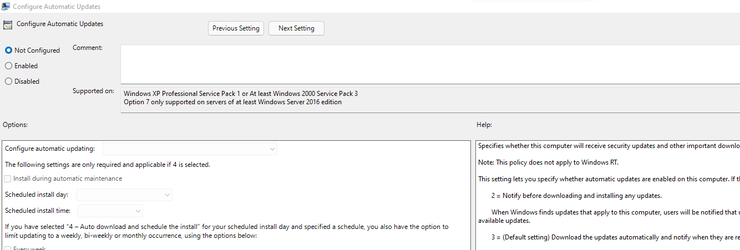
Configure Automatic updates , which gave me the following -
which shows the option was 'not configured'
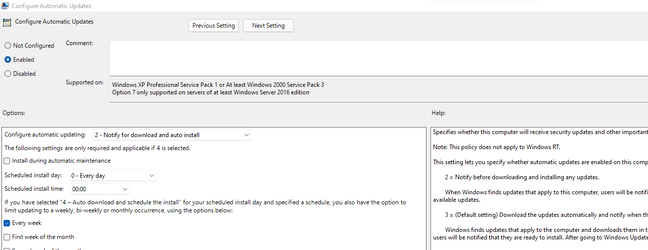
I then selected 'Enabled' and selected 'option 2' and hit 'OK'.
I then re-booted and checked in Group Policy again - the changes were confirmed as what I had selected earlier.
Windows 11 Pro 25H2 (Build 26200.8728) Intel Core Ultra 9 285 5.6 GHz 32.00 GB Intel Integrated Graphics (128 MB) Windows 11 Pro 25H2 (Build 26200.8728) PC/Desktop Dell Pro Max Tower T2 FCT2250 Intel Core Ultra 9 285 5.6 GHz 64-bit operating system, x64-based processor 32.00 GB Intel Integrated Graphics (128 MB) Realtek Audio Dell P2714H Monitor 1920 x 1080 1 x 512GB M.2 XG10d SED KIOXIA PCIe solid state drive (Internal) 500 Watts Air Microsoft Wired Keyboard 600 Microsoft USB Basic Optical Mouse v2.0 Firefox Windows Defender + Malwarebytes Premium BaseBoard Manufacturer Dell Inc.
Well-known member
Guru
VIP
If you only want to block specific updates, such as drivers, you can use the Windows Update Show/Hide Tool which works in all Windows 10 and 11 versions. See this Tenforums thread:
Hide or Show Windows Updates in Windows 10
Another tool is WAU Manager. Also O&O Windows Shutup can be used for various settings including blocking automatic updates.
Windows 11 Pro 23H2 (5699), 25H2 (8655) Mobile DualCore Intel Core 2 Duo T7250, 2000 MHz 4GB Mobile Intel(R) GMA 4500M (Mobile 4 series) Windows 11 Pro 23H2 (5699), 25H2 (8655) Laptop Acer Extensa 5630EZ Mobile DualCore Intel Core 2 Duo T7250, 2000 MHz Acer Extensa 5630 4GB Mobile Intel(R) GMA 4500M (Mobile 4 series) Realtek ALC268 @ Intel 82801IB ICH9 - High Definition Audio Controller 1 1280x800 Samsung SSD 850 EVO 250GB SATA Device (250 GB, SATA-III) VDSL 50 Mbps MICROSOFT EDGE WINDOWS DEFENDER Legacy MBR installation, no TPM, no Secure Boot, no WDDM 2.0 graphics drivers, no SSE4.2, cannot get more unsupported ;) This is only my test laptop. I had installed Windows 11 here before upgrading my main PC. For my main PC I use everyday see my 2nd system specs.
Windows 11 Pro v25H2 (build 26200.8655) Intel Core-i7 3770 3.40GHz s1155 (3rd generat... 2x Kingston Hyper-X Blu 8GB DDR3-1600 GIGABYTE GeForce RTX 3050 WINDFORCE OC V2 6GB... Windows 11 Pro v25H2 (build 26200.8655) PC/Desktop Custom-built PC Intel Core-i7 3770 3.40GHz s1155 (3rd generation) Asus P8H61 s1155 ATX 2x Kingston Hyper-X Blu 8GB DDR3-1600 GIGABYTE GeForce RTX 3050 WINDFORCE OC V2 6GB (GV-N3050WF2OCV2-6GD) Realtek HD audio (ALC887) Sony Bravia KDL-19L4000 19" LCD TV via VGA 1440x900 32-bit 60Hz WD Blue SA510 2.5 1000GB SSD as system disk, Western Digital Caviar Purple 4TB SATA III (WD40PURZ) as second Thermaltake Litepower RGB 550W Full Wired SUPERCASE MIDI-TOWER Deepcool Gamma Archer CPU cooler, 1x 8cm fan at the back Mitsumi 101-key PS/2 Sunnyline OptiEye PS/2 100Mbps Microsoft Edge, Mozilla Firefox Microsoft Windows Defender Legacy BIOS (MBR) installation, no TPM, no Secure Boot, WDDM 3.0 graphics drivers, WEI score 7.4
Windows Insider
Power User
VIP
Thread Starter
I'm only trying to block updates for Security Intelligence Updates for Microsoft Defender Antivirus & Real-time Protection for Microsoft Defender Antivirus. I also had to turn off Tamper Protection for Microsoft Defender Antivirus before running these tutorials.
Windows 11 Pro 25H2 (Build 26200.8728) Intel Core Ultra 9 285 5.6 GHz 32.00 GB Intel Integrated Graphics (128 MB) Windows 11 Pro 25H2 (Build 26200.8728) PC/Desktop Dell Pro Max Tower T2 FCT2250 Intel Core Ultra 9 285 5.6 GHz 64-bit operating system, x64-based processor 32.00 GB Intel Integrated Graphics (128 MB) Realtek Audio Dell P2714H Monitor 1920 x 1080 1 x 512GB M.2 XG10d SED KIOXIA PCIe solid state drive (Internal) 500 Watts Air Microsoft Wired Keyboard 600 Microsoft USB Basic Optical Mouse v2.0 Firefox Windows Defender + Malwarebytes Premium BaseBoard Manufacturer Dell Inc.
Well-known member
Guru
VIP
Whatever updates you want to block use one of the utilities I mentioned, I prefer the Show/Hide Tool which is the official Microsoft utility.
Windows 11 Pro 23H2 (5699), 25H2 (8655) Mobile DualCore Intel Core 2 Duo T7250, 2000 MHz 4GB Mobile Intel(R) GMA 4500M (Mobile 4 series) Windows 11 Pro 23H2 (5699), 25H2 (8655) Laptop Acer Extensa 5630EZ Mobile DualCore Intel Core 2 Duo T7250, 2000 MHz Acer Extensa 5630 4GB Mobile Intel(R) GMA 4500M (Mobile 4 series) Realtek ALC268 @ Intel 82801IB ICH9 - High Definition Audio Controller 1 1280x800 Samsung SSD 850 EVO 250GB SATA Device (250 GB, SATA-III) VDSL 50 Mbps MICROSOFT EDGE WINDOWS DEFENDER Legacy MBR installation, no TPM, no Secure Boot, no WDDM 2.0 graphics drivers, no SSE4.2, cannot get more unsupported ;) This is only my test laptop. I had installed Windows 11 here before upgrading my main PC. For my main PC I use everyday see my 2nd system specs.
Windows 11 Pro v25H2 (build 26200.8655) Intel Core-i7 3770 3.40GHz s1155 (3rd generat... 2x Kingston Hyper-X Blu 8GB DDR3-1600 GIGABYTE GeForce RTX 3050 WINDFORCE OC V2 6GB... Windows 11 Pro v25H2 (build 26200.8655) PC/Desktop Custom-built PC Intel Core-i7 3770 3.40GHz s1155 (3rd generation) Asus P8H61 s1155 ATX 2x Kingston Hyper-X Blu 8GB DDR3-1600 GIGABYTE GeForce RTX 3050 WINDFORCE OC V2 6GB (GV-N3050WF2OCV2-6GD) Realtek HD audio (ALC887) Sony Bravia KDL-19L4000 19" LCD TV via VGA 1440x900 32-bit 60Hz WD Blue SA510 2.5 1000GB SSD as system disk, Western Digital Caviar Purple 4TB SATA III (WD40PURZ) as second Thermaltake Litepower RGB 550W Full Wired SUPERCASE MIDI-TOWER Deepcool Gamma Archer CPU cooler, 1x 8cm fan at the back Mitsumi 101-key PS/2 Sunnyline OptiEye PS/2 100Mbps Microsoft Edge, Mozilla Firefox Microsoft Windows Defender Legacy BIOS (MBR) installation, no TPM, no Secure Boot, WDDM 3.0 graphics drivers, WEI score 7.4