How to fix an error in the Start menu?


jhsachs

Member
Member
Local time
5:24 PM
Posts
29
OS
Windows 11
Like virtually every other computer user, I have Adobe Reader installed on my system. If I open a PDF, Windows runs it. But if I try to run it from the Start menu, I get "C:\Program Files (x86)\Adobe\Reader 10.0\Reader\AcroRd32.exe / The specified path does not exist." Indeed it does not; Adobe Reader is now at major release 26, and there isn't even a "C:\Program Files (x86)\Adobe\" folder on my machine any more.

In the past I've fixed this sort of problem by locating the program's executable and creating a shortcut to it in "C:\Users\<user>\Start Menu." But with modern Windows features and security, I can't find the executable.

It should be somewhere in "C:\Program Files\Adobe." But that folder doesn't exist either. I searched "C:\Program Files\" for Adobe and found only one folder, "C:\Program Files\Adobe DC\," which I believe is a relic that should have been deleted by an uninstaller. I searched that folder for *.exe, but found nothing that looked like it might be Adobe Reader.

Where did the Adobe Reader installer stash it?

The other half of the process is to repair the folder(s) that define the Start menu. I opened a Windows Explorer window as Administrator, went to "C:\Users\All Users\," and tried to open Start Menu. I got "Access is denied." I tried the same with Default and with Default User. "Access is denied." I tried it with my own user directory. "Access is denied." Microsoft won't let me fix errors in my own Start Menu entries any more.

I tried uninstalling and reinstalling Reader, but it didn't help.

I looked up Microsoft's support page for "Customize the Windows Start Menu." It tells me how to do stuff like pin and unpin menu items, list menu items alphabetically, and organize them in folders, but not a whisper about how to fix an error in the menu item itself. Apparently that isn't allowed.

Now what? Is there any way to fix this?
 
Windows Build/Version
Windows 11 Pro

My Computer My Computer

At a glance

Windows 11i7-10875SH32 GBNVIDIA Quadro RTX 3000
OS
Windows 11
Computer type
Laptop
Manufacturer/Model
Dell Precision 5750
CPU
i7-10875SH
Memory
32 GB
Graphics Card(s)
NVIDIA Quadro RTX 3000
Screen Resolution
2x 1920x1200
Hard Drives
1 TB SSD
Browser
Firefox

@jhsachs


I take it that it wasn't in C:\Program Files (x86) either?

When you re-installed it, what location did it "say" it was installing it to?
 

My Computers My Computers

  • At a glance

    Win 11 Home ♦♦♦26200.9168 ♦♦♦♦♦♦♦25H2AMD Ryzen 7 3700XG.Skill (F4-3200C14D-16GTZKW)EVGA RTX 2070 (08G-P4-2171-KR)
    OS
    Win 11 Home ♦♦♦26200.9168 ♦♦♦♦♦♦♦25H2
    Computer type
    PC/Desktop
    Manufacturer/Model
    Built by Ghot® [May 2020]
    CPU
    AMD Ryzen 7 3700X
    Motherboard
    Asus Pro WS X570-ACE (BIOS 5302)
    Memory
    G.Skill (F4-3200C14D-16GTZKW)
    Graphics Card(s)
    EVGA RTX 2070 (08G-P4-2171-KR)
    Sound Card
    Realtek ALC1220P / ALC S1220A
    Monitor(s) Displays
    Dell U3011 30"
    Screen Resolution
    2560 x 1600
    Hard Drives
    2x Samsung 860 EVO 500GB,
    WD 4TB Black FZBX - SATA III,
    WD 8TB Black FZBX - SATA III,
    DRW-24B1ST CD/DVD Burner
    PSU
    PC Power & Cooling 750W Quad EPS12V
    Case
    Cooler Master ATCS 840 Tower
    Cooling
    CM Hyper 212 EVO (push/pull)
    Keyboard
    Ducky DK9008 Shine II Blue LED
    Mouse
    Logitech Optical M-100
    Internet Speed
    300/300
    Browser
    Firefox (latest)
    Antivirus
    Bitdefender Total Security
    Other Info
    Speakers: Klipsch Pro Media 2.1
  • At a glance

    Windows XP Pro 32bit w/SP3AMD Athlon 64 X2 5000+ (OC'd @ 3.2Ghz)TWIN2X2048-6400C4DHX (2 x 1GB, DDR2 800)EVGA 256-P2-N758-TR GeForce 8600GT SSC
    Operating System
    Windows XP Pro 32bit w/SP3
    Computer type
    PC/Desktop
    Manufacturer/Model
    Built by Ghot® (not in use)
    CPU
    AMD Athlon 64 X2 5000+ (OC'd @ 3.2Ghz)
    Motherboard
    ASUS M2N32-SLI Deluxe Wireless Edition
    Memory
    TWIN2X2048-6400C4DHX (2 x 1GB, DDR2 800)
    Graphics card(s)
    EVGA 256-P2-N758-TR GeForce 8600GT SSC
    Sound Card
    Onboard
    Monitor(s) Displays
    ViewSonic G90FB Black 19" Professional (CRT)
    Screen Resolution
    up to 2048 x 1536
    Hard Drives
    WD 36GB 10,000rpm Raptor SATA
    Seagate 80GB 7200rpm SATA
    Lite-On LTR-52246S CD/RW
    Lite-On LH-18A1P CD/DVD Burner
    PSU
    PC Power & Cooling Silencer 750 Quad EPS12V
    Case
    Generic Beige case, 80mm fans
    Cooling
    ZALMAN 9500A 92mm CPU Cooler
    Keyboard
    Logitech Classic Keybooard 200
    Mouse
    Logitech Optical M-BT96a
    Internet Speed
    300/300
    Browser
    Firefox 3.x ??
    Antivirus
    Symantec (Norton)
    Other Info
    Still assembled, still runs. Haven't turned it on for 15 years?
Hello @jhsachs

You can try an option in the tutorial below to remove the broken app shortcut from the Start Menu All apps list, then add a correct one.


My Computers My Computers

  • At a glance

    Windows 11 Pro for WorkstationsIntel i7-8700K 5 GHz64 GB (4x16GB) G.SKILL TridentZ RGB DDR4 3600...ASUS ROG-STRIX-GTX1080TI-O11G-GAMING (11GB GD...
    OS
    Windows 11 Pro for Workstations
    Computer type
    PC/Desktop
    Manufacturer/Model
    Custom self build
    CPU
    Intel i7-8700K 5 GHz
    Motherboard
    ASUS ROG Maximus XI Formula Z390
    Memory
    64 GB (4x16GB) G.SKILL TridentZ RGB DDR4 3600 MHz (F4-3600C18D-32GTZR)
    Graphics Card(s)
    ASUS ROG-STRIX-GTX1080TI-O11G-GAMING (11GB GDDR5X)
    Sound Card
    Integrated Digital Audio (S/PDIF)
    Monitor(s) Displays
    2 x Samsung Odyssey G75 27"
    Screen Resolution
    2560x1440
    Hard Drives
    1TB Samsung 990 PRO M.2,
    4TB Samsung 990 PRO M.2,
    TerraMaster F8 SSD Plus NAS
    PSU
    Seasonic Prime Titanium 850W
    Case
    Thermaltake Core P3 wall mounted
    Cooling
    Corsair Hydro H115i
    Keyboard
    Amazon Basics Wired Full Keyboard MD005
    Mouse
    Logitech MX Master 4
    Internet Speed
    2 Gbps Download and 100 Mbps Upload
    Browser
    Chrome and Edge
    Antivirus
    Microsoft Defender
    Other Info
    Logitech Z625 speaker system,
    Logitech BRIO 4K Pro webcam,
    HP Color LaserJet Pro MFP M477fdn,
    CyberPower CP1500PFCLCD
    Galaxy S23 Plus phone
  • At a glance

    Windows 11 ProSnapdragon X Elite (12 core) 3.42 GHz16 GB LPDDR5x-7467 MHz
    Operating System
    Windows 11 Pro
    Computer type
    Laptop
    Manufacturer/Model
    Surface Laptop 7 Copilot+ PC
    CPU
    Snapdragon X Elite (12 core) 3.42 GHz
    Memory
    16 GB LPDDR5x-7467 MHz
    Monitor(s) Displays
    15" HDR
    Screen Resolution
    2496 x 1664
    Hard Drives
    1 TB SSD
    Internet Speed
    Wi-Fi 7 and Bluetooth 5.4
    Browser
    Chrome and Edge
    Antivirus
    Microsoft Defender
Have you done a search for the exe file .... using a more reliable option rather than the search bar and/or Explorer search
Everything from Voidtools
Ultrasearch
Agent Ransack

Make sure you've turned on show hidden files

Also, when you open a pdf, check Task Manager to see the path of the running program

I suspect the installation has gone to the individual user location c:\users\[username]\AppsData\Local or Roaming (hidden files needs to be turned on to access these folders). Make sure you search here.

EDIT
The pdf's actually are opening in Adobe, aren't they, and not opening in a web browser?? Maybe even Adobe Reader online version, which will show up as Adobe, but within a browser

EDIT 2
Alternatively, kick invasive Adobe over the sideline and install an alternative like Foxit Reader.

EDIT 3
How did you uninstall it? Best to use sumfink like RevoUninstaller (incl the Advanced option to remove all leftovers after Windows perfunctory uninstall process .. like files, folders and registry entries. If there are leftovers, a re-install can just pickup and use those, and you're no better off
 
Last edited:

My Computers My Computers

  • At a glance

    Windows 11 2xH2 (latest update ... forever anal)Intel i5-124008GBNVIDIA GeForce GT730
    OS
    Windows 11 2xH2 (latest update ... forever anal)
    Computer type
    PC/Desktop
    Manufacturer/Model
    HP Slim S01
    CPU
    Intel i5-12400
    Memory
    8GB
    Graphics Card(s)
    NVIDIA GeForce GT730
    Sound Card
    OOBE
    Monitor(s) Displays
    Acer 32"
    Screen Resolution
    1920x1080
    Hard Drives
    512GB KIOXIA NVMe
    1TB SATA SSD
    PSU
    OOBE
    Case
    OOBE
    Cooling
    OOBE
    Keyboard
    BT
    Mouse
    BT
    Browser
    Brave FFox Chrome Opera
    Antivirus
    KIS
  • At a glance

    Windows 11 Pro 2xH2 (latest update ... 4ever ...i7-1165G7 @ 2.80GHzIntel Iris Xe Graphics
    Operating System
    Windows 11 Pro 2xH2 (latest update ... 4ever anal)
    Computer type
    Laptop
    Manufacturer/Model
    HP Pavillion 15
    CPU
    i7-1165G7 @ 2.80GHz
    Graphics card(s)
    Intel Iris Xe Graphics
    Hard Drives
    Samsung NVMe 512GB
    + numerous/multiple SSD Type C USB enclosures
    Internet Speed
    NBN FTTN 50
    Browser
    Brave
    Antivirus
    KIS
@Ghot asked, "When you re-installed it, what location did it "say" it was installing it to?"

I didn't notice, because at that point it seemed unimportant. I uninstalled and reinstalled, but the installer never told me where it was stashing the thing. (It appears that Adobe now ignores all of the customs that other software publishers have developed (and the software they use), and invented its own version of an installer from scratch. The result is just as unrefined as one would expect.)

@Brink, the tutorial you refered me to appears to be out of date. It says that there are three sections (I think it means tabs) in the Start menu: Pinned, All or All Apps, and Recommended. It tells me to select All Apps by clicking that term in the upper right corner of the menu. But there are no tabs, and I don't see the "All Apps" text anywhere.

@idgat, I never heard of Voidtools before last night, when I discovered it while looking for a solution to a different problem. Will try it soon.

What does Task Manager say: It's complicated.

I opened a PDF, then opened Task Manager, and it said I am running Acrobat, and not Reader. Which poses three possibilities (that I can think of). One, Reader has been merged with Acrobat so that Task Manager can't tell the difference. Two, the association of the PDF filetypeis persistently wrong, just as the path of "Adobe Reader" is persistently wrong. Three, the installer got confused and installed the wrong program. If this makes sense to you, I'll welcome your insight; for me it just compounds the confusion.

I didn't know it was possible to get an EXE pathname from Task Manager, but I found instructions for doing so. Thank you for helping me discover that. Unfortunately Task Manager backed itself into a corner from which I cannot extract it. When I tried to display the "image pathname" column, the Task Manager window was partly off the screen, and it opened the "Select columns" popup partly off the screen, so that I can read the instructions but I can't select anything. The rest of the Task Manager window is frozen (dimmed). The popup has no close button, can't be moved with the mouse, and doesn't close when I press Escape or Enter. Do you know how to close it? If not I'll have to reboot... not a catastrophe, but not something I want to do right now.

Going back a bit, yes, the PDFs are opening in "Adobe." But given Adobe's "unique" UI, I haven't a clue whether they're opening in Acrobat or Reader.

Your suggestion to use an alternate PDF reader may be the way I have to go. I'm reluctant to do it because then I'll be using an application that probably <1% of Windows users user, in place of one that >99% of them use. I'm not concerned that Foxit or whatever will cause problems, but I am concerned that some future client or employer may cause problems if they learn that I'm doing that. I don't want my PDF reader to become a painted bird.

How did I uninstall it? With Adobe's installer, through "Add or Remove Programs." An application's developer should know how to uninstall their own application better than anyone else. (I know there are exceptions. Adobe could be one if their functional software has become as wild and wooly as their UI. I hope not.)
 

My Computer My Computer

At a glance

Windows 11i7-10875SH32 GBNVIDIA Quadro RTX 3000
OS
Windows 11
Computer type
Laptop
Manufacturer/Model
Dell Precision 5750
CPU
i7-10875SH
Memory
32 GB
Graphics Card(s)
NVIDIA Quadro RTX 3000
Screen Resolution
2x 1920x1200
Hard Drives
1 TB SSD
Browser
Firefox
@Brink, the tutorial you refered me to appears to be out of date. It says that there are three sections (I think it means tabs) in the Start menu: Pinned, All or All Apps, and Recommended. It tells me to select All Apps by clicking that term in the upper right corner of the menu. But there are no tabs, and I don't see the "All Apps" text anywhere.

The Pinned, Recommended, and All apps sections on the Start Menu are like below. The All apps section is outlined in red below, but the other two sections are above it.

start_menu_all-category-webp.164851
 

My Computers My Computers

  • At a glance

    Windows 11 Pro for WorkstationsIntel i7-8700K 5 GHz64 GB (4x16GB) G.SKILL TridentZ RGB DDR4 3600...ASUS ROG-STRIX-GTX1080TI-O11G-GAMING (11GB GD...
    OS
    Windows 11 Pro for Workstations
    Computer type
    PC/Desktop
    Manufacturer/Model
    Custom self build
    CPU
    Intel i7-8700K 5 GHz
    Motherboard
    ASUS ROG Maximus XI Formula Z390
    Memory
    64 GB (4x16GB) G.SKILL TridentZ RGB DDR4 3600 MHz (F4-3600C18D-32GTZR)
    Graphics Card(s)
    ASUS ROG-STRIX-GTX1080TI-O11G-GAMING (11GB GDDR5X)
    Sound Card
    Integrated Digital Audio (S/PDIF)
    Monitor(s) Displays
    2 x Samsung Odyssey G75 27"
    Screen Resolution
    2560x1440
    Hard Drives
    1TB Samsung 990 PRO M.2,
    4TB Samsung 990 PRO M.2,
    TerraMaster F8 SSD Plus NAS
    PSU
    Seasonic Prime Titanium 850W
    Case
    Thermaltake Core P3 wall mounted
    Cooling
    Corsair Hydro H115i
    Keyboard
    Amazon Basics Wired Full Keyboard MD005
    Mouse
    Logitech MX Master 4
    Internet Speed
    2 Gbps Download and 100 Mbps Upload
    Browser
    Chrome and Edge
    Antivirus
    Microsoft Defender
    Other Info
    Logitech Z625 speaker system,
    Logitech BRIO 4K Pro webcam,
    HP Color LaserJet Pro MFP M477fdn,
    CyberPower CP1500PFCLCD
    Galaxy S23 Plus phone
  • At a glance

    Windows 11 ProSnapdragon X Elite (12 core) 3.42 GHz16 GB LPDDR5x-7467 MHz
    Operating System
    Windows 11 Pro
    Computer type
    Laptop
    Manufacturer/Model
    Surface Laptop 7 Copilot+ PC
    CPU
    Snapdragon X Elite (12 core) 3.42 GHz
    Memory
    16 GB LPDDR5x-7467 MHz
    Monitor(s) Displays
    15" HDR
    Screen Resolution
    2496 x 1664
    Hard Drives
    1 TB SSD
    Internet Speed
    Wi-Fi 7 and Bluetooth 5.4
    Browser
    Chrome and Edge
    Antivirus
    Microsoft Defender
I'll be using an application that probably <1% of Windows users user,
Absolutely definitely not <1% of general users, and an even much greater percentage usage by the more discerning Windows users who prefer superior software options.
 

My Computers My Computers

  • At a glance

    Windows 11 2xH2 (latest update ... forever anal)Intel i5-124008GBNVIDIA GeForce GT730
    OS
    Windows 11 2xH2 (latest update ... forever anal)
    Computer type
    PC/Desktop
    Manufacturer/Model
    HP Slim S01
    CPU
    Intel i5-12400
    Memory
    8GB
    Graphics Card(s)
    NVIDIA GeForce GT730
    Sound Card
    OOBE
    Monitor(s) Displays
    Acer 32"
    Screen Resolution
    1920x1080
    Hard Drives
    512GB KIOXIA NVMe
    1TB SATA SSD
    PSU
    OOBE
    Case
    OOBE
    Cooling
    OOBE
    Keyboard
    BT
    Mouse
    BT
    Browser
    Brave FFox Chrome Opera
    Antivirus
    KIS
  • At a glance

    Windows 11 Pro 2xH2 (latest update ... 4ever ...i7-1165G7 @ 2.80GHzIntel Iris Xe Graphics
    Operating System
    Windows 11 Pro 2xH2 (latest update ... 4ever anal)
    Computer type
    Laptop
    Manufacturer/Model
    HP Pavillion 15
    CPU
    i7-1165G7 @ 2.80GHz
    Graphics card(s)
    Intel Iris Xe Graphics
    Hard Drives
    Samsung NVMe 512GB
    + numerous/multiple SSD Type C USB enclosures
    Internet Speed
    NBN FTTN 50
    Browser
    Brave
    Antivirus
    KIS
With Adobe's installer, through "Add or Remove Programs."
No. Many programs have a vested interest in leaving behind traces of their software after the uninstall process.

RevoUninstaller - forum favourite - is the way to go

Install and run RevoUninstaller
Options tab (along the top) > Uninstaller (LH column)
Untick Make a Restore Point before uninstall
Tick Checkmark all leftovers by default
Uninstaller tab > Double click the desired program
Run the uninstallation process
IMPORTANT
DO NOT reboot even if prompted when completed (Cancel if prompted)

Next, select the Advanced button and then run the process to remove all leftover files/folders/registry entries left behind after a normal default uninstall process
If prompted at any stage previously, now do the reboot

An alternative to Revo is Geek Uninstaller
 

My Computers My Computers

  • At a glance

    Windows 11 2xH2 (latest update ... forever anal)Intel i5-124008GBNVIDIA GeForce GT730
    OS
    Windows 11 2xH2 (latest update ... forever anal)
    Computer type
    PC/Desktop
    Manufacturer/Model
    HP Slim S01
    CPU
    Intel i5-12400
    Memory
    8GB
    Graphics Card(s)
    NVIDIA GeForce GT730
    Sound Card
    OOBE
    Monitor(s) Displays
    Acer 32"
    Screen Resolution
    1920x1080
    Hard Drives
    512GB KIOXIA NVMe
    1TB SATA SSD
    PSU
    OOBE
    Case
    OOBE
    Cooling
    OOBE
    Keyboard
    BT
    Mouse
    BT
    Browser
    Brave FFox Chrome Opera
    Antivirus
    KIS
  • At a glance

    Windows 11 Pro 2xH2 (latest update ... 4ever ...i7-1165G7 @ 2.80GHzIntel Iris Xe Graphics
    Operating System
    Windows 11 Pro 2xH2 (latest update ... 4ever anal)
    Computer type
    Laptop
    Manufacturer/Model
    HP Pavillion 15
    CPU
    i7-1165G7 @ 2.80GHz
    Graphics card(s)
    Intel Iris Xe Graphics
    Hard Drives
    Samsung NVMe 512GB
    + numerous/multiple SSD Type C USB enclosures
    Internet Speed
    NBN FTTN 50
    Browser
    Brave
    Antivirus
    KIS
Where did the Adobe Reader installer stash it?
1. Press the Win + R keys, type regedit, and press Enter.
2. Navigate to the following key: HKEY_LOCAL_MACHINE\SOFTWARE\Adobe\Acrobat Reader (or HKEY_CURRENT_USER\SOFTWARE\Adobe\Acrobat Reader).
3. Open the folder with the version number (for example, DC or 11.0).
4. Look inside the InstallPath subkey to find the exact location of the executable file.
 

My Computer My Computer

At a glance

Windows 11 Insider Experimental (26H2)Intel Core i5-1140032Gb (DDR4 SDRAM)Intel(R) UHD Graphics 730
OS
Windows 11 Insider Experimental (26H2)
Computer type
PC/Desktop
Manufacturer/Model
Gigabyte Technology Co., Ltd.
CPU
Intel Core i5-11400
Motherboard
Z590 AORUS PRO AX
Memory
32Gb (DDR4 SDRAM)
Graphics Card(s)
Intel(R) UHD Graphics 730
Sound Card
Realtek USB Audio
Monitor(s) Displays
LG 27US500-W 4K UHD UltraFine™
Screen Resolution
3840x2160
Hard Drives
Samsung SSD 980 PRO 1TB
WDC WD7501AALS
PSU
Montech CENTURY, 650W, 80+ Gold
Case
Cougar Airface ECO RGB
Cooling
ID-COOLING SE-224-XTS BLACK
Keyboard
Microsoft SideWinder X6 Keyboard
Mouse
Microsoft SideWinder Mouse
Internet Speed
Internet speed of 1 Gbit/s
Browser
Vivaldi browser
Antivirus
Windows Defender
Like virtually every other computer user, I have Adobe Reader installed on my system

If you only use Adobe to "read" PDFs... I would switch to SumatraPDF.
It's much cleaner, uses less resources, etc.


As for the Start Menu itself...
If all else fails, do an In-Place Upgrade (repair install).
You won't lose any files, apps or tweaks...

Use Option Two (ISO method)...


My Computers My Computers

  • At a glance

    Win 11 Home ♦♦♦26200.9168 ♦♦♦♦♦♦♦25H2AMD Ryzen 7 3700XG.Skill (F4-3200C14D-16GTZKW)EVGA RTX 2070 (08G-P4-2171-KR)
    OS
    Win 11 Home ♦♦♦26200.9168 ♦♦♦♦♦♦♦25H2
    Computer type
    PC/Desktop
    Manufacturer/Model
    Built by Ghot® [May 2020]
    CPU
    AMD Ryzen 7 3700X
    Motherboard
    Asus Pro WS X570-ACE (BIOS 5302)
    Memory
    G.Skill (F4-3200C14D-16GTZKW)
    Graphics Card(s)
    EVGA RTX 2070 (08G-P4-2171-KR)
    Sound Card
    Realtek ALC1220P / ALC S1220A
    Monitor(s) Displays
    Dell U3011 30"
    Screen Resolution
    2560 x 1600
    Hard Drives
    2x Samsung 860 EVO 500GB,
    WD 4TB Black FZBX - SATA III,
    WD 8TB Black FZBX - SATA III,
    DRW-24B1ST CD/DVD Burner
    PSU
    PC Power & Cooling 750W Quad EPS12V
    Case
    Cooler Master ATCS 840 Tower
    Cooling
    CM Hyper 212 EVO (push/pull)
    Keyboard
    Ducky DK9008 Shine II Blue LED
    Mouse
    Logitech Optical M-100
    Internet Speed
    300/300
    Browser
    Firefox (latest)
    Antivirus
    Bitdefender Total Security
    Other Info
    Speakers: Klipsch Pro Media 2.1
  • At a glance

    Windows XP Pro 32bit w/SP3AMD Athlon 64 X2 5000+ (OC'd @ 3.2Ghz)TWIN2X2048-6400C4DHX (2 x 1GB, DDR2 800)EVGA 256-P2-N758-TR GeForce 8600GT SSC
    Operating System
    Windows XP Pro 32bit w/SP3
    Computer type
    PC/Desktop
    Manufacturer/Model
    Built by Ghot® (not in use)
    CPU
    AMD Athlon 64 X2 5000+ (OC'd @ 3.2Ghz)
    Motherboard
    ASUS M2N32-SLI Deluxe Wireless Edition
    Memory
    TWIN2X2048-6400C4DHX (2 x 1GB, DDR2 800)
    Graphics card(s)
    EVGA 256-P2-N758-TR GeForce 8600GT SSC
    Sound Card
    Onboard
    Monitor(s) Displays
    ViewSonic G90FB Black 19" Professional (CRT)
    Screen Resolution
    up to 2048 x 1536
    Hard Drives
    WD 36GB 10,000rpm Raptor SATA
    Seagate 80GB 7200rpm SATA
    Lite-On LTR-52246S CD/RW
    Lite-On LH-18A1P CD/DVD Burner
    PSU
    PC Power & Cooling Silencer 750 Quad EPS12V
    Case
    Generic Beige case, 80mm fans
    Cooling
    ZALMAN 9500A 92mm CPU Cooler
    Keyboard
    Logitech Classic Keybooard 200
    Mouse
    Logitech Optical M-BT96a
    Internet Speed
    300/300
    Browser
    Firefox 3.x ??
    Antivirus
    Symantec (Norton)
    Other Info
    Still assembled, still runs. Haven't turned it on for 15 years?
When you re-installed it, what location did it "say" it was installing it to?
It's a Silent installer, like Chrome..., it doesn't show you sh*t!!! Doesn't give you any choices either!!!
 

My Computers My Computers

  • At a glance

    Windows 11 Pro
    OS
    Windows 11 Pro
    Computer type
    PC/Desktop
    Manufacturer/Model
    ASUS ROG Strix
  • At a glance

    Windows 11 Pro
    Operating System
    Windows 11 Pro
    Computer type
    Laptop
    Manufacturer/Model
    ASUS VivoBook
  • ASUS VivoBook 'Lite' ~ Windows 11 Home
I installed Adobe Reader outta curiosity..., it's baffling the amount of junk it loads onto your PC!!!
The UI even changes your cursor to default!!! 🤷‍♂️
 
Last edited:

My Computers My Computers

  • At a glance

    Windows 11 Pro
    OS
    Windows 11 Pro
    Computer type
    PC/Desktop
    Manufacturer/Model
    ASUS ROG Strix
  • At a glance

    Windows 11 Pro
    Operating System
    Windows 11 Pro
    Computer type
    Laptop
    Manufacturer/Model
    ASUS VivoBook
  • ASUS VivoBook 'Lite' ~ Windows 11 Home
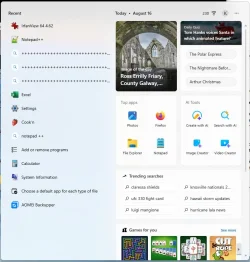
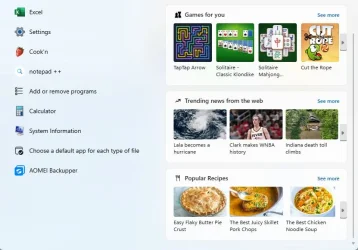
@Brink, my Start menu doesn't look anything like the one you posted:

Start menu 1.webp

(The right side scrolls, but I don't think any useful information is missing.)

There is a "Recent" heading, but no "Pinned/All/Recommended."

Maybe this is a result of corruption that would be fixed by a repair install. I may try that later today (after I've had a chance to make a full backup, just in case).

As for the three weird "+++++" lines... I think that's something one of my cats did! :wink:

@Lavik, you suggested looking in the Registry. I did, and what I found was just as shambolic as the rest of this adventure. There is no entry for "Adobe Reader." Under HKEY_LOCAL_MACHINE\SOFTWARE\Adobe\ there is only an entry for "Adobe Acrobat." Under that are subenries for "10.0," "11.0," "7.0," "8.0," "9.0," and "DC." Of those, only "DC" contains anything useful--apparently it is the current version. "DC" has about a dozen subentries, one of which is "InstallPath," which points to C:\Program Files\Adobe\Acrobat DC\Acrobat. One subfolder in that folder is named "RdrApp."

Hey, I thought, now we're getting somewhere! But I was wrong. "RdrApp" contains nothing except a subfolder named "ENU," which contains a couple of dozen files with the extension ".aapp," and names that suggest they're executable images that Acrobat loads for specific tasks.

More from information I can't find than what I can, I conclude that Adobe Reader no longer exists except as a free-use subset of Adobe Acrobat's functionality. When I double click a PDF and it opens Acrobat instead of Reader, it's doing exactly what it's supposed to do.

So the answer to my original question "How can I make Windows associate filetype PDF with Adobe Reader?" is, "You can't any more, so deal with it." Well, it's an answer, although not one I wanted.

At least this resolves my concern about reading PDFs in an unusual way; Reader is gone, Acrobat is there if someone ever insists that I use it, and until that happens I'm free to choose some other PDF reader that has a less insane UI. (Yes, I'm quite taken by that idea now!)

@Ghot recommended SumatraPDF "If you only use Adobe to "read" PDFs." That all I used it for in the past, because that's all Reader was good for! I was using a computer provided by my former employer (I'm retired now, remember). It had Acrobat too, and I used that to fix minor errors in text, to slice and splice pages, and to scan documents to PDF. I now perform the last function with NAPS2, but I have no substitutes for the others. So, if one of the other replacements is better suited to my needs, please make a suggestion, and I'll try out that.

I haven't responded to everyone's comments, but I believe I've reached a stopping point, so I'll shut up now. :wink:
 

Attachments

  • Start menu 2.webp
    Start menu 2.webp
    55.2 KB · Views: 2

My Computer My Computer

At a glance

Windows 11i7-10875SH32 GBNVIDIA Quadro RTX 3000
OS
Windows 11
Computer type
Laptop
Manufacturer/Model
Dell Precision 5750
CPU
i7-10875SH
Memory
32 GB
Graphics Card(s)
NVIDIA Quadro RTX 3000
Screen Resolution
2x 1920x1200
Hard Drives
1 TB SSD
Browser
Firefox
So, if one of the other replacements is better suited to my needs


No, Sumatra is just a reader.

Google AI recommends the following...


I just downloaded and scanned it at Virustotal... scans clean.


My Computers My Computers

  • At a glance

    Win 11 Home ♦♦♦26200.9168 ♦♦♦♦♦♦♦25H2AMD Ryzen 7 3700XG.Skill (F4-3200C14D-16GTZKW)EVGA RTX 2070 (08G-P4-2171-KR)
    OS
    Win 11 Home ♦♦♦26200.9168 ♦♦♦♦♦♦♦25H2
    Computer type
    PC/Desktop
    Manufacturer/Model
    Built by Ghot® [May 2020]
    CPU
    AMD Ryzen 7 3700X
    Motherboard
    Asus Pro WS X570-ACE (BIOS 5302)
    Memory
    G.Skill (F4-3200C14D-16GTZKW)
    Graphics Card(s)
    EVGA RTX 2070 (08G-P4-2171-KR)
    Sound Card
    Realtek ALC1220P / ALC S1220A
    Monitor(s) Displays
    Dell U3011 30"
    Screen Resolution
    2560 x 1600
    Hard Drives
    2x Samsung 860 EVO 500GB,
    WD 4TB Black FZBX - SATA III,
    WD 8TB Black FZBX - SATA III,
    DRW-24B1ST CD/DVD Burner
    PSU
    PC Power & Cooling 750W Quad EPS12V
    Case
    Cooler Master ATCS 840 Tower
    Cooling
    CM Hyper 212 EVO (push/pull)
    Keyboard
    Ducky DK9008 Shine II Blue LED
    Mouse
    Logitech Optical M-100
    Internet Speed
    300/300
    Browser
    Firefox (latest)
    Antivirus
    Bitdefender Total Security
    Other Info
    Speakers: Klipsch Pro Media 2.1
  • At a glance

    Windows XP Pro 32bit w/SP3AMD Athlon 64 X2 5000+ (OC'd @ 3.2Ghz)TWIN2X2048-6400C4DHX (2 x 1GB, DDR2 800)EVGA 256-P2-N758-TR GeForce 8600GT SSC
    Operating System
    Windows XP Pro 32bit w/SP3
    Computer type
    PC/Desktop
    Manufacturer/Model
    Built by Ghot® (not in use)
    CPU
    AMD Athlon 64 X2 5000+ (OC'd @ 3.2Ghz)
    Motherboard
    ASUS M2N32-SLI Deluxe Wireless Edition
    Memory
    TWIN2X2048-6400C4DHX (2 x 1GB, DDR2 800)
    Graphics card(s)
    EVGA 256-P2-N758-TR GeForce 8600GT SSC
    Sound Card
    Onboard
    Monitor(s) Displays
    ViewSonic G90FB Black 19" Professional (CRT)
    Screen Resolution
    up to 2048 x 1536
    Hard Drives
    WD 36GB 10,000rpm Raptor SATA
    Seagate 80GB 7200rpm SATA
    Lite-On LTR-52246S CD/RW
    Lite-On LH-18A1P CD/DVD Burner
    PSU
    PC Power & Cooling Silencer 750 Quad EPS12V
    Case
    Generic Beige case, 80mm fans
    Cooling
    ZALMAN 9500A 92mm CPU Cooler
    Keyboard
    Logitech Classic Keybooard 200
    Mouse
    Logitech Optical M-BT96a
    Internet Speed
    300/300
    Browser
    Firefox 3.x ??
    Antivirus
    Symantec (Norton)
    Other Info
    Still assembled, still runs. Haven't turned it on for 15 years?

My Computers My Computers

  • At a glance

    Windows 11 Pro for WorkstationsIntel i7-8700K 5 GHz64 GB (4x16GB) G.SKILL TridentZ RGB DDR4 3600...ASUS ROG-STRIX-GTX1080TI-O11G-GAMING (11GB GD...
    OS
    Windows 11 Pro for Workstations
    Computer type
    PC/Desktop
    Manufacturer/Model
    Custom self build
    CPU
    Intel i7-8700K 5 GHz
    Motherboard
    ASUS ROG Maximus XI Formula Z390
    Memory
    64 GB (4x16GB) G.SKILL TridentZ RGB DDR4 3600 MHz (F4-3600C18D-32GTZR)
    Graphics Card(s)
    ASUS ROG-STRIX-GTX1080TI-O11G-GAMING (11GB GDDR5X)
    Sound Card
    Integrated Digital Audio (S/PDIF)
    Monitor(s) Displays
    2 x Samsung Odyssey G75 27"
    Screen Resolution
    2560x1440
    Hard Drives
    1TB Samsung 990 PRO M.2,
    4TB Samsung 990 PRO M.2,
    TerraMaster F8 SSD Plus NAS
    PSU
    Seasonic Prime Titanium 850W
    Case
    Thermaltake Core P3 wall mounted
    Cooling
    Corsair Hydro H115i
    Keyboard
    Amazon Basics Wired Full Keyboard MD005
    Mouse
    Logitech MX Master 4
    Internet Speed
    2 Gbps Download and 100 Mbps Upload
    Browser
    Chrome and Edge
    Antivirus
    Microsoft Defender
    Other Info
    Logitech Z625 speaker system,
    Logitech BRIO 4K Pro webcam,
    HP Color LaserJet Pro MFP M477fdn,
    CyberPower CP1500PFCLCD
    Galaxy S23 Plus phone
  • At a glance

    Windows 11 ProSnapdragon X Elite (12 core) 3.42 GHz16 GB LPDDR5x-7467 MHz
    Operating System
    Windows 11 Pro
    Computer type
    Laptop
    Manufacturer/Model
    Surface Laptop 7 Copilot+ PC
    CPU
    Snapdragon X Elite (12 core) 3.42 GHz
    Memory
    16 GB LPDDR5x-7467 MHz
    Monitor(s) Displays
    15" HDR
    Screen Resolution
    2496 x 1664
    Hard Drives
    1 TB SSD
    Internet Speed
    Wi-Fi 7 and Bluetooth 5.4
    Browser
    Chrome and Edge
    Antivirus
    Microsoft Defender
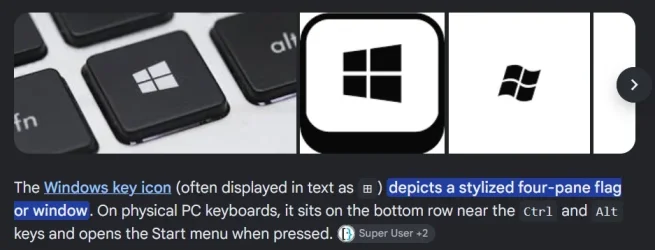
The screenshot in post #13 is from the search menu and not the Start Menu @jhsachs you should see the actual Start Menu if you press the "Windows Key"

Win Key.webp
 

My Computers My Computers

  • At a glance

    Windows 11 Pro x 2 + Insider DevIntel Core i9 12900K @ 5.2 GHz2 x Corsair Dominator Platinum RGB (4x16GB To...EVGA GeForce RTX 3080 XC3 ULTRA GAMING 10GB G...
    OS
    Windows 11 Pro x 2 + Insider Dev
    Computer type
    PC/Desktop
    Manufacturer/Model
    My first abomination, I call it the Money Pit One
    CPU
    Intel Core i9 12900K @ 5.2 GHz
    Motherboard
    ASUS ROG MAXIMUS Z690 HERO
    Memory
    2 x Corsair Dominator Platinum RGB (4x16GB Total) DDR5-6200 CL36 Dual Channel Kit
    Graphics Card(s)
    EVGA GeForce RTX 3080 XC3 ULTRA GAMING 10GB GDDR6X
    Sound Card
    ROG SupremeFX ALC4082 with ESS® ES9018Q2C DAC for pinpoint positioning and dynamics
    Monitor(s) Displays
    2 x Samsung 43" HDR Neo QLED Mini-LED Tizen Smart TV (QN43QN90DAFXZC) 2024
    Screen Resolution
    1920 x 1080 @ 150 DPI & 120Hz
    Hard Drives
    2 x Samsung 980 Series - 250GB PCIe Gen3. X4 NVMe 1.4 - M.2 Internal SSD (Windows 11 Pro Dual boot)
    PSU
    Corsair HX1000i 80+ Platinum Modular Power Supply 1000W
    Case
    Phanteks Enthoo Luxe Tempered Glass Full Tower Case - Black
    Cooling
    CORSAIR iCUE H150i RGB Elite 360mm Liquid CPU Cooler
    Keyboard
    Perixx PERIBOARD-732B Wireless Mini Backlit USB Keyboard with Low Profile Keys - US Layout
    Mouse
    Logitech MX Anywhere 2S Wireless Mouse
    Internet Speed
    1000 Mbps
    Browser
    Latest Version Of Firefox & Microsoft Edge Chromium Stable
    Antivirus
    ESET Internet Security
    Other Info
    LG Electronics 14x Sata Blu-ray Disk Rewriter - WH14NS4O
    2 x OREI 4K 4x2 HDMI Matrix Switch With ARC Audio Extraction, HDR & Downscaling (UHD-402D) so I can send the output of my Cable Box, Roku, or any of my 4 computers to either of my TV's separately or simultaneously.
  • At a glance

    Windows 11 Pro x 2Intel Core i9 12900K @ 5.2 GHz2 x Vengeance RGB 32GB DDR5 6400MHz CL32 Dual...ASUS TUF Gaming GeForce RTX 3070 Ti OC Editio...
    Operating System
    Windows 11 Pro x 2
    Computer type
    PC/Desktop
    Manufacturer/Model
    My second abomination, I call it the Money Pit Two
    CPU
    Intel Core i9 12900K @ 5.2 GHz
    Motherboard
    ASUS ROG STRIX Z690-F GAMING WIFI
    Memory
    2 x Vengeance RGB 32GB DDR5 6400MHz CL32 Dual Channel Kit (4x16GB Total) Black
    Graphics card(s)
    ASUS TUF Gaming GeForce RTX 3070 Ti OC Edition 8 GB GDDR6X
    Sound Card
    ROG SupremeFX ALC4082 with ESS® ES9018Q2C DAC for pinpoint positioning and dynamics
    Monitor(s) Displays
    2 x Samsung 43" HDR Neo QLED Mini-LED Tizen Smart TV (QN43QN90DAFXZC) 2024
    Screen Resolution
    1920 x 1080 @ 150 DPI & 120Hz
    Hard Drives
    2 x Samsung 980 Series - 250GB PCIe Gen3. X4 NVMe 1.4 - M.2 Internal SSD (Windows 11 Pro Dual boot)
    PSU
    Corsair AX860 - 860W Modular Power Supply
    Case
    Phanteks Enthoo Pro Tempered Glass Full Tower Case - Black
    Cooling
    CORSAIR iCUE H150i RGB Elite 360mm Liquid CPU Cooler
    Keyboard
    Perixx PERIBOARD-326 Wireless Mini Backlit USB Keyboard with Low Profile Keys - US Layout
    Mouse
    Logitech MX Anywhere 2S Wireless Mouse
    Internet Speed
    1000 Mbps
    Browser
    Latest Version Of Firefox & EDGE Chromium Stable
    Antivirus
    ESET Internet Security
    Other Info
    LG Electronics 14x Sata Blu-ray Disk Rewriter - WH14NS4O
    2 x OREI 4K 4x2 HDMI Matrix Switch With ARC Audio Extraction, HDR & Downscaling (UHD-402D) so I can send the output of my Cable Box, Roku, or any of my 4 computers to either of my TV's separately or simultaneously.
  • 2021 ASUS TUF Gaming A17 - FA706QM Gaming Laptop with a AMD Ryzen™ 7 5800H Mobile Processor, NVIDIA GeForce RTX 3060 Laptop GPU and AMD Graphics (512 MB), 17.3-inch, FHD (1920 x 1080) 16:9, Value IPS-level, Anti-glare display, 2 x 8GB DDR4 3200 SDRAM, Samsung 980 Series - 250GB PCIe Gen3. X4 NVMe 1.4 - M.2 Internal SSD running Windows 11 Pro , Backlit Chiclet Keyboard 1-Zone RGB, Touchpad, 720P HD camera, Wi-Fi 6(802.11ax) (Dual band) 2*2 + Bluetooth® 5.3 Wireless Card

    External Keyboard: Perixx PERIBOARD-326 Wireless Mini Backlit USB Keyboard with Low Profile Keys - US Layout

    External Mouse: Logitech MX Anywhere 2S Wireless Mouse

    External Monitor: Samsung 43" HDR Neo QLED Mini-LED Tizen Smart TV (QN43QN90DAFXZC) 2024
Sumatra is just a reader.
I'll second that suggestion for Sumatra as a reader! (y)

Also PDFgear as an editor! (y)

Both fully functional and FREE!

Matter of fact, the Sumatra Dev releases are becoming quite sophisticated yet simple...

13780.webp
 

My Computers My Computers

  • At a glance

    Windows 11 Pro
    OS
    Windows 11 Pro
    Computer type
    PC/Desktop
    Manufacturer/Model
    ASUS ROG Strix
  • At a glance

    Windows 11 Pro
    Operating System
    Windows 11 Pro
    Computer type
    Laptop
    Manufacturer/Model
    ASUS VivoBook
  • ASUS VivoBook 'Lite' ~ Windows 11 Home
@Ghot I installed PDFgear and tried it briefly. My first impression is: If you just want to open a PDF to read it requires too many clicks, so it's not a replacement for Adobe Reader. It looks like it has everything else I'd want, though, so PDFgear+Acrobat or PDFgear+Sumatra could be a solution for me. It doesn't appear to have a menu system, but at least it has a Ribbon, so I give the UI a B- for non-insanity.

@Brink I haven't installed anything like a Start menu customizer, but the computer belonged to my late wife before it became mine, so she might have done something like that. How can I tell?

@IownAmoneyPit said, "The screenshot in post #13 is from the search menu and not the Start Menu @jhsachs you should see the actual Start Menu if you press the "Windows Key."

That explains why I didn't even rrecognize the Start Menu screen. I never press the Windows key (except by accident). I tried it, and I could the "Show All" option. I'm not going to see it again, though, because I prefer the Search menu. It seems to have less crap in it. (I wish I could get rid of the crap on the right side, though. It never quite irritates me enough to make me research whether I can.)
 

My Computer My Computer

At a glance

Windows 11i7-10875SH32 GBNVIDIA Quadro RTX 3000
OS
Windows 11
Computer type
Laptop
Manufacturer/Model
Dell Precision 5750
CPU
i7-10875SH
Memory
32 GB
Graphics Card(s)
NVIDIA Quadro RTX 3000
Screen Resolution
2x 1920x1200
Hard Drives
1 TB SSD
Browser
Firefox
I installed PDFgear and tried it briefly. My first impression is: If you just want to open a PDF to read it requires too many clicks, so it's not a replacement for Adobe Reader.
Whichever program you want a pdf to open in you set as default for pdf.. then just double click the pdf and it opens in the program you've chosen as default for that file type.

Comparing PDFGear and Sumatra, Sumatra is faster.

If you choose to launch PDFGear (say) and then browse to your PDF - that's going to be slower.

Then there's rt click Open With....

(I suppose you could even put a shortcut to your PDF readers in the Sendto menu- then rt click a PDF, Sendto and click the reader... but that's not really sensible!)

Oh - & I haven't had an Adobe product on a PC for many years..
 

My Computer My Computer

At a glance

Windows 11 Proi7-8650U16GBIntel UHD 620
OS
Windows 11 Pro
Computer type
Laptop
Manufacturer/Model
Lenovo t480s
CPU
i7-8650U
Memory
16GB
Graphics Card(s)
Intel UHD 620
Screen Resolution
1920x1080
Hard Drives
C SN810 SDCPNRY-512G-1006
Browser
Edge, Firefox
Antivirus
Defender
@jhsachs The problem was resolved by uninstalling and then reinstalling Adobe Reader ?
 

My Computer My Computer

At a glance

Windows 11 Insider Experimental (26H2)Intel Core i5-1140032Gb (DDR4 SDRAM)Intel(R) UHD Graphics 730
OS
Windows 11 Insider Experimental (26H2)
Computer type
PC/Desktop
Manufacturer/Model
Gigabyte Technology Co., Ltd.
CPU
Intel Core i5-11400
Motherboard
Z590 AORUS PRO AX
Memory
32Gb (DDR4 SDRAM)
Graphics Card(s)
Intel(R) UHD Graphics 730
Sound Card
Realtek USB Audio
Monitor(s) Displays
LG 27US500-W 4K UHD UltraFine™
Screen Resolution
3840x2160
Hard Drives
Samsung SSD 980 PRO 1TB
WDC WD7501AALS
PSU
Montech CENTURY, 650W, 80+ Gold
Case
Cougar Airface ECO RGB
Cooling
ID-COOLING SE-224-XTS BLACK
Keyboard
Microsoft SideWinder X6 Keyboard
Mouse
Microsoft SideWinder Mouse
Internet Speed
Internet speed of 1 Gbit/s
Browser
Vivaldi browser
Antivirus
Windows Defender

Latest Support Threads

Back
Top Bottom