Solved How To Get Rid Of "Install The Latest PowerShell For New Features And Improvements" From Terminal


alexhob123

Active member
Member
Local time
9:49 PM
Posts
188
OS
Windows 11 Pro X64 Version 25H2 Build 260200.6901
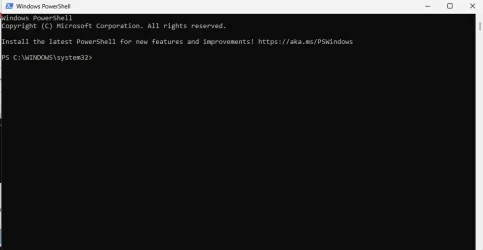
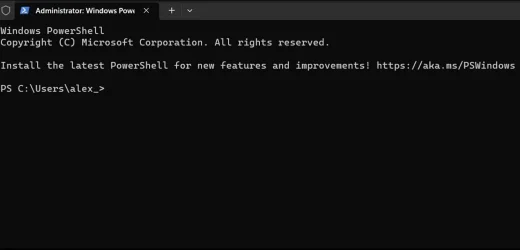
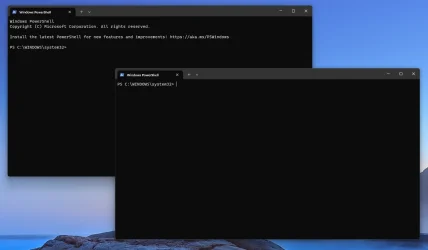
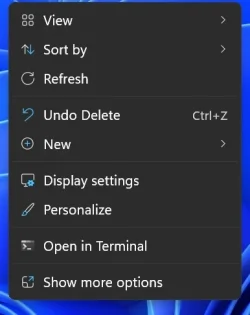
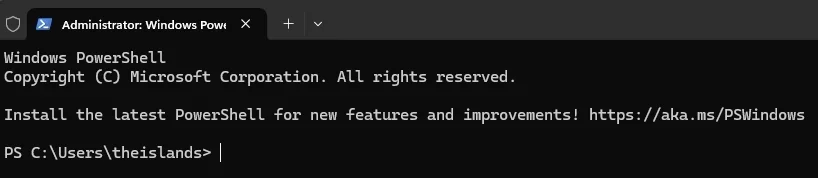
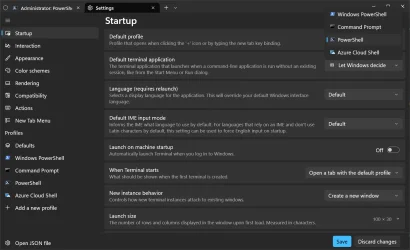
i am using windows powershell and wan't to get rid of the message that appears Install the latest PowerShell for new features and improvements! Windows PowerShell update message FAQ - PowerShell but i can't open up settings because i don't have the plus or arrow showing first image is mine second image is what i don't have appear when i open powershell
 
Windows Build/Version
26200.8037

Attachments

  • Screenshot 2026-03-20 165541.webp
    Screenshot 2026-03-20 165541.webp
    12.7 KB · Views: 1
  • Screenshot 2026-03-20 165903.webp
    Screenshot 2026-03-20 165903.webp
    21 KB · Views: 1

My Computer

System One

  • OS
    Windows 11 Pro X64 Version 25H2 Build 260200.6901
    Computer type
    PC/Desktop
    Manufacturer/Model
    Custom Build
    CPU
    Intel(R) Core(TM) i5-8400 CPU @ 2.80GHz
    Motherboard
    ASROCK B360M Pro4
    Memory
    24GB
    Graphics Card(s)
    NVIDIA GeForce GTX 960
    Sound Card
    Realtek(R) Audio 6.0.9231.1
    Monitor(s) Displays
    Generic Monitor (Dell S2721HN)
    Screen Resolution
    1920x1080
    Hard Drives
    CT240BX500SSD1
    EDILOCA ES106 500GB
    SATA SDD
    Keyboard
    TECKNET Wired Gaming Keyboard Model TK-B002
    Mouse
    Logitech G203 LIGHTSYNC Gaming Mouse
    Browser
    Firefox/Chrome
    Antivirus
    Malwarebytes

Then install PowerShell as it suggests. The version of PowerShell it wants to install (7.6.0) is far superior to the installed version. As it clearly states in the article linked in your post, PowerShell 5.1 (default / installed) is no longer maintained whereas PowerShell 7.6.0 is faster. more secure and actively maintained.
 

My Computers

System One System Two

  • OS
    Windows 11 build 26200.7296 / WSL 2 running Ubuntu
    Computer type
    Laptop
    Manufacturer/Model
    Dell Inspiron 14 5430
    CPU
    Intel i7-1355U
    Motherboard
    Dell 0GMW80
    Memory
    16GB
    Graphics Card(s)
    Intel Iris XE
    Sound Card
    Realtek
    Monitor(s) Displays
    Dell 14", LG 32" Curved Wide screen monitor and LG Ultrawide 26"
    Screen Resolution
    1920 x 1200 @ 60Hz, 1920 x 1080 @ 100Hz and 2560 x 1080 @ 60Hz
    Hard Drives
    Samsung 990 Pro 1TB NVME Gen 4 M.2 SSD
    PSU
    Dell
    Case
    Dell
    Cooling
    Dell
    Keyboard
    Dell KM3322W
    Mouse
    Dell Trackpad or Dell KM3322W
    Internet Speed
    900mb down / 400mb up FTTP
    Browser
    Edge 142.0.3595.90
    Antivirus
    Windows Defender
    Other Info
    Windows 365
    1TB OneDrive
    Outlook Classic
    Visual Studio Code running in WSL
    Python 3.14
    Samsung Magician
    Garmin Express
    Dell TB16 Thunderbolt dock
    WSL
    WEI Score: 8.3
  • Operating System
    Windows 11
    Computer type
    Tablet
    Manufacturer/Model
    Microsoft Surface Pro 7
    CPU
    Core i5 - 1035G4
    Motherboard
    Microsoft
    Memory
    8GB
    Graphics card(s)
    Intel Iris Plus
    Monitor(s) Displays
    Surface touch
    Screen Resolution
    2736 x 1824
    Hard Drives
    128GB
    PSU
    Microsoft
    Case
    Microsoft Keyboard
    Cooling
    None
    Keyboard
    Microsoft Surface Keyboard
    Mouse
    Microsoft Arc Intellimouse
    Internet Speed
    900mb / 400mb FTTP
    Browser
    Edge
    Antivirus
    Windows Defender
can i not remove it like in this video

and can i remove this version or not
 

My Computer

System One

  • OS
    Windows 11 Pro X64 Version 25H2 Build 260200.6901
    Computer type
    PC/Desktop
    Manufacturer/Model
    Custom Build
    CPU
    Intel(R) Core(TM) i5-8400 CPU @ 2.80GHz
    Motherboard
    ASROCK B360M Pro4
    Memory
    24GB
    Graphics Card(s)
    NVIDIA GeForce GTX 960
    Sound Card
    Realtek(R) Audio 6.0.9231.1
    Monitor(s) Displays
    Generic Monitor (Dell S2721HN)
    Screen Resolution
    1920x1080
    Hard Drives
    CT240BX500SSD1
    EDILOCA ES106 500GB
    SATA SDD
    Keyboard
    TECKNET Wired Gaming Keyboard Model TK-B002
    Mouse
    Logitech G203 LIGHTSYNC Gaming Mouse
    Browser
    Firefox/Chrome
    Antivirus
    Malwarebytes
If you are launching from terminal you can go into Settings (terminal), open JSON settings and look for the cmdline key:value pair. In the value section at the end but inside the double quotes just add -NoLogo, save and that's it.
 

My Computer

System One

  • OS
    Linux Mint
    Computer type
    Laptop
    Manufacturer/Model
    System76 Lemur Pro
i don't have terminal my says powershell
 

Attachments

  • Screenshot 2026-03-20 173918.webp
    Screenshot 2026-03-20 173918.webp
    10 KB · Views: 1

My Computer

System One

  • OS
    Windows 11 Pro X64 Version 25H2 Build 260200.6901
    Computer type
    PC/Desktop
    Manufacturer/Model
    Custom Build
    CPU
    Intel(R) Core(TM) i5-8400 CPU @ 2.80GHz
    Motherboard
    ASROCK B360M Pro4
    Memory
    24GB
    Graphics Card(s)
    NVIDIA GeForce GTX 960
    Sound Card
    Realtek(R) Audio 6.0.9231.1
    Monitor(s) Displays
    Generic Monitor (Dell S2721HN)
    Screen Resolution
    1920x1080
    Hard Drives
    CT240BX500SSD1
    EDILOCA ES106 500GB
    SATA SDD
    Keyboard
    TECKNET Wired Gaming Keyboard Model TK-B002
    Mouse
    Logitech G203 LIGHTSYNC Gaming Mouse
    Browser
    Firefox/Chrome
    Antivirus
    Malwarebytes
i don't have terminal my says powershell
Powershell runs INSIDE Terminal, also why remove it? Powershell 7.6.0 is much better than 5.1.
 

My Computers

System One System Two

  • OS
    Windows 11 build 26200.7296 / WSL 2 running Ubuntu
    Computer type
    Laptop
    Manufacturer/Model
    Dell Inspiron 14 5430
    CPU
    Intel i7-1355U
    Motherboard
    Dell 0GMW80
    Memory
    16GB
    Graphics Card(s)
    Intel Iris XE
    Sound Card
    Realtek
    Monitor(s) Displays
    Dell 14", LG 32" Curved Wide screen monitor and LG Ultrawide 26"
    Screen Resolution
    1920 x 1200 @ 60Hz, 1920 x 1080 @ 100Hz and 2560 x 1080 @ 60Hz
    Hard Drives
    Samsung 990 Pro 1TB NVME Gen 4 M.2 SSD
    PSU
    Dell
    Case
    Dell
    Cooling
    Dell
    Keyboard
    Dell KM3322W
    Mouse
    Dell Trackpad or Dell KM3322W
    Internet Speed
    900mb down / 400mb up FTTP
    Browser
    Edge 142.0.3595.90
    Antivirus
    Windows Defender
    Other Info
    Windows 365
    1TB OneDrive
    Outlook Classic
    Visual Studio Code running in WSL
    Python 3.14
    Samsung Magician
    Garmin Express
    Dell TB16 Thunderbolt dock
    WSL
    WEI Score: 8.3
  • Operating System
    Windows 11
    Computer type
    Tablet
    Manufacturer/Model
    Microsoft Surface Pro 7
    CPU
    Core i5 - 1035G4
    Motherboard
    Microsoft
    Memory
    8GB
    Graphics card(s)
    Intel Iris Plus
    Monitor(s) Displays
    Surface touch
    Screen Resolution
    2736 x 1824
    Hard Drives
    128GB
    PSU
    Microsoft
    Case
    Microsoft Keyboard
    Cooling
    None
    Keyboard
    Microsoft Surface Keyboard
    Mouse
    Microsoft Arc Intellimouse
    Internet Speed
    900mb / 400mb FTTP
    Browser
    Edge
    Antivirus
    Windows Defender
If Powershell 7 is so much better than Powershell 5, why does Terminal still invoke Powershell 5? Shouldn't Powershell 7 be downward compatible with Powershell 5?
 

My Computers

System One System Two

  • OS
    Win 11 Pro 25H2, Build 26200.8524
    Computer type
    PC/Desktop
    Manufacturer/Model
    Home Brew
    CPU
    Intel Core i5 14500
    Motherboard
    Gigabyte B760M G P WIFI
    Memory
    64GB DDR4
    Graphics Card(s)
    GeForce RTX 4060
    Sound Card
    Chipset Realtek
    Monitor(s) Displays
    LG 45" Ultragear, Acer 24" 1080p
    Screen Resolution
    5120x1440, 1920x1080
    Hard Drives
    Crucial P310 2TB 2280 PCIe Gen4 3D NAND NVMe M.2 SSD (O/S)
    Silicon Power 2TB US75 NVMe PCIe Gen4 M.2 2280 SSD (backup)
    Crucial BX500 2TB 3D NAND (2nd backup)
    Seagate 4TB Ironwolf, rotating HDD archive files
    External off-line backup Drives: 2 NVMe 4TB drives in external enclosures
    PSU
    Thermaltake Toughpower GF3 750W
    Case
    LIAN LI LANCOOL 216 E-ATX PC Case
    Cooling
    Lots of fans!
    Keyboard
    Microsoft Comfort Curve 2000
    Mouse
    Logitech G305
    Internet Speed
    Verizon FiOS 1GB
    Browser
    Firefox
    Antivirus
    Malware Bytes & Windows Defender Security
  • Operating System
    Win 11 Pro 25H2, Build 26200.8524
    Computer type
    PC/Desktop
    Manufacturer/Model
    Home Brew
    CPU
    Intel Core i5 14400
    Motherboard
    Gigabyte B760M DS3H AX
    Memory
    32GB DDR5
    Graphics card(s)
    Intel 700 Embedded GPU
    Sound Card
    Realtek Embedded
    Monitor(s) Displays
    27" HP 1080p
    Screen Resolution
    1920x1080
    Hard Drives
    Crucial P310 2TB 2280 PCIe Gen4 eD NAND PCIe SSD
    Samsung EVO 990 2TB NVMe Gen4 SSD
    Samsung 2TB SATA SSD
    PSU
    Thermaltake Smart BM3 650W
    Case
    Okinos Micro ATX Case
    Cooling
    Fans
    Keyboard
    Microsoft Comfort Curve 2000
    Mouse
    Logitech G305
    Internet Speed
    Verizon FiOS 1GB
    Browser
    Firefox
    Antivirus
    Malware Bytes & Windows Defender Security
i have no idea what to do
 

My Computer

System One

  • OS
    Windows 11 Pro X64 Version 25H2 Build 260200.6901
    Computer type
    PC/Desktop
    Manufacturer/Model
    Custom Build
    CPU
    Intel(R) Core(TM) i5-8400 CPU @ 2.80GHz
    Motherboard
    ASROCK B360M Pro4
    Memory
    24GB
    Graphics Card(s)
    NVIDIA GeForce GTX 960
    Sound Card
    Realtek(R) Audio 6.0.9231.1
    Monitor(s) Displays
    Generic Monitor (Dell S2721HN)
    Screen Resolution
    1920x1080
    Hard Drives
    CT240BX500SSD1
    EDILOCA ES106 500GB
    SATA SDD
    Keyboard
    TECKNET Wired Gaming Keyboard Model TK-B002
    Mouse
    Logitech G203 LIGHTSYNC Gaming Mouse
    Browser
    Firefox/Chrome
    Antivirus
    Malwarebytes
In your Documents folder, you should have a folder named WindowsPowerShell. In that folder, create a plain text file named profile.ps1. In that file, insert the text Clear-Host; save and close. Open PowerShell again.
 

My Computer

System One

  • OS
    Windows 11 Pro 25H2
    Computer type
    PC/Desktop
    Manufacturer/Model
    Intel NUC12WSHi7
    CPU
    12th Gen Core i7-1260P
    Motherboard
    NUC12WSBi7
    Memory
    64 GB Micron PC4-25600
    Graphics Card(s)
    Intel Iris Xe Graphics
    Sound Card
    on-board Realtek HD Audio
    Monitor(s) Displays
    Dell U3219Q
    Screen Resolution
    3840 x 2160
    Hard Drives
    Samsung SSD 990 PRO 1TB
    Crucial MX500 2 TB
    Antivirus
    Microsoft Defender
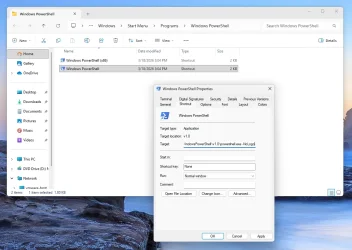
There is no way to hide this message, other than changing the Windows PowerShell shortcut.

1. Search for "Windows PowerShell" in the Start Menu.

2. Right-menu on the app icon, open file location (which brings up the Shortcut in your Start Menu folder).

3. Select "Windows PowerShell". Right-menu -> Properties

4. Find Shortcut / Target.

5. Append " -NoLogo" at the end of the Target line.

1774033689411.webp

Before and after.

1774033954440.webp
 

My Computer

System One

  • OS
    Windows 7
If Powershell 7 is so much better than Powershell 5, why does Terminal still invoke Powershell 5? Shouldn't Powershell 7 be downward compatible with Powershell 5?
Because...Microsoft
 

My Computers

System One System Two

  • OS
    Windows 11 build 26200.7296 / WSL 2 running Ubuntu
    Computer type
    Laptop
    Manufacturer/Model
    Dell Inspiron 14 5430
    CPU
    Intel i7-1355U
    Motherboard
    Dell 0GMW80
    Memory
    16GB
    Graphics Card(s)
    Intel Iris XE
    Sound Card
    Realtek
    Monitor(s) Displays
    Dell 14", LG 32" Curved Wide screen monitor and LG Ultrawide 26"
    Screen Resolution
    1920 x 1200 @ 60Hz, 1920 x 1080 @ 100Hz and 2560 x 1080 @ 60Hz
    Hard Drives
    Samsung 990 Pro 1TB NVME Gen 4 M.2 SSD
    PSU
    Dell
    Case
    Dell
    Cooling
    Dell
    Keyboard
    Dell KM3322W
    Mouse
    Dell Trackpad or Dell KM3322W
    Internet Speed
    900mb down / 400mb up FTTP
    Browser
    Edge 142.0.3595.90
    Antivirus
    Windows Defender
    Other Info
    Windows 365
    1TB OneDrive
    Outlook Classic
    Visual Studio Code running in WSL
    Python 3.14
    Samsung Magician
    Garmin Express
    Dell TB16 Thunderbolt dock
    WSL
    WEI Score: 8.3
  • Operating System
    Windows 11
    Computer type
    Tablet
    Manufacturer/Model
    Microsoft Surface Pro 7
    CPU
    Core i5 - 1035G4
    Motherboard
    Microsoft
    Memory
    8GB
    Graphics card(s)
    Intel Iris Plus
    Monitor(s) Displays
    Surface touch
    Screen Resolution
    2736 x 1824
    Hard Drives
    128GB
    PSU
    Microsoft
    Case
    Microsoft Keyboard
    Cooling
    None
    Keyboard
    Microsoft Surface Keyboard
    Mouse
    Microsoft Arc Intellimouse
    Internet Speed
    900mb / 400mb FTTP
    Browser
    Edge
    Antivirus
    Windows Defender
If Powershell 7 is so much better than Powershell 5, why does Terminal still invoke Powershell 5? Shouldn't Powershell 7 be downward compatible with Powershell 5?
PS 7 & PS 5.1 are designed to co-exist, because (plain) PowerShell 7 isn't 100% backwards compatible with Windows PowerShell 5.1.

The names are stupidly confusing. Original PowerShell (up to version 5.1) exists only on Windows platforms. Then MS decided they wanted to release PS to Linux and MacOS, and make it open source at the same time.

While PS 7 runs most PS 5 code, there are programming differences that will break certain scripts. PS 5.1 will continue to exist for legacy reasons.

For a non-programmer, it gets confusing because PS 7 is now "(just) PowerShell" and PS 5.1 is "Windows PowerShell". That's why you have "Windows PowerShell", "PowerShell", and "PowerShell IDE" (which is PS 5.1).
 

My Computer

System One

  • OS
    Windows 7
If Powershell 7 is so much better than Powershell 5, why does Terminal still invoke Powershell 5? Shouldn't Powershell 7 be downward compatible with Powershell 5?

When I "Open in Terminal" I get this.


Screenshot 2026-03-20 153641.webp Screenshot 2026-03-20 153552.webp
 

My Computers

System One System Two

  • OS
    Windows 11 Pro 25H2 26200.8457
    Computer type
    PC/Desktop
    Manufacturer/Model
    Dell Tower Plus EBT2250, DOB: 06/15/2025
    CPU
    Intel® Core™ Ultra 7 265 1.8GHz to 5.3GHz (Arrow Lake)
    Motherboard
    Dell Inc. 02D3NT A00 (U3E1)
    Memory
    SK Hynix 32GB DDR5 5600 Desktop RAM UDIMM Non-ECC PC5-5600B
    Graphics Card(s)
    Dell NVIDIA® GeForce RTX™ 4060 8GB GDDR6 & (iGPU) Integrated Intel® UHD Graphics
    Sound Card
    Chipset Realtek High-Definition Audio with Dolby Atmos
    Monitor(s) Displays
    Dell Ultra Sharp U2515H 25-Inch Screen LED-Lit
    Screen Resolution
    2560 X 1440
    Hard Drives
    Samsung (NVMe PM9C1a 1024GB) M.2 PCIe NVMe Solid State Drive (OS), with Samsung Piccolo (S4LY022) 6-Core 4 Channel Controller.

    Samsung T7 500GB SSD, USB-C External Drive
    PSU
    Dell 460W
    Case
    Dell Tower Plus EBT 2250
    Cooling
    Fan
    Keyboard
    Dell Wired Keyboard - KB216
    Mouse
    Logitech M510
    Internet Speed
    Intel Killer E3100G 2.5 Gigabit Ethernet Controller
    Browser
    Microsoft Edge
    Antivirus
    Microsoft Windows Security
    Other Info
    The Samsung NVMe PM9C1a 1024GB SSD does not use a Phison NAND controller. Instead, it uses Samsung's in-house developed Piccolo (S4LY022) 6-Core 4 Channel Controller. The PM9C1a utilizes a controller built using Samsung's 5-nanometer process and seventh-generation V-NAND technology. 🤔
  • Operating System
    Windows 11 Pro 25H2 26200.8457
    Computer type
    Laptop
    Manufacturer/Model
    Dell Inspiron 15 7000 (7591) 2-in-1, DOB: 11/30/2019
    CPU
    10th Generation Intel Core i7-10510U Processor (8MB Cache, up to 4.9 GHz) Comet Lake
    Motherboard
    Dell 0NNW5N
    Memory
    16GB DDR4 RAM
    Graphics card(s)
    NVIDIA® GeForce® MX250 with 2GB GDDR5 graphics memory
    Sound Card
    Chipset Realtek ALC3254 🤔🤣
    Monitor(s) Displays
    Dell 15.6-inch UHD Truelife Touch Narrow Border WVA Display with Active Pen support
    Screen Resolution
    3840 x 2160
    Hard Drives
    Intel NVME 512GB SSD with 32GB Intel Optane Memory, M.2 80mm PCIe 3.0 RAID

    SanDisk 256GB Extreme microSDXC UHS-I Memory Card
    PSU
    Dell 4-Cell Battery, 68 Whr (Integrated), 90 Watt AC Adapter
    Case
    Dell Inspiron 15 7000 2-in-1 (7591)
    Cooling
    Standard Dell Case Fan & Havit HV-F2056 USB Powered (3 Fans) Laptop Cooling Pad.
    Keyboard
    Dell
    Mouse
    Logitech Wireless Mouse M650L
    Internet Speed
    Wireless/Wired connectivity (WiFi 6 - 802.11 ax)
    Browser
    Microsoft Edge
    Antivirus
    Microsoft Windows Security
    Other Info
    From Dell: 512GB NVME Solid State Drive accelerated by 32GB Intel Optane Memory are the fastest as compared to NAND SSDs. Intel Optane H10 with SSD offers speedy storage and accelerates opening your programs.
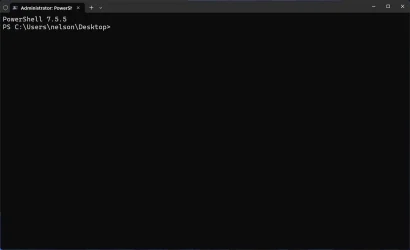
I thought I updated mine to vers. 7 but this is how it looks when I open PS:
powershell screengrab.webp
 

My Computers

System One System Two

  • OS
    Windows 11 Home, ver 25H2 build 26200.8246
    Computer type
    Laptop
    Manufacturer/Model
    Hewlett-Packard Spectre 13-4001 x360 convertable
    CPU
    Intel Core i5 5200U @ 2.20GH
    Motherboard
    Hewlett-Packard 802D
    Memory
    4 GB
    Graphics Card(s)
    Intel HD Graphics 5500 on board
    Sound Card
    Intel Smart Sound Technology (Intel SST)
    Hard Drives
    Micron 256GB M.2 2280 NGFF SSD MTFDDAV256TBN, (SATA 6.0 Gb/s)
    Keyboard
    Model # G01KB
    Antivirus
    Microsoft Defender
    Other Info
    born on date: 25 Feb 2016
  • Operating System
    Win 11 Home 25H2 build 26200.7922
    Computer type
    PC/Desktop
    Manufacturer/Model
    Asus Desktop model M32AD-US019S (DOM: 6/9/2014 )
    CPU
    Intel Core i7 4th Gen 4790 (3.60GHz), Haswell 22nm Technology, SOCKET 1150
    Motherboard
    H81M-E/M51AD/DP_MB
    Memory
    Samsung 16 GB DDR3 (8GB in 2 modules)
    Graphics card(s)
    NVIDIA GeForce GTX 760, 3GB, and on-board Intel HD Graphics 4600 Rev 6
    Monitor(s) Displays
    HP EliteDisplay E241i LED; HP EliteDisplay E243
    Hard Drives
    Samsung 500GB SSD, 870 EVO (SATA 6.0 )
    Micron 250GB SSD, CT250MX500
    Toshiba HDD, 3GB (original drive w/PC)
    Case
    ASUS
    Keyboard
    ASUS-------------------------
    Antivirus
    MS Defender
    Other Info
    Additional Laptops:

    HEWLETT PACKARD
    HP OmniBook X Flip NGAI (Next Gen AI),
    Model: 16-as0023dx
    PT# B5UH1UA#ABA Product #: B5UH1UA
    delivered and setup 7/25/25
    16" 2K Touch-Screen Laptop
    Intel Core Ultra 7 256V '24 Series 2 - CPU
    Boost Clock Frequency 4.8 gigahertz; Neural Processing Unit (NPU) Yes;
    16GB Memory, LPDDR5X
    1TB SSD PCIe 4.0
    Graphics: Intel Arc 140V
    1 x HDMI 2.1
    1 x Thunderbolt 4
    2K Touch-Screen display, LED, IPS; 1920 x 1200 (Full HD+)
    USB Ports: 1 x USB-C 3.1, 2 x USB-A 3.1
    Wi-Fi 6E
    weight 4.15 pounds

    DELL
    Model:I7591-7483BLK-PUS 2-in-1 (7000 Series)
    purchased 12/3/2019,
    15.6 inch 2-IN-1;
    4K Ultra HD Touch-Screen, 3840 x 2160,
    Intel Core i7 10510U CPU 1.80GHz,
    16GB RAM DDR4 SDRAM 2400 megahert (2 slots),
    dedicated graphics Nvidia GeForce MX250 2 GB Graphics,
    PCIe 512GB Intel SSD + 32GB Optane Memory (Intel Optane Memory H10 with solid-state storage),
    wireless-AX & Bluetooth
    Battery: 68wh, Type 4VGMP 4 cell
Windows is terrible for consistency, it really depends on which release you're running.

Sometimes "Open in Terminal" is CMD inside Console Host, other times it's CMD in Terminal app. Sometimes it's PowerShell in Terminal.
Sometimes an elevated shell is Admin CMD inside Console Host, other times it's Admin PowerShell in Terminal.

ahhhh Windows...
 

My Computer

System One

  • OS
    Windows 7
I thought I updated mine to vers. 7 but this is how it looks when I open PS:
Windows PowerShell (5.1) will always displays that message. It doesn't actually check if PS 7 is installed, or whether it's the latest PS 7.
That's MS trying to nudge you forward into using PS 7.
 

My Computer

System One

  • OS
    Windows 7
Windows is terrible for consistency, it really depends on which release you're running.

Sometimes "Open in Terminal" is CMD inside Console Host, other times it's CMD in Terminal app. Sometimes it's PowerShell in Terminal.
Sometimes an elevated shell is Admin CMD inside Console Host, other times it's Admin PowerShell in Terminal.

ahhhh Windows...
...ahhhh Windows... 🤣

I wonder if Settings has something to do with it.

Screenshot 2026-03-20 155434.webp
 

My Computers

System One System Two

  • OS
    Windows 11 Pro 25H2 26200.8457
    Computer type
    PC/Desktop
    Manufacturer/Model
    Dell Tower Plus EBT2250, DOB: 06/15/2025
    CPU
    Intel® Core™ Ultra 7 265 1.8GHz to 5.3GHz (Arrow Lake)
    Motherboard
    Dell Inc. 02D3NT A00 (U3E1)
    Memory
    SK Hynix 32GB DDR5 5600 Desktop RAM UDIMM Non-ECC PC5-5600B
    Graphics Card(s)
    Dell NVIDIA® GeForce RTX™ 4060 8GB GDDR6 & (iGPU) Integrated Intel® UHD Graphics
    Sound Card
    Chipset Realtek High-Definition Audio with Dolby Atmos
    Monitor(s) Displays
    Dell Ultra Sharp U2515H 25-Inch Screen LED-Lit
    Screen Resolution
    2560 X 1440
    Hard Drives
    Samsung (NVMe PM9C1a 1024GB) M.2 PCIe NVMe Solid State Drive (OS), with Samsung Piccolo (S4LY022) 6-Core 4 Channel Controller.

    Samsung T7 500GB SSD, USB-C External Drive
    PSU
    Dell 460W
    Case
    Dell Tower Plus EBT 2250
    Cooling
    Fan
    Keyboard
    Dell Wired Keyboard - KB216
    Mouse
    Logitech M510
    Internet Speed
    Intel Killer E3100G 2.5 Gigabit Ethernet Controller
    Browser
    Microsoft Edge
    Antivirus
    Microsoft Windows Security
    Other Info
    The Samsung NVMe PM9C1a 1024GB SSD does not use a Phison NAND controller. Instead, it uses Samsung's in-house developed Piccolo (S4LY022) 6-Core 4 Channel Controller. The PM9C1a utilizes a controller built using Samsung's 5-nanometer process and seventh-generation V-NAND technology. 🤔
  • Operating System
    Windows 11 Pro 25H2 26200.8457
    Computer type
    Laptop
    Manufacturer/Model
    Dell Inspiron 15 7000 (7591) 2-in-1, DOB: 11/30/2019
    CPU
    10th Generation Intel Core i7-10510U Processor (8MB Cache, up to 4.9 GHz) Comet Lake
    Motherboard
    Dell 0NNW5N
    Memory
    16GB DDR4 RAM
    Graphics card(s)
    NVIDIA® GeForce® MX250 with 2GB GDDR5 graphics memory
    Sound Card
    Chipset Realtek ALC3254 🤔🤣
    Monitor(s) Displays
    Dell 15.6-inch UHD Truelife Touch Narrow Border WVA Display with Active Pen support
    Screen Resolution
    3840 x 2160
    Hard Drives
    Intel NVME 512GB SSD with 32GB Intel Optane Memory, M.2 80mm PCIe 3.0 RAID

    SanDisk 256GB Extreme microSDXC UHS-I Memory Card
    PSU
    Dell 4-Cell Battery, 68 Whr (Integrated), 90 Watt AC Adapter
    Case
    Dell Inspiron 15 7000 2-in-1 (7591)
    Cooling
    Standard Dell Case Fan & Havit HV-F2056 USB Powered (3 Fans) Laptop Cooling Pad.
    Keyboard
    Dell
    Mouse
    Logitech Wireless Mouse M650L
    Internet Speed
    Wireless/Wired connectivity (WiFi 6 - 802.11 ax)
    Browser
    Microsoft Edge
    Antivirus
    Microsoft Windows Security
    Other Info
    From Dell: 512GB NVME Solid State Drive accelerated by 32GB Intel Optane Memory are the fastest as compared to NAND SSDs. Intel Optane H10 with SSD offers speedy storage and accelerates opening your programs.
You can change them, but the defaults are different across the builds. Not everyone religiously updates their Windows.
 

My Computer

System One

  • OS
    Windows 7
okay not showing now thanks
 

My Computer

System One

  • OS
    Windows 11 Pro X64 Version 25H2 Build 260200.6901
    Computer type
    PC/Desktop
    Manufacturer/Model
    Custom Build
    CPU
    Intel(R) Core(TM) i5-8400 CPU @ 2.80GHz
    Motherboard
    ASROCK B360M Pro4
    Memory
    24GB
    Graphics Card(s)
    NVIDIA GeForce GTX 960
    Sound Card
    Realtek(R) Audio 6.0.9231.1
    Monitor(s) Displays
    Generic Monitor (Dell S2721HN)
    Screen Resolution
    1920x1080
    Hard Drives
    CT240BX500SSD1
    EDILOCA ES106 500GB
    SATA SDD
    Keyboard
    TECKNET Wired Gaming Keyboard Model TK-B002
    Mouse
    Logitech G203 LIGHTSYNC Gaming Mouse
    Browser
    Firefox/Chrome
    Antivirus
    Malwarebytes
I simply install PowerShell from the Microsoft Store, pin it to my Start Menu, and it's automatically kept up to date. I'm currently at 7.6.0. No fuss, no muss, no problem.
 

My Computers

System One System Two

  • OS
    Windows 11 Pro
    Computer type
    Laptop
    Manufacturer/Model
    Dell XPS 16 DA16260
    CPU
    Intel Series 3 Core Ultra X9 388H
    Memory
    64GB LPDDR5x 9600 MT/s
    Graphics Card(s)
    Intel Arc graphics B390 Panther Lake
    Monitor(s) Displays
    16" 3.2K Tandem OLED Infinity Edge
    Screen Resolution
    3200 x 2000 16:10 236 PPI
    Hard Drives
    1 Terabyte M.2 PCIe NVMe SSD
    Case
    Black Anodized Aluminum
    Cooling
    Vapor Chamber Cooling
    Mouse
    None
    Internet Speed
    942 Mbps Netgear Mesh + 2 Satellites
    Browser
    Microsoft Edge (Chromium)
    Antivirus
    Windows Security (Defender)
    Other Info
    NPU delivering 67 TOPS
    Microsoft 365 subscription
    Microsoft OneDrive 1TB Cloud
    Microsoft Visual Studio
    Microsoft Visual Studio Code
    Microsoft Sysinternals Suite
    Microsoft BitLocker
    Microsoft Copilot
    Dell Support Assist
    Dell Command | Update
    Macrium Reflect X subscription
    1Password Password Manager
    Amazon Kindle for PC
    Lightroom/Photoshop subscription
    Interactive Brokers Trader Workstation
  • Operating System
    Windows 11 Pro
    Computer type
    Laptop
    Manufacturer/Model
    Microsoft Surface Laptop 7
    CPU
    Snapdragon® X Elite (12 Core) with Hexagon NPU delivering 45 TOPS
    Memory
    32GB LPDDR5x 8448 MT/s
    Graphics card(s)
    Integrated Adreno GPU
    Sound Card
    Omnisonic speakers with Dolby Atmos spatial sound
    Monitor(s) Displays
    13.8″ PixelSense Flow touchscreen 120 Hz 600 NIT
    Screen Resolution
    2304 × 1536 (201 PPI), 3:2 aspect ratio
    Hard Drives
    1 TB PCIe NVMe Gen 4 SSD
    Case
    Black Anodized Aluminum
    Cooling
    Vapor Chamber Cooling
    Mouse
    None
    Internet Speed
    942 Mbps Netgear Mesh + 2 Satellites
    Browser
    Microsoft Edge (Chromium)
    Antivirus
    Windows Security (Defender)
    Other Info
    Microsoft 365 subscription (Office)
    Microsoft OneDrive 1TB Cloud
    Microsoft Visual Studio 2026
    Microsoft Visual Studio Code
    Interactive Brokers Trader Workstation
    Lightroom/Photoshop subscription
    1Password Password Manager
    Microsoft Sysinternals
    Amazon Kindle for PC
    Microsoft BitLocker
    Microsoft Copilot

Latest Support Threads

Back
Top Bottom