Solved How to install Win 11 Pro Insider Dev on second drive


Manigue

Well-known member
VIP
Local time
11:26 PM
Posts
50
Location
Newnan, GA
OS
Windows 11 Home 25H2
Main disk runs Win 11 Pro. Want to install Win 11 Pro Insider Dev on third drive.

Which tutorial should I use? They all seem to be for Win11/10 versions.
 
Windows Build/Version
22H1 Pro

My Computer My Computer

At a glance

Windows 11 Home 25H2Intel i9-14900KFTeamGroup T-Force Delta DDR5-6000 64Gb(32Gb x 2)MSI Shadow 3X NVIDIA GeForce RTX-5080 w/16Gb ...
OS
Windows 11 Home 25H2
Computer type
PC/Desktop
Manufacturer/Model
IBuyPower Intel 14th Gen Ultra Extreme Gaming PC
CPU
Intel i9-14900KF
Motherboard
ASUS Z790 Gaming WIFI-7
Memory
TeamGroup T-Force Delta DDR5-6000 64Gb(32Gb x 2)
Graphics Card(s)
MSI Shadow 3X NVIDIA GeForce RTX-5080 w/16Gb GDDR7
Sound Card
Realtec 3D Premium Surround Sound Onboard
Monitor(s) Displays
Samsung Odessey G70NC 43"
Screen Resolution
3840 x 2160 144Hz
Hard Drives
WD BLUE SN7100 M.2 PCIe NVMe SSD 1Tb (Main Drive with Win 11 Home)
WD BLUE SN570 M.2 PCIe NVMe SSD 1Tb (Game Drive)
WD BLUE SN570 M.2 PCIe NVMe SSD 1Tb (Programs Drive)
WD BLUE SN570 M.2 PCIe NVMe SSD 1Tb (Data BackUp)
PSU
Enermax Revolution III, 80 Plus Gold, 1000 Watts, Gen 5
Case
Hyte 70, 3 - 120mm Side Fans, 1 - 120mm Back Fan, 3 - 120mm Bottom Fans
Cooling
iBuyPower AW5 360 ARGB Liquid Cooling Radiator
Keyboard
Corsair K70
Mouse
Basilisk v3 RZ01-0400
Internet Speed
Spectrum 1 Gb
Browser
Firefox Nightly
Antivirus
Windows Defender
Other Info
On Board Network and Bluetooth
Just boot the computer from a USB flash drive created from the insider ISO. When you get to the screen that lists drives and partitions, just make sure to select the correct drive.


The method that I use is to do the installation manually with dism /apply-image for which there is no tutorial and is done in a command prompt.
 

My Computers My Computers

  • At a glance

    Windows 11AMD Ryzen 7 3800XT32GBEVGA GeForce GTX 1080 Ti
    OS
    Windows 11
    Computer type
    PC/Desktop
    Manufacturer/Model
    Homebuilt
    CPU
    AMD Ryzen 7 3800XT
    Motherboard
    ASUS ROG Crosshair VII Hero (WiFi)
    Memory
    32GB
    Graphics Card(s)
    EVGA GeForce GTX 1080 Ti
  • At a glance

    Windows 11 EducationIntel i7-8550U32GBNvidia Geforce MX150
    Operating System
    Windows 11 Education
    Computer type
    Laptop
    Manufacturer/Model
    Dell Inspiron 7773
    CPU
    Intel i7-8550U
    Memory
    32GB
    Graphics card(s)
    Nvidia Geforce MX150
    Sound Card
    Realtek
    Monitor(s) Displays
    17"
    Screen Resolution
    1920 x 1080
    Hard Drives
    Toshiba 512GB NVMe SSD
    SK Hynix 512GB SATA SSD
    Internet Speed
    Fast!
Just boot the computer from a USB flash drive created from the insider ISO. When you get to the screen that lists drives and partitions, just make sure to select the correct drive.


The method that I use is to do the installation manually with dism /apply-image for which there is no tutorial and is done in a command prompt.
Thank you. Will go with the USB flash drive option.
 

My Computer My Computer

At a glance

Windows 11 Home 25H2Intel i9-14900KFTeamGroup T-Force Delta DDR5-6000 64Gb(32Gb x 2)MSI Shadow 3X NVIDIA GeForce RTX-5080 w/16Gb ...
OS
Windows 11 Home 25H2
Computer type
PC/Desktop
Manufacturer/Model
IBuyPower Intel 14th Gen Ultra Extreme Gaming PC
CPU
Intel i9-14900KF
Motherboard
ASUS Z790 Gaming WIFI-7
Memory
TeamGroup T-Force Delta DDR5-6000 64Gb(32Gb x 2)
Graphics Card(s)
MSI Shadow 3X NVIDIA GeForce RTX-5080 w/16Gb GDDR7
Sound Card
Realtec 3D Premium Surround Sound Onboard
Monitor(s) Displays
Samsung Odessey G70NC 43"
Screen Resolution
3840 x 2160 144Hz
Hard Drives
WD BLUE SN7100 M.2 PCIe NVMe SSD 1Tb (Main Drive with Win 11 Home)
WD BLUE SN570 M.2 PCIe NVMe SSD 1Tb (Game Drive)
WD BLUE SN570 M.2 PCIe NVMe SSD 1Tb (Programs Drive)
WD BLUE SN570 M.2 PCIe NVMe SSD 1Tb (Data BackUp)
PSU
Enermax Revolution III, 80 Plus Gold, 1000 Watts, Gen 5
Case
Hyte 70, 3 - 120mm Side Fans, 1 - 120mm Back Fan, 3 - 120mm Bottom Fans
Cooling
iBuyPower AW5 360 ARGB Liquid Cooling Radiator
Keyboard
Corsair K70
Mouse
Basilisk v3 RZ01-0400
Internet Speed
Spectrum 1 Gb
Browser
Firefox Nightly
Antivirus
Windows Defender
Other Info
On Board Network and Bluetooth

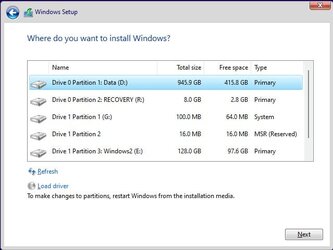
Just make sure to only click on the drive that you want to install insider to when you get to this screen. Don't mess with any other drive listed!

capture2.jpg
 

My Computers My Computers

  • At a glance

    Windows 11AMD Ryzen 7 3800XT32GBEVGA GeForce GTX 1080 Ti
    OS
    Windows 11
    Computer type
    PC/Desktop
    Manufacturer/Model
    Homebuilt
    CPU
    AMD Ryzen 7 3800XT
    Motherboard
    ASUS ROG Crosshair VII Hero (WiFi)
    Memory
    32GB
    Graphics Card(s)
    EVGA GeForce GTX 1080 Ti
  • At a glance

    Windows 11 EducationIntel i7-8550U32GBNvidia Geforce MX150
    Operating System
    Windows 11 Education
    Computer type
    Laptop
    Manufacturer/Model
    Dell Inspiron 7773
    CPU
    Intel i7-8550U
    Memory
    32GB
    Graphics card(s)
    Nvidia Geforce MX150
    Sound Card
    Realtek
    Monitor(s) Displays
    17"
    Screen Resolution
    1920 x 1080
    Hard Drives
    Toshiba 512GB NVMe SSD
    SK Hynix 512GB SATA SSD
    Internet Speed
    Fast!

My Computer My Computer

At a glance

Windows 11 Home 25H2Intel i9-14900KFTeamGroup T-Force Delta DDR5-6000 64Gb(32Gb x 2)MSI Shadow 3X NVIDIA GeForce RTX-5080 w/16Gb ...
OS
Windows 11 Home 25H2
Computer type
PC/Desktop
Manufacturer/Model
IBuyPower Intel 14th Gen Ultra Extreme Gaming PC
CPU
Intel i9-14900KF
Motherboard
ASUS Z790 Gaming WIFI-7
Memory
TeamGroup T-Force Delta DDR5-6000 64Gb(32Gb x 2)
Graphics Card(s)
MSI Shadow 3X NVIDIA GeForce RTX-5080 w/16Gb GDDR7
Sound Card
Realtec 3D Premium Surround Sound Onboard
Monitor(s) Displays
Samsung Odessey G70NC 43"
Screen Resolution
3840 x 2160 144Hz
Hard Drives
WD BLUE SN7100 M.2 PCIe NVMe SSD 1Tb (Main Drive with Win 11 Home)
WD BLUE SN570 M.2 PCIe NVMe SSD 1Tb (Game Drive)
WD BLUE SN570 M.2 PCIe NVMe SSD 1Tb (Programs Drive)
WD BLUE SN570 M.2 PCIe NVMe SSD 1Tb (Data BackUp)
PSU
Enermax Revolution III, 80 Plus Gold, 1000 Watts, Gen 5
Case
Hyte 70, 3 - 120mm Side Fans, 1 - 120mm Back Fan, 3 - 120mm Bottom Fans
Cooling
iBuyPower AW5 360 ARGB Liquid Cooling Radiator
Keyboard
Corsair K70
Mouse
Basilisk v3 RZ01-0400
Internet Speed
Spectrum 1 Gb
Browser
Firefox Nightly
Antivirus
Windows Defender
Other Info
On Board Network and Bluetooth
Just make sure to only click on the drive that you want to install insider to when you get to this screen. Don't mess with any other drive listed!

View attachment 46110
Thanks for this appreciated advice. Everything went smooth. Second drive now runs Win 11 Pro Insider Dev.
 

My Computer My Computer

At a glance

Windows 11 Home 25H2Intel i9-14900KFTeamGroup T-Force Delta DDR5-6000 64Gb(32Gb x 2)MSI Shadow 3X NVIDIA GeForce RTX-5080 w/16Gb ...
OS
Windows 11 Home 25H2
Computer type
PC/Desktop
Manufacturer/Model
IBuyPower Intel 14th Gen Ultra Extreme Gaming PC
CPU
Intel i9-14900KF
Motherboard
ASUS Z790 Gaming WIFI-7
Memory
TeamGroup T-Force Delta DDR5-6000 64Gb(32Gb x 2)
Graphics Card(s)
MSI Shadow 3X NVIDIA GeForce RTX-5080 w/16Gb GDDR7
Sound Card
Realtec 3D Premium Surround Sound Onboard
Monitor(s) Displays
Samsung Odessey G70NC 43"
Screen Resolution
3840 x 2160 144Hz
Hard Drives
WD BLUE SN7100 M.2 PCIe NVMe SSD 1Tb (Main Drive with Win 11 Home)
WD BLUE SN570 M.2 PCIe NVMe SSD 1Tb (Game Drive)
WD BLUE SN570 M.2 PCIe NVMe SSD 1Tb (Programs Drive)
WD BLUE SN570 M.2 PCIe NVMe SSD 1Tb (Data BackUp)
PSU
Enermax Revolution III, 80 Plus Gold, 1000 Watts, Gen 5
Case
Hyte 70, 3 - 120mm Side Fans, 1 - 120mm Back Fan, 3 - 120mm Bottom Fans
Cooling
iBuyPower AW5 360 ARGB Liquid Cooling Radiator
Keyboard
Corsair K70
Mouse
Basilisk v3 RZ01-0400
Internet Speed
Spectrum 1 Gb
Browser
Firefox Nightly
Antivirus
Windows Defender
Other Info
On Board Network and Bluetooth
Thanks for this appreciated advice. Everything went smooth. Second drive now runs Win 11 Pro Insider Dev.
Glad it worked for you and fairly easy.
 

My Computers My Computers

  • At a glance

    Windows 11AMD Ryzen 7 3800XT32GBEVGA GeForce GTX 1080 Ti
    OS
    Windows 11
    Computer type
    PC/Desktop
    Manufacturer/Model
    Homebuilt
    CPU
    AMD Ryzen 7 3800XT
    Motherboard
    ASUS ROG Crosshair VII Hero (WiFi)
    Memory
    32GB
    Graphics Card(s)
    EVGA GeForce GTX 1080 Ti
  • At a glance

    Windows 11 EducationIntel i7-8550U32GBNvidia Geforce MX150
    Operating System
    Windows 11 Education
    Computer type
    Laptop
    Manufacturer/Model
    Dell Inspiron 7773
    CPU
    Intel i7-8550U
    Memory
    32GB
    Graphics card(s)
    Nvidia Geforce MX150
    Sound Card
    Realtek
    Monitor(s) Displays
    17"
    Screen Resolution
    1920 x 1080
    Hard Drives
    Toshiba 512GB NVMe SSD
    SK Hynix 512GB SATA SSD
    Internet Speed
    Fast!
Probably stupid question, but couldn't he just run Setup from Windows 11 Pro and select custom installation and then select to install Windows 11 Dev on the third drive? If there is any compatibility check he could bypass it with the methods described in the respective thread (replace a specific file with an empty dummy and disconnect from the internet before installing). Not sure but he might also need to patch Registry after restarting before proceeding with the installation.
 

My Computers My Computers

  • At a glance

    Windows 11 Pro 23H2 (5699), 25H2 (8655)Mobile DualCore Intel Core 2 Duo T7250, 2000 MHz4GBMobile Intel(R) GMA 4500M (Mobile 4 series)
    OS
    Windows 11 Pro 23H2 (5699), 25H2 (8655)
    Computer type
    Laptop
    Manufacturer/Model
    Acer Extensa 5630EZ
    CPU
    Mobile DualCore Intel Core 2 Duo T7250, 2000 MHz
    Motherboard
    Acer Extensa 5630
    Memory
    4GB
    Graphics Card(s)
    Mobile Intel(R) GMA 4500M (Mobile 4 series)
    Sound Card
    Realtek ALC268 @ Intel 82801IB ICH9 - High Definition Audio Controller
    Monitor(s) Displays
    1
    Screen Resolution
    1280x800
    Hard Drives
    Samsung SSD 850 EVO 250GB SATA Device (250 GB, SATA-III)
    Internet Speed
    VDSL 50 Mbps
    Browser
    MICROSOFT EDGE
    Antivirus
    WINDOWS DEFENDER
    Other Info
    Legacy MBR installation, no TPM, no Secure Boot, no WDDM 2.0 graphics drivers, no SSE4.2, cannot get more unsupported ;) This is only my test laptop. I had installed Windows 11 here before upgrading my main PC. For my main PC I use everyday see my 2nd system specs.
  • At a glance

    Windows 11 Pro v25H2 (build 26200.8655)Intel Core-i7 3770 3.40GHz s1155 (3rd generat...2x Kingston Hyper-X Blu 8GB DDR3-1600GIGABYTE GeForce RTX 3050 WINDFORCE OC V2 6GB...
    Operating System
    Windows 11 Pro v25H2 (build 26200.8655)
    Computer type
    PC/Desktop
    Manufacturer/Model
    Custom-built PC
    CPU
    Intel Core-i7 3770 3.40GHz s1155 (3rd generation)
    Motherboard
    Asus P8H61 s1155 ATX
    Memory
    2x Kingston Hyper-X Blu 8GB DDR3-1600
    Graphics card(s)
    GIGABYTE GeForce RTX 3050 WINDFORCE OC V2 6GB (GV-N3050WF2OCV2-6GD)
    Sound Card
    Realtek HD audio (ALC887)
    Monitor(s) Displays
    Sony Bravia KDL-19L4000 19" LCD TV via VGA
    Screen Resolution
    1440x900 32-bit 60Hz
    Hard Drives
    WD Blue SA510 2.5 1000GB SSD as system disk, Western Digital Caviar Purple 4TB SATA III (WD40PURZ) as second
    PSU
    Thermaltake Litepower RGB 550W Full Wired
    Case
    SUPERCASE MIDI-TOWER
    Cooling
    Deepcool Gamma Archer CPU cooler, 1x 8cm fan at the back
    Keyboard
    Mitsumi 101-key PS/2
    Mouse
    Sunnyline OptiEye PS/2
    Internet Speed
    100Mbps
    Browser
    Microsoft Edge, Mozilla Firefox
    Antivirus
    Microsoft Windows Defender
    Other Info
    Legacy BIOS (MBR) installation, no TPM, no Secure Boot, WDDM 3.0 graphics drivers, WEI score 7.4
Probably stupid question, but couldn't he just run Setup from Windows 11 Pro and select custom installation and then select to install Windows 11 Dev on the third drive? If there is any compatibility check he could bypass it with the methods described in the respective thread (replace a specific file with an empty dummy and disconnect from the internet before installing). Not sure but he might also need to patch Registry after restarting before proceeding with the installation.
You don't get the choice for a custom install when you run setup from within Windows.
 

My Computers My Computers

  • At a glance

    Windows 11AMD Ryzen 7 3800XT32GBEVGA GeForce GTX 1080 Ti
    OS
    Windows 11
    Computer type
    PC/Desktop
    Manufacturer/Model
    Homebuilt
    CPU
    AMD Ryzen 7 3800XT
    Motherboard
    ASUS ROG Crosshair VII Hero (WiFi)
    Memory
    32GB
    Graphics Card(s)
    EVGA GeForce GTX 1080 Ti
  • At a glance

    Windows 11 EducationIntel i7-8550U32GBNvidia Geforce MX150
    Operating System
    Windows 11 Education
    Computer type
    Laptop
    Manufacturer/Model
    Dell Inspiron 7773
    CPU
    Intel i7-8550U
    Memory
    32GB
    Graphics card(s)
    Nvidia Geforce MX150
    Sound Card
    Realtek
    Monitor(s) Displays
    17"
    Screen Resolution
    1920 x 1080
    Hard Drives
    Toshiba 512GB NVMe SSD
    SK Hynix 512GB SATA SSD
    Internet Speed
    Fast!
OK got it.
 

My Computers My Computers

  • At a glance

    Windows 11 Pro 23H2 (5699), 25H2 (8655)Mobile DualCore Intel Core 2 Duo T7250, 2000 MHz4GBMobile Intel(R) GMA 4500M (Mobile 4 series)
    OS
    Windows 11 Pro 23H2 (5699), 25H2 (8655)
    Computer type
    Laptop
    Manufacturer/Model
    Acer Extensa 5630EZ
    CPU
    Mobile DualCore Intel Core 2 Duo T7250, 2000 MHz
    Motherboard
    Acer Extensa 5630
    Memory
    4GB
    Graphics Card(s)
    Mobile Intel(R) GMA 4500M (Mobile 4 series)
    Sound Card
    Realtek ALC268 @ Intel 82801IB ICH9 - High Definition Audio Controller
    Monitor(s) Displays
    1
    Screen Resolution
    1280x800
    Hard Drives
    Samsung SSD 850 EVO 250GB SATA Device (250 GB, SATA-III)
    Internet Speed
    VDSL 50 Mbps
    Browser
    MICROSOFT EDGE
    Antivirus
    WINDOWS DEFENDER
    Other Info
    Legacy MBR installation, no TPM, no Secure Boot, no WDDM 2.0 graphics drivers, no SSE4.2, cannot get more unsupported ;) This is only my test laptop. I had installed Windows 11 here before upgrading my main PC. For my main PC I use everyday see my 2nd system specs.
  • At a glance

    Windows 11 Pro v25H2 (build 26200.8655)Intel Core-i7 3770 3.40GHz s1155 (3rd generat...2x Kingston Hyper-X Blu 8GB DDR3-1600GIGABYTE GeForce RTX 3050 WINDFORCE OC V2 6GB...
    Operating System
    Windows 11 Pro v25H2 (build 26200.8655)
    Computer type
    PC/Desktop
    Manufacturer/Model
    Custom-built PC
    CPU
    Intel Core-i7 3770 3.40GHz s1155 (3rd generation)
    Motherboard
    Asus P8H61 s1155 ATX
    Memory
    2x Kingston Hyper-X Blu 8GB DDR3-1600
    Graphics card(s)
    GIGABYTE GeForce RTX 3050 WINDFORCE OC V2 6GB (GV-N3050WF2OCV2-6GD)
    Sound Card
    Realtek HD audio (ALC887)
    Monitor(s) Displays
    Sony Bravia KDL-19L4000 19" LCD TV via VGA
    Screen Resolution
    1440x900 32-bit 60Hz
    Hard Drives
    WD Blue SA510 2.5 1000GB SSD as system disk, Western Digital Caviar Purple 4TB SATA III (WD40PURZ) as second
    PSU
    Thermaltake Litepower RGB 550W Full Wired
    Case
    SUPERCASE MIDI-TOWER
    Cooling
    Deepcool Gamma Archer CPU cooler, 1x 8cm fan at the back
    Keyboard
    Mitsumi 101-key PS/2
    Mouse
    Sunnyline OptiEye PS/2
    Internet Speed
    100Mbps
    Browser
    Microsoft Edge, Mozilla Firefox
    Antivirus
    Microsoft Windows Defender
    Other Info
    Legacy BIOS (MBR) installation, no TPM, no Secure Boot, WDDM 3.0 graphics drivers, WEI score 7.4
OK got it.
And if you run setup.exe that is in the sources folder, you can only do a custom install to a partition that already has a drive letter, and then Windows will get that same drive letter when it boots into it. So, if for some reason you want Windows install on E: drive (E:\Windows), that is how you do it: run setup.exe from the sources folder and select the E: drive partition to install to.
 

My Computers My Computers

  • At a glance

    Windows 11AMD Ryzen 7 3800XT32GBEVGA GeForce GTX 1080 Ti
    OS
    Windows 11
    Computer type
    PC/Desktop
    Manufacturer/Model
    Homebuilt
    CPU
    AMD Ryzen 7 3800XT
    Motherboard
    ASUS ROG Crosshair VII Hero (WiFi)
    Memory
    32GB
    Graphics Card(s)
    EVGA GeForce GTX 1080 Ti
  • At a glance

    Windows 11 EducationIntel i7-8550U32GBNvidia Geforce MX150
    Operating System
    Windows 11 Education
    Computer type
    Laptop
    Manufacturer/Model
    Dell Inspiron 7773
    CPU
    Intel i7-8550U
    Memory
    32GB
    Graphics card(s)
    Nvidia Geforce MX150
    Sound Card
    Realtek
    Monitor(s) Displays
    17"
    Screen Resolution
    1920 x 1080
    Hard Drives
    Toshiba 512GB NVMe SSD
    SK Hynix 512GB SATA SSD
    Internet Speed
    Fast!
Just boot the computer from a USB flash drive created from the insider ISO. When you get to the screen that lists drives and partitions, just make sure to select the correct drive.


The method that I use is to do the installation manually with dism /apply-image for which there is no tutorial and is done in a command prompt.
Plenty of examples on this forum - I've (as you have too) posted a load of clear (hopefully) step by step instructions on how to do it.

Cheers
jimbo
 

My Computer My Computer

At a glance

Windows XP,11 Linux Fedora Rawhide pre-releas...2 X Intel i7
OS
Windows XP,11 Linux Fedora Rawhide pre-release 45
Computer type
PC/Desktop
CPU
2 X Intel i7
Screen Resolution
4KUHD X 2
Back
Top Bottom