
Navigation
Install the app
How to install the app on iOS
Follow along with the video below to see how to install our site as a web app on your home screen.
Note: This feature may not be available in some browsers.
More options
Style variation
System
Light
Dark
You are using an out of date browser. It may not display this or other websites correctly.
You should upgrade or use an alternative browser.
You should upgrade or use an alternative browser.
Solved How To Make Windows 11 Taskbar Uncombined and Unlocked
- Thread starter blacxarea
- Start date

Haven't seen that in a while. Man I played with that over and over. It is funWe all have our own toys. LOL
It's Rainmeter for me.
My Computer
At a glance
Windows 11 Pro 26H2Intel® Core™ i9-13900K Desktop Processor 16 (...G.Skill Ripjaws V Series 32gb (2x16gb) DDR4 3...Asus Dual Geforce Rtx™ 3060 TI Edition 8gb Gddr6
- OS
- Windows 11 Pro 26H2
- Computer type
- PC/Desktop
- CPU
- Intel® Core™ i9-13900K Desktop Processor 16 (8P+8E)
- Motherboard
- Asus TUF Gaming Z790-PLUS WIFI D4
- Memory
- G.Skill Ripjaws V Series 32gb (2x16gb) DDR4 3600mhz
- Graphics Card(s)
- Asus Dual Geforce Rtx™ 3060 TI Edition 8gb Gddr6
- Monitor(s) Displays
- BenQ EW3270U 31.5” 3840x2160 UHD 16:9 HDR LED 4K LG 27UK850-W 27'' 4K UHD IPS LED Monitor with HDR10
- Screen Resolution
- 3840x2160
- Hard Drives
- Samsung 990 with heatsink PRO PCIe 4.0 Gen 4 NVMe® SSD 1TB
WD_BLACK SN850X NVMe M.2 2280 1TB PCI-Express 4.0
Crucial T500 2TB Gen4
Samsung 970 Evo M.2 2280 2tb Pcie Gen3. X4
- PSU
- Corsair AXi Series AX860i Digital 860W 80 PLUS PSU
- Case
- Fractal Meshify C ATX Mid Tower Case
- Keyboard
- Logi MX Keys
- Mouse
- Logi M705
- Internet Speed
- 400 mbs
- Browser
- Firefox
- Antivirus
- Eset NOD32
- Other Info
- Love fast boots

- Local time
- 5:03 PM
- Posts
- 918
- OS
- Windows 11 x64 v23H2 Build 22631.3958
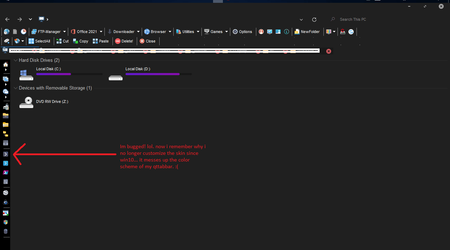
manage to find a workaround for that bug not perfect but eh, it works.
also, address bar and ribbon are gone! need to ask modders which files they are on.
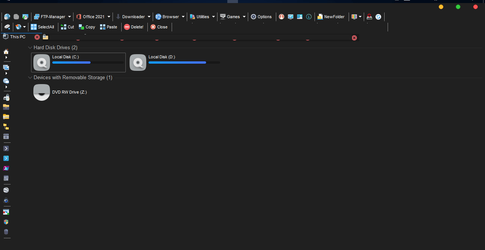
also, address bar and ribbon are gone!
need to ask modders which files they are on. My Computer
At a glance
Windows 11 x64 v23H2 Build 22631.3958
- OS
- Windows 11 x64 v23H2 Build 22631.3958
- Computer type
- PC/Desktop
- Manufacturer/Model
- Acer

(X): Oh no.. I never know that since I don't use Qttab..
My Computer
At a glance
Windows 11AMD Phenom(tm) II X2 555 Processor 3.20 GHzKingston 16GB DDR3NVidia GeForce GTX 650
- OS
- Windows 11
- Computer type
- PC/Desktop
- Manufacturer/Model
- Unbranded
- CPU
- AMD Phenom(tm) II X2 555 Processor 3.20 GHz
- Motherboard
- Asus M4A785T-M
- Memory
- Kingston 16GB DDR3
- Graphics Card(s)
- NVidia GeForce GTX 650
- Sound Card
- VIA HD Audio
- Monitor(s) Displays
- 2x LG 20" Display
- Screen Resolution
- 1600 x 900 60MHz
- Hard Drives
- WD Blue 1TB HDD
ADATA 500GB SSD
Midas Force 500GB SSD
- PSU
- Enermax 500W
- Case
- Unbranded
- Cooling
- Unbranded
- Keyboard
- Logitech Wired K120
- Mouse
- Logitech Wired B100
- Internet Speed
- 20MB Download 1,5MB Upload
- Browser
- Firefox
- Antivirus
- McAffee, Malwarebytes, Windows Defender
- Other Info
- Are you sneaking?
Indeed. Dangerous to play with it at our work time, because we'll forget just everything..Haven't seen that in a while. Man I played with that over and over. It is fun
My Computer
At a glance
Windows 11AMD Phenom(tm) II X2 555 Processor 3.20 GHzKingston 16GB DDR3NVidia GeForce GTX 650
- OS
- Windows 11
- Computer type
- PC/Desktop
- Manufacturer/Model
- Unbranded
- CPU
- AMD Phenom(tm) II X2 555 Processor 3.20 GHz
- Motherboard
- Asus M4A785T-M
- Memory
- Kingston 16GB DDR3
- Graphics Card(s)
- NVidia GeForce GTX 650
- Sound Card
- VIA HD Audio
- Monitor(s) Displays
- 2x LG 20" Display
- Screen Resolution
- 1600 x 900 60MHz
- Hard Drives
- WD Blue 1TB HDD
ADATA 500GB SSD
Midas Force 500GB SSD
- PSU
- Enermax 500W
- Case
- Unbranded
- Cooling
- Unbranded
- Keyboard
- Logitech Wired K120
- Mouse
- Logitech Wired B100
- Internet Speed
- 20MB Download 1,5MB Upload
- Browser
- Firefox
- Antivirus
- McAffee, Malwarebytes, Windows Defender
- Other Info
- Are you sneaking?
Now I believe you'll try to get the other working themes. LOL..manage to find a workaround for that bug not perfect but eh, it works.
also, address bar and ribbon are gone!
View attachment 4448
My Computer
At a glance
Windows 11AMD Phenom(tm) II X2 555 Processor 3.20 GHzKingston 16GB DDR3NVidia GeForce GTX 650
- OS
- Windows 11
- Computer type
- PC/Desktop
- Manufacturer/Model
- Unbranded
- CPU
- AMD Phenom(tm) II X2 555 Processor 3.20 GHz
- Motherboard
- Asus M4A785T-M
- Memory
- Kingston 16GB DDR3
- Graphics Card(s)
- NVidia GeForce GTX 650
- Sound Card
- VIA HD Audio
- Monitor(s) Displays
- 2x LG 20" Display
- Screen Resolution
- 1600 x 900 60MHz
- Hard Drives
- WD Blue 1TB HDD
ADATA 500GB SSD
Midas Force 500GB SSD
- PSU
- Enermax 500W
- Case
- Unbranded
- Cooling
- Unbranded
- Keyboard
- Logitech Wired K120
- Mouse
- Logitech Wired B100
- Internet Speed
- 20MB Download 1,5MB Upload
- Browser
- Firefox
- Antivirus
- McAffee, Malwarebytes, Windows Defender
- Other Info
- Are you sneaking?
- Local time
- 5:03 PM
- Posts
- 918
- OS
- Windows 11 x64 v23H2 Build 22631.3958
Now I believe you'll try to get the other working themes. LOL..
im bored. just waiting for the next update... but before it comes imma mess around.

My Computer
At a glance
Windows 11 x64 v23H2 Build 22631.3958
- OS
- Windows 11 x64 v23H2 Build 22631.3958
- Computer type
- PC/Desktop
- Manufacturer/Model
- Acer
I think we've got similar boredom waiting for updates. I spent my 2 days to animate my desktop background and checking the Windows Update almost every hour (Never tried that before Win11).im bored. just waiting for the next update... but before it comes imma mess around.
My Computer
At a glance
Windows 11AMD Phenom(tm) II X2 555 Processor 3.20 GHzKingston 16GB DDR3NVidia GeForce GTX 650
- OS
- Windows 11
- Computer type
- PC/Desktop
- Manufacturer/Model
- Unbranded
- CPU
- AMD Phenom(tm) II X2 555 Processor 3.20 GHz
- Motherboard
- Asus M4A785T-M
- Memory
- Kingston 16GB DDR3
- Graphics Card(s)
- NVidia GeForce GTX 650
- Sound Card
- VIA HD Audio
- Monitor(s) Displays
- 2x LG 20" Display
- Screen Resolution
- 1600 x 900 60MHz
- Hard Drives
- WD Blue 1TB HDD
ADATA 500GB SSD
Midas Force 500GB SSD
- PSU
- Enermax 500W
- Case
- Unbranded
- Cooling
- Unbranded
- Keyboard
- Logitech Wired K120
- Mouse
- Logitech Wired B100
- Internet Speed
- 20MB Download 1,5MB Upload
- Browser
- Firefox
- Antivirus
- McAffee, Malwarebytes, Windows Defender
- Other Info
- Are you sneaking?

- Local time
- 5:03 AM
- Posts
- 18,454
- OS
- Windows 11 Pro
I'm Chairman of the bored!...im bored...
Between the explorer.exe hack, doing a full disk cleanup and various other stupid things, I have nothing to do but enjoy a faux Windows 10 with a bit of makeup applied here and there!!!
And no, I didn't do a backup!!!

My Computers
-
At a glance
Windows 11 Pro- OS
- Windows 11 Pro
- Computer type
- PC/Desktop
- Manufacturer/Model
- ASUS ROG Strix
-
At a glance
Windows 11 Pro- Operating System
- Windows 11 Pro
- Computer type
- Laptop
- Manufacturer/Model
- ASUS VivoBook
-
ASUS VivoBook 'Lite' ~ Windows 11 Home
This Windows11 game really really needs some new DLC's..I'm Chairman of the bored!
Between the explorer.exe hack, doing a full disk cleanup and various other stupid things, I have nothing to do but enjoy a faux Windows 10 with a bit of makeup applied here and there!!!
And no, I didn't do a backup!!!
My Computer
At a glance
Windows 11AMD Phenom(tm) II X2 555 Processor 3.20 GHzKingston 16GB DDR3NVidia GeForce GTX 650
- OS
- Windows 11
- Computer type
- PC/Desktop
- Manufacturer/Model
- Unbranded
- CPU
- AMD Phenom(tm) II X2 555 Processor 3.20 GHz
- Motherboard
- Asus M4A785T-M
- Memory
- Kingston 16GB DDR3
- Graphics Card(s)
- NVidia GeForce GTX 650
- Sound Card
- VIA HD Audio
- Monitor(s) Displays
- 2x LG 20" Display
- Screen Resolution
- 1600 x 900 60MHz
- Hard Drives
- WD Blue 1TB HDD
ADATA 500GB SSD
Midas Force 500GB SSD
- PSU
- Enermax 500W
- Case
- Unbranded
- Cooling
- Unbranded
- Keyboard
- Logitech Wired K120
- Mouse
- Logitech Wired B100
- Internet Speed
- 20MB Download 1,5MB Upload
- Browser
- Firefox
- Antivirus
- McAffee, Malwarebytes, Windows Defender
- Other Info
- Are you sneaking?
- Local time
- 5:03 AM
- Posts
- 18,454
- OS
- Windows 11 Pro
XYplorer works well in W11.
Just re-visited the program..., it's pretty sophisticated!
Just re-visited the program..., it's pretty sophisticated!
My Computers
-
At a glance
Windows 11 Pro- OS
- Windows 11 Pro
- Computer type
- PC/Desktop
- Manufacturer/Model
- ASUS ROG Strix
-
At a glance
Windows 11 Pro- Operating System
- Windows 11 Pro
- Computer type
- Laptop
- Manufacturer/Model
- ASUS VivoBook
-
ASUS VivoBook 'Lite' ~ Windows 11 Home
- Local time
- 5:03 PM
- Posts
- 918
- OS
- Windows 11 x64 v23H2 Build 22631.3958
XYplorer works well in W11.
Just re-visited the program..., it's pretty sophisticated!
I use that when transferring files to multiple external drives. very convenient and efficient except i dont know how to integrate teracopy. also has its own search function which i find handy.
hmm... perhaps i'll make time to look into it deeper and try to customize it like qttabbar.
tablacus is also nice... has multiple panes.
My Computer
At a glance
Windows 11 x64 v23H2 Build 22631.3958
- OS
- Windows 11 x64 v23H2 Build 22631.3958
- Computer type
- PC/Desktop
- Manufacturer/Model
- Acer
I quit digging for these last 3 days. Spending my most time to hibernate myself, waiting for the newest build..
My Computer
At a glance
Windows 11AMD Phenom(tm) II X2 555 Processor 3.20 GHzKingston 16GB DDR3NVidia GeForce GTX 650
- OS
- Windows 11
- Computer type
- PC/Desktop
- Manufacturer/Model
- Unbranded
- CPU
- AMD Phenom(tm) II X2 555 Processor 3.20 GHz
- Motherboard
- Asus M4A785T-M
- Memory
- Kingston 16GB DDR3
- Graphics Card(s)
- NVidia GeForce GTX 650
- Sound Card
- VIA HD Audio
- Monitor(s) Displays
- 2x LG 20" Display
- Screen Resolution
- 1600 x 900 60MHz
- Hard Drives
- WD Blue 1TB HDD
ADATA 500GB SSD
Midas Force 500GB SSD
- PSU
- Enermax 500W
- Case
- Unbranded
- Cooling
- Unbranded
- Keyboard
- Logitech Wired K120
- Mouse
- Logitech Wired B100
- Internet Speed
- 20MB Download 1,5MB Upload
- Browser
- Firefox
- Antivirus
- McAffee, Malwarebytes, Windows Defender
- Other Info
- Are you sneaking?
- Local time
- 5:03 AM
- Posts
- 18,454
- OS
- Windows 11 Pro
Yeah..., I can't find much more to do to W11 since I have it mostly dressed in W10 clothing!!!I quit digging for these last 3 days. Spending my most time to hibernate myself, waiting for the newest build..

My Computers
-
At a glance
Windows 11 Pro- OS
- Windows 11 Pro
- Computer type
- PC/Desktop
- Manufacturer/Model
- ASUS ROG Strix
-
At a glance
Windows 11 Pro- Operating System
- Windows 11 Pro
- Computer type
- Laptop
- Manufacturer/Model
- ASUS VivoBook
-
ASUS VivoBook 'Lite' ~ Windows 11 Home

- Local time
- 5:03 AM
- Posts
- 4,796
- OS
- Windows 11 Pro
just noticed yesterday (been a while since i used it), but after the .100 update, microsoft office 2019 now has rounded UI... i'm sure this has been noticed already. just something i was waiting for, so figured i'd point it out.
My Computer
At a glance
Windows 11 Pro
- OS
- Windows 11 Pro

- Local time
- 5:03 AM
- Posts
- 130
- OS
- Windows 11
A week or so back I installed and ran StartIsBack++. The startmenu looks good but I can no longer click the magnifying glass on the taskbar to do a search. To revert back to the Windows 11 Defaultstart menu I uninstalled StartIsBack++. Now I have no start menu at all. So, can someone help me revert back to the Windows 11 start menu that works? Thanks
My Computer
At a glance
Windows 11I7 870016gbMSI 1050t
- OS
- Windows 11
- Computer type
- PC/Desktop
- Manufacturer/Model
- HP Pavilion Gaming 790-0077c
- CPU
- I7 8700
- Motherboard
- Berks Form factor: ATX, 36.45 x 24.88 cm (15.35 x 9.79 in)
- Memory
- 16gb
- Graphics Card(s)
- MSI 1050t
- Sound Card
- Creative SoundBlaster AE-9
- Monitor(s) Displays
- Twin Samsung 27" curved
- Screen Resolution
- 1920 x 1080
- Hard Drives
- 512Gb and 1Tb
- Local time
- 5:03 AM
- Posts
- 130
- OS
- Windows 11
Thank you Vann. I may have seen bad instructons for replacing explorer.exe. I couldn't get it to work. I tried to copy explorer.exe to the existing location, but I get a file protection error. I'll go back to the drawing board.did you replaced the explorer.exe?
My Computer
At a glance
Windows 11I7 870016gbMSI 1050t
- OS
- Windows 11
- Computer type
- PC/Desktop
- Manufacturer/Model
- HP Pavilion Gaming 790-0077c
- CPU
- I7 8700
- Motherboard
- Berks Form factor: ATX, 36.45 x 24.88 cm (15.35 x 9.79 in)
- Memory
- 16gb
- Graphics Card(s)
- MSI 1050t
- Sound Card
- Creative SoundBlaster AE-9
- Monitor(s) Displays
- Twin Samsung 27" curved
- Screen Resolution
- 1920 x 1080
- Hard Drives
- 512Gb and 1Tb
Replacing explorer.exe can't be done while you're running Win11, even if it's in Safe Mode.Thank you Vann. I may have seen bad instructons for replacing explorer.exe. I couldn't get it to work. I tried to copy explorer.exe to the existing location, but I get a file protection error. I'll go back to the drawing board.
Boot in Command Prompt. But when you run updates, this file will be replaced by the new one.
So, I no longer replace explorer.exe, just applied the "undocking" reghack and installed StartIsBack++
Working smoothly here, checked after 24 hours running the newest build (22000.120).
My Computer
At a glance
Windows 11AMD Phenom(tm) II X2 555 Processor 3.20 GHzKingston 16GB DDR3NVidia GeForce GTX 650
- OS
- Windows 11
- Computer type
- PC/Desktop
- Manufacturer/Model
- Unbranded
- CPU
- AMD Phenom(tm) II X2 555 Processor 3.20 GHz
- Motherboard
- Asus M4A785T-M
- Memory
- Kingston 16GB DDR3
- Graphics Card(s)
- NVidia GeForce GTX 650
- Sound Card
- VIA HD Audio
- Monitor(s) Displays
- 2x LG 20" Display
- Screen Resolution
- 1600 x 900 60MHz
- Hard Drives
- WD Blue 1TB HDD
ADATA 500GB SSD
Midas Force 500GB SSD
- PSU
- Enermax 500W
- Case
- Unbranded
- Cooling
- Unbranded
- Keyboard
- Logitech Wired K120
- Mouse
- Logitech Wired B100
- Internet Speed
- 20MB Download 1,5MB Upload
- Browser
- Firefox
- Antivirus
- McAffee, Malwarebytes, Windows Defender
- Other Info
- Are you sneaking?
Almost never use Office for many years, even when I have it on my PC's. Installed 2021 version and don't really know the differences..just noticed yesterday (been a while since i used it), but after the .100 update, microsoft office 2019 now has rounded UI... i'm sure this has been noticed already. just something i was waiting for, so figured i'd point it out.
My Computer
At a glance
Windows 11AMD Phenom(tm) II X2 555 Processor 3.20 GHzKingston 16GB DDR3NVidia GeForce GTX 650
- OS
- Windows 11
- Computer type
- PC/Desktop
- Manufacturer/Model
- Unbranded
- CPU
- AMD Phenom(tm) II X2 555 Processor 3.20 GHz
- Motherboard
- Asus M4A785T-M
- Memory
- Kingston 16GB DDR3
- Graphics Card(s)
- NVidia GeForce GTX 650
- Sound Card
- VIA HD Audio
- Monitor(s) Displays
- 2x LG 20" Display
- Screen Resolution
- 1600 x 900 60MHz
- Hard Drives
- WD Blue 1TB HDD
ADATA 500GB SSD
Midas Force 500GB SSD
- PSU
- Enermax 500W
- Case
- Unbranded
- Cooling
- Unbranded
- Keyboard
- Logitech Wired K120
- Mouse
- Logitech Wired B100
- Internet Speed
- 20MB Download 1,5MB Upload
- Browser
- Firefox
- Antivirus
- McAffee, Malwarebytes, Windows Defender
- Other Info
- Are you sneaking?
- Local time
- 5:03 AM
- Posts
- 130
- OS
- Windows 11
DoIneeed to Take Ownership of the explorer.exe files?Replacing explorer.exe can't be done while you're running Win11, even if it's in Safe Mode.
Boot in Command Prompt. But when you run updates, this file will be replaced by the new one.
So, I no longer replace explorer.exe, just applied the "undocking" reghack and installed StartIsBack++
Working smoothly here, checked after 24 hours running the newest build (22000.120).
My Computer
At a glance
Windows 11I7 870016gbMSI 1050t
- OS
- Windows 11
- Computer type
- PC/Desktop
- Manufacturer/Model
- HP Pavilion Gaming 790-0077c
- CPU
- I7 8700
- Motherboard
- Berks Form factor: ATX, 36.45 x 24.88 cm (15.35 x 9.79 in)
- Memory
- 16gb
- Graphics Card(s)
- MSI 1050t
- Sound Card
- Creative SoundBlaster AE-9
- Monitor(s) Displays
- Twin Samsung 27" curved
- Screen Resolution
- 1920 x 1080
- Hard Drives
- 512Gb and 1Tb
Similar threads

- Replies
- 1
- Views
- 2K


- Replies
- 2
- Views
- 3K

- Replies
- 0
- Views
- 1K
- Replies
- 3
- Views
- 902


Latest Tutorials
-
 Personalization Change Category for App in Start Menu All Apps on Windows 11
- Started by Brink
- Replies: 0
-
 Accessibility Enable or Disable Auto Zoom Out for Narrator Math Reading Navigation in Windows 11
- Started by Brink
- Replies: 0
-
 Accessibility Change Narrator Math Reading Navigation Verbosity in Windows 11
- Started by Brink
- Replies: 0
-
 Accessibility Change Narrator Math Reading Navigation Mode in Windows 11
- Started by Brink
- Replies: 0
-
 Accessibility Change Narrator Math Reading Pause Factor in Windows 11
- Started by Brink
- Replies: 0