How To Recover An Accidently Deleted Macrium Image?


An interesting thread.

As others have noted, a lot (perhaps most) of the freeware recover programs are limited in the file size they are able to recover. 2Gb seems to be the general limit.

Recuva (freeware version 1.54.120, 64 bit) states that it has no file size limiting recovery, although its' website does state that successful revovery ranges from 30% - 60%, with the paid Pro version at 80%. In answer to on of SIW2' question, the 1.54.120 version, the most recent so it says, does have an "All Files" menu option.

So I decided to test the claimed "no file size limit" - 2 Gb is pretty anaemic for full-throated macrium backup files.

I copied a mrimg file of about 22 Gb from one external USB drive where the backups are stored to another external USB drive that had not been previously used to store mrimg files. I deleted this 22 GTb file and found no residual bits or pieces after scan. I added nor deleted any other data - completely untouched after the initial delete. Then I asked Recuva to recover it.

I told Recuva which disk, which folder, and the name of the deleted 22 Gb file. Recuva found it on SCAN in a few seconds, listing the correct parameters of name plus extension, size and date. Most correctly, and also listed it as an mrimg file.

So I pressed the recover button. Within 0.1 seconds (Recuva boasted), it proudly announced that 0 bytes of 0 files were recovered because file contents could not be found. I may try again later, but that result is not all that encouraging.
 

My Computer My Computer

At a glance

Windows 11Intel i5 10210U16GbIntel UHD
OS
Windows 11
Computer type
Laptop
Manufacturer/Model
HP 15s_du1xxx
CPU
Intel i5 10210U
Motherboard
85F1
Memory
16Gb
Graphics Card(s)
Intel UHD
Sound Card
Realtek
Screen Resolution
1920 x 1080
Not sure why it isnt working for some. Maybe it varies depending on the type of disk. My tests were done with a sata connected mechanical disk.
 

My Computers My Computers

  • At a glance

    Win7,Win11i7-97002x16gb 3600mhz
    OS
    Win7,Win11
    Computer type
    PC/Desktop
    CPU
    i7-9700
    Motherboard
    gigabyte b365m ds3h
    Memory
    2x16gb 3600mhz
    Monitor(s) Displays
    benq gw2480
    PSU
    bequiet pure power 11 400CM
    Cooling
    cryorig m9i
  • At a glance

    win7,win11i5-84002x8gb 3200
    Operating System
    win7,win11
    Computer type
    PC/Desktop
    CPU
    i5-8400
    Motherboard
    gigabyte b365m ds3h
    Memory
    2x8gb 3200
    PSU
    xfx pro 450

My Computers My Computers

  • At a glance

    Win7,Win11i7-97002x16gb 3600mhz
    OS
    Win7,Win11
    Computer type
    PC/Desktop
    CPU
    i7-9700
    Motherboard
    gigabyte b365m ds3h
    Memory
    2x16gb 3600mhz
    Monitor(s) Displays
    benq gw2480
    PSU
    bequiet pure power 11 400CM
    Cooling
    cryorig m9i
  • At a glance

    win7,win11i5-84002x8gb 3200
    Operating System
    win7,win11
    Computer type
    PC/Desktop
    CPU
    i5-8400
    Motherboard
    gigabyte b365m ds3h
    Memory
    2x8gb 3200
    PSU
    xfx pro 450
Crisis over!

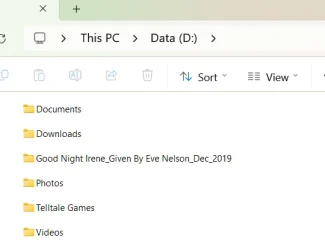
A few minutes ago, using the 'search' on my taskbar, I searched for a word I know is in a document folder name. When I looked through the results, I noticed a .JPG with that word in its name. It was a folder named Crystals Hair (a Granddaughter), in a folder named Telltale Games, on the D:\ drive.

Long story short: All the missing photos are on the D:\ drive, inside a folder named Telltale Games. That folder has a couple of PC games I tried out years ago. I have never been in the folder since as I now play on a PS4 Pro & Xbox Series X.

When I upgraded from Win 10 to Win 11, my Photos folder somehow got moved from C:\ to D:\
The C & D are two separate drives. The D drive has 2 partitions, D & E.

Some readers may think I had moved it there previously & forgot I had done so. If I had moved it, I would have put it on the root of D:\, not in the Telltale Games folder!

I just now Googled 'missing/moved folders when upgrading from Windows 10 to Windows 11' and found stories of folders going missing or being found in other places. Do any readers know of this?

I doubt I will ever find out how my photos folder got to where it did.
I will now keep two copies of both my Macrium backups & my Docs, Photos & Videos, on two separate drives.

Thanks to all who have helped me. I won't mark this thread as solved, as it would give the wrong impression, as my .mrimg has not been recovered.
I don't need to recover it now but this thread will certainly help others, with all the testing results that have been posted.

I hope 2025 will be good for all of you :)
 

Attachments

  • Screenshot 2024-12-30 #1.webp
    Screenshot 2024-12-30 #1.webp
    11.6 KB · Views: 1
  • Screenshot 2024-12-30 #2.webp
    Screenshot 2024-12-30 #2.webp
    10.2 KB · Views: 1

My Computer My Computer

At a glance

Windows 11 Pro 25H2 Version 10.0.26200 Build ...AMD Ryzen AI 7 350 w/ Radeon 860M (2.00 GHz)Hynix 32 GBAMD Radeon 860M
OS
Windows 11 Pro 25H2 Version 10.0.26200 Build 26200
Computer type
Laptop
Manufacturer/Model
Lenovo YOGA-SLIM-7 (10th Gen) 14"-14AKP10
CPU
AMD Ryzen AI 7 350 w/ Radeon 860M (2.00 GHz)
Motherboard
Lenovo
Memory
Hynix 32 GB
Graphics Card(s)
AMD Radeon 860M
Sound Card
Realtek Audio
Monitor(s) Displays
OLED
Screen Resolution
1920 x 1200
Hard Drives
SSD 1TB SAMSUNG MZAL81T0HFLB-00BL2
Internet Speed
Fibre 500/300
Browser
Google Chrome & Firefox & Brave & Edge
Antivirus
Windows Security
Not sure why it isnt working for some. Maybe it varies depending on the type of disk. My tests were done with a sata connected mechanical disk.
My image file was on a USB-attached 4TB mechanical disk.
 

My Computer My Computer

At a glance

Windows 11 Pro 25H2 Version 10.0.26200 Build ...AMD Ryzen AI 7 350 w/ Radeon 860M (2.00 GHz)Hynix 32 GBAMD Radeon 860M
OS
Windows 11 Pro 25H2 Version 10.0.26200 Build 26200
Computer type
Laptop
Manufacturer/Model
Lenovo YOGA-SLIM-7 (10th Gen) 14"-14AKP10
CPU
AMD Ryzen AI 7 350 w/ Radeon 860M (2.00 GHz)
Motherboard
Lenovo
Memory
Hynix 32 GB
Graphics Card(s)
AMD Radeon 860M
Sound Card
Realtek Audio
Monitor(s) Displays
OLED
Screen Resolution
1920 x 1200
Hard Drives
SSD 1TB SAMSUNG MZAL81T0HFLB-00BL2
Internet Speed
Fibre 500/300
Browser
Google Chrome & Firefox & Brave & Edge
Antivirus
Windows Security
@jumanji
have you got anything to work in your tests
 
Last edited:

My Computers My Computers

  • At a glance

    Win7,Win11i7-97002x16gb 3600mhz
    OS
    Win7,Win11
    Computer type
    PC/Desktop
    CPU
    i7-9700
    Motherboard
    gigabyte b365m ds3h
    Memory
    2x16gb 3600mhz
    Monitor(s) Displays
    benq gw2480
    PSU
    bequiet pure power 11 400CM
    Cooling
    cryorig m9i
  • At a glance

    win7,win11i5-84002x8gb 3200
    Operating System
    win7,win11
    Computer type
    PC/Desktop
    CPU
    i5-8400
    Motherboard
    gigabyte b365m ds3h
    Memory
    2x8gb 3200
    PSU
    xfx pro 450
@SIW2

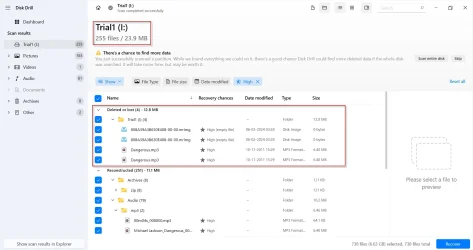
I just finished testing Disk Drill. After a one and half hour scan It showed the mrimg file and and the mp3 file under Deleted or lost files with Excellent recovery rate. But know what? The mrimg file is a zero byte file. Screenshots below
What can one do with an empty file ? :-)

30-12-2024 12-44-58.webp


30-12-2024 12-26-32.webp

I could preview and play the mp3 file''

30-12-2024 12-12-33.webp

Referring to your EaseUS Data Recovery screenshot is your *.mrimg file just 24MB????
 

My Computers My Computers

  • At a glance

    Windows 11 Pro Version:25H2 OS Build: 26200.865512th Gen Intel core i5-1235U(Alder16*2 (32 GB) DDR 4-3200(1600MHz) Crucial Tech...Intel Iris Xe Graphics (Internal)
    OS
    Windows 11 Pro Version:25H2 OS Build: 26200.8655
    Computer type
    PC/Desktop
    Manufacturer/Model
    Beelink Mini PC Model: SEi12
    CPU
    12th Gen Intel core i5-1235U(Alder
    Motherboard
    SEi (manufactured by AZW)
    Memory
    16*2 (32 GB) DDR 4-3200(1600MHz) Crucial Technology
    Graphics Card(s)
    Intel Iris Xe Graphics (Internal)
    Sound Card
    Internal
    Monitor(s) Displays
    BenQ GW2283
    Screen Resolution
    1920*1080
    Hard Drives
    500GB NVME (Kingston SNV2S500G)
    1TB (Crucial CT1000BX500SSD1)
    PSU
    Power Brick 19V-6.32A , 120.08W
    Keyboard
    Dell KB3322Wi (Wireless)
    Mouse
    Dell WM118t (Wireless)
    Internet Speed
    4G/5G
    Browser
    MS Edge, Chrome
    Antivirus
    Malwarebytes Premium - Subscription
  • At a glance

    Windows 11 Home Version 25H2 Build 26200.8655Intel Core i3 8145UIntel Optane 16GB module + DDR 4 16GB (Optane...Intel UHD Graphics 620
    Operating System
    Windows 11 Home Version 25H2 Build 26200.8655
    Computer type
    PC/Desktop
    Manufacturer/Model
    Dell Inspiron 3280 AIO 22"
    CPU
    Intel Core i3 8145U
    Motherboard
    Dell inc. 027W48
    Memory
    Intel Optane 16GB module + DDR 4 16GB (Optane disabled.)
    Graphics card(s)
    Intel UHD Graphics 620
    Sound Card
    Internal
    Monitor(s) Displays
    Dell Monitor 22"
    Screen Resolution
    1920x1080
    Hard Drives
    Crucial CT1000BX500SSD1 ; 1000,2 GB
    PSU
    Power Brick
    Case
    All-in one
    Keyboard
    Dell Wireless KM636
    Mouse
    Dell Wireless KM 636
    Internet Speed
    4G
    Browser
    Edge, Chrome
    Antivirus
    Malwarebytes
    Other Info
    Upgraded from Windows 10 Home to Windows 11 Home on 28 Oct 2023
Yes it is 24 mb and recovered successfully.

For test purposes can easily image only the esp partition with macrium.

Double clicking on the recovered .mrimg file

recovered-mrimg.webp

It mounts fine and is all there in perfect condition.
 

My Computers My Computers

  • At a glance

    Win7,Win11i7-97002x16gb 3600mhz
    OS
    Win7,Win11
    Computer type
    PC/Desktop
    CPU
    i7-9700
    Motherboard
    gigabyte b365m ds3h
    Memory
    2x16gb 3600mhz
    Monitor(s) Displays
    benq gw2480
    PSU
    bequiet pure power 11 400CM
    Cooling
    cryorig m9i
  • At a glance

    win7,win11i5-84002x8gb 3200
    Operating System
    win7,win11
    Computer type
    PC/Desktop
    CPU
    i5-8400
    Motherboard
    gigabyte b365m ds3h
    Memory
    2x8gb 3200
    PSU
    xfx pro 450
Yes it is 24 mb and recovered successfully.

It mounts fine and is all there in perfect condition.
(y)

I tried EaseUs Data Recovery wizard Free. It showed the correct file name and size (78.16 GB) of the mrimg file but could not be copied since free version is limited to 2GB data. I could preview, play and recover the Dangerous.mp3.

30-12-2024 21-55-10.webp
 

My Computers My Computers

  • At a glance

    Windows 11 Pro Version:25H2 OS Build: 26200.865512th Gen Intel core i5-1235U(Alder16*2 (32 GB) DDR 4-3200(1600MHz) Crucial Tech...Intel Iris Xe Graphics (Internal)
    OS
    Windows 11 Pro Version:25H2 OS Build: 26200.8655
    Computer type
    PC/Desktop
    Manufacturer/Model
    Beelink Mini PC Model: SEi12
    CPU
    12th Gen Intel core i5-1235U(Alder
    Motherboard
    SEi (manufactured by AZW)
    Memory
    16*2 (32 GB) DDR 4-3200(1600MHz) Crucial Technology
    Graphics Card(s)
    Intel Iris Xe Graphics (Internal)
    Sound Card
    Internal
    Monitor(s) Displays
    BenQ GW2283
    Screen Resolution
    1920*1080
    Hard Drives
    500GB NVME (Kingston SNV2S500G)
    1TB (Crucial CT1000BX500SSD1)
    PSU
    Power Brick 19V-6.32A , 120.08W
    Keyboard
    Dell KB3322Wi (Wireless)
    Mouse
    Dell WM118t (Wireless)
    Internet Speed
    4G/5G
    Browser
    MS Edge, Chrome
    Antivirus
    Malwarebytes Premium - Subscription
  • At a glance

    Windows 11 Home Version 25H2 Build 26200.8655Intel Core i3 8145UIntel Optane 16GB module + DDR 4 16GB (Optane...Intel UHD Graphics 620
    Operating System
    Windows 11 Home Version 25H2 Build 26200.8655
    Computer type
    PC/Desktop
    Manufacturer/Model
    Dell Inspiron 3280 AIO 22"
    CPU
    Intel Core i3 8145U
    Motherboard
    Dell inc. 027W48
    Memory
    Intel Optane 16GB module + DDR 4 16GB (Optane disabled.)
    Graphics card(s)
    Intel UHD Graphics 620
    Sound Card
    Internal
    Monitor(s) Displays
    Dell Monitor 22"
    Screen Resolution
    1920x1080
    Hard Drives
    Crucial CT1000BX500SSD1 ; 1000,2 GB
    PSU
    Power Brick
    Case
    All-in one
    Keyboard
    Dell Wireless KM636
    Mouse
    Dell Wireless KM 636
    Internet Speed
    4G
    Browser
    Edge, Chrome
    Antivirus
    Malwarebytes
    Other Info
    Upgraded from Windows 10 Home to Windows 11 Home on 28 Oct 2023
Back
Top Bottom