How to stop Windows auto updates?


Rich A

Well-known member
Local time
11:48 AM
Posts
17
Location
About 2 feet in front of Monitor
OS
Windows 11 Pro 25H2 Build 26200.8457
Is there any way to "control" windows updates with the latest Win 11? I'd simply like to be notified when they are available AND be able to selectively pick which to download. Actually I'd be fine with auto downloading them but I must be able to control when they are actually installed. Been a user of windows since before PC days and the first windows.

Now have my first Win 11 install for about 10 months on a headless custom built HTPC running 24/7 and some of windows 11 features are driving me crazy. Constantly being interupted and I have auto update totally disabled in group policy BUT even though it's disabled, Windows continues to update automatically any time it wants every day. Been playing for weeks with all the "crazy complicated" focus assist junk and wndows update settngs. Recently the most recent major OS update has caused even more new probems. I've seen recent other posts here where someone complained that disabling updates in group policy settings no longer worked but no resolution was found yet. My next try will be to hack the registry. Looking for any advise here first.
 

My Computer My Computer

At a glance

Windows 11 Pro 25H2 Build 26200.8457Intel i5-8259U16 GBIntel(R) Iris(R) Plus Graphics 655 [Display a...
OS
Windows 11 Pro 25H2 Build 26200.8457
Computer type
PC/Desktop
Manufacturer/Model
BeeLink Mini PC SEi 8
CPU
Intel i5-8259U
Motherboard
Board: AZW SEi UEFI: American Megatrends Inc. 5.13 03/01/2022
Memory
16 GB
Graphics Card(s)
Intel(R) Iris(R) Plus Graphics 655 [Display adapter]
Sound Card
1- Intel(R) Display Audio 2 - USB PnP Sound Device
Monitor(s) Displays
1 LG ULTRAFINE [Monitor] (27.2" 4k HDMI 2 - LG 27" HD TV
Screen Resolution
1 - 3840 x 2160 2 - 1920 x 1080
Hard Drives
1 - CT500P3PSSD8 500.11 GB NVMe
2 - SPCC 2.5 SSD 512.11 GB SSD
PSU
19v @ 3A External
Case
Mini - PC
Cooling
1 fan internal heat sinked CPU
Keyboard
Logitech
Mouse
Logitech
Internet Speed
GB
Browser
Brave
Antivirus
BitDefender
Other Info
1 of 3 PCs networked and shared via 4K HDMI KVM switch, and dual Monitors (1 HDMI 4K, 1 HDMI HD monitor)
From the top of my head...

You could set it on a Metered connection - that way big updated won't start till you manually select download.

You could disable the services - but you won't see what updates are available till starting them again.

You could block them with a firewall - and disable the block (or firewall) - while manually searching for updates.

There should be some group policy options as well (also editable through registry).
 

My Computer My Computer

At a glance

WinDOS 25H2Intel & AMDSO-DIMM SK Hynix 15.8 GB Dual-Channel DDR4-26...nVidia RTX 2060 6GB Mobile GPU (TU106M)
OS
WinDOS 25H2
Computer type
Laptop
CPU
Intel & AMD
Memory
SO-DIMM SK Hynix 15.8 GB Dual-Channel DDR4-2666 (2 x 8 GB) 1329MHz (19-19-19-43)
Graphics Card(s)
nVidia RTX 2060 6GB Mobile GPU (TU106M)
Sound Card
Onbord Realtek ALC1220
Screen Resolution
1920 x 1080
Hard Drives
1x Samsung PM981 NVMe PCIe M.2 512GB / 1x Seagate Expansion ST1000LM035 1TB
I'd simply like to be notified when they are available AND be able to selectively pick which to download. Actually I'd be fine with auto downloading them but I must be able to control when they are actually installed.
This group policy does it for me. Configure it for '2 - Notify for download and auto install'.

1683320045334.png

In Windows Update I see this....

1683320079985.png

1683320091521.png
 

My Computers My Computers

  • At a glance

    Windows 11 HomeAMD Athlon Silver 3050U8GBRadeon Graphics
    OS
    Windows 11 Home
    Computer type
    Laptop
    Manufacturer/Model
    Acer Aspire 3 A315-23-R9VY
    CPU
    AMD Athlon Silver 3050U
    Memory
    8GB
    Graphics Card(s)
    Radeon Graphics
    Monitor(s) Displays
    laptop screen
    Screen Resolution
    1366x768 native resolution, up to 2560x1440 with Radeon Virtual Super Resolution
    Hard Drives
    1TB Samsung EVO 870 SSD (from April 2026: 250GB EVO 850)
    Internet Speed
    150 Mbps
    Browser
    Edge, Firefox
    Antivirus
    Defender
    Other Info
    UPDATE - 11 April 2026: due to lid hinges starting to break up this laptop has been retired from active duty. The OS with all software and files has been migrated to my System Seven in 'Other systems' to carry on as my general purpose 'main machine'.

    I've now clean installed 25H2 and used Garlin's scripts to update Secure Boot to CA 2023 and revoke the PCA 2011 certificates. It's new role is to test secure boot issues.

    Info for 2021-2026:
    fully 'Windows 11 ready' laptop. Windows 10 C: partition migrated from my old unsupported 'main machine' then upgraded to 11. A test migration ran Insider builds for 2 months. When 11 was released on 5th October 2021 it was re-imaged back to 10 and was offered the upgrade in Windows Update on 20th October. Windows Update offered the 22H2 Feature Update on 20th September 2022. It got the 23H2 Feature Update on 4th November 2023 through Windows Update, 24H2 on 3rd October 2024 through Windows Update by setting the Target Release Version for 24H2, and 25H2 on 30th September 2025 through Windows Update by setting the Target Release Version for 25H2.
  • At a glance

    Windows 11 ProIntel® Core™ i5-520M8GB(integrated graphics) Intel HD Graphics
    Operating System
    Windows 11 Pro
    Computer type
    Laptop
    Manufacturer/Model
    Dell Latitude E4310
    CPU
    Intel® Core™ i5-520M
    Motherboard
    0T6M8G
    Memory
    8GB
    Graphics card(s)
    (integrated graphics) Intel HD Graphics
    Screen Resolution
    1366x768
    Hard Drives
    500GB Crucial MX500 SSD
    Browser
    Firefox, Edge
    Antivirus
    Defender
    Other Info
    unsupported machine: Legacy bios, MBR, TPM 1.2, upgraded from W10 to W11 using W10/W11 hybrid install media workaround.

    In-place upgrade to 22H2 using ISO and a workaround.
    Feature Update to 23H2 by manually installing the Enablement Package.
    In-place upgrade to 24H2 using hybrid 23H2/24H2 install media.
    Upgraded to 25H2 by Enablement Package.

    Also running Insider Experimental 263xx and 29xxx builds and Windows 10 as native boot .vhdx.
  • My SYSTEM THREE is a Dell Latitude 5410, i7-10610U, 32GB RAM, 512GB NVMe ssd, supported device running Windows 11 Pro.

    My SYSTEM FOUR was a 2-in-1 convertible Lenovo Yoga 11e (1st gen) type 20DA, Celeron N2930, 8GB RAM, 256GB ssd. Unsupported device. This has now been sold. It has been replaced by my System Eight.

    My SYSTEM FIVE is a Dell Latitude 3190 2-in-1, Pentium Silver N5030, 8GB RAM, 1TB NVMe ssd, supported device running Windows 11 Pro, plus Insider Beta, Experimental 263xx and 29xxx builds (and a few others) as a native boot .vhdx.

    My SYSTEM SIX is a Dell Latitude 5550, Core Ultra 7 165H, 64GB RAM, 1TB NVMe SSD, supported device, Windows 11 Pro, Hyper-V host machine. Updated to 25H2 on 30th September 2025.

    My SYSTEM SEVEN is a Lenovo Thinkpad T580, 1920x1080 touchscreen, Intel Core i7-8650U, 16GB RAM, 512GB NVMe SSD + 2nd 512GB NVMe SSD, a supported device for Windows 11. This is my current general purpose 'main machine'. The installed Windows 11 Home from my System One has been migrated to this machine. As its new home has an existing digital licence for Pro I've been able to upgrade the migrated OS from Home to Pro.

    My SYSTEM EIGHT is a 2-in-1 convertible Lenovo Yoga 11e (5th gen) type 20LN, Celeron N4120, 8GB RAM, 512GB NVMe ssd, a supported device for Windows 11. Currently running Windows 11 Pro, plus Insider Beta, Experimental 263xx and 29xxx builds as native boot vhdx.
With 40+ years experience, dealing with Microsoft, I've learned, the hard way NOT to trust Windows updates.
As a working PC tech, in my own business, I've learned that MS Updates just can not be trusted, to not cause problems on any particular PC.
OH, I know, the MS fanboys will say that they have gotten auto updates for years with no ill effects.
And they will say it, even if not true. But I have countless experiences with updates that have gone Horribly Wrong, and left a PC totally disabled!
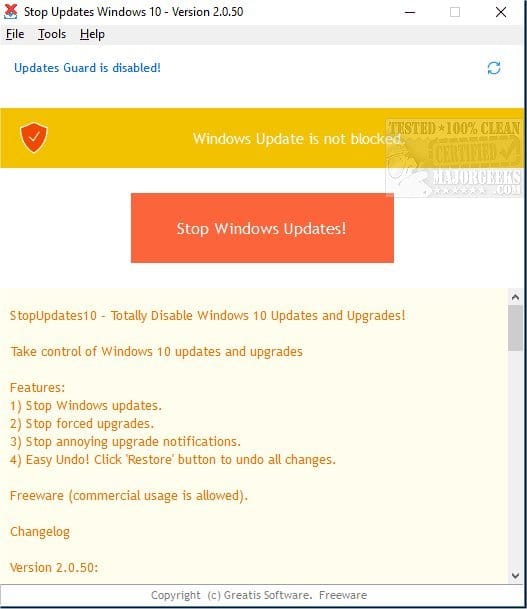
So, after I've installed Win-11, for instance, and it's downloaded all the relevant drivers for the PC's hardware, I run a little program that disables all MS Updates. The same program can turn Update back on if i ever desire it.
That program is an integral part of the Software I use when install Windows.
"Stopupdates10setup.exe" is all you need.

I hope that someone, reading this post, will download that program and run it. It works great for me, on all my PC's running Windows 10 or Windows 11. It's totally reversible, if the need ever arises.

Cheers Mates!
TM :cool:
Happy Cinco de Mayo!
Cinco de Mayo.jpg
 
This guide will teach you the steps to prevent updates from being installed on Windows 11 version 21H2, 22H2, and higher releases.


My Computer My Computer

At a glance

Windows 11AMD Ryzen 7 5700GMicron Technology DDR4-3200 16GBNVIDIA GeForce RTX 3060
OS
Windows 11
Computer type
PC/Desktop
Manufacturer/Model
HP Pavilion
CPU
AMD Ryzen 7 5700G
Motherboard
Erica6
Memory
Micron Technology DDR4-3200 16GB
Graphics Card(s)
NVIDIA GeForce RTX 3060
Sound Card
Realtek ALC671
Monitor(s) Displays
Samsung SyncMaster U28E590
Screen Resolution
3840 x 2160
Hard Drives
SAMSUNG MZVLQ1T0HALB-000H1
I use the WU pause advanced option to pause updates for the max time. Only issue is to remember the date and look at Brink's notifications regarding updates and their effects before unpausing or extending the pause.
 

My Computer My Computer

At a glance

W11 Home v. 25H2 bld. 26200.9168Intel i7 12700, @ 2.1-4.9 ghz, 20 core16GB, DDR4, 3200 mhzIntel UHD Graphics 770
OS
W11 Home v. 25H2 bld. 26200.9168
Computer type
PC/Desktop
Manufacturer/Model
HP ENVY/TE01-3254
CPU
Intel i7 12700, @ 2.1-4.9 ghz, 20 core
Motherboard
The Mother Of All Boards
Memory
16GB, DDR4, 3200 mhz
Graphics Card(s)
Intel UHD Graphics 770
Sound Card
internal, 5.1 Surround Sound
Monitor(s) Displays
AOC 22", mdl: 2269W
Screen Resolution
1280x1080
Hard Drives
1 internal- 1 TB SSD, 1 internal-1 TB SATA HDD, 1 USB external- 256GB SATA HDD, 2 USB external- 1 TB SATA HDD
PSU
310 watts
Case
HP ENVY
Cooling
Air, three internal fans
Keyboard
HP wireless
Mouse
HP wireless
Internet Speed
900+ Mb/sec Local Cable Gateway, Netgear R6400 bridged router, PC ethernet connection to Modem/Route
Browser
FireFox v.143.0, Chrome v.140.0.7339.128
Antivirus
Norton360 w/LifeLock
Other Info
4 USB 2.0 Type A Ports, 2 USB 3.0 Type A Ports, 2 USB 3.1 Type A Ports, 1 USB 3.0 Type C Port, 2 M.2 Slots
Macrium Reflect v.8.0.7279

My Computers My Computers

  • At a glance

    Windows 11 Pro 25H2 26200.9168i9-10900 10 core 20 threads32 gbnone-Intel UHD Graphics 630
    OS
    Windows 11 Pro 25H2 26200.9168
    Computer type
    PC/Desktop
    Manufacturer/Model
    Dell Optiplex 7080
    CPU
    i9-10900 10 core 20 threads
    Motherboard
    DELL 0J37VM
    Memory
    32 gb
    Graphics Card(s)
    none-Intel UHD Graphics 630
    Sound Card
    Integrated Realtek
    Monitor(s) Displays
    Benq 27
    Screen Resolution
    2560x1440
    Hard Drives
    2x1tb Solidigm m.2 nvme /External drives 512gb Samsung m.2 sata+2tb Kingston m2.nvme
    PSU
    500w
    Case
    MT
    Cooling
    Dell Premium
    Keyboard
    Logitech wired
    Mouse
    Logitech wireless
    Internet Speed
    so slow I'm too embarrassed to tell
    Browser
    #1 Edge #2 Firefox
    Antivirus
    Defender+MWB Premium
  • At a glance

    Windows 11 Pro 24H2 26200.9168AMD Ryzen 7 6800U32 gbintegrated
    Operating System
    Windows 11 Pro 24H2 26200.9168
    Computer type
    PC/Desktop
    Manufacturer/Model
    Beelink Mini PC SER5
    CPU
    AMD Ryzen 7 6800U
    Memory
    32 gb
    Graphics card(s)
    integrated
    Sound Card
    integrated
    Monitor(s) Displays
    Benq 27
    Screen Resolution
    2560x1440
    Hard Drives
    1TB Crucial nvme
    Keyboard
    Logitech wired
    Mouse
    Logitech wireless
    Internet Speed
    still too embarrassed to tell
    Browser
    Firefox
    Antivirus
    Defender
  • System 3 is non compliant Dell 9020 i7-4770/24gb ram Win11 PRO 26200.9168
Oh my. My first time here in this form has not disappointed. Very good info from all for me to digest. Thank you. I'm already familiar with, and had tried some of the suggestions. I appreciate the time and effort to help. I get the feeling that "TechnoMage2021" may be a "kindred spirit". <grin> I'm an old retired computer repair shop owner since the early 1970s. I'm not a tech wizard but did pick up some knowledge from the Techncians I employed. I'll have to update my profile here someday with some history. My first computers were a SWTP and later Heathkit with reel to reel analog tape recorder for storage. First "floppy drive" was a "floppy 8 inch thing". <grin>

Sorry for the trip down memory lane. So when and if I get the autoupdate thing to work (I always had the PC in question using an OS like Unix, DOS, XP, Vista, 7, 8, 10 and now 11), I will still want to be able to control the download. Pretty sure this 11 system is so automated that once I DO start the OS update, it will just do a bulk download of EVERYTHING and automatically install it all. This is why I "used" to hold off all updates for a few weeks until I could see what effect they would have on others so when I DID start the update later, I'd be prepared and hopefully be able to find, fix or modify the results before my PC is messed up because of some incompatihle personalzation I've done to my system. The problem is so far, all attempts to STOP windows up doing ANY auto updates has failed.

I "thnk" my problem became more an issue with this latest Windows version recently auto-updated during an OS update.
Windows 11 Pro 64 bit. 22H2 OS Build 22621.5555
Experience Windows Feature Pack 1000.22640.10000

If I had to guess something with this "Feature Pack" is causing some problems, with with my programs AND more importantly the updates.

Note that things I've tried have all been enabled and ARE showing they are enabled and supposedly working, but the system is STILL actually doing the automatic updates. There are a couple of suggestions listed here that I have not tried yet. Gonna give them a shot. Will be back with result.

Thanks for the quick and detailed help everyone.
 

My Computer My Computer

At a glance

Windows 11 Pro 25H2 Build 26200.8457Intel i5-8259U16 GBIntel(R) Iris(R) Plus Graphics 655 [Display a...
OS
Windows 11 Pro 25H2 Build 26200.8457
Computer type
PC/Desktop
Manufacturer/Model
BeeLink Mini PC SEi 8
CPU
Intel i5-8259U
Motherboard
Board: AZW SEi UEFI: American Megatrends Inc. 5.13 03/01/2022
Memory
16 GB
Graphics Card(s)
Intel(R) Iris(R) Plus Graphics 655 [Display adapter]
Sound Card
1- Intel(R) Display Audio 2 - USB PnP Sound Device
Monitor(s) Displays
1 LG ULTRAFINE [Monitor] (27.2" 4k HDMI 2 - LG 27" HD TV
Screen Resolution
1 - 3840 x 2160 2 - 1920 x 1080
Hard Drives
1 - CT500P3PSSD8 500.11 GB NVMe
2 - SPCC 2.5 SSD 512.11 GB SSD
PSU
19v @ 3A External
Case
Mini - PC
Cooling
1 fan internal heat sinked CPU
Keyboard
Logitech
Mouse
Logitech
Internet Speed
GB
Browser
Brave
Antivirus
BitDefender
Other Info
1 of 3 PCs networked and shared via 4K HDMI KVM switch, and dual Monitors (1 HDMI 4K, 1 HDMI HD monitor)
Back
Top Bottom