HP Laptop 14-dq0011dx question


corvairbob

Well-known member
Member
VIP
Local time
6:42 AM
Posts
271
OS
win10 64 bit 20h2 ver. now it is 22h2
i have this laptop and it has linx on it. i want to remove it but the pc is just not letting change the bios so it will boot from a usb port. so the drive is the nvme drive and i guess the best way will be to remove the drive and use aomei to format it and then see if i can put win11 on it from my pc. or maybe it will then boot from the blank formatted drive and let me go to the usb port and run win10 isd program.

i tried to run it from linx and it will not open the install exe on the usb drive. it seems i had this issue with linx before and because that was a small pc i just tossed it out. but i would like to get linx off this pc and put win11 on it.

anyone have some ideas. thanks
 

My Computer My Computer

At a glance

win10 64 bit 20h2 ver. now it is 22h2AMD A4-3310MX APU with Ra16gb
OS
win10 64 bit 20h2 ver. now it is 22h2
Computer type
Laptop
Manufacturer/Model
hp elitebook
CPU
AMD A4-3310MX APU with Ra
Memory
16gb
by the way i think i found out the issue. i took the nvme drive out of the other pc and put it in a backup holder and put it in this pc and folders can't see it. so i had to use aomei to redo that drive. so tell me can i leave this drive in a usb port and them start up win10 isd in another port and have it install to this nvme drive? my pc sees the isd a drive d and the nvme drive now as drive e. i can put it back in the other pc but as long as i have things setup in this pc and it will work i can install win10 on the nvme drive d in the usb port and then put it in the other pc and hope it runs. thanks

ok i had to take the nvme out of this pc and put it back in the other pc and then after a bit of bios resets it looks like the isd if working on that nvme drive now. i will let you know how it turns out. it seems linx would not let go of the small partition on that nvme drive. so after i formatted the drive with aomei and put it back in the other pc and a few bios restarts the finally booted to the isd and is setting win10 up now.
 
Last edited:

My Computer My Computer

At a glance

win10 64 bit 20h2 ver. now it is 22h2AMD A4-3310MX APU with Ra16gb
OS
win10 64 bit 20h2 ver. now it is 22h2
Computer type
Laptop
Manufacturer/Model
hp elitebook
CPU
AMD A4-3310MX APU with Ra
Memory
16gb

My Computer My Computer

At a glance

Windows 10Intel(R) Core(TM) i7-4800MQ CPU @ 2.70GHz16 GB Total: Manufacturer : Samsung MemoryTyp...NVIDIA Quadro K3100M; Intel(R) HD Graphics 4600
OS
Windows 10
Computer type
Laptop
Manufacturer/Model
HP
CPU
Intel(R) Core(TM) i7-4800MQ CPU @ 2.70GHz
Motherboard
Product : 190A Version : KBC Version 94.56
Memory
16 GB Total: Manufacturer : Samsung MemoryType : DDR3 FormFactor : SODIMM Capacity : 8GB Speed : 1600
Graphics Card(s)
NVIDIA Quadro K3100M; Intel(R) HD Graphics 4600
Sound Card
IDT High Definition Audio CODEC; PNP Device ID HDAUDIO\FUNC_01&VEN_111D&DEV_76E0
Hard Drives
Model Hitachi HTS727575A9E364
Antivirus
Microsoft Defender
Other Info
Mobile Workstation
Some trial and error steps:

a) Test the Win 11 iso on another Windows computer

b) Shutdown the laptop > insert the USB with Win 11 iso > power on and repetitively click F9 > select the USB

c) Power on and repetitively click F10 > disable secure boot

d) try different USB ports


thanks i did and it ran in the above replay i said what i had to do finally to get it to go. thanks
 

My Computer My Computer

At a glance

win10 64 bit 20h2 ver. now it is 22h2AMD A4-3310MX APU with Ra16gb
OS
win10 64 bit 20h2 ver. now it is 22h2
Computer type
Laptop
Manufacturer/Model
hp elitebook
CPU
AMD A4-3310MX APU with Ra
Memory
16gb
@corvairbob


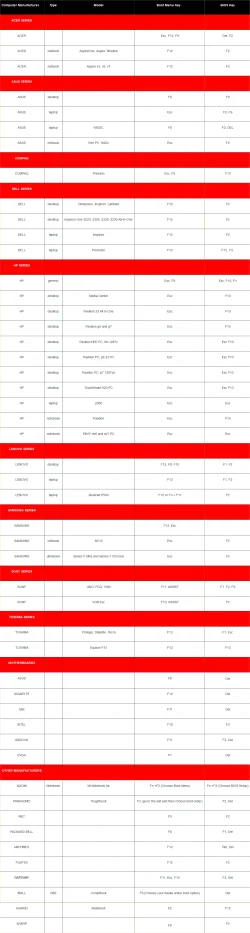
In the future, on an HP, the Esc key, then the F9 key will bring up the Boot Menu, without needing to go into the BIOS.

0000000 Boot Menu and BIOS keys.webp


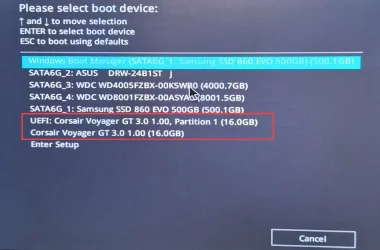
For example, this is the Boot Menu for my motherboard...

0000 Boot Menu - USB stick.webp
 
Last edited:

My Computers My Computers

  • At a glance

    Win 11 Home ♦♦♦26200.9278 ♦♦♦♦♦♦♦25H2AMD Ryzen 7 3700XG.Skill (F4-3200C14D-16GTZKW)EVGA RTX 2070 (08G-P4-2171-KR)
    OS
    Win 11 Home ♦♦♦26200.9278 ♦♦♦♦♦♦♦25H2
    Computer type
    PC/Desktop
    Manufacturer/Model
    Built by Ghot® [May 2020]
    CPU
    AMD Ryzen 7 3700X
    Motherboard
    Asus Pro WS X570-ACE (BIOS 5302)
    Memory
    G.Skill (F4-3200C14D-16GTZKW)
    Graphics Card(s)
    EVGA RTX 2070 (08G-P4-2171-KR)
    Sound Card
    Realtek ALC1220P / ALC S1220A
    Monitor(s) Displays
    Dell U3011 30"
    Screen Resolution
    2560 x 1600
    Hard Drives
    2x Samsung 860 EVO 500GB,
    WD 4TB Black FZBX - SATA III,
    WD 8TB Black FZBX - SATA III,
    DRW-24B1ST CD/DVD Burner
    PSU
    PC Power & Cooling 750W Quad EPS12V
    Case
    Cooler Master ATCS 840 Tower
    Cooling
    CM Hyper 212 EVO (push/pull)
    Keyboard
    Ducky DK9008 Shine II Blue LED
    Mouse
    Logitech Optical M-100
    Internet Speed
    300/300
    Browser
    Firefox (latest)
    Antivirus
    Bitdefender Total Security
    Other Info
    Speakers: Klipsch Pro Media 2.1
  • At a glance

    Windows XP Pro 32bit w/SP3AMD Athlon 64 X2 5000+ (OC'd @ 3.2Ghz)TWIN2X2048-6400C4DHX (2 x 1GB, DDR2 800)EVGA 256-P2-N758-TR GeForce 8600GT SSC
    Operating System
    Windows XP Pro 32bit w/SP3
    Computer type
    PC/Desktop
    Manufacturer/Model
    Built by Ghot® (not in use)
    CPU
    AMD Athlon 64 X2 5000+ (OC'd @ 3.2Ghz)
    Motherboard
    ASUS M2N32-SLI Deluxe Wireless Edition
    Memory
    TWIN2X2048-6400C4DHX (2 x 1GB, DDR2 800)
    Graphics card(s)
    EVGA 256-P2-N758-TR GeForce 8600GT SSC
    Sound Card
    Onboard
    Monitor(s) Displays
    ViewSonic G90FB Black 19" Professional (CRT)
    Screen Resolution
    up to 2048 x 1536
    Hard Drives
    WD 36GB 10,000rpm Raptor SATA
    Seagate 80GB 7200rpm SATA
    Lite-On LTR-52246S CD/RW
    Lite-On LH-18A1P CD/DVD Burner
    PSU
    PC Power & Cooling Silencer 750 Quad EPS12V
    Case
    Generic Beige case, 80mm fans
    Cooling
    ZALMAN 9500A 92mm CPU Cooler
    Keyboard
    Logitech Classic Keybooard 200
    Mouse
    Logitech Optical M-BT96a
    Internet Speed
    300/300
    Browser
    Firefox 3.x ??
    Antivirus
    Symantec (Norton)
    Other Info
    Still assembled, still runs. Haven't turned it on for 15 years?
ok thanks i tried that and that pc just would not do it. i finally took the nvme drive out and put it in a nvme holder and used this pc to format that drive.

i did get it to go. thanks but i have another issue with a ryzen pc, that for some reason just will not run very long with firefox as the browser running it crashes all the time. i run the same Firefox on 5 laptops and for some reason the ryzen laptop just does not like firefox. it will run chrome and edge all day long but Firefox it just will not run.

at this time i'm now doing a OS reset from the cloud and i will then only run firefox after the reinstall and see if it still crashes. the bios was reset to factory defaults. and all the hp recommended drivers were installed when i did the isd last month. we talked on that reset as it gave me fits. anyway we will see. it may be a ssd drive issue or even ram but that ryzen bios test page i ran all the tesst out to there full time and they all came back passed then. but if it does it again i will just change out the drive and memory from a known good running laptop and see if it still fails. it just may have a bad board. thanks

ok small update! i did that cloud restore and it came back and said it did not change anything. but i have had firefox running now for 3 hours and so far with fingers crossed it has not crashed. also i did d a bios factory rested to factory defaults so that may have helped also. i will no more tonight when i take it into the living room and use it there at night. thanks.
 
Last edited:

My Computer My Computer

At a glance

win10 64 bit 20h2 ver. now it is 22h2AMD A4-3310MX APU with Ra16gb
OS
win10 64 bit 20h2 ver. now it is 22h2
Computer type
Laptop
Manufacturer/Model
hp elitebook
CPU
AMD A4-3310MX APU with Ra
Memory
16gb
alright so far that laptop seems to be running firefox without crashing. so i must have got a good install this time. so time will tell but last week it would crash about every 2 minutes. now it has ran steady for 3 days it now has win11 on it after it did a self update. lest see if it keeps working. if not i will return and see if anyone has any ideas. thanks for the help.
 

My Computer My Computer

At a glance

win10 64 bit 20h2 ver. now it is 22h2AMD A4-3310MX APU with Ra16gb
OS
win10 64 bit 20h2 ver. now it is 22h2
Computer type
Laptop
Manufacturer/Model
hp elitebook
CPU
AMD A4-3310MX APU with Ra
Memory
16gb
ok update it seems that other laptop that had linx on it and kept crashing firefox may have been repaired. i did a reset on it and i can't say 100% as i got e message telling me the reset did nothing but the crash seems to have stopped.
 

My Computer My Computer

At a glance

win10 64 bit 20h2 ver. now it is 22h2AMD A4-3310MX APU with Ra16gb
OS
win10 64 bit 20h2 ver. now it is 22h2
Computer type
Laptop
Manufacturer/Model
hp elitebook
CPU
AMD A4-3310MX APU with Ra
Memory
16gb

Latest Support Threads

Back
Top Bottom