Harolddev
New member
- Local time
- 7:30 PM
- Posts
- 1
- OS
- WINDOWS 11 25H2
Hello HP,
I am experiencing a persistent issue with the fingerprint sensor on an HP ProBook 450 G6.
Device details:
- Model: HP ProBook 450 G6
- OS: Windows 11 25H2 (Build 26200.8117)
- Fingerprint sensor: Synaptics FS7605 Touch Fingerprint Sensor with PurePrint(TM)
- Hardware ID: USB\VID_06CB&PID_00DF\afc220461436
Issue:
The fingerprint sensor shows Error Code 43 in Device Manager. The Windows Biometric Service (wbiosrvc) stops automatically after startup. The sensor works correctly under Linux (Kali), confirming the hardware is functional.
What I have already tried:
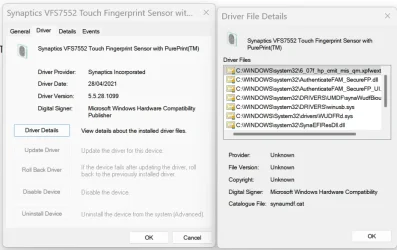
- Installed driver synawudfbiousbhpprod.inf (versions 5.5.27 and 5.5.28)
- Installed driver synaWudfBioUsbUwp.inf (version 6.0.205.1110)
- Ran SFC /scannow and DISM /RestoreHealth — no corruption found
- Cleared the Windows Biometric database (WinBioDatabase)
- Disabled Secure Boot
- Confirmed TPM 2.0 is enabled and available in BIOS
- Confirmed fingerprint device is enabled in BIOS
Error log:
- Event ID 411, Problem: 0x1F, Status: 0xC00000E5 (STATUS_OBJECT_NAME_NOT_FOUND)
- Service: WUDFRd
The issue appears to have started after the Windows 11 25H2 update. I believe a firmware update for the FS7605 sensor may be required.
Could you please provide:
1. A firmware update for the Synaptics FS7605 sensor compatible with Windows 11 25H2
2. Or guidance on resolving the Code 43 error for this specific configuration
Thank you for your assistance
I am experiencing a persistent issue with the fingerprint sensor on an HP ProBook 450 G6.
Device details:
- Model: HP ProBook 450 G6
- OS: Windows 11 25H2 (Build 26200.8117)
- Fingerprint sensor: Synaptics FS7605 Touch Fingerprint Sensor with PurePrint(TM)
- Hardware ID: USB\VID_06CB&PID_00DF\afc220461436
Issue:
The fingerprint sensor shows Error Code 43 in Device Manager. The Windows Biometric Service (wbiosrvc) stops automatically after startup. The sensor works correctly under Linux (Kali), confirming the hardware is functional.
What I have already tried:
- Installed driver synawudfbiousbhpprod.inf (versions 5.5.27 and 5.5.28)
- Installed driver synaWudfBioUsbUwp.inf (version 6.0.205.1110)
- Ran SFC /scannow and DISM /RestoreHealth — no corruption found
- Cleared the Windows Biometric database (WinBioDatabase)
- Disabled Secure Boot
- Confirmed TPM 2.0 is enabled and available in BIOS
- Confirmed fingerprint device is enabled in BIOS
Error log:
- Event ID 411, Problem: 0x1F, Status: 0xC00000E5 (STATUS_OBJECT_NAME_NOT_FOUND)
- Service: WUDFRd
The issue appears to have started after the Windows 11 25H2 update. I believe a firmware update for the FS7605 sensor may be required.
Could you please provide:
1. A firmware update for the Synaptics FS7605 sensor compatible with Windows 11 25H2
2. Or guidance on resolving the Code 43 error for this specific configuration
Thank you for your assistance
My Computer
At a glance
WINDOWS 11 25H2
- OS
- WINDOWS 11 25H2
- Computer type
- Laptop
- Manufacturer/Model
- Probook 450 g6