Solved I cant create a folder/no option


Local time
6:01 PM
Posts
18
OS
Windows 11
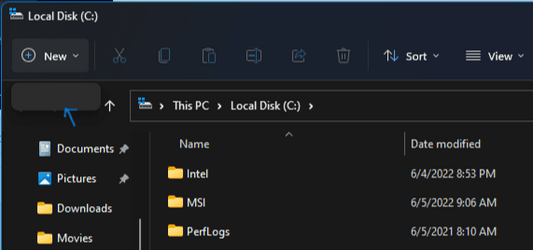
For some reason, when I right click and try to create a new folder, there is no option anymore.
Also, the "new+" menu is also empty if I try to create folder in my c drive. I also ran a virus scan using windows defender and nothing popped up.
 
Windows Build/Version
Version 21H2 (OS Build 22000.1098)

Attachments

  • Screenshot (29).png
    Screenshot (29).png
    51.3 KB · Views: 1
  • Screenshot (30).png
    Screenshot (30).png
    10.2 KB · Views: 1

My Computer My Computer

At a glance

Windows 11Intel Core i7 10700KFDDR4 32GBNVIDIA GeForce RTX 3070 8GB
OS
Windows 11
Computer type
PC/Desktop
Manufacturer/Model
Micro-Star International Co. Ltd.
CPU
Intel Core i7 10700KF
Motherboard
Z490-A PRO (MS-7C75)
Memory
DDR4 32GB
Graphics Card(s)
NVIDIA GeForce RTX 3070 8GB
Sound Card
XV272U V (NVIDIA High Definition Audio)
Monitor(s) Displays
Acer 27″ Nitro XV2 Series
Screen Resolution
2560 x 1440, 143.91 Hz
Hard Drives
1TB Solid State Drive
Case
PowerSpec/Lian Li ATX 205

My Computers My Computers

  • At a glance

    Windows 11 Pro 25H2 26200.8655i9-10900 10 core 20 threads32 gbnone-Intel UHD Graphics 630
    OS
    Windows 11 Pro 25H2 26200.8655
    Computer type
    PC/Desktop
    Manufacturer/Model
    Dell Optiplex 7080
    CPU
    i9-10900 10 core 20 threads
    Motherboard
    DELL 0J37VM
    Memory
    32 gb
    Graphics Card(s)
    none-Intel UHD Graphics 630
    Sound Card
    Integrated Realtek
    Monitor(s) Displays
    Benq 27
    Screen Resolution
    2560x1440
    Hard Drives
    2x1tb Solidigm m.2 nvme /External drives 512gb Samsung m.2 sata+2tb Kingston m2.nvme
    PSU
    500w
    Case
    MT
    Cooling
    Dell Premium
    Keyboard
    Logitech wired
    Mouse
    Logitech wireless
    Internet Speed
    so slow I'm too embarrassed to tell
    Browser
    #1 Edge #2 Firefox
    Antivirus
    Defender+MWB Premium
  • At a glance

    Windows 11 Pro 24H2 26200.8457AMD Ryzen 7 6800U32 gbintegrated
    Operating System
    Windows 11 Pro 24H2 26200.8457
    Computer type
    PC/Desktop
    Manufacturer/Model
    Beelink Mini PC SER5
    CPU
    AMD Ryzen 7 6800U
    Memory
    32 gb
    Graphics card(s)
    integrated
    Sound Card
    integrated
    Monitor(s) Displays
    Benq 27
    Screen Resolution
    2560x1440
    Hard Drives
    1TB Crucial nvme
    Keyboard
    Logitech wired
    Mouse
    Logitech wireless
    Internet Speed
    still too embarrassed to tell
    Browser
    Firefox
    Antivirus
    Defender
    Other Info
    System 3 is non compliant Dell 9020 i7-4770/24gb ram Win11 PRO 26200.8457
Thanks! This solved the issue for me.
Heads up: For anyone who else has a similar issue, this seemed to work for me:

Method 2: Using the Registry Editor​

  1. Start the Registry Editor (regedit.exe)
  2. Navigate to the following location:HKEY_CLASSES_ROOT\Folder
  3. In the right-pane, double-click (default) and set its data to Folder
    new folder missing right-click
  4. Exit the Registry Editor.
  5. Log off and log back in.
 

My Computer My Computer

At a glance

Windows 11Intel Core i7 10700KFDDR4 32GBNVIDIA GeForce RTX 3070 8GB
OS
Windows 11
Computer type
PC/Desktop
Manufacturer/Model
Micro-Star International Co. Ltd.
CPU
Intel Core i7 10700KF
Motherboard
Z490-A PRO (MS-7C75)
Memory
DDR4 32GB
Graphics Card(s)
NVIDIA GeForce RTX 3070 8GB
Sound Card
XV272U V (NVIDIA High Definition Audio)
Monitor(s) Displays
Acer 27″ Nitro XV2 Series
Screen Resolution
2560 x 1440, 143.91 Hz
Hard Drives
1TB Solid State Drive
Case
PowerSpec/Lian Li ATX 205
Back
Top Bottom