ALC
Member
- Local time
- 10:18 AM
- Posts
- 18
- OS
- Windows 11 Pro
Hey @Brink hope you're doing well!
I'm having a problem with my Microsoft Store Apps, and I'm hoping you might be able to help me.
As of this morning, I can't download any apps from the Microsoft Store, and if it tries to, it returns with an error message: 0X80246007, which apparently has to do with missing downloaded or required update files being unavailable. I have done a bunch of trouble shooting and now after the last step I tried, I'm getting an error message when trying to re-install the Microsoft Store, via your instructions above.
I've tried:
- Checking for updates.
- scanning for corrupt files: No integrity violations
- Running the DISM commands: All clear.
- Resetting the Microsoft Store.
-Clearing the cache of the Microsoft Store.
- Reinstalling a fresh install of Windows.
* I don't have an option to run the Windows Apps trouble shooter, it just isn't there when I go into "Other troubleshooters" so that's the only step I haven't taken, but not for a lack of trying.
Nothing has worked.
I don't know what files, apps, etc. aren't available that is preventing the updates from completing.
I don't know what the error code means that I received when I tried to reinstall the Microsoft Store.
I'm at a complete loss, and I can't open simple apps like Note Pad etc, which is so frustrating.
The Microsoft support people were not able to figure it out, and their suggestion was to find work arounds for those apps (which isn't an answer, because there's a reason something is wrong.)
Any guidance you might be able to provide would be incredibly appreciated.
Thank you!
 www.elevenforum.com
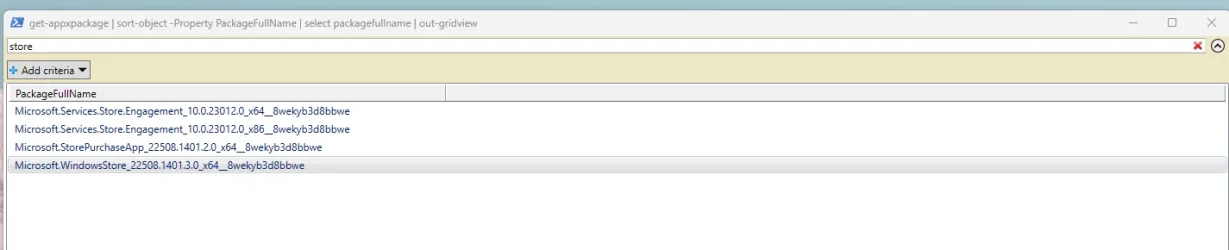
Here is the error message I got when I tried to follow your instructions above.

I'm having a problem with my Microsoft Store Apps, and I'm hoping you might be able to help me.
As of this morning, I can't download any apps from the Microsoft Store, and if it tries to, it returns with an error message: 0X80246007, which apparently has to do with missing downloaded or required update files being unavailable. I have done a bunch of trouble shooting and now after the last step I tried, I'm getting an error message when trying to re-install the Microsoft Store, via your instructions above.
I've tried:
- Checking for updates.
- scanning for corrupt files: No integrity violations
- Running the DISM commands: All clear.
- Resetting the Microsoft Store.
-Clearing the cache of the Microsoft Store.
- Reinstalling a fresh install of Windows.
* I don't have an option to run the Windows Apps trouble shooter, it just isn't there when I go into "Other troubleshooters" so that's the only step I haven't taken, but not for a lack of trying.
Nothing has worked.
I don't know what files, apps, etc. aren't available that is preventing the updates from completing.
I don't know what the error code means that I received when I tried to reinstall the Microsoft Store.
I'm at a complete loss, and I can't open simple apps like Note Pad etc, which is so frustrating.
The Microsoft support people were not able to figure it out, and their suggestion was to find work arounds for those apps (which isn't an answer, because there's a reason something is wrong.)
Any guidance you might be able to provide would be incredibly appreciated.
Thank you!
Uninstall or Reinstall Microsoft Store app in Windows 10 and Windows 11
This tutorial will show you how to uninstall or reinstall the Microsoft Store app for your account or all users in Windows 10 and Windows 11. Microsoft redesigned the Microsoft Store from the ground up in Windows, making space for more content, keeping the user experience simple and responsive...
www.elevenforum.com
Here is the error message I got when I tried to follow your instructions above.
My Computer
At a glance
Windows 11 Pro
- OS
- Windows 11 Pro
- Computer type
- Laptop
- Manufacturer/Model
- Lenovo


 .
.

 .
.