
Solved I don't have KB5063878; am I just lucky, or ...?


jdUnionngarden

Well-known member
Member
Local time
8:38 PM
Posts
60
Location
Denver, CO
OS
Windows 11 Pro
PowerSpec G355 Gaming Desktop PC
Windows 11 Pro, Ver. 24H2 (OS Build 26100.4349)


Howdy Folks, :-)
I've been following the issue(s) with KB5063878, however it's not in my list of available updates.
I'm looking for advice/thoughts/comments on whether I'm lucky for some reason or need to look into this further.
TIA to all who read this post and those who reply.
Cheers!
:cool:
/jdU
 

My Computer

System One

  • OS
    Windows 11 Pro
    Computer type
    PC/Desktop
    Manufacturer/Model
    PowerSpec G355 Gaming Desktop PC
    CPU
    Intel Core i7-9700KF Processor 3.6GHz
    Motherboard
    ASUS Z390-P Prime Intel LGA 1151 ATX Motherboard
    Memory
    16GB DDR4-3000 RAM
    Graphics Card(s)
    NVIDIA GeForce RTX 2060 6GB GDDR6
    Sound Card
    Realtek High Definition Audio
    Monitor(s) Displays
    Dell SE2717HR RVJXC 27" Full HD 1920 X 1080 Monitor
    Screen Resolution
    Full HD 1920 X 1080, 96 dpi
    Hard Drives
    Primary: 500GB M.2 SSD
    Data: 1TB HDD
    PSU
    600 Watt 80 Plus Power Supply
    Case
    (?) Open Front, Top, Bottom & Back
    Cooling
    3 Case Fans, 2 Graphics Card Fans, 1 CPU Fan
    Keyboard
    HP Wireless
    Mouse
    Logitech M510 Wireless
    Internet Speed
    Average 150 to 200+ Mbps via Xfinity xFi Pod to Ethernet cable
    Browser
    Firefox (Chrome Alternate rarely used)
    Antivirus
    Bitdefender
    Other Info
    Comcast Wi-Fi Router (~15 Ft. & 1 Floor below) runs 600+ Mbps
That update seems to have gained a very shady reputation, ignore it for now.
 

My Computers

System One System Two

  • OS
    Windows 11 Enterprise 25H2 26200 7462
    Computer type
    PC/Desktop
    Manufacturer/Model
    Custom Build
    CPU
    Intel XEON E5-2699 v3
    Motherboard
    ASUS X99-A
    Memory
    64GB Teamgroup UD4-3600
    Graphics Card(s)
    NVIDIA GeForce GTX 1080 Ti
    Sound Card
    Integrated
    Monitor(s) Displays
    ACER X34 Predator
    Screen Resolution
    3440 x 1440
    Hard Drives
    Crucial CT1000P 3P SSD8 1TB
    Crucial CT1000 BX500 SSD 1TB
    PSU
    GameMax Pro
    Case
    Fractal Design
    Cooling
    Corsair H110iGT + 6 140mm Fans
    Keyboard
    Corsair K4
    Mouse
    G-Skill G502
    Internet Speed
    300MBs
    Browser
    Chrome
    Antivirus
    OEM
    Other Info
    ASUS RT-AC87U Router
  • Operating System
    25H2 26200.5074
    Computer type
    Laptop
    Manufacturer/Model
    ASUS X555LA
    Memory
    8GB
    Browser
    Chrome
    Antivirus
    OEM
You may be lucky (but it’s 24H2 so that seems to be a contradiction) but it’s not normal that you haven’t seen it 15 days after its release.

Try resetting Windows Update

 
Last edited:

My Computers

System One System Two

  • OS
    Windows 11 Pro 25H2 Build 26200.8524
    Computer type
    PC/Desktop
    Manufacturer/Model
    Sin-built 2013
    CPU
    Intel(R) Core(TM) i7-4770K CPU @ 3.50GHz
    Motherboard
    ASUS ROG Maximus VI Formula
    Memory
    32.0 GB of I forget and the box is in storage.
    Graphics Card(s)
    Gigabyte nVidia GeForce GTX 1660 Super OC 6GB
    Sound Card
    Onboard thingy
    Monitor(s) Displays
    5 x LG 25MS500-B - 1 x 24MK430H-B - 1 x Wacom Pro 22" Touch Screen Tablet
    Screen Resolution
    All over the place
    Hard Drives
    Too many to list.
    OS on Samsung 1TB 870 QVO SATA
    PSU
    Silverstone 1500
    Case
    NZXT Phantom 820 Full-Tower Case
    Cooling
    Noctua NH-D15 Elite Class Dual Tower CPU Cooler / 6 x EziDIY 120mm / 2 x Corsair 140mm somethings / 1 x 140mm Thermaltake something / 2 x 200mm Corsair.
    Keyboard
    Corsair K95 / Logitech diNovo Edge Wireless
    Mouse
    Logitech: G402 / G502 / Mx Masters / Mx Air Cordless
    Internet Speed
    2000/500Mbps
    Browser
    All sorts
    Antivirus
    Kaspersky Premium
    Other Info
    ㅤㅤㅤㅤㅤㅤㅤㅤㅤㅤㅤㅤㅤㅤㅤㅤㅤㅤㅤㅤㅤㅤㅤㅤㅤㅤㅤㅤㅤㅤㅤㅤㅤㅤㅤㅤㅤㅤㅤㅤ⠀⠀⠀⠀⠀⠀⠀⠀⠀⠀
    TP-Link BE9300 WiFi 7 Bluetooth 5.4 (Archer TBE550E)
    TP-Link TX201 V1 2.5GB Lan

    Grandstream HT812 - VoIP
    ASUS DSL-AX82U - Mesh
    ASUS RT-AC68U - Mesh
    ASUS RT-BE88U Router

    Brother MFC-L2880DW Printer

    I’m on a horse.
  • Operating System
    Windows 11 Pro 25H2 Build 26200.8524
    Computer type
    Laptop
    Manufacturer/Model
    LENOVO Yoga 7 14IRL8 - 7i EVO OLED 14" Touchscreen i5 12 Core 16GB/512GB
    CPU
    Intel Core 12th Gen i5-1240P Processor (1.7 - 4.4GHz)
    Memory
    16GB LPDDR5 RAM
    Graphics card(s)
    Intel Iris Xe Graphics Processor
    Sound Card
    Optimized with Dolby Atmos®
    Screen Resolution
    QHD 2880 x 1800 OLED
    Hard Drives
    M.2 512GB
    Antivirus
    Defender / Malwarebytes
    Other Info
    …still on a horse.
@antspants
Thanks for confirming I may have an issue.
Since I use GP to "advise updates are available for download" (waiting to download when I feel all's okay) I'll sit tight for now as I don't want that setting to be reversed.
Staying tuned!
:cool:


Report


My Computer

System One

  • OS
    Windows 11 Pro
    Computer type
    PC/Desktop
    Manufacturer/Model
    PowerSpec G355 Gaming Desktop PC
    CPU
    Intel Core i7-9700KF Processor 3.6GHz
    Motherboard
    ASUS Z390-P Prime Intel LGA 1151 ATX Motherboard
    Memory
    16GB DDR4-3000 RAM
    Graphics Card(s)
    NVIDIA GeForce RTX 2060 6GB GDDR6
    Sound Card
    Realtek High Definition Audio
    Monitor(s) Displays
    Dell SE2717HR RVJXC 27" Full HD 1920 X 1080 Monitor
    Screen Resolution
    Full HD 1920 X 1080, 96 dpi
    Hard Drives
    Primary: 500GB M.2 SSD
    Data: 1TB HDD
    PSU
    600 Watt 80 Plus Power Supply
    Case
    (?) Open Front, Top, Bottom & Back
    Cooling
    3 Case Fans, 2 Graphics Card Fans, 1 CPU Fan
    Keyboard
    HP Wireless
    Mouse
    Logitech M510 Wireless
    Internet Speed
    Average 150 to 200+ Mbps via Xfinity xFi Pod to Ethernet cable
    Browser
    Firefox (Chrome Alternate rarely used)
    Antivirus
    Bitdefender
    Other Info
    Comcast Wi-Fi Router (~15 Ft. & 1 Floor below) runs 600+ Mbps
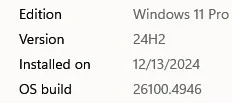
I agree, avoid it for now. Install the July 2025 update, which is build 4656. I removed KB5063878 (August 2025 update) from my desktops and laptops after having one of my desktops lose a healthy SSD shortly after installing it. I do believe there is something to the suspicion that it can result in bricked SSDs and have now paused all updates on my systems until late September.
 

My Computers

System One System Two

  • OS
    Windows 11 Pro
    Computer type
    PC/Desktop
    Manufacturer/Model
    built myself
    CPU
    Intel Core i7 10700K
    Motherboard
    MSI Z490-A Pro
    Graphics Card(s)
    Intel UHD Graphics 630
    Antivirus
    Microsoft Defender
    Other Info
    TPM 2.0
  • Operating System
    Windows 11 Pro
    Computer type
    PC/Desktop
    Manufacturer/Model
    built myself
    CPU
    Intel Core i7 6800K
    Motherboard
    Asus X99-E
    Graphics card(s)
    NVIDIA GeForce GTX 1050 Ti
    Antivirus
    Microsoft Defender
    Other Info
    no TPM
I agree, avoid it for now. Install the July 2025 update, which is build 4656. I removed KB5063878 (August 2025 update) from my desktops and laptops after having one of my desktops lose a healthy SSD shortly after installing it. I do believe there is something to the suspicion that it can result in bricked SSDs and have now paused all updates on my systems until late September.
Could you share the brand of SSD that failed in your desktop PC?
 

My Computer

System One

  • OS
    Windows 11 Professional 25H2
    Computer type
    PC/Desktop
    Manufacturer/Model
    Digital Storm VELOX
    CPU
    Intel Core i9 11900K
    Motherboard
    ASUS PRIME Z590-P
    Memory
    64GB
    Graphics Card(s)
    NVIDIA GeForce GTX 1650
    Sound Card
    Realtek onboard
    Monitor(s) Displays
    Acer R221Q 21.5"
    Screen Resolution
    1920 x 1080
    Hard Drives
    2 x Samsung SSD 990 EVO Plus (1 TB)
    2 x Seagate ST4000NE001 (4 TB)
    PSU
    None
    Case
    VELOX
    Cooling
    Cooler Master
    Keyboard
    Logitech
    Mouse
    Kensington trackball
    Browser
    Firefox, Chrome
    Antivirus
    Windows Defender, Malwarebytes
Could you share the brand of SSD that failed in your desktop PC?

It was a Samsung EVO 860. I had updated Magician a few days earlier to the latest version, and it was showing everything was completely healthy at that time.
 

My Computers

System One System Two

  • OS
    Windows 11 Pro
    Computer type
    PC/Desktop
    Manufacturer/Model
    built myself
    CPU
    Intel Core i7 10700K
    Motherboard
    MSI Z490-A Pro
    Graphics Card(s)
    Intel UHD Graphics 630
    Antivirus
    Microsoft Defender
    Other Info
    TPM 2.0
  • Operating System
    Windows 11 Pro
    Computer type
    PC/Desktop
    Manufacturer/Model
    built myself
    CPU
    Intel Core i7 6800K
    Motherboard
    Asus X99-E
    Graphics card(s)
    NVIDIA GeForce GTX 1050 Ti
    Antivirus
    Microsoft Defender
    Other Info
    no TPM
Hey Folks, I'm still learning proper etiquette here.
@OldMainframeGuy (& @kjlkjadfasdfasd ) Is it normal/appropriate to branch out from the original thread (subject)?
Seems sort of like replying to a previous email (subject) rather than starting a new one with the contact's email address.
I'm thinking a DM would be proper here.
just sayin'
/jdU
 

My Computer

System One

  • OS
    Windows 11 Pro
    Computer type
    PC/Desktop
    Manufacturer/Model
    PowerSpec G355 Gaming Desktop PC
    CPU
    Intel Core i7-9700KF Processor 3.6GHz
    Motherboard
    ASUS Z390-P Prime Intel LGA 1151 ATX Motherboard
    Memory
    16GB DDR4-3000 RAM
    Graphics Card(s)
    NVIDIA GeForce RTX 2060 6GB GDDR6
    Sound Card
    Realtek High Definition Audio
    Monitor(s) Displays
    Dell SE2717HR RVJXC 27" Full HD 1920 X 1080 Monitor
    Screen Resolution
    Full HD 1920 X 1080, 96 dpi
    Hard Drives
    Primary: 500GB M.2 SSD
    Data: 1TB HDD
    PSU
    600 Watt 80 Plus Power Supply
    Case
    (?) Open Front, Top, Bottom & Back
    Cooling
    3 Case Fans, 2 Graphics Card Fans, 1 CPU Fan
    Keyboard
    HP Wireless
    Mouse
    Logitech M510 Wireless
    Internet Speed
    Average 150 to 200+ Mbps via Xfinity xFi Pod to Ethernet cable
    Browser
    Firefox (Chrome Alternate rarely used)
    Antivirus
    Bitdefender
    Other Info
    Comcast Wi-Fi Router (~15 Ft. & 1 Floor below) runs 600+ Mbps
Well you did just state that you weren’t going to do anything about it so what’s the harm?

You can’t lock a thread so after it’s done it’s kind of just laying around for the taking.
Personally, I was thinking about stripping off naked and running around in here for a bit.
 

My Computers

System One System Two

  • OS
    Windows 11 Pro 25H2 Build 26200.8524
    Computer type
    PC/Desktop
    Manufacturer/Model
    Sin-built 2013
    CPU
    Intel(R) Core(TM) i7-4770K CPU @ 3.50GHz
    Motherboard
    ASUS ROG Maximus VI Formula
    Memory
    32.0 GB of I forget and the box is in storage.
    Graphics Card(s)
    Gigabyte nVidia GeForce GTX 1660 Super OC 6GB
    Sound Card
    Onboard thingy
    Monitor(s) Displays
    5 x LG 25MS500-B - 1 x 24MK430H-B - 1 x Wacom Pro 22" Touch Screen Tablet
    Screen Resolution
    All over the place
    Hard Drives
    Too many to list.
    OS on Samsung 1TB 870 QVO SATA
    PSU
    Silverstone 1500
    Case
    NZXT Phantom 820 Full-Tower Case
    Cooling
    Noctua NH-D15 Elite Class Dual Tower CPU Cooler / 6 x EziDIY 120mm / 2 x Corsair 140mm somethings / 1 x 140mm Thermaltake something / 2 x 200mm Corsair.
    Keyboard
    Corsair K95 / Logitech diNovo Edge Wireless
    Mouse
    Logitech: G402 / G502 / Mx Masters / Mx Air Cordless
    Internet Speed
    2000/500Mbps
    Browser
    All sorts
    Antivirus
    Kaspersky Premium
    Other Info
    ㅤㅤㅤㅤㅤㅤㅤㅤㅤㅤㅤㅤㅤㅤㅤㅤㅤㅤㅤㅤㅤㅤㅤㅤㅤㅤㅤㅤㅤㅤㅤㅤㅤㅤㅤㅤㅤㅤㅤㅤ⠀⠀⠀⠀⠀⠀⠀⠀⠀⠀
    TP-Link BE9300 WiFi 7 Bluetooth 5.4 (Archer TBE550E)
    TP-Link TX201 V1 2.5GB Lan

    Grandstream HT812 - VoIP
    ASUS DSL-AX82U - Mesh
    ASUS RT-AC68U - Mesh
    ASUS RT-BE88U Router

    Brother MFC-L2880DW Printer

    I’m on a horse.
  • Operating System
    Windows 11 Pro 25H2 Build 26200.8524
    Computer type
    Laptop
    Manufacturer/Model
    LENOVO Yoga 7 14IRL8 - 7i EVO OLED 14" Touchscreen i5 12 Core 16GB/512GB
    CPU
    Intel Core 12th Gen i5-1240P Processor (1.7 - 4.4GHz)
    Memory
    16GB LPDDR5 RAM
    Graphics card(s)
    Intel Iris Xe Graphics Processor
    Sound Card
    Optimized with Dolby Atmos®
    Screen Resolution
    QHD 2880 x 1800 OLED
    Hard Drives
    M.2 512GB
    Antivirus
    Defender / Malwarebytes
    Other Info
    …still on a horse.
It was a Samsung EVO 860. I had updated Magician a few days earlier to the latest version, and it was showing everything was completely healthy at that time.
Thanks for the info. My machine has two Samsung EVO 970 1TB drives so I'm feeling sort of safe. I don't remember seeing Samsung drives on any lists of affected drives but I could be wrong.
 

My Computer

System One

  • OS
    Windows 11 Professional 25H2
    Computer type
    PC/Desktop
    Manufacturer/Model
    Digital Storm VELOX
    CPU
    Intel Core i9 11900K
    Motherboard
    ASUS PRIME Z590-P
    Memory
    64GB
    Graphics Card(s)
    NVIDIA GeForce GTX 1650
    Sound Card
    Realtek onboard
    Monitor(s) Displays
    Acer R221Q 21.5"
    Screen Resolution
    1920 x 1080
    Hard Drives
    2 x Samsung SSD 990 EVO Plus (1 TB)
    2 x Seagate ST4000NE001 (4 TB)
    PSU
    None
    Case
    VELOX
    Cooling
    Cooler Master
    Keyboard
    Logitech
    Mouse
    Kensington trackball
    Browser
    Firefox, Chrome
    Antivirus
    Windows Defender, Malwarebytes

My Computer

System One

  • OS
    Windows 11 Pro
    Computer type
    PC/Desktop
    Manufacturer/Model
    PowerSpec G355 Gaming Desktop PC
    CPU
    Intel Core i7-9700KF Processor 3.6GHz
    Motherboard
    ASUS Z390-P Prime Intel LGA 1151 ATX Motherboard
    Memory
    16GB DDR4-3000 RAM
    Graphics Card(s)
    NVIDIA GeForce RTX 2060 6GB GDDR6
    Sound Card
    Realtek High Definition Audio
    Monitor(s) Displays
    Dell SE2717HR RVJXC 27" Full HD 1920 X 1080 Monitor
    Screen Resolution
    Full HD 1920 X 1080, 96 dpi
    Hard Drives
    Primary: 500GB M.2 SSD
    Data: 1TB HDD
    PSU
    600 Watt 80 Plus Power Supply
    Case
    (?) Open Front, Top, Bottom & Back
    Cooling
    3 Case Fans, 2 Graphics Card Fans, 1 CPU Fan
    Keyboard
    HP Wireless
    Mouse
    Logitech M510 Wireless
    Internet Speed
    Average 150 to 200+ Mbps via Xfinity xFi Pod to Ethernet cable
    Browser
    Firefox (Chrome Alternate rarely used)
    Antivirus
    Bitdefender
    Other Info
    Comcast Wi-Fi Router (~15 Ft. & 1 Floor below) runs 600+ Mbps

Hey Folks, I'm still learning proper etiquette here.
@OldMainframeGuy (& @kjlkjadfasdfasd ) Is it normal/appropriate to branch out from the original thread (subject)?
Seems sort of like replying to a previous email (subject) rather than starting a new one with the contact's email address.
I'm thinking a DM would be proper here.
just sayin'
/jdU
Didn't mean to offend you but the thread concerns a fix that potentially bricks certain brands of SSD and someone reported that his SSD failed recently so I was curious as to what brand.
 

My Computer

System One

  • OS
    Windows 11 Professional 25H2
    Computer type
    PC/Desktop
    Manufacturer/Model
    Digital Storm VELOX
    CPU
    Intel Core i9 11900K
    Motherboard
    ASUS PRIME Z590-P
    Memory
    64GB
    Graphics Card(s)
    NVIDIA GeForce GTX 1650
    Sound Card
    Realtek onboard
    Monitor(s) Displays
    Acer R221Q 21.5"
    Screen Resolution
    1920 x 1080
    Hard Drives
    2 x Samsung SSD 990 EVO Plus (1 TB)
    2 x Seagate ST4000NE001 (4 TB)
    PSU
    None
    Case
    VELOX
    Cooling
    Cooler Master
    Keyboard
    Logitech
    Mouse
    Kensington trackball
    Browser
    Firefox, Chrome
    Antivirus
    Windows Defender, Malwarebytes
Hey Folks, I'm still learning proper etiquette here.
@OldMainframeGuy (& @kjlkjadfasdfasd ) Is it normal/appropriate to branch out from the original thread (subject)?

/jdU
The discussion is continuing the subject and highlighting some of the potential drawbacks that you asked for.
Don't be to surprised if a few start discussing fishing or football though. Nobody is forcing you to read those splinters.
 

My Computers

System One System Two

  • OS
    Windows 11 Enterprise 25H2 26200 7462
    Computer type
    PC/Desktop
    Manufacturer/Model
    Custom Build
    CPU
    Intel XEON E5-2699 v3
    Motherboard
    ASUS X99-A
    Memory
    64GB Teamgroup UD4-3600
    Graphics Card(s)
    NVIDIA GeForce GTX 1080 Ti
    Sound Card
    Integrated
    Monitor(s) Displays
    ACER X34 Predator
    Screen Resolution
    3440 x 1440
    Hard Drives
    Crucial CT1000P 3P SSD8 1TB
    Crucial CT1000 BX500 SSD 1TB
    PSU
    GameMax Pro
    Case
    Fractal Design
    Cooling
    Corsair H110iGT + 6 140mm Fans
    Keyboard
    Corsair K4
    Mouse
    G-Skill G502
    Internet Speed
    300MBs
    Browser
    Chrome
    Antivirus
    OEM
    Other Info
    ASUS RT-AC87U Router
  • Operating System
    25H2 26200.5074
    Computer type
    Laptop
    Manufacturer/Model
    ASUS X555LA
    Memory
    8GB
    Browser
    Chrome
    Antivirus
    OEM
This is just for FYI purposes: After issuing a statement earlier that they were investigating the reports about SSDs being bricked under the latest Windows 11 update, Phison has now issued a second response in which they were unable to reproduce the same issues after hours of testing.


My Computers

System One System Two

  • OS
    Windows 11 25H2
    Computer type
    Laptop
    Manufacturer/Model
    Alienware 18 Area-51
    CPU
    Intel Core Ultra 9 275HX (24-Core)
    Motherboard
    Alienware
    Memory
    64GB DDR5 6400MT/s
    Graphics Card(s)
    NVIDIA GeForce RTX 5080 and Intel UHD Graphics
    Sound Card
    Onboard, Realtek high-performance Audio chips (ALC3329 & ALC1708))
    Monitor(s) Displays
    300HZ 18-inch QHD 500 nit Comfort View+
    Screen Resolution
    2560 x 1600
    Hard Drives
    2TB NVMe M.2 PCIe Gen 5 SSD
    Case
    Magnesium Alloy
    Cooling
    Advanced Cryo-Tech Quad-Fan Cooling system & large vapor chamber
    Keyboard
    Cherry MX ultra low profile mechanical keyboard with per key AlienFX RGB lighting
    Mouse
    Logitech MX Master 4
    Browser
    Vivaldi (main), Firefox, Chrome, Edge
    Antivirus
    MS Defender and Malwarebytes Free
  • Operating System
    Windows 11 25H2
    Computer type
    Laptop
    Manufacturer/Model
    Microsoft Surface Laptop 7
    CPU
    Qualcomm Snapdragon X Elite (12 Core) ARM based CPU
    Motherboard
    Microsoft Corp.
    Memory
    16GB LPDDR5
    Graphics card(s)
    Qualcomm Adreno X1-85
    Sound Card
    Omnisonic speakers with Dolby Atmos spatial sound
    Monitor(s) Displays
    120 Hz 13.8-inch 600 nit PixelSense Flow touchscreen
    Screen Resolution
    2304x1536
    Hard Drives
    1TB NVMe Gen 4 SSD
    Case
    Anodized Aluminum
    Cooling
    Traditional active cooling fan system
    Keyboard
    Mechanical QWERTY, backlit when in use
    Mouse
    Logitech MX Master 4 and Surface Arc Mouse
    Browser
    Vivaldi (main), Firefox, Chrome, Edge
    Antivirus
    MS Defender and Malwarebytes Free

My Computers

System One System Two

  • OS
    Windows 11 Pro 25H2
    Computer type
    PC/Desktop
    Manufacturer/Model
    PowerSpec B746
    CPU
    Intel Core i7-10700K
    Motherboard
    ASRock Z490 Phantom Gaming 4/ax
    Memory
    16GB (8GB PC4-19200 DDR4 SDRAM x2)
    Graphics Card(s)
    NVIDIA GeForce GTX 1050 TI
    Sound Card
    Realtek Audio
    Monitor(s) Displays
    #1. LG ULTRAWIDE 34" #2. AOC Q32G2WG3 32"
    Screen Resolution
    #1. 3440 X 1440 #2. 1920 x 1080
    Hard Drives
    NVMe WDC WDS100T2B0C-00PXH0 1TB
    Samsung SSD 860 EVO 1TB
    PSU
    750 Watts (62.5A)
    Case
    PowerSpec/Lian Li ATX 205
    Keyboard
    Logitech K270
    Mouse
    Logitech M185
    Browser
    Microsoft Edge and Firefox
    Antivirus
    Webroot SecureAnywhere CE 26.1
  • Operating System
    Windows 11 Canary Channel
    Computer type
    PC/Desktop
    Manufacturer/Model
    PowerSpec G156
    CPU
    Intel Core i5-8400 CPU @ 2.80GHz
    Motherboard
    AsusTeK Prime B360M-A
    Memory
    16 MB DDR 4-2666
    Monitor(s) Displays
    23" Speptre HDMI 75Hz
    Screen Resolution
    1920x1080
    Hard Drives
    Samsung 970 EVO 500GB NVMe
    Keyboard
    Logitek K270
    Mouse
    Logitek M185
    Browser
    Firefox, Edge and Edge Canary
    Antivirus
    Windows Defender
Back
Top Bottom




