
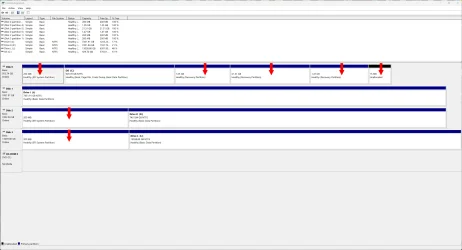
I don't know where these partitions came from . . .


archfoto

Well-known member
Member
VIP
Local time
11:38 AM
Posts
167
OS
Windows 11 Pro Version 25H2 (OS Build 26200.8457)
Hi Everyone -
I was looking at another posting on this forum, on a question about a drive not showing up, and someone suggested hitting the Win and X buttons and choosing disk management. I tried it. I haven't been in disk management for a while, and I was surprised to find so many partitions on my drives, all that I didn't put on the drives. Please see the image. The red arrows indicate the partitions, even on external drives. I am pretty sure my internal SSD did have one partition when I bought the computer from Dell. I don't know which one that was, and how were these partitions added, and will this be a problem? Will more partitions form, and will it hamper my computer? Did MS do this? I frequently check for malware, and antivirus.

Lots of weird things seem to be happening, ever since my last 2 MS updates, and updating my Nvidia driver - it was even hard to get a screenshot of the disk management screen. I had to make it a large window (it would not work on full screen), and click my cursor in the desktop area to get a screenshot at all.

Thanks.
 
Windows Build/Version
Windows 11 Pro Version 24H2 (OS Build 26100.4946)

Attachments
  • Screenshot 2025-08-31 111736.webp
    Screenshot 2025-08-31 111736.webp
    146.9 KB · Views: 3

My Computers

System One System Two

  • OS
    Windows 11 Pro Version 25H2 (OS Build 26200.8457)
    Computer type
    PC/Desktop
    Manufacturer/Model
    Dell 8950
    CPU
    i9 12th Generation
    Memory
    64GB
    Graphics Card(s)
    PNY 3060 12GB
    Monitor(s) Displays
    NEC EA27IU
    Screen Resolution
    3840X2160
    Hard Drives
    SSD internal, external drives
    Cooling
    Advanced Air Cooling
    Keyboard
    Microsoft
    Mouse
    Logitech
    Internet Speed
    High-Speed
    Browser
    MS Edge
    Antivirus
    Norton 360
  • Operating System
    Win 11 Pro 25H2 (OS Build 26200.8457)
    Computer type
    PC/Desktop
    Manufacturer/Model
    Dell Tower ECT1250
    CPU
    Intel Ultra 7 265 (20 cores) processor
    Memory
    32GB DDR5 Ram
    Graphics card(s)
    Built-in Intel UHD Graphics
    Sound Card
    Built-in
    Screen Resolution
    1920X1080
    Hard Drives
    2TB internal SSD
    Case
    Tower
The 3 EFI partitions are boot partitions. I'm guessing these other disks came from other systems that had Windows installed on them at some point. The two smaller recovery partitions are likely WinRM (windows recovery environments) and the larger recovery partition is probably an OEM recovery partition.
 

My Computer

System One

  • OS
    Linux Mint
    Computer type
    Laptop
    Manufacturer/Model
    System76 Lemur Pro
One of the recovery partitions is orphaned.

It can be left as is or deleted.
 

My Computer

System One

  • OS
    Windows 10
    Computer type
    Laptop
    Manufacturer/Model
    HP
    CPU
    Intel(R) Core(TM) i7-4800MQ CPU @ 2.70GHz
    Motherboard
    Product : 190A Version : KBC Version 94.56
    Memory
    16 GB Total: Manufacturer : Samsung MemoryType : DDR3 FormFactor : SODIMM Capacity : 8GB Speed : 1600
    Graphics Card(s)
    NVIDIA Quadro K3100M; Intel(R) HD Graphics 4600
    Sound Card
    IDT High Definition Audio CODEC; PNP Device ID HDAUDIO\FUNC_01&VEN_111D&DEV_76E0
    Hard Drives
    Model Hitachi HTS727575A9E364
    Antivirus
    Microsoft Defender
    Other Info
    Mobile Workstation
The 3 EFI partitions are boot partitions. I'm guessing these other disks came from other systems that had Windows installed on them at some point. The two smaller recovery partitions are likely WinRM (windows recovery environments) and the larger recovery partition is probably an OEM recovery partition.
Hi Neemobeer -

Thanks. I don't remember if the external drives were ever attached to my Win 10 computer, but never had partitions on them in the past, on this computer.

Are you saying that the Windows updates, like from 22H2, 2232, and 2242 caused these partitions in the C: drive?

Also, why does one external drive (I: drive) show no partitions, while all the others do? It is not my newest, or largest drive. The L: drive is!)
 

My Computers

System One System Two

  • OS
    Windows 11 Pro Version 25H2 (OS Build 26200.8457)
    Computer type
    PC/Desktop
    Manufacturer/Model
    Dell 8950
    CPU
    i9 12th Generation
    Memory
    64GB
    Graphics Card(s)
    PNY 3060 12GB
    Monitor(s) Displays
    NEC EA27IU
    Screen Resolution
    3840X2160
    Hard Drives
    SSD internal, external drives
    Cooling
    Advanced Air Cooling
    Keyboard
    Microsoft
    Mouse
    Logitech
    Internet Speed
    High-Speed
    Browser
    MS Edge
    Antivirus
    Norton 360
  • Operating System
    Win 11 Pro 25H2 (OS Build 26200.8457)
    Computer type
    PC/Desktop
    Manufacturer/Model
    Dell Tower ECT1250
    CPU
    Intel Ultra 7 265 (20 cores) processor
    Memory
    32GB DDR5 Ram
    Graphics card(s)
    Built-in Intel UHD Graphics
    Sound Card
    Built-in
    Screen Resolution
    1920X1080
    Hard Drives
    2TB internal SSD
    Case
    Tower
One of the recovery partitions is orphaned.

It can be left as is or deleted.
Hi Zbook -

Which one would that be? I have noticed since the last updates, that the computer takes longer to finish booting up completely after the desktop comes up. Are these partitions part of that problem?
 

My Computers

System One System Two

  • OS
    Windows 11 Pro Version 25H2 (OS Build 26200.8457)
    Computer type
    PC/Desktop
    Manufacturer/Model
    Dell 8950
    CPU
    i9 12th Generation
    Memory
    64GB
    Graphics Card(s)
    PNY 3060 12GB
    Monitor(s) Displays
    NEC EA27IU
    Screen Resolution
    3840X2160
    Hard Drives
    SSD internal, external drives
    Cooling
    Advanced Air Cooling
    Keyboard
    Microsoft
    Mouse
    Logitech
    Internet Speed
    High-Speed
    Browser
    MS Edge
    Antivirus
    Norton 360
  • Operating System
    Win 11 Pro 25H2 (OS Build 26200.8457)
    Computer type
    PC/Desktop
    Manufacturer/Model
    Dell Tower ECT1250
    CPU
    Intel Ultra 7 265 (20 cores) processor
    Memory
    32GB DDR5 Ram
    Graphics card(s)
    Built-in Intel UHD Graphics
    Sound Card
    Built-in
    Screen Resolution
    1920X1080
    Hard Drives
    2TB internal SSD
    Case
    Tower
I don't remember if the external drives were ever attached to my Win 10 computer, but never had partitions on them in the past

They must have. Cant use a disk until it has been initialized and partitioned.
From your screenshot it seems they had only one partition that was lettered and therefore visible to you in explorer.
 

My Computers

System One System Two

  • OS
    Win7,Win11
    Computer type
    PC/Desktop
    CPU
    i7-9700
    Motherboard
    gigabyte b365m ds3h
    Memory
    2x16gb 3600mhz
    Monitor(s) Displays
    benq gw2480
    PSU
    bequiet pure power 11 400CM
    Cooling
    cryorig m9i
  • Operating System
    win7,win11
    Computer type
    PC/Desktop
    CPU
    i5-8400
    Motherboard
    gigabyte b365m ds3h
    Memory
    2x8gb 3200
    PSU
    xfx pro 450
They must have. Cant use a disk until it has been initialized and partitioned.
From your screenshot it seems they had only one partition that was lettered and therefore visible to you in explorer.
Hi SIW2 -
I have looked at them several times in disk management (you are correct about explorer) on this Win 11 computer since I got it probably about 2 years ago. This is the first time I am seeing all these partitions. It has been several months, since I last looked at disk management. Can MS updates make their own partitions? Also, I have gone thru and filled up several Seagate External hdds, and have never partitioned any of them, or have seen this before.
Thanks.
 

My Computers

System One System Two

  • OS
    Windows 11 Pro Version 25H2 (OS Build 26200.8457)
    Computer type
    PC/Desktop
    Manufacturer/Model
    Dell 8950
    CPU
    i9 12th Generation
    Memory
    64GB
    Graphics Card(s)
    PNY 3060 12GB
    Monitor(s) Displays
    NEC EA27IU
    Screen Resolution
    3840X2160
    Hard Drives
    SSD internal, external drives
    Cooling
    Advanced Air Cooling
    Keyboard
    Microsoft
    Mouse
    Logitech
    Internet Speed
    High-Speed
    Browser
    MS Edge
    Antivirus
    Norton 360
  • Operating System
    Win 11 Pro 25H2 (OS Build 26200.8457)
    Computer type
    PC/Desktop
    Manufacturer/Model
    Dell Tower ECT1250
    CPU
    Intel Ultra 7 265 (20 cores) processor
    Memory
    32GB DDR5 Ram
    Graphics card(s)
    Built-in Intel UHD Graphics
    Sound Card
    Built-in
    Screen Resolution
    1920X1080
    Hard Drives
    2TB internal SSD
    Case
    Tower
backup software settings maybe? what backup software do you have and who set it up?
 

My Computer

System One

  • OS
    Win11
    Computer type
    PC/Desktop
    Manufacturer/Model
    Asus Home built
    CPU
    i9-13900
    Motherboard
    ASUS Strix Z790-H
    Memory
    64 GB
    Graphics Card(s)
    Nvidia RTX 5070 TI OC
    Monitor(s) Displays
    Sony 55"
    Hard Drives
    SSD
    PSU
    850 watt EVGA
    Case
    Cooler Master Haf 932
    Cooling
    CoolerMaster
    Keyboard
    RedDragon
    Mouse
    CoolerMaster
    Internet Speed
    300/300
    Antivirus
    Defender
    Other Info
    VR, Virtual Reality
The storage drive: (disk 1 ) may have one or two partitions (disk management does not display hidden partitions)

The other drives have EFI partitions and are each 200 MB.
(The default size is 100 MB)

If there is only one Windows installation the only one EFI is needed.


If you want definitive information on the disk drive partitions then run diskpart commands or run these scripts:


1) Please run disk partition info > post a share link


2) Run Tuneup plus > post a share link


3) Run the V2 log collector > post a share link


My Computer

System One

  • OS
    Windows 10
    Computer type
    Laptop
    Manufacturer/Model
    HP
    CPU
    Intel(R) Core(TM) i7-4800MQ CPU @ 2.70GHz
    Motherboard
    Product : 190A Version : KBC Version 94.56
    Memory
    16 GB Total: Manufacturer : Samsung MemoryType : DDR3 FormFactor : SODIMM Capacity : 8GB Speed : 1600
    Graphics Card(s)
    NVIDIA Quadro K3100M; Intel(R) HD Graphics 4600
    Sound Card
    IDT High Definition Audio CODEC; PNP Device ID HDAUDIO\FUNC_01&VEN_111D&DEV_76E0
    Hard Drives
    Model Hitachi HTS727575A9E364
    Antivirus
    Microsoft Defender
    Other Info
    Mobile Workstation
backup software settings maybe? what backup software do you have and who set it up?
Hi Retiredat44 -

I am using the Win 7 Backup program from the control panel. It backs up to the L: Drive. Never had a problem with it.
 

My Computers

System One System Two

  • OS
    Windows 11 Pro Version 25H2 (OS Build 26200.8457)
    Computer type
    PC/Desktop
    Manufacturer/Model
    Dell 8950
    CPU
    i9 12th Generation
    Memory
    64GB
    Graphics Card(s)
    PNY 3060 12GB
    Monitor(s) Displays
    NEC EA27IU
    Screen Resolution
    3840X2160
    Hard Drives
    SSD internal, external drives
    Cooling
    Advanced Air Cooling
    Keyboard
    Microsoft
    Mouse
    Logitech
    Internet Speed
    High-Speed
    Browser
    MS Edge
    Antivirus
    Norton 360
  • Operating System
    Win 11 Pro 25H2 (OS Build 26200.8457)
    Computer type
    PC/Desktop
    Manufacturer/Model
    Dell Tower ECT1250
    CPU
    Intel Ultra 7 265 (20 cores) processor
    Memory
    32GB DDR5 Ram
    Graphics card(s)
    Built-in Intel UHD Graphics
    Sound Card
    Built-in
    Screen Resolution
    1920X1080
    Hard Drives
    2TB internal SSD
    Case
    Tower
The storage drive: (disk 1 ) may have one or two partitions (disk management does not display hidden partitions)

The other drives have EFI partitions and are each 200 MB.
(The default size is 100 MB)

If there is only one Windows installation the only one EFI is needed.


If you want definitive information on the disk drive partitions then run diskpart commands or run these scripts:


1) Please run disk partition info > post a share link


2) Run Tuneup plus > post a share link


3) Run the V2 log collector > post a share link

Hi Zbook -

Thanks, but why run BSOD crash scripts, when I only want to know if the new drive partitions are harmful, cause draining of resources, and where they came from? I am, at this time, not experiencing any BSOD. Thank goodness.

And, there is only one Windows installation!
 

My Computers

System One System Two

  • OS
    Windows 11 Pro Version 25H2 (OS Build 26200.8457)
    Computer type
    PC/Desktop
    Manufacturer/Model
    Dell 8950
    CPU
    i9 12th Generation
    Memory
    64GB
    Graphics Card(s)
    PNY 3060 12GB
    Monitor(s) Displays
    NEC EA27IU
    Screen Resolution
    3840X2160
    Hard Drives
    SSD internal, external drives
    Cooling
    Advanced Air Cooling
    Keyboard
    Microsoft
    Mouse
    Logitech
    Internet Speed
    High-Speed
    Browser
    MS Edge
    Antivirus
    Norton 360
  • Operating System
    Win 11 Pro 25H2 (OS Build 26200.8457)
    Computer type
    PC/Desktop
    Manufacturer/Model
    Dell Tower ECT1250
    CPU
    Intel Ultra 7 265 (20 cores) processor
    Memory
    32GB DDR5 Ram
    Graphics card(s)
    Built-in Intel UHD Graphics
    Sound Card
    Built-in
    Screen Resolution
    1920X1080
    Hard Drives
    2TB internal SSD
    Case
    Tower
The V2 is a log collector.

It collects multiple files that can be troubleshooted.


Lots of weird things seem to be happening
 

My Computer

System One

  • OS
    Windows 10
    Computer type
    Laptop
    Manufacturer/Model
    HP
    CPU
    Intel(R) Core(TM) i7-4800MQ CPU @ 2.70GHz
    Motherboard
    Product : 190A Version : KBC Version 94.56
    Memory
    16 GB Total: Manufacturer : Samsung MemoryType : DDR3 FormFactor : SODIMM Capacity : 8GB Speed : 1600
    Graphics Card(s)
    NVIDIA Quadro K3100M; Intel(R) HD Graphics 4600
    Sound Card
    IDT High Definition Audio CODEC; PNP Device ID HDAUDIO\FUNC_01&VEN_111D&DEV_76E0
    Hard Drives
    Model Hitachi HTS727575A9E364
    Antivirus
    Microsoft Defender
    Other Info
    Mobile Workstation
Hi All -

I want to thank each and every one of you for your input. I really appreciate the time you took to write and help me.

Looking at the total partition sizes on each of the affected drives, they really aren't eating up that much hard drive space. I am quite averse to fixes that involve deletions, or updating, as I need this computer for communications, and my workflow will be interrupted, and a slip-up or bad choice on my end can make for a very bad time. I checked on Google to see if anyone had this problem and it actually came back to this forum at Mysterious Disk Partitions . That was back in 2023. What I really wanted to know is if anyone has had this same thing happen to them, and if they did, how did they fix it. Apparently, that did happen to someone else, and apparently, these partitions are needed. Fortunately for me, I have a 1TB SSD, so there is still quite a lot of room left on the drive, as I keep almost no sizeable data on the C: drive. There is still a lot of headroom on the external drives, as well.

The only problems I have had since my updates seem to have been annoyances at the worst, and may, or may not be related to the partitions. It is like going to the doctor for intestinal problems. He says, "Let's run some tests." We know the tests will be expensive, inconvenient, intrusive, and possibly involve pain and discomfort. We ask, "What if the tests don't show anything?" The doctor says, "Then you have IBS!" You say, "What is the cure for IBS?" The doctor says there isn't any, and you have to live with it!

I feel, for now, I have to live with the partitions.

Thank you all, again.
 

My Computers

System One System Two

  • OS
    Windows 11 Pro Version 25H2 (OS Build 26200.8457)
    Computer type
    PC/Desktop
    Manufacturer/Model
    Dell 8950
    CPU
    i9 12th Generation
    Memory
    64GB
    Graphics Card(s)
    PNY 3060 12GB
    Monitor(s) Displays
    NEC EA27IU
    Screen Resolution
    3840X2160
    Hard Drives
    SSD internal, external drives
    Cooling
    Advanced Air Cooling
    Keyboard
    Microsoft
    Mouse
    Logitech
    Internet Speed
    High-Speed
    Browser
    MS Edge
    Antivirus
    Norton 360
  • Operating System
    Win 11 Pro 25H2 (OS Build 26200.8457)
    Computer type
    PC/Desktop
    Manufacturer/Model
    Dell Tower ECT1250
    CPU
    Intel Ultra 7 265 (20 cores) processor
    Memory
    32GB DDR5 Ram
    Graphics card(s)
    Built-in Intel UHD Graphics
    Sound Card
    Built-in
    Screen Resolution
    1920X1080
    Hard Drives
    2TB internal SSD
    Case
    Tower
I am using the Win 7 Backup program from the control panel.
Probably not the best option. By Microsoft's own admission this program has been severely deprecated, and other 3rd party options are suggested/recommended.

Plenty of posts in multiple forums about problems with this program, particularly with restore/recovery attempts

Options
- imaging software like Macrium Reflect, AOMEI, Hasleo (all have freeware versions available) - best for systems backup
- native format backup like SyncBackFree - only for user files
- built-in system restore points
 

My Computers

System One System Two

  • OS
    Windows 11 2xH2 (latest update ... forever anal)
    Computer type
    PC/Desktop
    Manufacturer/Model
    HP Slim S01
    CPU
    Intel i5-12400
    Memory
    8GB
    Graphics Card(s)
    NVIDIA GeForce GT730
    Sound Card
    OOBE
    Monitor(s) Displays
    Acer 32"
    Screen Resolution
    1920x1080
    Hard Drives
    512GB KIOXIA NVMe
    1TB SATA SSD
    PSU
    OOBE
    Case
    OOBE
    Cooling
    OOBE
    Keyboard
    BT
    Mouse
    BT
    Browser
    Brave FFox Chrome Opera
    Antivirus
    KIS
  • Operating System
    Windows 11 Pro 2xH2 (latest update ... 4ever anal)
    Computer type
    Laptop
    Manufacturer/Model
    HP Pavillion 15
    CPU
    i7-1165G7 @ 2.80GHz
    Graphics card(s)
    Intel Iris Xe Graphics
    Hard Drives
    Samsung NVMe 512GB
    + numerous/multiple SSD Type C USB enclosures
    Internet Speed
    NBN FTTN 50
    Browser
    Brave
    Antivirus
    KIS
Probably not the best option. By Microsoft's own admission this program has been severely deprecated, and other 3rd party options are suggested/recommended.

Plenty of posts in multiple forums about problems with this program, particularly with restore/recovery attempts

Options
- imaging software like Macrium Reflect, AOMEI, Hasleo (all have freeware versions available) - best for systems backup
- native format backup like SyncBackFree - only for user files
- built-in system restore points
Thanks, Idgat -

I will consider them. Usually, since all my data is backed up on three external drives, the only thing that's on the C: drive is apps, drivers, etc. I usually wind up clearing the drive and reinstalling Windows and the apps without the backup, anyway. BTW, I do create system restore points with every new app, and update that I make.
 

My Computers

System One System Two

  • OS
    Windows 11 Pro Version 25H2 (OS Build 26200.8457)
    Computer type
    PC/Desktop
    Manufacturer/Model
    Dell 8950
    CPU
    i9 12th Generation
    Memory
    64GB
    Graphics Card(s)
    PNY 3060 12GB
    Monitor(s) Displays
    NEC EA27IU
    Screen Resolution
    3840X2160
    Hard Drives
    SSD internal, external drives
    Cooling
    Advanced Air Cooling
    Keyboard
    Microsoft
    Mouse
    Logitech
    Internet Speed
    High-Speed
    Browser
    MS Edge
    Antivirus
    Norton 360
  • Operating System
    Win 11 Pro 25H2 (OS Build 26200.8457)
    Computer type
    PC/Desktop
    Manufacturer/Model
    Dell Tower ECT1250
    CPU
    Intel Ultra 7 265 (20 cores) processor
    Memory
    32GB DDR5 Ram
    Graphics card(s)
    Built-in Intel UHD Graphics
    Sound Card
    Built-in
    Screen Resolution
    1920X1080
    Hard Drives
    2TB internal SSD
    Case
    Tower
Back
Top Bottom





