I have an unsolvable problem. Mem Leak \ Page Pools


rxnate

New member
Local time
7:30 AM
Posts
3
OS
Win 11
I've been through the ringer for months, reading documentation, forums, asking for help. I've never been able to solve it. I even turned to Ai for just a glimmer of hope.

Windows 11 paged pool never comes back down. Only a reboot frees it.

Task Manager → Memory → Paged pool. After reboot it's 300 MB. If I use the PC it jumps in stairs and sticks. Last measured boot: 300 MB in the morning, 900+ MB by evening. Close Discord, RuneLite, Firefox, Explorer — the number does not drop. Leave it long enough and the box runs out of memory and locks up. This is kernel paged pool, not Chrome.

Two other PCs in the house do the same kind of work (Discord / RuneLite / Firefox). They sit at 450–550 MB paged for days, sometimes a month. Same apps. Dont understand why..

Pool tags that grow and never free: FMfn, MmSt, NtfF/Ntff (paged). FMsl and File stay up on the nonpaged side. One snapshot at 8 hours: FMfn 123 MB with ~249k outstanding name-cache nodes (1.42M allocs vs 1.17M frees). fltmc is Microsoft-only (WdFilter, FileInfo, CldFlt, bindflt, bfs, …). No third-party minifilter required.

Already ruled out:
- Clean install with only Discord + RuneLite — still grew
- Windows 11 23H2 and earlier 11 on this same PC — still grew
- Defender real-time off — the huge scan spikes stopped, the slow climb did not
- wcifs disabled at boot — overnight idle went flat; daytime use still stairs
- Driver Verifier pool tracking on fltmgr, Ntfs, WdFilter: those .sys files' own paged bytes barely moved while FMfn grew tens of MB

So this is Filter Manager's filename cache / NTFS stream objects not getting torn down. Not "WdFilter leaking 200 MB of its own pool." Idle does not free it. Closing files does not free it. Reboot does.

I don't want to "reboot more" or "it's a cache until memory pressure." Pressure happened. The session still died. Other house PCs with the same apps never do this.

Put some extra details in a text doc, not sure if it helps. I'm so beyond my skillset at this point.
 
Windows Build/Version
25H2

Attachments

My Computer My Computer

At a glance

Win 11
OS
Win 11
Computer type
PC/Desktop
I don't know if PoolMon is still around, but it used to be part of the Windows Driver Kit...
 

My Computer My Computer

At a glance

Windows 11 Pro 25H2
OS
Windows 11 Pro 25H2
Computer type
Laptop
Manufacturer/Model
Toshiba
You might also look into Sysinternals RamMap...might save you some reboots until resolved.

The "Empty Standby List" function brings it down some...
 

My Computer My Computer

At a glance

Windows 11 Pro 25H2
OS
Windows 11 Pro 25H2
Computer type
Laptop
Manufacturer/Model
Toshiba
I have used the PoolMon, RampMap sounds new to me. Surprised I never came across that. Let me look into that, thanks! If anyone else has ideas, please please share. lol
 

My Computer My Computer

At a glance

Win 11
OS
Win 11
Computer type
PC/Desktop
Personally, I have no idea how to tell you to troubleshoot this, but I did have co-pilot analyze your thread and it's response was lengthy, eventually pointing to storage controller drivers, chipset drivers, sata/ahci controller drivers, uefi bios, and disk errors. Whether co-pilot is correct in its assessment, I can not say.

Since you currently have no other viable direction to go, it might be worth pursuing the direction co-pilot leads you.
If you are interested, while this thread is open in Edge, open co-pilot in upper right corner. In the message box, enter
"can you analyze this thread?"
Read the entire lengthy answer co-pilot gives you and interact with the questions co-pilot asks you.
 

My Computers My Computers

  • At a glance

    Windows 11 Pro 25H2 26200.9445i9-10900 10 core 20 threads32 gbnone-Intel UHD Graphics 630
    OS
    Windows 11 Pro 25H2 26200.9445
    Computer type
    PC/Desktop
    Manufacturer/Model
    Dell Optiplex 7080
    CPU
    i9-10900 10 core 20 threads
    Motherboard
    DELL 0J37VM
    Memory
    32 gb
    Graphics Card(s)
    none-Intel UHD Graphics 630
    Sound Card
    Integrated Realtek
    Monitor(s) Displays
    Benq 27
    Screen Resolution
    2560x1440
    Hard Drives
    2x1tb Solidigm m.2 nvme /External drives 512gb Samsung m.2 sata+2tb Kingston m2.nvme
    PSU
    500w
    Case
    MT
    Cooling
    Dell Premium
    Keyboard
    Logitech wired
    Mouse
    Logitech wireless
    Internet Speed
    so slow I'm too embarrassed to tell
    Browser
    #1 Edge #2 Firefox
    Antivirus
    Defender+MWB Premium
  • At a glance

    Windows 11 Pro 24H2 26200.9445AMD Ryzen 7 6800U32 gbintegrated
    Operating System
    Windows 11 Pro 24H2 26200.9445
    Computer type
    PC/Desktop
    Manufacturer/Model
    Beelink Mini PC SER5
    CPU
    AMD Ryzen 7 6800U
    Memory
    32 gb
    Graphics card(s)
    integrated
    Sound Card
    integrated
    Monitor(s) Displays
    Benq 27
    Screen Resolution
    2560x1440
    Hard Drives
    1TB Crucial nvme
    Keyboard
    Logitech wired
    Mouse
    Logitech wireless
    Internet Speed
    still too embarrassed to tell
    Browser
    Firefox
    Antivirus
    Defender
  • System 3 is non compliant Dell 9020 i7-4770/24gb ram Win11 PRO 26200.9445
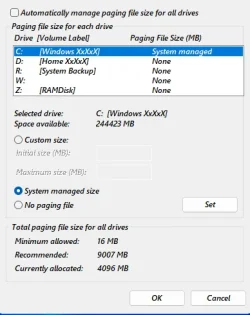
three settings i use to help with the page file

as stated it clears the page file completely at restart/shutdown

#####
this helps by using the RAM for your GPU instead of paging it out

i have mine set to 1024 decimal

#####
this is an old one but still seems to work with non-microsoft software and programs

and this is how i have my page file set up

1789186869264.webp

you can also use 'Custom size' depending on the amount of RAM you have installed
but i leave it on 'System managed' and it very often now stays at Zero use of page file
but then again i also have 64GB of DDR4 Ram installed

hopefully this maybe of some help
best of luck Steve ..
 

My Computers My Computers

  • At a glance

    Windows 11 HomeRyzen 7 5825u64GB DDR4 3200Ryzen 7 5825u
    OS
    Windows 11 Home
    Computer type
    PC/Desktop
    Manufacturer/Model
    HP 24" AiO
    CPU
    Ryzen 7 5825u
    Motherboard
    HP
    Memory
    64GB DDR4 3200
    Graphics Card(s)
    Ryzen 7 5825u
    Sound Card
    Realtek External 5w speaker bar.
    Monitor(s) Displays
    24" HP AiO
    Screen Resolution
    1920 x 1080 @60 Hz
    Hard Drives
    1TB WD Blue SN580 M2 SSD Partitioned C:/D: drives.
    2x 1TB USB HDD External Backup/Storage.
    all VeraCrypt encrypted.
    PSU
    90W external power brick
    Case
    24" All in One
    Cooling
    Default Air Cooling
    Keyboard
    Dell WiFi UK extended
    Mouse
    Dell WiFi 3 Button
    Internet Speed
    1GB full fibre
    Browser
    Vivaldi Browser/Email/Calendar
    Antivirus
    AVG Internet Security/Windows Defender
    Other Info
    Mainly Open Source Software
  • At a glance

    Ubuntu 22.04.5 LTSi5 7200u16GB DDR4Intel
    Operating System
    Ubuntu 22.04.5 LTS
    Computer type
    Laptop
    Manufacturer/Model
    Dell 13" Latitude 2017
    CPU
    i5 7200u
    Motherboard
    Dell
    Memory
    16GB DDR4
    Graphics card(s)
    Intel
    Sound Card
    Intel
    Monitor(s) Displays
    13" Dell Laptop
    Hard Drives
    250GB Crucial 2.5" SSD
    Mouse
    Generic WiFi 3 button
    Internet Speed
    WiFi only
    Browser
    Firefox
    Antivirus
    ClamAV TK
    Other Info
    Mainly Open Source Software
Personally, I have no idea how to tell you to troubleshoot this, but I did have co-pilot analyze your thread and it's response was lengthy, eventually pointing to storage controller drivers, chipset drivers, sata/ahci controller drivers, uefi bios, and disk errors. Whether co-pilot is correct in its assessment, I can not say.
I didn't know what "paged pool" is until I searched for it just now (Google's IA):

A paged pool is a region of virtual memory used by the Windows operating system kernel and device drivers that can be temporarily swapped out (paged) to the hard drive's page file when not actively needed. [1, 2]

How It Works
    • Kernel Allocations: Used for short-term, small memory needs by the operating system and drivers (similar to application heaps). [1, 2]
    • Pageability: Unlike the non-paged pool (which must stay permanently pinned in physical RAM), data in the paged pool can move freely between RAM and storage to free up physical memory. [1, 2]
    • Normal Sizes: On modern systems, a normal paged pool size frequently ranges up to a few gigabytes depending on workload and installed RAM. [1]
Troubleshooting High Usage


    • Memory Leaks: If the paged pool climbs continuously without dropping, a faulty device driver or background service is likely failing to release allocated memory.
    • Tools: You can inspect specific kernel pool allocations using diagnostic utilities like Microsoft's PoolMon tool. [1]
    As the problem happens in clean installs too, I think it should be a driver of a hardware part. As co-pilot has led to the same conclusion likely in a different way, I've quoted the glasskuter's paragraph.
 

My Computer My Computer

At a glance

Windows 11Celeron J4125 (10th gen)8GB DDR4
OS
Windows 11
Manufacturer/Model
MeLE Quieter 2Q (fanless miniPC)
CPU
Celeron J4125 (10th gen)
Memory
8GB DDR4
Monitor(s) Displays
Samsung SyncMaster T260
Screen Resolution
1920x1200
Hard Drives
256GB eMMC (Windows)
2TB USB3 HDD Toshiba (Data)
I just copied you first post and pasted it into ChatGPT. Here are its responses.


Can you read the first one and then open the second one and supply the info it requests. If it won't let you 4spond use my example to ask ChatGPT yourself.

Good luck.
 

My Computers My Computers

  • At a glance

    Windows 11 Pro 25H2 26200.9278AMD Ryzen 7 5825U with Radeon Graphics16GB
    OS
    Windows 11 Pro 25H2 26200.9278
    Computer type
    Laptop
    Manufacturer/Model
    Acemagic LX15PRO
    CPU
    AMD Ryzen 7 5825U with Radeon Graphics
    Motherboard
    BIOS CT_BI_AMI_LX15PRO_AB8139_A-004
    Memory
    16GB
    Screen Resolution
    1920 x 1080
    Hard Drives
    SSD 2TB
    Internet Speed
    30 Mbps
    Browser
    Brave
    Antivirus
    Webroot SecureAnywhere Complete beta
  • At a glance

    Windows 11 Pro 23H2 22631.2506Atom N450 1.66GHz2GB
    Operating System
    Windows 11 Pro 23H2 22631.2506
    Computer type
    Laptop
    Manufacturer/Model
    HP Mini 210-1090NR PC (bought in late 2009!)
    CPU
    Atom N450 1.66GHz
    Memory
    2GB
    Browser
    Brave
    Antivirus
    Webroot
  • Acer Swift SF114-34 laptop
    OS Windows 11 Pro 26200.8894
    CPU Pentium Silver N6000
    RAM 4GB
    BIOS v1.17
    SSD Samsung 970 EVO Plus SSD 2TB (an upgrade)
You said "Clean install with only Discord + RuneLite — still grew"

Why not try a clean install without Discord and RuneLite? Surely that should be your first step?
 

My Computers My Computers

  • At a glance

    Windows 11 Pro 25H2 26200.9278AMD Ryzen 7 5825U with Radeon Graphics16GB
    OS
    Windows 11 Pro 25H2 26200.9278
    Computer type
    Laptop
    Manufacturer/Model
    Acemagic LX15PRO
    CPU
    AMD Ryzen 7 5825U with Radeon Graphics
    Motherboard
    BIOS CT_BI_AMI_LX15PRO_AB8139_A-004
    Memory
    16GB
    Screen Resolution
    1920 x 1080
    Hard Drives
    SSD 2TB
    Internet Speed
    30 Mbps
    Browser
    Brave
    Antivirus
    Webroot SecureAnywhere Complete beta
  • At a glance

    Windows 11 Pro 23H2 22631.2506Atom N450 1.66GHz2GB
    Operating System
    Windows 11 Pro 23H2 22631.2506
    Computer type
    Laptop
    Manufacturer/Model
    HP Mini 210-1090NR PC (bought in late 2009!)
    CPU
    Atom N450 1.66GHz
    Memory
    2GB
    Browser
    Brave
    Antivirus
    Webroot
  • Acer Swift SF114-34 laptop
    OS Windows 11 Pro 26200.8894
    CPU Pentium Silver N6000
    RAM 4GB
    BIOS v1.17
    SSD Samsung 970 EVO Plus SSD 2TB (an upgrade)
Go to Task Manager>Startup Apps and disable all non Microsoft apps from Auto Starting.
Power off shutdown and restart.
See if that has any positive effect.
 

My Computer My Computer

At a glance

win 10amd ryzen 5-2600ng skill sniper x 16gbnvidea gtx 1050
OS
win 10
Computer type
PC/Desktop
Manufacturer/Model
home built
CPU
amd ryzen 5-2600
Motherboard
gigabyte b450m-ds3h
Memory
ng skill sniper x 16gb
Graphics Card(s)
nvidea gtx 1050
Monitor(s) Displays
benq fp 92
Hard Drives
samsung 860 evo 500gb m2 ssd
PSU
antec ea550g
Case
nzxt noctis 450
Browser
edge
have you tried to change what is pooled?

How to Change a Website’s Application Pool in IIS​

You can change a website’s application pool in IIS either through the IIS Manager GUI or via PowerShell. The change will affect how the site’s worker process runs, so it’s important to test after making the change.
 

My Computer My Computer

At a glance

Win11i9-1390064 GBNvidia RTX 5070 TI OC
OS
Win11
Computer type
PC/Desktop
Manufacturer/Model
Asus Home built
CPU
i9-13900
Motherboard
ASUS Strix Z790-H
Memory
64 GB
Graphics Card(s)
Nvidia RTX 5070 TI OC
Monitor(s) Displays
Sony 55"
Hard Drives
SSD
PSU
850 watt EVGA
Case
Cooler Master Haf 932
Cooling
CoolerMaster
Keyboard
RedDragon
Mouse
CoolerMaster
Internet Speed
300/300
Antivirus
Defender
Other Info
VR, Virtual Reality
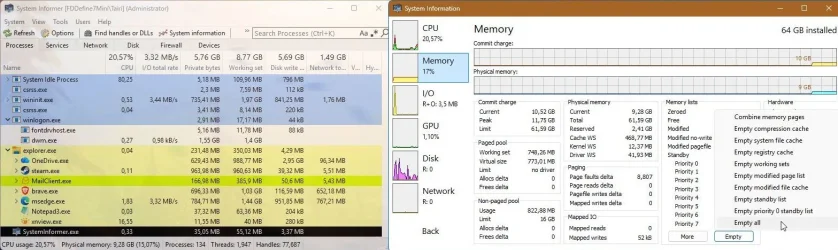
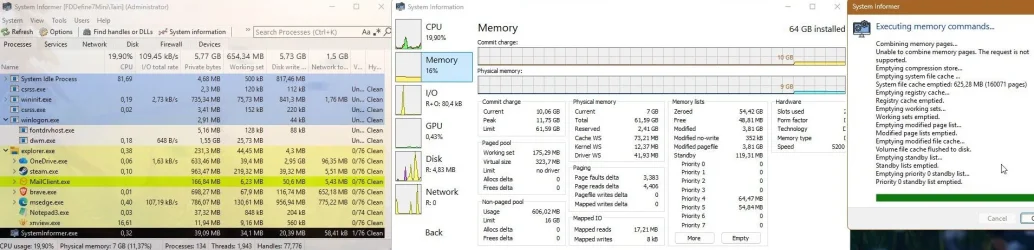
As the problem happens in clean installs too, I think it should be a driver of a hardware part.
Sometimes the issue can be fixed by updating a driver or software, if not, you can only deal with it by clearing the memory.

You can use System Informer as a quick fix or Memory Cleaner for a regular cleanup.
 

Attachments

  • capture_09122026_135517.webp
    capture_09122026_135517.webp
    121.7 KB · Views: 1
  • capture_09122026_135542.webp
    capture_09122026_135542.webp
    146.6 KB · Views: 1

My Computer My Computer

At a glance

Home2FH2CanAMD Ryzen 5 8600G (07/24)2x32GB Kingston FURY DDR5 5600 MHz CL36 @5200...ASROCK Radeon RX 6600 Challenger D 8G @48FPS ...
OS
Home2FH2Can
Computer type
PC/Desktop
CPU
AMD Ryzen 5 8600G (07/24)
Motherboard
ASROCK B650M-HDV/M.2 (07/24) BIOS 4.43 AGESA ComboAM5 1.3.0.1b Patch A (07/26)
Memory
2x32GB Kingston FURY DDR5 5600 MHz CL36 @5200 CL40 (07/24)
Graphics Card(s)
ASROCK Radeon RX 6600 Challenger D 8G @48FPS (08/24)
Sound Card
Creative Sound BlasterX AE-5 Plus (05/24)
Monitor(s) Displays
24" Philips 24M1N3200ZS/00 (05/24)
Screen Resolution
1920×1080@165Hz via DP1.4
Hard Drives
Kingston KC3000 NVMe 2TB (05/24)
ADATA XPG GAMMIX S11 Pro 512GB (07/19)
PSU
Seasonic Core GM 550 Gold (04/24)
Case
Fractal Design Define 7 Mini with 3x Noctua NF-P14s/12@555rpm (04/24)
Cooling
Noctua NH-U12S with Noctua NF-P12 (04/24)
Keyboard
HP Pavilion Wired Keyboard 300 (07/24) + Rabalux 76017 Parker (01/24)
Mouse
Logitech M330 Silent Plus (07/26)
Internet Speed
500/100 Mbps via RouterOS (05/21) & TCP Optimizer
Browser
Edge, Brave for YouTube, LibreWolf for FB
Antivirus
NextDNS blocking 1/3 Traffic
Other Info
Phone: Motorola Moto G86 (02/26)
Backup: Hasleo Backup Suite (PreOS)
Headphones: Sennheiser RS170 (09/10)
Chair: Huzaro Force 4.4 Grey Mesh (05/24)
Notifier: Xiaomi Mi Band 9 Milanese (10/24)
FlexCore USB-C 3.2 Gen 1 (M) to LAN (F) (08/25)
I ended up getting a reply from Microsoft, that it's a Kernel problem, and there is no fix at this time. :\ it really was unsolvable I guess lol... I've never tried Linux, probably won't. Thats annoying to hear.
 

My Computer My Computer

At a glance

Win 11
OS
Win 11
Computer type
PC/Desktop
Back
Top Bottom