I want to do a fresh install of my windows 11 laptop and want to keep all of my user names/passwords from browsers as well as bookmarks


dawn121988

Well-known member
Local time
1:23 AM
Posts
44
OS
Windows 11
Okay so first of all the history from my laptop is over 6 months old and I'm always worried if I delete the history I will delete some stuff I need like passwords and bookmarks and such. But here is what I want to do I want to back up all the bookmarks and the log in information from all the sites I have logged into that is still currently on the browsers and then completely reset the laptop to its original point.

So I will be backing up the bookmarks and the passwords from the browser but not the history. And I would also like to know if there was a way to remove the OneDrive from the laptop when I originally reset. I normally forget to remove it and then I have issues with it later on.

So I'm asking for some help on how to just save the bookmarks and the passwords and user names but not the entire history.
As well as how to remove the OneDrive after fresh windows 11 install from USB if this is at all possible.
 
Windows Build/Version
24H2

My Computer My Computer

At a glance

Windows 11AMD A9-9420 Radeon R5, 5 compute Cores 2c+3G,...installed 4.00 GB Total Physcal 3.81 GB Avail...AMD Radeon R5 Graphics 0x98E4
OS
Windows 11
Computer type
Laptop
Manufacturer/Model
Lenovo System Model 80XV
CPU
AMD A9-9420 Radeon R5, 5 compute Cores 2c+3G, 3000 Mhz,
Motherboard
LNVNB161216
Memory
installed 4.00 GB Total Physcal 3.81 GB Available Physical 462 MB Total Virtual 9.63 GB Available Virtual 4.16 GB
Graphics Card(s)
AMD Radeon R5 Graphics 0x98E4
Sound Card
Realtek High Definition Audio
Screen Resolution
1366 X 768 X 60 hertz
Hard Drives
929 GB internal, (2) 1TB Toshiba Externals
Browser
Firefox I always keep updated
Antivirus
Windows Defender
So I'm asking for some help on how to just save the bookmarks and the passwords and user names but not the entire history.

Which browser(s)?
 

My Computers My Computers

  • At a glance

    Win 11 Pro 25H2 26200.9445Intel® Core™ i7-14700KG.SKILL Ripjaws S5 Series 64GB (2 x 32GB) DDR5ASUS GeForce RTX 4070 Super 12GB
    OS
    Win 11 Pro 25H2 26200.9445
    Computer type
    PC/Desktop
    Manufacturer/Model
    Self Built
    CPU
    Intel® Core™ i7-14700K
    Motherboard
    ASUS TUF Z690-PLUS WIFI (BIOS 4505)
    Memory
    G.SKILL Ripjaws S5 Series 64GB (2 x 32GB) DDR5
    Graphics Card(s)
    ASUS GeForce RTX 4070 Super 12GB
    Sound Card
    Sound Blaster AE-5 Plus
    Monitor(s) Displays
    ASUS TUF Gaming 27" 2K HDR Gaming
    Screen Resolution
    2560 x 1440
    Hard Drives
    Samsung 990 Pro 1TB NVMe (Win 11 25H2)
    SK hynix P41 500GB NVMe
    SK hynix P41 2TB NVMe (x3)
    Crucial P3 Plus 4TB
    PSU
    Corsair RM850x Shift
    Case
    Antec Dark Phantom DP502 FLUX
    Cooling
    Corsair Nautilus 360 RS AIO
    Keyboard
    Logitech MK 320
    Mouse
    Razer Basilisk V3
    Internet Speed
    750Mbs
    Browser
    Firefox
    Antivirus
    Winows Security
    Other Info
    MR 8.1 Home
  • At a glance

    Win 11 Pro 25H2 26200.9445Intel Core i5-1140064 GB DDR4MSI GeForce RTX 3060 Ventus 2X 12GB
    Operating System
    Win 11 Pro 25H2 26200.9445
    Computer type
    PC/Desktop
    Manufacturer/Model
    Self Built
    CPU
    Intel Core i5-11400
    Motherboard
    Asus TUF Gaming Z590 Plus WiFi (BIOS 2803)
    Memory
    64 GB DDR4
    Graphics card(s)
    MSI GeForce RTX 3060 Ventus 2X 12GB
    Sound Card
    SoundBlaster Audigy Fx V2
    Monitor(s) Displays
    Samsung F27T350
    Screen Resolution
    1920x1080
    Hard Drives
    Samsung 980 Pro 1TB
    Samsung 970 EVO Plus 2TB
    Samsung 870 EVO 500GB SSD
    PSU
    Corsair HX750
    Case
    Cougar MX330-G Window
    Cooling
    Thermalright Frozen Edge 240 Black AIO
    Internet Speed
    350Mbps
    Browser
    Firefox
    Antivirus
    Windows Security
  • System Three
    Win 11 Pro 25H2 26200.9445
    ASUS PRIME Z370-P II BIOS 3004 7/12/21
    Intel Core i7-8700 CPU @ 3.20GHz
    32GB DDR4 RAM (4x8)
    EVGA RTX 2060 (used)
    iGPU Intel UHD Graphics 630 (backup)
    Cooler Master Hyper 212
    Mid-Tower Desktop
Because you are using Firefox as browser (I saw that in your Computer specs), you always can copy your complete profile folder to some other device, like an external SDD or Flash drive. You find the exact locaton in your Firefox help menu:
Click the menu button
Fx89menuButton
, click Help and select More Troubleshooting Information. Mine is located at:
C:\Users\[Username]\AppData\Roaming\Mozilla\Firefox\Profiles\default
Yours will have some combination of characters in stead of default.

After reinstalling Windows, you then can start Firefox and do the same: look where the profile folder is located.
First you copy that folder to another place (as it has the basic Firefox settings), then you delete all files and folders in that profile folder. Then replace that by the contents (files and folders) of the formerly saved profile folder.

After that you will have an exact copy of the situation you saved the profile before. Even cookies from exact that moment are saved (my online banking login depends on cookies...). All history, passwords and bookmarks will be back too!

There is another method if you have an account in the Mozilla/Firefox environment. Then you can save your settings there. But as I don't want to be dependent of the server of Mozilla/Firefox, I don't use that, so I don't have any experience with that.

PS. You only can copy all data from or to the Firefox profile folder after closing Firefox!
 

My Computer My Computer

At a glance

Windows 11 Pro 25H2AMD Ryzen 7 5700GKingston FURY Beast 2x16GB DIMM DDR4 2666 CL16MSI GeForce GT 730 2GB LP V1
OS
Windows 11 Pro 25H2
Computer type
PC/Desktop
Manufacturer/Model
Build by vendor to my specs
CPU
AMD Ryzen 7 5700G
Motherboard
MSI PRO B550M-P Gen3
Memory
Kingston FURY Beast 2x16GB DIMM DDR4 2666 CL16
Graphics Card(s)
MSI GeForce GT 730 2GB LP V1
Sound Card
Creative Sound Blaster Audigy FX
Monitor(s) Displays
Samsung S24E450F 24"
Screen Resolution
1920 x 1080
Hard Drives
1. SSD Crucial P5 Plus 500GB PCIe M.2
2. SSD-SATA Crucial MX500-2TB
PSU
Corsair CV650W
Case
Cooler Master Silencio S400
Cooling
Cooler Master Hyper H412R with Be Quiet Pure Wings 2 PWM BL038 fan
Keyboard
Cherry Stream (wired, scissor keys)
Mouse
Asus WT465 (wireless)
Internet Speed
70 Mbps down / 80 Mbps up
Browser
Firefox 130.0
Antivirus
F-Secure (Internetprovider version)
Other Info
Router: FRITZBox 7490
Oracle VirtualBox 7 for testing software on Win 10 or 11
... how to just save the bookmarks and the passwords and user names
Export both resources from Bookmarks/Manage:

7003.jpg

and about:logins:

7002.jpg
 
Last edited:

My Computers My Computers

  • At a glance

    Windows 11 Pro
    OS
    Windows 11 Pro
    Computer type
    PC/Desktop
    Manufacturer/Model
    ASUS ROG Strix
  • At a glance

    Windows 11 Pro
    Operating System
    Windows 11 Pro
    Computer type
    Laptop
    Manufacturer/Model
    ASUS VivoBook
  • ASUS VivoBook 'Lite' ~ Windows 11 Home
A reset will keep OEM software and will use part of the current installation. A Clean Install is pure MS.
If you do a Clean install, backup your data and drivers on an external drive.

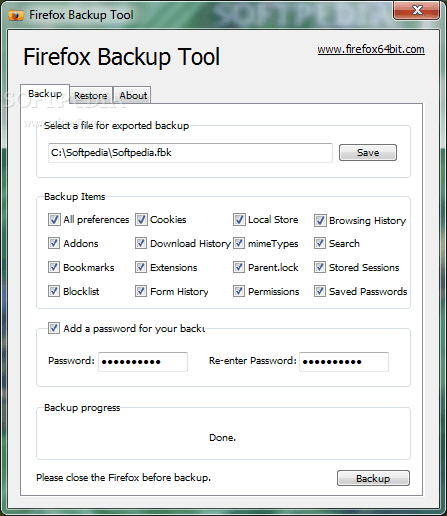
Firefox Backup Tool
If you often update and adjust your Firefox web browser, this Firefox Backup Tool can help you, it can be easily backup all important configuration of your Firefox, including user preferences, bookmarks, extensions, browsing history, etc., you can back up all of these to one file, then restore it when you need, you can also add password protection for backup files. This is a freeware, you can download it here, it currently only supports Windows platforms (both x86 and x64 versions).

 
Last edited:

My Computers My Computers

  • At a glance

    Windows 11 Pro - Windows 7 HP 64 - Lubuntui5 6600K - 800MHz to 4400MHz4+4G GSkill DDR4 3000IG - Intel 530
    OS
    Windows 11 Pro - Windows 7 HP 64 - Lubuntu
    Computer type
    PC/Desktop
    Manufacturer/Model
    custom build
    CPU
    i5 6600K - 800MHz to 4400MHz
    Motherboard
    GA-Z170-HD3P
    Memory
    4+4G GSkill DDR4 3000
    Graphics Card(s)
    IG - Intel 530
    Monitor(s) Displays
    Samsung 226BW
    Screen Resolution
    1680x1050
    Hard Drives
    (1) -1 SM951 – 128GB M.2 AHCI PCIe SSD drive for Win 11
    (2) -1 WD SATA 3 - 1T for Data
    (3) -1 WD SATA 3 - 1T for backup
    (4) -1 BX500 SSD - 256G for Windows 7 and Lubuntu
    PSU
    Thermaltake 450W TR2 gold
    Keyboard
    Old and good Chicony mechanical keyboard
    Mouse
    Logitech mX performance - 9 buttons (had to disable some)
    Internet Speed
    500 Mb/s
    Browser
    Firefox 64
  • At a glance

    Windows 11 Proi7-4500U 800- 3000MHz(4+4)G DDR3 1600IG intel 4400 + NVIDIA GeForce GT 745M
    Operating System
    Windows 11 Pro
    Computer type
    Laptop
    Manufacturer/Model
    Asus Q550LF
    CPU
    i7-4500U 800- 3000MHz
    Motherboard
    Asus Q550LF
    Memory
    (4+4)G DDR3 1600
    Graphics card(s)
    IG intel 4400 + NVIDIA GeForce GT 745M
    Sound Card
    Realtek
    Monitor(s) Displays
    LG Display LP156WF4-SPH1
    Screen Resolution
    1920 x 1080
    Hard Drives
    BX500 120G SSD for Windows and programs
    & 1T HDD for data
    Internet Speed
    500 Mb/s
    Browser
    Firefox 64
Megahertz, i found that backup tool to be a bit flaky. It didn't always copy all of the data.
I think the method as mentioned by Edwin is probably more reliable.
 

My Computer My Computer

At a glance

Win 11 ProAMD Ryzen 7 9700XG.Skill Trident Z5 Neo RGB 64GB Kit (2x32GB) ...PowerColor Radeon RX 9060 XT Reaper GDDR6 16GB
OS
Win 11 Pro
Computer type
PC/Desktop
Manufacturer/Model
N/A
CPU
AMD Ryzen 7 9700X
Motherboard
Asrock 870E Nova WiFi
Memory
G.Skill Trident Z5 Neo RGB 64GB Kit (2x32GB) DDR5-6000 C30
Graphics Card(s)
PowerColor Radeon RX 9060 XT Reaper GDDR6 16GB
Sound Card
USB Out NAD M51 DAC with Adams A8 powered speakers
Monitor(s) Displays
Dell 3219Q
Screen Resolution
3840 x 2160
Hard Drives
5 x WD_BLACK SN850x PCIe Gen4 NVMe M.2 SSD - 4TB
PSU
be quiet! DARK POWER 13 1000W Titanium PCIe 5.0 ATX Modular PSU
Case
Fractal Design Define 7 Full Tower Case (Black)
Cooling
Noctua NH-D15 G2 LBC - High Performance Multi-Socket PWM CPU Cooler
Keyboard
Razer Huntsman V2
Mouse
Razer Viper Ultimate
Internet Speed
Starlink 94Mbps down 20Mbps up
Browser
Brave
Antivirus
ESET
Sorry I will explain a bit better I am trying to get the bookmarks and user names/passwords from 3 google accounts which are all on my Goggle Chrome browser. As well as the Firefox Bookmarks and User Names/Passwords as well. I then plan to do a fresh install of windows by completely removing everything to make it like new. So far I have the saved passwords from Firefox Browser and (2) goggle accounts but I forgot the password for 1 google account and am trying to reset it but can't remember the current password since I have not needed to manually enter the password in so long in over a year so I forgot what it was. I think I tried to sign in once before on the phone and it would not work correctly so I changed the password and now it wont work. So now I need to wait 48 hours before I can change it even with the alternate email setup already. So I plan to reinstall a fresh installation of windows Monday or Tuesday whenever the timer runs up. Hopefully its on Monday I want to do a few program fresh installs and have them organized a bit better and organize my ahk files a bit as well. Hopefully the computer will be a bit better for me this summer with the reinstallation of the windows 11 and then the reinstall and setup of all my main programs.
 

My Computer My Computer

At a glance

Windows 11AMD A9-9420 Radeon R5, 5 compute Cores 2c+3G,...installed 4.00 GB Total Physcal 3.81 GB Avail...AMD Radeon R5 Graphics 0x98E4
OS
Windows 11
Computer type
Laptop
Manufacturer/Model
Lenovo System Model 80XV
CPU
AMD A9-9420 Radeon R5, 5 compute Cores 2c+3G, 3000 Mhz,
Motherboard
LNVNB161216
Memory
installed 4.00 GB Total Physcal 3.81 GB Available Physical 462 MB Total Virtual 9.63 GB Available Virtual 4.16 GB
Graphics Card(s)
AMD Radeon R5 Graphics 0x98E4
Sound Card
Realtek High Definition Audio
Screen Resolution
1366 X 768 X 60 hertz
Hard Drives
929 GB internal, (2) 1TB Toshiba Externals
Browser
Firefox I always keep updated
Antivirus
Windows Defender
So the main plan is to back up the bookmarks from both browser as well as all user names/passwords from both browsers and all (3) google account this upcoming Monday or Tuesday. And then do a fresh install of all my main programs and have them set to automatically update if possible. I also plan to remove anything relating to online storage or OneDrive since I don't use such stuff I have hard drives and flash drives.
 

My Computer My Computer

At a glance

Windows 11AMD A9-9420 Radeon R5, 5 compute Cores 2c+3G,...installed 4.00 GB Total Physcal 3.81 GB Avail...AMD Radeon R5 Graphics 0x98E4
OS
Windows 11
Computer type
Laptop
Manufacturer/Model
Lenovo System Model 80XV
CPU
AMD A9-9420 Radeon R5, 5 compute Cores 2c+3G, 3000 Mhz,
Motherboard
LNVNB161216
Memory
installed 4.00 GB Total Physcal 3.81 GB Available Physical 462 MB Total Virtual 9.63 GB Available Virtual 4.16 GB
Graphics Card(s)
AMD Radeon R5 Graphics 0x98E4
Sound Card
Realtek High Definition Audio
Screen Resolution
1366 X 768 X 60 hertz
Hard Drives
929 GB internal, (2) 1TB Toshiba Externals
Browser
Firefox I always keep updated
Antivirus
Windows Defender
Copy the existing %appdata%\mozilla\firefox folder to another location

Start firefox on the new installation. close it. rename or delete the new %appdata%\mozilla\forefox folder

then copy in the saved one.

dont know anything about chrome there is probably a similar method.
 

My Computers My Computers

  • At a glance

    Win7,Win11i7-97002x16gb 3600mhz
    OS
    Win7,Win11
    Computer type
    PC/Desktop
    CPU
    i7-9700
    Motherboard
    gigabyte b365m ds3h
    Memory
    2x16gb 3600mhz
    Monitor(s) Displays
    benq gw2480
    PSU
    bequiet pure power 11 400CM
    Cooling
    cryorig m9i
  • At a glance

    win7,win11i5-84002x8gb 3200
    Operating System
    win7,win11
    Computer type
    PC/Desktop
    CPU
    i5-8400
    Motherboard
    gigabyte b365m ds3h
    Memory
    2x8gb 3200
    PSU
    xfx pro 450
You can pretty much sync everything in Chrome and Firefox.
If you want physical backups, do what I posted earlier...

7004.jpg
 

My Computers My Computers

  • At a glance

    Windows 11 Pro
    OS
    Windows 11 Pro
    Computer type
    PC/Desktop
    Manufacturer/Model
    ASUS ROG Strix
  • At a glance

    Windows 11 Pro
    Operating System
    Windows 11 Pro
    Computer type
    Laptop
    Manufacturer/Model
    ASUS VivoBook
  • ASUS VivoBook 'Lite' ~ Windows 11 Home
On the %appdata% folder you have all user program settings.
I'll go a little further on SIW2 suggested. I would copy ALL %appdata% folder.
 
Last edited:

My Computers My Computers

  • At a glance

    Windows 11 Pro - Windows 7 HP 64 - Lubuntui5 6600K - 800MHz to 4400MHz4+4G GSkill DDR4 3000IG - Intel 530
    OS
    Windows 11 Pro - Windows 7 HP 64 - Lubuntu
    Computer type
    PC/Desktop
    Manufacturer/Model
    custom build
    CPU
    i5 6600K - 800MHz to 4400MHz
    Motherboard
    GA-Z170-HD3P
    Memory
    4+4G GSkill DDR4 3000
    Graphics Card(s)
    IG - Intel 530
    Monitor(s) Displays
    Samsung 226BW
    Screen Resolution
    1680x1050
    Hard Drives
    (1) -1 SM951 – 128GB M.2 AHCI PCIe SSD drive for Win 11
    (2) -1 WD SATA 3 - 1T for Data
    (3) -1 WD SATA 3 - 1T for backup
    (4) -1 BX500 SSD - 256G for Windows 7 and Lubuntu
    PSU
    Thermaltake 450W TR2 gold
    Keyboard
    Old and good Chicony mechanical keyboard
    Mouse
    Logitech mX performance - 9 buttons (had to disable some)
    Internet Speed
    500 Mb/s
    Browser
    Firefox 64
  • At a glance

    Windows 11 Proi7-4500U 800- 3000MHz(4+4)G DDR3 1600IG intel 4400 + NVIDIA GeForce GT 745M
    Operating System
    Windows 11 Pro
    Computer type
    Laptop
    Manufacturer/Model
    Asus Q550LF
    CPU
    i7-4500U 800- 3000MHz
    Motherboard
    Asus Q550LF
    Memory
    (4+4)G DDR3 1600
    Graphics card(s)
    IG intel 4400 + NVIDIA GeForce GT 745M
    Sound Card
    Realtek
    Monitor(s) Displays
    LG Display LP156WF4-SPH1
    Screen Resolution
    1920 x 1080
    Hard Drives
    BX500 120G SSD for Windows and programs
    & 1T HDD for data
    Internet Speed
    500 Mb/s
    Browser
    Firefox 64
Before doing anything; I would advise you to acquire an external drive and make a system image backup of your OS as it currently is.
You don’t want to complete your task of reinstalling Windows to all of a sudden remember that there is that one most important thing you forgot to do or save, whatever it may be.
It’s not uncommon for a person to all of a sudden experience a very sinking feeling due to remembering they forgot something.
A backup could be peace of mind.
 

My Computers My Computers

  • At a glance

    Windows 11 Pro 25H2 Build 26200.9168Intel(R) Core(TM) i7-4770K CPU @ 3.50GHz32.0 GB of I forget and the box is in storage.Gigabyte nVidia GeForce GTX 1660 Super OC 6GB
    OS
    Windows 11 Pro 25H2 Build 26200.9168
    Computer type
    PC/Desktop
    Manufacturer/Model
    Sin-built 2013
    CPU
    Intel(R) Core(TM) i7-4770K CPU @ 3.50GHz
    Motherboard
    ASUS ROG Maximus VI Formula
    Memory
    32.0 GB of I forget and the box is in storage.
    Graphics Card(s)
    Gigabyte nVidia GeForce GTX 1660 Super OC 6GB
    Sound Card
    ROG SupremeFX Formula 8-Channel High Definition Audio
    Monitor(s) Displays
    5 x LG 25MS500-B - 1 x 24MK430H-B - 1 x Wacom Pro 22" Touch Screen Tablet
    Screen Resolution
    All over the place
    Hard Drives
    Too many to list. OS on Samsung 1TB 870 QVO SATA
    PSU
    Silverstone 1500
    Case
    NZXT Phantom 820 Full-Tower Case
    Cooling
    Noctua NH-D15 Elite Class Dual Tower CPU Cooler / 6 x EziDIY 120mm / 2 x Corsair 140mm somethings / 1 x 140mm Thermaltake something / 2 x 200mm Corsair.
    Keyboard
    Corsair K95 / Logitech diNovo Edge Wireless
    Mouse
    Logitech: G402 / G502 / Mx Masters / Mx Air Cordless
    Internet Speed
    2000/500Mbps
    Browser
    All sorts
    Antivirus
    Kaspersky Premium
    Other Info
    ㅤㅤㅤㅤㅤㅤㅤㅤㅤㅤㅤㅤㅤㅤㅤㅤㅤㅤㅤㅤㅤㅤㅤㅤㅤㅤㅤㅤㅤㅤㅤㅤㅤㅤㅤㅤㅤㅤㅤㅤ⠀⠀⠀⠀⠀⠀⠀⠀⠀⠀
    TP-Link BE9300 WiFi 7 Bluetooth 5.4 (Archer TBE550E)
    TP-Link TX201 V1 2.5GB Lan

    Grandstream HT812 - VoIP
    ASUS DSL-AX82U - Mesh
    ASUS RT-AC68U - Mesh
    ASUS RT-BE88U Router

    Brother MFC-L2880DW Printer

    I’m on a horse.
  • At a glance

    Windows 11 Pro 25H2 Build 26200.9168 (Wifes)13th Generation Intel® Core™ i5-1340P Process...16GB LPDDR5-52001x Intel® Iris® Xe Graphics
    Operating System
    Windows 11 Pro 25H2 Build 26200.9168 (Wifes)
    Computer type
    Laptop
    Manufacturer/Model
    LENOVO Yoga 7 14IRL8 - Type 82YL
    CPU
    13th Generation Intel® Core™ i5-1340P Processor(Core™ i5-1340P)
    Memory
    16GB LPDDR5-5200
    Graphics card(s)
    1x Intel® Iris® Xe Graphics
    Sound Card
    Optimized with Dolby Atmos®
    Screen Resolution
    QHD 2880 x 1800 OLED
    Hard Drives
    M.2 512 GB SSD PCIe
    Mouse
    Logiteck MX Master 3S
    Internet Speed
    2000/500
    Antivirus
    Defender / Malwarebytes
    Other Info
    …still on a horse.


    Wireless Network: Wi-Fi 6E 2x2 AX; Bluetooth® 5.1 or above
    Ports: 1x 1 Novo button; 2 in 1 Audio Combo jack; Micro SD Card Reader; HDMI 1.4b; 2 x USB Type-C (TBT4)
    USB 3.2 Gen 2 DP 1.4a
    PD 3.0); 1 x USB 3.2 Gen1 Type A
    Camera
    1x 1080P FHD IR/RGB Hybrid with Privacy Shutter and Dual Array Microphone
    Graphics
    1x Intel® Iris® Xe Graphics
    Monitor
    14" WUXGA
    Form Factor
    Convertible Notebook
  • Windows 11 Pro 25H2 Build 26200.9168 (Wifes)

    Yoga 7 2-in-1 14IML9 - Type 83DJ

    Processor: Intel® Core™ Ultra 7 155H Processor(Core™ Ultra 7 155H)

    Memory: 32GB LPD5X-7467

    Hard Drive: 1 TB SSD PCIe

    Wireless Network: 1x Wi-Fi 6E 2x2 AX; Bluetooth® 5.1 or above

    Ports: 1 x HDMI 2.1 TMDS; 1 x Novo Button; 1 x Combo Audio Jack
    2 x USB-C (USB 4.0)
    1 x USB-A 3.2 Gen 1

    Camera: 1080P FHD IR Hybrid with Dual Microphone

    Graphics: Intel® Arc™ Graphics

    Monitor: 14" 2.8K

    ...Where's my horse?
Maybe you can consider an in-place upgrade instead of a fresh install. That way, all software, settings, and data are maintained.
 

My Computer My Computer

At a glance

Windows 11 Proi5-13400F16 GBRTX 4060
OS
Windows 11 Pro
Computer type
PC/Desktop
Manufacturer/Model
Custom Build
CPU
i5-13400F
Motherboard
Gigabyte B-760M
Memory
16 GB
Graphics Card(s)
RTX 4060
Sound Card
internal
Monitor(s) Displays
AOC 27 gaming
Screen Resolution
1920 x 1080
Hard Drives
Kingston 2 TB M.2
PSU
Thermaltake 700W
Case
DarkFlash C285P
Cooling
Kingsman KA-R240 ARGB Liquid Cooling
Keyboard
Redragon Kala
Mouse
Marvo G945
Internet Speed
400 Mbps DL/UL
Browser
Firefox, Mullvad
Antivirus
Kaspersky Standard
Other Info
Adguard for Desktop, Kerish PC Doctor, PerfectDisk Pro with OptiWrite, AOMEI Backupper Pro, Open-Shell, ExplorerPatcher
And I would also like to know if there was a way to remove the OneDrive from the laptop when I originally reset.
1. When using a MS account the default location for Documents, Desktop, Pictures, and Videos is Onedrive. You first have to turn off backup folder syncing. This tutorial tells you how and also how to get your files onto your local drive.
https://www.elevenforum.com/t/turn-on-or-off-onedrive-folder-backup-syncing-across-windows-11-devices.4321/

NOTE: ONLY IF FOLDERS DO NOT MOVE TO DEFAULT LOCATION IN STEP 1 ABOVE DO THIS

If this happens, then you could try option three below to restore the default folder location and move your files manually from Onedrive into the folders..

2. Then you have to unlink account & PC from onedrive.
https://www.elevenforum.com/t/unlink-account-and-pc-from-onedrive-in-windows-11.15162/
Once you do this the files you have in onedrive will remain there until you login to Onedrive on the Web and delete them.
Sign in - Microsoft OneDrive

3. You can then either uninstall Onedrive or disable it. I prefer to disable it. Open Task Manager>Startup Apps
Find Onedrive in the list and, right click on it, select disable. This prevents Onedrive from auto-starting.

4. If you want to uninstall it instead use Revo Uninstaller Freeware Portable. Be sure to delete any leftover files and registry entries Revo finds. Download Revo Uninstaller Freeware - Free and Full Download


My Computers My Computers

  • At a glance

    Windows 11 Pro 25H2 26200.9445i9-10900 10 core 20 threads32 gbnone-Intel UHD Graphics 630
    OS
    Windows 11 Pro 25H2 26200.9445
    Computer type
    PC/Desktop
    Manufacturer/Model
    Dell Optiplex 7080
    CPU
    i9-10900 10 core 20 threads
    Motherboard
    DELL 0J37VM
    Memory
    32 gb
    Graphics Card(s)
    none-Intel UHD Graphics 630
    Sound Card
    Integrated Realtek
    Monitor(s) Displays
    Benq 27
    Screen Resolution
    2560x1440
    Hard Drives
    2x1tb Solidigm m.2 nvme /External drives 512gb Samsung m.2 sata+2tb Kingston m2.nvme
    PSU
    500w
    Case
    MT
    Cooling
    Dell Premium
    Keyboard
    Logitech wired
    Mouse
    Logitech wireless
    Internet Speed
    so slow I'm too embarrassed to tell
    Browser
    #1 Edge #2 Firefox
    Antivirus
    Defender+MWB Premium
  • At a glance

    Windows 11 Pro 24H2 26200.9445AMD Ryzen 7 6800U32 gbintegrated
    Operating System
    Windows 11 Pro 24H2 26200.9445
    Computer type
    PC/Desktop
    Manufacturer/Model
    Beelink Mini PC SER5
    CPU
    AMD Ryzen 7 6800U
    Memory
    32 gb
    Graphics card(s)
    integrated
    Sound Card
    integrated
    Monitor(s) Displays
    Benq 27
    Screen Resolution
    2560x1440
    Hard Drives
    1TB Crucial nvme
    Keyboard
    Logitech wired
    Mouse
    Logitech wireless
    Internet Speed
    still too embarrassed to tell
    Browser
    Firefox
    Antivirus
    Defender
  • System 3 is non compliant Dell 9020 i7-4770/24gb ram Win11 PRO 26200.9445
In Firefox I go to Tools, Settings and make choices such as in Privacy and Security for logins.
 

My Computers My Computers

  • At a glance

    Win11 Pro RTM Version 24H2 Build 26100.4202Intel Core i5 11th Gen. 2.40GHz12GB
    OS
    Win11 Pro RTM Version 24H2 Build 26100.4202
    Computer type
    Laptop
    Manufacturer/Model
    Dell Vostro 3400
    CPU
    Intel Core i5 11th Gen. 2.40GHz
    Memory
    12GB
    Hard Drives
    256GB SSD NVMe M.2
  • At a glance

    Win11 Pro RTM Version 24H2 Build 26100.4202Intel Core i5 10th Gen. 2.90GHz16GBOnboard, no VGA, using a DisplayPort-to-VGA a...
    Operating System
    Win11 Pro RTM Version 24H2 Build 26100.4202
    Computer type
    PC/Desktop
    Manufacturer/Model
    Dell Vostro 5890
    CPU
    Intel Core i5 10th Gen. 2.90GHz
    Memory
    16GB
    Graphics card(s)
    Onboard, no VGA, using a DisplayPort-to-VGA adapter
    Monitor(s) Displays
    24" Dell
    Hard Drives
    512GB SSD NVMe, 4TB Seagate HDD
    Browser
    Firefox, Edge
    Antivirus
    Windows Defender/Microsoft Security
Back
Top Bottom