Icon


Tasmania Green

Well-known member
Member
Local time
11:09 AM
Posts
556
OS
Windows 11 Pro - version 24H2
I'd like to change the icon for the Bluetooth Audio Receiver app to something that is easier to see on the Taskbar. But I can't find the file location. I found an icon I'd like to use and converted it to an ICO image. (I read that's what I need form of the new icon.)
 

My Computer

System One

  • OS
    Windows 11 Pro - version 24H2
    Computer type
    PC/Desktop
    CPU
    AMD Ryzen 5 7600X 6 Core AM5 5.3GHz CPU
    Motherboard
    2024 MSI MAG B650 GAMING PLUS WIFI
    Memory
    Silicon Power XPOWER Zenith 32GB (16GBx2) CL30,1.35V UDIMM 6000MHz DDR5 RAM
    Graphics Card(s)
    MSI GeForce RTX 4060 Ventus 2X Black 8G OC Graphics Card
    Monitor(s) Displays
    Asus ROG Strix XG32WCS - 32in HDR VA 180Hz USB Type-C FreeSync Curved Gaming Monitor
    Screen Resolution
    2560 x 1440
    Hard Drives
    1) Silicon Power 1TB P34A60 Gen3x4 TLC R/W up to 2,200/1,600 MB/s PCIe M.2 NVMe SSD

    2) Crucial 1TB E100 CT1000E100SSD8 Gen4 M.2 NVMe SSD
    PSU
    MSI 750W MAG A750GL 80+ Gold PCIe 5 ATX 3.0 Modular Power Supply
    Case
    SilverStone Fara R1 Pro V2 Tempered Glass ATX Case - Black
    Cooling
    Thermalright Peerless Assassin 120 SE ARGB Dual Loop CPU Cooler, 120mm Fan
    Antivirus
    Microsoft Defender

I'd like to change the icon for the Bluetooth Audio Receiver app to something that is easier to see on the Taskbar. But I can't find the file location. I found an icon I'd like to use and converted it to an ICO image. (I read that's what I need form of the new icon.)
Sadly, you can't do that with modern apps.
I use Bluetooth Audio Receiver too.
 

My Computers

System One System Two

  • OS
    Windows 11 Pro
    Computer type
    PC/Desktop
    Manufacturer/Model
    Stigg's Build
    CPU
    Intel Core i9-10900X
    Motherboard
    GIGABYTE X299X DESIGNARE 10G
    Memory
    Corsair 64 GB (4 x 16 GB) CMW64GX4M4C3000C15 Vengeance RGB Pro 3000Mhz DDR4
    Graphics Card(s)
    GIGABYTE GeForce GTX 1660 Super Mini ITX 6 GB OC
    Sound Card
    Realtek ALC1220
    Monitor(s) Displays
    Samsung 27" FHD LED FreeSync Gaming Monitor (LS27F350FHEXXY)
    Screen Resolution
    1920 x 1080
    Hard Drives
    Samsung 970 Pro Series 1TB M.2 2280 NVMe SSD
    Western Digital Red Pro WD8003FFBX-68B9AN0 8 TB, 7200 RPM, SATA-III
    Western Digital Red Pro WD8003FFBX-68B9AN0 8 TB, 7200 RPM, SATA-III
    PSU
    Corsair HX1200 1200W 80 Plus Platinum
    Case
    Fractal Design Define 7 Black Solid Case
    Cooling
    Noctua NH-D15 Chromax Black
    Keyboard
    Razer Ornata V2
    Mouse
    Razer DeathAdder Essential
    Internet Speed
    FTTN 100Mbps / 40Mbps
    Browser
    Mozilla Firefox
    Antivirus
    N/A
    Other Info
    Logitech BRIO 4k Ultra HD USB-C Webcam
  • Operating System
    Windows 10 Pro
    Computer type
    Laptop
    Manufacturer/Model
    ASUS ROG Zephyrus M GM501GS
    CPU
    Core i7-8750H
    Motherboard
    Zephyrus M GM501GS
    Memory
    SK Hynix 32 GB (2 x 16 GB) HMA82GS6CJR8N-VK 16 GB DDR4-2666 DDR4 SDRAM
    Graphics card(s)
    NVIDIA GeForce GTX 1070
    Sound Card
    Realtek ALC294
    Monitor(s) Displays
    AU Optronics B156HAN07.1 [15.6" LCD]
    Screen Resolution
    1920 x 1080
    Hard Drives
    Samsung MZVKW512HMJP-00000 512 GB, PCI-E 3.0 x4
    Samsung SSD 860 QVO 4TB 4 TB, SATA-III
    PSU
    N/A
    Case
    N/A
    Cooling
    N/A
    Keyboard
    PC/AT Enhanced PS2 Keyboard (101/102-Key)
    Mouse
    Razer DeathAdder Essential
    Internet Speed
    FTTN 100Mbps / 40Mbps
    Browser
    Mozilla Firefox
    Antivirus
    N/A
    Other Info
    USB2.0 HD UVC Webcam
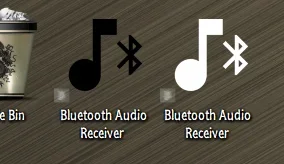
Odd..., you can create both, but, the black one will only show up on the Taskbar! 🤷‍♂️

10723.webp

UWP Apps are a pain in the apps!!!
 

My Computers

System One System Two

  • OS
    Windows 11 Pro
    Computer type
    PC/Desktop
    Manufacturer/Model
    ASUS ROG Strix
  • Operating System
    Windows 11 Pro
    Computer type
    Laptop
    Manufacturer/Model
    ASUS VivoBook
I'd like to change the icon for the Bluetooth Audio Receiver app to something that is easier to see on the Taskbar. But I can't find the file location. I found an icon I'd like to use and converted it to an ICO image. (I read that's what I need form of the new icon.)
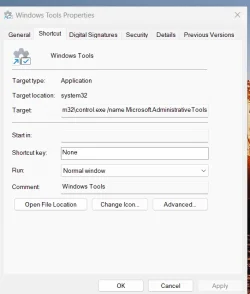
I think you can -- what you need to do is get the app to open file location -- then send to desktop -- create short cut and on the desktop right mouse click on properties then you can change the icon.

For example here's Windows tools

Screenshot 2025-10-11 111907.webp

However I don't think the icon will change on the taskbar.


Cheers
jimbo
 

My Computer

System One

  • OS
    Windows XP,11 Linux Fedora Rawhide pre-release 45
    Computer type
    PC/Desktop
    CPU
    2 X Intel i7
    Screen Resolution
    4KUHD X 2
Odd..., you can create both, but, the black one will only show up on the Taskbar! 🤷‍♂️

View attachment 148498

UWP Apps are a pain in the apps!!!


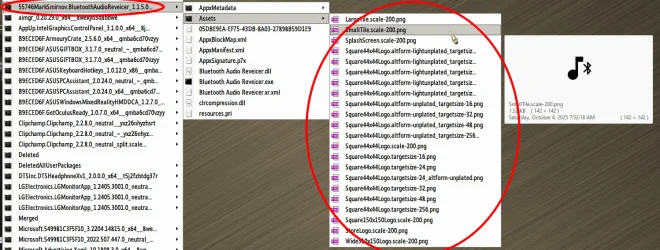
I opened the Bluetooth app, opened Task Manager, and then found the location of the Bluetooth app. With the window that opened I think I could change the icon. But I need to find a way to gain the Permissions to do so.
 

My Computer

System One

  • OS
    Windows 11 Pro - version 24H2
    Computer type
    PC/Desktop
    CPU
    AMD Ryzen 5 7600X 6 Core AM5 5.3GHz CPU
    Motherboard
    2024 MSI MAG B650 GAMING PLUS WIFI
    Memory
    Silicon Power XPOWER Zenith 32GB (16GBx2) CL30,1.35V UDIMM 6000MHz DDR5 RAM
    Graphics Card(s)
    MSI GeForce RTX 4060 Ventus 2X Black 8G OC Graphics Card
    Monitor(s) Displays
    Asus ROG Strix XG32WCS - 32in HDR VA 180Hz USB Type-C FreeSync Curved Gaming Monitor
    Screen Resolution
    2560 x 1440
    Hard Drives
    1) Silicon Power 1TB P34A60 Gen3x4 TLC R/W up to 2,200/1,600 MB/s PCIe M.2 NVMe SSD

    2) Crucial 1TB E100 CT1000E100SSD8 Gen4 M.2 NVMe SSD
    PSU
    MSI 750W MAG A750GL 80+ Gold PCIe 5 ATX 3.0 Modular Power Supply
    Case
    SilverStone Fara R1 Pro V2 Tempered Glass ATX Case - Black
    Cooling
    Thermalright Peerless Assassin 120 SE ARGB Dual Loop CPU Cooler, 120mm Fan
    Antivirus
    Microsoft Defender

I opened the Bluetooth app, opened Task Manager, and then found the location of the Bluetooth app. With the window that opened I think I could change the icon. But I need to find a way to gain the Permissions to do so.
Yup, you would need to take full Ownership of the entire WindowsApps folder!

Then, you would need to replace each and every image in the Assets folder with the exact type, size, name, bit depth, etc...

10726.webp
 
Last edited:

My Computers

System One System Two

  • OS
    Windows 11 Pro
    Computer type
    PC/Desktop
    Manufacturer/Model
    ASUS ROG Strix
  • Operating System
    Windows 11 Pro
    Computer type
    Laptop
    Manufacturer/Model
    ASUS VivoBook
Yup, you would need to take full Ownership of the entire WindowsApps folder!

Then, you would need to replace each and every image in the Assets folder with the exact type, size, name, bit depth, etc...

View attachment 148500

I think it will be easier if I just pin the Bluetooth app to the Start menu and use that. lol.
 

My Computer

System One

  • OS
    Windows 11 Pro - version 24H2
    Computer type
    PC/Desktop
    CPU
    AMD Ryzen 5 7600X 6 Core AM5 5.3GHz CPU
    Motherboard
    2024 MSI MAG B650 GAMING PLUS WIFI
    Memory
    Silicon Power XPOWER Zenith 32GB (16GBx2) CL30,1.35V UDIMM 6000MHz DDR5 RAM
    Graphics Card(s)
    MSI GeForce RTX 4060 Ventus 2X Black 8G OC Graphics Card
    Monitor(s) Displays
    Asus ROG Strix XG32WCS - 32in HDR VA 180Hz USB Type-C FreeSync Curved Gaming Monitor
    Screen Resolution
    2560 x 1440
    Hard Drives
    1) Silicon Power 1TB P34A60 Gen3x4 TLC R/W up to 2,200/1,600 MB/s PCIe M.2 NVMe SSD

    2) Crucial 1TB E100 CT1000E100SSD8 Gen4 M.2 NVMe SSD
    PSU
    MSI 750W MAG A750GL 80+ Gold PCIe 5 ATX 3.0 Modular Power Supply
    Case
    SilverStone Fara R1 Pro V2 Tempered Glass ATX Case - Black
    Cooling
    Thermalright Peerless Assassin 120 SE ARGB Dual Loop CPU Cooler, 120mm Fan
    Antivirus
    Microsoft Defender
Give me the exact path to the exe and the icon you want to use
@Tasmania Green
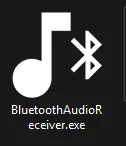
didnt hear back, so installed on a test machine and did it anyways. attached is the ahk compiled to exe with the white icon. you can pin it to your taskbar and it'll open the app. code is:

Code:
Run, explorer.exe shell:AppsFolder\55746MarkSmirnov.BluetoothAudioReveicer_xwrbx6997tsfc!App
ExitApp


1760287442216.webp

if you want a different colored icon, let me know and i'll make it up. saved the png of it for now until i hear from you.
 

Attachments

Last edited:

My Computer

System One

  • OS
    Windows 11 Pro
Back
Top Bottom