If Macrium Reflect X is too expensive, what will you switch to?


If Macrium Reflect X is too expensive, what will you switch to?

  • Ashampoo

  • Hasleo

  • Veeam

  • Acronis True Image

  • Paragon

  • Aomei Backupper

  • EaseUS ToDo

  • R-Image

  • Mini Tool Partition Wizard

  • ShadowProtect


Results are only viewable after voting.
I have had a 4 computer paid license for Macrium for years, it's very powerful and dependable. It offers more backup options than most of the competition but can be intimidating for new users. I recently bought a new Asus laptop with a trackpad. Macruim's restore via USB doesn't support the trackpad or the keyboard but neither does Hasleo or Minitool Shadowmaker.

I downloaded a copy of Ashampoo Backup Pro 27 and installed it. I was able to successfully build my recue USB with their software for for my Asus laptop on the first try. Ashampoo Backup Pro builds its recovery USB by creating a bootable, Windows-based environment (WinPE) that includes the necessary drivers for your hardware and a portable version of the Backup Pro software. The process requires the Windows Assessment and Deployment Kit (ADK) to be installed, which Ashampoo automatically downloaded and configured to build the drive. It supports secure boot and bitlocker.

Does it have all of Macruim's bells and whistles? No, but it has the options I need and is simple to use. I bought a license for 3 computers 18 dollars for the year. This company is based in Germany and has been in business for years.

I also use Rescuezilla's linux based highly recommended backup and recovery software, to backup both my linux and windows partitions. Its USB iso contains a GUI interface, rescue environment complete with wifi, browser, disk, terminal and gparted. It's not dependent on the windows operating system or it's drivers to work which makes it a valuable option to have. It just works...
You could import the macrium files into the ashampoo winpe

or

mount the ashampoo winpe, export the drivers, then install them into the macrium/hasleo winpe
dism++ is easy to use for this
 

My Computers

System One System Two

  • OS
    Win7,Win11
    Computer type
    PC/Desktop
    CPU
    i7-9700
    Motherboard
    gigabyte b365m ds3h
    Memory
    2x16gb 3600mhz
    Monitor(s) Displays
    benq gw2480
    PSU
    bequiet pure power 11 400CM
    Cooling
    cryorig m9i
  • Operating System
    win7,win11
    Computer type
    PC/Desktop
    CPU
    i5-8400
    Motherboard
    gigabyte b365m ds3h
    Memory
    2x8gb 3200
    PSU
    xfx pro 450
You could import the macrium files into the ashampoo winpe

or

mount the ashampoo winpe, export the drivers, then install them into the macrium/hasleo winpe
dism++ is easy to use for this

I agree that would probably work and I may give it a try as I love experimenting and digging myself out of trouble.... It's the best way to learn and I'm quite good at doing both... 😊
 

My Computer

System One

  • OS
    Windows 11 & Zorin Pro
    Computer type
    Laptop
    Manufacturer/Model
    Asus Rog Strix G16
    CPU
    Intel® Core™ Ultra 9 Processor 275HX 2.7 GHz
    Motherboard
    AsusteK Computer
    Memory
    32 gb
    Graphics Card(s)
    NVIDIA® GeForce RTX™ 5060 Laptop GPU
    Sound Card
    Realtek High Definition Audio
    Monitor(s) Displays
    Laptop 16 inch
    Screen Resolution
    2560 X 1600
    Hard Drives
    Boot: Samsung 9100 NVME 2 TB Microsoft Storage Controller: Standard NVM Express Driver: Microsoft 6/21/2006. No SATA/AHCI on my motherboard or in bios
    Mouse
    Pad
    Browser
    Google Chrome
    Antivirus
    Microsoft
    Other Info
    Printer: HP Color LaserJet MFP M477dw
I recently bought a new Asus laptop with a trackpad. Macruim's restore via USB doesn't support the trackpad or the keyboard but neither does Hasleo or Minitool Shadowmaker.
The standard HBS PE build on my ASUS Zenbook did not provide mousepad, keyboard, or wi-fi support. I added the five ialpss2*.inf drivers from the FIleStore on the PC, and e1d65x64.inf from an Intel driver package to the build. Now all function work.
 

My Computer

System One

  • OS
    Windows 11 Pro
    Computer type
    Laptop
    Manufacturer/Model
    ASUS Zenbook 14 OLED
    CPU
    Intel Core Ultra
    Memory
    16GB
    Graphics Card(s)
    Intel(R) Arc Graphics
    Sound Card
    Realtek High Definition Audio(SST)
    Screen Resolution
    2880 x 1800
    Hard Drives
    500 GB NVMe SSD
    Internet Speed
    1,500Mbps
    Browser
    Firefox, Edge
    Antivirus
    Windows Defender
Not that easy anymore, I've read all the posts and tried the suggestions pulled the needed drivers out of my 6 GB backup driver file..

I disagree. I could have it working in five minutes or less with most of that spent determining which drivers I need. In fact, I have a folder with nothing but the boot critical drivers for all my systems so I have instant access to those. Since I have taken this one-time only step, I can update any PE based media in under 30 seconds now.
 

My Computers

System One System Two

  • OS
    Win11 Pro 25H2 (RTM+)
    Computer type
    PC/Desktop
    Manufacturer/Model
    Acemagic
    CPU
    Intel i7-14650HX
    Memory
    32 GB
    Graphics Card(s)
    No GPU - Built-in Intel Graphics
    Sound Card
    Integrated
    Monitor(s) Displays
    Varies as machine will often be moved to locations with different monitors
    Screen Resolution
    Varies
    Hard Drives
    1 x 1TB Gen 4 NVMe SSD
    PSU
    120W Power Brick
    Keyboard
    Corsair K70 Max RGB Magnetic Keyboard
    Mouse
    Logitech MX Master 3
    Internet Speed
    1Gb Up / 1 Gb Down
    Browser
    Edge
    Antivirus
    Windows Defender
  • Operating System
    Win11 Pro 25H2 (RTM+)
    Computer type
    Laptop
    Manufacturer/Model
    Lenovo ThinkBook 13x Gen 2
    CPU
    Intel i7-1255U
    Memory
    16 GB
    Graphics card(s)
    Intel Iris Xe Graphics
    Sound Card
    Realtek® ALC3306-CG codec
    Monitor(s) Displays
    13.3-inch IPS Display
    Screen Resolution
    WQXGA (2560 x 1600)
    Hard Drives
    2 TB 4 x 4 NVMe SSD
    PSU
    USB-C / Thunderbolt 4 Power / Charging
    Keyboard
    Backlit, spill resistant keyboard
    Mouse
    Buttonless Glass Precision Touchpad
    Internet Speed
    1Gb Up / 1Gb Down
    Browser
    Edge
    Antivirus
    Windows Defender
    Other Info
    WiFi 6e / Bluetooth 5.1 / Facial Recognition / Fingerprint Sensor / ToF (Time of Flight) Human Presence Sensor
The tricky part is working out which are the critical drivers.
 
Last edited:

My Computer

System One

  • OS
    Win 11 Pro
    Computer type
    PC/Desktop
    Manufacturer/Model
    N/A
    CPU
    AMD Ryzen 7 9700X
    Motherboard
    ASUS Crosshair Viii Hero Wi Fi
    Memory
    G.Skill Trident Z5 Neo RGB 64GB Kit (2x32GB) DDR5-6000 C30
    Graphics Card(s)
    PowerColor Radeon RX 9060 XT Reaper GDDR6 16GB
    Sound Card
    USB Out NAD M51 DAC with Adams A8 powered speakers
    Monitor(s) Displays
    Dell 3219Q
    Screen Resolution
    3840 x 2160
    Hard Drives
    5 x WD_BLACK SN850x PCIe Gen4 NVMe M.2 SSD - 4TB
    PSU
    be quiet! DARK POWER 13 1000W Titanium PCIe 5.0 ATX Modular PSU
    Case
    Fractal Design Define 7 Full Tower Case (Black)
    Cooling
    Noctua NH-D15 G2 LBC - High Performance Multi-Socket PWM CPU Cooler
    Keyboard
    Razer Huntsman V2
    Mouse
    Razer Viper Ultimate
    Internet Speed
    Starlink 94Mbps down 20Mbps up
    Browser
    Brave
    Antivirus
    ESET
I just use a USB mouse.
 

My Computers

System One System Two

  • OS
    Windows 11 Pro 25H2 26200.8524
    Computer type
    Laptop
    Manufacturer/Model
    Acemagic LX15PRO
    CPU
    AMD Ryzen 7 5825U with Radeon Graphics
    Memory
    16GB
    Screen Resolution
    1920 x 1080
    Hard Drives
    SSD 2TB
    Internet Speed
    30 Mbps
    Browser
    Brave
    Antivirus
    Webroot Secure Anywhere
    Other Info
    System 3

    Acer Swift SF114-34 laptop
    OS Windows 11 Pro 26200.8524
    CPU Pentium Silver N6000
    RAM 4GB
    SSD Samsung 970 EVO Plus SSD 2TB (an upgrade)
  • Operating System
    Windows 11 Pro 23H2 22631.2506
    Computer type
    Laptop
    Manufacturer/Model
    HP Mini 210-1090NR PC (bought in late 2009!)
    CPU
    Atom N450 1.66GHz
    Memory
    2GB
    Browser
    Brave
    Antivirus
    Webroot
io drivers plus touchpad drivers likely elan or synaptics

drivers in current installtion can be displayed and selectively exported using dism++

dism++ can also mount the relevant wim file and add the exported drivers

the drivers should also be downloadable from the asus website for the specific laptop model
 

My Computers

System One System Two

  • OS
    Win7,Win11
    Computer type
    PC/Desktop
    CPU
    i7-9700
    Motherboard
    gigabyte b365m ds3h
    Memory
    2x16gb 3600mhz
    Monitor(s) Displays
    benq gw2480
    PSU
    bequiet pure power 11 400CM
    Cooling
    cryorig m9i
  • Operating System
    win7,win11
    Computer type
    PC/Desktop
    CPU
    i5-8400
    Motherboard
    gigabyte b365m ds3h
    Memory
    2x8gb 3200
    PSU
    xfx pro 450
The tricky part is workin g out which are the critical drivers.

True, but after you have done it once or twice, it's easy to figure out. Mouse, touchpad, touchscreen are all slow devices, so they typically use a USB or serial I/O interface.

In my opinion, it's a good thing to do a couple of times just so that you will know how to do it easily and quickly should you really ever need to do so in the future. That way you already have the learning out of the way and can avoid wasting that time just when you are really short of time.
 

My Computers

System One System Two

  • OS
    Win11 Pro 25H2 (RTM+)
    Computer type
    PC/Desktop
    Manufacturer/Model
    Acemagic
    CPU
    Intel i7-14650HX
    Memory
    32 GB
    Graphics Card(s)
    No GPU - Built-in Intel Graphics
    Sound Card
    Integrated
    Monitor(s) Displays
    Varies as machine will often be moved to locations with different monitors
    Screen Resolution
    Varies
    Hard Drives
    1 x 1TB Gen 4 NVMe SSD
    PSU
    120W Power Brick
    Keyboard
    Corsair K70 Max RGB Magnetic Keyboard
    Mouse
    Logitech MX Master 3
    Internet Speed
    1Gb Up / 1 Gb Down
    Browser
    Edge
    Antivirus
    Windows Defender
  • Operating System
    Win11 Pro 25H2 (RTM+)
    Computer type
    Laptop
    Manufacturer/Model
    Lenovo ThinkBook 13x Gen 2
    CPU
    Intel i7-1255U
    Memory
    16 GB
    Graphics card(s)
    Intel Iris Xe Graphics
    Sound Card
    Realtek® ALC3306-CG codec
    Monitor(s) Displays
    13.3-inch IPS Display
    Screen Resolution
    WQXGA (2560 x 1600)
    Hard Drives
    2 TB 4 x 4 NVMe SSD
    PSU
    USB-C / Thunderbolt 4 Power / Charging
    Keyboard
    Backlit, spill resistant keyboard
    Mouse
    Buttonless Glass Precision Touchpad
    Internet Speed
    1Gb Up / 1Gb Down
    Browser
    Edge
    Antivirus
    Windows Defender
    Other Info
    WiFi 6e / Bluetooth 5.1 / Facial Recognition / Fingerprint Sensor / ToF (Time of Flight) Human Presence Sensor
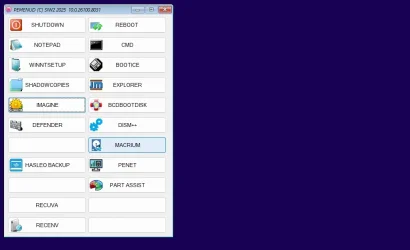
Not difficult to make a fairly simple pe build with a menu that can contain multiple programs

I use pecmd for the menu I expect it could be done with hta or something else

rough example:

clicking the relevant button launches the program

e.g.

the menu says

Code:
ITEM Button5,L8T106W195H40,WINNTSETUP,EXEC %programfiles%\winntsetup\WinNTSetup_x64.exe,%programfiles%\winntsetup\WinNTSetup_x64.exe#0

it is essential to get the commas in the correct places

the button number,
ITEM Button5,

button position and size Left Top Width Height,
L8T106W195H40,

name on the button,
WINNTSETUP,

command to execute when the button is clicked,
EXEC %programfiles%\winntsetup\WinNTSetup_x64.exe,

icon on the button
%programfiles%\winntsetup\WinNTSetup_x64.exe#0

the winpe default ramdisk letter is X so %programfiles% expands to x:\program files


Captured_000.webp
 
Last edited:

My Computers

System One System Two

  • OS
    Win7,Win11
    Computer type
    PC/Desktop
    CPU
    i7-9700
    Motherboard
    gigabyte b365m ds3h
    Memory
    2x16gb 3600mhz
    Monitor(s) Displays
    benq gw2480
    PSU
    bequiet pure power 11 400CM
    Cooling
    cryorig m9i
  • Operating System
    win7,win11
    Computer type
    PC/Desktop
    CPU
    i5-8400
    Motherboard
    gigabyte b365m ds3h
    Memory
    2x8gb 3200
    PSU
    xfx pro 450
Just needs 4 small files in winpe windows\system32

winpeshl.ini ( small text file which tells winpeshl.exe to instruct pecmd.exe to load pecmd.ini )
Code:
[LaunchApp]
AppPath="Pecmd.exe Main %SystemDrive%\Windows\System32\Pecmd.ini"
pecmd.exe
pecmd.ini ( contains commands pecmd.exe will execute. For example SHEL PECMD.EXE LOAD %CURDIR%\PEMENU.WCS )
pemenu.ini or pemenu.wcs ( they are both text files just with different extensions )
 

My Computers

System One System Two

  • OS
    Win7,Win11
    Computer type
    PC/Desktop
    CPU
    i7-9700
    Motherboard
    gigabyte b365m ds3h
    Memory
    2x16gb 3600mhz
    Monitor(s) Displays
    benq gw2480
    PSU
    bequiet pure power 11 400CM
    Cooling
    cryorig m9i
  • Operating System
    win7,win11
    Computer type
    PC/Desktop
    CPU
    i5-8400
    Motherboard
    gigabyte b365m ds3h
    Memory
    2x8gb 3200
    PSU
    xfx pro 450
As far as touchpad drivers being "critical" I never have understood why anyone who owns a laptop doesn't have a plain ol' usb corded mouse hanging around for emergencies.
 

My Computers

System One System Two

  • OS
    Windows 11 Pro 25H2
    Computer type
    PC/Desktop
    Manufacturer/Model
    Dell Optiplex 7080
    CPU
    i9-10900 10 core 20 threads
    Motherboard
    DELL 0J37VM
    Memory
    32 gb
    Graphics Card(s)
    none-Intel UHD Graphics 630
    Sound Card
    Integrated Realtek
    Monitor(s) Displays
    Benq 27
    Screen Resolution
    2560x1440
    Hard Drives
    2x1tb Solidigm m.2 nvme /External drives 512gb Samsung m.2 sata+2tb Kingston m2.nvme
    PSU
    500w
    Case
    MT
    Cooling
    Dell Premium
    Keyboard
    Logitech wired
    Mouse
    Logitech wireless
    Internet Speed
    so slow I'm too embarrassed to tell
    Browser
    #1 Edge #2 Firefox
    Antivirus
    Defender+MWB Premium
  • Operating System
    Windows 11 Pro 24H2 26200.8457
    Computer type
    PC/Desktop
    Manufacturer/Model
    Beelink Mini PC SER5
    CPU
    AMD Ryzen 7 6800U
    Memory
    32 gb
    Graphics card(s)
    integrated
    Sound Card
    integrated
    Monitor(s) Displays
    Benq 27
    Screen Resolution
    2560x1440
    Hard Drives
    1TB Crucial nvme
    Keyboard
    Logitech wired
    Mouse
    Logitech wireless
    Internet Speed
    still too embarrassed to tell
    Browser
    Firefox
    Antivirus
    Defender
    Other Info
    System 3 is non compliant Dell 9020 i7-4770/24gb ram Win11 PRO 26200.8457
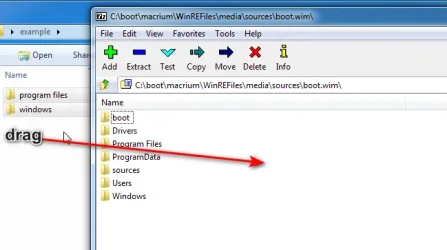
you can give it whirl with this small basic example

unzip example.zip (attached below)

open a wim e.g macrium boot.wim or hasleo backup boot.wim with 7-zip

then use mouse to drag into the 7-zip window the two folders program files and windows

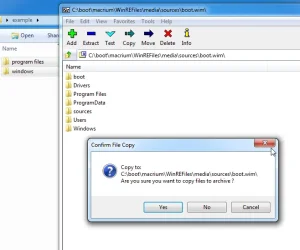
7-zip will ask if you want to add them

click Yes

7-zip-add1.webp


7-zip-add2.webp
 
Last edited:

My Computers

System One System Two

  • OS
    Win7,Win11
    Computer type
    PC/Desktop
    CPU
    i7-9700
    Motherboard
    gigabyte b365m ds3h
    Memory
    2x16gb 3600mhz
    Monitor(s) Displays
    benq gw2480
    PSU
    bequiet pure power 11 400CM
    Cooling
    cryorig m9i
  • Operating System
    win7,win11
    Computer type
    PC/Desktop
    CPU
    i5-8400
    Motherboard
    gigabyte b365m ds3h
    Memory
    2x8gb 3200
    PSU
    xfx pro 450
As far as touchpad drivers being "critical" I never have understood why anyone who owns a laptop doesn't have a plain ol' usb corded mouse hanging around for emergencies.
I have one of those mini USB keyboard/mousepad devices that was used with my TV Box. Works like a charm when the equivalent devices on laptop are non-operational.
 

My Computer

System One

  • OS
    Windows 11 Pro
    Computer type
    Laptop
    Manufacturer/Model
    ASUS Zenbook 14 OLED
    CPU
    Intel Core Ultra
    Memory
    16GB
    Graphics Card(s)
    Intel(R) Arc Graphics
    Sound Card
    Realtek High Definition Audio(SST)
    Screen Resolution
    2880 x 1800
    Hard Drives
    500 GB NVMe SSD
    Internet Speed
    1,500Mbps
    Browser
    Firefox, Edge
    Antivirus
    Windows Defender
As far as touchpad drivers being "critical" I never have understood why anyone who owns a laptop doesn't have a plain ol' usb corded mouse hanging around for emergencies.

Usually, I do. But when traveling, I like to go minimalist and carry along as little extra baggage as possible. And with all the crazy testing that I do, I sometimes have the need to perform a clean install on the fly away from home. On a laptop, this would not be a problem because you have the built-in touchpad and keyboard. But I sometimes travel with a Mini PC instead.

I know that I'm an exception, my use cases are very different from most people, so I agree that this may not be a big deal for most individuals.
 

My Computers

System One System Two

  • OS
    Win11 Pro 25H2 (RTM+)
    Computer type
    PC/Desktop
    Manufacturer/Model
    Acemagic
    CPU
    Intel i7-14650HX
    Memory
    32 GB
    Graphics Card(s)
    No GPU - Built-in Intel Graphics
    Sound Card
    Integrated
    Monitor(s) Displays
    Varies as machine will often be moved to locations with different monitors
    Screen Resolution
    Varies
    Hard Drives
    1 x 1TB Gen 4 NVMe SSD
    PSU
    120W Power Brick
    Keyboard
    Corsair K70 Max RGB Magnetic Keyboard
    Mouse
    Logitech MX Master 3
    Internet Speed
    1Gb Up / 1 Gb Down
    Browser
    Edge
    Antivirus
    Windows Defender
  • Operating System
    Win11 Pro 25H2 (RTM+)
    Computer type
    Laptop
    Manufacturer/Model
    Lenovo ThinkBook 13x Gen 2
    CPU
    Intel i7-1255U
    Memory
    16 GB
    Graphics card(s)
    Intel Iris Xe Graphics
    Sound Card
    Realtek® ALC3306-CG codec
    Monitor(s) Displays
    13.3-inch IPS Display
    Screen Resolution
    WQXGA (2560 x 1600)
    Hard Drives
    2 TB 4 x 4 NVMe SSD
    PSU
    USB-C / Thunderbolt 4 Power / Charging
    Keyboard
    Backlit, spill resistant keyboard
    Mouse
    Buttonless Glass Precision Touchpad
    Internet Speed
    1Gb Up / 1Gb Down
    Browser
    Edge
    Antivirus
    Windows Defender
    Other Info
    WiFi 6e / Bluetooth 5.1 / Facial Recognition / Fingerprint Sensor / ToF (Time of Flight) Human Presence Sensor
But my laptops' touchpads do not work when I boot into some PEs.
 

My Computers

System One System Two

  • OS
    Windows 11 Pro 25H2 26200.8524
    Computer type
    Laptop
    Manufacturer/Model
    Acemagic LX15PRO
    CPU
    AMD Ryzen 7 5825U with Radeon Graphics
    Memory
    16GB
    Screen Resolution
    1920 x 1080
    Hard Drives
    SSD 2TB
    Internet Speed
    30 Mbps
    Browser
    Brave
    Antivirus
    Webroot Secure Anywhere
    Other Info
    System 3

    Acer Swift SF114-34 laptop
    OS Windows 11 Pro 26200.8524
    CPU Pentium Silver N6000
    RAM 4GB
    SSD Samsung 970 EVO Plus SSD 2TB (an upgrade)
  • Operating System
    Windows 11 Pro 23H2 22631.2506
    Computer type
    Laptop
    Manufacturer/Model
    HP Mini 210-1090NR PC (bought in late 2009!)
    CPU
    Atom N450 1.66GHz
    Memory
    2GB
    Browser
    Brave
    Antivirus
    Webroot
But my laptops' touchpads do not work when I boot into some PEs.
True enough but many do not realise that you can set off a restore from Windows with Macrium Reflect and pc will boot into WinPE session (provided you have added it to boot menu) and do the restore with no input needed in winpe mode.

Of course, this only applies if Windows is fumctioning.
 

My Computer

System One

  • OS
    Windows 11 Pro + Win11 Canary VM.
    Computer type
    Laptop
    Manufacturer/Model
    ASUS Zenbook 14
    CPU
    I9 13th gen i9-13900H 2.60 GHZ
    Motherboard
    Yep, Laptop has one.
    Memory
    16 GB soldered
    Graphics Card(s)
    Integrated Intel Iris XE
    Sound Card
    Realtek built in
    Monitor(s) Displays
    laptop OLED screen
    Screen Resolution
    2880x1800 touchscreen
    Hard Drives
    1 TB NVME SSD (only weakness is only one slot)
    PSU
    Internal + 65W thunderbolt USB4 charger
    Case
    Yep, got one
    Cooling
    Stella Artois (UK pint cans - 568 ml) - extra cost.
    Keyboard
    Built in UK keybd
    Mouse
    Bluetooth , wireless dongled, wired
    Internet Speed
    900 mbs (ethernet), wifi 6 typical 350-450 mb/s both up and down
    Browser
    Edge
    Antivirus
    Defender
    Other Info
    TPM 2.0, 2xUSB4 thunderbolt, 1xUsb3 (usb a), 1xUsb-c, hdmi out, 3.5 mm audio out/in combo, ASUS backlit trackpad (inc. switchable number pad)

    Macrium Reflect Home V8
    Office 365 Family (6 users each 1TB onedrive space)
    Hyper-V (a vm runs almost as fast as my older laptop)
But my laptops' touchpads do not work when I boot into some PEs.

Do you need any help with that? If you give me your exact model, I can look at the available drivers and tell you the most likely course of action to resolve that.

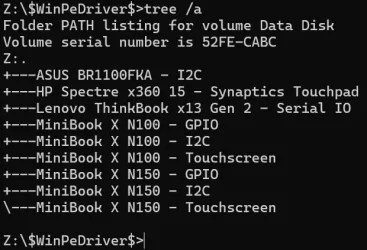
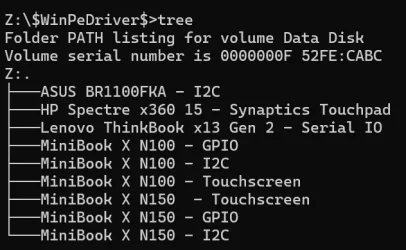
TIP: Once you identify what driver(s) you need, you can simply create a folder on the root of your PE media called $WinPeDriver$ and drop the drivers in there. PE will automatically load those drivers, and the associated devices will work in PE. You could get fancy and inject the drivers into your PE image, but why bother? This is so easy it takes mere seconds.

As an example, this is what my $WinPeDriver$ folder looks like. Note that I have drivers in here for multiple systems. Normally I would drop in the driver(s) for only the system I am currently working with.

Image1.webp
 

Attachments

  • Image1.webp
    Image1.webp
    34.6 KB · Views: 0

My Computers

System One System Two

  • OS
    Win11 Pro 25H2 (RTM+)
    Computer type
    PC/Desktop
    Manufacturer/Model
    Acemagic
    CPU
    Intel i7-14650HX
    Memory
    32 GB
    Graphics Card(s)
    No GPU - Built-in Intel Graphics
    Sound Card
    Integrated
    Monitor(s) Displays
    Varies as machine will often be moved to locations with different monitors
    Screen Resolution
    Varies
    Hard Drives
    1 x 1TB Gen 4 NVMe SSD
    PSU
    120W Power Brick
    Keyboard
    Corsair K70 Max RGB Magnetic Keyboard
    Mouse
    Logitech MX Master 3
    Internet Speed
    1Gb Up / 1 Gb Down
    Browser
    Edge
    Antivirus
    Windows Defender
  • Operating System
    Win11 Pro 25H2 (RTM+)
    Computer type
    Laptop
    Manufacturer/Model
    Lenovo ThinkBook 13x Gen 2
    CPU
    Intel i7-1255U
    Memory
    16 GB
    Graphics card(s)
    Intel Iris Xe Graphics
    Sound Card
    Realtek® ALC3306-CG codec
    Monitor(s) Displays
    13.3-inch IPS Display
    Screen Resolution
    WQXGA (2560 x 1600)
    Hard Drives
    2 TB 4 x 4 NVMe SSD
    PSU
    USB-C / Thunderbolt 4 Power / Charging
    Keyboard
    Backlit, spill resistant keyboard
    Mouse
    Buttonless Glass Precision Touchpad
    Internet Speed
    1Gb Up / 1Gb Down
    Browser
    Edge
    Antivirus
    Windows Defender
    Other Info
    WiFi 6e / Bluetooth 5.1 / Facial Recognition / Fingerprint Sensor / ToF (Time of Flight) Human Presence Sensor
@hsehestedt
Thanks for the offer. I did try this earlier but there seem to be many drivers required. I'm happy to use a USB mouse. I don't know why Macrium don't design the GUI so people could use the keyboard to navigate - some fields just can't be reached with TAB and or the cursor keys, so you can't select a specific image to restore. I'll recheck Hasleo and Macrium X today to see what works.
 

My Computers

System One System Two

  • OS
    Windows 11 Pro 25H2 26200.8524
    Computer type
    Laptop
    Manufacturer/Model
    Acemagic LX15PRO
    CPU
    AMD Ryzen 7 5825U with Radeon Graphics
    Memory
    16GB
    Screen Resolution
    1920 x 1080
    Hard Drives
    SSD 2TB
    Internet Speed
    30 Mbps
    Browser
    Brave
    Antivirus
    Webroot Secure Anywhere
    Other Info
    System 3

    Acer Swift SF114-34 laptop
    OS Windows 11 Pro 26200.8524
    CPU Pentium Silver N6000
    RAM 4GB
    SSD Samsung 970 EVO Plus SSD 2TB (an upgrade)
  • Operating System
    Windows 11 Pro 23H2 22631.2506
    Computer type
    Laptop
    Manufacturer/Model
    HP Mini 210-1090NR PC (bought in late 2009!)
    CPU
    Atom N450 1.66GHz
    Memory
    2GB
    Browser
    Brave
    Antivirus
    Webroot
Hasleo is great AND works on my server as well as my Window 11 machine.
 

My Computers

System One System Two

  • OS
    Windows 11 Professional (25H2)
    Computer type
    Laptop
    Manufacturer/Model
    HP Envy 17-r107na
    CPU
    Intel Core i7-6700HQ @2.6GHz
    Motherboard
    HP
    Memory
    16GB
    Hard Drives
    C: 2TB - SATA SSD - Fanxiang
    Internet Speed
    1GB (Virgin)
  • Operating System
    Server 2025 Datacenter (24H2)
    Computer type
    PC/Desktop
    Manufacturer/Model
    Homebrew
    CPU
    Intel Core i7-6700K @ 4.0GHz
    Motherboard
    MSI
    Memory
    32GB
    Hard Drives
    C: 2TB NVMe SSD - WD_BLACK SN850X HS 2000GB
    D: 2TB SSHD - ST2000DX001-INS164
    E: 2TB SSHD - ST2000DX001-INS164
    Internet Speed
    1GB (Virgin)
    Antivirus
    Defender
On my Acemagic LP15Pro, the keyboard and touchpad work in both Hasleo and Macrium X's PE.
On my older Acer SF114, the keyboard and touchpad work in Hasleo, but I can't boot into Macrium 8.1's PE.

Glad I checked! I've just updated 8.1 and the boot menu and it still won't boot. I'll have a happy morning running SFC and DISM!

SFC /SCANNOW fixed it for me. The touchpad and keyboard work in Macrium 8.1.
 
Last edited:

My Computers

System One System Two

  • OS
    Windows 11 Pro 25H2 26200.8524
    Computer type
    Laptop
    Manufacturer/Model
    Acemagic LX15PRO
    CPU
    AMD Ryzen 7 5825U with Radeon Graphics
    Memory
    16GB
    Screen Resolution
    1920 x 1080
    Hard Drives
    SSD 2TB
    Internet Speed
    30 Mbps
    Browser
    Brave
    Antivirus
    Webroot Secure Anywhere
    Other Info
    System 3

    Acer Swift SF114-34 laptop
    OS Windows 11 Pro 26200.8524
    CPU Pentium Silver N6000
    RAM 4GB
    SSD Samsung 970 EVO Plus SSD 2TB (an upgrade)
  • Operating System
    Windows 11 Pro 23H2 22631.2506
    Computer type
    Laptop
    Manufacturer/Model
    HP Mini 210-1090NR PC (bought in late 2009!)
    CPU
    Atom N450 1.66GHz
    Memory
    2GB
    Browser
    Brave
    Antivirus
    Webroot

Latest Support Threads

Back
Top Bottom