I'm tried


My Computers My Computers

  • At a glance

    Windows 11 Pro 25H2 Build 26200.8973Intel(R) Core(TM) i7-4770K CPU @ 3.50GHz32.0 GB of I forget and the box is in storage.Gigabyte nVidia GeForce GTX 1660 Super OC 6GB
    OS
    Windows 11 Pro 25H2 Build 26200.8973
    Computer type
    PC/Desktop
    Manufacturer/Model
    Sin-built 2013
    CPU
    Intel(R) Core(TM) i7-4770K CPU @ 3.50GHz
    Motherboard
    ASUS ROG Maximus VI Formula
    Memory
    32.0 GB of I forget and the box is in storage.
    Graphics Card(s)
    Gigabyte nVidia GeForce GTX 1660 Super OC 6GB
    Sound Card
    ROG SupremeFX Formula 8-Channel High Definition Audio
    Monitor(s) Displays
    5 x LG 25MS500-B - 1 x 24MK430H-B - 1 x Wacom Pro 22" Touch Screen Tablet
    Screen Resolution
    All over the place
    Hard Drives
    Too many to list. OS on Samsung 1TB 870 QVO SATA
    PSU
    Silverstone 1500
    Case
    NZXT Phantom 820 Full-Tower Case
    Cooling
    Noctua NH-D15 Elite Class Dual Tower CPU Cooler / 6 x EziDIY 120mm / 2 x Corsair 140mm somethings / 1 x 140mm Thermaltake something / 2 x 200mm Corsair.
    Keyboard
    Corsair K95 / Logitech diNovo Edge Wireless
    Mouse
    Logitech: G402 / G502 / Mx Masters / Mx Air Cordless
    Internet Speed
    2000/500Mbps
    Browser
    All sorts
    Antivirus
    Kaspersky Premium
    Other Info
    ㅤㅤㅤㅤㅤㅤㅤㅤㅤㅤㅤㅤㅤㅤㅤㅤㅤㅤㅤㅤㅤㅤㅤㅤㅤㅤㅤㅤㅤㅤㅤㅤㅤㅤㅤㅤㅤㅤㅤㅤ⠀⠀⠀⠀⠀⠀⠀⠀⠀⠀
    TP-Link BE9300 WiFi 7 Bluetooth 5.4 (Archer TBE550E)
    TP-Link TX201 V1 2.5GB Lan

    Grandstream HT812 - VoIP
    ASUS DSL-AX82U - Mesh
    ASUS RT-AC68U - Mesh
    ASUS RT-BE88U Router

    Brother MFC-L2880DW Printer

    I’m on a horse.
  • At a glance

    Windows 11 Pro 25H2 Build 26200.8973 (Wifes)13th Generation Intel® Core™ i5-1340P Process...16GB LPDDR5-52001x Intel® Iris® Xe Graphics
    Operating System
    Windows 11 Pro 25H2 Build 26200.8973 (Wifes)
    Computer type
    Laptop
    Manufacturer/Model
    LENOVO Yoga 7 14IRL8 - Type 82YL
    CPU
    13th Generation Intel® Core™ i5-1340P Processor(Core™ i5-1340P)
    Memory
    16GB LPDDR5-5200
    Graphics card(s)
    1x Intel® Iris® Xe Graphics
    Sound Card
    Optimized with Dolby Atmos®
    Screen Resolution
    QHD 2880 x 1800 OLED
    Hard Drives
    M.2 512 GB SSD PCIe
    Mouse
    Logiteck MX Master 3S
    Internet Speed
    2000/500
    Antivirus
    Defender / Malwarebytes
    Other Info
    …still on a horse.


    Wireless Network: Wi-Fi 6E 2x2 AX; Bluetooth® 5.1 or above
    Ports: 1x 1 Novo button; 2 in 1 Audio Combo jack; Micro SD Card Reader; HDMI 1.4b; 2 x USB Type-C (TBT4)
    USB 3.2 Gen 2 DP 1.4a
    PD 3.0); 1 x USB 3.2 Gen1 Type A
    Camera
    1x 1080P FHD IR/RGB Hybrid with Privacy Shutter and Dual Array Microphone
    Graphics
    1x Intel® Iris® Xe Graphics
    Monitor
    14" WUXGA
    Form Factor
    Convertible Notebook
  • Windows 11 Pro 25H2 Build 26200.8973 (Wifes)

    Yoga 7 2-in-1 14IML9 - Type 83DJ

    Processor: Intel® Core™ Ultra 7 155H Processor(Core™ Ultra 7 155H)

    Memory: 32GB LPD5X-7467

    Hard Drive: 1 TB SSD PCIe

    Wireless Network: 1x Wi-Fi 6E 2x2 AX; Bluetooth® 5.1 or above

    Ports: 1 x HDMI 2.1 TMDS; 1 x Novo Button; 1 x Combo Audio Jack
    2 x USB-C (USB 4.0)
    1 x USB-A 3.2 Gen 1

    Camera: 1080P FHD IR Hybrid with Dual Microphone

    Graphics: Intel® Arc™ Graphics

    Monitor: 14" 2.8K

    ...Where's my horse?
I just found out that the reason why I can get the SMB2 is because of Merlin. Other than that, without Merlin, I would be limited to SMB1 as well. But SMB1 is outdated
Did you install Merlin or was it already the base firmware?
 

My Computers My Computers

  • At a glance

    Windows 11 Enterprise 25H2 26200 7462Intel XEON E5-2699 v364GB Teamgroup UD4-3600NVIDIA GeForce GTX 1080 Ti
    OS
    Windows 11 Enterprise 25H2 26200 7462
    Computer type
    PC/Desktop
    Manufacturer/Model
    Custom Build
    CPU
    Intel XEON E5-2699 v3
    Motherboard
    ASUS X99-A
    Memory
    64GB Teamgroup UD4-3600
    Graphics Card(s)
    NVIDIA GeForce GTX 1080 Ti
    Sound Card
    Integrated
    Monitor(s) Displays
    ACER X34 Predator
    Screen Resolution
    3440 x 1440
    Hard Drives
    Crucial CT1000P 3P SSD8 1TB
    Crucial CT1000 BX500 SSD 1TB
    PSU
    GameMax Pro
    Case
    Fractal Design
    Cooling
    Corsair H110iGT + 6 140mm Fans
    Keyboard
    Corsair K4
    Mouse
    G-Skill G502
    Internet Speed
    300MBs
    Browser
    Chrome
    Antivirus
    OEM
    Other Info
    ASUS RT-AC87U Router
  • At a glance

    25H2 26200.50748GB
    Operating System
    25H2 26200.5074
    Computer type
    Laptop
    Manufacturer/Model
    ASUS X555LA
    Memory
    8GB
    Browser
    Chrome
    Antivirus
    OEM
Nope I install Merlin as well. Here are the instructions that I followed myself and it works 100% of the time. If one morning you turn on your computer and it doesn't work, just do a "network reset".

I heard and myself included about whereand how to setup the USB for the ASUS router and windows can talk toeach other. If your a starter, this is the place to be. If yournot, well I can't say much. So let's get started.

STEP #1: Go to System, then click onAdvance System settings. From there, click on “computer name”. Here look for the word “Workgroup”. You must have the word“WORKGROUP” there. To chanage it, you much click on Change andfollow along.

STEP #2: Click on “Network &Internet”, then click on Ethernet, Make sure it's on a PrivateNetwork.

STEP #3: Click on “Network &Internet” again, then click on “Advaned Sharing Settings”. Make sure Private Network, Network Discovery is “ON”, a checkmark in “Setup network connected devices automatically” and thatFile and Printer Sharing is “ON”. Under Public Network, makesure Network Discovery and File and Printer Sharing are both “ON”. Under All Networks, Public Folder Sharing is on, and that FileSharing Connections is set to 128-bit encryption. Password Protectedsharing is “OFF”.

STEP #4: Break

STEP #5: Under Control Panel, AllControl Panel Items, Network and Sharing Center, click on NetworkConnections, then find your Ethernet Controller. Click on that, thenright click on that and go down to “Properties”. Click onInternet Protocol Version 4 (TCP/IPv4), then click on Properties. Then click on “Advance”, then click on “WINS”. Make sureunder NETBIOS settings that the Default is checked.

STEP #6: Find your USB drive that youwant to use, and insert that into the slot for USB 3.0.

STEP #7: Log in to your router. Clickon the icon with is showing your USB drive. Once you click on that amenu will come up, with the titles of Information, Health Scanner andFormat. Format your drive, and set it to format NTFS.

STEP #8: Click on USB Application. Click on Servers Center, then click on “Network Place (Samba)Share/Cloud Disk.

STEP #9: Enable Share

STEP #10: Everything else is “NO”. Depending on your system under “Samba protocol version” Clickon the highest one you can. If you only have SMBv1. This might notwork, as SMB1 is being stop. You can try it, but NOT recommendated.

STEP #11: Under Maximum number ofconcurrent connections, keep it at 5. and hit apply.

STEP #12: Now you'll see a plus sign,a negative sign and a pencil. Click on the “Plus Sign”. A smallwindow will open up to ask you for “account”, “password”, andthen “password”.

STEP #13. Fill out the account namewith anything up to 10 characters. Then fill out the password forthis account. Click “Add”.

STEP# 14: You'll see the name of theaccount. Click on it. Then on the right hand side of the screenyou'll see a paper with a plus sign, then one with a negative signand then one with a pencil. Click on the paper with the plus sign onit. Then enter the folder name that you want.

STEP #15: In the middle you'll see atree with the name of the router, then drive information and then onthe bottom you'll see the name of the folder that you created. Clickon the first button to allow the person to have R/W permission.

STEP #16: Coffee Break

STEP #17: Click on Start and thenclick on This PC, then under “Network locations”. Right click ona blank area. Then click on “Add A Network Location”. Click on“Next”, click “Next”, then click on Browses. A little boxwill pop up with the word “network” in it. Wait. Then click onyour newly USB drive. Click on it, and it should place a yellowfolder on your desktop.

STEP #18: If you run into a problemand this is the only way I've been to figure it out.

A. Click on Start, then click onSettings, then click on Network and Internet, then click on Advancednetwork settings, then click on Network Reset.

B. Wait until your computer reboots,and it should work.
If not, you didn't take long enoughcoffee breaks, and didn't follow the directions. I believe in you and it will work.

GOOD LUCK

 

My Computer My Computer

At a glance

Windows 11 Pro Build by Timlab55Intel Core i9-11900K32.0GBIntel UHD Graphics 750 (ASUStek Computer Inc)...
OS
Windows 11 Pro Build by Timlab55
Computer type
PC/Desktop
CPU
Intel Core i9-11900K
Motherboard
ASUSTeK COMPUTER INC. ROG STRIX Z590-E GAMING WIFI (LGA1200)
Memory
32.0GB
Graphics Card(s)
Intel UHD Graphics 750 (ASUStek Computer Inc) 8176MB ATI Radeon RX 5500 XT (ASUStek Computer Inc)
Sound Card
N/A
Monitor(s) Displays
ASUS VE278 (1920x1080@60Hz) VX3418-2KPC (2560x1080@60Hz) LEN C27-20 (1920x1080@75Hz)
Hard Drives
931GB SanDisk SSD PLUS 1000GB (SATA (SSD)) 34 °C
476GB SanDisk SDSSDH3512G (SATA (SSD)) 29 °C
3726GB Western Digital WDC WD4003FFBX-68MU3N0 (SATA ) 35 °C
931GB Samsung SSD 980 PRO 1TB (Unknown (SSD))
29GB Samsung Flash Drive FIT USB Device (USB )
PSU
Corsair 850W
Any suggestions on the above post?
 

My Computer My Computer

At a glance

Windows 11 Pro Build by Timlab55Intel Core i9-11900K32.0GBIntel UHD Graphics 750 (ASUStek Computer Inc)...
OS
Windows 11 Pro Build by Timlab55
Computer type
PC/Desktop
CPU
Intel Core i9-11900K
Motherboard
ASUSTeK COMPUTER INC. ROG STRIX Z590-E GAMING WIFI (LGA1200)
Memory
32.0GB
Graphics Card(s)
Intel UHD Graphics 750 (ASUStek Computer Inc) 8176MB ATI Radeon RX 5500 XT (ASUStek Computer Inc)
Sound Card
N/A
Monitor(s) Displays
ASUS VE278 (1920x1080@60Hz) VX3418-2KPC (2560x1080@60Hz) LEN C27-20 (1920x1080@75Hz)
Hard Drives
931GB SanDisk SSD PLUS 1000GB (SATA (SSD)) 34 °C
476GB SanDisk SDSSDH3512G (SATA (SSD)) 29 °C
3726GB Western Digital WDC WD4003FFBX-68MU3N0 (SATA ) 35 °C
931GB Samsung SSD 980 PRO 1TB (Unknown (SSD))
29GB Samsung Flash Drive FIT USB Device (USB )
PSU
Corsair 850W
Any suggestions on the above post?
Yeah stop jumping through hoops to get things to work, keep it simple,

I have an Asus RT-BE86U, with attached ssd which I use as a network share through samba,

I have 0 issues connecting to this, I use a local account in windows 11, said local account details(User name and Password) are added to the Asus USB Application - Network Place (Samba) Share / Cloud Disk.

The only thing I disable is Netbios over TCP/IP, I Reinstall windows on a regular basis, and it works every time, there is absolutely no need to mess with signing or encryption...

Regards
 

My Computer My Computer

At a glance

Windows 11Ryzen 9950XGskill DDR5 8000Msi Suprim X 4090
OS
Windows 11
Computer type
PC/Desktop
CPU
Ryzen 9950X
Motherboard
Asus Crosshair X870E Hero
Memory
Gskill DDR5 8000
Graphics Card(s)
Msi Suprim X 4090
Sound Card
Realtek 4082
Monitor(s) Displays
Samsung Odyssey G9 Neo 57"
Screen Resolution
7680 x 2160p
Hard Drives
Intel Optane 118gb, Samsung 860 evo 2tb, Samsung 860 evo 1tb, Samsung 870 evo 4tb x2,Samsung 980 2tb,Lexar NM790 4tb, Adata SX8200 2tb x2
PSU
Corsair 1500w
Case
Cosair 7000x
Cooling
lots of water
Keyboard
Corsair Strafe RGB MKII
Mouse
Corsair Sabre
Internet Speed
crapola
Browser
Chrome
Antivirus
Miscrosoft Defender
I'm glad you have 0 issues with connecting to your SSD. In fact I'm happy. However, there are those of us out there that don't have the knowledge that you do. That is why all the steps are there. Either use them, or don't it's up to you.
 

My Computer My Computer

At a glance

Windows 11 Pro Build by Timlab55Intel Core i9-11900K32.0GBIntel UHD Graphics 750 (ASUStek Computer Inc)...
OS
Windows 11 Pro Build by Timlab55
Computer type
PC/Desktop
CPU
Intel Core i9-11900K
Motherboard
ASUSTeK COMPUTER INC. ROG STRIX Z590-E GAMING WIFI (LGA1200)
Memory
32.0GB
Graphics Card(s)
Intel UHD Graphics 750 (ASUStek Computer Inc) 8176MB ATI Radeon RX 5500 XT (ASUStek Computer Inc)
Sound Card
N/A
Monitor(s) Displays
ASUS VE278 (1920x1080@60Hz) VX3418-2KPC (2560x1080@60Hz) LEN C27-20 (1920x1080@75Hz)
Hard Drives
931GB SanDisk SSD PLUS 1000GB (SATA (SSD)) 34 °C
476GB SanDisk SDSSDH3512G (SATA (SSD)) 29 °C
3726GB Western Digital WDC WD4003FFBX-68MU3N0 (SATA ) 35 °C
931GB Samsung SSD 980 PRO 1TB (Unknown (SSD))
29GB Samsung Flash Drive FIT USB Device (USB )
PSU
Corsair 850W
I just found out that the reason why I can get the SMB2 is because of Merlin. Other than that, without Merlin, I would be limited to SMB1 as well. But SMB1 is outdated
That's just fake news. :-)
The RT-AC68U, RT-AX68U, and RT-BE68U, all can support both SMB v2 and SMB v3 (i.e. in addition to SMB v1) without needing to install Merlin. Same as my RT-AX92U 2-Pack. My very old (from 2012) RT-N66U only had support for SMB v1.
 

My Computers My Computers

  • At a glance

    11 Homei7 13650HX16GB DDR5GeForce RTX 4060 Mobile
    OS
    11 Home
    Computer type
    Laptop
    Manufacturer/Model
    Asus TUF Gaming F16 (2024)
    CPU
    i7 13650HX
    Memory
    16GB DDR5
    Graphics Card(s)
    GeForce RTX 4060 Mobile
    Sound Card
    Eastern Electric MiniMax DAC Supreme; Emotiva UMC-200; Astell & Kern AK240
    Monitor(s) Displays
    Sony Bravia XR-55X90J
    Screen Resolution
    3840×2160
    Hard Drives
    512GB SSD internal
    37TB external
    PSU
    Li-ion
    Cooling
    2× Arc Flow Fans, 4× exhaust vents, 5× heatpipes
    Keyboard
    Logitech K800
    Mouse
    Logitech G402
    Internet Speed
    30Mbit/s up, 500Mbit/s down
    Browser
    FF
    Antivirus
    What's an antivirus?
  • At a glance

    11 Homei5 1135G716GB DDR4Intel Iris Xe
    Operating System
    11 Home
    Computer type
    Laptop
    Manufacturer/Model
    Medion S15450
    CPU
    i5 1135G7
    Memory
    16GB DDR4
    Graphics card(s)
    Intel Iris Xe
    Sound Card
    Eastern Electric MiniMax DAC Supreme; Emotiva UMC-200; Astell & Kern AK240
    Monitor(s) Displays
    Sony Bravia XR-55X90J
    Screen Resolution
    3840×2160
    Hard Drives
    2TB SSD internal
    37TB external
    PSU
    Li-ion
    Keyboard
    Logitech K800
    Mouse
    Logitech G402
    Internet Speed
    30Mbit/s up, 500Mbit/s down
    Browser
    FF
In my experience the vast majority of routers only support the SMB1 protocol.

To use the shared USB drive on my router I had to enable the SMB/CIFS 1.0 Client in Windows Features.

1730931722739-png.115457
@Bree

perhaps in the UK -- these days many if you want SMB1 you need to do a whole lot of other things now to get it to work.

What's the point of having all this extra security if at the Internet level you are still using SMB1 which is as leaky as a sieve. Even if you use amazon fire sticks / roku sticks etc to connect to remote TV's (which themselves might not have anything better -- but most TV's have dreadful Internet apps -- far better to use external firestick etc) they support up to SMBV3.

On Full fibre ISP many are using the excellent eero system with a great high performing mesh network easily allowing up to 10Gpbs on home systems.!! If you are on full fibre get your ISP to change the router box , I believe most (even in the UK) will do it free -- better security is good for everyone !!!.

Cheers
jimbo
 

My Computer My Computer

At a glance

Windows XP,11 Linux Fedora Rawhide pre-releas...2 X Intel i7
OS
Windows XP,11 Linux Fedora Rawhide pre-release 45
Computer type
PC/Desktop
CPU
2 X Intel i7
Screen Resolution
4KUHD X 2
What's the point of having all this extra security if at the Internet level you are still using SMB1 which is as leaky as a sieve. Even if you use amazon fire sticks / roku sticks etc to connect to remote TV's (which themselves might not have anything better -- but most TV's have dreadful Internet apps -- far better to use external firestick etc) they support up to SMBV3.
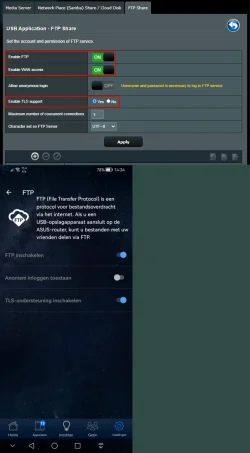
For sharing files over the internet, what's the point of using any version of SMB when SMB never was designed to be used for that purpose, anyway in the first place? In terms of internet security, SMB v3 won't save your bacon. This is why, to share media files securely over the internet, I only use TLS over FTP in my Asus router—and FileZilla because I am allergic to firesticks etc..

TLS over FTP.webp
 

My Computers My Computers

  • At a glance

    11 Homei7 13650HX16GB DDR5GeForce RTX 4060 Mobile
    OS
    11 Home
    Computer type
    Laptop
    Manufacturer/Model
    Asus TUF Gaming F16 (2024)
    CPU
    i7 13650HX
    Memory
    16GB DDR5
    Graphics Card(s)
    GeForce RTX 4060 Mobile
    Sound Card
    Eastern Electric MiniMax DAC Supreme; Emotiva UMC-200; Astell & Kern AK240
    Monitor(s) Displays
    Sony Bravia XR-55X90J
    Screen Resolution
    3840×2160
    Hard Drives
    512GB SSD internal
    37TB external
    PSU
    Li-ion
    Cooling
    2× Arc Flow Fans, 4× exhaust vents, 5× heatpipes
    Keyboard
    Logitech K800
    Mouse
    Logitech G402
    Internet Speed
    30Mbit/s up, 500Mbit/s down
    Browser
    FF
    Antivirus
    What's an antivirus?
  • At a glance

    11 Homei5 1135G716GB DDR4Intel Iris Xe
    Operating System
    11 Home
    Computer type
    Laptop
    Manufacturer/Model
    Medion S15450
    CPU
    i5 1135G7
    Memory
    16GB DDR4
    Graphics card(s)
    Intel Iris Xe
    Sound Card
    Eastern Electric MiniMax DAC Supreme; Emotiva UMC-200; Astell & Kern AK240
    Monitor(s) Displays
    Sony Bravia XR-55X90J
    Screen Resolution
    3840×2160
    Hard Drives
    2TB SSD internal
    37TB external
    PSU
    Li-ion
    Keyboard
    Logitech K800
    Mouse
    Logitech G402
    Internet Speed
    30Mbit/s up, 500Mbit/s down
    Browser
    FF
For sharing files over the internet, what's the point of using any version of SMB when SMB never was designed to be used for that purpose, anyway in the first place? In terms of internet security, SMB v3 won't save your bacon. This is why, to share media files securely over the internet, I only use TLS over FTP in my Asus router—and FileZilla because I am allergic to firesticks etc..

View attachment 140494
Hi there
It was primarliy designed for a lot of Non Windows stuff to share files with windows -- but if you are talking about ftp -- sftp is far better as used by things like filezilla !!!

Cheers
jimbo
 

My Computer My Computer

At a glance

Windows XP,11 Linux Fedora Rawhide pre-releas...2 X Intel i7
OS
Windows XP,11 Linux Fedora Rawhide pre-release 45
Computer type
PC/Desktop
CPU
2 X Intel i7
Screen Resolution
4KUHD X 2
It was primarliy designed for a lot of Non Windows stuff to share files with windows -- but if you are talking about ftp -- sftp is far better as used by things like filezilla !!!
I meant FTP over TLS, i.e., FTPS.
 

My Computers My Computers

  • At a glance

    11 Homei7 13650HX16GB DDR5GeForce RTX 4060 Mobile
    OS
    11 Home
    Computer type
    Laptop
    Manufacturer/Model
    Asus TUF Gaming F16 (2024)
    CPU
    i7 13650HX
    Memory
    16GB DDR5
    Graphics Card(s)
    GeForce RTX 4060 Mobile
    Sound Card
    Eastern Electric MiniMax DAC Supreme; Emotiva UMC-200; Astell & Kern AK240
    Monitor(s) Displays
    Sony Bravia XR-55X90J
    Screen Resolution
    3840×2160
    Hard Drives
    512GB SSD internal
    37TB external
    PSU
    Li-ion
    Cooling
    2× Arc Flow Fans, 4× exhaust vents, 5× heatpipes
    Keyboard
    Logitech K800
    Mouse
    Logitech G402
    Internet Speed
    30Mbit/s up, 500Mbit/s down
    Browser
    FF
    Antivirus
    What's an antivirus?
  • At a glance

    11 Homei5 1135G716GB DDR4Intel Iris Xe
    Operating System
    11 Home
    Computer type
    Laptop
    Manufacturer/Model
    Medion S15450
    CPU
    i5 1135G7
    Memory
    16GB DDR4
    Graphics card(s)
    Intel Iris Xe
    Sound Card
    Eastern Electric MiniMax DAC Supreme; Emotiva UMC-200; Astell & Kern AK240
    Monitor(s) Displays
    Sony Bravia XR-55X90J
    Screen Resolution
    3840×2160
    Hard Drives
    2TB SSD internal
    37TB external
    PSU
    Li-ion
    Keyboard
    Logitech K800
    Mouse
    Logitech G402
    Internet Speed
    30Mbit/s up, 500Mbit/s down
    Browser
    FF
Thank you to all! I appreciate all of the contributors to this post. I've been a longtime ASUS router user with the RT-AC87U, and recently replaced it with an ASUS RT-BE92U BE9700 Tri-Band WiFi 7 Router. For the curious, I'm using the 3 separate bands independently 2.4Ghz, 5Ghz, 6Ghz.

For you laptop users out there, the Intel AX210 Tri-Band Wi-Fi 6E Bluetooth 5.3 Network Card for Notebook is a sweet upgrade for many, and it's at a very decent price.

Although I use a NAS, I'll likely be trying the USB on the router just for kicks. Thanks for all the info and tips.
Much appreciated. (y)
 
Last edited:

My Computers My Computers

  • At a glance

    Windows 11 Pro 25H2 (OS Build 26200.8246)Intel(R) Xeon(R) CPU E3-1535M v5 @ 2.90 Max T...64GB DDR4 ECC (Error-Correcting Code memory)NVIDIA Quadro M2000M 4GB GDDR5 & Intel(R) HD ...
    OS
    Windows 11 Pro 25H2 (OS Build 26200.8246)
    Computer type
    Laptop
    Manufacturer/Model
    Dell Precision Mobile Workstation
    CPU
    Intel(R) Xeon(R) CPU E3-1535M v5 @ 2.90 Max Turbo 3.80
    Motherboard
    00V5FJ
    Memory
    64GB DDR4 ECC (Error-Correcting Code memory)
    Graphics Card(s)
    NVIDIA Quadro M2000M 4GB GDDR5 & Intel(R) HD Graphics P530
    Sound Card
    Realtek Audio
    Monitor(s) Displays
    15.6" 4K UltraHD
    Screen Resolution
    4K UHD 3840x2160
    Hard Drives
    2TB Crucial NVMe & 2TB Seagate SATA
    PSU
    Dell 180W 19.5V-9.23A
    Keyboard
    Backlit
    Mouse
    Logitech G703 & Logitech G305
    Internet Speed
    WIFI: Intel(R) Wi-Fi 6E AX210NGW(Gig+) 160MHz Bands 2.4GHz(574Mbps), 5GHz 2.4Gbps, 6 GHz (160MHz) 2.4Gbps
    Browser
    Mozilla Firefox
    Antivirus
    Windows Defender/Microsoft Security + additional Anti Spyware, Anti Malware, etc.
    Other Info
    Thunderbolt 3
  • At a glance

    Windows 11 Pro 24H2 (OS Build 26100.6725)Dual (X2) Intel(R) Xeon(R) CPU E5-2690 0 @ 2....64GB DDR3 ECC (Error-Correcting Code memory)NVIDIA GeForce GTX 970 4GB of GDDR5
    Operating System
    Windows 11 Pro 24H2 (OS Build 26100.6725)
    Computer type
    PC/Desktop
    Manufacturer/Model
    Dell Precision Workstation T5610
    CPU
    Dual (X2) Intel(R) Xeon(R) CPU E5-2690 0 @ 2.90GHz Max Turbo 3.80
    Motherboard
    0WN7Y6
    Memory
    64GB DDR3 ECC (Error-Correcting Code memory)
    Graphics card(s)
    NVIDIA GeForce GTX 970 4GB of GDDR5
    Sound Card
    Realtek Audio & NVIDIA High Definition Audio
    Monitor(s) Displays
    3 Acer Monitors
    Screen Resolution
    1920x1080
    Hard Drives
    2 Seagate Barracuda ST2000DM008-2UB102 (RAID)
    Mouse
    Logitech G305
Thank you to all! I appreciate all of the contributors to this post. I've been a longtime ASUS router user with the RT-AC87U, and recently replaced it with an ASUS RT-BE92U BE9700 Tri-Band WiFi 7 Router. For the curious, I'm using the 3 separate bands independently 2.4Ghz, 5Ghz, 6Ghz.
Yes, you need to keep the Smart Connect feature disabled in the router settings because otherwise you'll lose the ability to use the separate bands independently, and, according to Asus, in most regions (excepting many regions in East Asia) typically you want to avoid losing that ability to maintain smooth compatibility with a lot of Wi-Fi devices (i.e. in terms of whether they will properly connect to the router by always using the correct band). [Wireless Router] How to configure the Smart Connect in ASUS Router? | Official Support | ASUS Global
For you laptop users out there, the Intel AX210 Tri-Band Wi-Fi 6E Bluetooth 5.3 Network Card for Notebook is a sweet upgrade for many, and it's at a very decent price.
Also keep in mind that a lot of modern Intel-based laptops use Intel CNVio2 such a way that the laptop can NOT support the AX210 card. That is, if the laptop uses an AX201, not an AX200, usually it means that 1/ upgrading it to the AX210 refuses to work whereas 2/ upgrading to the AX211 does work.

That said, both my 2 different laptops use an AX201. I saw no reason to upgrade the cards because my Asus RT-AX92U 2 Pack supports Wi-Fi 6 but not Wi-Fi 6E. Using the 2.4GHz band, my old RT-N66U "Dark Knight" was able to go through 3 solid walls over a 59 ft. distance, stably, and without the kind of performance degradations that would have made the idea of going that far useless.

So, I wanted to see with my own eyes how the signal stability and range of this particular Wi-Fi 6 mesh system from Asus would compare against that plus multiple other Wi-Fi 6 solutions from other major brands that (supposedly) were in direct competition with the RT-AX92U 2 Pack. It didn't take very long before I had discovered that there quite simply was no competition.

The bottom line is that moving from Wi-Fi 6 to Wi-Fi 6E or 7 isn't necessarily always going to be worth the added expense. Especially if it also means that you'd have to sacrifice on signal stability and range, just to keep it affordable. I am using the wired backhaul option of AiMesh 2.0 so the fact that the RT-AX92U isn't a true Tri-band is an added bonus to me due to it being more cost effective, faster, and more reliable than a wireless backhaul. And yes, the USB 3.0 port on each RT-AX92U performs well anough for it to be suitable to be used as a cheap NAS replacement.

Upgrade to Wi-Fi 6E, you say? Two words. Fat chance. :D
Although I use a NAS, I'll likely be trying the USB on the router just for kicks.
In a few certain ways, it's actually better than NAS but a lot of people don't see (or they keep refusing to see) the potential benefits of skipping NAS even though NAS still has its own merits of course.
Thanks for all the info and tips.
Much appreciated. (y)
 

My Computers My Computers

  • At a glance

    11 Homei7 13650HX16GB DDR5GeForce RTX 4060 Mobile
    OS
    11 Home
    Computer type
    Laptop
    Manufacturer/Model
    Asus TUF Gaming F16 (2024)
    CPU
    i7 13650HX
    Memory
    16GB DDR5
    Graphics Card(s)
    GeForce RTX 4060 Mobile
    Sound Card
    Eastern Electric MiniMax DAC Supreme; Emotiva UMC-200; Astell & Kern AK240
    Monitor(s) Displays
    Sony Bravia XR-55X90J
    Screen Resolution
    3840×2160
    Hard Drives
    512GB SSD internal
    37TB external
    PSU
    Li-ion
    Cooling
    2× Arc Flow Fans, 4× exhaust vents, 5× heatpipes
    Keyboard
    Logitech K800
    Mouse
    Logitech G402
    Internet Speed
    30Mbit/s up, 500Mbit/s down
    Browser
    FF
    Antivirus
    What's an antivirus?
  • At a glance

    11 Homei5 1135G716GB DDR4Intel Iris Xe
    Operating System
    11 Home
    Computer type
    Laptop
    Manufacturer/Model
    Medion S15450
    CPU
    i5 1135G7
    Memory
    16GB DDR4
    Graphics card(s)
    Intel Iris Xe
    Sound Card
    Eastern Electric MiniMax DAC Supreme; Emotiva UMC-200; Astell & Kern AK240
    Monitor(s) Displays
    Sony Bravia XR-55X90J
    Screen Resolution
    3840×2160
    Hard Drives
    2TB SSD internal
    37TB external
    PSU
    Li-ion
    Keyboard
    Logitech K800
    Mouse
    Logitech G402
    Internet Speed
    30Mbit/s up, 500Mbit/s down
    Browser
    FF
Yes, you need to keep the Smart Connect feature disabled in the router settings because otherwise you'll lose the ability to use the separate bands independently, and, according to Asus, in most regions (excepting many regions in East Asia) typically you want to avoid losing that ability to maintain smooth compatibility with a lot of Wi-Fi devices (i.e. in terms of whether they will properly connect to the router by always using the correct band). [Wireless Router] How to configure the Smart Connect in ASUS Router? | Official Support | ASUS Global

Also keep in mind that a lot of modern Intel-based laptops use Intel CNVio2 such a way that the laptop can NOT support the AX210 card. That is, if the laptop uses an AX201, not an AX200, usually it means that 1/ upgrading it to the AX210 refuses to work whereas 2/ upgrading to the AX211 does work.

That said, both my 2 different laptops use an AX201. I saw no reason to upgrade the cards because my Asus RT-AX92U 2 Pack supports Wi-Fi 6 but not Wi-Fi 6E. Using the 2.4GHz band, my old RT-N66U "Dark Knight" was able to go through 3 solid walls over a 59 ft. distance, stably, and without the kind of performance degradations that would have made the idea of going that far useless.

So, I wanted to see with my own eyes how the signal stability and range of this particular Wi-Fi 6 mesh system from Asus would compare against that plus multiple other Wi-Fi 6 solutions from other major brands that (supposedly) were in direct competition with the RT-AX92U 2 Pack. It didn't take very long before I had discovered that there quite simply was no competition.

The bottom line is that moving from Wi-Fi 6 to Wi-Fi 6E or 7 isn't necessarily always going to be worth the added expense. Especially if it also means that you'd have to sacrifice on signal stability and range, just to keep it affordable. I am using the wired backhaul option of AiMesh 2.0 so the fact that the RT-AX92U isn't a true Tri-band is an added bonus to me due to it being more cost effective, faster, and more reliable than a wireless backhaul. And yes, the USB 3.0 port on each RT-AX92U performs well anough for it to be suitable to be used as a cheap NAS replacement.

Upgrade to Wi-Fi 6E, you say? Two words. Fat chance. :D

In a few certain ways, it's actually better than NAS but a lot of people don't see (or they keep refusing to see) the potential benefits of skipping NAS even though NAS still has its own merits of course.
I'm using the Intel AX210 Tri-Band Wi-Fi 6E Bluetooth 5.3 Network Card for Notebook with the ASUS RT-BE92U on 6Ghz WiFi, and it's SUPER FAST! Better range/distance, speed, reliability, over a GB+ speed DOWN on wireless and usually 850MBPS or a GB+ UP.

Highly enjoying! (y)
 

My Computers My Computers

  • At a glance

    Windows 11 Pro 25H2 (OS Build 26200.8246)Intel(R) Xeon(R) CPU E3-1535M v5 @ 2.90 Max T...64GB DDR4 ECC (Error-Correcting Code memory)NVIDIA Quadro M2000M 4GB GDDR5 & Intel(R) HD ...
    OS
    Windows 11 Pro 25H2 (OS Build 26200.8246)
    Computer type
    Laptop
    Manufacturer/Model
    Dell Precision Mobile Workstation
    CPU
    Intel(R) Xeon(R) CPU E3-1535M v5 @ 2.90 Max Turbo 3.80
    Motherboard
    00V5FJ
    Memory
    64GB DDR4 ECC (Error-Correcting Code memory)
    Graphics Card(s)
    NVIDIA Quadro M2000M 4GB GDDR5 & Intel(R) HD Graphics P530
    Sound Card
    Realtek Audio
    Monitor(s) Displays
    15.6" 4K UltraHD
    Screen Resolution
    4K UHD 3840x2160
    Hard Drives
    2TB Crucial NVMe & 2TB Seagate SATA
    PSU
    Dell 180W 19.5V-9.23A
    Keyboard
    Backlit
    Mouse
    Logitech G703 & Logitech G305
    Internet Speed
    WIFI: Intel(R) Wi-Fi 6E AX210NGW(Gig+) 160MHz Bands 2.4GHz(574Mbps), 5GHz 2.4Gbps, 6 GHz (160MHz) 2.4Gbps
    Browser
    Mozilla Firefox
    Antivirus
    Windows Defender/Microsoft Security + additional Anti Spyware, Anti Malware, etc.
    Other Info
    Thunderbolt 3
  • At a glance

    Windows 11 Pro 24H2 (OS Build 26100.6725)Dual (X2) Intel(R) Xeon(R) CPU E5-2690 0 @ 2....64GB DDR3 ECC (Error-Correcting Code memory)NVIDIA GeForce GTX 970 4GB of GDDR5
    Operating System
    Windows 11 Pro 24H2 (OS Build 26100.6725)
    Computer type
    PC/Desktop
    Manufacturer/Model
    Dell Precision Workstation T5610
    CPU
    Dual (X2) Intel(R) Xeon(R) CPU E5-2690 0 @ 2.90GHz Max Turbo 3.80
    Motherboard
    0WN7Y6
    Memory
    64GB DDR3 ECC (Error-Correcting Code memory)
    Graphics card(s)
    NVIDIA GeForce GTX 970 4GB of GDDR5
    Sound Card
    Realtek Audio & NVIDIA High Definition Audio
    Monitor(s) Displays
    3 Acer Monitors
    Screen Resolution
    1920x1080
    Hard Drives
    2 Seagate Barracuda ST2000DM008-2UB102 (RAID)
    Mouse
    Logitech G305
I'm using the Intel AX210 Tri-Band Wi-Fi 6E Bluetooth 5.3 Network Card for Notebook with the ASUS RT-BE92U on 6Ghz WiFi, and it's SUPER FAST! Better range/distance, speed, reliability, over a GB+ speed DOWN on wireless and usually 850MBPS or a GB+ UP.

Highly enjoying! (y)
Like I said, I have the 2 Pack of the RT-AX92U... it consists of two identical RT-AX92U routers packaged together in a single cardboard box. To be able to upgrade this, in addition to getting the AX211 cards I would be forced to get two identical RT-BE92U routers at 209 Euros each. Compare that to what I paid (almost 4 years ago) and immediately you will see why this is still going to be an enormously overexpensive upgrade for me. That's right: almost 4 years ago, the RT-AX92U 2 Pack was only 279 Euros. It means that if you give me the AX211 cards for free, you're still talking about an upgrade that would set me back 418 Euros in total. Put simply, it's the kind of upgrade that costs 150% of what I paid. It's tariffying. 🤣
 

My Computers My Computers

  • At a glance

    11 Homei7 13650HX16GB DDR5GeForce RTX 4060 Mobile
    OS
    11 Home
    Computer type
    Laptop
    Manufacturer/Model
    Asus TUF Gaming F16 (2024)
    CPU
    i7 13650HX
    Memory
    16GB DDR5
    Graphics Card(s)
    GeForce RTX 4060 Mobile
    Sound Card
    Eastern Electric MiniMax DAC Supreme; Emotiva UMC-200; Astell & Kern AK240
    Monitor(s) Displays
    Sony Bravia XR-55X90J
    Screen Resolution
    3840×2160
    Hard Drives
    512GB SSD internal
    37TB external
    PSU
    Li-ion
    Cooling
    2× Arc Flow Fans, 4× exhaust vents, 5× heatpipes
    Keyboard
    Logitech K800
    Mouse
    Logitech G402
    Internet Speed
    30Mbit/s up, 500Mbit/s down
    Browser
    FF
    Antivirus
    What's an antivirus?
  • At a glance

    11 Homei5 1135G716GB DDR4Intel Iris Xe
    Operating System
    11 Home
    Computer type
    Laptop
    Manufacturer/Model
    Medion S15450
    CPU
    i5 1135G7
    Memory
    16GB DDR4
    Graphics card(s)
    Intel Iris Xe
    Sound Card
    Eastern Electric MiniMax DAC Supreme; Emotiva UMC-200; Astell & Kern AK240
    Monitor(s) Displays
    Sony Bravia XR-55X90J
    Screen Resolution
    3840×2160
    Hard Drives
    2TB SSD internal
    37TB external
    PSU
    Li-ion
    Keyboard
    Logitech K800
    Mouse
    Logitech G402
    Internet Speed
    30Mbit/s up, 500Mbit/s down
    Browser
    FF
Like I said, I have the 2 Pack of the RT-AX92U... it consists of two identical RT-AX92U routers packaged together in a single cardboard box. To be able to upgrade this, in addition to getting the AX211 cards I would be forced to get two identical RT-BE92U routers at 209 Euros each. Compare that to what I paid (almost 4 years ago) and immediately you will see why this is still going to be an enormously overexpensive upgrade for me. That's right: almost 4 years ago, the RT-AX92U 2 Pack was only 279 Euros. It means that if you give me the AX211 cards for free, you're still talking about an upgrade that would set me back 418 Euros in total. Put simply, it's the kind of upgrade that costs 150% of what I paid. It's tariffying. 🤣
Excellent deal on two pack.

Yes, Tariffs are stupid. Everything was so much better without them. UGH

Not free Intel AX210, but almost!
www.amazon.com/dp/B0B4T696W5
 

My Computers My Computers

  • At a glance

    Windows 11 Pro 25H2 (OS Build 26200.8246)Intel(R) Xeon(R) CPU E3-1535M v5 @ 2.90 Max T...64GB DDR4 ECC (Error-Correcting Code memory)NVIDIA Quadro M2000M 4GB GDDR5 & Intel(R) HD ...
    OS
    Windows 11 Pro 25H2 (OS Build 26200.8246)
    Computer type
    Laptop
    Manufacturer/Model
    Dell Precision Mobile Workstation
    CPU
    Intel(R) Xeon(R) CPU E3-1535M v5 @ 2.90 Max Turbo 3.80
    Motherboard
    00V5FJ
    Memory
    64GB DDR4 ECC (Error-Correcting Code memory)
    Graphics Card(s)
    NVIDIA Quadro M2000M 4GB GDDR5 & Intel(R) HD Graphics P530
    Sound Card
    Realtek Audio
    Monitor(s) Displays
    15.6" 4K UltraHD
    Screen Resolution
    4K UHD 3840x2160
    Hard Drives
    2TB Crucial NVMe & 2TB Seagate SATA
    PSU
    Dell 180W 19.5V-9.23A
    Keyboard
    Backlit
    Mouse
    Logitech G703 & Logitech G305
    Internet Speed
    WIFI: Intel(R) Wi-Fi 6E AX210NGW(Gig+) 160MHz Bands 2.4GHz(574Mbps), 5GHz 2.4Gbps, 6 GHz (160MHz) 2.4Gbps
    Browser
    Mozilla Firefox
    Antivirus
    Windows Defender/Microsoft Security + additional Anti Spyware, Anti Malware, etc.
    Other Info
    Thunderbolt 3
  • At a glance

    Windows 11 Pro 24H2 (OS Build 26100.6725)Dual (X2) Intel(R) Xeon(R) CPU E5-2690 0 @ 2....64GB DDR3 ECC (Error-Correcting Code memory)NVIDIA GeForce GTX 970 4GB of GDDR5
    Operating System
    Windows 11 Pro 24H2 (OS Build 26100.6725)
    Computer type
    PC/Desktop
    Manufacturer/Model
    Dell Precision Workstation T5610
    CPU
    Dual (X2) Intel(R) Xeon(R) CPU E5-2690 0 @ 2.90GHz Max Turbo 3.80
    Motherboard
    0WN7Y6
    Memory
    64GB DDR3 ECC (Error-Correcting Code memory)
    Graphics card(s)
    NVIDIA GeForce GTX 970 4GB of GDDR5
    Sound Card
    Realtek Audio & NVIDIA High Definition Audio
    Monitor(s) Displays
    3 Acer Monitors
    Screen Resolution
    1920x1080
    Hard Drives
    2 Seagate Barracuda ST2000DM008-2UB102 (RAID)
    Mouse
    Logitech G305
I'm getting tried of this thread. 🤣
 

My Computers My Computers

  • At a glance

    Windows 11 ProIntel Core i9-10900XCorsair 64 GB (4 x 16 GB) CMW64GX4M4C3000C15 ...GIGABYTE GeForce GTX 1660 Super Mini ITX 6 GB OC
    OS
    Windows 11 Pro
    Computer type
    PC/Desktop
    Manufacturer/Model
    Stigg's Build
    CPU
    Intel Core i9-10900X
    Motherboard
    GIGABYTE X299X DESIGNARE 10G
    Memory
    Corsair 64 GB (4 x 16 GB) CMW64GX4M4C3000C15 Vengeance RGB Pro 3000Mhz DDR4
    Graphics Card(s)
    GIGABYTE GeForce GTX 1660 Super Mini ITX 6 GB OC
    Sound Card
    Realtek ALC1220
    Monitor(s) Displays
    Samsung 27" FHD LED FreeSync Gaming Monitor (LS27F350FHEXXY)
    Screen Resolution
    1920 x 1080
    Hard Drives
    Samsung 970 Pro Series 1TB M.2 2280 NVMe SSD
    Western Digital Red Pro WD8003FFBX-68B9AN0 8 TB, 7200 RPM, SATA-III
    Western Digital Red Pro WD8003FFBX-68B9AN0 8 TB, 7200 RPM, SATA-III
    PSU
    Corsair HX1200 1200W 80 Plus Platinum
    Case
    Fractal Design Define 7 Black Solid Case
    Cooling
    Noctua NH-D15 Chromax Black
    Keyboard
    Razer Ornata V2
    Mouse
    Razer DeathAdder Essential
    Internet Speed
    FTTN 100Mbps / 40Mbps
    Browser
    Mozilla Firefox
    Antivirus
    N/A
    Other Info
    Logitech BRIO 4k Ultra HD USB-C Webcam
  • At a glance

    Windows 10 ProCore i7-8750HSK Hynix 32 GB (2 x 16 GB) HMA82GS6CJR8N-VK 1...NVIDIA GeForce GTX 1070
    Operating System
    Windows 10 Pro
    Computer type
    Laptop
    Manufacturer/Model
    ASUS ROG Zephyrus M GM501GS
    CPU
    Core i7-8750H
    Motherboard
    Zephyrus M GM501GS
    Memory
    SK Hynix 32 GB (2 x 16 GB) HMA82GS6CJR8N-VK 16 GB DDR4-2666 DDR4 SDRAM
    Graphics card(s)
    NVIDIA GeForce GTX 1070
    Sound Card
    Realtek ALC294
    Monitor(s) Displays
    AU Optronics B156HAN07.1 [15.6" LCD]
    Screen Resolution
    1920 x 1080
    Hard Drives
    Samsung MZVKW512HMJP-00000 512 GB, PCI-E 3.0 x4
    Samsung SSD 860 QVO 4TB 4 TB, SATA-III
    PSU
    N/A
    Case
    N/A
    Cooling
    N/A
    Keyboard
    PC/AT Enhanced PS2 Keyboard (101/102-Key)
    Mouse
    Razer DeathAdder Essential
    Internet Speed
    FTTN 100Mbps / 40Mbps
    Browser
    Mozilla Firefox
    Antivirus
    N/A
    Other Info
    USB2.0 HD UVC Webcam

My Computers My Computers

  • At a glance

    11 Homei7 13650HX16GB DDR5GeForce RTX 4060 Mobile
    OS
    11 Home
    Computer type
    Laptop
    Manufacturer/Model
    Asus TUF Gaming F16 (2024)
    CPU
    i7 13650HX
    Memory
    16GB DDR5
    Graphics Card(s)
    GeForce RTX 4060 Mobile
    Sound Card
    Eastern Electric MiniMax DAC Supreme; Emotiva UMC-200; Astell & Kern AK240
    Monitor(s) Displays
    Sony Bravia XR-55X90J
    Screen Resolution
    3840×2160
    Hard Drives
    512GB SSD internal
    37TB external
    PSU
    Li-ion
    Cooling
    2× Arc Flow Fans, 4× exhaust vents, 5× heatpipes
    Keyboard
    Logitech K800
    Mouse
    Logitech G402
    Internet Speed
    30Mbit/s up, 500Mbit/s down
    Browser
    FF
    Antivirus
    What's an antivirus?
  • At a glance

    11 Homei5 1135G716GB DDR4Intel Iris Xe
    Operating System
    11 Home
    Computer type
    Laptop
    Manufacturer/Model
    Medion S15450
    CPU
    i5 1135G7
    Memory
    16GB DDR4
    Graphics card(s)
    Intel Iris Xe
    Sound Card
    Eastern Electric MiniMax DAC Supreme; Emotiva UMC-200; Astell & Kern AK240
    Monitor(s) Displays
    Sony Bravia XR-55X90J
    Screen Resolution
    3840×2160
    Hard Drives
    2TB SSD internal
    37TB external
    PSU
    Li-ion
    Keyboard
    Logitech K800
    Mouse
    Logitech G402
    Internet Speed
    30Mbit/s up, 500Mbit/s down
    Browser
    FF

My Computer My Computer

At a glance

Windows 11 Pro 23H2Intel(R) Core(TM) i9-12900HK32gbIntel(R) Iris(R) Xe Graphics
OS
Windows 11 Pro 23H2
Computer type
PC/Desktop
Manufacturer/Model
MinisForum
CPU
Intel(R) Core(TM) i9-12900HK
Memory
32gb
Graphics Card(s)
Intel(R) Iris(R) Xe Graphics
Sound Card
Realtek 888
Monitor(s) Displays
Acer
Screen Resolution
1920x1080
Hard Drives
1TB SSD
Keyboard
Logitech
Mouse
Logitech MX Master 2X
Internet Speed
1GB
Browser
Firefox
Antivirus
Windows Defender

My Computers My Computers

  • At a glance

    11 Homei7 13650HX16GB DDR5GeForce RTX 4060 Mobile
    OS
    11 Home
    Computer type
    Laptop
    Manufacturer/Model
    Asus TUF Gaming F16 (2024)
    CPU
    i7 13650HX
    Memory
    16GB DDR5
    Graphics Card(s)
    GeForce RTX 4060 Mobile
    Sound Card
    Eastern Electric MiniMax DAC Supreme; Emotiva UMC-200; Astell & Kern AK240
    Monitor(s) Displays
    Sony Bravia XR-55X90J
    Screen Resolution
    3840×2160
    Hard Drives
    512GB SSD internal
    37TB external
    PSU
    Li-ion
    Cooling
    2× Arc Flow Fans, 4× exhaust vents, 5× heatpipes
    Keyboard
    Logitech K800
    Mouse
    Logitech G402
    Internet Speed
    30Mbit/s up, 500Mbit/s down
    Browser
    FF
    Antivirus
    What's an antivirus?
  • At a glance

    11 Homei5 1135G716GB DDR4Intel Iris Xe
    Operating System
    11 Home
    Computer type
    Laptop
    Manufacturer/Model
    Medion S15450
    CPU
    i5 1135G7
    Memory
    16GB DDR4
    Graphics card(s)
    Intel Iris Xe
    Sound Card
    Eastern Electric MiniMax DAC Supreme; Emotiva UMC-200; Astell & Kern AK240
    Monitor(s) Displays
    Sony Bravia XR-55X90J
    Screen Resolution
    3840×2160
    Hard Drives
    2TB SSD internal
    37TB external
    PSU
    Li-ion
    Keyboard
    Logitech K800
    Mouse
    Logitech G402
    Internet Speed
    30Mbit/s up, 500Mbit/s down
    Browser
    FF

Latest Support Threads

Back
Top Bottom