
Solved I'm trying to associate a file type with a Microsoft Store app.


LAPIII

Well-known member
Local time
4:48 AM
Posts
74
OS
Windows 11
The app isn't in the default apps list so in Folder Options I had enabled Show hidden files and now I see, but can't access WindowsApps. When I click it says I don't have permission and when you click continue then it says I have been denied permission and to gain access I will need to use the security tab. I had gone to
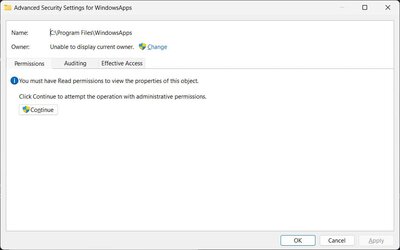
Properties > Security tab > Advanced button And am now stuck here:

Advanced_Security_Settings_for_WindowsApps 17_04_23 10⦂28⦂51⦂308 AM.jpg
 
Windows Build/Version
Windows 11 Pro 10.0.22621

My Computer My Computer

At a glance

Windows 11AMD Ryzen 7 5700U16.0GB Dual-Channel Unknown @ 1596MHz (22-22-...512MB ATI AMD Radeon Graphics (HP)
OS
Windows 11
Computer type
Laptop
CPU
AMD Ryzen 7 5700U
Motherboard
HP 887A (FP6)
Memory
16.0GB Dual-Channel Unknown @ 1596MHz (22-22-22-52)
Graphics Card(s)
512MB ATI AMD Radeon Graphics (HP)
Monitor(s) Displays
Generic PnP Monitor
Screen Resolution
1920x1080
Hard Drives
238GB KBG40ZNV256G KIOXIA (Unknown (SSD))
Mouse
Razer Naga Pro
Internet Speed
424.4 Mbps download 230.5 Mbps upload
Browser
Microsoft Edge
Antivirus
Bitdefender Total Security
You would help us greatly by telling us the file type and the app you are referring to.
 

My Computers My Computers

  • At a glance

    All Branches but StableAMD Ryzen 7 7735HS 3200-4500 Mhz 8 cores x 232 GB DDR5Radeon Graphic / NVIDIA GeForce RTX 4060 8 GB...
    OS
    All Branches but Stable
    Computer type
    Laptop
    Manufacturer/Model
    Acer Nitro ANV15-51
    CPU
    AMD Ryzen 7 7735HS 3200-4500 Mhz 8 cores x 2
    Motherboard
    Sportage_RBH
    Memory
    32 GB DDR5
    Graphics Card(s)
    Radeon Graphic / NVIDIA GeForce RTX 4060 8 GB GDDR6
    Sound Card
    AMD/Realtek(R) Audio
    Monitor(s) Displays
    Integrated Monitor (15.3"vis)
    Screen Resolution
    FHD 1920X1080 16:9 144Hz
    Hard Drives
    KINGSTON OM8SEP4512Q-AA 1TB
    Western Digital 256GB
    PSU
    19V DC 6.32 A 120 W
    Cooling
    Dual Fans
    Mouse
    MS Bluetooth
    Internet Speed
    Fiber 1GB Cox -us & 1GB Orange-fr
    Browser
    Edge Canary- Firefox Nightly-Chrome Dev-Chrome Dev
    Antivirus
    Windows Defender
  • At a glance

    Windows 11 BetaAMD A9-94208 GB of DDR4AMD Radeon R5
    Operating System
    Windows 11 Beta
    Computer type
    Laptop
    Manufacturer/Model
    Asus X751BP
    CPU
    AMD A9-9420
    Memory
    8 GB of DDR4
    Graphics card(s)
    AMD Radeon R5
    Screen Resolution
    1600x900
    Hard Drives
    Seagate 1 TB
App: Microsoft Photos
File types: J2C, J2K, JBG, JNG, JP2
 

My Computer My Computer

At a glance

Windows 11AMD Ryzen 7 5700U16.0GB Dual-Channel Unknown @ 1596MHz (22-22-...512MB ATI AMD Radeon Graphics (HP)
OS
Windows 11
Computer type
Laptop
CPU
AMD Ryzen 7 5700U
Motherboard
HP 887A (FP6)
Memory
16.0GB Dual-Channel Unknown @ 1596MHz (22-22-22-52)
Graphics Card(s)
512MB ATI AMD Radeon Graphics (HP)
Monitor(s) Displays
Generic PnP Monitor
Screen Resolution
1920x1080
Hard Drives
238GB KBG40ZNV256G KIOXIA (Unknown (SSD))
Mouse
Razer Naga Pro
Internet Speed
424.4 Mbps download 230.5 Mbps upload
Browser
Microsoft Edge
Antivirus
Bitdefender Total Security
Photos doesn't have native support for those image formats. It won't open them, even if you forced the file type associations.
You need to use another app which understands them.
 

My Computer My Computer

At a glance

Windows 7
OS
Windows 7
I'm downloading the Universe FILE Viewer from the Microsoft Store now.
 

My Computer My Computer

At a glance

Windows 11AMD Ryzen 7 5700U16.0GB Dual-Channel Unknown @ 1596MHz (22-22-...512MB ATI AMD Radeon Graphics (HP)
OS
Windows 11
Computer type
Laptop
CPU
AMD Ryzen 7 5700U
Motherboard
HP 887A (FP6)
Memory
16.0GB Dual-Channel Unknown @ 1596MHz (22-22-22-52)
Graphics Card(s)
512MB ATI AMD Radeon Graphics (HP)
Monitor(s) Displays
Generic PnP Monitor
Screen Resolution
1920x1080
Hard Drives
238GB KBG40ZNV256G KIOXIA (Unknown (SSD))
Mouse
Razer Naga Pro
Internet Speed
424.4 Mbps download 230.5 Mbps upload
Browser
Microsoft Edge
Antivirus
Bitdefender Total Security
App: Microsoft Photos
File types: J2C, J2K, JBG, JNG, JP2
You can use NCH Software's Pixillion program to convert these file types into the more popular types that most software can read.

It's free software.

bob
 

My Computers My Computers

  • At a glance

    Windows 11 Professional (x64)Intel Core i916 GBNVIDIA GeForce RTX
    OS
    Windows 11 Professional (x64)
    Computer type
    Laptop
    Manufacturer/Model
    Dell Inc. G16
    CPU
    Intel Core i9
    Motherboard
    Dell Inc. 0FDMYT A00
    Memory
    16 GB
    Graphics Card(s)
    NVIDIA GeForce RTX
    Sound Card
    Realtek(R) Audio
    Monitor(s) Displays
    Generic PnP Monitor (15.3"vis)
    Screen Resolution
    2560 x 1600
    Hard Drives
    4TB SSD
    PSU
    Dell
    Case
    Laptop
    Cooling
    Air
    Keyboard
    Dell
    Mouse
    Logitech
    Internet Speed
    10 Mbps (Dismal, slow DSL over phone line)
    Browser
    Google Chrome
    Antivirus
    Webroot SecureAnywhere
  • At a glance

    Windows 11 Pro
    Operating System
    Windows 11 Pro
    Computer type
    PC/Desktop
    Manufacturer/Model
    Dell

Latest Support Threads

Back
Top Bottom




