
Solved In Macrium how to change file and folder source path ?


William654

Well-known member
Member
VIP
Local time
4:51 PM
Posts
740
OS
Windows 11
Hi

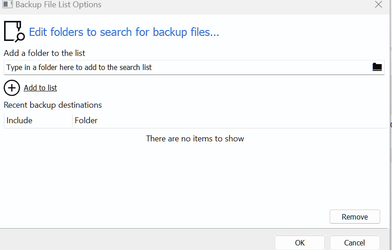
I created file and folder backup in Macrium but the source drive letter changed so when I try to create incremental backup it does not find the path and display error. I tried to press on Edit and add new source file but still when I run the backup it display error that the path does not exists, how to solve this ?
1680458413663.png
 

My Computer My Computer

At a glance

Windows 115900x32 GB G.SkillRX 6800 XT
OS
Windows 11
Computer type
PC/Desktop
CPU
5900x
Motherboard
MAG X570S TOMAHAWK MAX WIFI
Memory
32 GB G.Skill
Graphics Card(s)
RX 6800 XT
Sound Card
Creative Sound Blaster Z
Monitor(s) Displays
BENQ and AOC QHD 120Hz
Screen Resolution
QHD
Hard Drives
2TB Intel 660p and 2TB Sabrent Rokect 4 plus nvme, 4TB HDD HGST
PSU
Corsair RM750
Case
Bloody rage
Cooling
Water cooling gamdias 240
Keyboard
razer ornata
Mouse
razer da v2
Browser
FF and Chrome
Antivirus
Malwarebytes

My Computers My Computers

  • At a glance

    Windows 11 Pro 25H2 26200.8655i9-10900 10 core 20 threads32 gbnone-Intel UHD Graphics 630
    OS
    Windows 11 Pro 25H2 26200.8655
    Computer type
    PC/Desktop
    Manufacturer/Model
    Dell Optiplex 7080
    CPU
    i9-10900 10 core 20 threads
    Motherboard
    DELL 0J37VM
    Memory
    32 gb
    Graphics Card(s)
    none-Intel UHD Graphics 630
    Sound Card
    Integrated Realtek
    Monitor(s) Displays
    Benq 27
    Screen Resolution
    2560x1440
    Hard Drives
    2x1tb Solidigm m.2 nvme /External drives 512gb Samsung m.2 sata+2tb Kingston m2.nvme
    PSU
    500w
    Case
    MT
    Cooling
    Dell Premium
    Keyboard
    Logitech wired
    Mouse
    Logitech wireless
    Internet Speed
    so slow I'm too embarrassed to tell
    Browser
    #1 Edge #2 Firefox
    Antivirus
    Defender+MWB Premium
  • At a glance

    Windows 11 Pro 24H2 26200.8457AMD Ryzen 7 6800U32 gbintegrated
    Operating System
    Windows 11 Pro 24H2 26200.8457
    Computer type
    PC/Desktop
    Manufacturer/Model
    Beelink Mini PC SER5
    CPU
    AMD Ryzen 7 6800U
    Memory
    32 gb
    Graphics card(s)
    integrated
    Sound Card
    integrated
    Monitor(s) Displays
    Benq 27
    Screen Resolution
    2560x1440
    Hard Drives
    1TB Crucial nvme
    Keyboard
    Logitech wired
    Mouse
    Logitech wireless
    Internet Speed
    still too embarrassed to tell
    Browser
    Firefox
    Antivirus
    Defender
    Other Info
    System 3 is non compliant Dell 9020 i7-4770/24gb ram Win11 PRO 26200.8457

My Computers My Computers

  • At a glance

    Windows 11 ProAMD Ryzen 7 9800X3D32GB DDR5 CL30 Kingston FuryASUS Prime Radeon RX 9060 XT OC Edition 16GB
    OS
    Windows 11 Pro
    Computer type
    PC/Desktop
    CPU
    AMD Ryzen 7 9800X3D
    Motherboard
    MSI PRO B850-P Wifi
    Memory
    32GB DDR5 CL30 Kingston Fury
    Graphics Card(s)
    ASUS Prime Radeon RX 9060 XT OC Edition 16GB
    Monitor(s) Displays
    LG Ultrawide 34" + LG 27" 1080p
    Screen Resolution
    3440x1440
    Hard Drives
    Main Boot Drive : 512GB Adata XPG RGB Gen3x4 NVMe M.2 SSD
    PSU
    EVGA 750 Watts 80+ Gold
    Case
    Deepcool Genome II
    Cooling
    Thermalright Burst Assassin 120
    Internet Speed
    1Gbps
    Browser
    Chrome
    Antivirus
    "Moderna"
  • At a glance

    Windows 11 Proi7-4790K16GB Corsair Vengeance ProMSI R9 290
    Operating System
    Windows 11 Pro
    Computer type
    PC/Desktop
    CPU
    i7-4790K
    Motherboard
    ASRock Xtreme6 Z97
    Memory
    16GB Corsair Vengeance Pro
    Graphics card(s)
    MSI R9 290
    Monitor(s) Displays
    LG Ultrawide 34"
    Screen Resolution
    3440x1440
    Hard Drives
    500GB Adata SSD (OS Only)
    PSU
    Thermaltake 475 Watts 80 Bronze
    Case
    Thermaltake Commander I Snow Edition
    Cooling
    Deep Cool Archer Air Cooler
    Keyboard
    Armageddon MKA-5R RGB-Hornet
    Mouse
    Logitech G402
    Internet Speed
    1Gbps
    Browser
    Chrome
    Antivirus
    Moderna :)
Did you try changing the drive letter back to the original letter?
I know this will solve it but why the app has no option to change source path ?

You can disable incrementals entirely, run a complete new full image, then set up incremental backups again.
No option to change source path ? it is external drives , drive letters will alwayes change
 

My Computer My Computer

At a glance

Windows 115900x32 GB G.SkillRX 6800 XT
OS
Windows 11
Computer type
PC/Desktop
CPU
5900x
Motherboard
MAG X570S TOMAHAWK MAX WIFI
Memory
32 GB G.Skill
Graphics Card(s)
RX 6800 XT
Sound Card
Creative Sound Blaster Z
Monitor(s) Displays
BENQ and AOC QHD 120Hz
Screen Resolution
QHD
Hard Drives
2TB Intel 660p and 2TB Sabrent Rokect 4 plus nvme, 4TB HDD HGST
PSU
Corsair RM750
Case
Bloody rage
Cooling
Water cooling gamdias 240
Keyboard
razer ornata
Mouse
razer da v2
Browser
FF and Chrome
Antivirus
Malwarebytes
I know this will solve it but why the app has no option to change source path ?
Top of my head, changing the path will break the link between your previous back-ups and new backups. There's nothing to update incrementally because of the broken link with the original path. The path itself is written in the back-up and will always look for it.

As suggested, you have to disable incremental backup and start a new one if you want to change the path.
 

My Computers My Computers

  • At a glance

    Windows 11 ProAMD Ryzen 7 9800X3D32GB DDR5 CL30 Kingston FuryASUS Prime Radeon RX 9060 XT OC Edition 16GB
    OS
    Windows 11 Pro
    Computer type
    PC/Desktop
    CPU
    AMD Ryzen 7 9800X3D
    Motherboard
    MSI PRO B850-P Wifi
    Memory
    32GB DDR5 CL30 Kingston Fury
    Graphics Card(s)
    ASUS Prime Radeon RX 9060 XT OC Edition 16GB
    Monitor(s) Displays
    LG Ultrawide 34" + LG 27" 1080p
    Screen Resolution
    3440x1440
    Hard Drives
    Main Boot Drive : 512GB Adata XPG RGB Gen3x4 NVMe M.2 SSD
    PSU
    EVGA 750 Watts 80+ Gold
    Case
    Deepcool Genome II
    Cooling
    Thermalright Burst Assassin 120
    Internet Speed
    1Gbps
    Browser
    Chrome
    Antivirus
    "Moderna"
  • At a glance

    Windows 11 Proi7-4790K16GB Corsair Vengeance ProMSI R9 290
    Operating System
    Windows 11 Pro
    Computer type
    PC/Desktop
    CPU
    i7-4790K
    Motherboard
    ASRock Xtreme6 Z97
    Memory
    16GB Corsair Vengeance Pro
    Graphics card(s)
    MSI R9 290
    Monitor(s) Displays
    LG Ultrawide 34"
    Screen Resolution
    3440x1440
    Hard Drives
    500GB Adata SSD (OS Only)
    PSU
    Thermaltake 475 Watts 80 Bronze
    Case
    Thermaltake Commander I Snow Edition
    Cooling
    Deep Cool Archer Air Cooler
    Keyboard
    Armageddon MKA-5R RGB-Hornet
    Mouse
    Logitech G402
    Internet Speed
    1Gbps
    Browser
    Chrome
    Antivirus
    Moderna :)
drive letters will alwayes chang
No they do not if you assign a static drive letter to them. Go into disk management, assign the external drive a letter higher up in the alphabet. It will keep that letter every time it's plugged in. I suggest w,x,y, or z
 

My Computers My Computers

  • At a glance

    Windows 11 Pro 25H2 26200.8655i9-10900 10 core 20 threads32 gbnone-Intel UHD Graphics 630
    OS
    Windows 11 Pro 25H2 26200.8655
    Computer type
    PC/Desktop
    Manufacturer/Model
    Dell Optiplex 7080
    CPU
    i9-10900 10 core 20 threads
    Motherboard
    DELL 0J37VM
    Memory
    32 gb
    Graphics Card(s)
    none-Intel UHD Graphics 630
    Sound Card
    Integrated Realtek
    Monitor(s) Displays
    Benq 27
    Screen Resolution
    2560x1440
    Hard Drives
    2x1tb Solidigm m.2 nvme /External drives 512gb Samsung m.2 sata+2tb Kingston m2.nvme
    PSU
    500w
    Case
    MT
    Cooling
    Dell Premium
    Keyboard
    Logitech wired
    Mouse
    Logitech wireless
    Internet Speed
    so slow I'm too embarrassed to tell
    Browser
    #1 Edge #2 Firefox
    Antivirus
    Defender+MWB Premium
  • At a glance

    Windows 11 Pro 24H2 26200.8457AMD Ryzen 7 6800U32 gbintegrated
    Operating System
    Windows 11 Pro 24H2 26200.8457
    Computer type
    PC/Desktop
    Manufacturer/Model
    Beelink Mini PC SER5
    CPU
    AMD Ryzen 7 6800U
    Memory
    32 gb
    Graphics card(s)
    integrated
    Sound Card
    integrated
    Monitor(s) Displays
    Benq 27
    Screen Resolution
    2560x1440
    Hard Drives
    1TB Crucial nvme
    Keyboard
    Logitech wired
    Mouse
    Logitech wireless
    Internet Speed
    still too embarrassed to tell
    Browser
    Firefox
    Antivirus
    Defender
    Other Info
    System 3 is non compliant Dell 9020 i7-4770/24gb ram Win11 PRO 26200.8457
In the drop-down menu of 'Definition Files" (these are saved xml files) from Macrium, just other click the definition file you wish to change parameters for and choose "Edit".
 

My Computer My Computer

At a glance

Windows 11Intel i5 10210U16GbIntel UHD
OS
Windows 11
Computer type
Laptop
Manufacturer/Model
HP 15s_du1xxx
CPU
Intel i5 10210U
Motherboard
85F1
Memory
16Gb
Graphics Card(s)
Intel UHD
Sound Card
Realtek
Screen Resolution
1920 x 1080
In the drop-down menu of 'Definition Files" (these are saved xml files) from Macrium, just other click the definition file you wish to change parameters for and choose "Edit".
this is the solution thanks, I dont know why they did not add in UI as an option
 

My Computer My Computer

At a glance

Windows 115900x32 GB G.SkillRX 6800 XT
OS
Windows 11
Computer type
PC/Desktop
CPU
5900x
Motherboard
MAG X570S TOMAHAWK MAX WIFI
Memory
32 GB G.Skill
Graphics Card(s)
RX 6800 XT
Sound Card
Creative Sound Blaster Z
Monitor(s) Displays
BENQ and AOC QHD 120Hz
Screen Resolution
QHD
Hard Drives
2TB Intel 660p and 2TB Sabrent Rokect 4 plus nvme, 4TB HDD HGST
PSU
Corsair RM750
Case
Bloody rage
Cooling
Water cooling gamdias 240
Keyboard
razer ornata
Mouse
razer da v2
Browser
FF and Chrome
Antivirus
Malwarebytes
In the drop-down menu of 'Definition Files" (these are saved xml files) from Macrium, just other click the definition file you wish to change parameters for and choose "Edit".
My "Incrementals Forever" .xml file named Win11.xml is located on my C: drive, which is an NVMe on the motherboard. Destination folder is on my D: drive, which is a 3.5" sata SSD connected to the motherboard. Each are static drive letters, yet when I boot my PC and Macrium Reflect auto runs, it always ends with 'failure'. I've not edited Win11.xml. I've no clue as to the failure. Macrium Reflect did successfully make a full backup after a fresh install with all motherboard dirvers. MR made another successful full backup with lots of programs installed.
 

Attachments

Last edited:

My Computer My Computer

At a glance

Windows 11 Pro 23H2 (OS Build [22631.4751])Intel Core i5-11600KF48GB DDR4-2667 = 2x8 Patriot + 2x16 G.SkillNvidia GeForce RTX 3060
OS
Windows 11 Pro 23H2 (OS Build [22631.4751])
Computer type
PC/Desktop
Manufacturer/Model
CyberPower Inc.
CPU
Intel Core i5-11600KF
Motherboard
MSI MPG Z590 Gaming Carbon WIFI
Memory
48GB DDR4-2667 = 2x8 Patriot + 2x16 G.Skill
Graphics Card(s)
Nvidia GeForce RTX 3060
Sound Card
All on-board: Nvidia High-def Audio, Nvidia Virtual Audio Device, Realtek USB Audio
Monitor(s) Displays
LG 32GN63T-Baus
Screen Resolution
2560 x 1440
Hard Drives
GP-ASM2NE6100TTTD GIGABYTE AORUS NVMe Gen4 M.2 1TB PCI-E 4.0, CT250MX500SSD1, CT1000MX500SSD1, 2x NVMe Gen3 M.2 NE-256 2280, 1x NVMe Gen3 M.2 NE-1TB 2280
PSU
EVGA 600W Gold 80 Plus
Case
Phantek Eclipse P600S Silent ATX
Cooling
Phantek PH-TC12DX U-Type Dual
Keyboard
NOHI 01 MODEL:KB-161-306
Mouse
CyberPowerPC Elite M1-131
Internet Speed
DL 827.77Mbps, UL 23.93 Mbps, Ping 4ms
Browser
Firefox 134.0.2 (64-bit)
Antivirus
Emsisoft Anti-Malware Home

Latest Support Threads

Back
Top Bottom




