Install Windows 11 - Intel 3rd Generation CPU


You can make Windows 11 (build 22000.194) work on your hardware, and all features except the security features will work fine.

I do however not recommend this. You should rather stick to Windows 10 for now. Currently there is nothing in Windows 11 that you don't have in Windows 10 except for different User Interface.

Windows 11 runs fine on my 2nd generation Intel system (check my computer specs), but it can be a bit of a fiddle to get it installed.
 

My Computers

System One System Two

  • OS
    Win 11 Pro 25H2 26200.8457 / Linux Mint 22.3
    Computer type
    Laptop
    Manufacturer/Model
    Lenovo A485
    CPU
    Ryzen 7 2700U Pro
    Motherboard
    Lenovo (WiFi/BT module upgraded to Intel Wireless-AC-9260)
    Memory
    32GB
    Graphics Card(s)
    iGPU Vega 10
    Sound Card
    Realtek
    Monitor(s) Displays
    14" FHD (built-in) + 14" Lenovo Thinkvision M14t (touch+pen) + 32" Asus PB328
    Screen Resolution
    FHD + FHD + 1440p
    Hard Drives
    Intel 660p m.2 nVME PCIe3.0 x2 512GB
    PSU
    125W(Dock)/65W(Travel Adapter)
    Keyboard
    Thinkpad / Logitech MX Keys
    Mouse
    Logitech MX Master 2S
    Internet Speed
    1/1Gbit
    Browser
    Firefox
    Antivirus
    Windows Defender
    Other Info
    SecureBoot: Enabled
    TPM2.0: Enabled
    AMD-V: Enabled
  • Operating System
    Win 11 Pro 25H2 26200.8521(RP)
    Computer type
    PC/Desktop
    Manufacturer/Model
    Custom
    CPU
    i7-7700k @4.8GHz
    Motherboard
    Asus PRIME Z270-A
    Memory
    32GB 2x16GB 2133MHz CL15
    Graphics card(s)
    EVGA GTX1080Ti FTW 11GB
    Sound Card
    Integrated
    Monitor(s) Displays
    32" 10-bit Asus PB328Q
    Screen Resolution
    WQHD 2560x1440
    Hard Drives
    512GB ADATA SX8000NP NVMe PCIe Gen 3 x4
    PSU
    850W
    Case
    Fractal Design Define 7
    Cooling
    Noctua NH-D15 chromax.black
    Keyboard
    Logitech MX Keys
    Mouse
    Logitech MX Master 2S
    Internet Speed
    1/1Gbit
    Browser
    Firefox
    Antivirus
    Windows Defender
    Other Info
    AC WiFi Card

My Computers

System One System Two

  • OS
    Win 10 > Win 11 > Linux Mint 22.3
    Computer type
    PC/Desktop
    Manufacturer/Model
    Custom
    CPU
    i5-11400
    Motherboard
    Gigabyte B560M DS3H
    Memory
    64GB Crucial RAM DDR4
    Graphics Card(s)
    none
    Sound Card
    Custom USB 24-bit 96kHz DAC (PCM5102A + STM32F411)
    Monitor(s) Displays
    31.5" LG 1440p
    Screen Resolution
    2560x1440
    Hard Drives
    4 TB WD HDD
    1 TB WD SSD
    500 GB WD NVME
    500 GB Crucial P5 (main OS Win10)
    PSU
    Corsair 550W
    Case
    ATX
    Cooling
    Fan
    Keyboard
    Genius
    Mouse
    Logitech
    Internet Speed
    4G/5G
    Browser
    Firefox
    Antivirus
    Defender
  • Operating System
    Win 10 more than Win 11 more than Linux Mint 22.1
    Computer type
    PC/Desktop
    Manufacturer/Model
    Home
    CPU
    i5-14400
    Motherboard
    Gigabyte B760M D3H
    Memory
    48 GB DDR5
    Graphics card(s)
    none
    Sound Card
    Custom USB 24-bit 96kHz DAC (PCM5102A + STM32F411)
    Monitor(s) Displays
    27" FHD Gaming IPS LCD 144Hz
    Screen Resolution
    1920x1080
    Hard Drives
    4 TB WD HDD
    1TB + 2TB WD NVME
    PSU
    Corsair 550W
    Case
    Cooler Master
    Cooling
    Fan
    Keyboard
    Genius
    Mouse
    Logitec
    Internet Speed
    4G/5G
    Browser
    Firefox
    Antivirus
    Defender
I am short of a psu at the moment so cant fire up my 3rd gen machine.

I will take a guess that it can be installed by applying the image from the install.wim/esd to a partition. Then just add a boot menu entry.

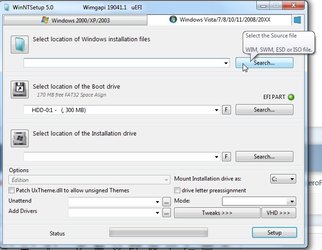
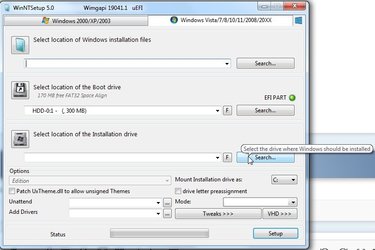
If you dont know how to do that, you could use JFX winntsetup to do the job.

Presumably you already have an os installed on your 3rd gen. From within that create another partition and point winntsetup at it.

winntsetup-slect-source.jpg


winntsetup-select-installdrive.jpg
Select the edition in the dropdown

Then click SETUP and OK the defaults at the next screen.

Thats all

It will do the apply and the bcd etc stuff for you. When you reboot there will be the extra entry for win11


Attachments

Last edited:

My Computers

System One System Two

  • OS
    Win7,Win11
    Computer type
    PC/Desktop
    CPU
    i7-9700
    Motherboard
    gigabyte b365m ds3h
    Memory
    2x16gb 3600mhz
    Monitor(s) Displays
    benq gw2480
    PSU
    bequiet pure power 11 400CM
    Cooling
    cryorig m9i
  • Operating System
    win7,win11
    Computer type
    PC/Desktop
    CPU
    i5-8400
    Motherboard
    gigabyte b365m ds3h
    Memory
    2x8gb 3200
    PSU
    xfx pro 450
Hello,

My CPU is i7-3370 and it isn't in Windows 11 processors support. it means I won't be able to install windows 11 at all or I can install but I can't use all feature from it?

( In the below list my CPU (i7-3770) doesn't exist but I install the latest windows 10 and it works fine for me.
Windows Processor Requirements Windows 10 21H1 Supported Intel Processors )

Thanks
And it won't ever in my opinion be eligible. I'm running 11 on a non compatible CPU machine after a little jiggling around but there's really nothing new there on the surface that you haven't got in 10. Sure the UI is a little different but it's really just stuff shuffled around.

My main rig will stay on 10 until I feel the need to change even though it is compatible.

Maybe things will or may change in the future when MS get round to it but for now I'd stay as you are.
 

My Computers

System One System Two

  • OS
    Win11 Pro 24H2
    Computer type
    PC/Desktop
    Manufacturer/Model
    Lenovo M90q
    CPU
    i5 12500
    Motherboard
    Lenovo
    Memory
    32GB
    Graphics Card(s)
    Intel CPU integrated
    Sound Card
    Intel MB intergrated
    Monitor(s) Displays
    Dell 4k IPS
    Screen Resolution
    3840 x 2160
    Hard Drives
    500GB NVMe Samsung 980 Pro
    2 TB NVMe Samsung 990 Pro
    1 TB Crucial MX500
    PSU
    Lenovo
    Case
    Lenovo
    Cooling
    Air
    Keyboard
    Logitech BT
    Mouse
    Logitech BT
    Internet Speed
    FTTP
    Browser
    Firefox
    Antivirus
    MS Defender and Malwarebytes
  • Operating System
    Win 11 Pro
    Computer type
    Laptop
    Manufacturer/Model
    Surface Pro 8
    CPU
    i5-1135G7
    Motherboard
    MS
    Memory
    16GB
    Graphics card(s)
    Intel Iris XE
    Sound Card
    ATI/AMD Renoir
    Monitor(s) Displays
    UHD
    Screen Resolution
    2880 x 1920
    Hard Drives
    2TB NVMe
    PSU
    MS
    Case
    Microsoft
    Cooling
    Air
    Keyboard
    Built In
    Mouse
    Touchpad
    Internet Speed
    FTTP
    Browser
    Firefox
    Antivirus
    MS Defender and Malwarebytes
Hello,

My CPU is i7-3370 and it isn't in Windows 11 processors support. it means I won't be able to install windows 11 at all or I can install but I can't use all feature from it?

( In the below list my CPU (i7-3770) doesn't exist but I install the latest windows 10 and it works fine for me.
Windows Processor Requirements Windows 10 21H1 Supported Intel Processors )

Thanks
Not worth bothering with, stay on 10. These requirements are there for a reason and I don't think it's worth the effort of trying to get round it, also MS may stop these tweaks
 

My Computers

System One System Two

  • OS
    Windows 11 Pro
    Computer type
    Laptop
    Manufacturer/Model
    Alienware M18 R1
    CPU
    13th Gen Core i9 13900HX
    Memory
    32GB DDR5 @4800MHz 2x16GB
    Graphics Card(s)
    Geforce RTX 4090HX 16GB
    Sound Card
    Nvidia HD / Realtek ALC3254
    Monitor(s) Displays
    18" QHD+
    Screen Resolution
    25660 X 1600
    Hard Drives
    C: KIOXIA (Toshiba) 2TB KXG80ZNV2T04 NVMe PCIe M.2 SSD
    D: KIOXIA (Toshiba) 2TB KXG80ZNV2T04 NVMe PCIe M.2 SSD
    Case
    Dark Metallic Moon
    Keyboard
    Alienware M Series per-key AlienFX RGB
    Mouse
    Alienware AW610M
    Browser
    Chrome and Firefox
    Antivirus
    Norton
    Other Info
    Killer E3000 Ethernet Controller
    Killer Killer AX1690 Wi-Fi Network Adaptor Wi-Fi 6E
    Bluetooth 5.2
    Alienware Z01G Graphic Amplifier
  • Operating System
    Windows 11 Pro
    Computer type
    Laptop
    Manufacturer/Model
    Alienware Area 51m R2
    CPU
    10th Gen i-9 10900 K
    Memory
    32Gb Dual Channel DDR4 @ 8843MHz
    Graphics card(s)
    Nvidia RTX 2080 Super
    Sound Card
    Nvidia
    Screen Resolution
    1920 x 1080
    Hard Drives
    Hard Drive C: Samsung 2TB SSD PM981a NVMe
    Hard Drive D:Samsung 2TB SSD 970 EVO Plus
    Mouse
    Alienware 610M
    Browser
    Chrome
    Antivirus
    Norton
I have the same cpu. You will find your m/b wont support tpm 2.0 either.

Ive installed win11 on a vm with checks bypassed. Tbh not seening the need to upgrade with potential issues on your main machine or more to the point a whole new pc for the security.
 

My Computer

System One

  • OS
    Win10
Could you guys (those who installed win11 on non compatible gen3) share your experience performance wise and tell us
how smooth windows 11 is working for you? Do you feel any performance decrease compared to win10?
 

My Computer

System One

  • OS
    Windows
    Computer type
    Laptop
    Manufacturer/Model
    Lenovo Legion 7i
    CPU
    Intel i7-12800HX
    Memory
    32 GB DDR5 4800 MHz dual-channel
    Graphics Card(s)
    NVIDIA® GeForce RTX™ 3070 Ti
    Sound Card
    Steinberg UR44
    Hard Drives
    1 TB SSD (M.2 NVMe PCIe 4.0 x4
    2 TB SSD Samsung 980 PRO NNMe
    Browser
    Firefox
    Antivirus
    Windows Defender + Malwarebytes
These requirements are there for a reason and I don't think it's worth the effort of trying to get round it, also MS may stop these tweaks
I'm sure they are but it would stop many a frustrated user that genuinely believes they are missing out, which they're not in my opinion, if MS laid out a simple A, B, C , etc as to exactly why they are imposing these minimum hardware standards. At the moment we have a scatter gun release of bits here and there with tech jargon - a why use one word when you can use ...... approach.

Many of the media reviews seem to be mixed with several failing to understand why all the hype. Others of course take a different view.
 

My Computers

System One System Two

  • OS
    Win11 Pro 24H2
    Computer type
    PC/Desktop
    Manufacturer/Model
    Lenovo M90q
    CPU
    i5 12500
    Motherboard
    Lenovo
    Memory
    32GB
    Graphics Card(s)
    Intel CPU integrated
    Sound Card
    Intel MB intergrated
    Monitor(s) Displays
    Dell 4k IPS
    Screen Resolution
    3840 x 2160
    Hard Drives
    500GB NVMe Samsung 980 Pro
    2 TB NVMe Samsung 990 Pro
    1 TB Crucial MX500
    PSU
    Lenovo
    Case
    Lenovo
    Cooling
    Air
    Keyboard
    Logitech BT
    Mouse
    Logitech BT
    Internet Speed
    FTTP
    Browser
    Firefox
    Antivirus
    MS Defender and Malwarebytes
  • Operating System
    Win 11 Pro
    Computer type
    Laptop
    Manufacturer/Model
    Surface Pro 8
    CPU
    i5-1135G7
    Motherboard
    MS
    Memory
    16GB
    Graphics card(s)
    Intel Iris XE
    Sound Card
    ATI/AMD Renoir
    Monitor(s) Displays
    UHD
    Screen Resolution
    2880 x 1920
    Hard Drives
    2TB NVMe
    PSU
    MS
    Case
    Microsoft
    Cooling
    Air
    Keyboard
    Built In
    Mouse
    Touchpad
    Internet Speed
    FTTP
    Browser
    Firefox
    Antivirus
    MS Defender and Malwarebytes
Could you guys (those who installed win11 on non compatible gen3) share your experience performance wise and tell us
how smooth windows 11 is working for you? Do you feel any performance decrease compared to win10?
In my case no performance difference although it is working on a spare rig with a non-approved CPU. When it was first installed it was snappier but as I added programs then it is about the same as 10.

I'm not a gamer so maybe a member with more experience will be able to answer you better.
 

My Computers

System One System Two

  • OS
    Win11 Pro 24H2
    Computer type
    PC/Desktop
    Manufacturer/Model
    Lenovo M90q
    CPU
    i5 12500
    Motherboard
    Lenovo
    Memory
    32GB
    Graphics Card(s)
    Intel CPU integrated
    Sound Card
    Intel MB intergrated
    Monitor(s) Displays
    Dell 4k IPS
    Screen Resolution
    3840 x 2160
    Hard Drives
    500GB NVMe Samsung 980 Pro
    2 TB NVMe Samsung 990 Pro
    1 TB Crucial MX500
    PSU
    Lenovo
    Case
    Lenovo
    Cooling
    Air
    Keyboard
    Logitech BT
    Mouse
    Logitech BT
    Internet Speed
    FTTP
    Browser
    Firefox
    Antivirus
    MS Defender and Malwarebytes
  • Operating System
    Win 11 Pro
    Computer type
    Laptop
    Manufacturer/Model
    Surface Pro 8
    CPU
    i5-1135G7
    Motherboard
    MS
    Memory
    16GB
    Graphics card(s)
    Intel Iris XE
    Sound Card
    ATI/AMD Renoir
    Monitor(s) Displays
    UHD
    Screen Resolution
    2880 x 1920
    Hard Drives
    2TB NVMe
    PSU
    MS
    Case
    Microsoft
    Cooling
    Air
    Keyboard
    Built In
    Mouse
    Touchpad
    Internet Speed
    FTTP
    Browser
    Firefox
    Antivirus
    MS Defender and Malwarebytes
Could you guys (those who installed win11 on non compatible gen3) share your experience performance wise and tell us
how smooth windows 11 is working for you?

Oh I'm not running it on anything as new as a 3rd gen, If you look at my System Two in 'My Computers' below this post You'll see I'm testing 11 on a 1st gen i5.

Do you feel any performance decrease compared to win10?

No, quite the opposite in fact. It feels a little smoother and faster.
 

My Computers

System One System Two

  • OS
    Windows 11 Home
    Computer type
    Laptop
    Manufacturer/Model
    Acer Aspire 3 A315-23-R9VY
    CPU
    AMD Athlon Silver 3050U
    Memory
    8GB
    Graphics Card(s)
    Radeon Graphics
    Monitor(s) Displays
    laptop screen
    Screen Resolution
    1366x768 native resolution, up to 2560x1440 with Radeon Virtual Super Resolution
    Hard Drives
    1TB Samsung EVO 870 SSD (from April 2026: 250GB EVO 850)
    Internet Speed
    150 Mbps
    Browser
    Edge, Firefox
    Antivirus
    Defender
    Other Info
    fully 'Windows 11 ready' laptop. Windows 10 C: partition migrated from my old unsupported 'main machine' then upgraded to 11. A test migration ran Insider builds for 2 months. When 11 was released on 5th October 2021 it was re-imaged back to 10 and was offered the upgrade in Windows Update on 20th October. Windows Update offered the 22H2 Feature Update on 20th September 2022. It got the 23H2 Feature Update on 4th November 2023 through Windows Update, 24H2 on 3rd October 2024 through Windows Update by setting the Target Release Version for 24H2, and 25H2 on 30th September 2025 through Windows Update by setting the Target Release Version for 25H2.

    UPDATE - 11 April 2026: due to mechanical deterioration this PC has been retired from active duty. The OS with all software and files has been migrated to my System Seven below to carry on as my general purpose 'main machine'.

    My SYSTEM THREE is a Dell Latitude 5410, i7-10610U, 32GB RAM, 512GB NVMe ssd, supported device running Windows 11 Pro.

    My SYSTEM FOUR is a 2-in-1 convertible Lenovo Yoga 11e 20DA, Celeron N2930, 8GB RAM, 256GB ssd. Unsupported device: currently running Win10 Pro, plus Win11 Pro RTM and Insider Dev, Beta, and RP 24H2 as native boot vhdx.

    My SYSTEM FIVE is a Dell Latitude 3190 2-in-1, Pentium Silver N5030, 8GB RAM, 1TB NVMe ssd, supported device running Windows 11 Pro, plus Insider Beta, Dev, and Canary builds (and a few others) as a native boot .vhdx.

    My SYSTEM SIX is a Dell Latitude 5550, Core Ultra 7 165H, 64GB RAM, 1TB NVMe SSD, supported device, Windows 11 Pro 24H2, Hyper-V host machine. Updated to 25H2 on 30th September 2025.

    My SYSTEM SEVEN is a Lenovo Thinkpad T580, Intel Core i7-8650U, 16GB RAM, 512GB NVMe SSD + 2nd 512GB NVMe SSD, a supported device for Windows 11. This is my current general purpose 'main machine'. The installed Windows 11 Home from my System One has been migrated to this machine.
  • Operating System
    Windows 11 Pro
    Computer type
    Laptop
    Manufacturer/Model
    Dell Latitude E4310
    CPU
    Intel® Core™ i5-520M
    Motherboard
    0T6M8G
    Memory
    8GB
    Graphics card(s)
    (integrated graphics) Intel HD Graphics
    Screen Resolution
    1366x768
    Hard Drives
    500GB Crucial MX500 SSD
    Browser
    Firefox, Edge
    Antivirus
    Defender
    Other Info
    unsupported machine: Legacy bios, MBR, TPM 1.2, upgraded from W10 to W11 using W10/W11 hybrid install media workaround. In-place upgrade to 22H2 using ISO and a workaround. Feature Update to 23H2 by manually installing the Enablement Package. In-place upgrade to 24H2 using hybrid 23H2/24H2 install media. Upgraded to 25H2 by Enablement Package. Also running Insider Dev, and Canary builds and Windows 10 as native boot .vhdx.

    My SYSTEM THREE is a Dell Latitude 5410, i7-10610U, 32GB RAM, 512GB NVMe ssd, supported device running Windows 11 Pro.

    My SYSTEM FOUR is a 2-in-1 convertible Lenovo Yoga 11e 20DA, Celeron N2930, 8GB RAM, 256GB ssd. Unsupported device: currently running Win10 Pro, plus Win11 Pro RTM and Insider Dev, Beta, and RP 24H2 as native boot vhdx.

    My SYSTEM FIVE is a Dell Latitude 3190 2-in-1, Pentium Silver N5030, 8GB RAM, 1TB NVMe ssd, supported device running Windows 11 Pro, plus Insider Beta, Dev, and Canary builds (and a few others) as a native boot .vhdx.

    My SYSTEM SIX is a Dell Latitude 5550, Core Ultra 7 165H, 64GB RAM, 1TB NVMe SSD, supported device, Windows 11 Pro 24H2, Hyper-V host machine. Updated to 25H2 on 30th September 2025.

    My SYSTEM SEVEN is a Lenovo Thinkpad T580, Intel Core i7-8650U, 16GB RAM, 512GB NVMe SSD + 2nd 512GB NVMe SSD, a supported device for Windows 11. This is my current general purpose 'main machine'. The installed Windows 11 Home from my System One has been migrated to this machine.
Oh I'm not running it on anything as new as a 3rd gen, If you look at my System Two in 'My Computers' below this post You'll see I'm testing 11 on a 1st gen i5.


No, quite the opposite in fact. It feels a little smoother and faster.
Thanks a lot for this information. But when I read it I get even more disappointed that MS decided to list it as incompatible with older PC's! :(
 

My Computer

System One

  • OS
    Windows
    Computer type
    Laptop
    Manufacturer/Model
    Lenovo Legion 7i
    CPU
    Intel i7-12800HX
    Memory
    32 GB DDR5 4800 MHz dual-channel
    Graphics Card(s)
    NVIDIA® GeForce RTX™ 3070 Ti
    Sound Card
    Steinberg UR44
    Hard Drives
    1 TB SSD (M.2 NVMe PCIe 4.0 x4
    2 TB SSD Samsung 980 PRO NNMe
    Browser
    Firefox
    Antivirus
    Windows Defender + Malwarebytes
I'm sure they are but it would stop many a frustrated user that genuinely believes they are missing out, which they're not in my opinion, if MS laid out a simple A, B, C , etc as to exactly why they are imposing these minimum hardware standards. At the moment we have a scatter gun release of bits here and there with tech jargon - a why use one word when you can use ...... approach.

Many of the media reviews seem to be mixed with several failing to understand why all the hype. Others of course take a different view.
I see what you mean. I think it is out there there along with so many rumours, which causes a lot of peoples problems and at the end of the day without 11 you aren't missing much, and personally I would rather have a secure fast machine on 10, albeit mine are both on 11 and working 100%. thanks 6391mb it's always good to hear other peoples views
 

My Computers

System One System Two

  • OS
    Windows 11 Pro
    Computer type
    Laptop
    Manufacturer/Model
    Alienware M18 R1
    CPU
    13th Gen Core i9 13900HX
    Memory
    32GB DDR5 @4800MHz 2x16GB
    Graphics Card(s)
    Geforce RTX 4090HX 16GB
    Sound Card
    Nvidia HD / Realtek ALC3254
    Monitor(s) Displays
    18" QHD+
    Screen Resolution
    25660 X 1600
    Hard Drives
    C: KIOXIA (Toshiba) 2TB KXG80ZNV2T04 NVMe PCIe M.2 SSD
    D: KIOXIA (Toshiba) 2TB KXG80ZNV2T04 NVMe PCIe M.2 SSD
    Case
    Dark Metallic Moon
    Keyboard
    Alienware M Series per-key AlienFX RGB
    Mouse
    Alienware AW610M
    Browser
    Chrome and Firefox
    Antivirus
    Norton
    Other Info
    Killer E3000 Ethernet Controller
    Killer Killer AX1690 Wi-Fi Network Adaptor Wi-Fi 6E
    Bluetooth 5.2
    Alienware Z01G Graphic Amplifier
  • Operating System
    Windows 11 Pro
    Computer type
    Laptop
    Manufacturer/Model
    Alienware Area 51m R2
    CPU
    10th Gen i-9 10900 K
    Memory
    32Gb Dual Channel DDR4 @ 8843MHz
    Graphics card(s)
    Nvidia RTX 2080 Super
    Sound Card
    Nvidia
    Screen Resolution
    1920 x 1080
    Hard Drives
    Hard Drive C: Samsung 2TB SSD PM981a NVMe
    Hard Drive D:Samsung 2TB SSD 970 EVO Plus
    Mouse
    Alienware 610M
    Browser
    Chrome
    Antivirus
    Norton
Back
Top Bottom