Intel i9-14900K set at 4096W by default!


Looks like you still have unstable CPU core(s)!

Especially if you're at a resource-intensive web site and scrolling when the browser shows an access violation page.
Its random (but usually happens on Youtube), but I can play cpu intensive games with no issues. Even Unreal engine 5.x games have no issues with shader compilations, and this is where the instability usually shows. Very unhappy with the situation and the amount of money I spent on essentially faulty and over hyped products.
 

My Computers My Computers

  • At a glance

    Windows 11 25H2Intel i9 14900KF64GB Corsair Vengeance RGBMSI 4090 Suprim X
    OS
    Windows 11 25H2
    Computer type
    PC/Desktop
    Manufacturer/Model
    Custom Built
    CPU
    Intel i9 14900KF
    Motherboard
    ASUS Z790 ProArt Creator WiFi
    Memory
    64GB Corsair Vengeance RGB
    Graphics Card(s)
    MSI 4090 Suprim X
    Sound Card
    Onboard
    Monitor(s) Displays
    1 x Asus 24". 1 x Asus 32"
    Screen Resolution
    1920 x 1080 & 2560 x 1440
    Hard Drives
    Multiple
    PSU
    Corsair 1200HX
    Case
    Corsair 7000D RGB
    Cooling
    Corsair H150I Capellix XT
    Keyboard
    Corsair K70 RGB PRO
    Mouse
    Corsair M55 RGB Pro
    Internet Speed
    1000Mbps
    Browser
    Edge
    Antivirus
    Windows Default
  • At a glance

    Windows 11 25H2Intel i7 6800K32GB DDR4 (Corsair)ASUS GTX 1080ti
    Operating System
    Windows 11 25H2
    Computer type
    PC/Desktop
    Manufacturer/Model
    Custom Built
    CPU
    Intel i7 6800K
    Motherboard
    ASUS Z99 Deluxe
    Memory
    32GB DDR4 (Corsair)
    Graphics card(s)
    ASUS GTX 1080ti
    Sound Card
    Onboard
    Monitor(s) Displays
    1x Viewsonic 24" 1x LG 19"
    Screen Resolution
    1920 x 1080 & 1600 x 900
    Hard Drives
    3 x SATA SSD
    PSU
    650W Gigabyte Bronze
    Case
    Coolermaster HAF-X
    Cooling
    Noctua NH-15 Chroma black
    Keyboard
    Generic RGB
    Mouse
    Microsoft Basic
    Internet Speed
    1000Mbps
    Browser
    Edge
    Antivirus
    Windows Default
Its random (but usually happens on Youtube)
IIRC, that happened to me with my Ryzen 5 5600X, because apparently it was a dud core OC'er.

That was back when I was OC'ing my Vermeer with CTR and my low-core-count-max-boost was too high.
 

My Computers My Computers

  • At a glance

    Windows 11 Pro x64 24H2Ryzen 9 5900X64 GB G.Skill RipJaws V F4-3200C16D-64GVKASRock Steel Legend Arc B580 12 GB
    OS
    Windows 11 Pro x64 24H2
    Computer type
    PC/Desktop
    CPU
    Ryzen 9 5900X
    Motherboard
    ASRock B550 PG Velocita (UEFI-BIOS 3.90)
    Memory
    64 GB G.Skill RipJaws V F4-3200C16D-64GVK
    Graphics Card(s)
    ASRock Steel Legend Arc B580 12 GB
    Monitor(s) Displays
    Alienware AW3423DWF OLED ultrawide
    Hard Drives
    Samsung 990 Pro 1 TB NVMe SSD
    PSU
    eVGA Supernova 750 G3
    Case
    Corsair 275R
    Internet Speed
    VTel FTTH 1 Gb down and 1 Gb up
  • At a glance

    Windows 11 Home x64 25H2Ryzen 7 5800X3D32 GB (2x16 GB G.Skill TridentZ Neo)Sapphire Nitro+ Radeon RX 6750 XT
    Operating System
    Windows 11 Home x64 25H2
    Computer type
    PC/Desktop
    CPU
    Ryzen 7 5800X3D
    Motherboard
    Asus ROG Strix B550-F Gaming (UEFI-BIOS version 3636)
    Memory
    32 GB (2x16 GB G.Skill TridentZ Neo)
    Graphics card(s)
    Sapphire Nitro+ Radeon RX 6750 XT
    Hard Drives
    Samsung 970 Pro 512 GB NVMe SSD
    PSU
    Corsair RM850x
    Case
    Fractal Focus G
2.jpg

I have this set to default in my BIOS and never had the processor get any hotter than that 50°C (122 °F).
I guess it depends on what you do with the computer.

Ultimate Performance Power Plan ?
 

My Computer My Computer

At a glance

Microsoft Windows 11 HomeIntel Core i5-13490F2 x 16 Patriot Memory (PDP Systems) PSD516G56...GIGABYTE GeForce RTX 4070 WINDFORCE OC 12G (G...
OS
Microsoft Windows 11 Home
Computer type
PC/Desktop
Manufacturer/Model
MSI MS-7D98
CPU
Intel Core i5-13490F
Motherboard
MSI B760 GAMING PLUS WIFI
Memory
2 x 16 Patriot Memory (PDP Systems) PSD516G560081 6400MT (32-37-37-74); 1.35V)
Graphics Card(s)
GIGABYTE GeForce RTX 4070 WINDFORCE OC 12G (GV-N4070WF3OC-12GD)
Sound Card
Bluetooth Аудио
Monitor(s) Displays
INNOCN 15K1F
Screen Resolution
1920 x 1080
Hard Drives
WD_BLACK SN770 250GB
KINGSTON SNV2S1000G (ELFK0S.6)
PSU
Thermaltake Toughpower GF3 1000W
Case
CG560 - DeepCool
Cooling
ID-COOLING SE-224-XTS / 2 x 140Mm Fan - rear and top; 3 x 120Mm - front
Keyboard
Corsair K70 RGB TKL
Mouse
Corsair KATAR PRO XT
Internet Speed
100 Mbps
Browser
Firefox
Antivirus
Microsoft Defender Antivirus
Other Info
https://www.userbenchmark.com/UserRun/66553205
View attachment 95576

I have this set to default in my BIOS and never had the processor get any hotter than that 50°C (122 °F).
I guess it depends on what you do with the computer.

Ultimate Performance Power Plan ?
That looks good.

It's not like Ryzen 7 5800X, where it's easily 80C at only 140W! (tested in Maxon Cinebench R23 multicore)
My Ryzen 9 5900X, OTOH, (what I got on Christmas, 2023) is a lot better!

I like both AMD and Intel.

Intel CPUs, rarely have problems with thermal transfer to the IHS and the heatsink.

The problem on Intel, is the watt limit being set to an unreasonably high value, especially setting it to more than 300-something watts!
It's when it's set in the BIOS to "4096W" and the like.
 
Last edited:

My Computers My Computers

  • At a glance

    Windows 11 Pro x64 24H2Ryzen 9 5900X64 GB G.Skill RipJaws V F4-3200C16D-64GVKASRock Steel Legend Arc B580 12 GB
    OS
    Windows 11 Pro x64 24H2
    Computer type
    PC/Desktop
    CPU
    Ryzen 9 5900X
    Motherboard
    ASRock B550 PG Velocita (UEFI-BIOS 3.90)
    Memory
    64 GB G.Skill RipJaws V F4-3200C16D-64GVK
    Graphics Card(s)
    ASRock Steel Legend Arc B580 12 GB
    Monitor(s) Displays
    Alienware AW3423DWF OLED ultrawide
    Hard Drives
    Samsung 990 Pro 1 TB NVMe SSD
    PSU
    eVGA Supernova 750 G3
    Case
    Corsair 275R
    Internet Speed
    VTel FTTH 1 Gb down and 1 Gb up
  • At a glance

    Windows 11 Home x64 25H2Ryzen 7 5800X3D32 GB (2x16 GB G.Skill TridentZ Neo)Sapphire Nitro+ Radeon RX 6750 XT
    Operating System
    Windows 11 Home x64 25H2
    Computer type
    PC/Desktop
    CPU
    Ryzen 7 5800X3D
    Motherboard
    Asus ROG Strix B550-F Gaming (UEFI-BIOS version 3636)
    Memory
    32 GB (2x16 GB G.Skill TridentZ Neo)
    Graphics card(s)
    Sapphire Nitro+ Radeon RX 6750 XT
    Hard Drives
    Samsung 970 Pro 512 GB NVMe SSD
    PSU
    Corsair RM850x
    Case
    Fractal Focus G
Recently purchased a new system Asus Z790 motherboard, i9 14900KF & RTX 4090 and all was great for 6 months, never overclocked left everything on Asus defaults (as a normal user would). The about a month ago display drivers would not install, odd errors about no supported devices. I could install the drivers though manually via Device Manager. Then on boot up the pc would continually BSOD, I think I got ever error message Microsoft has ever added to Windows.

Then odd crc errors when unzipping files. Reinstalled 7 zip and this fixed things initially. In a total panic, thought I had a problem with the graphics card initially.

Stripped the pc, reinstalled Windows, bought a new ssd, different graphics card, all to find out i could have a damaged cpu due to Asus default settings.

Issue is i am having difficulty getting my cpu replaced. Maddening you purchase a product, marketed to perform a certain way, is unlocked i.e. overclockable (and assuming it's designed for this as well) to find out its infact none of these.

Managed to get my system relatively stable but tweaking a few settings, but its irritating that now the processor does not reach the advertised speeds. could have gone for a i7 and saved. Still get the odd access violation errors though in Edge.

This is the first brand new pc i have bought in 15 years, my old i7 x990 extreme cpu was overclocked since it was installed, and never had an issue.

Irritated (sorry for rant)

Try limiting the max CPU temperature to say 85C as I did in my Asus Z790 board BIOS? The performance hit is minor.
 

My Computer My Computer

At a glance

Windows 11 ProCore i7-13700K64 GB Kingston Fury Beast DDR5Gigabyte GeForce RTX 2060 Super Gaming OC 8G
OS
Windows 11 Pro
Computer type
PC/Desktop
Manufacturer/Model
Self build
CPU
Core i7-13700K
Motherboard
Asus TUF Gaming Plus WiFi Z790
Memory
64 GB Kingston Fury Beast DDR5
Graphics Card(s)
Gigabyte GeForce RTX 2060 Super Gaming OC 8G
Sound Card
Realtek S1200A
Monitor(s) Displays
Viewsonic VP2770 & Dell (secondary)
Screen Resolution
2560 x 1440
Hard Drives
Kingston KC3000 2TB NVME SSD & SATA HDDs & SSD
PSU
EVGA SuperNova G2 850W
Case
Nanoxia Deep Silence 1
Cooling
Noctua NH-D14
Keyboard
Microsoft Digital Media Pro
Mouse
Logitech Wireless
Internet Speed
80 Mb / s
Browser
Chrome
Antivirus
Defender, Malwarebytes Free & AdwCleaner
Try limiting the max CPU temperature to say 85C as I did in my Asus Z790 board BIOS? The performance hit is minor.
Coud you post a screenshot of the setting you changed? Its ridiculous though that we have to change these settings to get a stable system
 

My Computers My Computers

  • At a glance

    Windows 11 25H2Intel i9 14900KF64GB Corsair Vengeance RGBMSI 4090 Suprim X
    OS
    Windows 11 25H2
    Computer type
    PC/Desktop
    Manufacturer/Model
    Custom Built
    CPU
    Intel i9 14900KF
    Motherboard
    ASUS Z790 ProArt Creator WiFi
    Memory
    64GB Corsair Vengeance RGB
    Graphics Card(s)
    MSI 4090 Suprim X
    Sound Card
    Onboard
    Monitor(s) Displays
    1 x Asus 24". 1 x Asus 32"
    Screen Resolution
    1920 x 1080 & 2560 x 1440
    Hard Drives
    Multiple
    PSU
    Corsair 1200HX
    Case
    Corsair 7000D RGB
    Cooling
    Corsair H150I Capellix XT
    Keyboard
    Corsair K70 RGB PRO
    Mouse
    Corsair M55 RGB Pro
    Internet Speed
    1000Mbps
    Browser
    Edge
    Antivirus
    Windows Default
  • At a glance

    Windows 11 25H2Intel i7 6800K32GB DDR4 (Corsair)ASUS GTX 1080ti
    Operating System
    Windows 11 25H2
    Computer type
    PC/Desktop
    Manufacturer/Model
    Custom Built
    CPU
    Intel i7 6800K
    Motherboard
    ASUS Z99 Deluxe
    Memory
    32GB DDR4 (Corsair)
    Graphics card(s)
    ASUS GTX 1080ti
    Sound Card
    Onboard
    Monitor(s) Displays
    1x Viewsonic 24" 1x LG 19"
    Screen Resolution
    1920 x 1080 & 1600 x 900
    Hard Drives
    3 x SATA SSD
    PSU
    650W Gigabyte Bronze
    Case
    Coolermaster HAF-X
    Cooling
    Noctua NH-15 Chroma black
    Keyboard
    Generic RGB
    Mouse
    Microsoft Basic
    Internet Speed
    1000Mbps
    Browser
    Edge
    Antivirus
    Windows Default
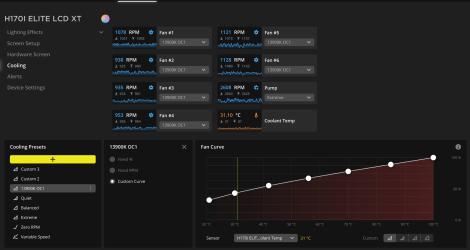
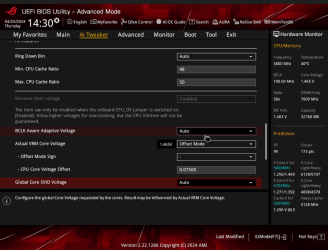
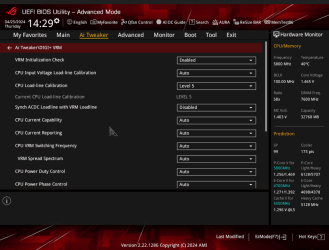
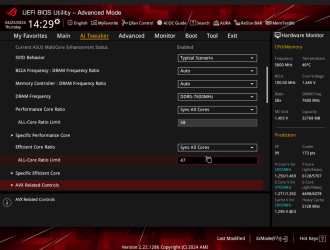
Well mine is tuned to all-core 5.8Ghz P-cores 4.7Ghz E-cores
running 7600mhz on a Asus Strix-e never had a issue because i am overclocked and i did adjustments a long time ago and even at stock i never had those issues also using LLC5 and a Negative offset Intel Core i9 14900K @ 5800 MHz - CPU-Z VALIDATOR
 

Attachments

  • 42k 14900k.png
    42k 14900k.png
    37.5 KB · Views: 6
  • 13900koc.png
    13900koc.png
    84.9 KB · Views: 6
  • ada.png
    ada.png
    140 KB · Views: 7

My Computer My Computer

At a glance

Windows10/1113900k64GB 3600Mhz TridentZ Royal @3800 can go to 4...EVGA FTW ULTRA 3090
OS
Windows10/11
Computer type
PC/Desktop
Manufacturer/Model
Intel
CPU
13900k
Motherboard
Z790 Tuff plus Wifi D4
Memory
64GB 3600Mhz TridentZ Royal @3800 can go to 4000Mhz
Graphics Card(s)
EVGA FTW ULTRA 3090
Sound Card
none /Dolby Atmos
Monitor(s) Displays
Rog Swift PG348Q 34inch Ultrawide
Screen Resolution
3440x1440
Hard Drives
Multi SSD'S and NVME's Samsung 980 500GB 2x Samsung 980Pro 1TB 1X 980Pro 2TB
PSU
EVGA 1600W Platinum
Case
Corsair 4000X
Cooling
Corsair Capellix 360mm
Keyboard
Logitech K350
Mouse
Logitech K350
Internet Speed
550+MB
Browser
Explorer, Chrome, Firefox
Antivirus
Webroot Anti Virus
My Bios Settings
This how i tuned my system everyone's is different what works for me might not work for you.
I forgot to snap E-core settings sorry just realized i have them under special voltages in the prediction menu each block is 1.38v for stability
 

Attachments

  • B6.png
    B6.png
    78 KB · Views: 8
  • B5.png
    B5.png
    85.1 KB · Views: 7
  • B4.png
    B4.png
    91.4 KB · Views: 8
  • B3.png
    B3.png
    79.8 KB · Views: 8
  • B2.png
    B2.png
    75.8 KB · Views: 8
  • B1.png
    B1.png
    95.8 KB · Views: 8
  • B.png
    B.png
    87.6 KB · Views: 7
Last edited:

My Computer My Computer

At a glance

Windows10/1113900k64GB 3600Mhz TridentZ Royal @3800 can go to 4...EVGA FTW ULTRA 3090
OS
Windows10/11
Computer type
PC/Desktop
Manufacturer/Model
Intel
CPU
13900k
Motherboard
Z790 Tuff plus Wifi D4
Memory
64GB 3600Mhz TridentZ Royal @3800 can go to 4000Mhz
Graphics Card(s)
EVGA FTW ULTRA 3090
Sound Card
none /Dolby Atmos
Monitor(s) Displays
Rog Swift PG348Q 34inch Ultrawide
Screen Resolution
3440x1440
Hard Drives
Multi SSD'S and NVME's Samsung 980 500GB 2x Samsung 980Pro 1TB 1X 980Pro 2TB
PSU
EVGA 1600W Platinum
Case
Corsair 4000X
Cooling
Corsair Capellix 360mm
Keyboard
Logitech K350
Mouse
Logitech K350
Internet Speed
550+MB
Browser
Explorer, Chrome, Firefox
Antivirus
Webroot Anti Virus
Coud you post a screenshot of the setting you changed? Its ridiculous though that we have to change these settings to get a stable system
For my Asus BIOS this setting is under the AI Tweaker options under Internal CPU Power Management. I set 85C. In practice my PC never goes much above 55C even running a game like MS Fight Simulator.

cpu.png
 

My Computer My Computer

At a glance

Windows 11 ProCore i7-13700K64 GB Kingston Fury Beast DDR5Gigabyte GeForce RTX 2060 Super Gaming OC 8G
OS
Windows 11 Pro
Computer type
PC/Desktop
Manufacturer/Model
Self build
CPU
Core i7-13700K
Motherboard
Asus TUF Gaming Plus WiFi Z790
Memory
64 GB Kingston Fury Beast DDR5
Graphics Card(s)
Gigabyte GeForce RTX 2060 Super Gaming OC 8G
Sound Card
Realtek S1200A
Monitor(s) Displays
Viewsonic VP2770 & Dell (secondary)
Screen Resolution
2560 x 1440
Hard Drives
Kingston KC3000 2TB NVME SSD & SATA HDDs & SSD
PSU
EVGA SuperNova G2 850W
Case
Nanoxia Deep Silence 1
Cooling
Noctua NH-D14
Keyboard
Microsoft Digital Media Pro
Mouse
Logitech Wireless
Internet Speed
80 Mb / s
Browser
Chrome
Antivirus
Defender, Malwarebytes Free & AdwCleaner

Latest Support Threads

Back
Top Bottom