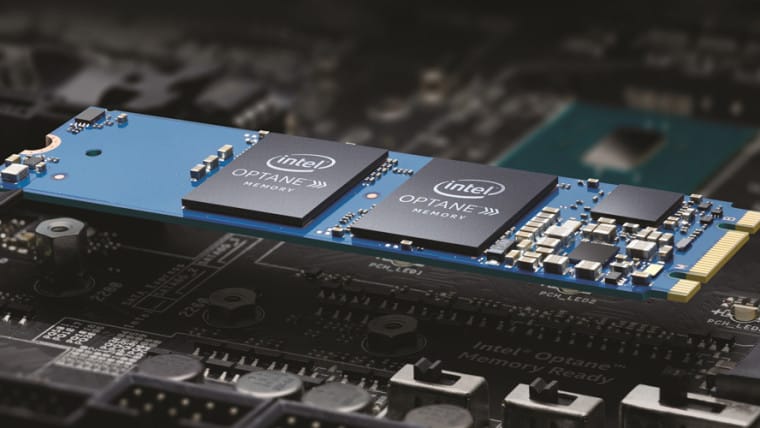
I read where Intel has abandoned Optane and is taking a multi-million dollar loss.@TraderGary The way I see it from reading Intel's articles, if one manually updates IRST, Intel says "During the installation of the Intel RST driver (version 17.9 and later) you will have an option to download and install the Intel® Optane™ Memory and Storage Management application from the Microsoft Store" but since both you and Dan ended up with the app, it would appear WU downloads it automatically."But if that is the case, even if one uninstalls it, it will probably be back at some point. I don't have to worry about that as I have driver updates disabled, but a lot of people do not disable driver updates. Having the app doesn't hurt anything as it is only a tool to configure optane, but it would be all to easy for a novice user who has a optane module to use the app to enable optane out of a lack of knowledge to what it really is. A computer should come with it disabled in bios by default, but mine did not.
Reference- Intel® Rapid Storage Technology and Intel® Optane™...
From everything I've read about it, I wouldn't have an optane drive in my system.
My Computers
-
At a glance
Windows 11 ProIntel Series 3 Core Ultra X9 388H64GB LPDDR5x 9600 MT/sIntel Arc graphics B390 Panther Lake- OS
- Windows 11 Pro
- Computer type
- Laptop
- Manufacturer/Model
- Dell XPS 16 DA16260
- CPU
- Intel Series 3 Core Ultra X9 388H
- Memory
- 64GB LPDDR5x 9600 MT/s
- Graphics Card(s)
- Intel Arc graphics B390 Panther Lake
- Monitor(s) Displays
- 16" 3.2K Tandem OLED Infinity Edge
- Screen Resolution
- 3200 x 2000 16:10 236 PPI
- Hard Drives
- 1 Terabyte M.2 PCIe NVMe SSD
- Case
- Black Anodized Aluminum
- Cooling
- Vapor Chamber Cooling
- Mouse
- None
- Internet Speed
- 942 Mbps Netgear Mesh + 2 Satellites
- Browser
- Microsoft Edge (Chromium)
- Antivirus
- Windows Security (Defender)
- Other Info
- NPU delivering 67 TOPS
Microsoft 365 subscription
Microsoft Office 365
Microsoft OneDrive 1TB Cloud
Microsoft Visual Studio
Microsoft Visual Studio Code
Microsoft Sysinternals Suite
Microsoft BitLocker
Microsoft Copilot
Dell Support Assist
Dell Command | Update
Macrium Reflect X subscription
1Password Password Manager
Amazon Kindle for PC
Lightroom/Photoshop subscription
Interactive Brokers Trader Workstation
-
At a glance
Windows 11 ProSnapdragon® X Elite (12 Core) with Hexagon NP...32GB LPDDR5x 8448 MT/sIntegrated Adreno GPU- Operating System
- Windows 11 Pro
- Computer type
- Laptop
- Manufacturer/Model
- Microsoft Surface Laptop 7
- CPU
- Snapdragon® X Elite (12 Core) with Hexagon NPU delivering 45 TOPS
- Memory
- 32GB LPDDR5x 8448 MT/s
- Graphics card(s)
- Integrated Adreno GPU
- Sound Card
- Omnisonic speakers with Dolby Atmos spatial sound
- Monitor(s) Displays
- 13.8″ PixelSense Flow touchscreen 120 Hz 600 NIT
- Screen Resolution
- 2304 × 1536 (201 PPI), 3:2 aspect ratio
- Hard Drives
- 1 TB PCIe NVMe Gen 4 SSD
- Case
- Black Anodized Aluminum
- Cooling
- Vapor Chamber Cooling
- Mouse
- None
- Internet Speed
- 942 Mbps Netgear Mesh + 2 Satellites
- Browser
- Microsoft Edge (Chromium)
- Antivirus
- Windows Security (Defender)
- Other Info
- Microsoft 365 subscription (Office)
Microsoft Office 365
Microsoft OneDrive 1TB Cloud
Microsoft Visual Studio 2026
Microsoft Visual Studio Code
Lightroom/Photoshop subscription
1Password Password Manager
Microsoft Sysinternals Suite
Amazon Kindle for PC
Microsoft BitLocker
Microsoft Copilot
Interactive Brokers Trader Workstation