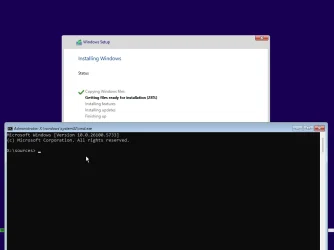
Intriguing question about old setup


Rbcc

Well-known member
Local time
3:51 PM
Posts
124
OS
Windows 11 pro
DISM /Mount-Wim /wimfile:F:\test\boot.wim /index:2 /mountdir:M:\Mount
reg load HKLM\TEMP M:\Mount\Windows\System32\config\SYSTEM
reg add HKLM\TEMP\Setup /v "CmdLine" /t REG_SZ /d "X:\\sources\\setup.exe" /f
reg unload HKLM\TEMP
DISM /Unmount-Wim /mountdir:M:\Mount /commit

Shouldn't this HKLM\TEMP\Setup /v "CmdLine" /t REG_SZ /d "X:\\sources\\setup.exe" /f put something in HKEY_LOCAL_MACHINE\SYSTEM\Setup in boot.wim?
 

My Computer My Computer

At a glance

Windows 11 proI-7 2gigaherz16Gig
OS
Windows 11 pro
Computer type
Laptop
Manufacturer/Model
Asus
CPU
I-7 2gigaherz
Motherboard
Asus
Memory
16Gig
Screen Resolution
1024x768
Hard Drives
512 SSD
Yes it will. Doesn't guarantee it will do anything.
 

My Computer My Computer

At a glance

Linux Mint
OS
Linux Mint
Computer type
Laptop
Manufacturer/Model
System76 Lemur Pro
For a live Windows system, the SYSTEM and SOFTWARE hives are mounted in this manner:
Code:
reg load HKLM\SYSTEM C:\Windows\System32\config\SYSTEM
reg load HKLM\SOFTWARE C:\Windows\System32\config\SOFTWARE

Because HKLM\SYSTEM is already in active use, we're forced to mount the offline image's SYSTEM hive on a different path.
Code:
reg load HKLM\TEMP M:\Mount\Windows\System32\config\SYSTEM

Reg changes are applied relative to the temporary path (HKLM\TEMP). There is nothing named SYSTEM under HKLM\TEMP, because the hive doesn't save its own name as part of the reg path.

What happens when the updated boot.wim runs?
Code:
reg load HKLM\SYSTEM C:\Windows\System32\config\SYSTEM

So your offline changes to a SYSTEM hive mounted on HKLM\TEMP will end up as HKLM\SYSTEM on the live system.
 
Last edited:

My Computer My Computer

At a glance

Windows 7
OS
Windows 7
I've tried in answer file, batch file and manually, after that rebooting. what is the suggested way of usage?
This work in 24h2 2620.5570 but not in 26200.5764. I wonder why?
 

My Computer My Computer

At a glance

Windows 11 proI-7 2gigaherz16Gig
OS
Windows 11 pro
Computer type
Laptop
Manufacturer/Model
Asus
CPU
I-7 2gigaherz
Motherboard
Asus
Memory
16Gig
Screen Resolution
1024x768
Hard Drives
512 SSD
I didn't have a problem with 26200.5733. Don't mix and match with startnet.cmd or winpeshl.ini changes.
 

Attachments

  • Windows 11 x64-2025-08-18-19-37-18.webp
    Windows 11 x64-2025-08-18-19-37-18.webp
    17.8 KB · Views: 2

My Computer My Computer

At a glance

Windows 7
OS
Windows 7
This is a squeeky clean boot screen with the reghacks being the only thing in boot.wim!
 

My Computer My Computer

At a glance

Windows 11 proI-7 2gigaherz16Gig
OS
Windows 11 pro
Computer type
Laptop
Manufacturer/Model
Asus
CPU
I-7 2gigaherz
Motherboard
Asus
Memory
16Gig
Screen Resolution
1024x768
Hard Drives
512 SSD
I'm thinking about getting the old setup working.
 

My Computer My Computer

At a glance

Windows 11 proI-7 2gigaherz16Gig
OS
Windows 11 pro
Computer type
Laptop
Manufacturer/Model
Asus
CPU
I-7 2gigaherz
Motherboard
Asus
Memory
16Gig
Screen Resolution
1024x768
Hard Drives
512 SSD
I went an installed windows on a vmware virtual machine clicked where it said old setup and asked to go the command prompt then I keyed in X: then cd sources and ran setup from the prompt it went back to the new setup. Now I am putting the made windows install iso and will reboot rufus made drive and will see if it works! Which doesn't work! It was a fun idea but I guess I'll use the new one!
 
Last edited:

My Computer My Computer

At a glance

Windows 11 proI-7 2gigaherz16Gig
OS
Windows 11 pro
Computer type
Laptop
Manufacturer/Model
Asus
CPU
I-7 2gigaherz
Motherboard
Asus
Memory
16Gig
Screen Resolution
1024x768
Hard Drives
512 SSD
Thank you garlin for your help
Great support
 

My Computer My Computer

At a glance

Windows 11 proI-7 2gigaherz16Gig
OS
Windows 11 pro
Computer type
Laptop
Manufacturer/Model
Asus
CPU
I-7 2gigaherz
Motherboard
Asus
Memory
16Gig
Screen Resolution
1024x768
Hard Drives
512 SSD
Back
Top Bottom