

@garlin, I suspect that this question might be something that you are familiar with:
I have been making a few sysprep images for a small project that I am working on. I have created these images in both Hyper-V and VMware Workstation Pro and both work just fine.
However, I wanted to see if I could successfully create a sysprep image based upon a native boot VHD. I create the native boot VHD and do the usual routine of starting the installation and then entering audit mode just as I would on a VM. I create the image and my final ISO based upon that image.
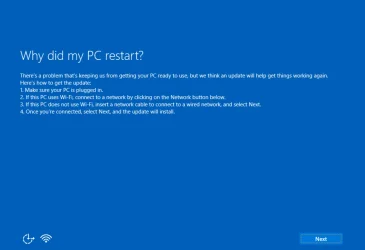
To test, I begin installing to a Hyper-V VM using that image. I get past the first two reboots, but it seems to do pretty much nothing after the 2nd boot. Finally, after a few minutes I get the error below. If I proceed from there it simply comes back to this same screen over and over.
Would you happen to know if there is any inherent problem with syspreping a native boot VHD installation of Windows?
Test scenario:
The primary OS is Win 11 Pro 24H2
The VHD is on the C: drive. Note that C: is BitLocker encrypted.
I know that when running a native boot VHD on a BitLocker volume it wants to see a small amount of non-BitLocker encrypted space so I have a small 1GB partition that is not encrypted.
The Native VHD booted Windows is also 24H2.
I have been making a few sysprep images for a small project that I am working on. I have created these images in both Hyper-V and VMware Workstation Pro and both work just fine.
However, I wanted to see if I could successfully create a sysprep image based upon a native boot VHD. I create the native boot VHD and do the usual routine of starting the installation and then entering audit mode just as I would on a VM. I create the image and my final ISO based upon that image.
To test, I begin installing to a Hyper-V VM using that image. I get past the first two reboots, but it seems to do pretty much nothing after the 2nd boot. Finally, after a few minutes I get the error below. If I proceed from there it simply comes back to this same screen over and over.
Would you happen to know if there is any inherent problem with syspreping a native boot VHD installation of Windows?
Test scenario:
The primary OS is Win 11 Pro 24H2
The VHD is on the C: drive. Note that C: is BitLocker encrypted.
I know that when running a native boot VHD on a BitLocker volume it wants to see a small amount of non-BitLocker encrypted space so I have a small 1GB partition that is not encrypted.
The Native VHD booted Windows is also 24H2.
My Computers
-
At a glance
Win11 Pro 26H2 (Release Preview)Intel i7-14650HX32 GBNo GPU - Built-in Intel Graphics- OS
- Win11 Pro 26H2 (Release Preview)
- Computer type
- PC/Desktop
- Manufacturer/Model
- Acemagic Matrix M5
- CPU
- Intel i7-14650HX
- Memory
- 32 GB
- Graphics Card(s)
- No GPU - Built-in Intel Graphics
- Sound Card
- Integrated
- Monitor(s) Displays
- Varies as machine will often be moved to locations with different monitors
- Screen Resolution
- Varies
- Hard Drives
- 1 x 1TB Gen 4 NVMe SSD
- PSU
- 120W Power Brick
- Keyboard
- Corsair K70 Max RGB Magnetic Keyboard
- Mouse
- Logitech MX Master 3
- Internet Speed
- 1Gb Up / 1 Gb Down
- Browser
- Edge
- Antivirus
- Windows Defender
-
At a glance
Win11 Pro 26H2 (Release Preview)Intel i7-1255U16 GBIntel Iris Xe Graphics- Operating System
- Win11 Pro 26H2 (Release Preview)
- Computer type
- Laptop
- Manufacturer/Model
- Lenovo ThinkBook 13x Gen 2
- CPU
- Intel i7-1255U
- Memory
- 16 GB
- Graphics card(s)
- Intel Iris Xe Graphics
- Sound Card
- Realtek® ALC3306-CG codec
- Monitor(s) Displays
- 13.3-inch IPS Display
- Screen Resolution
- WQXGA (2560 x 1600)
- Hard Drives
- 4 TB 4 x 4 NVMe SSD
- PSU
- USB-C / Thunderbolt 4 Power / Charging Using an Anker 160W Charger
- Keyboard
- Backlit, spill resistant keyboard
- Mouse
- Buttonless Glass Precision Touchpad
- Internet Speed
- 1Gb Up / 1Gb Down
- Browser
- Edge
- Antivirus
- Windows Defender
- Other Info
- WiFi 6e / Bluetooth 5.1 / Facial Recognition / Fingerprint Sensor / ToF (Time of Flight) Human Presence Sensor







