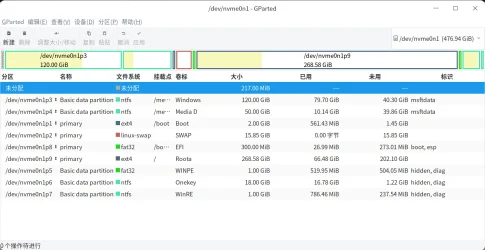
Solved Is it possible to create system reserved partition manually ?


Here is how the successful commands looked on my computer:

Code:
Microsoft Windows [Version 10.0.22000.434]
(c) Microsoft Corporation. All rights reserved.

C:\windows\system32>diskpart

Microsoft DiskPart version 10.0.22000.1

Copyright (C) Microsoft Corporation.
On computer: RAIDER

DISKPART> select vol c

Volume 2 is the selected volume.

DISKPART> shrink desired=250

DiskPart successfully shrunk the volume by:  250 MB

DISKPART> create part EFI

DiskPart succeeded in creating the specified partition.

DISKPART> format fs=fat32 quick

  100 percent completed

DiskPart successfully formatted the volume.

DISKPART> assign letter=s

DiskPart successfully assigned the drive letter or mount point.

DISKPART> exit

Leaving DiskPart...

C:\windows\system32>bcdboot C:\Windows /s S: /f UEFI
Boot files successfully created.

C:\windows\system32>shutdown /r /fw /t 00
 

My Computers My Computers

  • At a glance

    Windows 11AMD Ryzen 7 3800XT32GBEVGA GeForce GTX 1080 Ti
    OS
    Windows 11
    Computer type
    PC/Desktop
    Manufacturer/Model
    Homebuilt
    CPU
    AMD Ryzen 7 3800XT
    Motherboard
    ASUS ROG Crosshair VII Hero (WiFi)
    Memory
    32GB
    Graphics Card(s)
    EVGA GeForce GTX 1080 Ti
  • At a glance

    Windows 11 EducationIntel i7-8550U32GBNvidia Geforce MX150
    Operating System
    Windows 11 Education
    Computer type
    Laptop
    Manufacturer/Model
    Dell Inspiron 7773
    CPU
    Intel i7-8550U
    Memory
    32GB
    Graphics card(s)
    Nvidia Geforce MX150
    Sound Card
    Realtek
    Monitor(s) Displays
    17"
    Screen Resolution
    1920 x 1080
    Hard Drives
    Toshiba 512GB NVMe SSD
    SK Hynix 512GB SATA SSD
    Internet Speed
    Fast!
Here is how the successful commands looked on my computer:

Code:
Microsoft Windows [Version 10.0.22000.434]
(c) Microsoft Corporation. All rights reserved.

C:\windows\system32>diskpart

Microsoft DiskPart version 10.0.22000.1

Copyright (C) Microsoft Corporation.
On computer: RAIDER

DISKPART> select vol c

Volume 2 is the selected volume.

DISKPART> shrink desired=250

DiskPart successfully shrunk the volume by:  250 MB

DISKPART> create part EFI

DiskPart succeeded in creating the specified partition.

DISKPART> format fs=fat32 quick

  100 percent completed

DiskPart successfully formatted the volume.

DISKPART> assign letter=s

DiskPart successfully assigned the drive letter or mount point.

DISKPART> exit

Leaving DiskPart...

C:\windows\system32>bcdboot C:\Windows /s S: /f UEFI
Boot files successfully created.

C:\windows\system32>shutdown /r /fw /t 00
Thanks I followed the steps but I think I still boot from C:\ here is a picture :

Untitled.jpg

Should I set partition type id or something else ?
 

My Computer My Computer

At a glance

Windows 115900x32 GB G.SkillRX 6800 XT
OS
Windows 11
Computer type
PC/Desktop
CPU
5900x
Motherboard
MAG X570S TOMAHAWK MAX WIFI
Memory
32 GB G.Skill
Graphics Card(s)
RX 6800 XT
Sound Card
Creative Sound Blaster Z
Monitor(s) Displays
BENQ and AOC QHD 120Hz
Screen Resolution
QHD
Hard Drives
2TB Intel 660p and 2TB Sabrent Rokect 4 plus nvme, 4TB HDD HGST
PSU
Corsair RM750
Case
Bloody rage
Cooling
Water cooling gamdias 240
Keyboard
razer ornata
Mouse
razer da v2
Browser
FF and Chrome
Antivirus
Malwarebytes
Thanks I followed the steps but I think I still boot from C:\ here is a picture :

View attachment 18542

Should I set partition type id or something else ?
Did you go into your firmware (BIOS) settings and set the new EFI system partition as first in the boot order? Note, that right now you have two identical file locations, \EFI\Microsoft\Boot\bootmgfw.efi, one is on C: drive and one is on the new EFI I: drive. In BIOS you need to set the one in the EFI partition as the first priority.
 

My Computers My Computers

  • At a glance

    Windows 11AMD Ryzen 7 3800XT32GBEVGA GeForce GTX 1080 Ti
    OS
    Windows 11
    Computer type
    PC/Desktop
    Manufacturer/Model
    Homebuilt
    CPU
    AMD Ryzen 7 3800XT
    Motherboard
    ASUS ROG Crosshair VII Hero (WiFi)
    Memory
    32GB
    Graphics Card(s)
    EVGA GeForce GTX 1080 Ti
  • At a glance

    Windows 11 EducationIntel i7-8550U32GBNvidia Geforce MX150
    Operating System
    Windows 11 Education
    Computer type
    Laptop
    Manufacturer/Model
    Dell Inspiron 7773
    CPU
    Intel i7-8550U
    Memory
    32GB
    Graphics card(s)
    Nvidia Geforce MX150
    Sound Card
    Realtek
    Monitor(s) Displays
    17"
    Screen Resolution
    1920 x 1080
    Hard Drives
    Toshiba 512GB NVMe SSD
    SK Hynix 512GB SATA SSD
    Internet Speed
    Fast!
Did you go into your firmware (BIOS) settings and set the new EFI system partition as first in the boot order? Note, that right now you have two identical file locations, \EFI\Microsoft\Boot\bootmgfw.efi, one is on C: drive and one is on the new EFI I: drive. In BIOS you need to set the one in the EFI partition as the first priority.
In bios I see the nvme sabrent 2TB in boot order ? CSM disabled ?
 

My Computer My Computer

At a glance

Windows 115900x32 GB G.SkillRX 6800 XT
OS
Windows 11
Computer type
PC/Desktop
CPU
5900x
Motherboard
MAG X570S TOMAHAWK MAX WIFI
Memory
32 GB G.Skill
Graphics Card(s)
RX 6800 XT
Sound Card
Creative Sound Blaster Z
Monitor(s) Displays
BENQ and AOC QHD 120Hz
Screen Resolution
QHD
Hard Drives
2TB Intel 660p and 2TB Sabrent Rokect 4 plus nvme, 4TB HDD HGST
PSU
Corsair RM750
Case
Bloody rage
Cooling
Water cooling gamdias 240
Keyboard
razer ornata
Mouse
razer da v2
Browser
FF and Chrome
Antivirus
Malwarebytes
Or use Avanced startup menu from windows 11 ?
 

My Computer My Computer

At a glance

Windows 115900x32 GB G.SkillRX 6800 XT
OS
Windows 11
Computer type
PC/Desktop
CPU
5900x
Motherboard
MAG X570S TOMAHAWK MAX WIFI
Memory
32 GB G.Skill
Graphics Card(s)
RX 6800 XT
Sound Card
Creative Sound Blaster Z
Monitor(s) Displays
BENQ and AOC QHD 120Hz
Screen Resolution
QHD
Hard Drives
2TB Intel 660p and 2TB Sabrent Rokect 4 plus nvme, 4TB HDD HGST
PSU
Corsair RM750
Case
Bloody rage
Cooling
Water cooling gamdias 240
Keyboard
razer ornata
Mouse
razer da v2
Browser
FF and Chrome
Antivirus
Malwarebytes
In your BIOS settings, CSM should be disabled. You should now see two entries for the same SSD as UEFI boot options.
 

My Computers My Computers

  • At a glance

    Windows 11AMD Ryzen 7 3800XT32GBEVGA GeForce GTX 1080 Ti
    OS
    Windows 11
    Computer type
    PC/Desktop
    Manufacturer/Model
    Homebuilt
    CPU
    AMD Ryzen 7 3800XT
    Motherboard
    ASUS ROG Crosshair VII Hero (WiFi)
    Memory
    32GB
    Graphics Card(s)
    EVGA GeForce GTX 1080 Ti
  • At a glance

    Windows 11 EducationIntel i7-8550U32GBNvidia Geforce MX150
    Operating System
    Windows 11 Education
    Computer type
    Laptop
    Manufacturer/Model
    Dell Inspiron 7773
    CPU
    Intel i7-8550U
    Memory
    32GB
    Graphics card(s)
    Nvidia Geforce MX150
    Sound Card
    Realtek
    Monitor(s) Displays
    17"
    Screen Resolution
    1920 x 1080
    Hard Drives
    Toshiba 512GB NVMe SSD
    SK Hynix 512GB SATA SSD
    Internet Speed
    Fast!
In your BIOS settings, CSM should be disabled. You should now see two entries for the same SSD as UEFI boot options.
I see 6 and choose second one but same result

unnamed.jpg
 

My Computer My Computer

At a glance

Windows 115900x32 GB G.SkillRX 6800 XT
OS
Windows 11
Computer type
PC/Desktop
CPU
5900x
Motherboard
MAG X570S TOMAHAWK MAX WIFI
Memory
32 GB G.Skill
Graphics Card(s)
RX 6800 XT
Sound Card
Creative Sound Blaster Z
Monitor(s) Displays
BENQ and AOC QHD 120Hz
Screen Resolution
QHD
Hard Drives
2TB Intel 660p and 2TB Sabrent Rokect 4 plus nvme, 4TB HDD HGST
PSU
Corsair RM750
Case
Bloody rage
Cooling
Water cooling gamdias 240
Keyboard
razer ornata
Mouse
razer da v2
Browser
FF and Chrome
Antivirus
Malwarebytes
This is my BIOS after I created the second EFI partition on my drive:
Capture.JPG

Notice I have two entries available on the same SSD. To get a clue as to where you computer is booting from you can run the commands:

Code:
bcdedit
diskpart
list vol

Like this:

Code:
Microsoft Windows [Version 10.0.22000.434]
(c) Microsoft Corporation. All rights reserved.

C:\windows\system32>bcdedit

Windows Boot Manager
--------------------
identifier              {bootmgr}
device                  partition=\Device\HarddiskVolume3
path                    \EFI\MICROSOFT\BOOT\BOOTMGFW.EFI
description             Windows Boot Manager
locale                  en-us
inherit                 {globalsettings}
default                 {current}
resumeobject            {a47003aa-5703-11ec-97ab-2c8db1e3769f}
displayorder            {current}
toolsdisplayorder       {memdiag}
timeout                 0

Windows Boot Loader
-------------------
identifier              {current}
device                  partition=C:
path                    \windows\system32\winload.efi
description             Windows 11
locale                  en-us
inherit                 {bootloadersettings}
recoverysequence        {5c6b1a31-5d04-11ec-97cb-00155d01b400}
displaymessageoverride  Recovery
recoveryenabled         Yes
isolatedcontext         Yes
allowedinmemorysettings 0x15000075
osdevice                partition=C:
systemroot              \windows
resumeobject            {a47003aa-5703-11ec-97ab-2c8db1e3769f}
nx                      OptIn
bootmenupolicy          Standard
hypervisorlaunchtype    Auto

C:\windows\system32>diskpart

Microsoft DiskPart version 10.0.22000.1

Copyright (C) Microsoft Corporation.
On computer: RAIDER

DISKPART> list vol

  Volume ###  Ltr  Label        Fs     Type        Size     Status     Info
  ----------  ---  -----------  -----  ----------  -------  ---------  --------
  Volume 0     D   Data         NTFS   Partition    945 GB  Healthy
  Volume 1     R   RECOVERY     FAT32  Partition   8191 MB  Healthy
  Volume 2     C   Windows      NTFS   Partition    443 GB  Healthy    Boot
  Volume 3                      FAT32  Partition    100 MB  Healthy    System
  Volume 4                      FAT32  Partition    250 MB  Healthy    Hidden
  Volume 5         WinRE tools  NTFS   Partition    980 MB  Healthy    Hidden
  Volume 6         BIOS_RVY     NTFS   Partition     21 GB  Healthy    Hidden

DISKPART>

Notice in the Boot Manager Section the lines:

device partition=\Device\HarddiskVolume3
path \EFI\MICROSOFT\BOOT\BOOTMGFW.EFI

Then you look to see what the matching volume (3 in my example) is to get a clue which partition it is. In my case I am still booting from my original 100 MB FAT32 partition and not the new 250 MB FAT32 partition that I created. I would have to change my boot priority to the second Windows Boot Manager in my list to change booting to Volume 4 in the list above.
 

My Computers My Computers

  • At a glance

    Windows 11AMD Ryzen 7 3800XT32GBEVGA GeForce GTX 1080 Ti
    OS
    Windows 11
    Computer type
    PC/Desktop
    Manufacturer/Model
    Homebuilt
    CPU
    AMD Ryzen 7 3800XT
    Motherboard
    ASUS ROG Crosshair VII Hero (WiFi)
    Memory
    32GB
    Graphics Card(s)
    EVGA GeForce GTX 1080 Ti
  • At a glance

    Windows 11 EducationIntel i7-8550U32GBNvidia Geforce MX150
    Operating System
    Windows 11 Education
    Computer type
    Laptop
    Manufacturer/Model
    Dell Inspiron 7773
    CPU
    Intel i7-8550U
    Memory
    32GB
    Graphics card(s)
    Nvidia Geforce MX150
    Sound Card
    Realtek
    Monitor(s) Displays
    17"
    Screen Resolution
    1920 x 1080
    Hard Drives
    Toshiba 512GB NVMe SSD
    SK Hynix 512GB SATA SSD
    Internet Speed
    Fast!
SIX?!? Holy Cow. K. Hold on. Let me try something.
 

My Computers My Computers

  • At a glance

    Windows 11AMD Ryzen 7 3800XT32GBEVGA GeForce GTX 1080 Ti
    OS
    Windows 11
    Computer type
    PC/Desktop
    Manufacturer/Model
    Homebuilt
    CPU
    AMD Ryzen 7 3800XT
    Motherboard
    ASUS ROG Crosshair VII Hero (WiFi)
    Memory
    32GB
    Graphics Card(s)
    EVGA GeForce GTX 1080 Ti
  • At a glance

    Windows 11 EducationIntel i7-8550U32GBNvidia Geforce MX150
    Operating System
    Windows 11 Education
    Computer type
    Laptop
    Manufacturer/Model
    Dell Inspiron 7773
    CPU
    Intel i7-8550U
    Memory
    32GB
    Graphics card(s)
    Nvidia Geforce MX150
    Sound Card
    Realtek
    Monitor(s) Displays
    17"
    Screen Resolution
    1920 x 1080
    Hard Drives
    Toshiba 512GB NVMe SSD
    SK Hynix 512GB SATA SSD
    Internet Speed
    Fast!
C:\Windows\system32>bcdedit
The boot configuration data store could not be opened.
The requested system device cannot be found.
 

My Computer My Computer

At a glance

Windows 115900x32 GB G.SkillRX 6800 XT
OS
Windows 11
Computer type
PC/Desktop
CPU
5900x
Motherboard
MAG X570S TOMAHAWK MAX WIFI
Memory
32 GB G.Skill
Graphics Card(s)
RX 6800 XT
Sound Card
Creative Sound Blaster Z
Monitor(s) Displays
BENQ and AOC QHD 120Hz
Screen Resolution
QHD
Hard Drives
2TB Intel 660p and 2TB Sabrent Rokect 4 plus nvme, 4TB HDD HGST
PSU
Corsair RM750
Case
Bloody rage
Cooling
Water cooling gamdias 240
Keyboard
razer ornata
Mouse
razer da v2
Browser
FF and Chrome
Antivirus
Malwarebytes
Do you get the same error with "bcdedit /enum all"?
 

My Computers My Computers

  • At a glance

    Windows 11AMD Ryzen 7 3800XT32GBEVGA GeForce GTX 1080 Ti
    OS
    Windows 11
    Computer type
    PC/Desktop
    Manufacturer/Model
    Homebuilt
    CPU
    AMD Ryzen 7 3800XT
    Motherboard
    ASUS ROG Crosshair VII Hero (WiFi)
    Memory
    32GB
    Graphics Card(s)
    EVGA GeForce GTX 1080 Ti
  • At a glance

    Windows 11 EducationIntel i7-8550U32GBNvidia Geforce MX150
    Operating System
    Windows 11 Education
    Computer type
    Laptop
    Manufacturer/Model
    Dell Inspiron 7773
    CPU
    Intel i7-8550U
    Memory
    32GB
    Graphics card(s)
    Nvidia Geforce MX150
    Sound Card
    Realtek
    Monitor(s) Displays
    17"
    Screen Resolution
    1920 x 1080
    Hard Drives
    Toshiba 512GB NVMe SSD
    SK Hynix 512GB SATA SSD
    Internet Speed
    Fast!
Do you get the same error with "bcdedit /enum all"?
I got it this time here is the output

C:\Windows\system32>bcdedit

Windows Boot Manager
--------------------
identifier {bootmgr}
device partition=\Device\HarddiskVolume2
path \EFI\Microsoft\Boot\bootmgfw.efi
description Windows Boot Manager
locale en-us
inherit {globalsettings}
default {default}
resumeobject {cf64f082-74a4-11ec-b5cc-087190bfe608}
displayorder {default}
toolsdisplayorder {memdiag}
timeout 30

Windows Boot Loader
-------------------
identifier {default}
device partition=C:
path \Windows\system32\winload.efi
description Windows 11
locale en-us
inherit {bootloadersettings}
isolatedcontext Yes
allowedinmemorysettings 0x15000075
osdevice partition=C:
systemroot \Windows
resumeobject {cf64f082-74a4-11ec-b5cc-087190bfe608}
nx OptIn
bootmenupolicy Standard

C:\Windows\system32>bcdedit /enum all

Firmware Boot Manager
---------------------
identifier {fwbootmgr}
displayorder {bootmgr}
{08acb151-74a5-11ec-b5cd-806e6f6e6963}
{08acb155-74a5-11ec-b5cd-806e6f6e6963}
{08acb150-74a5-11ec-b5cd-806e6f6e6963}
{08acb152-74a5-11ec-b5cd-806e6f6e6963}
{08acb153-74a5-11ec-b5cd-806e6f6e6963}
{08acb154-74a5-11ec-b5cd-806e6f6e6963}
timeout 1

Windows Boot Manager
--------------------
identifier {bootmgr}
device partition=\Device\HarddiskVolume2
path \EFI\Microsoft\Boot\bootmgfw.efi
description Windows Boot Manager
locale en-us
inherit {globalsettings}
default {default}
resumeobject {cf64f082-74a4-11ec-b5cc-087190bfe608}
displayorder {default}
toolsdisplayorder {memdiag}
timeout 30

Firmware Application (101fffff)
-------------------------------
identifier {08acb150-74a5-11ec-b5cd-806e6f6e6963}
device partition=C:
path \EFI\Microsoft\Boot\bootmgfw.efi
description Windows Boot Manager

Firmware Application (101fffff)
-------------------------------
identifier {08acb151-74a5-11ec-b5cd-806e6f6e6963}
device partition=C:
path \EFI\Microsoft\Boot\bootmgfw.efi
description Windows Boot Manager

Firmware Application (101fffff)
-------------------------------
identifier {08acb152-74a5-11ec-b5cd-806e6f6e6963}
device partition=C:
path \EFI\Microsoft\Boot\bootmgfw.efi
description Windows Boot Manager

Firmware Application (101fffff)
-------------------------------
identifier {08acb153-74a5-11ec-b5cd-806e6f6e6963}
device partition=C:
path \EFI\MICROSOFT\BOOT\BOOTMGFW.EFI
description Windows Boot Manager

Firmware Application (101fffff)
-------------------------------
identifier {08acb154-74a5-11ec-b5cd-806e6f6e6963}
device partition=C:
path \EFI\MICROSOFT\BOOT\BOOTMGFW.EFI
description Windows Boot Manager

Firmware Application (101fffff)
-------------------------------
identifier {08acb155-74a5-11ec-b5cd-806e6f6e6963}
device partition=\Device\HarddiskVolume2
path \EFI\Microsoft\Boot\bootmgfw.efi
description Windows Boot Manager

Windows Boot Loader
-------------------
identifier {default}
device partition=C:
path \Windows\system32\winload.efi
description Windows 11
locale en-us
inherit {bootloadersettings}
isolatedcontext Yes
allowedinmemorysettings 0x15000075
osdevice partition=C:
systemroot \Windows
resumeobject {cf64f082-74a4-11ec-b5cc-087190bfe608}
nx OptIn
bootmenupolicy Standard

Resume from Hibernate
---------------------
identifier {cf64f082-74a4-11ec-b5cc-087190bfe608}
device partition=C:
path \Windows\system32\winresume.efi
description Windows Resume Application
locale en-us
inherit {resumeloadersettings}
isolatedcontext Yes
allowedinmemorysettings 0x15000075
filepath \hiberfil.sys
bootmenupolicy Standard

Windows Memory Tester
---------------------
identifier {memdiag}
device partition=\Device\HarddiskVolume2
path \EFI\Microsoft\Boot\memtest.efi
description Windows Memory Diagnostic
locale en-us
inherit {globalsettings}
badmemoryaccess Yes

EMS Settings
------------
identifier {emssettings}
bootems No

Debugger Settings
-----------------
identifier {dbgsettings}
debugtype Local

RAM Defects
-----------
identifier {badmemory}

Global Settings
---------------
identifier {globalsettings}
inherit {dbgsettings}
{emssettings}
{badmemory}

Boot Loader Settings
--------------------
identifier {bootloadersettings}
inherit {globalsettings}
{hypervisorsettings}

Hypervisor Settings
-------------------
identifier {hypervisorsettings}
hypervisordebugtype Serial
hypervisordebugport 1
hypervisorbaudrate 115200

Resume Loader Settings
----------------------
identifier {resumeloadersettings}
inherit {globalsettings}
 

My Computer My Computer

At a glance

Windows 115900x32 GB G.SkillRX 6800 XT
OS
Windows 11
Computer type
PC/Desktop
CPU
5900x
Motherboard
MAG X570S TOMAHAWK MAX WIFI
Memory
32 GB G.Skill
Graphics Card(s)
RX 6800 XT
Sound Card
Creative Sound Blaster Z
Monitor(s) Displays
BENQ and AOC QHD 120Hz
Screen Resolution
QHD
Hard Drives
2TB Intel 660p and 2TB Sabrent Rokect 4 plus nvme, 4TB HDD HGST
PSU
Corsair RM750
Case
Bloody rage
Cooling
Water cooling gamdias 240
Keyboard
razer ornata
Mouse
razer da v2
Browser
FF and Chrome
Antivirus
Malwarebytes
easybcd can clean this mess ? but which to remove ?
 

My Computer My Computer

At a glance

Windows 115900x32 GB G.SkillRX 6800 XT
OS
Windows 11
Computer type
PC/Desktop
CPU
5900x
Motherboard
MAG X570S TOMAHAWK MAX WIFI
Memory
32 GB G.Skill
Graphics Card(s)
RX 6800 XT
Sound Card
Creative Sound Blaster Z
Monitor(s) Displays
BENQ and AOC QHD 120Hz
Screen Resolution
QHD
Hard Drives
2TB Intel 660p and 2TB Sabrent Rokect 4 plus nvme, 4TB HDD HGST
PSU
Corsair RM750
Case
Bloody rage
Cooling
Water cooling gamdias 240
Keyboard
razer ornata
Mouse
razer da v2
Browser
FF and Chrome
Antivirus
Malwarebytes
Something is weird in your post #22. The instructions that I gave should have created a 250 MB EFI system partition with drive letter S:. Your disk management screenshot shows a 500 MB partition with drive letter I:. Did you change the commands that I listed?
 

My Computers My Computers

  • At a glance

    Windows 11AMD Ryzen 7 3800XT32GBEVGA GeForce GTX 1080 Ti
    OS
    Windows 11
    Computer type
    PC/Desktop
    Manufacturer/Model
    Homebuilt
    CPU
    AMD Ryzen 7 3800XT
    Motherboard
    ASUS ROG Crosshair VII Hero (WiFi)
    Memory
    32GB
    Graphics Card(s)
    EVGA GeForce GTX 1080 Ti
  • At a glance

    Windows 11 EducationIntel i7-8550U32GBNvidia Geforce MX150
    Operating System
    Windows 11 Education
    Computer type
    Laptop
    Manufacturer/Model
    Dell Inspiron 7773
    CPU
    Intel i7-8550U
    Memory
    32GB
    Graphics card(s)
    Nvidia Geforce MX150
    Sound Card
    Realtek
    Monitor(s) Displays
    17"
    Screen Resolution
    1920 x 1080
    Hard Drives
    Toshiba 512GB NVMe SSD
    SK Hynix 512GB SATA SSD
    Internet Speed
    Fast!
Something is weird in your post #22. The instructions that I gave should have created a 250 MB EFI system partition with drive letter S:. Your disk management screenshot shows a 500 MB partition with drive letter I:. Did you change the commands that I listed?
Yes I choose 500mb and I:\
 

My Computer My Computer

At a glance

Windows 115900x32 GB G.SkillRX 6800 XT
OS
Windows 11
Computer type
PC/Desktop
CPU
5900x
Motherboard
MAG X570S TOMAHAWK MAX WIFI
Memory
32 GB G.Skill
Graphics Card(s)
RX 6800 XT
Sound Card
Creative Sound Blaster Z
Monitor(s) Displays
BENQ and AOC QHD 120Hz
Screen Resolution
QHD
Hard Drives
2TB Intel 660p and 2TB Sabrent Rokect 4 plus nvme, 4TB HDD HGST
PSU
Corsair RM750
Case
Bloody rage
Cooling
Water cooling gamdias 240
Keyboard
razer ornata
Mouse
razer da v2
Browser
FF and Chrome
Antivirus
Malwarebytes
I repeated the steps and this is the current result

Untitled.jpg
 

My Computer My Computer

At a glance

Windows 115900x32 GB G.SkillRX 6800 XT
OS
Windows 11
Computer type
PC/Desktop
CPU
5900x
Motherboard
MAG X570S TOMAHAWK MAX WIFI
Memory
32 GB G.Skill
Graphics Card(s)
RX 6800 XT
Sound Card
Creative Sound Blaster Z
Monitor(s) Displays
BENQ and AOC QHD 120Hz
Screen Resolution
QHD
Hard Drives
2TB Intel 660p and 2TB Sabrent Rokect 4 plus nvme, 4TB HDD HGST
PSU
Corsair RM750
Case
Bloody rage
Cooling
Water cooling gamdias 240
Keyboard
razer ornata
Mouse
razer da v2
Browser
FF and Chrome
Antivirus
Malwarebytes
@NavyLCDR
The main problem is to make the last update get installed
As I said earlier, this has nothing to do with boot files.

Is it crashing during updates or failing to download updates.

The first thing I do when update issues is to delete the softwaredistribution folder fron windows directory. Then check for updates again.

If this fails, do a repair upgrade by downloading latest iso, mounting it as a drive and running setup.exe. Backup critical data first - better make an image backup.
 

My Computer My Computer

At a glance

Windows 11 Pro + Win11 Canary VM.I9 13th gen i9-13900H 2.60 GHZ16 GB solderedIntegrated Intel Iris XE
OS
Windows 11 Pro + Win11 Canary VM.
Computer type
Laptop
Manufacturer/Model
ASUS Zenbook 14
CPU
I9 13th gen i9-13900H 2.60 GHZ
Motherboard
Yep, Laptop has one.
Memory
16 GB soldered
Graphics Card(s)
Integrated Intel Iris XE
Sound Card
Realtek built in
Monitor(s) Displays
laptop OLED screen
Screen Resolution
2880x1800 touchscreen
Hard Drives
1 TB NVME SSD (only weakness is only one slot)
PSU
Internal + 65W thunderbolt USB4 charger
Case
Yep, got one
Cooling
Stella Artois (UK pint cans - 568 ml) - extra cost.
Keyboard
Built in UK keybd
Mouse
Bluetooth , wireless dongled, wired
Internet Speed
900 mbs (ethernet), wifi 6 typical 350-450 mb/s both up and down
Browser
Edge
Antivirus
Defender
Other Info
TPM 2.0, 2xUSB4 thunderbolt, 1xUsb3 (usb a), 1xUsb-c, hdmi out, 3.5 mm audio out/in combo, ASUS backlit trackpad (inc. switchable number pad)

Macrium Reflect Home V8
Office 365 Family (6 users each 1TB onedrive space)
Hyper-V (a vm runs almost as fast as my older laptop)
What drive letter did you give the EFI system partition,
As I said earlier, this has nothing to do with boot files.

Is it crashing during updates or failing to download updates.

The first thing I do when update issues is to delete the softwaredistribution folder fron windows directory. Then check for updates again.

If this fails, do a repair upgrade by downloading latest iso, mounting it as a drive and running setup.exe. Backup critical data first - better make an image backup.
Ok, @cereberus. I'll turn it over to you then. Bye! Good luck @William654, hopefully you get it straightened out!
 

My Computers My Computers

  • At a glance

    Windows 11AMD Ryzen 7 3800XT32GBEVGA GeForce GTX 1080 Ti
    OS
    Windows 11
    Computer type
    PC/Desktop
    Manufacturer/Model
    Homebuilt
    CPU
    AMD Ryzen 7 3800XT
    Motherboard
    ASUS ROG Crosshair VII Hero (WiFi)
    Memory
    32GB
    Graphics Card(s)
    EVGA GeForce GTX 1080 Ti
  • At a glance

    Windows 11 EducationIntel i7-8550U32GBNvidia Geforce MX150
    Operating System
    Windows 11 Education
    Computer type
    Laptop
    Manufacturer/Model
    Dell Inspiron 7773
    CPU
    Intel i7-8550U
    Memory
    32GB
    Graphics card(s)
    Nvidia Geforce MX150
    Sound Card
    Realtek
    Monitor(s) Displays
    17"
    Screen Resolution
    1920 x 1080
    Hard Drives
    Toshiba 512GB NVMe SSD
    SK Hynix 512GB SATA SSD
    Internet Speed
    Fast!
There are so many solutions to this depending on your tech-level knowledge. I suggest a reinstall of Windows using a Flash Drive. You can download W11 or W10 from these links and use the tool to create the Flash Drive. Before or after that is completed. backup up your personal files to an external or second internal SSD or HDD.

Do an advanced installation so Windows will create all your EFT, System and Recovery partitions in GPT. You don't want MBR like the old days.

Having a flash drive of either OS is much better for making repairs or reinstalling options. Yes you can find those in Recovery in Settings but not if you have system-core glitches or infections.

Windows 11

Windows 10
Download Windows 10
 

My Computer My Computer

At a glance

W11 HomeIntel Core i9-13900KFDDR5 32GB (2x16GB) DDR5 4600RTX 4080 12GB
OS
W11 Home
Computer type
PC/Desktop
Manufacturer/Model
Build Date: March 2022
CPU
Intel Core i9-13900KF
Motherboard
ASUS Prime 690-P
Memory
DDR5 32GB (2x16GB) DDR5 4600
Graphics Card(s)
RTX 4080 12GB
Screen Resolution
1920 x 1080 (scaled 125%) (144Mhz Refresh Rate)
PSU
1000 Watt
Cooling
AIO
Internet Speed
1GB
Browser
Chrome and Edge
Antivirus
Malwarebytes Premium

My Computer My Computer

At a glance

Windows 115900x32 GB G.SkillRX 6800 XT
OS
Windows 11
Computer type
PC/Desktop
CPU
5900x
Motherboard
MAG X570S TOMAHAWK MAX WIFI
Memory
32 GB G.Skill
Graphics Card(s)
RX 6800 XT
Sound Card
Creative Sound Blaster Z
Monitor(s) Displays
BENQ and AOC QHD 120Hz
Screen Resolution
QHD
Hard Drives
2TB Intel 660p and 2TB Sabrent Rokect 4 plus nvme, 4TB HDD HGST
PSU
Corsair RM750
Case
Bloody rage
Cooling
Water cooling gamdias 240
Keyboard
razer ornata
Mouse
razer da v2
Browser
FF and Chrome
Antivirus
Malwarebytes
Back
Top Bottom