Solved Is It Possible To Remove "Try The New Outlook' Slider Button In The Mail App ?


Thanks so much for all of your replies, I'm so grateful for the existence of these forums and how members are seemingly always ready to help others. Thank You 😊
 

My Computers My Computers

  • At a glance

    Windows11Pro (x64)Intel(R) Core(TM) i5-3470 CPU @ 3.20GHz 3.20 GHz8.00 GB (7.88 GB usable)
    OS
    Windows11Pro (x64)
    Computer type
    PC/Desktop
    Manufacturer/Model
    HP/HP8300EliteSFF
    CPU
    Intel(R) Core(TM) i5-3470 CPU @ 3.20GHz 3.20 GHz
    Memory
    8.00 GB (7.88 GB usable)
  • At a glance

    Windows11Pro(x64)Intel(R) Core(TM) i5-3320M CPU @ 2.60GHz 2.60...8.00 GB (7.82 GB usable)Intel (R) HD Graphics 4000
    Operating System
    Windows11Pro(x64)
    Computer type
    Laptop
    Manufacturer/Model
    Lenovo/T430
    CPU
    Intel(R) Core(TM) i5-3320M CPU @ 2.60GHz 2.60 GHz
    Motherboard
    Lenovo 2349KB7
    Memory
    8.00 GB (7.82 GB usable)
    Graphics card(s)
    Intel (R) HD Graphics 4000
    Sound Card
    Realtek High Definition Audio
    Hard Drives
    SSD 222.79 GB
Thanks so much for all of your replies, I'm so grateful for the existence of these forums and how members are seemingly always ready to help others. Thank You 😊
I try to help, even if it is not guaranteed to work, it is more than no help! :D
 

My Computers My Computers

  • At a glance

    Windows 11 21H2AMD Ryzen 3 3100Corsair 8GB x 2 (16GB)Asus Nvidia Geforce GTX 1650 Super
    OS
    Windows 11 21H2
    Computer type
    PC/Desktop
    Manufacturer/Model
    Chillblast
    CPU
    AMD Ryzen 3 3100
    Motherboard
    Asus ROG Strix b450-f
    Memory
    Corsair 8GB x 2 (16GB)
    Graphics Card(s)
    Asus Nvidia Geforce GTX 1650 Super
    Monitor(s) Displays
    Dell 27" 1440p
    Screen Resolution
    1440p
    Hard Drives
    Seagate Barracuda 1TB
    256GB NVME Seagate Barracuda
    Browser
    Firefox / Edge
    Antivirus
    Windows Defender
  • At a glance

    Windows 8.1Amd E24GB
    Operating System
    Windows 8.1
    Computer type
    Laptop
    Manufacturer/Model
    HP
    CPU
    Amd E2
    Memory
    4GB
    Hard Drives
    128GB SSD
I try to help, even if it is not guaranteed to work, it is more than no help! :D
James,
Your statement sounds like something I would say, I've always believed in trying my best to help other people, in the past I know on several occasions I probably overstepped my limits but that's how we learn when to try and offer help and when not to.
 

My Computers My Computers

  • At a glance

    Windows11Pro (x64)Intel(R) Core(TM) i5-3470 CPU @ 3.20GHz 3.20 GHz8.00 GB (7.88 GB usable)
    OS
    Windows11Pro (x64)
    Computer type
    PC/Desktop
    Manufacturer/Model
    HP/HP8300EliteSFF
    CPU
    Intel(R) Core(TM) i5-3470 CPU @ 3.20GHz 3.20 GHz
    Memory
    8.00 GB (7.88 GB usable)
  • At a glance

    Windows11Pro(x64)Intel(R) Core(TM) i5-3320M CPU @ 2.60GHz 2.60...8.00 GB (7.82 GB usable)Intel (R) HD Graphics 4000
    Operating System
    Windows11Pro(x64)
    Computer type
    Laptop
    Manufacturer/Model
    Lenovo/T430
    CPU
    Intel(R) Core(TM) i5-3320M CPU @ 2.60GHz 2.60 GHz
    Motherboard
    Lenovo 2349KB7
    Memory
    8.00 GB (7.82 GB usable)
    Graphics card(s)
    Intel (R) HD Graphics 4000
    Sound Card
    Realtek High Definition Audio
    Hard Drives
    SSD 222.79 GB
That button should be removed. MS's behavior in recent years is shameful.
 

My Computer My Computer

At a glance

Windows 11 Pro 22H2
OS
Windows 11 Pro 22H2
I've sh*tcanned "New Outlook" on both my personal and work machines. For work, it dumbs things down too much for the sake of having a pretty, browser-like app. I'll be very sad if they deprecate the current Outlook client.

For my personal machine, I use Gmail for my primary email address and the New Outlook client configures that very nicely, but does NOT synchronize well with the Gmail servers at all. And yes, I've very carefully checked my Gmail IMAP settings thankyouverramuch.
After trying it myself i can say it feels like they just inserted the online outlook into a window - as it does with the free included 'Office' app, it is rubbish.

Also, there is this: Turn On or Off Try the new Outlook app in Windows 10 and Windows 11 Tutorial
 

My Computers My Computers

  • At a glance

    Windows 11 21H2AMD Ryzen 3 3100Corsair 8GB x 2 (16GB)Asus Nvidia Geforce GTX 1650 Super
    OS
    Windows 11 21H2
    Computer type
    PC/Desktop
    Manufacturer/Model
    Chillblast
    CPU
    AMD Ryzen 3 3100
    Motherboard
    Asus ROG Strix b450-f
    Memory
    Corsair 8GB x 2 (16GB)
    Graphics Card(s)
    Asus Nvidia Geforce GTX 1650 Super
    Monitor(s) Displays
    Dell 27" 1440p
    Screen Resolution
    1440p
    Hard Drives
    Seagate Barracuda 1TB
    256GB NVME Seagate Barracuda
    Browser
    Firefox / Edge
    Antivirus
    Windows Defender
  • At a glance

    Windows 8.1Amd E24GB
    Operating System
    Windows 8.1
    Computer type
    Laptop
    Manufacturer/Model
    HP
    CPU
    Amd E2
    Memory
    4GB
    Hard Drives
    128GB SSD
... it feels like they just inserted the online outlook into a window
Pretty much! Surprised they don't call it EdgeLook! :cool:

6575 - Copy.jpg
 

My Computers My Computers

  • At a glance

    Windows 11 Pro
    OS
    Windows 11 Pro
    Computer type
    PC/Desktop
    Manufacturer/Model
    ASUS ROG Strix
  • At a glance

    Windows 11 Pro
    Operating System
    Windows 11 Pro
    Computer type
    Laptop
    Manufacturer/Model
    ASUS VivoBook
  • ASUS VivoBook 'Lite' ~ Windows 11 Home

My Computers My Computers

  • At a glance

    Win 11 Pro (25H2 RP)Intel(R) Core(TM) i5-9300H CPU @ 2.40GHz 2.40...32GBNvidia GeForce GTX 1650, Intel UHD 630
    OS
    Win 11 Pro (25H2 RP)
    Computer type
    Laptop
    Manufacturer/Model
    Acer AN515-54
    CPU
    Intel(R) Core(TM) i5-9300H CPU @ 2.40GHz 2.40 GHz
    Memory
    32GB
    Graphics Card(s)
    Nvidia GeForce GTX 1650, Intel UHD 630
    Monitor(s) Displays
    Acer CB272D
    Screen Resolution
    1920x1080
    Hard Drives
    256GB and 1T SSD
    Internet Speed
    500MB
    Browser
    Edge (Stable)
    Antivirus
    Microsoft Defender
  • At a glance

    Win 11 Pro (RP)Intel(R) Core(TM) Ultra 9 275HX (2.70 GHz)32GB DDR5-5600NVIDIA® GeForce RTX™ 5060 8GB
    Operating System
    Win 11 Pro (RP)
    Computer type
    Laptop
    Manufacturer/Model
    Lenovo Legion 5 16IAX10 - Type 83NX
    CPU
    Intel(R) Core(TM) Ultra 9 275HX (2.70 GHz)
    Memory
    32GB DDR5-5600
    Graphics card(s)
    NVIDIA® GeForce RTX™ 5060 8GB
    Monitor(s) Displays
    Acer CB272D
    Screen Resolution
    1920x1080 75Hz
    Hard Drives
    WD Green SN3000 (2TB)
    Samsung Portable T5 (2TB)
    Keyboard
    Logi MX Keys
    Mouse
    Logi MX Anywhere 3
    Internet Speed
    500MB
    Browser
    Edge
    Antivirus
    MS Defender
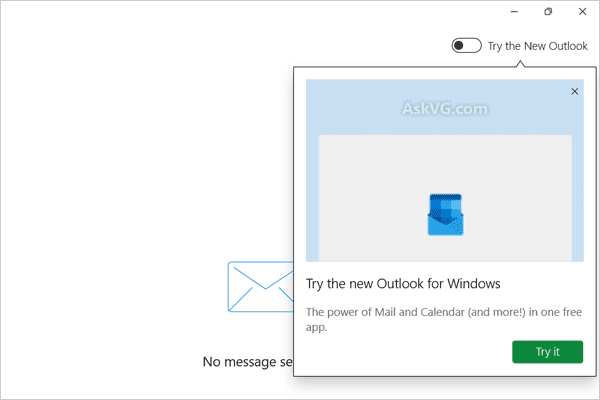
The slider itself can't be removed AFAIK, but recently it also began to show a big animated ad directly below the slider, and, although it is possible to close this ad, it automatically comes back each time as soon as the Mail app is started again after the Mail app is closed. So, I wrote a simple launcher that opens the Mail app and closes the ad.

MailApp.cs
Code:
using System;
using System.Diagnostics;
using System.Runtime.InteropServices;
using System.Windows.Automation;
using System.Windows.Forms;

class Program
{
  [DllImport("user32.dll")]
  private static extern void keybd_event(byte bVk, byte bScan, int dwFlags, int dwExtraInfo);

  private const int KEYEVENTF_EXTENDEDKEY = 1;
  private const int KEYEVENTF_KEYUP = 2;

  public static void KeyDown(Keys vKey)
  {
    keybd_event((byte)vKey, 0, KEYEVENTF_EXTENDEDKEY, 0);
  }

  public static void KeyUp(Keys vKey)
  {
    keybd_event((byte)vKey, 0, KEYEVENTF_EXTENDEDKEY | KEYEVENTF_KEYUP, 0);
  }

  private static void OnWindowOpened(object sender, AutomationEventArgs automationEventArgs)
  {
    try
    {
      var element = sender as AutomationElement;
      if (element != null && Process.GetProcessById(element.Current.ProcessId).MainModule.FileName ==
            Environment.GetFolderPath(Environment.SpecialFolder.System)+"\\ApplicationFrameHost.exe")
      {
        System.Threading.Thread.Sleep(1500);
        KeyDown(Keys.F3);
        KeyUp(Keys.F3);
        System.Threading.Thread.Sleep(200);
        KeyDown(Keys.LShiftKey);
        KeyDown(Keys.Tab);
        KeyUp(Keys.Tab);
        KeyUp(Keys.LShiftKey);
        KeyDown(Keys.Space);
        KeyUp(Keys.Space);
        KeyDown(Keys.Escape);
        KeyUp(Keys.Escape);
        KeyDown(Keys.LControlKey);
        KeyDown(Keys.LShiftKey);
        KeyDown(Keys.O);
        KeyUp(Keys.LControlKey);
        KeyUp(Keys.LShiftKey);
        System.Threading.Thread.Sleep(200);
        KeyDown(Keys.LControlKey);
        KeyDown(Keys.LShiftKey);
        KeyDown(Keys.I);
        KeyUp(Keys.LControlKey);
        KeyUp(Keys.LShiftKey);
      }
    }
    catch (ElementNotAvailableException)
    {
    }
  }

  static void Main(string[] args)
  {
    System.Windows.Automation.Automation.AddAutomationEventHandler(
      eventId: WindowPattern.WindowOpenedEvent,
      element: AutomationElement.RootElement,
      scope: TreeScope.Children,
      eventHandler: OnWindowOpened);

    Process.Start("outlookmail:");
    System.Threading.Thread.Sleep(2500);
    Automation.RemoveAllEventHandlers();
  }
}

Build MailApp.bat
Batch:
@ECHO OFF
FOR /F "tokens=* USEBACKQ" %%F IN (`REG QUERY "HKLM\SOFTWARE\Microsoft\NET Framework Setup\NDP\v4\Full" /v InstallPath`) DO SET InstallPath=%%F
SET InstallPath=%InstallPath:*REG_SZ =%
FOR /F "tokens=* Eol= " %%F IN ("%InstallPath%") DO SET "InstallPath=%%F"
IF EXIST "%InstallPath%csc.exe" (ECHO ON) ELSE (ECHO ERROR - Missing csc.exe & GOTO end)
"%InstallPath%csc.exe" /out:"%~dp0\MailApp.exe" /target:winexe "%~dp0\MailApp.cs" /lib:%InstallPath%WPF /r:UIAutomationTypes.dll,UIAutomationClient.dll
:end
@ECHO Press any key to close this command window . . . & PAUSE >NUL

Run the batchfile to create a file MailApp.exe and run that to start the Mail app so the ad will be automatically closed after the app opens.
 

My Computers My Computers

  • At a glance

    11 Homei7 13650HX16GB DDR5GeForce RTX 4060 Mobile
    OS
    11 Home
    Computer type
    Laptop
    Manufacturer/Model
    Asus TUF Gaming F16 (2024)
    CPU
    i7 13650HX
    Memory
    16GB DDR5
    Graphics Card(s)
    GeForce RTX 4060 Mobile
    Sound Card
    Eastern Electric MiniMax DAC Supreme; Emotiva UMC-200; Astell & Kern AK240
    Monitor(s) Displays
    Sony Bravia XR-55X90J
    Screen Resolution
    3840×2160
    Hard Drives
    512GB SSD internal
    37TB external
    PSU
    Li-ion
    Cooling
    2× Arc Flow Fans, 4× exhaust vents, 5× heatpipes
    Keyboard
    Logitech K800
    Mouse
    Logitech G402
    Internet Speed
    30Mbit/s up, 500Mbit/s down
    Browser
    FF
    Antivirus
    What's an antivirus?
  • At a glance

    11 Homei5 1135G716GB DDR4Intel Iris Xe
    Operating System
    11 Home
    Computer type
    Laptop
    Manufacturer/Model
    Medion S15450
    CPU
    i5 1135G7
    Memory
    16GB DDR4
    Graphics card(s)
    Intel Iris Xe
    Sound Card
    Eastern Electric MiniMax DAC Supreme; Emotiva UMC-200; Astell & Kern AK240
    Monitor(s) Displays
    Sony Bravia XR-55X90J
    Screen Resolution
    3840×2160
    Hard Drives
    2TB SSD internal
    37TB external
    PSU
    Li-ion
    Keyboard
    Logitech K800
    Mouse
    Logitech G402
    Internet Speed
    30Mbit/s up, 500Mbit/s down
    Browser
    FF
There's four, maybe five iterations of Outlook/Mail floating around..., what a mess! MS needs to get their :poop: together!

6684.jpg
 

My Computers My Computers

  • At a glance

    Windows 11 Pro
    OS
    Windows 11 Pro
    Computer type
    PC/Desktop
    Manufacturer/Model
    ASUS ROG Strix
  • At a glance

    Windows 11 Pro
    Operating System
    Windows 11 Pro
    Computer type
    Laptop
    Manufacturer/Model
    ASUS VivoBook
  • ASUS VivoBook 'Lite' ~ Windows 11 Home
I found that the keypresses were being sent too soon sometimes. This version should fix that problem.

MailApp.cs
Code:
using System;
using System.Diagnostics;
using System.Runtime.InteropServices;
using System.Windows.Automation;
using System.Windows.Forms;

class Program
{
  [DllImport("user32.dll")]
  private static extern void keybd_event(byte bVk, byte bScan, int dwFlags, int dwExtraInfo);

  private const int KEYEVENTF_EXTENDEDKEY = 1;
  private const int KEYEVENTF_KEYUP = 2;

  public static void KeyDown(Keys vKey)
  {
    keybd_event((byte)vKey, 0, KEYEVENTF_EXTENDEDKEY, 0);
  }

  public static void KeyUp(Keys vKey)
  {
    keybd_event((byte)vKey, 0, KEYEVENTF_EXTENDEDKEY | KEYEVENTF_KEYUP, 0);
  }

  private static void OnWindowOpened(object sender, AutomationEventArgs automationEventArgs)
  {
    try
    {
      var element = sender as AutomationElement;
      if (element != null && Process.GetProcessById(element.Current.ProcessId).MainModule.FileName ==
            Environment.GetFolderPath(Environment.SpecialFolder.System)+"\\ApplicationFrameHost.exe")
      {
        WindowPattern windowPattern = null;
        windowPattern = element.GetCurrentPattern(WindowPattern.Pattern) as WindowPattern;
        if (windowPattern.WaitForInputIdle(5000))
        {
          System.Threading.Thread.Sleep(2000);
          KeyDown(Keys.F3);
          KeyUp(Keys.F3);
          System.Threading.Thread.Sleep(200);
          KeyDown(Keys.LShiftKey);
          KeyDown(Keys.Tab);
          KeyUp(Keys.Tab);
          KeyUp(Keys.LShiftKey);
          KeyDown(Keys.Space);
          KeyUp(Keys.Space);
          KeyDown(Keys.Escape);
          KeyUp(Keys.Escape);
          KeyDown(Keys.LControlKey);
          KeyDown(Keys.LShiftKey);
          KeyDown(Keys.O);
          KeyUp(Keys.LControlKey);
          KeyUp(Keys.LShiftKey);
          System.Threading.Thread.Sleep(200);
          KeyDown(Keys.LControlKey);
          KeyDown(Keys.LShiftKey);
          KeyDown(Keys.I);
          KeyUp(Keys.LControlKey);
          KeyUp(Keys.LShiftKey);
        }
      }
    }
    catch (ElementNotAvailableException)
    {
    }
  }

  static void Main(string[] args)
  {
    System.Windows.Automation.Automation.AddAutomationEventHandler(
      eventId: WindowPattern.WindowOpenedEvent,
      element: AutomationElement.RootElement,
      scope: TreeScope.Children,
      eventHandler: OnWindowOpened);

    Process.Start("outlookmail:");
    System.Threading.Thread.Sleep(2500);
    Automation.RemoveAllEventHandlers();
  }
}
 
Last edited:

My Computers My Computers

  • At a glance

    11 Homei7 13650HX16GB DDR5GeForce RTX 4060 Mobile
    OS
    11 Home
    Computer type
    Laptop
    Manufacturer/Model
    Asus TUF Gaming F16 (2024)
    CPU
    i7 13650HX
    Memory
    16GB DDR5
    Graphics Card(s)
    GeForce RTX 4060 Mobile
    Sound Card
    Eastern Electric MiniMax DAC Supreme; Emotiva UMC-200; Astell & Kern AK240
    Monitor(s) Displays
    Sony Bravia XR-55X90J
    Screen Resolution
    3840×2160
    Hard Drives
    512GB SSD internal
    37TB external
    PSU
    Li-ion
    Cooling
    2× Arc Flow Fans, 4× exhaust vents, 5× heatpipes
    Keyboard
    Logitech K800
    Mouse
    Logitech G402
    Internet Speed
    30Mbit/s up, 500Mbit/s down
    Browser
    FF
    Antivirus
    What's an antivirus?
  • At a glance

    11 Homei5 1135G716GB DDR4Intel Iris Xe
    Operating System
    11 Home
    Computer type
    Laptop
    Manufacturer/Model
    Medion S15450
    CPU
    i5 1135G7
    Memory
    16GB DDR4
    Graphics card(s)
    Intel Iris Xe
    Sound Card
    Eastern Electric MiniMax DAC Supreme; Emotiva UMC-200; Astell & Kern AK240
    Monitor(s) Displays
    Sony Bravia XR-55X90J
    Screen Resolution
    3840×2160
    Hard Drives
    2TB SSD internal
    37TB external
    PSU
    Li-ion
    Keyboard
    Logitech K800
    Mouse
    Logitech G402
    Internet Speed
    30Mbit/s up, 500Mbit/s down
    Browser
    FF
The slider itself can't be removed AFAIK, but recently it also began to show a big animated ad directly below the slider, and, although it is possible to close this ad, it automatically comes back each time as soon as the Mail app is started again after the Mail app is closed. So, I wrote a simple launcher that opens the Mail app and closes the ad.

MailApp.cs
Code:
using System;
using System.Diagnostics;
using System.Runtime.InteropServices;
using System.Windows.Automation;
using System.Windows.Forms;

class Program
{
  [DllImport("user32.dll")]
  private static extern void keybd_event(byte bVk, byte bScan, int dwFlags, int dwExtraInfo);

  private const int KEYEVENTF_EXTENDEDKEY = 1;
  private const int KEYEVENTF_KEYUP = 2;

  public static void KeyDown(Keys vKey)
  {
    keybd_event((byte)vKey, 0, KEYEVENTF_EXTENDEDKEY, 0);
  }

  public static void KeyUp(Keys vKey)
  {
    keybd_event((byte)vKey, 0, KEYEVENTF_EXTENDEDKEY | KEYEVENTF_KEYUP, 0);
  }

  private static void OnWindowOpened(object sender, AutomationEventArgs automationEventArgs)
  {
    try
    {
      var element = sender as AutomationElement;
      if (element != null && Process.GetProcessById(element.Current.ProcessId).MainModule.FileName ==
            Environment.GetFolderPath(Environment.SpecialFolder.System)+"\\ApplicationFrameHost.exe")
      {
        System.Threading.Thread.Sleep(1500);
        KeyDown(Keys.F3);
        KeyUp(Keys.F3);
        System.Threading.Thread.Sleep(200);
        KeyDown(Keys.LShiftKey);
        KeyDown(Keys.Tab);
        KeyUp(Keys.Tab);
        KeyUp(Keys.LShiftKey);
        KeyDown(Keys.Space);
        KeyUp(Keys.Space);
        KeyDown(Keys.Escape);
        KeyUp(Keys.Escape);
        KeyDown(Keys.LControlKey);
        KeyDown(Keys.LShiftKey);
        KeyDown(Keys.O);
        KeyUp(Keys.LControlKey);
        KeyUp(Keys.LShiftKey);
        System.Threading.Thread.Sleep(200);
        KeyDown(Keys.LControlKey);
        KeyDown(Keys.LShiftKey);
        KeyDown(Keys.I);
        KeyUp(Keys.LControlKey);
        KeyUp(Keys.LShiftKey);
      }
    }
    catch (ElementNotAvailableException)
    {
    }
  }

  static void Main(string[] args)
  {
    System.Windows.Automation.Automation.AddAutomationEventHandler(
      eventId: WindowPattern.WindowOpenedEvent,
      element: AutomationElement.RootElement,
      scope: TreeScope.Children,
      eventHandler: OnWindowOpened);

    Process.Start("outlookmail:");
    System.Threading.Thread.Sleep(2500);
    Automation.RemoveAllEventHandlers();
  }
}

Build MailApp.bat
Batch:
@ECHO OFF
FOR /F "tokens=* USEBACKQ" %%F IN (`REG QUERY "HKLM\SOFTWARE\Microsoft\NET Framework Setup\NDP\v4\Full" /v InstallPath`) DO SET InstallPath=%%F
SET InstallPath=%InstallPath:*REG_SZ =%
FOR /F "tokens=* Eol= " %%F IN ("%InstallPath%") DO SET "InstallPath=%%F"
IF EXIST "%InstallPath%csc.exe" (ECHO ON) ELSE (ECHO ERROR - Missing csc.exe & GOTO end)
"%InstallPath%csc.exe" /out:"%~dp0\MailApp.exe" /target:winexe "%~dp0\MailApp.cs" /lib:%InstallPath%WPF /r:UIAutomationTypes.dll,UIAutomationClient.dll
:end
@ECHO Press any key to close this command window . . . & PAUSE >NUL

Run the batchfile to create a file MailApp.exe and run that to start the Mail app so the ad will be automatically closed after the app opens.
I'm guessing ads are only for users that don't use Office 365 services? I have the Family pack subscription and never see any ads
 

My Computer My Computer

At a glance

Windows 11 Pro 25H2 (RP channel)AMD Ryzen 7 9800X3D 8-core64GB Corsair Titanium 6000/CL30MSI Suprim 5080 SOC
OS
Windows 11 Pro 25H2 (RP channel)
Computer type
PC/Desktop
Manufacturer/Model
MSI
CPU
AMD Ryzen 7 9800X3D 8-core
Motherboard
MEG X870E Godlike
Memory
64GB Corsair Titanium 6000/CL30
Graphics Card(s)
MSI Suprim 5080 SOC
Sound Card
Soundblaster AE-9
Monitor(s) Displays
ASUS TUF Gaming VG289Q
Screen Resolution
3840x2160
Hard Drives
Samsung 9100 Pro 4TB (gen 5 x4, system drive/games)
Samsung 990 Pro 2TB
Samsung 980 Pro 2TB
Samsung 870 Evo 4TB
Samsung 870 Evo 2TB
Samsung T9 4TB
PSU
Seasonic PX-2200
Case
Bequiet! Dark Base Pro 901
Cooling
Noctua NH-D15S Chromax black
Keyboard
Logitech G915 X (wired)
Mouse
Logitech G903 with PowerPlay charger
Internet Speed
900Mb/sec
Browser
Microsoft Edge
Antivirus
Windows Defender
I'm guessing ads are only for users that don't use Office 365 services? I have the Family pack subscription and never see any ads
I don't know if it goes away if you use Office 365, but the Mail app recently began to show this ad below the toggle slider. This is what I am referring to:
apps.28355.9007199266248608.6a399a57-b260-4ce9-b265-c47558f755e1.b4124129-26e8-401d-9989-f8689f69fa3a
Try_The_New_Outlook_For_Windows_Notification_Mail_App.png
 
Last edited:

My Computers My Computers

  • At a glance

    11 Homei7 13650HX16GB DDR5GeForce RTX 4060 Mobile
    OS
    11 Home
    Computer type
    Laptop
    Manufacturer/Model
    Asus TUF Gaming F16 (2024)
    CPU
    i7 13650HX
    Memory
    16GB DDR5
    Graphics Card(s)
    GeForce RTX 4060 Mobile
    Sound Card
    Eastern Electric MiniMax DAC Supreme; Emotiva UMC-200; Astell & Kern AK240
    Monitor(s) Displays
    Sony Bravia XR-55X90J
    Screen Resolution
    3840×2160
    Hard Drives
    512GB SSD internal
    37TB external
    PSU
    Li-ion
    Cooling
    2× Arc Flow Fans, 4× exhaust vents, 5× heatpipes
    Keyboard
    Logitech K800
    Mouse
    Logitech G402
    Internet Speed
    30Mbit/s up, 500Mbit/s down
    Browser
    FF
    Antivirus
    What's an antivirus?
  • At a glance

    11 Homei5 1135G716GB DDR4Intel Iris Xe
    Operating System
    11 Home
    Computer type
    Laptop
    Manufacturer/Model
    Medion S15450
    CPU
    i5 1135G7
    Memory
    16GB DDR4
    Graphics card(s)
    Intel Iris Xe
    Sound Card
    Eastern Electric MiniMax DAC Supreme; Emotiva UMC-200; Astell & Kern AK240
    Monitor(s) Displays
    Sony Bravia XR-55X90J
    Screen Resolution
    3840×2160
    Hard Drives
    2TB SSD internal
    37TB external
    PSU
    Li-ion
    Keyboard
    Logitech K800
    Mouse
    Logitech G402
    Internet Speed
    30Mbit/s up, 500Mbit/s down
    Browser
    FF
The toggle has been present for at least 6 months, also in the associated People App. That in itself is not the problem.

The problem now after intentionally installing it to try, then uninstalling the Beta product.
Now New Outlook (Beta) persistently installs itself, on both of my Windows 10/11 machines, maybe 5 times on each occasion errors being sent to MS then uninstalling.

Being a user of the Mail App for 8 years obviously that is a very annoying time waster.
 

My Computer My Computer

At a glance

Windows 11
OS
Windows 11
The toggle has been present for at least 6 months, also in the associated People App. That in itself is not the problem.

The problem now after intentionally installing it to try, then uninstalling the Beta product.
Now New Outlook (Beta) persistently installs itself, on both of my Windows 10/11 machines, maybe 5 times on each occasion errors being sent to MS then uninstalling.

Being a user of the Mail App for 8 years obviously that is a very annoying time waster.
Batch:
del %LOCALAPPDATA%\Packages\microsoft.windowscommunicationsapps_8wekyb3d8bbwe\LocalState\Migration\settings.json
 

My Computers My Computers

  • At a glance

    11 Homei7 13650HX16GB DDR5GeForce RTX 4060 Mobile
    OS
    11 Home
    Computer type
    Laptop
    Manufacturer/Model
    Asus TUF Gaming F16 (2024)
    CPU
    i7 13650HX
    Memory
    16GB DDR5
    Graphics Card(s)
    GeForce RTX 4060 Mobile
    Sound Card
    Eastern Electric MiniMax DAC Supreme; Emotiva UMC-200; Astell & Kern AK240
    Monitor(s) Displays
    Sony Bravia XR-55X90J
    Screen Resolution
    3840×2160
    Hard Drives
    512GB SSD internal
    37TB external
    PSU
    Li-ion
    Cooling
    2× Arc Flow Fans, 4× exhaust vents, 5× heatpipes
    Keyboard
    Logitech K800
    Mouse
    Logitech G402
    Internet Speed
    30Mbit/s up, 500Mbit/s down
    Browser
    FF
    Antivirus
    What's an antivirus?
  • At a glance

    11 Homei5 1135G716GB DDR4Intel Iris Xe
    Operating System
    11 Home
    Computer type
    Laptop
    Manufacturer/Model
    Medion S15450
    CPU
    i5 1135G7
    Memory
    16GB DDR4
    Graphics card(s)
    Intel Iris Xe
    Sound Card
    Eastern Electric MiniMax DAC Supreme; Emotiva UMC-200; Astell & Kern AK240
    Monitor(s) Displays
    Sony Bravia XR-55X90J
    Screen Resolution
    3840×2160
    Hard Drives
    2TB SSD internal
    37TB external
    PSU
    Li-ion
    Keyboard
    Logitech K800
    Mouse
    Logitech G402
    Internet Speed
    30Mbit/s up, 500Mbit/s down
    Browser
    FF
The slider itself can't be removed AFAIK
Code:
Windows Registry Editor Version 5.00

[HKEY_CURRENT_USER\Software\Microsoft\Office\16.0\Outlook\Options\General]
"HideNewOutlookToggle"=dword:00000001

[HKEY_CURRENT_USER\Software\Microsoft\Office\16.0\Outlook\Preferences]
"UseNewOutlook"=dword:00000001

Sure can.
 

My Computer My Computer

At a glance

Windows 11 Pro
OS
Windows 11 Pro
Code:
Windows Registry Editor Version 5.00

[HKEY_CURRENT_USER\Software\Microsoft\Office\16.0\Outlook\Options\General]
"HideNewOutlookToggle"=dword:00000001

[HKEY_CURRENT_USER\Software\Microsoft\Office\16.0\Outlook\Preferences]
"UseNewOutlook"=dword:00000001

Sure can.
I was talking about the Mail app, or "Mail and Calendar" app, that used to be part of Windows 10/11 by default. The registry settings that you posted have always been ignored by it, as the Mail app is a completely different animal [when compared to, e.g., Office 2016/2019/2021/2024 Outlook, Outlook 365, and Outlook Classic].
 

My Computers My Computers

  • At a glance

    11 Homei7 13650HX16GB DDR5GeForce RTX 4060 Mobile
    OS
    11 Home
    Computer type
    Laptop
    Manufacturer/Model
    Asus TUF Gaming F16 (2024)
    CPU
    i7 13650HX
    Memory
    16GB DDR5
    Graphics Card(s)
    GeForce RTX 4060 Mobile
    Sound Card
    Eastern Electric MiniMax DAC Supreme; Emotiva UMC-200; Astell & Kern AK240
    Monitor(s) Displays
    Sony Bravia XR-55X90J
    Screen Resolution
    3840×2160
    Hard Drives
    512GB SSD internal
    37TB external
    PSU
    Li-ion
    Cooling
    2× Arc Flow Fans, 4× exhaust vents, 5× heatpipes
    Keyboard
    Logitech K800
    Mouse
    Logitech G402
    Internet Speed
    30Mbit/s up, 500Mbit/s down
    Browser
    FF
    Antivirus
    What's an antivirus?
  • At a glance

    11 Homei5 1135G716GB DDR4Intel Iris Xe
    Operating System
    11 Home
    Computer type
    Laptop
    Manufacturer/Model
    Medion S15450
    CPU
    i5 1135G7
    Memory
    16GB DDR4
    Graphics card(s)
    Intel Iris Xe
    Sound Card
    Eastern Electric MiniMax DAC Supreme; Emotiva UMC-200; Astell & Kern AK240
    Monitor(s) Displays
    Sony Bravia XR-55X90J
    Screen Resolution
    3840×2160
    Hard Drives
    2TB SSD internal
    37TB external
    PSU
    Li-ion
    Keyboard
    Logitech K800
    Mouse
    Logitech G402
    Internet Speed
    30Mbit/s up, 500Mbit/s down
    Browser
    FF

Latest Support Threads

Back
Top Bottom