
Solved Is It Safe To Delete User Accounts ?


jmallard

Member
Member
Local time
2:11 PM
Posts
14
Location
So Cal
OS
Windows 11 Home 25H2 Build 26200.6899
I have recently updated my Dell XPS 8930 desktop and the wife's HP17tby200 laptop to Win 11 25H2.

I created New Local Administrator accounts on both computers. Checking the Windows>User accounts I see that I have 6 Users on the XPS desktop and 4 Users on the HP Laptop. It appears to me that generally, there are 4 User accounts created on a new computer:
1 - Microsoft Admin Account
2 - Local Account or Admin Account (Later)
3 - Default
4 - Public

I would like to delete some of the accounts and only keep what is necessary for the safe operation of the two computers.

These are the Windows>User accounts on the XPS Desktop
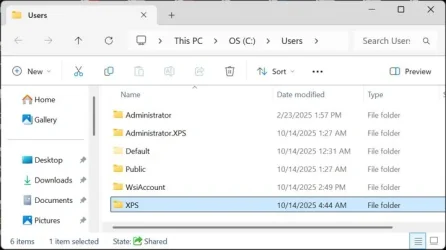
Users_List_XPS.webp

There was a MS Admin Account on the XPS at first, but after I updated to 25H2, I created a Local Account (XPS) & later changed it to an Administrator Account, then I deleted the MS Admin Account. I don't think I need the first two user accounts listed in the photo above (Administrator and Administrator.XPS). I remember creating those users long time ago and I forget for what reasons. This XPS is over 5 years old.

I read somewhere on this forum that the WsiAccount should NOT be deleted. It seems odd because the properties of this account shows 0 bytes of space being used. I never heard of an WsiAccount before and I suppose that it could be 0 bytes because at the date and time of creation, it was 0 bytes.

XPS_User_WsiAccount_0-bytes.webp

When looking at the User Profiles on the XPS, it shows that the WsiAccount has 81.2 MB in the photo below. So I probably should NOT delete this account based on reading on here that it should not be deleted. On the photo below, I think I should delete the "XPS\Administrator 1.24 GB Local" account dated 10/14/2025.
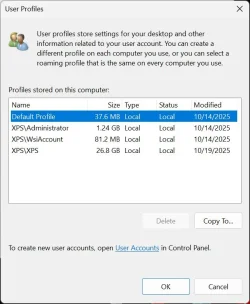
User_Profile_XPS.webp

In both of the photos there is an option to "Delete" accounts. I don't know which account I should use to delete with.

In my searching around in these user areas I discovered that of the 10 total accounts on both computers, 7 of the accounts show has an "Account Unknown"
with a very long filename of many numbers and letters. See the photo below.
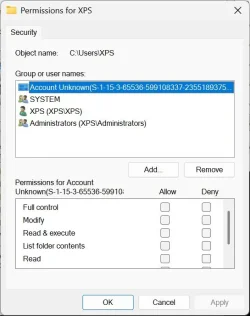
XPS_Users_Permissions_Long_Filemname.webp

All of these 7 accounts have one of these files. I'm wondering if they can be deleted. There is an option to delete the "Permission" file in all of the accounts.
At the same time, they probably don't matter and I could just leave them.

To recap, these are all the Windows/User accounts listed and which ones I think it is safe to delete or keep. Please someone let me know if I am correct in my choices:

Dell XPS Windows>Users
Administrator- - - - - - 140KB - - - - DELETE
Administrator.XPS - - - 1.25GB - - - DELETE
Default - - - - - - - - - - 377MB - - - KEEP
Public - - - - - - - - - - - 41GB - - - - KEEP
WsiAccount - - - - - - - 0 Bytes - - - KEEP
XPS - - - - - - - - - - - - 39.6GB - - - KEEP

If using the User Profiles for the XPS desktop - I should only delete the 2nd Account in the list of 4 listed:
XPS\Administrator - - - 1.24GB - - - DELETE

HP17t Laptop Windows>Users (the "Lxx" accounts are my wife's name)
Default - - - - - - - - - - 3.92MB - - - - KEEP
Lxxx - - - - - - - - - - - - 112GB - - - - DELETE- - -This is the MS Admin Account - Dated 10/12/2025
Lxx - - - - - - - - - - - - - 106GB - - - - KEEP- - - - This is the newly created Local Admin Account - Dated 10/19/2025
Public - - - - - - - - - - - 41GB - - - - - KEEP

If using the User Profiles for the HP17t Laptop - I should only delete the account listed in the center of the 3 listed;
Lxxx - - - - - - - - - - - - - 111GB - Local - - Dated 10/19/2025 - - - - KEEP

The question is which of the listing should I use to delete the accounts completely ? Windows>Users or User Profiles ?

I hope I have made myself clear. :-)

Any help is greatly appreciated.
 
Windows Build/Version
Win 11 Version 25H2 (OS Build 26200.6899)

My Computers

System One System Two

  • OS
    Windows 11 Home 25H2 Build 26200.6899
    Computer type
    PC/Desktop
    Manufacturer/Model
    Dell XPS 8930 (Feb 2020)
    CPU
    Processor Intel(R) Core(TM) i7-9700 CPU @ 3.00GHz, 3000
    Motherboard
    Dell Inc. 0T2HR0, ver A02, s/n F1J6P23.CNPE1009CK0644
    Memory
    32 GB
    Graphics Card(s)
    NVIDIA GeForce GT 1030
    Sound Card
    Reaktek Audio
    Monitor(s) Displays
    (2) HP Pavilion 22cw IPS LED Backlit Monitor
    Screen Resolution
    1280 x 960
    Hard Drives
    C: 1TB Samsung 990 Evo Plus PCIe NVMe M.2 SSD
    E: 1TB SSD Scan Disk Plus
    F: 1TB GB WD Hard Disk
    G: 1TB GB WD Hard Disk
    I: WD 2TB My Passport USB 3.0 Secure Portable Hard Drive (Red)
    PSU
    Dell 450 watt
    Case
    Dell XPS 8930
    Cooling
    5" internal fan
    Keyboard
    Wired Dell keyboard came with system
    Mouse
    Wireless Kensington Expert Mouse
    Internet Speed
    Frontier Fiber Optic 800MB up 940MB down (average). Killer Ethernet Controller cannot be updated.
    Browser
    MozillaFirefox | Brave |
    Antivirus
    Winows Defender
    Other Info
    3 printers:
    Brother 8040 USB (Copy - Print - Scan) b&w (scan in color & b&w)
    HP LaserJet 4000 Series (print 17 ppm in b&w)
    HP OfficeJet Pro 8630 Wireless Color (Print - Fax - Scan - Copy - Web)
  • Operating System
    Windows 11 Home 25H2 Build 26200.6899
    Computer type
    Laptop
    Manufacturer/Model
    Hewlett Packard Laptop 17t-by200
    CPU
    Processor Intel(R) Core(TM) i7-10510U CPU @ 1.80GHz, 2304 Mhz, 4 Core(s), 8 Logical Processor(s)
    Motherboard
    HP 865B
    Memory
    16.8 GB
    Graphics card(s)
    Built In - Unk
    Sound Card
    Built In - Unk
    Monitor(s) Displays
    17.3 Inch Touchscreen
    Screen Resolution
    1600 x 900
    Hard Drives
    1 TB PCIe NVMe M.2 Solid State Drive
    PSU
    Built In
    Case
    Plastic
    Cooling
    Internal
    Keyboard
    Built In
    Mouse
    DPI
    Internet Speed
    Frontier Fiber Optic 235 up/down average
    Browser
    Mozilla Firefox | Brave
    Antivirus
    Windows Defender
    Other Info
    3 printers:
    Brother 8040 USB (Copy - Print - Scan) b&w (scan in color & b&w)
    HP LaserJet 4000 Series (print 17 ppm in b&w)
    HP OfficeJet Pro 8630 Wireless Color (Print - Fax - Scan - Copy - Web)
I tried to edit the above but could not.

I was not clear on which of the 7 accounts have an "Account Unknown" with very long filename of letters and numbers. I have indicated which accounts have the long filenames with an asterisk (*) at the start of the name.
Dell XPS Windows>Users
Administrator- - - - - - 140KB - - - - DELETE
* Administrator.XPS - - 1.25GB - - - DELETE
* Default - - - - - - - - - 377MB - - - KEEP
* Public - - - - - - - - - - 41GB - - - - KEEP
WsiAccount - - - - - - - 0 Bytes - - - KEEP
* XPS - - - - - - - - - - - 39.6GB - - - KEEP

HP17t Laptop Windows>Users (the "Lxx" accounts are my wife's name)
* Default - - - - - - - - - - 3.92MB - - - - KEEP
* Lxxx - - - - - - - - - - - - 112GB - - - - DELETE- - -This is the MS Admin Account - Dated 10/12/2025
* Lxx - - - - - - - - - - - - - 106GB - - - - KEEP- - - - This is the newly created Local Admin Account - Dated 10/19/2025
Public- - - - - - - - - - - - 41GB - - - - - KEEP

I'm wondering if they can be deleted. There is an option to delete the "Permission" file in all of the accounts.
At the same time, they probably don't matter and I could just leave them.

Thanks..
 

My Computers

System One System Two

  • OS
    Windows 11 Home 25H2 Build 26200.6899
    Computer type
    PC/Desktop
    Manufacturer/Model
    Dell XPS 8930 (Feb 2020)
    CPU
    Processor Intel(R) Core(TM) i7-9700 CPU @ 3.00GHz, 3000
    Motherboard
    Dell Inc. 0T2HR0, ver A02, s/n F1J6P23.CNPE1009CK0644
    Memory
    32 GB
    Graphics Card(s)
    NVIDIA GeForce GT 1030
    Sound Card
    Reaktek Audio
    Monitor(s) Displays
    (2) HP Pavilion 22cw IPS LED Backlit Monitor
    Screen Resolution
    1280 x 960
    Hard Drives
    C: 1TB Samsung 990 Evo Plus PCIe NVMe M.2 SSD
    E: 1TB SSD Scan Disk Plus
    F: 1TB GB WD Hard Disk
    G: 1TB GB WD Hard Disk
    I: WD 2TB My Passport USB 3.0 Secure Portable Hard Drive (Red)
    PSU
    Dell 450 watt
    Case
    Dell XPS 8930
    Cooling
    5" internal fan
    Keyboard
    Wired Dell keyboard came with system
    Mouse
    Wireless Kensington Expert Mouse
    Internet Speed
    Frontier Fiber Optic 800MB up 940MB down (average). Killer Ethernet Controller cannot be updated.
    Browser
    MozillaFirefox | Brave |
    Antivirus
    Winows Defender
    Other Info
    3 printers:
    Brother 8040 USB (Copy - Print - Scan) b&w (scan in color & b&w)
    HP LaserJet 4000 Series (print 17 ppm in b&w)
    HP OfficeJet Pro 8630 Wireless Color (Print - Fax - Scan - Copy - Web)
  • Operating System
    Windows 11 Home 25H2 Build 26200.6899
    Computer type
    Laptop
    Manufacturer/Model
    Hewlett Packard Laptop 17t-by200
    CPU
    Processor Intel(R) Core(TM) i7-10510U CPU @ 1.80GHz, 2304 Mhz, 4 Core(s), 8 Logical Processor(s)
    Motherboard
    HP 865B
    Memory
    16.8 GB
    Graphics card(s)
    Built In - Unk
    Sound Card
    Built In - Unk
    Monitor(s) Displays
    17.3 Inch Touchscreen
    Screen Resolution
    1600 x 900
    Hard Drives
    1 TB PCIe NVMe M.2 Solid State Drive
    PSU
    Built In
    Case
    Plastic
    Cooling
    Internal
    Keyboard
    Built In
    Mouse
    DPI
    Internet Speed
    Frontier Fiber Optic 235 up/down average
    Browser
    Mozilla Firefox | Brave
    Antivirus
    Windows Defender
    Other Info
    3 printers:
    Brother 8040 USB (Copy - Print - Scan) b&w (scan in color & b&w)
    HP LaserJet 4000 Series (print 17 ppm in b&w)
    HP OfficeJet Pro 8630 Wireless Color (Print - Fax - Scan - Copy - Web)
I remember creating those users long time ago
No, the computer made both
Administrator
and
Administrator.XPS

Administrator is the username of the normally disabled & hidden built-in Admin. Windows should stop you deleting it.

Administrator.XPS is, so I've seen claimed but never experienced, the result of a failed attempt to log into Administrator.
Is that the case here?
Have you ever done anything unusual to Administrator such as
- try to rename it?
- set or try to set a password on it?
- try to link it to an MSAccount?
- has the computer crashed or been forced off whilst logged into the Administrator?


I suggest you get a list of user accounts by running the command
Net user
and posting the results.
Do this on both computers. I am concerned by the apparent absence of of the HP's Administrator account.
A user account is not quite the same as a profile. A profile can get left behind without an account linked to it.


By the way, the folder called Default is the profile used by Windows when creating new user accounts. You must not edit it let alone delete it.


Denis
 

My Computer

System One

  • OS
    Windows 11 Home x64 Version 25H2 Build 26200.8037
@Try3

Thanks very much for the quick response.

I ran the net user command on each computer. Here is the result:

XPS desktop

Microsoft Windows [Version 10.0.26200.6899]
(c) Microsoft Corporation. All rights reserved.

C:\Windows\System32>Net User

User accounts for \\XPS

-------------------------------------------------------------------------------
Administrator DefaultAccount Guest
WDAGUtilityAccount WsiAccount XPS
The command completed successfully.
____________________________________________________________________

HP17t laptop


Microsoft Windows [Version 10.0.26200.6899]
(c) Microsoft Corporation. All rights reserved.

C:\Windows\System32>net user

User accounts for \\LORRAINE-LAPTOP

-------------------------------------------------------------------------------
Administrator DefaultAccount Guest
Lorraine Lorri WDAGUtilityAccount
The command completed successfully.
_____________________________________________________________________________________

I appreciate you having me run this command. I have to admit, it is new to me and I'm not sure how to interpret those files.
Could you please explain them to me ?
It is strange that both the files show the Windows Version as "10.0.26200.6899).

Now I definitely don't know what I can delete. :(

It is helpful that you took time to answer - Thank You !! :-)

Jerry
 

My Computers

System One System Two

  • OS
    Windows 11 Home 25H2 Build 26200.6899
    Computer type
    PC/Desktop
    Manufacturer/Model
    Dell XPS 8930 (Feb 2020)
    CPU
    Processor Intel(R) Core(TM) i7-9700 CPU @ 3.00GHz, 3000
    Motherboard
    Dell Inc. 0T2HR0, ver A02, s/n F1J6P23.CNPE1009CK0644
    Memory
    32 GB
    Graphics Card(s)
    NVIDIA GeForce GT 1030
    Sound Card
    Reaktek Audio
    Monitor(s) Displays
    (2) HP Pavilion 22cw IPS LED Backlit Monitor
    Screen Resolution
    1280 x 960
    Hard Drives
    C: 1TB Samsung 990 Evo Plus PCIe NVMe M.2 SSD
    E: 1TB SSD Scan Disk Plus
    F: 1TB GB WD Hard Disk
    G: 1TB GB WD Hard Disk
    I: WD 2TB My Passport USB 3.0 Secure Portable Hard Drive (Red)
    PSU
    Dell 450 watt
    Case
    Dell XPS 8930
    Cooling
    5" internal fan
    Keyboard
    Wired Dell keyboard came with system
    Mouse
    Wireless Kensington Expert Mouse
    Internet Speed
    Frontier Fiber Optic 800MB up 940MB down (average). Killer Ethernet Controller cannot be updated.
    Browser
    MozillaFirefox | Brave |
    Antivirus
    Winows Defender
    Other Info
    3 printers:
    Brother 8040 USB (Copy - Print - Scan) b&w (scan in color & b&w)
    HP LaserJet 4000 Series (print 17 ppm in b&w)
    HP OfficeJet Pro 8630 Wireless Color (Print - Fax - Scan - Copy - Web)
  • Operating System
    Windows 11 Home 25H2 Build 26200.6899
    Computer type
    Laptop
    Manufacturer/Model
    Hewlett Packard Laptop 17t-by200
    CPU
    Processor Intel(R) Core(TM) i7-10510U CPU @ 1.80GHz, 2304 Mhz, 4 Core(s), 8 Logical Processor(s)
    Motherboard
    HP 865B
    Memory
    16.8 GB
    Graphics card(s)
    Built In - Unk
    Sound Card
    Built In - Unk
    Monitor(s) Displays
    17.3 Inch Touchscreen
    Screen Resolution
    1600 x 900
    Hard Drives
    1 TB PCIe NVMe M.2 Solid State Drive
    PSU
    Built In
    Case
    Plastic
    Cooling
    Internal
    Keyboard
    Built In
    Mouse
    DPI
    Internet Speed
    Frontier Fiber Optic 235 up/down average
    Browser
    Mozilla Firefox | Brave
    Antivirus
    Windows Defender
    Other Info
    3 printers:
    Brother 8040 USB (Copy - Print - Scan) b&w (scan in color & b&w)
    HP LaserJet 4000 Series (print 17 ppm in b&w)
    HP OfficeJet Pro 8630 Wireless Color (Print - Fax - Scan - Copy - Web)
It is strange that both the files show the Windows Version as "10.0.26200.6899).
Actually, no that is always a mystifying number. It's been weird for so long that I cannot even remember the excuse for it the detailed technical explanation.

The last two groups of numbers [26200.6899] are your Version [25H2] and Build [6899 - the last CU you updated to].
But why it's preceded by 10.0 I don't know.
- The 10 itself is reasonable because Windows 11 is essentially Windows 10 with a rehashed user interface.
- I don't know what the .0 is for but that's what I think I saw an explanation of ages ago.


Denis
 
Last edited:

My Computer

System One

  • OS
    Windows 11 Home x64 Version 25H2 Build 26200.8037
There are accounts created by Windows on both computers that you should not delete -
Administrator
DefaultAccount
Guest
WDAGUtilityAccount

I have never seen this account before [it's on your XPS]
WsiAccount
I suppose it was made by some installed security[?] utility.

Your account
XPS
seems to me to have either been made by you or the computer maker.

Her accounts
Lorraine
Lorri
seem perectly normal.


I do not think there are any accounts to delete.
I have more than either of you because I always make two spare, Admin-level, password-protected local user accounts as a precaution against user profile corruption [which does not seem to be nearly as common as it was a decade ago].
my ditty - Create two spare local, password-protected Admin accounts [post #2] in Windows 10, 11 - TenForums


Is there anything you want to discuss about user accounts before we move on to talk about the various profiles & Permissions issues you also posted about?


Denis
 

My Computer

System One

  • OS
    Windows 11 Home x64 Version 25H2 Build 26200.8037

My Computer

System One

  • OS
    Windows 11 Home x64 Version 25H2 Build 26200.8037
I knew I had read about this WsiAccount on this forum. That is the post that I read and learned about the WsiAccount.

Thanks for the link. I don't know how it got installed on my XPS.

It is late for you, about 12:35 PM. I don't know where you are located but I would like to talk more about your responses, but it is 4:43 AM here in CA and I need to go to bed.

You have basically solved my problem and answered my questions. I won't delete anything.

Jerry
 

My Computers

System One System Two

  • OS
    Windows 11 Home 25H2 Build 26200.6899
    Computer type
    PC/Desktop
    Manufacturer/Model
    Dell XPS 8930 (Feb 2020)
    CPU
    Processor Intel(R) Core(TM) i7-9700 CPU @ 3.00GHz, 3000
    Motherboard
    Dell Inc. 0T2HR0, ver A02, s/n F1J6P23.CNPE1009CK0644
    Memory
    32 GB
    Graphics Card(s)
    NVIDIA GeForce GT 1030
    Sound Card
    Reaktek Audio
    Monitor(s) Displays
    (2) HP Pavilion 22cw IPS LED Backlit Monitor
    Screen Resolution
    1280 x 960
    Hard Drives
    C: 1TB Samsung 990 Evo Plus PCIe NVMe M.2 SSD
    E: 1TB SSD Scan Disk Plus
    F: 1TB GB WD Hard Disk
    G: 1TB GB WD Hard Disk
    I: WD 2TB My Passport USB 3.0 Secure Portable Hard Drive (Red)
    PSU
    Dell 450 watt
    Case
    Dell XPS 8930
    Cooling
    5" internal fan
    Keyboard
    Wired Dell keyboard came with system
    Mouse
    Wireless Kensington Expert Mouse
    Internet Speed
    Frontier Fiber Optic 800MB up 940MB down (average). Killer Ethernet Controller cannot be updated.
    Browser
    MozillaFirefox | Brave |
    Antivirus
    Winows Defender
    Other Info
    3 printers:
    Brother 8040 USB (Copy - Print - Scan) b&w (scan in color & b&w)
    HP LaserJet 4000 Series (print 17 ppm in b&w)
    HP OfficeJet Pro 8630 Wireless Color (Print - Fax - Scan - Copy - Web)
  • Operating System
    Windows 11 Home 25H2 Build 26200.6899
    Computer type
    Laptop
    Manufacturer/Model
    Hewlett Packard Laptop 17t-by200
    CPU
    Processor Intel(R) Core(TM) i7-10510U CPU @ 1.80GHz, 2304 Mhz, 4 Core(s), 8 Logical Processor(s)
    Motherboard
    HP 865B
    Memory
    16.8 GB
    Graphics card(s)
    Built In - Unk
    Sound Card
    Built In - Unk
    Monitor(s) Displays
    17.3 Inch Touchscreen
    Screen Resolution
    1600 x 900
    Hard Drives
    1 TB PCIe NVMe M.2 Solid State Drive
    PSU
    Built In
    Case
    Plastic
    Cooling
    Internal
    Keyboard
    Built In
    Mouse
    DPI
    Internet Speed
    Frontier Fiber Optic 235 up/down average
    Browser
    Mozilla Firefox | Brave
    Antivirus
    Windows Defender
    Other Info
    3 printers:
    Brother 8040 USB (Copy - Print - Scan) b&w (scan in color & b&w)
    HP LaserJet 4000 Series (print 17 ppm in b&w)
    HP OfficeJet Pro 8630 Wireless Color (Print - Fax - Scan - Copy - Web)
Last edited:

My Computer

System One

  • OS
    Windows 11 Home x64 Version 25H2 Build 26200.8037
Simple answer is do not delete any built in profiles. You can get issues e.g. inability to add a new user if things go pearshaped.

If you add a user, it is safe to delete them.

Remember the old adage - if it ain't broke, don't fix it.

There is absolutely nothing to be gained by deleting inbuilt profiles as it "ain't broke".
 

My Computer

System One

  • OS
    Windows 11 Pro + Win11 Canary VM.
    Computer type
    Laptop
    Manufacturer/Model
    ASUS Zenbook 14
    CPU
    I9 13th gen i9-13900H 2.60 GHZ
    Motherboard
    Yep, Laptop has one.
    Memory
    16 GB soldered
    Graphics Card(s)
    Integrated Intel Iris XE
    Sound Card
    Realtek built in
    Monitor(s) Displays
    laptop OLED screen
    Screen Resolution
    2880x1800 touchscreen
    Hard Drives
    1 TB NVME SSD (only weakness is only one slot)
    PSU
    Internal + 65W thunderbolt USB4 charger
    Case
    Yep, got one
    Cooling
    Stella Artois (UK pint cans - 568 ml) - extra cost.
    Keyboard
    Built in UK keybd
    Mouse
    Bluetooth , wireless dongled, wired
    Internet Speed
    900 mbs (ethernet), wifi 6 typical 350-450 mb/s both up and down
    Browser
    Edge
    Antivirus
    Defender
    Other Info
    TPM 2.0, 2xUSB4 thunderbolt, 1xUsb3 (usb a), 1xUsb-c, hdmi out, 3.5 mm audio out/in combo, ASUS backlit trackpad (inc. switchable number pad)

    Macrium Reflect Home V8
    Office 365 Family (6 users each 1TB onedrive space)
    Hyper-V (a vm runs almost as fast as my older laptop)
Simple answer is do not delete any built in profiles. You can get issues e.g. inability to add a new user if things go pearshaped.

If you add a user, it is safe to delete them.

Remember the old adage - if it ain't broke, don't fix it.

There is absolutely nothing to be gained by deleting inbuilt profiles as it "ain't broke".

I agree, I have been biting my tongue.
 

My Computers

System One System Two

  • OS
    Windows 11 Pro 25H2 Build 26200.8524
    Computer type
    PC/Desktop
    Manufacturer/Model
    Sin-built 2013
    CPU
    Intel(R) Core(TM) i7-4770K CPU @ 3.50GHz
    Motherboard
    ASUS ROG Maximus VI Formula
    Memory
    32.0 GB of I forget and the box is in storage.
    Graphics Card(s)
    Gigabyte nVidia GeForce GTX 1660 Super OC 6GB
    Sound Card
    Onboard thingy
    Monitor(s) Displays
    5 x LG 25MS500-B - 1 x 24MK430H-B - 1 x Wacom Pro 22" Touch Screen Tablet
    Screen Resolution
    All over the place
    Hard Drives
    Too many to list.
    OS on Samsung 1TB 870 QVO SATA
    PSU
    Silverstone 1500
    Case
    NZXT Phantom 820 Full-Tower Case
    Cooling
    Noctua NH-D15 Elite Class Dual Tower CPU Cooler / 6 x EziDIY 120mm / 2 x Corsair 140mm somethings / 1 x 140mm Thermaltake something / 2 x 200mm Corsair.
    Keyboard
    Corsair K95 / Logitech diNovo Edge Wireless
    Mouse
    Logitech: G402 / G502 / Mx Masters / Mx Air Cordless
    Internet Speed
    2000/500Mbps
    Browser
    All sorts
    Antivirus
    Kaspersky Premium
    Other Info
    ㅤㅤㅤㅤㅤㅤㅤㅤㅤㅤㅤㅤㅤㅤㅤㅤㅤㅤㅤㅤㅤㅤㅤㅤㅤㅤㅤㅤㅤㅤㅤㅤㅤㅤㅤㅤㅤㅤㅤㅤ⠀⠀⠀⠀⠀⠀⠀⠀⠀⠀
    TP-Link BE9300 WiFi 7 Bluetooth 5.4 (Archer TBE550E)
    TP-Link TX201 V1 2.5GB Lan

    Grandstream HT812 - VoIP
    ASUS DSL-AX82U - Mesh
    ASUS RT-AC68U - Mesh
    ASUS RT-BE88U Router

    Brother MFC-L2880DW Printer

    I’m on a horse.
  • Operating System
    Windows 11 Pro 25H2 Build 26200.8524
    Computer type
    Laptop
    Manufacturer/Model
    LENOVO Yoga 7 14IRL8 - 7i EVO OLED 14" Touchscreen i5 12 Core 16GB/512GB
    CPU
    Intel Core 12th Gen i5-1240P Processor (1.7 - 4.4GHz)
    Memory
    16GB LPDDR5 RAM
    Graphics card(s)
    Intel Iris Xe Graphics Processor
    Sound Card
    Optimized with Dolby Atmos®
    Screen Resolution
    QHD 2880 x 1800 OLED
    Hard Drives
    M.2 512GB
    Antivirus
    Defender / Malwarebytes
    Other Info
    …still on a horse.
Also, on the HP, the one profile OP marked for deletion is 112 GB. Somebody was using that for something.
 

My Computer

System One

  • OS
    Windows 11 Pro 25H2
    Computer type
    PC/Desktop
    Manufacturer/Model
    Intel NUC12WSHi7
    CPU
    12th Gen Core i7-1260P
    Motherboard
    NUC12WSBi7
    Memory
    64 GB Micron PC4-25600
    Graphics Card(s)
    Intel Iris Xe Graphics
    Sound Card
    on-board Realtek HD Audio
    Monitor(s) Displays
    Dell U3219Q
    Screen Resolution
    3840 x 2160
    Hard Drives
    Samsung SSD 990 PRO 1TB
    Crucial MX500 2 TB
    Antivirus
    Microsoft Defender
Also, on the HP, the one profile OP marked for deletion is 112 GB. Somebody was using that for something.
Yes, it's the profile for one of his wife's two user accounts.

I deliberately avoided commenting on any of the account profiles until we'd got the list of user accounts nailed down.


All the best,
Denis
 

My Computer

System One

  • OS
    Windows 11 Home x64 Version 25H2 Build 26200.8037
That wasn't my point, but okay.
 

My Computer

System One

  • OS
    Windows 11 Pro 25H2
    Computer type
    PC/Desktop
    Manufacturer/Model
    Intel NUC12WSHi7
    CPU
    12th Gen Core i7-1260P
    Motherboard
    NUC12WSBi7
    Memory
    64 GB Micron PC4-25600
    Graphics Card(s)
    Intel Iris Xe Graphics
    Sound Card
    on-board Realtek HD Audio
    Monitor(s) Displays
    Dell U3219Q
    Screen Resolution
    3840 x 2160
    Hard Drives
    Samsung SSD 990 PRO 1TB
    Crucial MX500 2 TB
    Antivirus
    Microsoft Defender
* Lxxx - - - - - - - - - - - - 112GB - - - - DELETE- - -This is the MS Admin Account - Dated 10/12/2025
* Lxx - - - - - - - - - - - - - 106GB - - - - KEEP- - - - This is the newly created Local Admin Account - Dated 10/19/2025

Jerry,

As pseymour has pointed out, you said you would delete that MSAccount of your wife's.
She's got an awful lot of data in there.
I assume she's already copied over the files she wants to retain to her local account.


Denis
 

My Computer

System One

  • OS
    Windows 11 Home x64 Version 25H2 Build 26200.8037
I agree, I have been biting my tongue.
Same. Looks like Cereberus nailed it though. I tend to get impatient with multiple user accounts that are no longer (or never were) needed. I'm inclined to simply do a clean install. As a rule there should be only one administrator. As an extra safety precaution you can have an additional log in for normal daily use and simply keep the administrator log in for when things go awry. But hey, that's just my opinion.
 

My Computer

System One

  • OS
    WIN 11, WIN 10, WIN 8.1, WIN 7 U, WIN 7 PRO, WIN 7 HOME (32 Bit), LINUX MINT
    Computer type
    PC/Desktop
    Manufacturer/Model
    DIY, ASUS, and DELL
    CPU
    Intel i7 6900K and i9-7960X / AMD 3800X (8 core)
    Motherboard
    ASUS X99E-WS USB 3.1 and ASUS X299 SAGE
    Memory
    128 GB CORSAIR DOMINATOR PLATINUM (B DIE)
    Graphics Card(s)
    NVIDIA 1070 and RTX 3070
    Sound Card
    Crystal Sound (onboard)
    Monitor(s) Displays
    single Samsung 30" 4K and 8" aux monitor
    Screen Resolution
    4K and something equally attrocious. I'll be working on this.
    Hard Drives
    A, B, C, D, E, F, G, H, I, J, K, L, M, N, O, P, Q, R, S, T, U, V, W

    Ports X, Y, and Z are reserved for USB access and removable drives.

    Drive types consist of the following: Various mechanical hard drives bearing the brand names, Seagate, Toshiba, and Western Digital. Various NVMe drives bearing the brand names Kingston, Intel, Silicon Power, Crucial, Western Digital, and Team Group. Various SATA SSDs bearing various different brand names.

    RAID arrays included:

    LSI RAID 10 (WD Velociraptors) 1115.72 GB
    LSI RAID 10 (WD SSDS) 463.80 GB

    INTEL RAID 0 (KINGSTON HYPER X) System 447.14 GB
    INTEL RAID 1 TOSHIBA ENTERPRIZE class Data 2794.52 GB
    INTEL RAID 1 SEAGATE HYBRID 931.51 GB
    PSU
    SEVERAL. I prefer my Corsair Platinum HX1000i but I also like EVGA power supplies
    Case
    ThermalTake Level 10 GT (among others)
    Cooling
    Noctua is my favorite and I use it in my main. I also own various other coolers.
    Keyboard
    all kinds.
    Mouse
    all kinds
    Internet Speed
    360 mbps - 1 gbps (depending)
    Browser
    FIREFOX
    Antivirus
    KASPERSKY (no apologies)
    Other Info
    Gave Dell touch screen with Windows 11 to daughter and got me an OTVOC. Being a PC builder I own many desktop PCs as well. I am a father of five providing PCs, laptops, and tablets for all my family, most of which I have modified, rebuilt, or simply built from scratch. I do not own a cell phone, never have, never will.
Jerry,

As pseymour has pointed out, you said you would delete that MSAccount of your wife's.
She's got an awful lot of data in there.
I assume she's already copied over the files she wants to retain to her local account.


Denis
My wife is not an avid computer user like me. She is competent at what she does and used computers for years in her payroll clerk job(s) and has had a few home laptops over the years. She is not into the setup, software installation, internet connections, etc., tasks. :-) She leaves that to me. Yes, I copied the profile files from the MSAccount of my wife to her new Admin Account. It was a little tedious, but I got it done and all the programs were present - just took logging on to most of them to get them going as in the past.

Unfortunately, I waited until the last few days before updating to Win 11 on my computers. I was just dreading it. I hate being forced to update my computers (along with millions) and everything else in this "everything has to be replaced in 5 years society".
I was initially going to do a clean install on both computers but the thought of installing over 50 programs and getting my 3 old printers installed on my XPS desktop and over 22 programs on my wife's HP laptop was daunting. That's not counting acquiring the proper drivers for display, sound, printers, etc. You can read about my update saga in my first post on this forum. Please HelpDetermine The Best Way to Update to Win 11
Fortunately I received many help offers and very quickly - just like this thread.

I had never heard of OOBE & Rufus and many other things involving this Win 11 update. I got the impression that most folks did not want to create a MS Account and those that did, created a new Local Amin Account after install and deleted the required MS Account after an install. That is why I was thinking of deleting the wife's MS Account. I already did that on my XPS and fortunately my update carried over all programs and information.

So Thanks Very Much to @cereberus, @antspants, @pseymour, @Scannerman and of course @Try3 for responding with helpful information and giving of their time. I appreciate it very much. This forum has an overwhelming amount of expert information and expert members.

In the end, I agree with everyone, I won't be deleting any user accounts. Probably would have caused me many new problems down the line. This one is SOLVED.

Jerry
 

My Computers

System One System Two

  • OS
    Windows 11 Home 25H2 Build 26200.6899
    Computer type
    PC/Desktop
    Manufacturer/Model
    Dell XPS 8930 (Feb 2020)
    CPU
    Processor Intel(R) Core(TM) i7-9700 CPU @ 3.00GHz, 3000
    Motherboard
    Dell Inc. 0T2HR0, ver A02, s/n F1J6P23.CNPE1009CK0644
    Memory
    32 GB
    Graphics Card(s)
    NVIDIA GeForce GT 1030
    Sound Card
    Reaktek Audio
    Monitor(s) Displays
    (2) HP Pavilion 22cw IPS LED Backlit Monitor
    Screen Resolution
    1280 x 960
    Hard Drives
    C: 1TB Samsung 990 Evo Plus PCIe NVMe M.2 SSD
    E: 1TB SSD Scan Disk Plus
    F: 1TB GB WD Hard Disk
    G: 1TB GB WD Hard Disk
    I: WD 2TB My Passport USB 3.0 Secure Portable Hard Drive (Red)
    PSU
    Dell 450 watt
    Case
    Dell XPS 8930
    Cooling
    5" internal fan
    Keyboard
    Wired Dell keyboard came with system
    Mouse
    Wireless Kensington Expert Mouse
    Internet Speed
    Frontier Fiber Optic 800MB up 940MB down (average). Killer Ethernet Controller cannot be updated.
    Browser
    MozillaFirefox | Brave |
    Antivirus
    Winows Defender
    Other Info
    3 printers:
    Brother 8040 USB (Copy - Print - Scan) b&w (scan in color & b&w)
    HP LaserJet 4000 Series (print 17 ppm in b&w)
    HP OfficeJet Pro 8630 Wireless Color (Print - Fax - Scan - Copy - Web)
  • Operating System
    Windows 11 Home 25H2 Build 26200.6899
    Computer type
    Laptop
    Manufacturer/Model
    Hewlett Packard Laptop 17t-by200
    CPU
    Processor Intel(R) Core(TM) i7-10510U CPU @ 1.80GHz, 2304 Mhz, 4 Core(s), 8 Logical Processor(s)
    Motherboard
    HP 865B
    Memory
    16.8 GB
    Graphics card(s)
    Built In - Unk
    Sound Card
    Built In - Unk
    Monitor(s) Displays
    17.3 Inch Touchscreen
    Screen Resolution
    1600 x 900
    Hard Drives
    1 TB PCIe NVMe M.2 Solid State Drive
    PSU
    Built In
    Case
    Plastic
    Cooling
    Internal
    Keyboard
    Built In
    Mouse
    DPI
    Internet Speed
    Frontier Fiber Optic 235 up/down average
    Browser
    Mozilla Firefox | Brave
    Antivirus
    Windows Defender
    Other Info
    3 printers:
    Brother 8040 USB (Copy - Print - Scan) b&w (scan in color & b&w)
    HP LaserJet 4000 Series (print 17 ppm in b&w)
    HP OfficeJet Pro 8630 Wireless Color (Print - Fax - Scan - Copy - Web)
Back
Top Bottom


