

I have recently updated my Dell XPS 8930 desktop and the wife's HP17tby200 laptop to Win 11 25H2.
I created New Local Administrator accounts on both computers. Checking the Windows>User accounts I see that I have 6 Users on the XPS desktop and 4 Users on the HP Laptop. It appears to me that generally, there are 4 User accounts created on a new computer:
1 - Microsoft Admin Account
2 - Local Account or Admin Account (Later)
3 - Default
4 - Public
I would like to delete some of the accounts and only keep what is necessary for the safe operation of the two computers.
These are the Windows>User accounts on the XPS Desktop
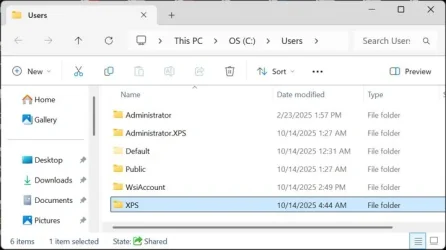
There was a MS Admin Account on the XPS at first, but after I updated to 25H2, I created a Local Account (XPS) & later changed it to an Administrator Account, then I deleted the MS Admin Account. I don't think I need the first two user accounts listed in the photo above (Administrator and Administrator.XPS). I remember creating those users long time ago and I forget for what reasons. This XPS is over 5 years old.
I read somewhere on this forum that the WsiAccount should NOT be deleted. It seems odd because the properties of this account shows 0 bytes of space being used. I never heard of an WsiAccount before and I suppose that it could be 0 bytes because at the date and time of creation, it was 0 bytes.

When looking at the User Profiles on the XPS, it shows that the WsiAccount has 81.2 MB in the photo below. So I probably should NOT delete this account based on reading on here that it should not be deleted. On the photo below, I think I should delete the "XPS\Administrator 1.24 GB Local" account dated 10/14/2025.
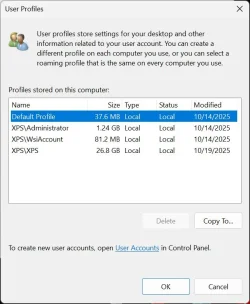
In both of the photos there is an option to "Delete" accounts. I don't know which account I should use to delete with.
In my searching around in these user areas I discovered that of the 10 total accounts on both computers, 7 of the accounts show has an "Account Unknown"
with a very long filename of many numbers and letters. See the photo below.
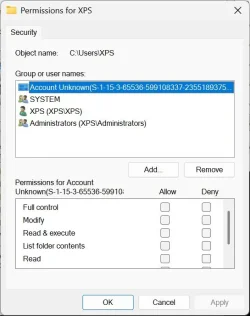
All of these 7 accounts have one of these files. I'm wondering if they can be deleted. There is an option to delete the "Permission" file in all of the accounts.
At the same time, they probably don't matter and I could just leave them.
To recap, these are all the Windows/User accounts listed and which ones I think it is safe to delete or keep. Please someone let me know if I am correct in my choices:
Dell XPS Windows>Users
Administrator- - - - - - 140KB - - - - DELETE
Administrator.XPS - - - 1.25GB - - - DELETE
Default - - - - - - - - - - 377MB - - - KEEP
Public - - - - - - - - - - - 41GB - - - - KEEP
WsiAccount - - - - - - - 0 Bytes - - - KEEP
XPS - - - - - - - - - - - - 39.6GB - - - KEEP
If using the User Profiles for the XPS desktop - I should only delete the 2nd Account in the list of 4 listed:
XPS\Administrator - - - 1.24GB - - - DELETE
HP17t Laptop Windows>Users (the "Lxx" accounts are my wife's name)
Default - - - - - - - - - - 3.92MB - - - - KEEP
Lxxx - - - - - - - - - - - - 112GB - - - - DELETE- - -This is the MS Admin Account - Dated 10/12/2025
Lxx - - - - - - - - - - - - - 106GB - - - - KEEP- - - - This is the newly created Local Admin Account - Dated 10/19/2025
Public - - - - - - - - - - - 41GB - - - - - KEEP
If using the User Profiles for the HP17t Laptop - I should only delete the account listed in the center of the 3 listed;
Lxxx - - - - - - - - - - - - - 111GB - Local - - Dated 10/19/2025 - - - - KEEP
The question is which of the listing should I use to delete the accounts completely ? Windows>Users or User Profiles ?
I hope I have made myself clear.
Any help is greatly appreciated.
I created New Local Administrator accounts on both computers. Checking the Windows>User accounts I see that I have 6 Users on the XPS desktop and 4 Users on the HP Laptop. It appears to me that generally, there are 4 User accounts created on a new computer:
1 - Microsoft Admin Account
2 - Local Account or Admin Account (Later)
3 - Default
4 - Public
I would like to delete some of the accounts and only keep what is necessary for the safe operation of the two computers.
These are the Windows>User accounts on the XPS Desktop
There was a MS Admin Account on the XPS at first, but after I updated to 25H2, I created a Local Account (XPS) & later changed it to an Administrator Account, then I deleted the MS Admin Account. I don't think I need the first two user accounts listed in the photo above (Administrator and Administrator.XPS). I remember creating those users long time ago and I forget for what reasons. This XPS is over 5 years old.
I read somewhere on this forum that the WsiAccount should NOT be deleted. It seems odd because the properties of this account shows 0 bytes of space being used. I never heard of an WsiAccount before and I suppose that it could be 0 bytes because at the date and time of creation, it was 0 bytes.
When looking at the User Profiles on the XPS, it shows that the WsiAccount has 81.2 MB in the photo below. So I probably should NOT delete this account based on reading on here that it should not be deleted. On the photo below, I think I should delete the "XPS\Administrator 1.24 GB Local" account dated 10/14/2025.
In both of the photos there is an option to "Delete" accounts. I don't know which account I should use to delete with.
In my searching around in these user areas I discovered that of the 10 total accounts on both computers, 7 of the accounts show has an "Account Unknown"
with a very long filename of many numbers and letters. See the photo below.
All of these 7 accounts have one of these files. I'm wondering if they can be deleted. There is an option to delete the "Permission" file in all of the accounts.
At the same time, they probably don't matter and I could just leave them.
To recap, these are all the Windows/User accounts listed and which ones I think it is safe to delete or keep. Please someone let me know if I am correct in my choices:
Dell XPS Windows>Users
Administrator- - - - - - 140KB - - - - DELETE
Administrator.XPS - - - 1.25GB - - - DELETE
Default - - - - - - - - - - 377MB - - - KEEP
Public - - - - - - - - - - - 41GB - - - - KEEP
WsiAccount - - - - - - - 0 Bytes - - - KEEP
XPS - - - - - - - - - - - - 39.6GB - - - KEEP
If using the User Profiles for the XPS desktop - I should only delete the 2nd Account in the list of 4 listed:
XPS\Administrator - - - 1.24GB - - - DELETE
HP17t Laptop Windows>Users (the "Lxx" accounts are my wife's name)
Default - - - - - - - - - - 3.92MB - - - - KEEP
Lxxx - - - - - - - - - - - - 112GB - - - - DELETE- - -This is the MS Admin Account - Dated 10/12/2025
Lxx - - - - - - - - - - - - - 106GB - - - - KEEP- - - - This is the newly created Local Admin Account - Dated 10/19/2025
Public - - - - - - - - - - - 41GB - - - - - KEEP
If using the User Profiles for the HP17t Laptop - I should only delete the account listed in the center of the 3 listed;
Lxxx - - - - - - - - - - - - - 111GB - Local - - Dated 10/19/2025 - - - - KEEP
The question is which of the listing should I use to delete the accounts completely ? Windows>Users or User Profiles ?
I hope I have made myself clear.
Any help is greatly appreciated.
- Windows Build/Version
- Win 11 Version 25H2 (OS Build 26200.6899)
My Computers
-
At a glance
Windows 11 Home 25H2 Build 26200.6899Processor Intel(R) Core(TM) i7-9700 CPU @ 3.0...32 GBNVIDIA GeForce GT 1030- OS
- Windows 11 Home 25H2 Build 26200.6899
- Computer type
- PC/Desktop
- Manufacturer/Model
- Dell XPS 8930 (Feb 2020)
- CPU
- Processor Intel(R) Core(TM) i7-9700 CPU @ 3.00GHz, 3000
- Motherboard
- Dell Inc. 0T2HR0, ver A02, s/n F1J6P23.CNPE1009CK0644
- Memory
- 32 GB
- Graphics Card(s)
- NVIDIA GeForce GT 1030
- Sound Card
- Reaktek Audio
- Monitor(s) Displays
- (2) HP Pavilion 22cw IPS LED Backlit Monitor
- Screen Resolution
- 1280 x 960
- Hard Drives
- C: 1TB Samsung 990 Evo Plus PCIe NVMe M.2 SSD
E: 1TB SSD Scan Disk Plus
F: 1TB GB WD Hard Disk
G: 1TB GB WD Hard Disk
I: WD 2TB My Passport USB 3.0 Secure Portable Hard Drive (Red)
- PSU
- Dell 450 watt
- Case
- Dell XPS 8930
- Cooling
- 5" internal fan
- Keyboard
- Wired Dell keyboard came with system
- Mouse
- Wireless Kensington Expert Mouse
- Internet Speed
- Frontier Fiber Optic 800MB up 940MB down (average). Killer Ethernet Controller cannot be updated.
- Browser
- MozillaFirefox | Brave |
- Antivirus
- Winows Defender
- Other Info
- 3 printers:
Brother 8040 USB (Copy - Print - Scan) b&w (scan in color & b&w)
HP LaserJet 4000 Series (print 17 ppm in b&w)
HP OfficeJet Pro 8630 Wireless Color (Print - Fax - Scan - Copy - Web)
-
At a glance
Windows 11 Home 25H2 Build 26200.6899Processor Intel(R) Core(TM) i7-10510U CPU @ 1...16.8 GBBuilt In - Unk- Operating System
- Windows 11 Home 25H2 Build 26200.6899
- Computer type
- Laptop
- Manufacturer/Model
- Hewlett Packard Laptop 17t-by200
- CPU
- Processor Intel(R) Core(TM) i7-10510U CPU @ 1.80GHz, 2304 Mhz, 4 Core(s), 8 Logical Processor(s)
- Motherboard
- HP 865B
- Memory
- 16.8 GB
- Graphics card(s)
- Built In - Unk
- Sound Card
- Built In - Unk
- Monitor(s) Displays
- 17.3 Inch Touchscreen
- Screen Resolution
- 1600 x 900
- Hard Drives
- 1 TB PCIe NVMe M.2 Solid State Drive
- PSU
- Built In
- Case
- Plastic
- Cooling
- Internal
- Keyboard
- Built In
- Mouse
- DPI
- Internet Speed
- Frontier Fiber Optic 235 up/down average
- Browser
- Mozilla Firefox | Brave
- Antivirus
- Windows Defender
- Other Info
- 3 printers:
Brother 8040 USB (Copy - Print - Scan) b&w (scan in color & b&w)
HP LaserJet 4000 Series (print 17 ppm in b&w)
HP OfficeJet Pro 8630 Wireless Color (Print - Fax - Scan - Copy - Web)






