Is there a way to reload/reinstall the widgets?


Paul S.

Well-known member
Local time
1:24 PM
Posts
29
OS
Windows 11 Pro (Dev Insider Preview)
For over a week now I have lost the ability to pull up the widgets. I see the cute little animation on the taskbar button but nothing pops up (not even a blank widget area). I cannot find a way to possibly reinstall them or reload it somehow. I have repeatedly submitted feedback through the hub but of course no response. Any help would be very much appreciated.
 
Windows Build/Version
10.0.22000.71

My Computers My Computers

  • At a glance

    Windows 11 Pro (Dev Insider Preview)11th Gen Intel Core i512GBIntel(R) Iris(R) Xe Graphics
    OS
    Windows 11 Pro (Dev Insider Preview)
    Computer type
    Laptop
    Manufacturer/Model
    Dell Inspiron 7506 2n1
    CPU
    11th Gen Intel Core i5
    Motherboard
    Intel(R) LPC Controller/eSPI Controller (U Premium) - A082
    Memory
    12GB
    Graphics Card(s)
    Intel(R) Iris(R) Xe Graphics
    Sound Card
    Realtek Audio
    Monitor(s) Displays
    Dell Inspiron IVO061F Display; Planar PLL2210W
    Screen Resolution
    1920 x 1080
    Hard Drives
    Intel Optane+477GB SSD (internal); WD easystore 2647 5TB (external); WD Elements 2621 2TB (external)
    Keyboard
    Dell Inspiron 7605 Internal Keyboard
    Mouse
    Tecknet Bluetooth Silent Mouse
    Browser
    Mozilla Unbranded (Firefox)/Google Chrome/Microsoft Edge
    Antivirus
    McAfee Security & Windows Defender / Defender Firewall
  • At a glance

    Windows 11 Pro (Dev Insider Preview)11th Gen Intel(R) Core(TM) i716GBIntel(R) Iris(R) Xe Graphics
    Operating System
    Windows 11 Pro (Dev Insider Preview)
    Computer type
    PC/Desktop
    Manufacturer/Model
    Dell
    CPU
    11th Gen Intel(R) Core(TM) i7
    Motherboard
    0VY7G1
    Memory
    16GB
    Graphics card(s)
    Intel(R) Iris(R) Xe Graphics
    Sound Card
    Intel® Smart Sound Technology
    Monitor(s) Displays
    24" Anti-Glare Narrow Border AIT Infinity Touch (internal); LG 32MN50W (external)
    Screen Resolution
    1920 x 1080 (1); 1920 x 1080 (2)
    Hard Drives
    KBG40ZNS512G NVMe KIOXIA 512GB (internal); WD easystore 2647 5TB (external) x2
    Keyboard
    Logi MX Keys Mini
    Mouse
    Microsoft Arc Mouse
    Browser
    Mozilla Unbranded (Firefox)/Google Chrome/Microsoft Edge
    Antivirus
    McAfee Security & Windows Defender / Defender Firewall

Thank you for moving. I was unsure which forum to put it. My bad!
 

My Computers My Computers

  • At a glance

    Windows 11 Pro (Dev Insider Preview)11th Gen Intel Core i512GBIntel(R) Iris(R) Xe Graphics
    OS
    Windows 11 Pro (Dev Insider Preview)
    Computer type
    Laptop
    Manufacturer/Model
    Dell Inspiron 7506 2n1
    CPU
    11th Gen Intel Core i5
    Motherboard
    Intel(R) LPC Controller/eSPI Controller (U Premium) - A082
    Memory
    12GB
    Graphics Card(s)
    Intel(R) Iris(R) Xe Graphics
    Sound Card
    Realtek Audio
    Monitor(s) Displays
    Dell Inspiron IVO061F Display; Planar PLL2210W
    Screen Resolution
    1920 x 1080
    Hard Drives
    Intel Optane+477GB SSD (internal); WD easystore 2647 5TB (external); WD Elements 2621 2TB (external)
    Keyboard
    Dell Inspiron 7605 Internal Keyboard
    Mouse
    Tecknet Bluetooth Silent Mouse
    Browser
    Mozilla Unbranded (Firefox)/Google Chrome/Microsoft Edge
    Antivirus
    McAfee Security & Windows Defender / Defender Firewall
  • At a glance

    Windows 11 Pro (Dev Insider Preview)11th Gen Intel(R) Core(TM) i716GBIntel(R) Iris(R) Xe Graphics
    Operating System
    Windows 11 Pro (Dev Insider Preview)
    Computer type
    PC/Desktop
    Manufacturer/Model
    Dell
    CPU
    11th Gen Intel(R) Core(TM) i7
    Motherboard
    0VY7G1
    Memory
    16GB
    Graphics card(s)
    Intel(R) Iris(R) Xe Graphics
    Sound Card
    Intel® Smart Sound Technology
    Monitor(s) Displays
    24" Anti-Glare Narrow Border AIT Infinity Touch (internal); LG 32MN50W (external)
    Screen Resolution
    1920 x 1080 (1); 1920 x 1080 (2)
    Hard Drives
    KBG40ZNS512G NVMe KIOXIA 512GB (internal); WD easystore 2647 5TB (external) x2
    Keyboard
    Logi MX Keys Mini
    Mouse
    Microsoft Arc Mouse
    Browser
    Mozilla Unbranded (Firefox)/Google Chrome/Microsoft Edge
    Antivirus
    McAfee Security & Windows Defender / Defender Firewall
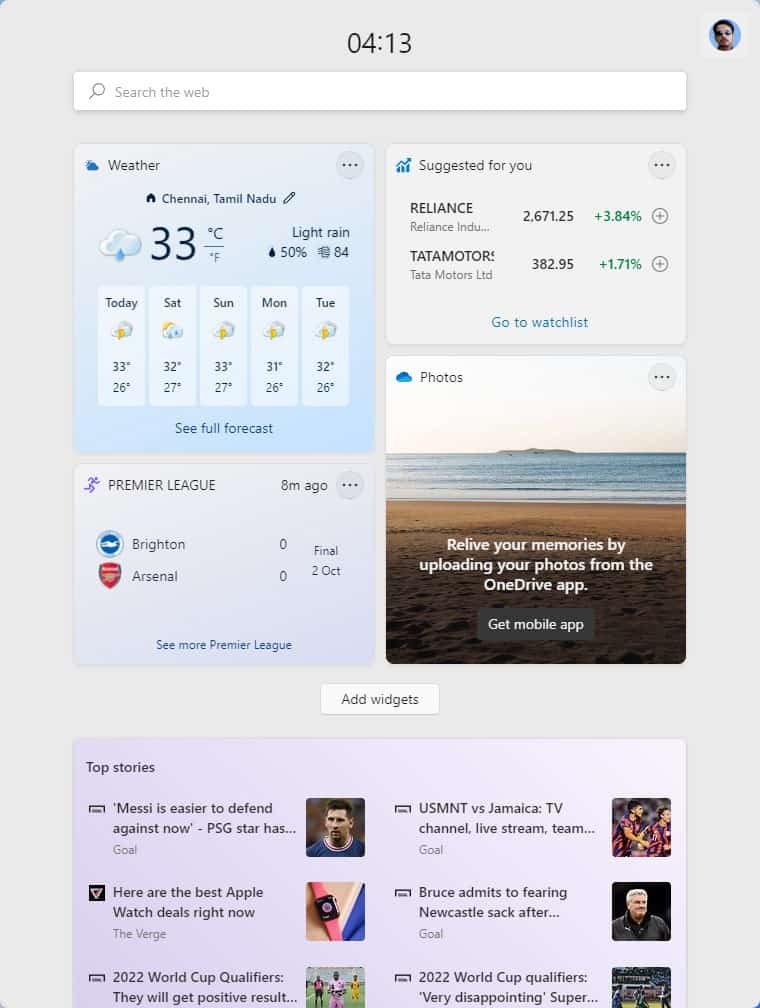
So .... where did this question get answered?
 

My Computer My Computer

At a glance

Windows 11 Pro Version 23H2 OS build 22631.32...Intel Core i7 9700K 3.6GHz32GB DDR4 3.200 MHzNVidia GeForce RTX 2060 Super 8 GB
OS
Windows 11 Pro Version 23H2 OS build 22631.3235 (First install 22H2 ‎04/‎10/‎22)
Computer type
PC/Desktop
Manufacturer/Model
Asus Hand built to my Spec
CPU
Intel Core i7 9700K 3.6GHz
Motherboard
Asus TUF Z390-Plus Gaming WiFi
Memory
32GB DDR4 3.200 MHz
Graphics Card(s)
NVidia GeForce RTX 2060 Super 8 GB
Sound Card
On Motherboard
Monitor(s) Displays
BENQ GL2780E 27"
Screen Resolution
1920 x 1080
Hard Drives
2 SSDs and 1 HDD
PSU
Corsair RM750X Gold - 750w
Case
Fractal Design Define R6 Black/Silent Case
Cooling
1 CPU fan and 5 case fans
Keyboard
Logitech K800
Mouse
Logi
Internet Speed
200Mbps down 20Mbps up
Browser
Edge and Crome
Antivirus
Zone Alarm
Other Info
Upgraded from Win 10 to Win 11 on 22/10/21.
Hi,
There are a few tutorials

A good article

1636213499903.png
 

My Computer My Computer

At a glance

Win-7-10-11Pro's10900k & 9940x & 5930kTrident-Z Royal 4000c16 2x16gb & Trident-Z 36...Titan Xp & 1080ti FTW3 & evga 980ti gaming
OS
Win-7-10-11Pro's
Computer type
PC/Desktop
Manufacturer/Model
Acer 17" Nitro 7840sn/ 2x16gb 5600c40/ 4060/ stock 1tb-os/ 4tb sn850x
CPU
10900k & 9940x & 5930k
Motherboard
z490-Apex & x299-Apex & x99-Sabertooth
Memory
Trident-Z Royal 4000c16 2x16gb & Trident-Z 3600c16 4x8gb & 3200c14 4x8gb
Graphics Card(s)
Titan Xp & 1080ti FTW3 & evga 980ti gaming
Sound Card
Onboard Realtek x3
Monitor(s) Displays
1-AOC G2460PG 24"G-Sync 144Hz/ 2nd 1-ASUS VG248QE 24"/ 3rd LG 43" series
Screen Resolution
1920-1080 not sure what the t.v is besides 43" class scales from 1920-1080 perfectly
Hard Drives
2-WD-sn850x 4tb/ 970evo+500gb/ 980 pro 2tb.
PSU
1000p2 & 1200p2 & 850p2
Case
D450 x2 & 1 Test bench in cherry Entertainment center
Cooling
Custom water loops x3 with 2x mora 360mm rads only 980ti gaming air cooled
Keyboard
G710+x3
Mouse
Redragon x3
Internet Speed
xfinity gigabyte
Browser
Firefox
Antivirus
mbam pro

My Computer My Computer

At a glance

Windows 11 Pro Version 23H2 OS build 22631.32...Intel Core i7 9700K 3.6GHz32GB DDR4 3.200 MHzNVidia GeForce RTX 2060 Super 8 GB
OS
Windows 11 Pro Version 23H2 OS build 22631.3235 (First install 22H2 ‎04/‎10/‎22)
Computer type
PC/Desktop
Manufacturer/Model
Asus Hand built to my Spec
CPU
Intel Core i7 9700K 3.6GHz
Motherboard
Asus TUF Z390-Plus Gaming WiFi
Memory
32GB DDR4 3.200 MHz
Graphics Card(s)
NVidia GeForce RTX 2060 Super 8 GB
Sound Card
On Motherboard
Monitor(s) Displays
BENQ GL2780E 27"
Screen Resolution
1920 x 1080
Hard Drives
2 SSDs and 1 HDD
PSU
Corsair RM750X Gold - 750w
Case
Fractal Design Define R6 Black/Silent Case
Cooling
1 CPU fan and 5 case fans
Keyboard
Logitech K800
Mouse
Logi
Internet Speed
200Mbps down 20Mbps up
Browser
Edge and Crome
Antivirus
Zone Alarm
Other Info
Upgraded from Win 10 to Win 11 on 22/10/21.

My Computer My Computer

At a glance

26200.8037i5-11400F32GBGeforce GT-1030
OS
26200.8037
Computer type
PC/Desktop
CPU
i5-11400F
Motherboard
Gigabyte
Memory
32GB
Graphics Card(s)
Geforce GT-1030
Keyboard
Logitech K400
Mouse
Logitech M720
Internet Speed
600 Mb
Browser
Edge
Hi,
Might also restart the machine and try widgets.
 

My Computer My Computer

At a glance

Win-7-10-11Pro's10900k & 9940x & 5930kTrident-Z Royal 4000c16 2x16gb & Trident-Z 36...Titan Xp & 1080ti FTW3 & evga 980ti gaming
OS
Win-7-10-11Pro's
Computer type
PC/Desktop
Manufacturer/Model
Acer 17" Nitro 7840sn/ 2x16gb 5600c40/ 4060/ stock 1tb-os/ 4tb sn850x
CPU
10900k & 9940x & 5930k
Motherboard
z490-Apex & x299-Apex & x99-Sabertooth
Memory
Trident-Z Royal 4000c16 2x16gb & Trident-Z 3600c16 4x8gb & 3200c14 4x8gb
Graphics Card(s)
Titan Xp & 1080ti FTW3 & evga 980ti gaming
Sound Card
Onboard Realtek x3
Monitor(s) Displays
1-AOC G2460PG 24"G-Sync 144Hz/ 2nd 1-ASUS VG248QE 24"/ 3rd LG 43" series
Screen Resolution
1920-1080 not sure what the t.v is besides 43" class scales from 1920-1080 perfectly
Hard Drives
2-WD-sn850x 4tb/ 970evo+500gb/ 980 pro 2tb.
PSU
1000p2 & 1200p2 & 850p2
Case
D450 x2 & 1 Test bench in cherry Entertainment center
Cooling
Custom water loops x3 with 2x mora 360mm rads only 980ti gaming air cooled
Keyboard
G710+x3
Mouse
Redragon x3
Internet Speed
xfinity gigabyte
Browser
Firefox
Antivirus
mbam pro
You need to open Widgets. Not Windows Web Experience Pack.
The <Open> of the Web Experience Pack was to run it.
Normally the <Get> does the download and the <Open> does the install, I think.
I don't use MS Store very often.
 

My Computer My Computer

At a glance

Windows 11 Pro Version 23H2 OS build 22631.32...Intel Core i7 9700K 3.6GHz32GB DDR4 3.200 MHzNVidia GeForce RTX 2060 Super 8 GB
OS
Windows 11 Pro Version 23H2 OS build 22631.3235 (First install 22H2 ‎04/‎10/‎22)
Computer type
PC/Desktop
Manufacturer/Model
Asus Hand built to my Spec
CPU
Intel Core i7 9700K 3.6GHz
Motherboard
Asus TUF Z390-Plus Gaming WiFi
Memory
32GB DDR4 3.200 MHz
Graphics Card(s)
NVidia GeForce RTX 2060 Super 8 GB
Sound Card
On Motherboard
Monitor(s) Displays
BENQ GL2780E 27"
Screen Resolution
1920 x 1080
Hard Drives
2 SSDs and 1 HDD
PSU
Corsair RM750X Gold - 750w
Case
Fractal Design Define R6 Black/Silent Case
Cooling
1 CPU fan and 5 case fans
Keyboard
Logitech K800
Mouse
Logi
Internet Speed
200Mbps down 20Mbps up
Browser
Edge and Crome
Antivirus
Zone Alarm
Other Info
Upgraded from Win 10 to Win 11 on 22/10/21.
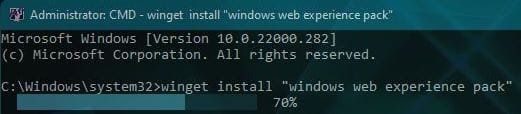
You need to get App Installer first.
Code:
winget install "windows web experience pack"
 

My Computer My Computer

At a glance

Home2FH2CanAMD Ryzen 5 8600G (07/24)2x32GB Kingston FURY DDR5 5600 MHz CL36 @5200...ASROCK Radeon RX 6600 Challenger D 8G @48FPS ...
OS
Home2FH2Can
Computer type
PC/Desktop
CPU
AMD Ryzen 5 8600G (07/24)
Motherboard
ASROCK B650M-HDV/M.2 (07/24) BIOS 4.43 AGESA ComboAM5 1.3.0.1b Patch A (07/26)
Memory
2x32GB Kingston FURY DDR5 5600 MHz CL36 @5200 CL40 (07/24)
Graphics Card(s)
ASROCK Radeon RX 6600 Challenger D 8G @48FPS (08/24)
Sound Card
Creative Sound BlasterX AE-5 Plus (05/24)
Monitor(s) Displays
24" Philips 24M1N3200ZS/00 (05/24)
Screen Resolution
1920×1080@165Hz via DP1.4
Hard Drives
Kingston KC3000 NVMe 2TB (05/24)
ADATA XPG GAMMIX S11 Pro 512GB (07/19)
PSU
Seasonic Core GM 550 Gold (04/24)
Case
Fractal Design Define 7 Mini with 3x Noctua NF-P14s/12@555rpm (04/24)
Cooling
Noctua NH-U12S with Noctua NF-P12 (04/24)
Keyboard
HP Pavilion Wired Keyboard 300 (07/24) + Rabalux 76017 Parker (01/24)
Mouse
Logitech M330 Silent Plus (07/26)
Internet Speed
500/100 Mbps via RouterOS (05/21) & TCP Optimizer
Browser
Edge, Brave for YouTube, LibreWolf for FB
Antivirus
NextDNS blocking 1/3 Traffic
Other Info
Phone: Motorola Moto G86 (02/26)
Backup: Hasleo Backup Suite (PreOS)
Headphones: Sennheiser RS170 (09/10)
Chair: Huzaro Force 4.4 Grey Mesh (05/24)
Notifier: Xiaomi Mi Band 9 Milanese (10/24)
FlexCore USB-C 3.2 Gen 1 (M) to LAN (F) (08/25)
You need to get App Installer first.
Code:
winget install "windows web experience pack"
Used the <Get> button to install "App Installer", but cannot progress any further.
I do not get an <Install> option. By opening the MS store separately and searching for the "App Installer" I see that the App is already installed.
Check this on Win 11 to find out when installed with Setting => Apps => Default Apps. Cannot find date of install.
Anyway do I have to do the 'winget' thingy as well. I am confused.
 

My Computer My Computer

At a glance

Windows 11 Pro Version 23H2 OS build 22631.32...Intel Core i7 9700K 3.6GHz32GB DDR4 3.200 MHzNVidia GeForce RTX 2060 Super 8 GB
OS
Windows 11 Pro Version 23H2 OS build 22631.3235 (First install 22H2 ‎04/‎10/‎22)
Computer type
PC/Desktop
Manufacturer/Model
Asus Hand built to my Spec
CPU
Intel Core i7 9700K 3.6GHz
Motherboard
Asus TUF Z390-Plus Gaming WiFi
Memory
32GB DDR4 3.200 MHz
Graphics Card(s)
NVidia GeForce RTX 2060 Super 8 GB
Sound Card
On Motherboard
Monitor(s) Displays
BENQ GL2780E 27"
Screen Resolution
1920 x 1080
Hard Drives
2 SSDs and 1 HDD
PSU
Corsair RM750X Gold - 750w
Case
Fractal Design Define R6 Black/Silent Case
Cooling
1 CPU fan and 5 case fans
Keyboard
Logitech K800
Mouse
Logi
Internet Speed
200Mbps down 20Mbps up
Browser
Edge and Crome
Antivirus
Zone Alarm
Other Info
Upgraded from Win 10 to Win 11 on 22/10/21.
winget install "windows web experience pack"

Tried this in CMD (Admin) - Result "No package found matching input criteria.".
So what do I do now?
 

My Computer My Computer

At a glance

Windows 11 Pro Version 23H2 OS build 22631.32...Intel Core i7 9700K 3.6GHz32GB DDR4 3.200 MHzNVidia GeForce RTX 2060 Super 8 GB
OS
Windows 11 Pro Version 23H2 OS build 22631.3235 (First install 22H2 ‎04/‎10/‎22)
Computer type
PC/Desktop
Manufacturer/Model
Asus Hand built to my Spec
CPU
Intel Core i7 9700K 3.6GHz
Motherboard
Asus TUF Z390-Plus Gaming WiFi
Memory
32GB DDR4 3.200 MHz
Graphics Card(s)
NVidia GeForce RTX 2060 Super 8 GB
Sound Card
On Motherboard
Monitor(s) Displays
BENQ GL2780E 27"
Screen Resolution
1920 x 1080
Hard Drives
2 SSDs and 1 HDD
PSU
Corsair RM750X Gold - 750w
Case
Fractal Design Define R6 Black/Silent Case
Cooling
1 CPU fan and 5 case fans
Keyboard
Logitech K800
Mouse
Logi
Internet Speed
200Mbps down 20Mbps up
Browser
Edge and Crome
Antivirus
Zone Alarm
Other Info
Upgraded from Win 10 to Win 11 on 22/10/21.
It says so, but it should install. Once installed, it will not install again.
capture_11072021_164620.jpg
Afterwards install the store version.
Enable Widgets and Restart explorer.exe
Code:
reg add "HKCU\Software\Microsoft\Windows\CurrentVersion\Explorer\Advanced" /v "TaskbarDa" /t REG_DWORD /d "1" /f
taskkill /im explorer.exe /f & explorer.exe
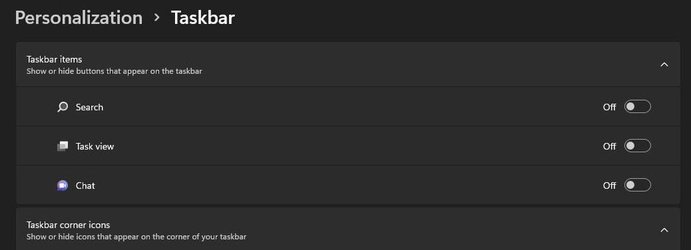
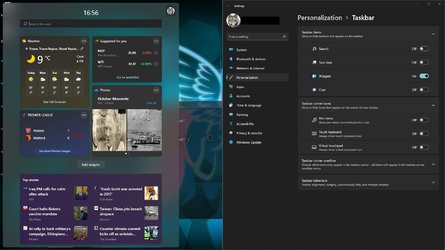
I had no Widgets, not even in Settings and upon performing those steps, it reappeared.

capture_11072021_165357.jpg

capture_11072021_165608.jpg
 

My Computer My Computer

At a glance

Home2FH2CanAMD Ryzen 5 8600G (07/24)2x32GB Kingston FURY DDR5 5600 MHz CL36 @5200...ASROCK Radeon RX 6600 Challenger D 8G @48FPS ...
OS
Home2FH2Can
Computer type
PC/Desktop
CPU
AMD Ryzen 5 8600G (07/24)
Motherboard
ASROCK B650M-HDV/M.2 (07/24) BIOS 4.43 AGESA ComboAM5 1.3.0.1b Patch A (07/26)
Memory
2x32GB Kingston FURY DDR5 5600 MHz CL36 @5200 CL40 (07/24)
Graphics Card(s)
ASROCK Radeon RX 6600 Challenger D 8G @48FPS (08/24)
Sound Card
Creative Sound BlasterX AE-5 Plus (05/24)
Monitor(s) Displays
24" Philips 24M1N3200ZS/00 (05/24)
Screen Resolution
1920×1080@165Hz via DP1.4
Hard Drives
Kingston KC3000 NVMe 2TB (05/24)
ADATA XPG GAMMIX S11 Pro 512GB (07/19)
PSU
Seasonic Core GM 550 Gold (04/24)
Case
Fractal Design Define 7 Mini with 3x Noctua NF-P14s/12@555rpm (04/24)
Cooling
Noctua NH-U12S with Noctua NF-P12 (04/24)
Keyboard
HP Pavilion Wired Keyboard 300 (07/24) + Rabalux 76017 Parker (01/24)
Mouse
Logitech M330 Silent Plus (07/26)
Internet Speed
500/100 Mbps via RouterOS (05/21) & TCP Optimizer
Browser
Edge, Brave for YouTube, LibreWolf for FB
Antivirus
NextDNS blocking 1/3 Traffic
Other Info
Phone: Motorola Moto G86 (02/26)
Backup: Hasleo Backup Suite (PreOS)
Headphones: Sennheiser RS170 (09/10)
Chair: Huzaro Force 4.4 Grey Mesh (05/24)
Notifier: Xiaomi Mi Band 9 Milanese (10/24)
FlexCore USB-C 3.2 Gen 1 (M) to LAN (F) (08/25)
This is what it looks like after I have clicked the <Open> button.

I.E. The button flash quickly and nothing happened.
 

Attachments

  • Screenshot 2021-11-07 215957.png
    Screenshot 2021-11-07 215957.png
    17.9 KB · Views: 7

My Computer My Computer

At a glance

Windows 11 Pro Version 23H2 OS build 22631.32...Intel Core i7 9700K 3.6GHz32GB DDR4 3.200 MHzNVidia GeForce RTX 2060 Super 8 GB
OS
Windows 11 Pro Version 23H2 OS build 22631.3235 (First install 22H2 ‎04/‎10/‎22)
Computer type
PC/Desktop
Manufacturer/Model
Asus Hand built to my Spec
CPU
Intel Core i7 9700K 3.6GHz
Motherboard
Asus TUF Z390-Plus Gaming WiFi
Memory
32GB DDR4 3.200 MHz
Graphics Card(s)
NVidia GeForce RTX 2060 Super 8 GB
Sound Card
On Motherboard
Monitor(s) Displays
BENQ GL2780E 27"
Screen Resolution
1920 x 1080
Hard Drives
2 SSDs and 1 HDD
PSU
Corsair RM750X Gold - 750w
Case
Fractal Design Define R6 Black/Silent Case
Cooling
1 CPU fan and 5 case fans
Keyboard
Logitech K800
Mouse
Logi
Internet Speed
200Mbps down 20Mbps up
Browser
Edge and Crome
Antivirus
Zone Alarm
Other Info
Upgraded from Win 10 to Win 11 on 22/10/21.
I'm just about to give up on getting Widgets working (Yes I know some of you think it's rubbish, but ..), so I am going to try a different tack.
Is there a simple list of how Win 11 should look with regard to Widgets? i.e.
1) Registry entries required and values
2) Apps that need loading
3) Switches required where
4) etc
..
n)

If I can see what is not there perhaps I can focus on how to fix the problem.
At the moment I seem overwhelmed with options to change things and I don't know what's going on, with the multiple choices in various orders.
I realize this is a long shot, and thanks in advance to anybody that can help.
At this moment in time, I have tried ALL options I have seen (on ElevenForum) and nothing has helped.
 

My Computer My Computer

At a glance

Windows 11 Pro Version 23H2 OS build 22631.32...Intel Core i7 9700K 3.6GHz32GB DDR4 3.200 MHzNVidia GeForce RTX 2060 Super 8 GB
OS
Windows 11 Pro Version 23H2 OS build 22631.3235 (First install 22H2 ‎04/‎10/‎22)
Computer type
PC/Desktop
Manufacturer/Model
Asus Hand built to my Spec
CPU
Intel Core i7 9700K 3.6GHz
Motherboard
Asus TUF Z390-Plus Gaming WiFi
Memory
32GB DDR4 3.200 MHz
Graphics Card(s)
NVidia GeForce RTX 2060 Super 8 GB
Sound Card
On Motherboard
Monitor(s) Displays
BENQ GL2780E 27"
Screen Resolution
1920 x 1080
Hard Drives
2 SSDs and 1 HDD
PSU
Corsair RM750X Gold - 750w
Case
Fractal Design Define R6 Black/Silent Case
Cooling
1 CPU fan and 5 case fans
Keyboard
Logitech K800
Mouse
Logi
Internet Speed
200Mbps down 20Mbps up
Browser
Edge and Crome
Antivirus
Zone Alarm
Other Info
Upgraded from Win 10 to Win 11 on 22/10/21.
Hi,
Save all your personal files to removable device and refresh install keep nothing.

Less nuclear is make a new user account and see how that goes but I believe you already tried this.
 

My Computer My Computer

At a glance

Win-7-10-11Pro's10900k & 9940x & 5930kTrident-Z Royal 4000c16 2x16gb & Trident-Z 36...Titan Xp & 1080ti FTW3 & evga 980ti gaming
OS
Win-7-10-11Pro's
Computer type
PC/Desktop
Manufacturer/Model
Acer 17" Nitro 7840sn/ 2x16gb 5600c40/ 4060/ stock 1tb-os/ 4tb sn850x
CPU
10900k & 9940x & 5930k
Motherboard
z490-Apex & x299-Apex & x99-Sabertooth
Memory
Trident-Z Royal 4000c16 2x16gb & Trident-Z 3600c16 4x8gb & 3200c14 4x8gb
Graphics Card(s)
Titan Xp & 1080ti FTW3 & evga 980ti gaming
Sound Card
Onboard Realtek x3
Monitor(s) Displays
1-AOC G2460PG 24"G-Sync 144Hz/ 2nd 1-ASUS VG248QE 24"/ 3rd LG 43" series
Screen Resolution
1920-1080 not sure what the t.v is besides 43" class scales from 1920-1080 perfectly
Hard Drives
2-WD-sn850x 4tb/ 970evo+500gb/ 980 pro 2tb.
PSU
1000p2 & 1200p2 & 850p2
Case
D450 x2 & 1 Test bench in cherry Entertainment center
Cooling
Custom water loops x3 with 2x mora 360mm rads only 980ti gaming air cooled
Keyboard
G710+x3
Mouse
Redragon x3
Internet Speed
xfinity gigabyte
Browser
Firefox
Antivirus
mbam pro
Hi,
Save all your personal files to removable device and refresh install keep nothing.

Less nuclear is make a new user account and see how that goes but I believe you already tried this.
My personal files are on separate discs to the OS which is the only thing on C:\ a whole SSD drive of 500GB (Yes I know overkill).
BUT, I only 'upgraded' to Win 11 a few days ago, which was as 'Windows Reset' keeping nothing.
Strange with Windows systems, when there is a problem - we try every single potential fix that we can do without our knowing the root cause.
In my case sometimes trying a fix (which may and often does not make any difference to the problem at hand), seems to make matters worse.
To be honest, I think I'll live without Widgets for a while (I do have another life), and hope it gets fixed with an update in the future.
Thanks for the thoughts.
 
Last edited:

My Computer My Computer

At a glance

Windows 11 Pro Version 23H2 OS build 22631.32...Intel Core i7 9700K 3.6GHz32GB DDR4 3.200 MHzNVidia GeForce RTX 2060 Super 8 GB
OS
Windows 11 Pro Version 23H2 OS build 22631.3235 (First install 22H2 ‎04/‎10/‎22)
Computer type
PC/Desktop
Manufacturer/Model
Asus Hand built to my Spec
CPU
Intel Core i7 9700K 3.6GHz
Motherboard
Asus TUF Z390-Plus Gaming WiFi
Memory
32GB DDR4 3.200 MHz
Graphics Card(s)
NVidia GeForce RTX 2060 Super 8 GB
Sound Card
On Motherboard
Monitor(s) Displays
BENQ GL2780E 27"
Screen Resolution
1920 x 1080
Hard Drives
2 SSDs and 1 HDD
PSU
Corsair RM750X Gold - 750w
Case
Fractal Design Define R6 Black/Silent Case
Cooling
1 CPU fan and 5 case fans
Keyboard
Logitech K800
Mouse
Logi
Internet Speed
200Mbps down 20Mbps up
Browser
Edge and Crome
Antivirus
Zone Alarm
Other Info
Upgraded from Win 10 to Win 11 on 22/10/21.
My Widgets are still not working - just nothing loads, but the icon 'rolls'.
I noticed today that one thing to try (new to me) is to "Install MS Edge Webview2", so I thought I should investigate.
However, the runtime version was already in my PC, having been installed yesterday (Win Update 2nd Tue).
I had a look at the CBS log for yesterday and it showed.
The store corruption status report is incomplete. [HRESULT = 0x80070002 - ERROR_FILE_NOT_FOUND]
So we have an error in the log associated with Windows update and my PC has no Widgets.
Do not know whether this is a good thing or not - but could I have an opinion on error 0x80070002 please.
 

My Computer My Computer

At a glance

Windows 11 Pro Version 23H2 OS build 22631.32...Intel Core i7 9700K 3.6GHz32GB DDR4 3.200 MHzNVidia GeForce RTX 2060 Super 8 GB
OS
Windows 11 Pro Version 23H2 OS build 22631.3235 (First install 22H2 ‎04/‎10/‎22)
Computer type
PC/Desktop
Manufacturer/Model
Asus Hand built to my Spec
CPU
Intel Core i7 9700K 3.6GHz
Motherboard
Asus TUF Z390-Plus Gaming WiFi
Memory
32GB DDR4 3.200 MHz
Graphics Card(s)
NVidia GeForce RTX 2060 Super 8 GB
Sound Card
On Motherboard
Monitor(s) Displays
BENQ GL2780E 27"
Screen Resolution
1920 x 1080
Hard Drives
2 SSDs and 1 HDD
PSU
Corsair RM750X Gold - 750w
Case
Fractal Design Define R6 Black/Silent Case
Cooling
1 CPU fan and 5 case fans
Keyboard
Logitech K800
Mouse
Logi
Internet Speed
200Mbps down 20Mbps up
Browser
Edge and Crome
Antivirus
Zone Alarm
Other Info
Upgraded from Win 10 to Win 11 on 22/10/21.
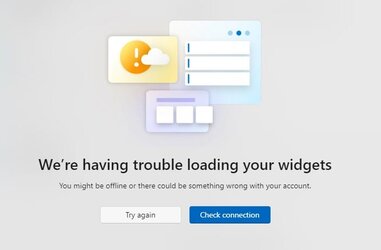
After the most recent updates I NOW get the following info when pressing the Widgets icon.
Any thoughts welcome as it is not a connection problem.
 

Attachments

  • Screenshot 2022-08-19 154721.jpg
    Screenshot 2022-08-19 154721.jpg
    16.5 KB · Views: 4

My Computer My Computer

At a glance

Windows 11 Pro Version 23H2 OS build 22631.32...Intel Core i7 9700K 3.6GHz32GB DDR4 3.200 MHzNVidia GeForce RTX 2060 Super 8 GB
OS
Windows 11 Pro Version 23H2 OS build 22631.3235 (First install 22H2 ‎04/‎10/‎22)
Computer type
PC/Desktop
Manufacturer/Model
Asus Hand built to my Spec
CPU
Intel Core i7 9700K 3.6GHz
Motherboard
Asus TUF Z390-Plus Gaming WiFi
Memory
32GB DDR4 3.200 MHz
Graphics Card(s)
NVidia GeForce RTX 2060 Super 8 GB
Sound Card
On Motherboard
Monitor(s) Displays
BENQ GL2780E 27"
Screen Resolution
1920 x 1080
Hard Drives
2 SSDs and 1 HDD
PSU
Corsair RM750X Gold - 750w
Case
Fractal Design Define R6 Black/Silent Case
Cooling
1 CPU fan and 5 case fans
Keyboard
Logitech K800
Mouse
Logi
Internet Speed
200Mbps down 20Mbps up
Browser
Edge and Crome
Antivirus
Zone Alarm
Other Info
Upgraded from Win 10 to Win 11 on 22/10/21.
Widgets NOW WORKING after update:-

September 13, 2022—KB5017328 (OS Build 22000.978)​

That's great - Huzzah
 

My Computer My Computer

At a glance

Windows 11 Pro Version 23H2 OS build 22631.32...Intel Core i7 9700K 3.6GHz32GB DDR4 3.200 MHzNVidia GeForce RTX 2060 Super 8 GB
OS
Windows 11 Pro Version 23H2 OS build 22631.3235 (First install 22H2 ‎04/‎10/‎22)
Computer type
PC/Desktop
Manufacturer/Model
Asus Hand built to my Spec
CPU
Intel Core i7 9700K 3.6GHz
Motherboard
Asus TUF Z390-Plus Gaming WiFi
Memory
32GB DDR4 3.200 MHz
Graphics Card(s)
NVidia GeForce RTX 2060 Super 8 GB
Sound Card
On Motherboard
Monitor(s) Displays
BENQ GL2780E 27"
Screen Resolution
1920 x 1080
Hard Drives
2 SSDs and 1 HDD
PSU
Corsair RM750X Gold - 750w
Case
Fractal Design Define R6 Black/Silent Case
Cooling
1 CPU fan and 5 case fans
Keyboard
Logitech K800
Mouse
Logi
Internet Speed
200Mbps down 20Mbps up
Browser
Edge and Crome
Antivirus
Zone Alarm
Other Info
Upgraded from Win 10 to Win 11 on 22/10/21.
Back
Top Bottom