Solved Is there any way to tag files in Windows 11?


RhinoCan

Member
Member
Local time
1:11 PM
Posts
65
OS
Win 11 Pro
I have a substantial number of video files on my laptop that are stored by their titles and the title is often not very descriptive about what nature of the video. I'd like to be able to write tags for each file so that when I look at the file name, I can see relevant information, like whether it is colour or black & white or give it a rating.

I've never seen anything like that in Windows but maybe it's there and I never noticed it. If it is there, please tell me what it this feature is called so that I can find instructions for how to use it. If it is not available in Windows, is there an add-on I can get that would do this job?
 
Windows Build/Version
24H2

My Computer My Computer

At a glance

Win 11 ProAMD Ryzen 7 7735U16GBAMD Radeon™ 680M Graphics
OS
Win 11 Pro
Computer type
Laptop
Manufacturer/Model
HP Elitebook 665 G11
CPU
AMD Ryzen 7 7735U
Memory
16GB
Graphics Card(s)
AMD Radeon™ 680M Graphics
Monitor(s) Displays
1920 x 1200
Hard Drives
512GB SSD
Browser
Brave, Chrome
Other Info
Windows version: 24H2
I think a notepad file named appropriately that you can also obviously add info into, placed in a folder of the same name with the video is helpful.
It’s how I do it and I also have a lot of videos that I edit and need to refer to for cuts.
I search for the txt file as apposed to the video, essentially they are one in the same.
 

My Computers My Computers

  • At a glance

    Windows 11 Pro 25H2 Build 26200.9168Intel(R) Core(TM) i7-4770K CPU @ 3.50GHz32.0 GB of I forget and the box is in storage.Gigabyte nVidia GeForce GTX 1660 Super OC 6GB
    OS
    Windows 11 Pro 25H2 Build 26200.9168
    Computer type
    PC/Desktop
    Manufacturer/Model
    Sin-built 2013
    CPU
    Intel(R) Core(TM) i7-4770K CPU @ 3.50GHz
    Motherboard
    ASUS ROG Maximus VI Formula
    Memory
    32.0 GB of I forget and the box is in storage.
    Graphics Card(s)
    Gigabyte nVidia GeForce GTX 1660 Super OC 6GB
    Sound Card
    ROG SupremeFX Formula 8-Channel High Definition Audio
    Monitor(s) Displays
    5 x LG 25MS500-B - 1 x 24MK430H-B - 1 x Wacom Pro 22" Touch Screen Tablet
    Screen Resolution
    All over the place
    Hard Drives
    Too many to list. OS on Samsung 1TB 870 QVO SATA
    PSU
    Silverstone 1500
    Case
    NZXT Phantom 820 Full-Tower Case
    Cooling
    Noctua NH-D15 Elite Class Dual Tower CPU Cooler / 6 x EziDIY 120mm / 2 x Corsair 140mm somethings / 1 x 140mm Thermaltake something / 2 x 200mm Corsair.
    Keyboard
    Corsair K95 / Logitech diNovo Edge Wireless
    Mouse
    Logitech: G402 / G502 / Mx Masters / Mx Air Cordless
    Internet Speed
    2000/500Mbps
    Browser
    All sorts
    Antivirus
    Kaspersky Premium
    Other Info
    ㅤㅤㅤㅤㅤㅤㅤㅤㅤㅤㅤㅤㅤㅤㅤㅤㅤㅤㅤㅤㅤㅤㅤㅤㅤㅤㅤㅤㅤㅤㅤㅤㅤㅤㅤㅤㅤㅤㅤㅤ⠀⠀⠀⠀⠀⠀⠀⠀⠀⠀
    TP-Link BE9300 WiFi 7 Bluetooth 5.4 (Archer TBE550E)
    TP-Link TX201 V1 2.5GB Lan

    Grandstream HT812 - VoIP
    ASUS DSL-AX82U - Mesh
    ASUS RT-AC68U - Mesh
    ASUS RT-BE88U Router

    Brother MFC-L2880DW Printer

    I’m on a horse.
  • At a glance

    Windows 11 Pro 25H2 Build 26200.9168 (Wifes)13th Generation Intel® Core™ i5-1340P Process...16GB LPDDR5-52001x Intel® Iris® Xe Graphics
    Operating System
    Windows 11 Pro 25H2 Build 26200.9168 (Wifes)
    Computer type
    Laptop
    Manufacturer/Model
    LENOVO Yoga 7 14IRL8 - Type 82YL
    CPU
    13th Generation Intel® Core™ i5-1340P Processor(Core™ i5-1340P)
    Memory
    16GB LPDDR5-5200
    Graphics card(s)
    1x Intel® Iris® Xe Graphics
    Sound Card
    Optimized with Dolby Atmos®
    Screen Resolution
    QHD 2880 x 1800 OLED
    Hard Drives
    M.2 512 GB SSD PCIe
    Mouse
    Logiteck MX Master 3S
    Internet Speed
    2000/500
    Antivirus
    Defender / Malwarebytes
    Other Info
    …still on a horse.


    Wireless Network: Wi-Fi 6E 2x2 AX; Bluetooth® 5.1 or above
    Ports: 1x 1 Novo button; 2 in 1 Audio Combo jack; Micro SD Card Reader; HDMI 1.4b; 2 x USB Type-C (TBT4)
    USB 3.2 Gen 2 DP 1.4a
    PD 3.0); 1 x USB 3.2 Gen1 Type A
    Camera
    1x 1080P FHD IR/RGB Hybrid with Privacy Shutter and Dual Array Microphone
    Graphics
    1x Intel® Iris® Xe Graphics
    Monitor
    14" WUXGA
    Form Factor
    Convertible Notebook
  • Windows 11 Pro 25H2 Build 26200.9168 (Wifes)

    Yoga 7 2-in-1 14IML9 - Type 83DJ

    Processor: Intel® Core™ Ultra 7 155H Processor(Core™ Ultra 7 155H)

    Memory: 32GB LPD5X-7467

    Hard Drive: 1 TB SSD PCIe

    Wireless Network: 1x Wi-Fi 6E 2x2 AX; Bluetooth® 5.1 or above

    Ports: 1 x HDMI 2.1 TMDS; 1 x Novo Button; 1 x Combo Audio Jack
    2 x USB-C (USB 4.0)
    1 x USB-A 3.2 Gen 1

    Camera: 1080P FHD IR Hybrid with Dual Microphone

    Graphics: Intel® Arc™ Graphics

    Monitor: 14" 2.8K

    ...Where's my horse?

My Computers My Computers

  • At a glance

    Windows 11 ProIntel Core i9-10900XCorsair 64 GB (4 x 16 GB) CMW64GX4M4C3000C15 ...GIGABYTE GeForce GTX 1660 Super Mini ITX 6 GB OC
    OS
    Windows 11 Pro
    Computer type
    PC/Desktop
    Manufacturer/Model
    Stigg's Build
    CPU
    Intel Core i9-10900X
    Motherboard
    GIGABYTE X299X DESIGNARE 10G
    Memory
    Corsair 64 GB (4 x 16 GB) CMW64GX4M4C3000C15 Vengeance RGB Pro 3000Mhz DDR4
    Graphics Card(s)
    GIGABYTE GeForce GTX 1660 Super Mini ITX 6 GB OC
    Sound Card
    Realtek ALC1220
    Monitor(s) Displays
    Samsung 27" FHD LED FreeSync Gaming Monitor (LS27F350FHEXXY)
    Screen Resolution
    1920 x 1080
    Hard Drives
    Samsung 970 Pro Series 1TB M.2 2280 NVMe SSD
    Western Digital Red Pro WD8003FFBX-68B9AN0 8 TB, 7200 RPM, SATA-III
    Western Digital Red Pro WD8003FFBX-68B9AN0 8 TB, 7200 RPM, SATA-III
    PSU
    Corsair HX1200 1200W 80 Plus Platinum
    Case
    Fractal Design Define 7 Black Solid Case
    Cooling
    Noctua NH-D15 Chromax Black
    Keyboard
    Razer Ornata V2
    Mouse
    Razer DeathAdder Essential
    Internet Speed
    FTTN 100Mbps / 40Mbps
    Browser
    Mozilla Firefox
    Antivirus
    N/A
    Other Info
    Logitech BRIO 4k Ultra HD USB-C Webcam
  • At a glance

    Windows 10 ProCore i7-8750HSK Hynix 32 GB (2 x 16 GB) HMA82GS6CJR8N-VK 1...NVIDIA GeForce GTX 1070
    Operating System
    Windows 10 Pro
    Computer type
    Laptop
    Manufacturer/Model
    ASUS ROG Zephyrus M GM501GS
    CPU
    Core i7-8750H
    Motherboard
    Zephyrus M GM501GS
    Memory
    SK Hynix 32 GB (2 x 16 GB) HMA82GS6CJR8N-VK 16 GB DDR4-2666 DDR4 SDRAM
    Graphics card(s)
    NVIDIA GeForce GTX 1070
    Sound Card
    Realtek ALC294
    Monitor(s) Displays
    AU Optronics B156HAN07.1 [15.6" LCD]
    Screen Resolution
    1920 x 1080
    Hard Drives
    Samsung MZVKW512HMJP-00000 512 GB, PCI-E 3.0 x4
    Samsung SSD 860 QVO 4TB 4 TB, SATA-III
    PSU
    N/A
    Case
    N/A
    Cooling
    N/A
    Keyboard
    PC/AT Enhanced PS2 Keyboard (101/102-Key)
    Mouse
    Razer DeathAdder Essential
    Internet Speed
    FTTN 100Mbps / 40Mbps
    Browser
    Mozilla Firefox
    Antivirus
    N/A
    Other Info
    USB2.0 HD UVC Webcam
Right click the video file and select Properties > Details tab.

Alternatively, Mp3tag supports tagging video files. I use it myself for such purposes.

I clicked on Properties/Details but I can't edit; all the fields seem to be read-only. Am I doing something wrong? I'd like to try that first before installing mp3tag.
 

My Computer My Computer

At a glance

Win 11 ProAMD Ryzen 7 7735U16GBAMD Radeon™ 680M Graphics
OS
Win 11 Pro
Computer type
Laptop
Manufacturer/Model
HP Elitebook 665 G11
CPU
AMD Ryzen 7 7735U
Memory
16GB
Graphics Card(s)
AMD Radeon™ 680M Graphics
Monitor(s) Displays
1920 x 1200
Hard Drives
512GB SSD
Browser
Brave, Chrome
Other Info
Windows version: 24H2
I have a substantial number of video files on my laptop that are stored by their titles and the title is often not very descriptive about what nature of the video. I'd like to be able to write tags for each file so that when I look at the file name, I can see relevant information
Right click the video file and select Properties > Details tab.
There's a lot you can put in the Details, many of the fields are editable. Comments, for example, can hold as much text as you like.

1761427003193.webp1761427034227.webp1761427053051.webp

I clicked on Properties/Details but I can't edit; all the fields seem to be read-only. Am I doing something wrong?
Click on a field to edit it. Click OK to save your changes.

1761426828938.webp
 

My Computers My Computers

  • At a glance

    Windows 11 HomeAMD Athlon Silver 3050U8GBRadeon Graphics
    OS
    Windows 11 Home
    Computer type
    Laptop
    Manufacturer/Model
    Acer Aspire 3 A315-23-R9VY
    CPU
    AMD Athlon Silver 3050U
    Memory
    8GB
    Graphics Card(s)
    Radeon Graphics
    Monitor(s) Displays
    laptop screen
    Screen Resolution
    1366x768 native resolution, up to 2560x1440 with Radeon Virtual Super Resolution
    Hard Drives
    1TB Samsung EVO 870 SSD (from April 2026: 250GB EVO 850)
    Internet Speed
    150 Mbps
    Browser
    Edge, Firefox
    Antivirus
    Defender
    Other Info
    UPDATE - 11 April 2026: due to lid hinges starting to break up this laptop has been retired from active duty. The OS with all software and files has been migrated to my System Seven in 'Other systems' to carry on as my general purpose 'main machine'.

    I've now clean installed 25H2 and used Garlin's scripts to update Secure Boot to CA 2023 and revoke the PCA 2011 certificates. It's new role is to test secure boot issues.

    Info for 2021-2026:
    fully 'Windows 11 ready' laptop. Windows 10 C: partition migrated from my old unsupported 'main machine' then upgraded to 11. A test migration ran Insider builds for 2 months. When 11 was released on 5th October 2021 it was re-imaged back to 10 and was offered the upgrade in Windows Update on 20th October. Windows Update offered the 22H2 Feature Update on 20th September 2022. It got the 23H2 Feature Update on 4th November 2023 through Windows Update, 24H2 on 3rd October 2024 through Windows Update by setting the Target Release Version for 24H2, and 25H2 on 30th September 2025 through Windows Update by setting the Target Release Version for 25H2.
  • At a glance

    Windows 11 ProIntel® Core™ i5-520M8GB(integrated graphics) Intel HD Graphics
    Operating System
    Windows 11 Pro
    Computer type
    Laptop
    Manufacturer/Model
    Dell Latitude E4310
    CPU
    Intel® Core™ i5-520M
    Motherboard
    0T6M8G
    Memory
    8GB
    Graphics card(s)
    (integrated graphics) Intel HD Graphics
    Screen Resolution
    1366x768
    Hard Drives
    500GB Crucial MX500 SSD
    Browser
    Firefox, Edge
    Antivirus
    Defender
    Other Info
    unsupported machine: Legacy bios, MBR, TPM 1.2, upgraded from W10 to W11 using W10/W11 hybrid install media workaround.

    In-place upgrade to 22H2 using ISO and a workaround.
    Feature Update to 23H2 by manually installing the Enablement Package.
    In-place upgrade to 24H2 using hybrid 23H2/24H2 install media.
    Upgraded to 25H2 by Enablement Package.

    Also running Insider Experimental 263xx and 29xxx builds and Windows 10 as native boot .vhdx.
  • My SYSTEM THREE is a Dell Latitude 5410, i7-10610U, 32GB RAM, 512GB NVMe ssd, supported device running Windows 11 Pro.

    My SYSTEM FOUR was a 2-in-1 convertible Lenovo Yoga 11e (1st gen) type 20DA, Celeron N2930, 8GB RAM, 256GB ssd. Unsupported device. This has now been sold. It has been replaced by my System Eight.

    My SYSTEM FIVE is a Dell Latitude 3190 2-in-1, Pentium Silver N5030, 8GB RAM, 1TB NVMe ssd, supported device running Windows 11 Pro, plus Insider Beta, Experimental 263xx and 29xxx builds (and a few others) as a native boot .vhdx.

    My SYSTEM SIX is a Dell Latitude 5550, Core Ultra 7 165H, 64GB RAM, 1TB NVMe SSD, supported device, Windows 11 Pro, Hyper-V host machine. Updated to 25H2 on 30th September 2025.

    My SYSTEM SEVEN is a Lenovo Thinkpad T580, 1920x1080 touchscreen, Intel Core i7-8650U, 16GB RAM, 512GB NVMe SSD + 2nd 512GB NVMe SSD, a supported device for Windows 11. This is my current general purpose 'main machine'. The installed Windows 11 Home from my System One has been migrated to this machine. As its new home has an existing digital licence for Pro I've been able to upgrade the migrated OS from Home to Pro.

    My SYSTEM EIGHT is a 2-in-1 convertible Lenovo Yoga 11e (5th gen) type 20LN, Celeron N4120, 8GB RAM, 512GB NVMe ssd, a supported device for Windows 11. Currently running Windows 11 Pro, plus Insider Beta, Experimental 263xx and 29xxx builds as native boot vhdx.
There's a lot you can put in the Details, Comments can hold as much text as you like.


Click on a field to edit it. Click OK to save your changes.

View attachment 150417
I have the Title, Subtitle and Rating fields but NOT the Tags or Comments fields. WTF?
 

My Computer My Computer

At a glance

Win 11 ProAMD Ryzen 7 7735U16GBAMD Radeon™ 680M Graphics
OS
Win 11 Pro
Computer type
Laptop
Manufacturer/Model
HP Elitebook 665 G11
CPU
AMD Ryzen 7 7735U
Memory
16GB
Graphics Card(s)
AMD Radeon™ 680M Graphics
Monitor(s) Displays
1920 x 1200
Hard Drives
512GB SSD
Browser
Brave, Chrome
Other Info
Windows version: 24H2
I think a notepad file

Create tags within the notepad (txt) file and use the "context:" prefix to search.​

  • Folder containing video
    • Notepad txt file
      • Notepad txt file content
        • David Gulpilil Dance Troupe
        • Black & White, B&W
        • Melbourne
        • Year: 1976
        • 2hrs 15min
        • 4:3 ratio
        • Etc

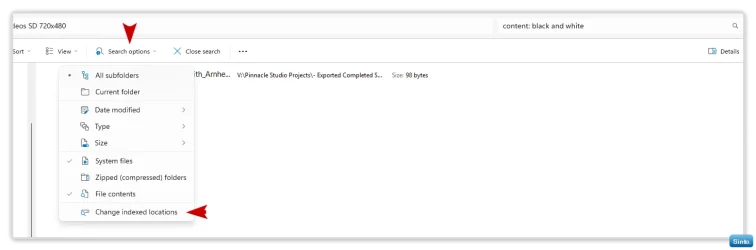
  • Use the content: prefix to search in File Explorer

    To search for tags (in txt file):
    Code:
    content: black and white

    To search for multiple phrases:
    Code:
    content: black and white OR content: B&W
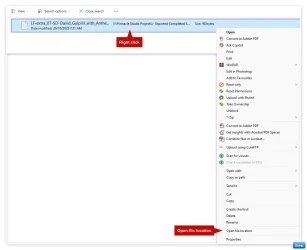
    This finds files that mention either the specific tag or the source name.

    If you want files that contain both phrases:
    Code:
    content: black and white AND content: Gulpilil dance troupe

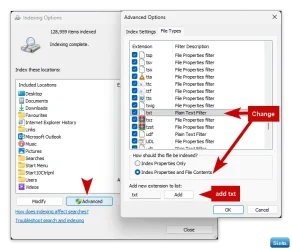
  • Make sure Search Indexing is correct


Win-1965.webp


  • If txt files aren’t included, add txt

Win-1967.webp


Win-1968.webp

Win-1969.webp
 
Last edited:

My Computers My Computers

  • At a glance

    Windows 11 Pro 25H2 Build 26200.9168Intel(R) Core(TM) i7-4770K CPU @ 3.50GHz32.0 GB of I forget and the box is in storage.Gigabyte nVidia GeForce GTX 1660 Super OC 6GB
    OS
    Windows 11 Pro 25H2 Build 26200.9168
    Computer type
    PC/Desktop
    Manufacturer/Model
    Sin-built 2013
    CPU
    Intel(R) Core(TM) i7-4770K CPU @ 3.50GHz
    Motherboard
    ASUS ROG Maximus VI Formula
    Memory
    32.0 GB of I forget and the box is in storage.
    Graphics Card(s)
    Gigabyte nVidia GeForce GTX 1660 Super OC 6GB
    Sound Card
    ROG SupremeFX Formula 8-Channel High Definition Audio
    Monitor(s) Displays
    5 x LG 25MS500-B - 1 x 24MK430H-B - 1 x Wacom Pro 22" Touch Screen Tablet
    Screen Resolution
    All over the place
    Hard Drives
    Too many to list. OS on Samsung 1TB 870 QVO SATA
    PSU
    Silverstone 1500
    Case
    NZXT Phantom 820 Full-Tower Case
    Cooling
    Noctua NH-D15 Elite Class Dual Tower CPU Cooler / 6 x EziDIY 120mm / 2 x Corsair 140mm somethings / 1 x 140mm Thermaltake something / 2 x 200mm Corsair.
    Keyboard
    Corsair K95 / Logitech diNovo Edge Wireless
    Mouse
    Logitech: G402 / G502 / Mx Masters / Mx Air Cordless
    Internet Speed
    2000/500Mbps
    Browser
    All sorts
    Antivirus
    Kaspersky Premium
    Other Info
    ㅤㅤㅤㅤㅤㅤㅤㅤㅤㅤㅤㅤㅤㅤㅤㅤㅤㅤㅤㅤㅤㅤㅤㅤㅤㅤㅤㅤㅤㅤㅤㅤㅤㅤㅤㅤㅤㅤㅤㅤ⠀⠀⠀⠀⠀⠀⠀⠀⠀⠀
    TP-Link BE9300 WiFi 7 Bluetooth 5.4 (Archer TBE550E)
    TP-Link TX201 V1 2.5GB Lan

    Grandstream HT812 - VoIP
    ASUS DSL-AX82U - Mesh
    ASUS RT-AC68U - Mesh
    ASUS RT-BE88U Router

    Brother MFC-L2880DW Printer

    I’m on a horse.
  • At a glance

    Windows 11 Pro 25H2 Build 26200.9168 (Wifes)13th Generation Intel® Core™ i5-1340P Process...16GB LPDDR5-52001x Intel® Iris® Xe Graphics
    Operating System
    Windows 11 Pro 25H2 Build 26200.9168 (Wifes)
    Computer type
    Laptop
    Manufacturer/Model
    LENOVO Yoga 7 14IRL8 - Type 82YL
    CPU
    13th Generation Intel® Core™ i5-1340P Processor(Core™ i5-1340P)
    Memory
    16GB LPDDR5-5200
    Graphics card(s)
    1x Intel® Iris® Xe Graphics
    Sound Card
    Optimized with Dolby Atmos®
    Screen Resolution
    QHD 2880 x 1800 OLED
    Hard Drives
    M.2 512 GB SSD PCIe
    Mouse
    Logiteck MX Master 3S
    Internet Speed
    2000/500
    Antivirus
    Defender / Malwarebytes
    Other Info
    …still on a horse.


    Wireless Network: Wi-Fi 6E 2x2 AX; Bluetooth® 5.1 or above
    Ports: 1x 1 Novo button; 2 in 1 Audio Combo jack; Micro SD Card Reader; HDMI 1.4b; 2 x USB Type-C (TBT4)
    USB 3.2 Gen 2 DP 1.4a
    PD 3.0); 1 x USB 3.2 Gen1 Type A
    Camera
    1x 1080P FHD IR/RGB Hybrid with Privacy Shutter and Dual Array Microphone
    Graphics
    1x Intel® Iris® Xe Graphics
    Monitor
    14" WUXGA
    Form Factor
    Convertible Notebook
  • Windows 11 Pro 25H2 Build 26200.9168 (Wifes)

    Yoga 7 2-in-1 14IML9 - Type 83DJ

    Processor: Intel® Core™ Ultra 7 155H Processor(Core™ Ultra 7 155H)

    Memory: 32GB LPD5X-7467

    Hard Drive: 1 TB SSD PCIe

    Wireless Network: 1x Wi-Fi 6E 2x2 AX; Bluetooth® 5.1 or above

    Ports: 1 x HDMI 2.1 TMDS; 1 x Novo Button; 1 x Combo Audio Jack
    2 x USB-C (USB 4.0)
    1 x USB-A 3.2 Gen 1

    Camera: 1080P FHD IR Hybrid with Dual Microphone

    Graphics: Intel® Arc™ Graphics

    Monitor: 14" 2.8K

    ...Where's my horse?
Thanks to all who responded. I think I've cobbled together a system to handle things with ambiguous names now.

By the way, with regards to the Tags and Comments fields not being present for my files, I think this must be related to the file type for some reason. I have those fields on .MKV files but the ones I was trying to tag were .AVI. It beats me why they chose not to allow Tags and Comments for .AVI files but it is what it is....
 

My Computer My Computer

At a glance

Win 11 ProAMD Ryzen 7 7735U16GBAMD Radeon™ 680M Graphics
OS
Win 11 Pro
Computer type
Laptop
Manufacturer/Model
HP Elitebook 665 G11
CPU
AMD Ryzen 7 7735U
Memory
16GB
Graphics Card(s)
AMD Radeon™ 680M Graphics
Monitor(s) Displays
1920 x 1200
Hard Drives
512GB SSD
Browser
Brave, Chrome
Other Info
Windows version: 24H2
I've been using this for some time:

MetaX

$9.95 -- Unregistered versions can tag up to 5 files, after that you'll need to register.
Runs On: Windows 11, 10, 8, 7, Vista
Requires: .NET Framework 3.5


Tag Your Movies To Look Perfect in iTunes, Apple TV or other Media Players

When you want your movies to look as good as those purchased from iTunes, with cover art, descriptions, ratings, actors and more, you NEED MetaX.

With only a mouse click or two, MetaX will scour all the major sources of movie and TV information on the web: TVDB, TheMovieDB, Amazon, and tagChimp, as well as IMDB and Yahoo posters and display the information. You can select from multiple entries to get just the look you want, then quickly write the tags into the file so that it shows up in iTunes, Apple TV or whatever media play you use, just like it would if you had purchased the movie from iTunes.

MetaX supports MP4, M4V, MOV, AVI, MKV and WMV files.

Not all formats support all tags. AVI files in particular don't support most tags, including not supporting cover art.

To install MetaX on Windows, go to Programs and Features and under Features turn on .NET Framework 3.5.

Check out the MetaX YouTube channel https://www.youtube.com/channel/UCy17FLxMu1AIhb07017qepQ
The MetaX YouTube channel has lots of instructional videos

Great for TV Shows
By using theTVDB you can tag an entire season of episodes with just a couple of clicks.

Set Ratings for Parental Control
Set the rating of a show to allow parental controls to work. You can even use country specific ratings for the UK, Germany, France, Canada, Japan, New Zealand, Ireland and Japan.

Easy To Customize
MetaX has lots of preferences that allow it to work the way you want it to. You can configure MetaX to copy the tagged file to a different location, set the filename or title based on information from the show (title, year, showName, season, episode and more). You can have MetaX pull the movie name or TV Show, season and episode number from the filename, you can save a copy of the untagged file, you can specify which data sources you want to use, and what order to display them in the search results, and have MetaX automatically update iTunes and MovieLibrary when it tags a file.

Import data from MyMovies or other XML files
MetaX will import data from the MyMovies files, or from NFO files.

Find Great Cover Art
You can get cover art from any of the data sources (theMovieDB, theTVDb, iTunes, Amazon or Yahoo). You can also use files you've downloaded, use cut and paste from websites, and even select a frame from the movie itself!

 

My Computer My Computer

At a glance

W11 Proi7-12700128GB DDR4NVIDIA GeForce GTX 1050Ti, 4GB discrete memory
OS
W11 Pro
Computer type
PC/Desktop
Manufacturer/Model
Gigabyte
CPU
i7-12700
Motherboard
B760M G P WIFI DDR4
Memory
128GB DDR4
Graphics Card(s)
NVIDIA GeForce GTX 1050Ti, 4GB discrete memory
Sound Card
Realtek HD switching output between each monitor, a soundbar, headphones, earphones
Monitor(s) Displays
2 Vizio 40" D-series LED Smart TV in Monitor-Mode
Screen Resolution
1080p 1920 x 1080
Hard Drives
Internal: Bootdrive WD_Black SN850X Gen4 NVMe 1TB SSD; secondary WD_Black SN770 NVMe SSD GAME DRIVE 2 TB PCI Gen 4 x4
External: 2 Seagate 6TB Backup Hubs, 2 Seagate 6TB Expansion Drives
NAS: WD EX2 Ultra 16TB Cloud Server, with WD 8TB HD attached
PSU
ATX - RM750e-Modular
Case
CORSAIR 4000D AIRFLOW Tempered Glass Mid-Tower ATX Case
Cooling
Laminar CPU Cooler plus two CORSAIR 120mm AirGuide fans, utilizing anti-vortex vanes
Keyboard
Logitech K740 Illuminated Keyboard
Mouse
LogiTech M720 Triathlon Multi-3-Device BT & Wireless
Internet Speed
1 Gbps

Latest Support Threads

Back
Top Bottom