Issue when reinstalling Windows


CompuGeekCasey

Active member
Member
Local time
6:27 PM
Posts
55
OS
Windows 11 Home 25H2 (OS Build: 26200.7849)
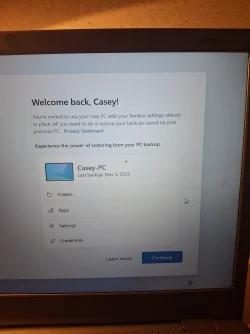
I had to reinstall Windows on my pc due to issues I was having and all went well until it as if I want to restore a backup and I state that I want to set it up as a new pc, but it still restores the latest backup. Any help of advice is appreciated!
 
Last edited:

My Computer My Computer

At a glance

Windows 11 Home 25H2 (OS Build: 26200.7849)AMD Athlon Silver 7120U 2.40 gigahertz8GB with 7.25 Gigabytes Usable Installed Memory512MB ATI AMD Radeon Graphics (HP)
OS
Windows 11 Home 25H2 (OS Build: 26200.7849)
Computer type
Laptop
Manufacturer/Model
HP Laptop 15-fc0xxx
CPU
AMD Athlon Silver 7120U 2.40 gigahertz
Motherboard
HP 8DC9 52.52
Memory
8GB with 7.25 Gigabytes Usable Installed Memory
Graphics Card(s)
512MB ATI AMD Radeon Graphics (HP)
Sound Card
Realtek High Definition Audio
Monitor(s) Displays
Integrated Monitor (15.3"vis, May 2021)
Screen Resolution
1366 X 768
Hard Drives
SAMSUNG MZVL8256HEJD-00BH1 NVMe SSD
Keyboard
Standard PS/2 Keyboard
Mouse
USB HID-compliant mouse
Internet Speed
103.67Mbps (Up) and 11.22 Mbps (Down)
Browser
Microsoft Edge
Antivirus
Windows Security
Did you do a clean install, deleting all partitions on the drive before proceeding?
What kind of backup you have and where is it stored?

Can you be more clear: "until it as if I want to restore a backup and I state that I want to set it up as a new pc, but it still restores the latest backup"
 

My Computers My Computers

  • At a glance

    Windows 11 Pro - Windows 7 HP 64 - Lubuntui5 6600K - 800MHz to 4400MHz4+4G GSkill DDR4 3000IG - Intel 530
    OS
    Windows 11 Pro - Windows 7 HP 64 - Lubuntu
    Computer type
    PC/Desktop
    Manufacturer/Model
    custom build
    CPU
    i5 6600K - 800MHz to 4400MHz
    Motherboard
    GA-Z170-HD3P
    Memory
    4+4G GSkill DDR4 3000
    Graphics Card(s)
    IG - Intel 530
    Monitor(s) Displays
    Samsung 226BW
    Screen Resolution
    1680x1050
    Hard Drives
    (1) -1 SM951 – 128GB M.2 AHCI PCIe SSD drive for Win 11
    (2) -1 WD SATA 3 - 1T for Data
    (3) -1 WD SATA 3 - 1T for backup
    (4) -1 BX500 SSD - 256G for Windows 7 and Lubuntu
    PSU
    Thermaltake 450W TR2 gold
    Keyboard
    Old and good Chicony mechanical keyboard
    Mouse
    Logitech mX performance - 9 buttons (had to disable some)
    Internet Speed
    500 Mb/s
    Browser
    Firefox 64
  • At a glance

    Windows 11 Proi7-4500U 800- 3000MHz(4+4)G DDR3 1600IG intel 4400 + NVIDIA GeForce GT 745M
    Operating System
    Windows 11 Pro
    Computer type
    Laptop
    Manufacturer/Model
    Asus Q550LF
    CPU
    i7-4500U 800- 3000MHz
    Motherboard
    Asus Q550LF
    Memory
    (4+4)G DDR3 1600
    Graphics card(s)
    IG intel 4400 + NVIDIA GeForce GT 745M
    Sound Card
    Realtek
    Monitor(s) Displays
    LG Display LP156WF4-SPH1
    Screen Resolution
    1920 x 1080
    Hard Drives
    BX500 120G SSD for Windows and programs
    & 1T HDD for data
    Internet Speed
    500 Mb/s
    Browser
    Firefox 64
Doing a clean install of Windows is best if no other drive is attached, can prevent picking up unwanted things. However, a backup should not be stored on the only drive in the computer, whether on the only partition or a second partition it can be lost if the drive has problems.
 

My Computers My Computers

  • At a glance

    Win11 Pro RTM Version 24H2 Build 26100.4202Intel Core i5 11th Gen. 2.40GHz12GB
    OS
    Win11 Pro RTM Version 24H2 Build 26100.4202
    Computer type
    Laptop
    Manufacturer/Model
    Dell Vostro 3400
    CPU
    Intel Core i5 11th Gen. 2.40GHz
    Memory
    12GB
    Hard Drives
    256GB SSD NVMe M.2
  • At a glance

    Win11 Pro RTM Version 24H2 Build 26100.4202Intel Core i5 10th Gen. 2.90GHz16GBOnboard, no VGA, using a DisplayPort-to-VGA a...
    Operating System
    Win11 Pro RTM Version 24H2 Build 26100.4202
    Computer type
    PC/Desktop
    Manufacturer/Model
    Dell Vostro 5890
    CPU
    Intel Core i5 10th Gen. 2.90GHz
    Memory
    16GB
    Graphics card(s)
    Onboard, no VGA, using a DisplayPort-to-VGA adapter
    Monitor(s) Displays
    24" Dell
    Hard Drives
    512GB SSD NVMe, 4TB Seagate HDD
    Browser
    Firefox, Edge
    Antivirus
    Windows Defender/Microsoft Security
Did you do a clean install, deleting all partitions on the drive before proceeding?
What kind of backup you have and where is it stored?

Can you be more clear: "until it as if I want to restore a backup and I state that I want to set it up as a new pc, but it still restores the latest backup"
Yes I did all clean install, deleting all partitions on the drive.

All my apps and settings it looks like and I guess in the cloud with microsoft.

During the Installation it ask if I want to install from a backup I'm guessing a cloud backup stored with Microsoft and I just click setup as new computer, but it still restore the cloud backup. It's
 

My Computer My Computer

At a glance

Windows 11 Home 25H2 (OS Build: 26200.7849)AMD Athlon Silver 7120U 2.40 gigahertz8GB with 7.25 Gigabytes Usable Installed Memory512MB ATI AMD Radeon Graphics (HP)
OS
Windows 11 Home 25H2 (OS Build: 26200.7849)
Computer type
Laptop
Manufacturer/Model
HP Laptop 15-fc0xxx
CPU
AMD Athlon Silver 7120U 2.40 gigahertz
Motherboard
HP 8DC9 52.52
Memory
8GB with 7.25 Gigabytes Usable Installed Memory
Graphics Card(s)
512MB ATI AMD Radeon Graphics (HP)
Sound Card
Realtek High Definition Audio
Monitor(s) Displays
Integrated Monitor (15.3"vis, May 2021)
Screen Resolution
1366 X 768
Hard Drives
SAMSUNG MZVL8256HEJD-00BH1 NVMe SSD
Keyboard
Standard PS/2 Keyboard
Mouse
USB HID-compliant mouse
Internet Speed
103.67Mbps (Up) and 11.22 Mbps (Down)
Browser
Microsoft Edge
Antivirus
Windows Security
Yes I did all clean install, deleting all partitions on the drive.
Ok
All my apps and settings it looks like and I guess in the cloud with microsoft.

During the Installation it ask if I want to install from a backup (install what?) I'm guessing a cloud backup stored with Microsoft and I just click setup as new computer, but it still restore the cloud backup. It's
Can't understand what you mean. What language do you speak?
 

My Computers My Computers

  • At a glance

    Windows 11 Pro - Windows 7 HP 64 - Lubuntui5 6600K - 800MHz to 4400MHz4+4G GSkill DDR4 3000IG - Intel 530
    OS
    Windows 11 Pro - Windows 7 HP 64 - Lubuntu
    Computer type
    PC/Desktop
    Manufacturer/Model
    custom build
    CPU
    i5 6600K - 800MHz to 4400MHz
    Motherboard
    GA-Z170-HD3P
    Memory
    4+4G GSkill DDR4 3000
    Graphics Card(s)
    IG - Intel 530
    Monitor(s) Displays
    Samsung 226BW
    Screen Resolution
    1680x1050
    Hard Drives
    (1) -1 SM951 – 128GB M.2 AHCI PCIe SSD drive for Win 11
    (2) -1 WD SATA 3 - 1T for Data
    (3) -1 WD SATA 3 - 1T for backup
    (4) -1 BX500 SSD - 256G for Windows 7 and Lubuntu
    PSU
    Thermaltake 450W TR2 gold
    Keyboard
    Old and good Chicony mechanical keyboard
    Mouse
    Logitech mX performance - 9 buttons (had to disable some)
    Internet Speed
    500 Mb/s
    Browser
    Firefox 64
  • At a glance

    Windows 11 Proi7-4500U 800- 3000MHz(4+4)G DDR3 1600IG intel 4400 + NVIDIA GeForce GT 745M
    Operating System
    Windows 11 Pro
    Computer type
    Laptop
    Manufacturer/Model
    Asus Q550LF
    CPU
    i7-4500U 800- 3000MHz
    Motherboard
    Asus Q550LF
    Memory
    (4+4)G DDR3 1600
    Graphics card(s)
    IG intel 4400 + NVIDIA GeForce GT 745M
    Sound Card
    Realtek
    Monitor(s) Displays
    LG Display LP156WF4-SPH1
    Screen Resolution
    1920 x 1080
    Hard Drives
    BX500 120G SSD for Windows and programs
    & 1T HDD for data
    Internet Speed
    500 Mb/s
    Browser
    Firefox 64

Attachments

  • 20250503_171639.webp
    20250503_171639.webp
    682.7 KB · Views: 1

My Computer My Computer

At a glance

Windows 11 Home 25H2 (OS Build: 26200.7849)AMD Athlon Silver 7120U 2.40 gigahertz8GB with 7.25 Gigabytes Usable Installed Memory512MB ATI AMD Radeon Graphics (HP)
OS
Windows 11 Home 25H2 (OS Build: 26200.7849)
Computer type
Laptop
Manufacturer/Model
HP Laptop 15-fc0xxx
CPU
AMD Athlon Silver 7120U 2.40 gigahertz
Motherboard
HP 8DC9 52.52
Memory
8GB with 7.25 Gigabytes Usable Installed Memory
Graphics Card(s)
512MB ATI AMD Radeon Graphics (HP)
Sound Card
Realtek High Definition Audio
Monitor(s) Displays
Integrated Monitor (15.3"vis, May 2021)
Screen Resolution
1366 X 768
Hard Drives
SAMSUNG MZVL8256HEJD-00BH1 NVMe SSD
Keyboard
Standard PS/2 Keyboard
Mouse
USB HID-compliant mouse
Internet Speed
103.67Mbps (Up) and 11.22 Mbps (Down)
Browser
Microsoft Edge
Antivirus
Windows Security
That's OneDrive again. Still it should not have used this backup when you selected "setup as new computer".
 

My Computers My Computers

  • At a glance

    Win 11 ProAMD Ryzen™ 7 7730U24GB Dual-Channel DDR4 @ 1596MHz (22-22-22-52)512MB ATI AMD Radeon Graphics (ASUStek Comput...
    OS
    Win 11 Pro
    Computer type
    Laptop
    Manufacturer/Model
    ASUS Vivobook
    CPU
    AMD Ryzen™ 7 7730U
    Motherboard
    M1605YA
    Memory
    24GB Dual-Channel DDR4 @ 1596MHz (22-22-22-52)
    Graphics Card(s)
    512MB ATI AMD Radeon Graphics (ASUStek Computer Inc)
    Monitor(s) Displays
    Generic PnP Monitor (1920x1200@60Hz) - P1 PLUS (1920x1080@59Hz)
    Screen Resolution
    1920 X 1200
    Hard Drives
    953GB Western Digital WD
    PSU
    45 Watts
    Mouse
    Lenovo Bluetooth.
    Internet Speed
    500 Mbps
    Browser
    Edge
    Antivirus
    Defender
  • At a glance

    Windows 11AMD Ryzen 7 5800H / 3.2 GHz32 GB DDR4 SDRAM 3200 MHzNVIDIA GeForce RTX 3060 6 GB GDDR6 SDRAM
    Operating System
    Windows 11
    Computer type
    Laptop
    Manufacturer/Model
    ACER NITRO
    CPU
    AMD Ryzen 7 5800H / 3.2 GHz
    Motherboard
    CZ Scala_CAS (FP6)
    Memory
    32 GB DDR4 SDRAM 3200 MHz
    Graphics card(s)
    NVIDIA GeForce RTX 3060 6 GB GDDR6 SDRAM
    Sound Card
    Realtek Audio. NVIDIA High Definition Audio
    Monitor(s) Displays
    15.6" LED backlight 1920 x 1080 (Full HD) 144 Hz
    Screen Resolution
    1920 x 1080 (Full HD)
    Hard Drives
    Samsung 970 Evo Plus 2TB NVMe M.2
    PSU
    180 Watt, 19.5 V
    Mouse
    Lenovo Bluetooth
    Internet Speed
    500 Mbps
    Browser
    Edge
    Antivirus
    Defender
Maybe redo and this time make sure there's no network for it to hook up to? Then it can't restore what isn't there.

But keep in mind I'm just tossing technical darts: Someone may know a proper workaround (or there might not be a "proper" one if MS is ignoring your decision to do a fresh build).
 

My Computer My Computer

At a glance

Windows 11 Pro 24H2Intel Ultra 7 155H16gbIntel Arc integrated
OS
Windows 11 Pro 24H2
Computer type
Laptop
Manufacturer/Model
HP
CPU
Intel Ultra 7 155H
Memory
16gb
Graphics Card(s)
Intel Arc integrated
Hard Drives
SSD
Ok


Can't understand what you mean. What language do you speak?
Hi.

Windows installation nowadays asks close to the end of the installation if one wishes to install from a backup (onedrive backup) only for some settings and configurations, not the whole OS backup.
 

My Computers My Computers

  • At a glance

    Windows 11 Pro build 26200.8524Intel i7-4790Teams DDR3-1600 4x4 GBMSI Nvidia GeForce GTX 1050Ti
    OS
    Windows 11 Pro build 26200.8524
    Computer type
    PC/Desktop
    Manufacturer/Model
    Home Built
    CPU
    Intel i7-4790
    Motherboard
    Asus H97 Pro Gamer with add-on TPM1.2 module
    Memory
    Teams DDR3-1600 4x4 GB
    Graphics Card(s)
    MSI Nvidia GeForce GTX 1050Ti
    Sound Card
    Realtek ALC1150
    Monitor(s) Displays
    Dell P2425D
    Screen Resolution
    2560 by 1440 pixels
    Hard Drives
    Corsair NVMe M.2 Core XT 1000 GB (Windows 11 v.25H2); Samsung SATA Evo 870 500 GB (Windows 11 v.25H2);
    PSU
    Corsair HX850
    Case
    Gigabyte Solo 210
    Cooling
    Zalman CNPS7X Tower
    Keyboard
    Microsoft AIO Wireless (includes touchpad)
    Mouse
    HP S1000 Plus Wireless
    Internet Speed
    500 Mb fiber optic
    Browser
    Chrome; MS Edge
    Antivirus
    Windows Defender
  • At a glance

    MacOS 12 MontereyIntel Core i58 GBIntel integrated
    Operating System
    MacOS 12 Monterey
    Computer type
    Laptop
    Manufacturer/Model
    Apple Macbook Air
    CPU
    Intel Core i5
    Memory
    8 GB
    Graphics card(s)
    Intel integrated
    Screen Resolution
    1440 by 900 pixels
    Hard Drives
    128 GB
    Keyboard
    Built-in
    Mouse
    Microsoft Wireless
    Internet Speed
    802.11 ac
    Browser
    Chrome; Safari
    Antivirus
    N/A
That's OneDrive again. Still it should not have used this backup when you selected "setup as new computer".
That is what is suspected, but wasn't sure.For some reason it did restore the backup.
Maybe redo and this time make sure there's no network for it to hook up to? Then it can't restore what isn't there.

But keep in mind I'm just tossing technical darts: Someone may know a proper workaround (or there might not be a "proper" one if MS is ignoring your decision to do a fresh build).
I didn't see an option like "I don't have internet" on the wifi connection page.
 

My Computer My Computer

At a glance

Windows 11 Home 25H2 (OS Build: 26200.7849)AMD Athlon Silver 7120U 2.40 gigahertz8GB with 7.25 Gigabytes Usable Installed Memory512MB ATI AMD Radeon Graphics (HP)
OS
Windows 11 Home 25H2 (OS Build: 26200.7849)
Computer type
Laptop
Manufacturer/Model
HP Laptop 15-fc0xxx
CPU
AMD Athlon Silver 7120U 2.40 gigahertz
Motherboard
HP 8DC9 52.52
Memory
8GB with 7.25 Gigabytes Usable Installed Memory
Graphics Card(s)
512MB ATI AMD Radeon Graphics (HP)
Sound Card
Realtek High Definition Audio
Monitor(s) Displays
Integrated Monitor (15.3"vis, May 2021)
Screen Resolution
1366 X 768
Hard Drives
SAMSUNG MZVL8256HEJD-00BH1 NVMe SSD
Keyboard
Standard PS/2 Keyboard
Mouse
USB HID-compliant mouse
Internet Speed
103.67Mbps (Up) and 11.22 Mbps (Down)
Browser
Microsoft Edge
Antivirus
Windows Security
Doing a clean install of Windows is best if no other drive is attached, can prevent picking up unwanted things.
My NVMe drive has C, E, and F partitions. I'm planning to install a second NVMe drive (to replace a slow HDD). What's the best way to proceed?


However, a backup should not be stored on the only drive in the computer, whether on the only partition or a second partition it can be lost if the drive has problems.
That does without saying, but I know of people who store their Adobe Lightroom Classic catalog and the catalog backup on the same drive partition. Lose the catalog drive and lose the backups. Some people aren't/weren't aware of that.
 

My Computer My Computer

At a glance

Windows 11 2H25AMD 9900X64 GBAMD 9070 XT
OS
Windows 11 2H25
Computer type
PC/Desktop
Manufacturer/Model
DIY
CPU
AMD 9900X
Motherboard
MSI X870E Carbon
Memory
64 GB
Graphics Card(s)
AMD 9070 XT
Sound Card
built-in
Monitor(s) Displays
Dell 24"
Hard Drives
Sabrent 1 TB NVMe, 4 x SSD (need to check models), 4 x 3.5" HDD, 8-16 TB, all WD
PSU
Seasonic 850
Case
Fractal Design North XL (which I likw)
Cooling
Corsair AIO for CPU, fans for case
Keyboard
Das Keyboard 4
Mouse
Corsair M65 (white)
Internet Speed
1 TB download
Browser
Firefox
Antivirus
Bitdefender
Other Info
Also have Lenovo T14S laptop (me) and Lenovo Slim 71 (wife)
That is what is suspected, but wasn't sure.For some reason it did restore the backup.

I didn't see an option like "I don't have internet" on the wifi connection page.

I'm thinking that you disconnect the external cable on your router or similar. Let it hook up to the WIFI if you want, just don't let it out of the local network.
 

My Computer My Computer

At a glance

Windows 11 Pro 24H2Intel Ultra 7 155H16gbIntel Arc integrated
OS
Windows 11 Pro 24H2
Computer type
Laptop
Manufacturer/Model
HP
CPU
Intel Ultra 7 155H
Memory
16gb
Graphics Card(s)
Intel Arc integrated
Hard Drives
SSD
My NVMe drive has C, E, and F partitions. I'm planning to install a second NVMe drive (to replace a slow HDD). What's the best way to proceed?

You should really start your own thread.
 

My Computers My Computers

  • At a glance

    Win 11 Pro 25H2 26200.9457Intel® Core™ i7-14700KG.SKILL Ripjaws S5 Series 64GB (2 x 32GB) DDR5ASUS GeForce RTX 4070 Super 12GB
    OS
    Win 11 Pro 25H2 26200.9457
    Computer type
    PC/Desktop
    Manufacturer/Model
    Self Built
    CPU
    Intel® Core™ i7-14700K
    Motherboard
    ASUS TUF Z690-PLUS WIFI (BIOS 4505)
    Memory
    G.SKILL Ripjaws S5 Series 64GB (2 x 32GB) DDR5
    Graphics Card(s)
    ASUS GeForce RTX 4070 Super 12GB
    Sound Card
    Sound Blaster AE-5 Plus
    Monitor(s) Displays
    ASUS TUF Gaming 27" 2K HDR Gaming
    Screen Resolution
    2560 x 1440
    Hard Drives
    Samsung 990 Pro 1TB NVMe (Win 11 25H2)
    SK hynix P41 500GB NVMe
    SK hynix P41 2TB NVMe (x3)
    Crucial P3 Plus 4TB
    PSU
    Corsair RM850x Shift
    Case
    Antec Dark Phantom DP502 FLUX
    Cooling
    Corsair Nautilus 360 RS AIO
    Keyboard
    Logitech MK 320
    Mouse
    Razer Basilisk V3
    Internet Speed
    750Mbs
    Browser
    Firefox
    Antivirus
    Winows Security
    Other Info
    MR 8.1 Home
  • At a glance

    Win 11 Pro 25H2 26200.9457Intel Core i5-1140064 GB DDR4MSI GeForce RTX 3060 Ventus 2X 12GB
    Operating System
    Win 11 Pro 25H2 26200.9457
    Computer type
    PC/Desktop
    Manufacturer/Model
    Self Built
    CPU
    Intel Core i5-11400
    Motherboard
    Asus TUF Gaming Z590 Plus WiFi (BIOS 2803)
    Memory
    64 GB DDR4
    Graphics card(s)
    MSI GeForce RTX 3060 Ventus 2X 12GB
    Sound Card
    SoundBlaster Audigy Fx V2
    Monitor(s) Displays
    Samsung F27T350
    Screen Resolution
    1920x1080
    Hard Drives
    Samsung 980 Pro 1TB
    Samsung 970 EVO Plus 2TB
    Samsung 870 EVO 500GB SSD
    PSU
    Corsair HX750
    Case
    Cougar MX330-G Window
    Cooling
    Thermalright Frozen Edge 240 Black AIO
    Internet Speed
    350Mbps
    Browser
    Firefox
    Antivirus
    Windows Security
  • System Three
    Win 11 Pro 25H2 26200.9457
    ASUS PRIME Z370-P II BIOS 3004 7/12/21
    Intel Core i7-8700 CPU @ 3.20GHz
    32GB DDR4 RAM (4x8)
    EVGA RTX 2060 (used)
    iGPU Intel UHD Graphics 630 (backup)
    Cooler Master Hyper 212
    Mid-Tower Desktop

My Computer My Computer

At a glance

Windows 11 2H25AMD 9900X64 GBAMD 9070 XT
OS
Windows 11 2H25
Computer type
PC/Desktop
Manufacturer/Model
DIY
CPU
AMD 9900X
Motherboard
MSI X870E Carbon
Memory
64 GB
Graphics Card(s)
AMD 9070 XT
Sound Card
built-in
Monitor(s) Displays
Dell 24"
Hard Drives
Sabrent 1 TB NVMe, 4 x SSD (need to check models), 4 x 3.5" HDD, 8-16 TB, all WD
PSU
Seasonic 850
Case
Fractal Design North XL (which I likw)
Cooling
Corsair AIO for CPU, fans for case
Keyboard
Das Keyboard 4
Mouse
Corsair M65 (white)
Internet Speed
1 TB download
Browser
Firefox
Antivirus
Bitdefender
Other Info
Also have Lenovo T14S laptop (me) and Lenovo Slim 71 (wife)
Back
Top Bottom