JavaScript is disabled. For a better experience, please enable JavaScript in your browser before proceeding.
You are using an out of date browser. It may not display this or other websites correctly.
You should upgrade or use an
alternative browser .
Solved Issue with system after reboot, need help finding the cause
somthing has happened to my system today upon rebooting.
i have tried running scans and found no issues.
chkdsk and sfc.
avast AV
using msconfig and rebooting with diagnostic level boot. explorer works fine.
with all my programs disabled. and most of microsofts disabled it works fine.
afer going through and starting microsofts services. it goes weird again,
explorer will not respond. this is with none of any software running other than microsofts services.
i have enabled most of them and it works fine. though it then reboots explorer and the issue starts again.
i have gone through this process several times and i cant find what service it is that is causing the issue.
i really dont want to do a clean install, due to only resontly moved from insider to public version.
i never had this issue with the insider versions.
can any one help?
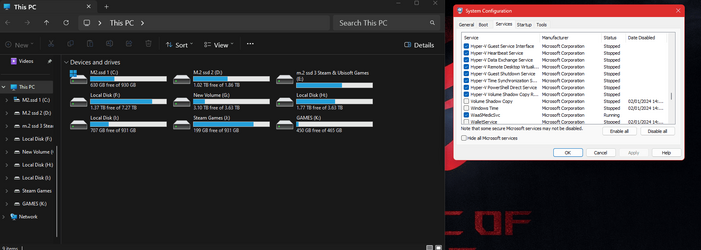
picture is showing what explorer looks like when it starts with all microsoft services running.
minamal services it is as you would expect.
thanks in advance :)
Screenshot 2024-01-02 115418.png
6.2 KB
· Views: 1
win 11 pro i9 9900K 32g ddr4 nvidia rtx3060 OSwin 11 pro Computer typePC/Desktop Manufacturer/Modelself built CPUi9 9900K MotherboardASUS Z390-A Memory32g ddr4 Graphics Card(s)nvidia rtx3060 Sound Cardonboard PSUcorsair 1000w Casecorsair Coolingliquid Internet Speed1TB
Well-known member
Pro User
VIP
Make sure msconfig is set for normal start.
Windows 11 Pro 25H2 26200.8655 AMD Ryzen 7 5825U with Radeon Graphics 16GB
OSWindows 11 Pro 25H2 26200.8655 Computer typeLaptop Manufacturer/ModelAcemagic LX15PRO CPUAMD Ryzen 7 5825U with Radeon Graphics MotherboardBIOS CT_BI_AMI_LX15PRO_AB8139_A-004 Memory16GB Screen Resolution1920 x 1080 Hard DrivesSSD 2TB Internet Speed30 Mbps BrowserBrave AntivirusDefender/Windows Security Other InfoSystem 3
Acer Swift SF114-34 laptop
OS Windows 11 Pro 26200.8655
CPU Pentium Silver N6000
RAM 4GB
BIOS v1.17
SSD Samsung 970 EVO Plus SSD 2TB (an upgrade)
Windows 11 Pro 23H2 22631.2506 Atom N450 1.66GHz 2GB
Operating SystemWindows 11 Pro 23H2 22631.2506 Computer typeLaptop Manufacturer/ModelHP Mini 210-1090NR PC (bought in late 2009!) CPUAtom N450 1.66GHz Memory2GB BrowserBrave AntivirusWebroot
Active member
Thread Starter
if i do that then the issue is there!
win 11 pro i9 9900K 32g ddr4 nvidia rtx3060 OSwin 11 pro Computer typePC/Desktop Manufacturer/Modelself built CPUi9 9900K MotherboardASUS Z390-A Memory32g ddr4 Graphics Card(s)nvidia rtx3060 Sound Cardonboard PSUcorsair 1000w Casecorsair Coolingliquid Internet Speed1TB
Well-known member
Pro User
VIP
if i do that then the issue is there!
But you said you had set msconfig to a diagnostic start?
Windows 11 Pro 25H2 26200.8655 AMD Ryzen 7 5825U with Radeon Graphics 16GB
OSWindows 11 Pro 25H2 26200.8655 Computer typeLaptop Manufacturer/ModelAcemagic LX15PRO CPUAMD Ryzen 7 5825U with Radeon Graphics MotherboardBIOS CT_BI_AMI_LX15PRO_AB8139_A-004 Memory16GB Screen Resolution1920 x 1080 Hard DrivesSSD 2TB Internet Speed30 Mbps BrowserBrave AntivirusDefender/Windows Security Other InfoSystem 3
Acer Swift SF114-34 laptop
OS Windows 11 Pro 26200.8655
CPU Pentium Silver N6000
RAM 4GB
BIOS v1.17
SSD Samsung 970 EVO Plus SSD 2TB (an upgrade)
Windows 11 Pro 23H2 22631.2506 Atom N450 1.66GHz 2GB
Operating SystemWindows 11 Pro 23H2 22631.2506 Computer typeLaptop Manufacturer/ModelHP Mini 210-1090NR PC (bought in late 2009!) CPUAtom N450 1.66GHz Memory2GB BrowserBrave AntivirusWebroot
Active member
Thread Starter
currently using 60% ms services and all my software and it responds as it should.
the following pic everything is enabled above hyper v volume. listed alphabetically
Screenshot 2024-01-02 145757.png
84.6 KB
· Views: 1
win 11 pro i9 9900K 32g ddr4 nvidia rtx3060 OSwin 11 pro Computer typePC/Desktop Manufacturer/Modelself built CPUi9 9900K MotherboardASUS Z390-A Memory32g ddr4 Graphics Card(s)nvidia rtx3060 Sound Cardonboard PSUcorsair 1000w Casecorsair Coolingliquid Internet Speed1TB
Active member
Thread Starter
rebooted @normal boot.
exploder is hung.
from a normal boot and disabling have now reduced to one service.
thanks for pointing me in the right direction.
its now solved
its windows search that is the issue.
Last edited: Jan 2, 2024
win 11 pro i9 9900K 32g ddr4 nvidia rtx3060 OSwin 11 pro Computer typePC/Desktop Manufacturer/Modelself built CPUi9 9900K MotherboardASUS Z390-A Memory32g ddr4 Graphics Card(s)nvidia rtx3060 Sound Cardonboard PSUcorsair 1000w Casecorsair Coolingliquid Internet Speed1TB
Active member
Thread Starter
verified , disabled in services menu rebooted in normal startup and all is ok.
thankyou Kelper!
win 11 pro i9 9900K 32g ddr4 nvidia rtx3060 OSwin 11 pro Computer typePC/Desktop Manufacturer/Modelself built CPUi9 9900K MotherboardASUS Z390-A Memory32g ddr4 Graphics Card(s)nvidia rtx3060 Sound Cardonboard PSUcorsair 1000w Casecorsair Coolingliquid Internet Speed1TB
Well-known member
Pro User
VIP
I do not understand what you did, but well done! I'm happy for you.
Windows 11 Pro 25H2 26200.8655 AMD Ryzen 7 5825U with Radeon Graphics 16GB
OSWindows 11 Pro 25H2 26200.8655 Computer typeLaptop Manufacturer/ModelAcemagic LX15PRO CPUAMD Ryzen 7 5825U with Radeon Graphics MotherboardBIOS CT_BI_AMI_LX15PRO_AB8139_A-004 Memory16GB Screen Resolution1920 x 1080 Hard DrivesSSD 2TB Internet Speed30 Mbps BrowserBrave AntivirusDefender/Windows Security Other InfoSystem 3
Acer Swift SF114-34 laptop
OS Windows 11 Pro 26200.8655
CPU Pentium Silver N6000
RAM 4GB
BIOS v1.17
SSD Samsung 970 EVO Plus SSD 2TB (an upgrade)
Windows 11 Pro 23H2 22631.2506 Atom N450 1.66GHz 2GB
Operating SystemWindows 11 Pro 23H2 22631.2506 Computer typeLaptop Manufacturer/ModelHP Mini 210-1090NR PC (bought in late 2009!) CPUAtom N450 1.66GHz Memory2GB BrowserBrave AntivirusWebroot
Well-known member
Guru
VIP
I do not understand what you did, but well done! I'm happy for you.
I think they turned off the Search Indexing service.
Windows 11 Pro 25H2 Intel Core i7-10700K 16GB (8GB PC4-19200 DDR4 SDRAM x2) NVIDIA GeForce GTX 1050 TI
OSWindows 11 Pro 25H2 Computer typePC/Desktop Manufacturer/ModelPowerSpec B746 CPUIntel Core i7-10700K MotherboardASRock Z490 Phantom Gaming 4/ax Memory16GB (8GB PC4-19200 DDR4 SDRAM x2) Graphics Card(s)NVIDIA GeForce GTX 1050 TI Sound CardRealtek Audio Monitor(s) Displays#1. LG ULTRAWIDE 34" #2. AOC Q32G2WG3 32" Screen Resolution#1. 3440 X 1440 #2. 1920 x 1080 Hard DrivesNVMe WDC WDS100T2B0C-00PXH0 1TB
Samsung SSD 860 EVO 1TB PSU750 Watts (62.5A) CasePowerSpec/Lian Li ATX 205 KeyboardLogitech K270 MouseLogitech M185 BrowserMicrosoft Edge and Firefox AntivirusWebroot SecureAnywhere CE 26.1
Windows 11 Canary Channel Intel Core i5-8400 CPU @ 2.80GHz 16 MB DDR 4-2666
Operating SystemWindows 11 Canary Channel Computer typePC/Desktop Manufacturer/ModelPowerSpec G156 CPUIntel Core i5-8400 CPU @ 2.80GHz MotherboardAsusTeK Prime B360M-A Memory16 MB DDR 4-2666 Monitor(s) Displays23" Speptre HDMI 75Hz Screen Resolution1920x1080 Hard DrivesSamsung 970 EVO 500GB NVMe KeyboardLogitek K270 MouseLogitek M185 BrowserFirefox, Edge and Edge Canary AntivirusWindows Defender