
Issues with AMD Adrenalin software versions 26.1.1 and 26.5.2: how to fix them?


Local time
2:54 PM
Posts
2
OS
Windows 11 23H2 Build 22631.2861
Greetings

I am having trouble with the latest video driver updates for my RX 590 GPU; the issue is that when I try to install the AMD software, I get the error "Failed to initialize graphics backend for OpenGL," and it won't let me proceed with the installation.

Before this, I was using version 24.9.1, which was very stable on my system, but eventually, it started throwing a specific error. I tried reinstalling it—first using DDU for a clean uninstall—but that didn't fix the issue, so I decided to try the only two versions released this year (2026) for my specific card model, and that’s when the problem occurs 😔,
But right now, what I need most is to figure out how to fix that OpenGL issue, and I hope AMD improves compatibility for these GPUs; after all, if they are still supported, these kinds of conflicts shouldn't exist.
I'll leave a screenshot of the error, and I would really appreciate the help.
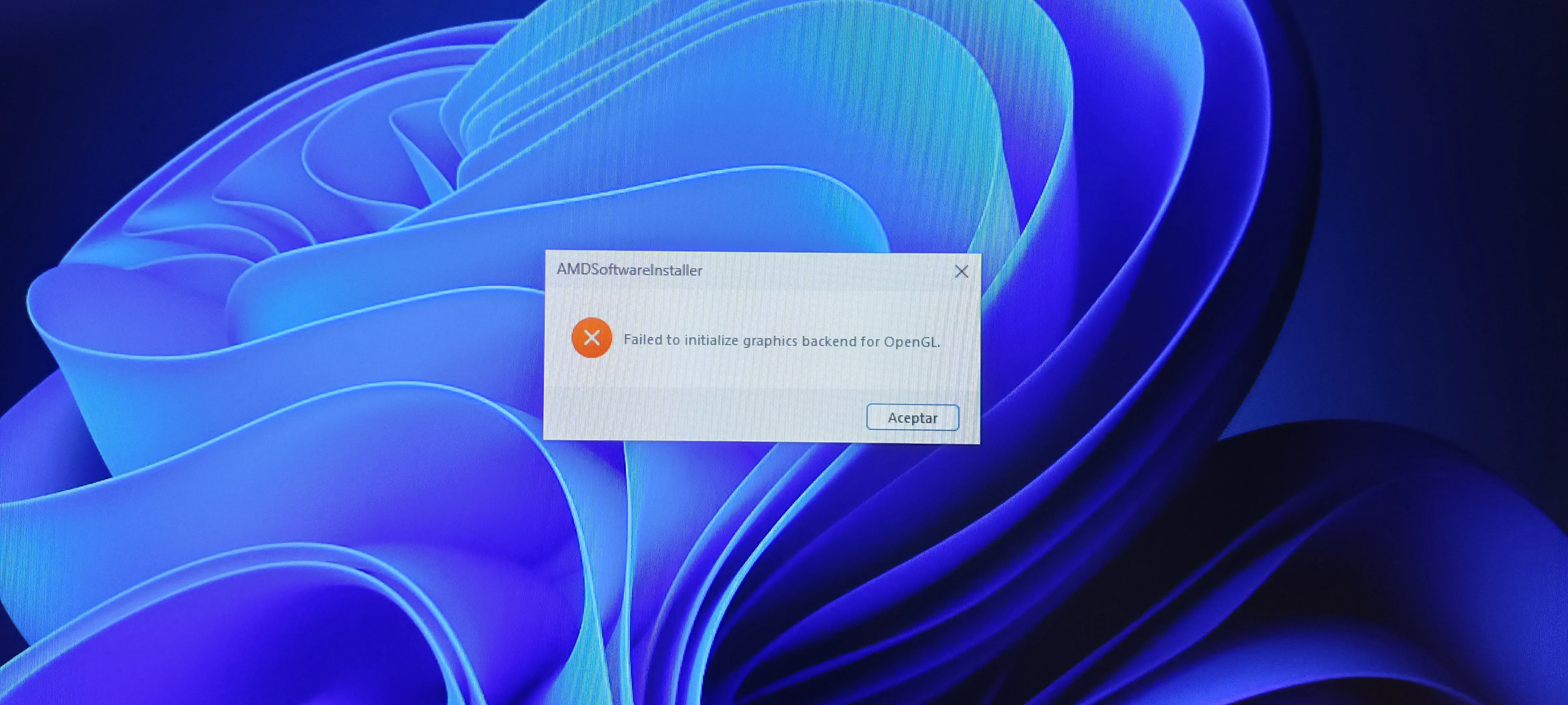
IMG_20261011_145559.webp
 
Windows Build/Version
Windows 11 23H2 Build 22631.2861

My Computer My Computer

At a glance

Windows 11 23H2 Build 22631.2861i7 12700kCorsair Vengeance 16GB DDR4 3000mhzRX 590 Sapphire Pulse 8GB GDDR5
OS
Windows 11 23H2 Build 22631.2861
Computer type
PC/Desktop
Manufacturer/Model
MSI
CPU
i7 12700k
Motherboard
MSI Z790-P Pro Wifi DDR4
Memory
Corsair Vengeance 16GB DDR4 3000mhz
Graphics Card(s)
RX 590 Sapphire Pulse 8GB GDDR5
PSU
Cooler Master Silent Pro Gold 1200W
Cooling
DeepCool Assassin III
Greetings

I am having trouble with the latest video driver updates for my RX 590 GPU; the issue is that when I try to install the AMD software, I get the error "Failed to initialize graphics backend for OpenGL," and it won't let me proceed with the installation.

Before this, I was using version 24.9.1, which was very stable on my system, but eventually, it started throwing a specific error. I tried reinstalling it—first using DDU for a clean uninstall—but that didn't fix the issue, so I decided to try the only two versions released this year (2026) for my specific card model, and that’s when the problem occurs 😔,
But right now, what I need most is to figure out how to fix that OpenGL issue, and I hope AMD improves compatibility for these GPUs; after all, if they are still supported, these kinds of conflicts shouldn't exist.
I'll leave a screenshot of the error, and I would really appreciate the help.
An Open GL error in 2026? Haven't seen that in a while.
What is that CPU 850 va you have listed in your specs?

Your OS 23H2 Build 22631.2861 needs an update as well.
Start there with the windows updates, DDU the GPU driver & software again and let windows choose the driver for you.
 

My Computers My Computers

  • At a glance

    All Branches but StableAMD Ryzen 7 7735HS 3200-4500 Mhz 8 cores x 232 GB DDR5Radeon Graphic / NVIDIA GeForce RTX 4060 8 GB...
    OS
    All Branches but Stable
    Computer type
    Laptop
    Manufacturer/Model
    Acer Nitro ANV15-51
    CPU
    AMD Ryzen 7 7735HS 3200-4500 Mhz 8 cores x 2
    Motherboard
    Sportage_RBH
    Memory
    32 GB DDR5
    Graphics Card(s)
    Radeon Graphic / NVIDIA GeForce RTX 4060 8 GB GDDR6
    Sound Card
    AMD/Realtek(R) Audio
    Monitor(s) Displays
    Integrated Monitor (15.3"vis)
    Screen Resolution
    FHD 1920X1080 16:9 144Hz
    Hard Drives
    KINGSTON OM8SEP4512Q-AA 1TB
    Western Digital 256GB
    PSU
    19V DC 6.32 A 120 W
    Cooling
    Dual Fans
    Mouse
    MS Bluetooth
    Internet Speed
    Fiber 1GB Cox -us & 1GB Orange-fr
    Browser
    Edge Canary- Firefox Nightly-Chrome Dev-Chrome Dev
    Antivirus
    Windows Defender
  • At a glance

    Windows 11 BetaAMD A9-94208 GB of DDR4AMD Radeon R5
    Operating System
    Windows 11 Beta
    Computer type
    Laptop
    Manufacturer/Model
    Asus X751BP
    CPU
    AMD A9-9420
    Memory
    8 GB of DDR4
    Graphics card(s)
    AMD Radeon R5
    Screen Resolution
    1600x900
    Hard Drives
    Seagate 1 TB
¿Un error de OpenGL en 2026? Hace tiempo que no veía algo así.
¿Qué procesador 850 va tienes listado en tus especificaciones?

Tu sistema operativo OS 23H2 Build 22631.2861 también necesita una actualización.
Empieza por ahí con las actualizaciones de Windows, desinstala de nuevo el controlador y el software de la GPU con DDU y deja que Windows elija el controlador por ti.
Hi, I'm correcting the processor info: it's an i7-12700K.
For now, I need a solution that doesn't involve updating Windows or reinstalling it; my internet connection is terrible for doing all that.
 

My Computer My Computer

At a glance

Windows 11 23H2 Build 22631.2861i7 12700kCorsair Vengeance 16GB DDR4 3000mhzRX 590 Sapphire Pulse 8GB GDDR5
OS
Windows 11 23H2 Build 22631.2861
Computer type
PC/Desktop
Manufacturer/Model
MSI
CPU
i7 12700k
Motherboard
MSI Z790-P Pro Wifi DDR4
Memory
Corsair Vengeance 16GB DDR4 3000mhz
Graphics Card(s)
RX 590 Sapphire Pulse 8GB GDDR5
PSU
Cooler Master Silent Pro Gold 1200W
Cooling
DeepCool Assassin III

Latest Support Threads

Back
Top Bottom




